Blog
Software Testing Metrics - Types, Formula, Key Metrics, and Best Practices

Virtuoso QA
Published on

Table of contents
Lorem ipsum
Lorem ipsum
Lorem ipsum
Lorem ipsum
Lorem ipsum
In modern software development, decisions are driven by data. But without the right metrics, quality assurance becomes guesswork. Software testing metrics transform subjective opinions into objective insights, giving QA teams, managers, and stakeholders the clarity they need to release with confidence.
Imagine releasing a product without knowing your defect density, test coverage, or automation ROI. You're flying blind. Testing metrics illuminate the path forward, revealing bottlenecks, measuring progress, and proving the value of your QA investments.
This comprehensive guide explores software testing metrics that matter. You'll discover which metrics to track, how to calculate them, real-world examples, and best practices for using metrics to drive continuous improvement. Whether you're a QA engineer optimizing test suites or a manager justifying automation spend, these metrics will transform how you measure and deliver quality.
What are Software Testing Metrics?
Software testing metrics are quantifiable measures used to evaluate the effectiveness, efficiency, and quality of testing activities. They provide objective data about your testing process, test coverage, defect trends, and overall product quality.
Think of testing metrics as your quality dashboard. Just as a car's speedometer, fuel gauge, and engine temperature provide real-time feedback, testing metrics give you visibility into test execution speed, coverage completeness, and system health.
Key characteristics of effective testing metrics:
Measurable: Based on quantifiable data, not subjective opinions
Relevant: Directly tied to testing objectives and business goals
Actionable: Provide insights that drive specific improvements
Timely: Available when decisions need to be made
Understandable: Clear to both technical and non-technical stakeholders
Software testing metrics answer critical questions like "Are we ready to release?" and "Is our automation delivering value?" Without metrics, you're relying on intuition. With metrics, you're making informed decisions backed by data.
Why are Software Testing Metrics Important?
Measuring software quality
Metrics show how stable, reliable and fast your application is. Defect density reveals code quality, coverage shows thoroughness, and pass rates show reliability.
Together, they give a full picture of product health, and turn quality debates into evidence.
Improving test effectiveness
Metrics expose gaps, flaky tests and wasted effort. A high flaky test rate points to unstable environments or poor test design, low automation coverage shows where to focus, and defect leakage reveals what testing is missing.
Supporting decisions
When someone asks "Are we ready to ship?", metrics give the answer. A high defect density suggests waiting, while full coverage with passing tests supports a release. Decisions backed by data carry more weight than gut feel.
Building stakeholder confidence
Clear, regular metrics build trust with leadership and customers. When executives see defect detection improving and automation coverage growing, they understand the value QA brings.
Reducing the cost of failure
The later a defect is found, the more it costs to fix. In production, it's no longer just a code change. It's a support ticket, an investigation, a hotfix and a dent in customer trust.
Metrics like mean time to detect and defect removal efficiency show how early your team catches problems.
Driving continuous improvement
Tracked over time, metrics reveal trends and give retrospectives something concrete to work with. What gets measured gets improved.
Key Questions Answered by Testing Metrics
Question | Metrics that answer it |
|---|---|
Are we ready to release? | Pass rate, open critical defects, defect severity trends |
How effective is our testing? | Defect removal efficiency, coverage, defect leakage |
Is automation paying off? | Automation coverage, time saved, maintenance effort, automation ROI |
Where are the high-risk areas? | Defect density by module, risk coverage |
Can we show what was tested? | Requirement coverage, requirement traceability |
For example, if most tests pass and no critical or high-priority defects remain open, you're likely ready to release. If one module's defect density is several times the average, it needs attention.
Related read: Explore the essential test automation KPIs every QA organisation should report to measure the effectiveness of test automation.
Types of Software Testing Metrics
Software testing metrics fall into four categories. Each answers a different set of questions about your testing programme.
Category | What It Measures | Key Questions Answered |
|---|---|---|
Process Metrics | Efficiency and effectiveness of testing activities | Is our testing process working well? Are we finding defects efficiently? How long does it take to fix issues? |
Product Metrics | Quality of the software under test | How stable is the application? How many defects does it carry? Where are the high-risk areas? |
Project Metrics | Health of the testing effort relative to the overall project | Are we on schedule? Are we within budget? Is our test coverage aligned with scope? |
Automation Metrics | Return, stability and upkeep of test automation | Is automation paying off? Are our automated tests reliable? How much effort goes on maintenance? |
Process Metrics
Process metrics measure how efficiently your QA work is done.
Examples include:
Test execution time: how long tests take to run
Test preparation time: time spent creating test cases
Test case productivity: test cases created per hour
Defect closure rate: how quickly reported issues are fixed
They help streamline workflows and remove bottlenecks.
Product Metrics
Product metrics measure the quality of the software itself.
Examples include:
Defect density: defects per thousand lines of code
Code coverage: the share of code executed by tests
Mean time between failures (MTBF): a reliability indicator
Customer-reported defects: issues found in production
They show the health and stability of your application.
Project Metrics
Project metrics give a high-level view of testing progress.
Examples include:
Percentage of tests completed: progress so far
Open vs closed defects: current defect status
Test case execution rate: testing pace
Requirements coverage: how much of the scope is tested
They keep stakeholders informed on testing status.
Automation Metrics
Automation metrics track the return, coverage, stability and reliability of your automation.
Examples include:
Percentage of automated tests: automation coverage
Test script maintenance effort: the upkeep automation needs
Flaky test rate: how reliable automated tests are
Automation ROI: savings compared with investment
They prove the value of automation and show where to improve.
5 Key Software Testing Metrics to Track
Defect Metrics
✅ Defect Density
Defect Density = Total Defects / Size of Module (KLOC, Function Points)
This metric measures defects per unit of code. A module with 50 defects across 10,000 lines of code (10 KLOC) has a density of 5 defects/KLOC.
Industry benchmarks:
Excellent: <1 defect/KLOC
Good: 1-3 defects/KLOC
Needs improvement: >5 defects/KLOC
High defect density indicates code complexity, inadequate testing, or poor development practices.
✅ Defect Arrival Rate
Defect Arrival Rate measures how quickly new defects are being reported during a given testing phase.
Defect Arrival Rate = New Defects Logged / Time Period
Example: If 60 defects are reported during a 10-day test cycle, the arrival rate is 6 defects per day.
A high arrival rate early in the test cycle is expected and healthy, it means testing is finding issues. A high arrival rate late in regression testing or immediately before release is a warning signal. It indicates the application is less stable than assumed and may not be ready to ship.
Track arrival rate trends across sprints rather than in isolation. A declining rate through the test cycle typically signals improving stability. A flat or rising rate signals the opposite.
✅ Defect Severity Index
DSI = (Σ (Defects × Severity Weight)) / Total Defects
This metric measures the overall severity impact of defects. Assign weights: Critical=10, High=5, Medium=3, Low=1.
Example: 5 Critical (50 points), 10 High (50 points), 20 Medium (60 points) = 160 points / 35 defects = DSI of 4.57 (indicates moderately severe issues)
DSI helps prioritize testing and development effort.
✅ Defect Removal Efficiency (DRE)
DRE = (Defects Removed / (Defects Removed + Escaped Defects)) × 100
This metric shows the percentage of defects caught before production. If QA finds 45 defects and 5 escape to production, DRE = (45 / 50) × 100 = 90%.
Target: >95% DRE indicates excellent testing effectiveness.
Low DRE suggests testing gaps or insufficient coverage.
✅ Defect Leakage
Defect Leakage = (Defects Found in Production / Total Defects) × 100
This measures defects that escape testing and reach production. If 5 production defects occur among 50 total defects, leakage = 10%.
Goal: <5% defect leakage. High leakage damages user trust and increases costs.
✅ Reopen Rate
Reopen Rate measures the percentage of defects that are marked as fixed but subsequently reopened because the fix was incomplete or the defect reappeared.
Reopen Rate = (Reopened Defects / Total Fixed Defects) × 100
Example: If 8 of 80 resolved defects are reopened, the reopen rate is 10%.
A high reopen rate reveals one of three systemic problems: incomplete root cause analysis leading to partial fixes, insufficient fix verification allowing inadequate solutions through, or environment differences between development and testing producing misleading results.
Test Execution Metrics
✅ Test Case Execution Rate
Execution Rate = (Executed Test Cases / Planned Test Cases) × 100
This tracks testing progress. If 80 of 100 planned tests execute, the rate is 80%.
Usage: Monitors testing velocity and identifies scheduling issues.
✅ Test Pass/Fail Percentage
Pass Rate = (Passed Tests / Total Executed Tests) × 100
This reveals test stability. A pass rate of 95% means 95 of 100 tests succeed.
Target: >90% pass rate for stable releases. Lower rates indicate product instability.
✅ Test Case Effectiveness
Test Case Effectiveness measures how well your test cases are actually finding defects. A high pass rate with low test case effectiveness means tests are passing but not because the application is high quality, it is because the tests are not challenging the application sufficiently.
Test Case Effectiveness = (Defects Detected / Test Cases Run) × 100
Example: If 25 defects are found across 500 executed test cases, effectiveness is 5%. If 25 defects are found across 100 test cases, effectiveness is 25%.
Higher effectiveness indicates tests are targeting real problem areas rather than validating already-stable functionality. Teams focused purely on increasing test count without measuring effectiveness often build large suites that provide false confidence.
✅ Test Case Productivity
Productivity = Number of Test Cases Designed / Effort (Person-Hours)
This measures test design efficiency. Creating 50 test cases in 10 hours yields productivity of 5 test cases/hour.
Usage: Benchmarks team performance and identifies training needs.
Coverage Metrics
✅ Requirement Coverage
Test Coverage = (Requirements Covered / Total Requirements) × 100
This ensures all requirements have tests. With 80 of 100 requirements tested, coverage = 80%.
Goal: 100% requirement coverage before release. Gaps represent risk.
✅ Code Coverage
Code Coverage = (Lines of Code Executed / Total Lines of Code) × 100
This measures code tested by automated tests. If tests execute 7,000 of 10,000 lines, coverage = 70%.
Benchmarks:
Unit tests: >80%
Integration tests: >60%
E2E tests: Focus on critical paths, not coverage percentage
High coverage doesn't guarantee quality, but low coverage guarantees gaps.
✅ Risk Coverage
This qualitative metric assesses whether high-risk areas receive adequate testing attention. Critical payment flows, security features, and data integrity checks need thorough coverage.
Best practice: Use risk-based testing to prioritize coverage where failures hurt most.
Effort & Cost Metrics
✅ Test Effort Variance
Effort Variance = Actual Effort - Planned Effort
This measures estimation accuracy. If testing takes 120 hours vs 100 planned, variance = +20 hours (20% over).
Usage: Improves future estimation and reveals scope creep.
✅ Cost per Defect
Cost per Defect = Total Testing Cost / Total Number of Defects Found
This calculates testing efficiency. Spending $50,000 to find 200 defects = $250/defect.
Application: Justifies testing investments and optimizes resource allocation.
✅ Testing ROI
ROI = (Manual Testing Cost – Automated Testing Cost) / Automated Testing Cost × 100
This proves automation value. If manual testing costs $100,000 and automation costs $30,000 with $20,000 in avoided manual costs, ROI = 350%.
Target: Positive ROI within 6-12 months of automation investment.
Automation Metrics
✅ Percentage of Automated Tests
Automation Coverage = (Number of Automated Test Cases / Total Test Cases) × 100
This tracks automation adoption. With 150 automated tests among 200 total, coverage = 75%.
Industry targets:
Regression tests: 80-90%
API tests: 90%+
UI tests: 50-70%
Focus automation on stable, repetitive, high-value tests.
✅ Test Script Maintenance Effort
Maintenance Effort = Hours Spent Updating Tests / Total Test Automation Hours
This reveals automation overhead. Spending 10 hours monthly maintaining tests that run in 2 hours = high maintenance burden.
Goal: <20% of automation time spent on maintenance. High maintenance suggests brittle tests or poor framework design.
✅ Flaky Test Rate
Flaky Test Rate = (Number of Flaky Tests / Total Automated Tests) × 100
This measures test reliability. If 5 of 100 tests fail intermittently, flaky rate = 5%.
Target: <2% flaky rate. Flaky tests erode confidence and waste debugging time.
✅ Automation ROI
ROI = (Manual Testing Cost – Automated Testing Cost) / Automated Testing Cost × 100
This justifies automation investments through time and cost savings.
Example: Manual regression takes 40 hours/sprint at $50/hour = $2,000. Automated regression takes 2 hours at $50/hour = $100. Monthly savings = $7,800. If automation costs $30,000, ROI achieved in 4 months.
Test Metrics Life Cycle
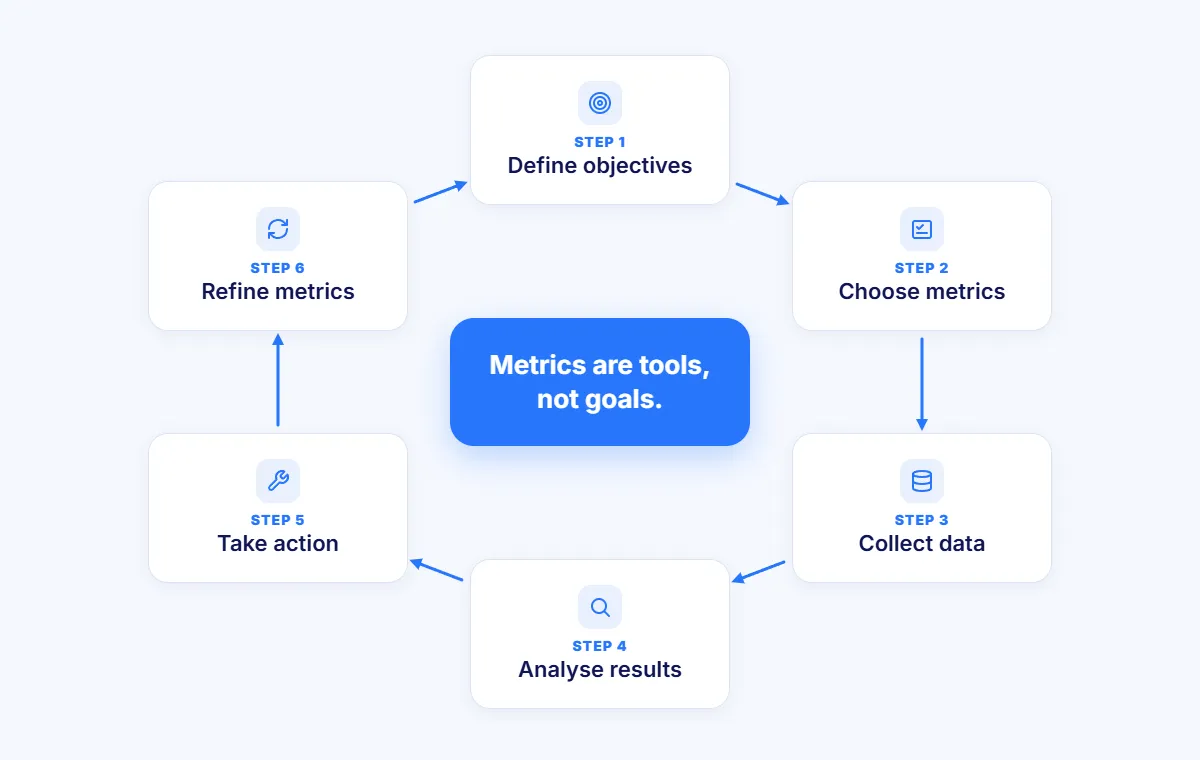
Define Objectives
Start by identifying what you want to measure and why, and align those goals with your broader test automation strategy. Are you improving defect detection? Reducing test time? Proving automation ROI? Clear objectives guide metric selection.
Identify Metrics to Collect
Choose metrics that directly support your objectives. Don't track metrics because you can measure them. Track metrics because they drive decisions.
Prioritize:
3-5 core metrics for regular monitoring
5-10 supporting metrics for deeper analysis
Avoid metric overload
Data Collection During Testing
Implement automated data collection wherever possible. Test management tools, CI/CD systems, and defect trackers capture most metrics automatically.
Best practices:
Integrate metrics into existing workflows
Avoid manual data entry
Ensure data accuracy through validation
Analyze Results
Look for trends, patterns, and anomalies. A single metric value means little. Trends over time reveal insights. Compare metrics against baselines and benchmarks.
Ask:
What's improving?
What's declining?
What surprised us?
What actions should we take?
Related Read: What is Baseline Testing? Definition, Types, and Best Practices
Take Corrective Actions
Metrics without action waste effort. Use insights to drive specific improvements. High defect density? Increase code reviews. Low automation coverage? Prioritize test automation. High flaky rate? Stabilize test environments.
Track whether actions improve metrics.
Refine Metrics Continuously
As projects evolve, metrics must adapt. Quarterly reviews ensure metrics remain relevant. Retire metrics that no longer drive decisions. Add metrics for emerging priorities.
Metrics are tools, not goals. Focus on outcomes, not numbers.
Calculating Key Testing Metrics
Step 1: Define the Metric
Choose a metric aligned with your objectives. Need to measure testing thoroughness? Use requirement coverage or code coverage. Want to track defect trends? Use defect density or leakage rate.
Step 2: Collect Raw Data
Gather the inputs needed for calculation. Most data comes from test management systems, defect tracking tools, and CI/CD platforms.
Common data sources:
Test execution reports
Defect databases
Code repositories
Time tracking systems
Step 3: Apply Formula
Calculate the metric using the appropriate formula. Consistency matters. Calculate metrics the same way every time for accurate trending.
Step 4: Compare with Benchmarks
Context gives metrics meaning. A 70% pass rate could be excellent for early testing or concerning for release candidates. Compare against:
Historical performance
Industry benchmarks
Project goals
Step 5: Present in Reports/Dashboards
Visualize metrics in clear, actionable formats. Dashboards show current status at a glance. Trend charts reveal progress over time. Color-coded indicators (red/yellow/green) highlight areas needing attention.
Effective presentations:
Executive summaries for leadership
Detailed analyses for QA teams
Automated reports for continuous monitoring
Testing Metrics Formula Quick Reference
Metric | Formula | Example |
|---|---|---|
Defect density | Total defects / size of module (KLOC) | 30 defects / 5 KLOC = 6 per KLOC |
Defect removal efficiency | Defects removed / (removed + escaped) × 100 | 85 / (85 + 5) × 100 = 94.4% |
Defect leakage | Production defects / total defects × 100 | 20 / 120 × 100 = 16.7% |
Defect severity index | Σ (defects × severity weight) / total defects | 139 points / 50 defects = 2.78 |
Defect rejection ratio | Rejected defects / total reported × 100 | 15 / 150 × 100 = 10% |
Requirement coverage | Requirements covered / total requirements × 100 | 102 / 120 × 100 = 85% |
Test execution rate | Executed tests / planned tests × 100 | 175 / 200 × 100 = 87.5% |
Mean time to detect | Total time to detect / total defects | 160 hours / 40 defects = 4 hours |
Mean time to repair | Total time to fix / total defects | 120 hours / 30 defects = 4 hours |
Cost per defect | Total testing cost / defects found | $75,000 / 150 = $500 |
Automation coverage | Automated tests / total tests × 100 | 180 / 250 × 100 = 72% |
Automation ROI | Annual savings / automation investment × 100 | $32,400 / $25,000 × 100 = 129.6% |
Test case productivity | Test cases designed / person-hours | 45 / 15 = 3 per hour |
Reading the examples:
Defect density of 6 per KLOC: above the common "good" range of 1 to 3, so the module needs attention.
Defect leakage of 16.7%: high, which points to gaps in coverage and regression testing.
Defect rejection ratio of 10%: high rejection ratios suggest unclear defect criteria or poor communication between QA and development.
Automation ROI of 129.6%: based on $36,000 a year of manual regression falling to $3,600, saving $32,400 against a $25,000 investment. It pays for itself in under 10 months.
Example of Software Test Metrics Calculation
Example 1: Defect Density in a Banking Module
A loan processing module contains 8 KLOC (8,000 lines of code). During testing, QA discovers 24 defects.
Calculation: Defect Density = 24 defects / 8 KLOC = 3 defects per KLOC
Analysis: This falls within the "good" range (1-3 defects/KLOC) but approaches the upper limit. The module needs monitoring. If defect density increases in future sprints, investigate code quality and testing thoroughness.
Example 2: Test Coverage in an E-commerce Site
An online store has 150 functional requirements. The test suite covers 135 of them with documented test cases.
Calculation: Test Coverage = (135 / 150) × 100 = 90%
Analysis: Strong coverage, but 15 requirements lack tests. These uncovered requirements represent release risk. Prioritize test creation for the 10% gap before launch.
Example 3: DRE in a SaaS Product
During a release cycle, testing catches 92 defects. Post-release, customers report 8 additional defects.
Calculation: Total defects = 92 + 8 = 100 DRE = (92 / 100) × 100 = 92%
Analysis: Good DRE, but room for improvement. Industry leaders achieve 95%+ DRE. Analyze the 8 escaped defects. Were they in untested areas? Edge cases? Use this analysis to strengthen testing.
How to Define Effective Testing Metrics
SMART Metrics (Specific, Measurable, Achievable, Relevant, Time-bound)
Effective metrics follow the SMART framework:
Specific: "Improve test coverage" is vague. "Increase API test coverage from 70% to 85%" is specific.
Measurable: Quantify the metric. Use percentages, counts, or time-based measures.
Achievable: Set realistic targets. Don't aim for 100% automation if your application changes daily.
Relevant: Align metrics with business goals. Track what matters to stakeholders.
Time-bound: Define when to achieve the target. "Reach 85% coverage by Q3 end" creates urgency.
Align with Business Goals
Choose metrics that support organizational objectives. If rapid releases drive business value, track CI/CD test execution time. If customer satisfaction is priority, monitor production defect rates.
Metrics disconnected from business goals won't get attention or resources.
Balance Quality and Productivity
Avoid metrics that incentivize wrong behaviors. Tracking test cases created might encourage quantity over quality. Measuring developers by defect counts creates blame culture.
Balance efficiency metrics (execution time) with quality metrics (defect detection rate).
Avoid Vanity Metrics
Some metrics look impressive but provide no actionable insights. Total test cases executed sounds good but reveals nothing without context. What matters is coverage of critical paths, not total volume.
Focus on metrics that drive decisions, not those that look good in presentations.
Ensure Metrics are Actionable
Every metric should answer "What should we do differently?" If a metric doesn't inform action, stop tracking it.
Good metric: Defect leakage is 12% (Action: Strengthen regression testing)
Vanity metric: We ran 10,000 tests (Action: None clear)
Challenges in Using Testing Metrics
Over-Reliance on Numbers
Metrics without context mislead. A 95% pass rate might indicate quality or might reflect inadequate test depth. Low defect counts could mean excellent quality or insufficient testing.
Always interpret metrics within context. Combine quantitative metrics with qualitative insights.
Collecting Inaccurate Data
Poor logging or inconsistent reporting undermines metric reliability. If defect severity varies by reporter, severity metrics become meaningless. If testers forget to log hours, effort metrics fail.
Invest in consistent data collection processes and tool integration.
Measuring Too Many Metrics
Information overload paralyzes decision-making. Tracking 50 metrics means tracking none effectively. Focus spreads too thin. Critical signals drown in noise.
Identify 5-7 key metrics for regular review. Use others for deep dives when needed.
Ignoring Qualitative Aspects
Not everything valuable is measurable. User experience, exploratory testing insights, and team morale impact quality but resist quantification.
Balance metrics with qualitative feedback from testing, user research, and team retrospectives.
Resistance from Teams
Metrics can feel like micromanagement. If teams believe metrics judge them personally rather than improve processes, resistance follows.
Frame metrics as process improvement tools, not performance evaluation weapons. Focus on trends, not individual performance.
Related read: See how Predictive Intelligence is transforming test metrics by turning reactive tracking into proactive, risk-based insights.
Best Practices for Software Testing Metrics
Track a Balanced Set of Metrics
Mix process, product, and automation metrics for comprehensive visibility. Don't focus solely on defects while ignoring test coverage. Balance leading indicators (coverage, test design productivity) with lagging indicators (defect leakage).
A balanced scorecard prevents blind spots.
Automate Metric Collection
CI/CD integration enables real-time dashboards. Modern tools automatically capture execution results, defect data, and coverage metrics. Automated collection ensures consistency and saves manual effort.
If you're manually compiling metrics, you're wasting time and introducing errors.
Regularly Review Metrics
Retrospectives should analyze metric trends. Monthly or quarterly reviews identify patterns. What improved? What declined? What surprised us? Use these insights to refine testing strategy.
Metrics without review are data collection theater.
Make Metrics Transparent
Share metrics with all stakeholders to build accountability. Visible metrics create shared understanding of quality status. Developers see test coverage gaps. Managers see automation ROI. Leadership sees release readiness.
Transparency drives collective ownership of quality.
Use Metrics for Improvement, Not Blame
Encourage a culture of learning, not punishment. When defects escape, analyze why testing missed them. Don't blame testers. Improve test design, expand coverage, or adjust test strategy.
Blame culture makes teams hide problems. Learning culture makes teams solve them.
Related read: Review the common challenges of test automation and how to overcome them, since issues like flaky tests, brittle scripts, and unstable environments can distort your metrics and create a blame culture.
Common Mistakes to Avoid with Metrics
Mistake | What goes wrong | Better approach |
|---|---|---|
Tracking everything | Nobody knows which numbers matter | Prioritise the metrics that drive decisions, and archive the rest |
Never updating metrics | Yesterday's metrics stop fitting today's priorities | Review your metrics every quarter |
Relying only on automation stats | High coverage with poor test design gives false confidence | Balance automation metrics with defect and coverage metrics |
Valuing quantity over quality | Counting tests or defects encourages padding | Measure effectiveness, not volume |
Virtuoso QA: Making Metrics Work for QA Teams
Most testing metrics tell you how much was tested. Virtuoso QA also shows what was proven.
Every run produces release evidence: which requirement each test covers, what happened at every step, and who approved the test. That makes requirement coverage and traceability metrics something you can report straight away, not something you have to rebuild by hand.
Requirement-linked results: Touchstone agents draft tests from your specs and Jira stories, each citing its source, and a named person approves every requirement. Coverage maps directly to what the business asked for.
Step-by-step evidence: Every run captures execution results, failures and screenshots, with reports you can export for release reviews and audits.
Faster diagnosis: AI root cause analysis points to the likely cause of each failure, which helps cut mean time to repair.
Lower maintenance and fewer flaky tests: Self-healing finds elements through several signals when the UI changes, and every repair is logged for your team to review. That keeps maintenance effort and flaky test rates down, without anything changing unnoticed.
Faster test creation: Tests are written in plain English through Natural Language Programming, with StepIQ suggesting the next step.
Frequently Asked Questions (FAQs)
What are the most important software testing metrics?
What's a good defect leakage percentage?
How many test metrics should we track?
What's the difference between defect density and defect leakage?
What's a healthy pass rate for automated tests?
Should all testing metrics be automated?