Salesforce Test Automation Built for Continuous Releases
Salesforce updates three times a year whether your organisation is ready or not. Virtuoso QA runs your coverage inside the sandbox preview window, and Touchstone proposes repairs as reviewable diffs rather than rewriting journeys on your behalf. You decide what enters the suite, and every accepted change is logged.

Salesforce Test Automation Built for Continuous Releases
Salesforce updates three times a year whether your organisation is ready or not. Virtuoso QA runs your coverage inside the sandbox preview window, and Touchstone proposes repairs as reviewable diffs rather than rewriting journeys on your behalf. You decide what enters the suite, and every accepted change is logged.
Salesforce Test Automation Built for Continuous Releases
Salesforce updates three times a year whether your organisation is ready or not. Virtuoso QA runs your coverage inside the sandbox preview window, and Touchstone proposes repairs as reviewable diffs rather than rewriting journeys on your behalf. You decide what enters the suite, and every accepted change is logged.
Used by the world's leading companies













Used by the world's leading companies
Used by the world's leading companies
Used by the world's leading companies
Why Every Salesforce Release Challenges Your Test Suite
Salesforce releases three times a year on a fixed seasonal calendar, while your org continues to change through configuration, custom logic and integrations. Preview sandboxes usually arrive four to six weeks before production, giving teams a limited window to validate critical workflows before the update reaches users.
Seasonal releases create recurring work
Spring, Summer and Winter releases can change rendering, components and user flows even when the business process stays the same. Selector-based tests often fail before they explain whether anything meaningful changed.

Every Salesforce org behaves differently
Custom objects, Flows, validation rules, Apex triggers and Lightning Web Components turn each org into its own application. Coverage needs to reflect your configuration, not a generic Salesforce process.

Business outcomes often sit beyond the UI
A quote may update billing, an approval may trigger automation, or an integration may write back from another system. A completed screen does not always prove the downstream record, rule or handoff worked correctly.

Why Every Salesforce Release Challenges Your Test Suite
Salesforce releases three times a year on a fixed seasonal calendar, while your org continues to change through configuration, custom logic and integrations. Preview sandboxes usually arrive four to six weeks before production, giving teams a limited window to validate critical workflows before the update reaches users.
Seasonal releases create recurring work
Spring, Summer and Winter releases can change rendering, components and user flows even when the business process stays the same. Selector-based tests often fail before they explain whether anything meaningful changed.
Every Salesforce org behaves differently
Custom objects, Flows, validation rules, Apex triggers and Lightning Web Components turn each org into its own application. Coverage needs to reflect your configuration, not a generic Salesforce process.
Business outcomes often sit beyond the UI
A quote may update billing, an approval may trigger automation, or an integration may write back from another system. A completed screen does not always prove the downstream record, rule or handoff worked correctly.
Why Every Salesforce Release Challenges Your Test Suite
Salesforce releases three times a year on a fixed seasonal calendar, while your org continues to change through configuration, custom logic and integrations. Preview sandboxes usually arrive four to six weeks before production, giving teams a limited window to validate critical workflows before the update reaches users.
Seasonal releases create recurring work
Spring, Summer and Winter releases can change rendering, components and user flows even when the business process stays the same. Selector-based tests often fail before they explain whether anything meaningful changed.
Every Salesforce org behaves differently
Custom objects, Flows, validation rules, Apex triggers and Lightning Web Components turn each org into its own application. Coverage needs to reflect your configuration, not a generic Salesforce process.
Business outcomes often sit beyond the UI
A quote may update billing, an approval may trigger automation, or an integration may write back from another system. A completed screen does not always prove the downstream record, rule or handoff worked correctly.
Keep Salesforce Test Coverage Ready for Every Seasonal Release
Virtuoso QA helps Salesforce admins and QA teams validate the processes that matter before each seasonal release reaches production, then keep coverage aligned as the org changes.

Compose: Build from your Salesforce processes
Upload process documents, specifications and configuration notes to the Knowledge Base. Touchstone, Virtuoso QA’s agentic testing capability, turns them into source-cited requirements and proposed journeys, so coverage reflects your org’s objects, flows, rules and customisations.

Preview: Test inside the release window
Run approved journeys against a sandbox on the preview release before the update reaches production. Teams can validate critical workflows early, instead of discovering release impact after the upgrade lands.

Detect: Handle Lightning changes during execution
Virtuoso QA identifies elements by intent and context rather than relying only on stored selectors. Common Lightning rendering changes can be handled during the run and recorded, reducing false failures caused by interface changes.

Diagnose: Investigate from recorded evidence
Screenshots, logs, DOM state and network activity are captured at each step, giving teams a clear record of what happened. A failed run can be assessed against evidence rather than recreated from memory.

Repair: Review proposed updates
When a requirement, process or configuration changes, Touchstone identifies affected journeys and proposes an editable update with the relevant source attached. Every accepted change is versioned, reviewable and available for rollback.

Ship: Execute through your pipeline
Approved journeys run on Virtuoso QA’s deterministic execution engine, triggered from your delivery workflow and executed across the required browsers, environments and datasets.
Keep Salesforce Test Coverage Ready for Every Seasonal Release
Virtuoso QA helps Salesforce admins and QA teams validate the processes that matter before each seasonal release reaches production, then keep coverage aligned as the org changes.
Compose: Build from your Salesforce processes
Upload process documents, specifications and configuration notes to the Knowledge Base. Touchstone, Virtuoso QA’s agentic testing capability, turns them into source-cited requirements and proposed journeys, so coverage reflects your org’s objects, flows, rules and customisations.
Preview: Test inside the release window
Run approved journeys against a sandbox on the preview release before the update reaches production. Teams can validate critical workflows early, instead of discovering release impact after the upgrade lands.
Detect: Handle Lightning changes during execution
Virtuoso QA identifies elements by intent and context rather than relying only on stored selectors. Common Lightning rendering changes can be handled during the run and recorded, reducing false failures caused by interface changes.
Diagnose: Investigate from recorded evidence
Screenshots, logs, DOM state and network activity are captured at each step, giving teams a clear record of what happened. A failed run can be assessed against evidence rather than recreated from memory.
Repair: Review proposed updates
When a requirement, process or configuration changes, Touchstone identifies affected journeys and proposes an editable update with the relevant source attached. Every accepted change is versioned, reviewable and available for rollback.
Ship: Execute through your pipeline
Approved journeys run on Virtuoso QA’s deterministic execution engine, triggered from your delivery workflow and executed across the required browsers, environments and datasets.
Keep Salesforce Test Coverage Ready for Every Seasonal Release
Virtuoso QA helps Salesforce admins and QA teams validate the processes that matter before each seasonal release reaches production, then keep coverage aligned as the org changes.
Compose: Build from your Salesforce processes
Upload process documents, specifications and configuration notes to the Knowledge Base. Touchstone, Virtuoso QA’s agentic testing capability, turns them into source-cited requirements and proposed journeys, so coverage reflects your org’s objects, flows, rules and customisations.
Preview: Test inside the release window
Run approved journeys against a sandbox on the preview release before the update reaches production. Teams can validate critical workflows early, instead of discovering release impact after the upgrade lands.
Detect: Handle Lightning changes during execution
Virtuoso QA identifies elements by intent and context rather than relying only on stored selectors. Common Lightning rendering changes can be handled during the run and recorded, reducing false failures caused by interface changes.
Diagnose: Investigate from recorded evidence
Screenshots, logs, DOM state and network activity are captured at each step, giving teams a clear record of what happened. A failed run can be assessed against evidence rather than recreated from memory.
Repair: Review proposed updates
When a requirement, process or configuration changes, Touchstone identifies affected journeys and proposes an editable update with the relevant source attached. Every accepted change is versioned, reviewable and available for rollback.
Ship: Execute through your pipeline
Approved journeys run on Virtuoso QA’s deterministic execution engine, triggered from your delivery workflow and executed across the required browsers, environments and datasets.
Put Specialised Agents to Work on Your Salesforce Coverage
Touchstone brings specialised agents together to analyse Salesforce requirements, design journeys and validate them in a real browser. Each agent has a defined role, while human review controls what is approved and added to the test suite.
The Analyst
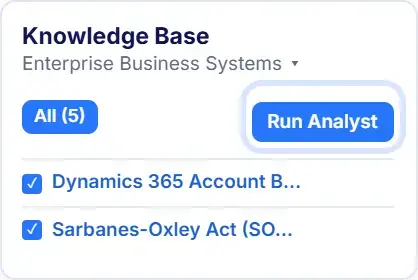
Turns Salesforce process documents, setup notes and user stories into clear requirements, with each one linked to its source. If a rule or exception is unclear, the gap is shown during review before the journey is built.
The Architect
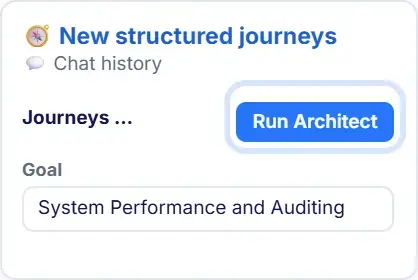
Creates approved Salesforce journeys for leads, opportunities, cases, quotes, approvals and integrations. It defines the steps, checks and data variations required, reusing your existing checkpoints, data tables and environments across record types, profiles and business units as your org grows.
The Autopilot
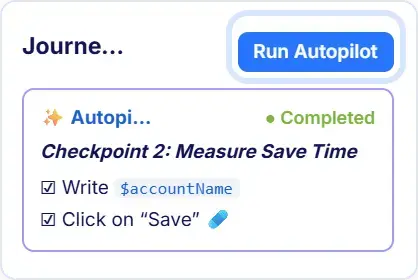
Builds the approved Salesforce test automation journey in a live org and validates it through a real browser. Reviewers can watch the journey run, correct any step and approve it before it joins the regression suite and CI pipeline.
Put Specialised Agents to Work on Your Salesforce Coverage
Touchstone brings specialised agents together to analyse Salesforce requirements, design journeys and validate them in a real browser. Each agent has a defined role, while human review controls what is approved and added to the test suite.
The Analyst
Turns Salesforce process documents, setup notes and user stories into clear requirements, with each one linked to its source. If a rule or exception is unclear, the gap is shown during review before the journey is built.
The Architect
Creates approved Salesforce journeys for leads, opportunities, cases, quotes, approvals and integrations. It defines the steps, checks and data variations required, reusing your existing checkpoints, data tables and environments across record types, profiles and business units as your org grows.
The Autopilot
Builds the approved Salesforce test automation journey in a live org and validates it through a real browser. Reviewers can watch the journey run, correct any step and approve it before it joins the regression suite and CI pipeline.
Put Specialised Agents to Work on Your Salesforce Coverage
Touchstone brings specialised agents together to analyse Salesforce requirements, design journeys and validate them in a real browser. Each agent has a defined role, while human review controls what is approved and added to the test suite.
The Analyst
Turns Salesforce process documents, setup notes and user stories into clear requirements, with each one linked to its source. If a rule or exception is unclear, the gap is shown during review before the journey is built.
The Architect
Creates approved Salesforce journeys for leads, opportunities, cases, quotes, approvals and integrations. It defines the steps, checks and data variations required, reusing your existing checkpoints, data tables and environments across record types, profiles and business units as your org grows.
The Autopilot
Builds the approved Salesforce test automation journey in a live org and validates it through a real browser. Reviewers can watch the journey run, correct any step and approve it before it joins the regression suite and CI pipeline.
Test Salesforce and the Systems Connected to it
One library and one review workflow for the Salesforce processes, customisations and connected systems your business depends on.

Core CRM processes
Validate lead to cash, case to resolution, quote to order, approvals, assignments and escalation rules as they operate in your Salesforce org.

Configured and custom behaviour
Test custom objects, Flows, validation rules, Apex-driven behaviour and Lightning Web Components against your configuration, not a generic Salesforce setup.

Connected systems and data
Combine UI steps, API calls and data checks in a single journey to confirm that outcomes are reflected in ERP, billing, integration and downstream systems.

Surrounding digital surfaces
Extend coverage to Experience Cloud sites, partner portals, AppExchange applications and custom web applications that depend on Salesforce data.
Test Salesforce and the Systems Connected to it
One library and one review workflow for the Salesforce processes, customisations and connected systems your business depends on.
Core CRM processes
Validate lead to cash, case to resolution, quote to order, approvals, assignments and escalation rules as they operate in your Salesforce org.
Configured and custom behaviour
Test custom objects, Flows, validation rules, Apex-driven behaviour and Lightning Web Components against your configuration, not a generic Salesforce setup.
Connected systems and data
Combine UI steps, API calls and data checks in a single journey to confirm that outcomes are reflected in ERP, billing, integration and downstream systems.
Surrounding digital surfaces
Extend coverage to Experience Cloud sites, partner portals, AppExchange applications and custom web applications that depend on Salesforce data.
Test Salesforce and the Systems Connected to it
One library and one review workflow for the Salesforce processes, customisations and connected systems your business depends on.
Core CRM processes
Validate lead to cash, case to resolution, quote to order, approvals, assignments and escalation rules as they operate in your Salesforce org.
Configured and custom behaviour
Test custom objects, Flows, validation rules, Apex-driven behaviour and Lightning Web Components against your configuration, not a generic Salesforce setup.
Connected systems and data
Combine UI steps, API calls and data checks in a single journey to confirm that outcomes are reflected in ERP, billing, integration and downstream systems.
Surrounding digital surfaces
Extend coverage to Experience Cloud sites, partner portals, AppExchange applications and custom web applications that depend on Salesforce data.
Test Salesforce and the Systems Connected to it
One library and one review workflow for the Salesforce processes, customisations and connected systems your business depends on.
Core CRM processes
Validate lead to cash, case to resolution, quote to order, approvals, assignments and escalation rules as they operate in your Salesforce org.
Configured and custom behaviour
Test custom objects, Flows, validation rules, Apex-driven behaviour and Lightning Web Components against your configuration, not a generic Salesforce setup.
Connected systems and data
Combine UI steps, API calls and data checks in a single journey to confirm that outcomes are reflected in ERP, billing, integration and downstream systems.
Surrounding digital surfaces
Extend coverage to Experience Cloud sites, partner portals, AppExchange applications and custom web applications that depend on Salesforce data.
Start with the Salesforce Processes Your Team Already Documents
You do not need to rebuild your testing estate to begin. The process documents, configuration notes, user stories and test material your team already maintains become the sources Touchstone generates from. Existing checkpoints, data tables and environments are referenced before new assets are created, so your current testing work carries forward. Journeys remain readable, inspectable and available for export, keeping coverage clear to the admins, analysts and QA teams who understand the processes being verified.
Start with the Salesforce Processes Your Team Already Documents
You do not need to rebuild your testing estate to begin. The process documents, configuration notes, user stories and test material your team already maintains become the sources Touchstone generates from. Existing checkpoints, data tables and environments are referenced before new assets are created, so your current testing work carries forward. Journeys remain readable, inspectable and available for export, keeping coverage clear to the admins, analysts and QA teams who understand the processes being verified.
Start with the Salesforce Processes Your Team Already Documents
You do not need to rebuild your testing estate to begin. The process documents, configuration notes, user stories and test material your team already maintains become the sources Touchstone generates from. Existing checkpoints, data tables and environments are referenced before new assets are created, so your current testing work carries forward. Journeys remain readable, inspectable and available for export, keeping coverage clear to the admins, analysts and QA teams who understand the processes being verified.
Keep Salesforce Releases Predictable and Evidence Based
Virtuoso QA keeps coverage running through each seasonal release, uses the preview window for real risks rather than repairs, and records what every run verified.
Coverage survives each seasonal release
Process-based journeys continue through Spring, Summer and Winter updates, with Virtuoso QA proposing repairs for common Lightning changes at approximately 95% user acceptance under human oversight.
Use the preview window to resolve risks
Approved journeys run as soon as the preview release arrives, so teams spend the window investigating business failures rather than getting the suite working again before they can start.

Support every release decision with evidence
Each run records what was tested, which requirement it covered, what changed, who approved it and when it last ran. Teams can rely on evidence, not just a pass rate or sign-off email.
Outcomes are verified past the screen
Interface steps, API calls and data checks run in one journey, so an approval that triggers automation or a quote that updates billing is confirmed against the record it created rather than the screen that closed.
Keep Salesforce Releases Predictable and Evidence Based
Virtuoso QA keeps coverage running through each seasonal release, uses the preview window for real risks rather than repairs, and records what every run verified.
Coverage survives each seasonal release
Process-based journeys continue through Spring, Summer and Winter updates, with Virtuoso QA proposing repairs for common Lightning changes at approximately 95% user acceptance under human oversight.
Use the preview window to resolve risks
Approved journeys run as soon as the preview release arrives, so teams spend the window investigating business failures rather than getting the suite working again before they can start.
Support every release decision with evidence
Each run records what was tested, which requirement it covered, what changed, who approved it and when it last ran. Teams can rely on evidence, not just a pass rate or sign-off email.
Outcomes are verified past the screen
Interface steps, API calls and data checks run in one journey, so an approval that triggers automation or a quote that updates billing is confirmed against the record it created rather than the screen that closed.
Keep Salesforce Releases Predictable and Evidence Based
Virtuoso QA keeps coverage running through each seasonal release, uses the preview window for real risks rather than repairs, and records what every run verified.
Coverage survives each seasonal release
Process-based journeys continue through Spring, Summer and Winter updates, with Virtuoso QA proposing repairs for common Lightning changes at approximately 95% user acceptance under human oversight.
Use the preview window to resolve risks
Approved journeys run as soon as the preview release arrives, so teams spend the window investigating business failures rather than getting the suite working again before they can start.
Support every release decision with evidence
Each run records what was tested, which requirement it covered, what changed, who approved it and when it last ran. Teams can rely on evidence, not just a pass rate or sign-off email.
Outcomes are verified past the screen
Interface steps, API calls and data checks run in one journey, so an approval that triggers automation or a quote that updates billing is confirmed against the record it created rather than the screen that closed.
Explore Related Virtuoso QA Solutions
Validate finance system handoffs
Confirm that invoices, tax codes, supplier details and payment data land correctly in the finance system as part of the same journey.
Test Guidewire insurance workflows end to end
Follow quote, policy and claims journeys across PolicyCenter, BillingCenter, ClaimCenter and connected services, verifying the data and decisions at each handoff.

Explore Related Virtuoso QA Solutions
Validate finance system handoffs
Confirm that invoices, tax codes, supplier details and payment data land correctly in the finance system as part of the same journey.
Test Guidewire insurance workflows end to end
Follow quote, policy and claims journeys across PolicyCenter, BillingCenter, ClaimCenter and connected services, verifying the data and decisions at each handoff.
Explore Related Virtuoso QA Solutions
Validate finance system handoffs
Confirm that invoices, tax codes, supplier details and payment data land correctly in the finance system as part of the same journey.
Test Guidewire insurance workflows end to end
Follow quote, policy and claims journeys across PolicyCenter, BillingCenter, ClaimCenter and connected services, verifying the data and decisions at each handoff.
AI-native, proven in production.
10x
Faster execution
9x
Faster authoring
85%
Less maintenance
50%
Lower QA cost
AI-native, proven in production.
10x
Faster execution
9x
Faster authoring
85%
Less maintenance
50%
Lower QA cost
AI-native, proven in production.
10x
Faster execution
9x
Faster authoring
85%
Less maintenance
50%
Lower QA cost
Proven where quality and accountability matter
Recognised by independent analysts, trusted by enterprise teams, and built with the security controls required for critical software.

WAVE STRONG PERFORMER
Proven where quality and accountability matter
Recognised by independent analysts, trusted by enterprise teams, and built with the security controls required for critical software.
WAVE STRONG PERFORMER
Proven where quality and accountability matter
Recognised by independent analysts, trusted by enterprise teams, and built with the security controls required for critical software.
WAVE STRONG PERFORMER
Frequently Asked Questions
How Virtuoso QA works across a Salesforce org, from testing against the preview release to proving what an integration actually wrote.
Can we test against the preview release before it reaches production?
Can a journey confirm what an Apex trigger or an integration actually did?
How do we avoid maintaining a separate journey for every record type and profile?
How does Virtuoso QA handle Lightning components that regenerate identifiers?
How is test data handled across sandbox and production?
Frequently Asked Questions
How Virtuoso QA works across a Salesforce org, from testing against the preview release to proving what an integration actually wrote.
Can we test against the preview release before it reaches production?
Can a journey confirm what an Apex trigger or an integration actually did?
How do we avoid maintaining a separate journey for every record type and profile?
How does Virtuoso QA handle Lightning components that regenerate identifiers?
How is test data handled across sandbox and production?
Frequently Asked Questions
How Virtuoso QA works across a Salesforce org, from testing against the preview release to proving what an integration actually wrote.
Can we test against the preview release before it reaches production?
Can a journey confirm what an Apex trigger or an integration actually did?
How do we avoid maintaining a separate journey for every record type and profile?
How does Virtuoso QA handle Lightning components that regenerate identifiers?
How is test data handled across sandbox and production?

See what your next release looks like with Virtuoso
Book a walkthrough on your applications and your workflows. Bring a requirement, a user journey, or a brittle Selenium script, and watch the loop run on something you recognise.
See what your next release looks like with Virtuoso
Book a walkthrough on your applications and your workflows. Bring a requirement, a user journey, or a brittle Selenium script, and watch the loop run on something you recognise.
See what your next release looks like with Virtuoso
Book a walkthrough on your applications and your workflows. Bring a requirement, a user journey, or a brittle Selenium script, and watch the loop run on something you recognise.

Trust Center
AICPA
SOC

WAVE STRONG PERFORMER


@ Copyright 2026 SpotQA, Creators of Virtuoso QA
Trust Center
AICPA
SOC
WAVE STRONG PERFORMER
@ Copyright 2026 SpotQA, Creators of Virtuoso QA
Trust Center
AICPA
SOC
WAVE STRONG PERFORMER
@ Copyright 2026 SpotQA, Creators of Virtuoso QA