Turn Your Manual Tests into Automation You Control
Touchstone, Virtuoso QA’s agentic testing capability, turns your existing test scenarios into requirements and automated journeys written in plain English. You review and refine what it proposes without handing the work to an automation engineer, while Virtuoso QA runs every approved journey consistently across releases.

Turn Your Manual Tests into Automation You Control
Touchstone, Virtuoso QA’s agentic testing capability, turns your existing test scenarios into requirements and automated journeys written in plain English. You review and refine what it proposes without handing the work to an automation engineer, while Virtuoso QA runs every approved journey consistently across releases.
Turn Your Manual Tests into Automation You Control
Touchstone, Virtuoso QA’s agentic testing capability, turns your existing test scenarios into requirements and automated journeys written in plain English. You review and refine what it proposes without handing the work to an automation engineer, while Virtuoso QA runs every approved journey consistently across releases.
Trusted where releases carry consequences













Trusted where releases carry consequences
Trusted where releases carry consequences
Trusted where releases carry consequences
What Stands Between Manual Testing and Automation
Manual testers understand the workflows, exceptions and edge cases that determine whether an application works as intended. But when that knowledge must pass through an automation backlog, important context can be lost before it becomes executable coverage.
Critical context is lost during handover
Detailed scenarios become tickets for an automation engineer to interpret. Business rules, exceptions and expected outcomes may be simplified or missed as the test moves from one person to another.

Valuable coverage waits in the backlog
New journeys compete with framework maintenance and existing automation requests. In the meantime, manual testers continue repeating checks that could already be running automatically.

Existing automation is difficult to verify
When tests are written in code, manual testers cannot easily confirm which scenarios, conditions and outcomes are covered. A passing result provides limited confidence when the underlying test is difficult to inspect.

What Stands Between Manual Testing and Automation
Manual testers understand the workflows, exceptions and edge cases that determine whether an application works as intended. But when that knowledge must pass through an automation backlog, important context can be lost before it becomes executable coverage.
Critical context is lost during handover
Detailed scenarios become tickets for an automation engineer to interpret. Business rules, exceptions and expected outcomes may be simplified or missed as the test moves from one person to another.
Valuable coverage waits in the backlog
New journeys compete with framework maintenance and existing automation requests. In the meantime, manual testers continue repeating checks that could already be running automatically.
Existing automation is difficult to verify
When tests are written in code, manual testers cannot easily confirm which scenarios, conditions and outcomes are covered. A passing result provides limited confidence when the underlying test is difficult to inspect.
What Stands Between Manual Testing and Automation
Manual testers understand the workflows, exceptions and edge cases that determine whether an application works as intended. But when that knowledge must pass through an automation backlog, important context can be lost before it becomes executable coverage.
Critical context is lost during handover
Detailed scenarios become tickets for an automation engineer to interpret. Business rules, exceptions and expected outcomes may be simplified or missed as the test moves from one person to another.
Valuable coverage waits in the backlog
New journeys compete with framework maintenance and existing automation requests. In the meantime, manual testers continue repeating checks that could already be running automatically.
Existing automation is difficult to verify
When tests are written in code, manual testers cannot easily confirm which scenarios, conditions and outcomes are covered. A passing result provides limited confidence when the underlying test is difficult to inspect.
Move Your Test Scenarios Out of the Automation Queue
Virtuoso QA removes the handover between manual testing expertise and automated coverage. Build from the scenarios you already maintain, review every proposed journey in plain English and keep control as the application changes.

Capture: Begin with your existing scenarios
Upload test cases, specifications and notes to the Knowledge Base. Touchstone turns them into source-cited requirements, giving you a structured draft to review rather than an empty authoring screen.

Author: Create journeys in plain English
Build and edit test steps as readable sentences without learning a scripting language. You can confirm directly that each journey reflects the workflow, conditions and outcomes you intended to test.

Vary: Automate repetitive data combinations
Use one data-driven journey to cover valid inputs, invalid inputs, boundary values and locale variations instead of repeating the same manual test for every dataset.

Review: Control what enters the suite
Review, edit, approve or reject proposed requirements and journeys. Nothing becomes part of the test suite until you are satisfied that it represents the expected behaviour.

Execute: Run approved coverage automatically
Execute journeys deterministically across browsers, environments and datasets, either on a schedule or as part of the delivery pipeline.

Maintain: Keep journeys aligned with change
Virtuoso QA handles common interface changes through recorded self-healing. When requirements change, Touchstone identifies affected journeys and proposes editable updates for your review.
Move Your Test Scenarios Out of the Automation Queue
Virtuoso QA removes the handover between manual testing expertise and automated coverage. Build from the scenarios you already maintain, review every proposed journey in plain English and keep control as the application changes.
Capture: Begin with your existing scenarios
Upload test cases, specifications and notes to the Knowledge Base. Touchstone turns them into source-cited requirements, giving you a structured draft to review rather than an empty authoring screen.
Author: Create journeys in plain English
Build and edit test steps as readable sentences without learning a scripting language. You can confirm directly that each journey reflects the workflow, conditions and outcomes you intended to test.
Vary: Automate repetitive data combinations
Use one data-driven journey to cover valid inputs, invalid inputs, boundary values and locale variations instead of repeating the same manual test for every dataset.
Review: Control what enters the suite
Review, edit, approve or reject proposed requirements and journeys. Nothing becomes part of the test suite until you are satisfied that it represents the expected behaviour.
Execute: Run approved coverage automatically
Execute journeys deterministically across browsers, environments and datasets, either on a schedule or as part of the delivery pipeline.
Maintain: Keep journeys aligned with change
Virtuoso QA handles common interface changes through recorded self-healing. When requirements change, Touchstone identifies affected journeys and proposes editable updates for your review.
Move Your Test Scenarios Out of the Automation Queue
Virtuoso QA removes the handover between manual testing expertise and automated coverage. Build from the scenarios you already maintain, review every proposed journey in plain English and keep control as the application changes.
Capture: Begin with your existing scenarios
Upload test cases, specifications and notes to the Knowledge Base. Touchstone turns them into source-cited requirements, giving you a structured draft to review rather than an empty authoring screen.
Author: Create journeys in plain English
Build and edit test steps as readable sentences without learning a scripting language. You can confirm directly that each journey reflects the workflow, conditions and outcomes you intended to test.
Vary: Automate repetitive data combinations
Use one data-driven journey to cover valid inputs, invalid inputs, boundary values and locale variations instead of repeating the same manual test for every dataset.
Review: Control what enters the suite
Review, edit, approve or reject proposed requirements and journeys. Nothing becomes part of the test suite until you are satisfied that it represents the expected behaviour.
Execute: Run approved coverage automatically
Execute journeys deterministically across browsers, environments and datasets, either on a schedule or as part of the delivery pipeline.
Maintain: Keep journeys aligned with change
Virtuoso QA handles common interface changes through recorded self-healing. When requirements change, Touchstone identifies affected journeys and proposes editable updates for your review.
Put Specialised Agents to Work on Building Your Automated Coverage
Touchstone’s specialised agents turn the scenarios, specifications and testing knowledge you already have into automated journeys. You review each proposal in plain English and control what enters the suite without writing code or relying on an automation engineer.
" height="10.182000000000016px" id="C361dJxCp" width="11.692999999999984px"/></svg>)
The Analyst
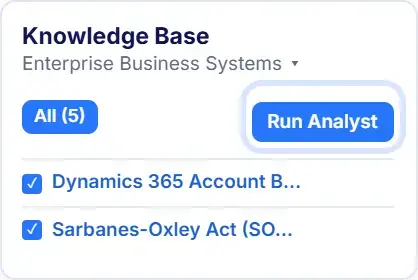
The Analyst generates structured, source-cited requirements from your scenarios, specifications and testing notes. You review expected behaviour and resolve ambiguity before automated coverage is designed.
The Architect
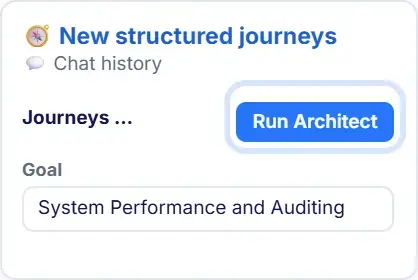
The Architect proposes the journey structure, steps and validations needed to cover each approved requirement. It references existing checkpoints, data tables and environments wherever relevant.
The Autopilot
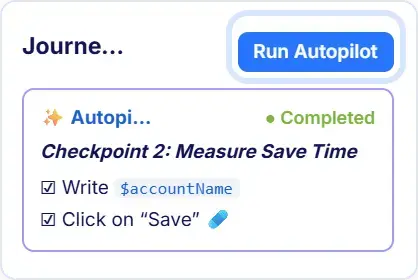
Autopilot builds the approved journey against the live application and validates the resulting steps. You can inspect its progress, correct anything that does not reflect how the application should work and approve the journey before it enters the suite.
Put Specialised Agents to Work on Building Your Automated Coverage
Touchstone’s specialised agents turn the scenarios, specifications and testing knowledge you already have into automated journeys. You review each proposal in plain English and control what enters the suite without writing code or relying on an automation engineer.
The Analyst
The Analyst generates structured, source-cited requirements from your scenarios, specifications and testing notes. You review expected behaviour and resolve ambiguity before automated coverage is designed.
The Architect
The Architect proposes the journey structure, steps and validations needed to cover each approved requirement. It references existing checkpoints, data tables and environments wherever relevant.
The Autopilot
Autopilot builds the approved journey against the live application and validates the resulting steps. You can inspect its progress, correct anything that does not reflect how the application should work and approve the journey before it enters the suite.
Put Specialised Agents to Work on Building Your Automated Coverage
Touchstone’s specialised agents turn the scenarios, specifications and testing knowledge you already have into automated journeys. You review each proposal in plain English and control what enters the suite without writing code or relying on an automation engineer.
The Analyst
The Analyst generates structured, source-cited requirements from your scenarios, specifications and testing notes. You review expected behaviour and resolve ambiguity before automated coverage is designed.
The Architect
The Architect proposes the journey structure, steps and validations needed to cover each approved requirement. It references existing checkpoints, data tables and environments wherever relevant.
The Autopilot
Autopilot builds the approved journey against the live application and validates the resulting steps. You can inspect its progress, correct anything that does not reflect how the application should work and approve the journey before it enters the suite.
Automate the Applications and Workflows You Test Manually
Use one library and review workflow to build automated coverage across the applications, systems and test variations your team currently validates by hand.

Packaged enterprise applications
Automate business processes across Salesforce, SAP, Dynamics 365, Workday, Oracle and ServiceNow, including the regression coverage required after vendor updates.

Customer-facing web applications
Turn manually tested portals, booking flows, account journeys and self-service processes into readable automated journeys that reflect the expected user experience.

Connected systems and data layers
Combine UI interactions, API calls and database checks in a single journey to confirm that a process completes correctly beyond the visible interface.

Browsers, environments and datasets
Run the same approved journey in parallel across multiple browsers, environments and data variations instead of repeating each combination manually.
Automate the Applications and Workflows You Test Manually
Use one library and review workflow to build automated coverage across the applications, systems and test variations your team currently validates by hand.
Packaged enterprise applications
Automate business processes across Salesforce, SAP, Dynamics 365, Workday, Oracle and ServiceNow, including the regression coverage required after vendor updates.
Customer-facing web applications
Turn manually tested portals, booking flows, account journeys and self-service processes into readable automated journeys that reflect the expected user experience.
Connected systems and data layers
Combine UI interactions, API calls and database checks in a single journey to confirm that a process completes correctly beyond the visible interface.
Browsers, environments and datasets
Run the same approved journey in parallel across multiple browsers, environments and data variations instead of repeating each combination manually.
Automate the Applications and Workflows You Test Manually
Use one library and review workflow to build automated coverage across the applications, systems and test variations your team currently validates by hand.
Packaged enterprise applications
Automate business processes across Salesforce, SAP, Dynamics 365, Workday, Oracle and ServiceNow, including the regression coverage required after vendor updates.
Customer-facing web applications
Turn manually tested portals, booking flows, account journeys and self-service processes into readable automated journeys that reflect the expected user experience.
Connected systems and data layers
Combine UI interactions, API calls and database checks in a single journey to confirm that a process completes correctly beyond the visible interface.
Browsers, environments and datasets
Run the same approved journey in parallel across multiple browsers, environments and data variations instead of repeating each combination manually.
Automate the Applications and Workflows You Test Manually
Use one library and review workflow to build automated coverage across the applications, systems and test variations your team currently validates by hand.
Packaged enterprise applications
Automate business processes across Salesforce, SAP, Dynamics 365, Workday, Oracle and ServiceNow, including the regression coverage required after vendor updates.
Customer-facing web applications
Turn manually tested portals, booking flows, account journeys and self-service processes into readable automated journeys that reflect the expected user experience.
Connected systems and data layers
Combine UI interactions, API calls and database checks in a single journey to confirm that a process completes correctly beyond the visible interface.
Browsers, environments and datasets
Run the same approved journey in parallel across multiple browsers, environments and data variations instead of repeating each combination manually.
What Manual Testers Achieve with Virtuoso QA
Turn the scenarios, edge cases and product knowledge you rely on every day into automated coverage you can create, review and understand.

Product knowledge becomes repeatable coverage
Turn important workflows and edge cases into readable journeys that run on every release.

Repetitive regression runs automatically
Execute approved journeys on deployment, giving you more time for exploratory and risk-based testing.

Coverage no longer waits in a queue
Create and update journeys in plain English without relying on an automation engineer for every change.

Failures include supporting evidence
Capture screenshots, logs, DOM details and network activity during execution, giving developers the context needed to investigate.
What Manual Testers Achieve with Virtuoso QA
Turn the scenarios, edge cases and product knowledge you rely on every day into automated coverage you can create, review and understand.
Product knowledge becomes repeatable coverage
Turn important workflows and edge cases into readable journeys that run on every release.
Repetitive regression runs automatically
Execute approved journeys on deployment, giving you more time for exploratory and risk-based testing.
Coverage no longer waits in a queue
Create and update journeys in plain English without relying on an automation engineer for every change.
Failures include supporting evidence
Capture screenshots, logs, DOM details and network activity during execution, giving developers the context needed to investigate.
What Manual Testers Achieve with Virtuoso QA
Turn the scenarios, edge cases and product knowledge you rely on every day into automated coverage you can create, review and understand.
Product knowledge becomes repeatable coverage
Turn important workflows and edge cases into readable journeys that run on every release.
Repetitive regression runs automatically
Execute approved journeys on deployment, giving you more time for exploratory and risk-based testing.
Coverage no longer waits in a queue
Create and update journeys in plain English without relying on an automation engineer for every change.
Failures include supporting evidence
Capture screenshots, logs, DOM details and network activity during execution, giving developers the context needed to investigate.
Manual Testing vs Scripted Automation vs Virtuoso QA
Virtuoso QA sits between manual testing and scripted automation, taking the readability and product knowledge of one and the repeatability of the other. The difference shows up in who can create coverage, what it costs to add a scenario, and what happens when the application changes.

Creating test coverage
Manual testing records scenarios for a person to execute. Scripted automation converts them into code. With Virtuoso QA, Touchstone proposes plain-English journeys that manual testers can review and refine directly.
Capturing product knowledge
Manual testing relies on documented scenarios and tester experience. Scripted automation transfers that knowledge through requirements and handovers. Virtuoso QA generates from the source material already held in your Knowledge Base.
Running regression tests
Manual regression requires someone to repeat each journey. Scripted automation runs once engineers have implemented it. Virtuoso QA executes approved, readable journeys automatically on deployment or a schedule.

Adding edge cases
Manual testers add the scenario to their test plan. Scripted automation may require another engineering request. With Virtuoso QA, testers can add or refine the journey in plain English.
Testing data variations
Manual testing repeats the journey for each dataset. Scripted automation requires parameterisation. Virtuoso QA uses data tables to run one approved journey across multiple input combinations.
Responding to application changes
Manual testers discover changes during execution. Scripted tests require investigation and repair when they fail. Virtuoso QA records self-healing for common element changes, while Touchstone proposes more substantial updates for review.
Manual Testing vs Scripted Automation vs Virtuoso QA
Virtuoso QA sits between manual testing and scripted automation, taking the readability and product knowledge of one and the repeatability of the other. The difference shows up in who can create coverage, what it costs to add a scenario, and what happens when the application changes.
Creating test coverage
Manual testing records scenarios for a person to execute. Scripted automation converts them into code. With Virtuoso QA, Touchstone proposes plain-English journeys that manual testers can review and refine directly.
Capturing product knowledge
Manual testing relies on documented scenarios and tester experience. Scripted automation transfers that knowledge through requirements and handovers. Virtuoso QA generates from the source material already held in your Knowledge Base.
Running regression tests
Manual regression requires someone to repeat each journey. Scripted automation runs once engineers have implemented it. Virtuoso QA executes approved, readable journeys automatically on deployment or a schedule.
Adding edge cases
Manual testers add the scenario to their test plan. Scripted automation may require another engineering request. With Virtuoso QA, testers can add or refine the journey in plain English.
Testing data variations
Manual testing repeats the journey for each dataset. Scripted automation requires parameterisation. Virtuoso QA uses data tables to run one approved journey across multiple input combinations.
Responding to application changes
Manual testers discover changes during execution. Scripted tests require investigation and repair when they fail. Virtuoso QA records self-healing for common element changes, while Touchstone proposes more substantial updates for review.
Manual Testing vs Scripted Automation vs Virtuoso QA
Virtuoso QA sits between manual testing and scripted automation, taking the readability and product knowledge of one and the repeatability of the other. The difference shows up in who can create coverage, what it costs to add a scenario, and what happens when the application changes.
Creating test coverage
Manual testing records scenarios for a person to execute. Scripted automation converts them into code. With Virtuoso QA, Touchstone proposes plain-English journeys that manual testers can review and refine directly.
Capturing product knowledge
Manual testing relies on documented scenarios and tester experience. Scripted automation transfers that knowledge through requirements and handovers. Virtuoso QA generates from the source material already held in your Knowledge Base.
Running regression tests
Manual regression requires someone to repeat each journey. Scripted automation runs once engineers have implemented it. Virtuoso QA executes approved, readable journeys automatically on deployment or a schedule.
Adding edge cases
Manual testers add the scenario to their test plan. Scripted automation may require another engineering request. With Virtuoso QA, testers can add or refine the journey in plain English.
Testing data variations
Manual testing repeats the journey for each dataset. Scripted automation requires parameterisation. Virtuoso QA uses data tables to run one approved journey across multiple input combinations.
Responding to application changes
Manual testers discover changes during execution. Scripted tests require investigation and repair when they fail. Virtuoso QA records self-healing for common element changes, while Touchstone proposes more substantial updates for review.
Extend Your Coverage Across the Testing Lifecycle
Create automation without writing code
Build readable journeys that testers, analysts and subject matter experts can create, review and maintain directly
Validate complete business processes
Combine UI interactions, API calls and database checks in one journey to verify outcomes across connected systems.
Extend Your Coverage Across the Testing Lifecycle
Create automation without writing code
Build readable journeys that testers, analysts and subject matter experts can create, review and maintain directly
Validate complete business processes
Combine UI interactions, API calls and database checks in one journey to verify outcomes across connected systems.
Extend Your Coverage Across the Testing Lifecycle
Create automation without writing code
Build readable journeys that testers, analysts and subject matter experts can create, review and maintain directly
Validate complete business processes
Combine UI interactions, API calls and database checks in one journey to verify outcomes across connected systems.
AI-native, proven in production.
10x
Faster execution
9x
Faster authoring
85%
Less maintenance
50%
Lower QA cost
AI-native, proven in production.
10x
Faster execution
9x
Faster authoring
85%
Less maintenance
50%
Lower QA cost
AI-native, proven in production.
10x
Faster execution
9x
Faster authoring
85%
Less maintenance
50%
Lower QA cost
Proven where quality and accountability matter
Recognised by independent analysts, trusted by enterprise teams, and built with the security controls required for critical software.

WAVE STRONG PERFORMER
Proven where quality and accountability matter
Recognised by independent analysts, trusted by enterprise teams, and built with the security controls required for critical software.
WAVE STRONG PERFORMER
Proven where quality and accountability matter
Recognised by independent analysts, trusted by enterprise teams, and built with the security controls required for critical software.
WAVE STRONG PERFORMER
Frequently Asked Questions
Do I need to know how to code?
How long before I can build my own journey?
What if my scenarios are not written down anywhere?
Will the journeys I build be readable by the rest of the team?
What happens if I build a journey incorrectly?
Frequently Asked Questions
Do I need to know how to code?
How long before I can build my own journey?
What if my scenarios are not written down anywhere?
Will the journeys I build be readable by the rest of the team?
What happens if I build a journey incorrectly?
Frequently Asked Questions
Do I need to know how to code?
How long before I can build my own journey?
What if my scenarios are not written down anywhere?
Will the journeys I build be readable by the rest of the team?
What happens if I build a journey incorrectly?

See what your next release looks like with Virtuoso
Book a walkthrough on your applications and your workflows. Bring a requirement, a user journey, or a brittle Selenium script, and watch the loop run on something you recognise.
See what your next release looks like with Virtuoso
Book a walkthrough on your applications and your workflows. Bring a requirement, a user journey, or a brittle Selenium script, and watch the loop run on something you recognise.
See what your next release looks like with Virtuoso
Book a walkthrough on your applications and your workflows. Bring a requirement, a user journey, or a brittle Selenium script, and watch the loop run on something you recognise.

Trust Center
AICPA
SOC

WAVE STRONG PERFORMER


@ Copyright 2026 SpotQA, Creators of Virtuoso QA
Trust Center
AICPA
SOC
WAVE STRONG PERFORMER
@ Copyright 2026 SpotQA, Creators of Virtuoso QA
Trust Center
AICPA
SOC
WAVE STRONG PERFORMER
@ Copyright 2026 SpotQA, Creators of Virtuoso QA