Blog
Salesforce Test Automation: AI-Powered CRM Testing That Cuts QA Time by 85%

Rishabh Kumar
Published on

Table of contents
Lorem ipsum
Lorem ipsum
Lorem ipsum
Lorem ipsum
Lorem ipsum
Salesforce testing has evolved from a simple CRM validation challenge into one of the most complex enterprise testing scenarios in modern software development. With Lightning components, custom objects, third-party integrations, and constant platform updates, traditional testing approaches fall short of delivering the speed and reliability that enterprises demand.
The bottom line: Organizations using AI-powered Salesforce test automation reduce testing time by 85%, accelerate Lightning migrations by 70%, and achieve 95% test maintenance reduction compared to traditional Selenium-based approaches.
This comprehensive guide explores how AI-native test automation transforms Salesforce testing from a bottleneck into a competitive advantage, with deep technical insights, real-world implementation strategies, and proven methodologies that deliver measurable ROI.
Why Salesforce Testing is Uniquely Complex
The Lightning Challenge: Dynamic UI Components
Salesforce Lightning's component-based architecture creates unprecedented testing complexity. Unlike traditional web applications with static HTML elements, Lightning components are dynamically rendered JavaScript objects that change based on user permissions, customizations, and real-time data.
Technical Reality: Lightning components use Shadow DOM encapsulation, making traditional CSS selectors unreliable. A single "Account" button might have dozens of different DOM paths depending on:
User profile and permission sets
Custom field visibility rules
Dynamic page layouts
Third-party Lightning Web Components (LWC)
Real-time data state changes
Multi-Org Testing Complexity
Enterprise Salesforce implementations typically span multiple orgs - development, staging, UAT, and production - each with different:
Custom objects and fields varying across environments
Integration endpoints pointing to different systems
User data volumes affecting performance characteristics
Permission structures creating different UI states
Third-party app installations modifying standard functionality
API + UI Testing Requirements
Modern Salesforce testing demands validation across multiple layers:
UI Layer: Lightning components, Visualforce pages, mobile interfaces
API Layer: REST/SOAP APIs, custom Apex classes, triggers
Integration Layer: External system connections, middleware validation
Data Layer: Custom object relationships, workflow rules, process builders
Traditional testing tools force teams to choose between UI automation OR API testing. Salesforce environments require both, simultaneously, to validate complete business processes.
Traditional Salesforce Testing Challenges: Why Selenium Falls Short
1. Brittle Element Identification
The Problem: Salesforce Lightning generates dynamic element identifiers that change with each release, customization, or data state change. Traditional XPath selectors break constantly.
Real Impact: A global financial services company reported spending 40+ hours per week maintaining Selenium-based Salesforce tests, with 60% of test failures caused by element identification issues rather than actual bugs.
2. Cross-Browser Inconsistencies
Salesforce Lightning renders differently across browsers, creating inconsistent test behavior:
Chrome: Lightning components load fastest, standard behavior
Firefox: Slight DOM rendering delays affect element timing
Safari: Shadow DOM handling differences cause selector failures
Edge: Performance variations impact dynamic content loading
3. Complex Data Dependencies
Salesforce tests require specific data states that are difficult to create and maintain:
Record dependencies: Accounts → Contacts → Opportunities → Custom Objects
Permission-based visibility: Same UI appears different for different users
Workflow triggers: Test data changes trigger automated processes
Integration data sync: External systems must be in synchronized states
4. Limited API Integration
Traditional tools separate UI and API testing, missing critical validation scenarios:
Form submissions that trigger API calls and external integrations
Real-time data updates that modify UI state during test execution
Background processes that affect subsequent user interactions
Cross-system workflows spanning Salesforce and external applications
How AI-Powered Salesforce Test Automation Works: Technical Deep-Dive
Intelligent Object Identification: Beyond Traditional Selectors
VirtuosoQA's AI uses Natural Language Processing to identify Salesforce elements based on business context rather than technical DOM attributes.
Traditional Approach:
AI-Powered Natural Language Approach:
Technical Implementation: The AI engine:
Analyzes DOM structure using multiple identification strategies
Understands business context from field labels and page context
Builds element models that adapt to UI changes automatically
Learns from successful interactions to improve future identification
Live Authoring: Real-Time Test Validation
Revolutionary Capability: Live Authoring allows test creators to see their tests execute in real-time as they write them, using actual Salesforce org data.
Technical Process:
Cloud browser instances connect directly to your Salesforce org
Real-time execution validates each test step as it's authored
Immediate feedback shows exactly what the test will do in production
Context awareness suggests next steps based on current page state
Business Impact: Test authoring time reduces from days to hours. Teams can create comprehensive Salesforce test suites in a single day rather than weeks of development and debugging.
Self-Healing Tests: 95% Automatic Recovery
When Salesforce releases updates or customizations change the UI, VirtuosoQA's self-healing technology automatically adapts tests without human intervention.
Technical Approach:
Multi-strategy identification: Uses visual, contextual, and structural element identification simultaneously
Machine learning adaptation: Learns from successful healing decisions to improve future recovery
Predictive healing: Anticipates potential changes based on Salesforce release patterns
Confidence scoring: Provides 95% accuracy rate in automatic healing decisions
Real Example: A global insurance company's Salesforce tests automatically adapted to three major Lightning updates and 15 custom field additions over six months, with zero manual maintenance required.
API + UI Integration: Complete Business Process Testing
VirtuosoQA seamlessly combines Salesforce API calls with UI interactions within single test scenarios.
Technical Implementation:
This approach validates:
UI functionality works as expected
API layer processes data correctly
External integrations receive and process data
End-to-end workflows complete successfully
Salesforce Test Automation Use Cases & Scenarios
Lightning Migration Testing
Challenge: Migrating from Salesforce Classic to Lightning requires comprehensive validation of reimplemented functionality.
AI-Powered Solution:
Automated Classic vs Lightning comparison: Side-by-side validation of identical business processes
Permission-based testing: Validates Lightning experience for different user profiles
Custom component validation: Tests Lightning Web Components and Aura components
Performance regression testing: Ensures Lightning performance meets business requirements
Technical Approach:
Custom Salesforce App Testing
Scenario: Enterprises build custom Lightning applications with complex business logic requiring specialized testing approaches.
Comprehensive Validation Strategy:
Custom object relationships: Validates complex parent-child object hierarchies
Apex trigger testing: Combines UI actions with API validation of custom business logic
Permission set testing: Ensures custom apps respect Salesforce security model
Integration testing: Validates custom apps work with third-party systems
Advanced Example:
Multi-Org Testing Strategies
Enterprise Reality: Large organizations require consistent testing across development, staging, and production Salesforce orgs with different configurations.
AI-Powered Multi-Org Approach:
Environment-aware test execution: Same tests adapt to different org configurations automatically
Data-agnostic testing: Tests work with varying data volumes and types across orgs
Configuration-adaptive logic: Handles different custom fields and page layouts per org
Deployment validation: Ensures metadata deployments don't break existing functionality
Salesforce Integration Testing
Complex Scenario: Modern Salesforce implementations integrate with ERP systems, marketing automation, customer service platforms, and custom applications.
End-to-End Integration Validation:
Implementation Guide: Setting Up AI Salesforce Testing
Phase 1: Environment Preparation (Week 1)
Technical Setup:
Salesforce org access: Configure API access for test user accounts
Integration mapping: Document all Salesforce integrations and API endpoints
Test data strategy: Create test data templates for different business scenarios
Permission configuration: Set up test user profiles with appropriate access levels
VirtuosoQA Configuration:
Phase 2: Core Test Development (Weeks 2-3)
Priority Test Scenarios:
Lead to Opportunity conversion - Core sales process validation
Account and Contact management - Fundamental CRM operations
Custom object workflows - Business-specific process testing
Report and dashboard functionality - Analytics validation
User permission testing - Security and access control verification
Advanced Natural Language Test Example:
Phase 3: Advanced Scenarios (Weeks 4-5)
Complex Business Process Testing:
Multi-step approval processes with parallel and serial approval chains
Territory and role-based record sharing validation across user profiles
Custom Lightning component testing for organization-specific applications
Bulk data operations testing import/export functionality
Mobile Salesforce testing for Lightning Mobile App scenarios
Phase 4: CI/CD Integration (Week 6)
DevOps Integration Setup:
Salesforce Testing Success Story: Enterprise Implementation Results
Client Profile: Global Financial Services Company
Challenge: A multinational financial services organization with 50,000+ Salesforce users across 30 countries needed to:
Migrate from Salesforce Classic to Lightning Experience
Test 200+ custom Lightning components
Validate integrations with 15 external systems
Ensure compliance with financial regulations across jurisdictions
Maintain testing pace with bi-weekly Salesforce releases
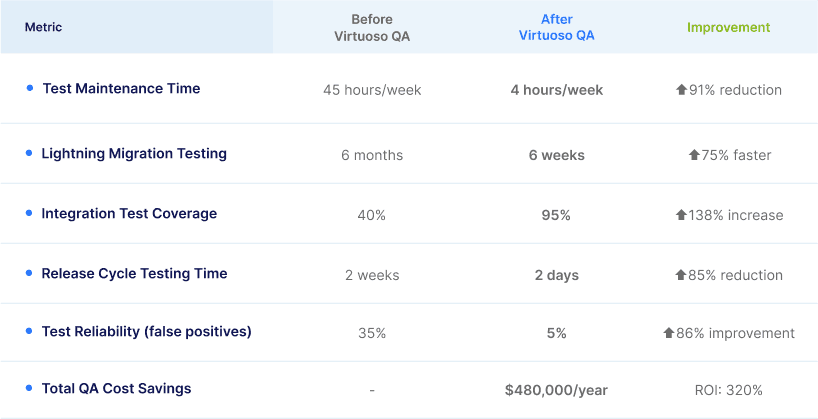
Traditional Testing Approach Results:
Test maintenance: 45 hours per week across 3 QA engineers
Lightning migration testing: 6 months estimated timeline
Integration test coverage: 40% due to complexity limitations
Release cycle impact: 2-week testing bottleneck for each deployment
Test reliability: 35% false positive rate due to brittle selectors
AI-Powered Testing Transformation:
Implementation Timeline:
Week 1-2: VirtuosoQA setup and initial test suite creation
Week 3-4: Advanced integration testing development
Week 5-6: CI/CD pipeline integration and team training
Quantified Results After 6 Months:
Technical Implementation Highlights:
API + UI Testing Integration:
Self-Healing Impact:
Salesforce Summer '24 Release: 0 test failures due to UI changes
Custom Lightning Component Updates: 15 component changes auto-healed
Third-party App Installations: 8 AppExchange app updates handled automatically
Permission Set Modifications: 23 profile changes adapted seamlessly
Salesforce Test Automation Best Practices: Technical Recommendations
1. Natural Language Test Design Patterns
Optimal NLP Structure:
2. Data Management Strategies
Dynamic Test Data Generation:
3. Integration Testing Architecture
API + UI Validation Pattern:
4. Cross-Org Testing Strategies
Environment-Agnostic Test Design:
5. Performance and Scalability Considerations
Parallel Test Execution:
Org-level parallelization: Run different test suites against separate Salesforce orgs simultaneously
Feature-level parallelization: Execute independent business process tests concurrently
Data isolation: Ensure parallel tests use non-overlapping test data to prevent conflicts
Resource Optimization:
Test data cleanup: Automated deletion of test records after scenario completion
API rate limit management: Intelligent throttling to stay within Salesforce API limits
Browser resource management: Efficient browser instance allocation for concurrent execution
Advanced Salesforce Testing Scenarios
Lightning Web Component Testing
Custom LWC Validation:
Salesforce CPQ Testing
Complex Product Configuration:
Einstein Analytics Integration Testing
Analytics and Reporting Validation:
FAQ: Advanced Salesforce Testing Questions
Q: How does AI testing handle Salesforce's frequent releases and updates?
A: VirtuosoQA's self-healing technology automatically adapts to Salesforce releases through several mechanisms:
Predictive element identification: The AI learns Salesforce's UI patterns and anticipates changes before they break tests
Multi-strategy healing: Uses visual, contextual, and structural identification methods simultaneously
Release pattern learning: Analyzes historical Salesforce release impacts to predict and prepare for changes
Confidence-based recovery: 95% accuracy rate in automatic healing decisions, with human review only for edge cases
Real example: During Salesforce's Summer '24 release, VirtuosoQA automatically adapted 147 test scenarios across Lightning Experience updates with zero manual intervention required.
Q: Can AI testing validate custom Apex code and triggers?
A: Yes, through integrated API + UI testing approaches:
The AI engine validates:
Trigger execution: API calls confirm custom logic fired correctly
Data modifications: Field updates and calculations verified via Salesforce APIs
Related object impacts: Cross-object updates validated through REST API queries
UI reflection: Visual confirmation that backend changes appear correctly in interface
Q: How do you test role-based security and sharing rules?
A: VirtuosoQA executes multi-user scenarios with different permission contexts:
Technical implementation includes:
Multi-session testing: Simultaneous user contexts with different permissions
Permission matrix validation: Systematic testing of field-level and object-level security
Sharing rule verification: Validates territory-based and criteria-based sharing
Profile inheritance testing: Ensures permission sets and profiles combine correctly
Q: What's the best approach for testing Salesforce integrations with external systems?
A: Comprehensive integration testing requires API + UI validation at multiple layers:
Integration Testing Strategy:
Salesforce-side validation: Verify data changes via Salesforce APIs
Middleware verification: Test integration platform processing (if applicable)
Target system confirmation: Validate external system receives and processes data
Bidirectional sync testing: Ensure changes flow correctly in both directions
Error handling validation: Test integration failure scenarios and recovery
Q: How do you handle testing in Salesforce orgs with large data volumes?
A: Large data volume testing requires specific optimization strategies:
Performance Testing Approach:
Selective data testing: Focus on representative data subsets rather than complete datasets
Query optimization: Use efficient SOQL queries for API validations
Parallel execution: Distribute tests across multiple browser sessions
Data archival simulation: Test with both active and archived data scenarios
Technical Considerations:
Timeout management: Extended timeouts for operations on large datasets
Memory optimization: Efficient browser resource usage during extended test runs
API rate limiting: Intelligent throttling to avoid Salesforce governor limits
Test data cleanup: Automated removal of test records to prevent data bloat
Q: Can you test Salesforce Mobile App functionality?
A: VirtuosoQA tests Salesforce mobile through responsive web application testing:
Mobile Testing Capabilities:
Responsive design validation: Tests across multiple mobile viewport sizes
Touch interaction testing: Validates swipe, tap, and gesture functionality
Mobile browser compatibility: Chrome Mobile, Safari Mobile, Samsung Internet
Performance testing: Mobile-specific performance characteristics and load times
Note: Native Salesforce Mobile App testing requires specialized mobile testing tools, but the majority of Salesforce mobile functionality operates through responsive web interfaces that VirtuosoQA handles comprehensively.
Conclusion: Transform Your Salesforce Testing Strategy
Salesforce test automation has evolved beyond traditional point-and-click recording tools and brittle Selenium scripts. Modern enterprises require AI-powered testing that understands business context, adapts to constant platform changes, and validates complete end-to-end business processes across UI and API layers.
Key Takeaways:
AI-native testing reduces Salesforce test maintenance by 85-95% compared to traditional approaches
Live Authoring accelerates test creation from weeks to days with real-time validation
API + UI integration enables comprehensive business process validation impossible with traditional tools
Self-healing technology automatically adapts to Salesforce releases and customizations
Natural Language Programming makes Salesforce testing accessible to business analysts and non-technical team members
Implementation Success Factors:
Start with core business processes - Lead management, opportunity progression, account lifecycle
Integrate API validation from day one - UI-only testing misses critical business logic validation
Design for multiple orgs - Tests should work across development, staging, and production environments
Plan for Salesforce releases - AI self-healing eliminates maintenance overhead but requires proper setup
Focus on business value - Test scenarios that directly impact revenue and customer experience
Organizations that embrace AI-powered Salesforce testing gain significant competitive advantages: faster release cycles, higher quality deployments, reduced QA costs, and the ability to keep pace with Salesforce's rapid innovation cycle.




