Blog
Pension Software Testing: How to Prove Every Calculation

Rishabh Kumar
Published on






Table of contents
Lorem ipsum
Lorem ipsum
Lorem ipsum
Lorem ipsum
Lorem ipsum
Test every change to a pension administration system by tracing it from the scheme rule it implements, to the calculation, to a test at that rule’s boundaries, to a named approval. Pension errors are slow to surface and expensive to put right. The only real defence is knowing, for every calculation, which rule it came from and who agreed it was right.
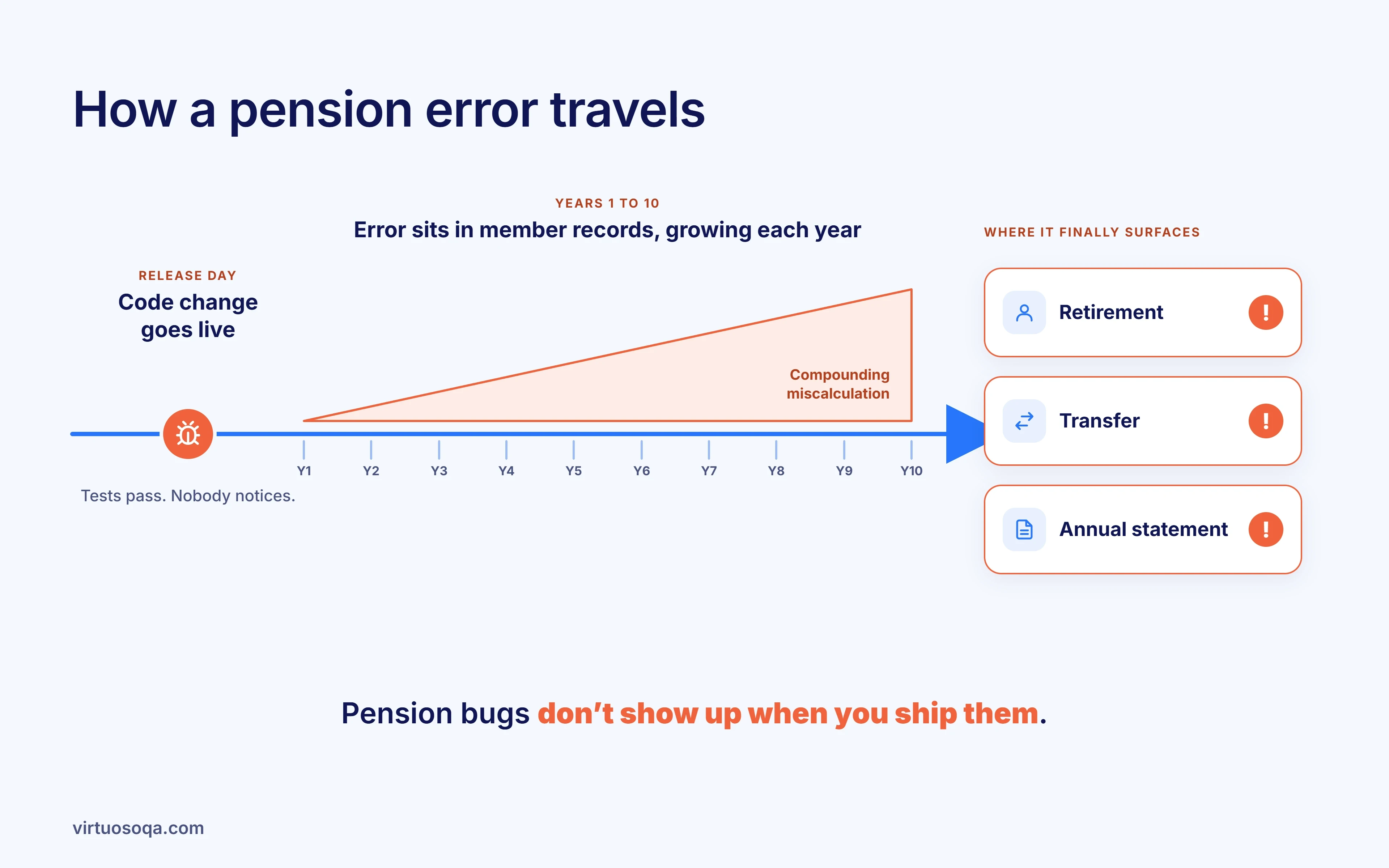
Pension software carries a promise that lasts for decades. A mistake in a benefit calculation doesn’t show up at release. It sits in member records until a retirement, a transfer or an annual statement brings it to light, years later and multiplied across the membership.
Meanwhile, the code behind those calculations is changing faster than ever, through platform upgrades, regulatory changes and, more and more, AI-assisted development.
Why Do Pension Calculation Errors Behave Differently?
Because they’re hidden, they build up over time and they’re different for each member. A wrong factor or rounding rule affects every member it touches, but stays invisible until a benefit event, and the impact can vary with each member’s history. Fixing it means recalculating records, possibly paying arrears and explaining what happened to members. That’s why pension software needs proof at the level of each rule, not just a passing regression run.
What Makes Pensions Different | What it Means |
|---|---|
Errors show up late | A bug released today might not matter until a member retires or transfers, by which time nobody remembers the release that caused it |
Errors build on each other | Revaluation, indexation and accrual all build on last year’s numbers, so a mistake in one year carries into every year after |
Values are becoming more visible | In the UK, the Pensions Dashboards Regulations set 31 October 2026 as the final deadline for in-scope schemes and providers to connect to the dashboards ecosystem. Once connected, they must respond to members’ find and view requests. Values that used to appear once a year on a statement are one search away, next to every other pension the member holds |
On top of that, change keeps coming. Administration platforms get upgraded. New rules keep arriving, from dashboards data to new requirements on value and transfers.
Administrators are starting to use AI to build and change code faster. Any of these can touch a calculation that has run unchanged for ten years.
How Do You Prove a Pension Calculation is Right After a Change?
Keep a Calculation Lineage for every calculation that matters. It’s an unbroken chain from the scheme rule or regulation, to the calculation that applies it, to tests at each of the rule’s boundaries, to a named person who approved those tests as a fair check.
When the code changes, the lineage shows which rules are affected. When a rule changes, it shows which tests are now out of date.
Link | The Question it Answers | What it Looks Like | What Happens Without it |
|---|---|---|---|
Rule | Which scheme rule, deed clause or regulation does this calculation implement? | The cited clause, with its version | Calculations drift away from the rules over years of change |
Calculation | Where in the system is the rule applied? | The journey or service that produces the figure, such as a retirement quote, transfer value or statement | Nobody knows which screens and batches a rule change reaches |
Boundaries | Does it hold up at the edges? | Tests at each edge: normal pension age, early and late retirement factors, tranches by service period, caps and underpins | The middle case passes and the edge case pays the wrong amount |
4. Approval | Who agreed the tests are a fair check of the rule? | A named scheme actuary, pensions technician or administration lead, recorded and versioned | Tests nobody owns, signed off as “regression complete” |
Change trigger | What happens when the rule or code changes? | Rule changes flag the affected tests, and code changes rerun the affected calculations | Out-of-date tests keep passing against new rules |
Link 3 is where pension software really breaks. Pension rules are full of edges, like dates, service periods, tranches and underpins, and general regression tests mostly check the middle. The cost sits at the edges, with the members whose history crosses a boundary.

Illustrative Scenario: The Factor Table That Moved
This scenario is illustrative. It describes how things can go wrong, not a specific scheme or administrator.
Picture a third-party administrator running several defined benefit schemes on one administration platform, with a member portal on top. The scheme actuary issues updated transfer value factors for one scheme. A developer loads the new table and uses a coding agent to adjust the lookup logic. The agent’s tests confirm the new factors load and that a sample member’s transfer value changes. Everything passes, and the change ships.
What nobody tested was the lookup for members with service in two tranches. Their transfer value should blend factors by tranche, but the new lookup applies a single factor based on the member’s latest tranche. The portal quotes these members a figure that looks completely believable. Months later, a member’s financial adviser compares a quote with an earlier statement and asks why the figure moved more than expected.
With Calculation Lineage, the factor change is traced to the transfer value rule in the scheme’s actuarial guidance. The tests cover each boundary the rule defines, including two-tranche members, and the pensions technician who owns transfers approves them against the rule. The two-tranche case fails before release.
Where Does Virtuoso QA Touchstone Fit?
Touchstone builds and maintains Calculation Lineage as a by-product of testing. AI reasons, a deterministic engine runs the tests, a person approves what matters, and every decision leaves evidence.
Available Today
Rules with citations: Touchstone reads the scheme rules, actuarial guidance, factor documentation and process notes you choose, and cites the source clause for every requirement it proposes. That means every requirement can be checked against a rule you actually gave it.
Every boundary as data: Virtuoso QA runs each journey across a data table, with a separate result for each row. One approved retirement or transfer journey can cover every tranche, age band and service pattern the rule defines.
Named, versioned approval: Nothing reaches the build without a named person approving it, whether that’s a pensions technician or the scheme actuary’s delegate. Each change is reviewed as a diff, and the decision is recorded, timestamped and versioned.
Rule changes flagged: Upload revised guidance or a new factor table, and the requirements it affects are flagged for review, along with any journeys built on the old rule.
The whole member journey: Virtuoso QA tests administration platforms, member portals and the browser-based systems around them, end to end, with the same result on every run.
Pension changes rarely stay inside one system. To see how Virtuoso QA follows a member journey from the portal through administration and payments, take a look at end-to-end testing.
Coming Next
The direction is lineage you can search. Touchstone will answer questions like “which calculations does this scheme rule reach, and when were they last proven?” straight from its application intelligence graph, turning a scheme review into a search. This is on the roadmap and isn’t available today.
What It Doesn’t Do
Touchstone checks that the system applies the rules as written. It doesn’t judge whether the actuarial assumptions are right, which stays with the actuary. Batch processes with no browser or API access, native desktop administration clients, and load or performance testing are outside its scope.
When a trustee, regulator or auditor asks how a calculation change was checked, Virtuoso QA’s release evidence shows the rule it came from, the tests that ran and who approved them.
What Can You Do This Quarter?
Here are five things you can do without buying anything:
Step | What to Do |
|---|---|
List your high-risk calculations | Retirement quotes, transfer values, revaluation, commutation, death benefits and the values you send to dashboards. Name an owner for each |
Cite the rule for each | For every calculation on the list, record the scheme rule, deed clause or guidance it implements, and the version. If you can’t find one, write it down. That gap is your first priority |
Write down the boundaries | For each rule, list its edges, such as dates, ages, tranches, caps and underpins, and check whether each one has a test |
Check what dashboards show | Once you’re connected, compare the values your system returns to dashboards with what your statements say, for a sample that includes boundary cases |
Name who approves calculation tests | Decide who signs off test sets for calculation changes. It should be someone who knows the rules, not just the code, and their approval should be recorded every time |
Pensions sit alongside life, annuities and the rest of an insurer’s or administrator’s estate, and Virtuoso QA’s insurance testing covers those connected systems too.
Pension Software Testing FAQs
How do you test a pension administration system?
Why are pension calculation errors so costly?
When do UK pension schemes need to connect to pensions dashboards?
What is Calculation Lineage?
Can testing confirm that pension assumptions are correct?
" height="10.182000000000016px" id="C361dJxCp" width="11.692999999999984px"/></svg>)