Blog
Selenium Timeouts Explained: Implicit, Explicit, Fluent Waits

Rishabh Kumar
Published on

Table of contents
Lorem ipsum
Lorem ipsum
Lorem ipsum
Lorem ipsum
Lorem ipsum
Selenium timeouts are synchronization mechanisms that prevent test failures when web elements take varying amounts of time to load. However, manually configuring timeouts for every element and scenario creates maintenance overhead, slows test execution, and causes flakiness when applications change.
This guide provides comprehensive technical coverage of all Selenium timeout types with working code examples. More importantly, it reveals how AI native testing platforms with Live Authoring and intelligent synchronization eliminate the need for manual timeout management, delivering 85% faster test creation and 81% reduction in maintenance.
What are Selenium Timeouts
Selenium timeouts define maximum wait duration before throwing exceptions when elements aren't immediately available. Modern web applications load content dynamically via JavaScript, AJAX, and single page application frameworks. Without timeouts, Selenium would fail instantly when elements aren't present, even if they're about to load.
Why Timeouts Matter in Test Automation
Dynamic Content Loading - React, Vue, Angular, and other frameworks load content asynchronously. Elements appear at unpredictable intervals based on API responses, network latency, and client-side rendering.
Network Variability - Test environments experience different network speeds. What loads instantly in development may take seconds in staging or CI/CD pipelines.
Test Stability - Properly configured timeouts distinguish between genuine failures (element truly doesn't exist) and timing issues (element is loading but not ready).
CI/CD Reliability - Automated test pipelines fail when synchronization breaks. Timeout configuration directly impacts pipeline success rates and release velocity.
Default Selenium Timeout Values
Implicit Wait: 0 seconds (immediate failure if element not found)
Page Load Timeout: 300 seconds (5 minutes)
Script Timeout: 30 seconds (for asynchronous JavaScript execution)
These defaults work for static pages but fail catastrophically for modern dynamic applications.
Types of Selenium Timeouts
1. Implicit Wait
Implicit wait tells WebDriver to poll the DOM for a specified duration when attempting to locate elements. If the element appears during that period, execution continues immediately. If not, NoSuchElementException is thrown.
Key Characteristics:
Applies globally to ALL element location calls in the session
Remains active for the entire browser session
Default value is 0 seconds
Cannot be changed per element
Polls DOM repeatedly until timeout expires or element found
Implementation Example (Java):
Python Implementation:
When to Use Implicit Wait:
Static pages with predictable load times
Rapid prototyping or proof-of-concept tests
Simple test scripts without complex synchronization needs
When you want global default wait behavior
When NOT to Use Implicit Wait:
Dynamic single page applications
Pages with AJAX operations
When you need precise control over specific elements
NEVER mix with explicit waits (causes unpredictable behavior)
2. Explicit Wait
Explicit wait pauses execution until a specific condition is met for a particular element. Uses WebDriverWait class with ExpectedConditions to check element state.
Key Characteristics:
Applied to specific elements, not globally
Waits for explicit conditions (visibility, clickability, presence)
More flexible and precise than implicit wait
Polls condition at regular intervals (default 500ms)
Recommended for modern web applications
Implementation Example (Java):
Python Implementation:
Common ExpectedConditions:
presence_of_element_located: Element exists in DOM (may not be visible)
visibility_of_element_located: Element visible on page
element_to_be_clickable: Element visible and enabled
title_contains: Page title contains specific text
text_to_be_present_in_element: Element contains specific text
invisibility_of_element_located: Element no longer visible
staleness_of: Element no longer attached to DOM
When to Use Explicit Wait:
Dynamic web applications with AJAX
Single page applications (React, Vue, Angular)
When waiting for specific element states
Complex multi-step interactions requiring precise timing
Modern recommended approach over implicit wait
3. Fluent Wait
Fluent wait is an advanced form of explicit wait offering customizable polling intervals and exception handling. Checks conditions at defined frequencies and ignores specified exceptions.
Key Characteristics:
Custom polling frequency (how often to check condition)
Ignore specific exceptions during wait period
Maximum timeout duration
More granular control than standard explicit wait
Ideal for highly dynamic or unpredictable elements
Implementation Example (Java):
Python Implementation:
When to Use Fluent Wait:
Elements that load at highly variable intervals
Need to ignore specific exceptions during wait
Custom polling frequencies for performance optimization
Complex conditions requiring lambda functions
Single page applications with unpredictable rendering
4. Page Load Timeout
Page load timeout defines maximum time WebDriver waits for a page to fully load before throwing TimeoutException. Applies to driver.get() and driver.navigate() operations.
Default: 300 seconds (5 minutes)
Implementation Example (Java)
Python Implementation:
When to Use:
Limit time waiting for slow pages
Prevent indefinite hangs on broken pages
CI/CD pipelines with time constraints
Testing page load performance thresholds
5. Script Timeout
Script timeout defines maximum time for asynchronous JavaScript execution via executeAsyncScript().
Default: 30 seconds
Implementation Example (Java):
Python Implementation:
When to Use:
Executing long-running JavaScript operations
Waiting for AJAX callbacks
Complex DOM manipulations requiring time
Thread.sleep() vs Selenium Waits
Why Thread.sleep() Is Problematic
Thread.sleep() pauses execution for a fixed duration regardless of element state.
Problems:
Wastes Time: Waits full duration even if element appears instantly
Not Adaptive: Fails if element needs longer than sleep duration
Masks Issues: Hides synchronization problems with arbitrary delays
Reduces Efficiency: Accumulates unnecessary wait time across test suites
Bad Example:
Better with Explicit Wait:
Performance Impact: Test suite with 100 Thread.sleep(5000) calls wastes 500 seconds even if all elements appear in 100ms.

Common Timeout Exceptions
1. TimeoutException
Thrown when wait duration expires without condition being met.
Causes:
Element never appears or becomes visible
Incorrect locator strategy
Application error preventing element load
Timeout set too low for actual load time
Network latency exceeding timeout
Resolution:
Verify element locator is correct
Increase timeout for slower environments
Check for JavaScript errors preventing element load
Inspect network tab for failed requests
2. NoSuchElementException
Thrown immediately when element not found and implicit wait is 0.
With Implicit Wait: Polls DOM for specified duration before throwing
With Explicit Wait: Not thrown if using presence_of_element_located condition
Selenium Timeout Best Practices
1. Do Not Mix Implicit and Explicit Waits
Critical Rule: Mixing implicit and explicit waits causes unpredictable timeout behavior.
Why: Implicit wait (global) + explicit wait (specific) can compound, causing waits of 20+ seconds when you expect 10.
Example of Bad Practice:
Correct Approach: Choose ONE strategy and use it consistently.
2. Prefer Explicit Waits for Modern Applications
Explicit waits provide precise control, better performance, and clearer intent.
3. Use Appropriate Timeout Values
Too Low: False failures, flaky tests, CI/CD instability
Too High: Slow test execution, delayed failure feedback
Recommended Starting Points:
Implicit Wait: 5-10 seconds
Explicit Wait: 10-15 seconds for most conditions
Page Load: 30-60 seconds
Script Timeout: 30-45 seconds
Adjust based on application behavior and environment.
4. Implement Polling for Fluent Wait
For highly dynamic elements, configure polling frequency to balance responsiveness and resource usage.
5. Use Specific ExpectedConditions
Choose the most precise condition for your scenario.
6. Handle Timeout Exceptions Gracefully
Wrap timeout-prone operations in try-catch for better error messages.
The Fundamental Problem with Manual Timeout Management
Timeout Configuration Proliferation
Every element interaction requires timeout decisions:
How long should this specific element wait?
Is 10 seconds enough or do I need 15?
Should I use implicit or explicit for this case?
What polling frequency optimizes performance?
Reality: Enterprise applications have thousands of element interactions. Manual timeout configuration for each becomes unmanageable.
Application Change Brittleness
When applications change:
New AJAX operations introduce different timing
Framework updates alter rendering speeds
Infrastructure changes affect network latency
Timeouts configured for old behavior cause failures
Maintenance Tax: Teams spend significant time adjusting timeout values when applications evolve, not because tests are wrong but because timing assumptions changed.
Environment Variability
The same test with identical timeout configuration behaves differently across environments:
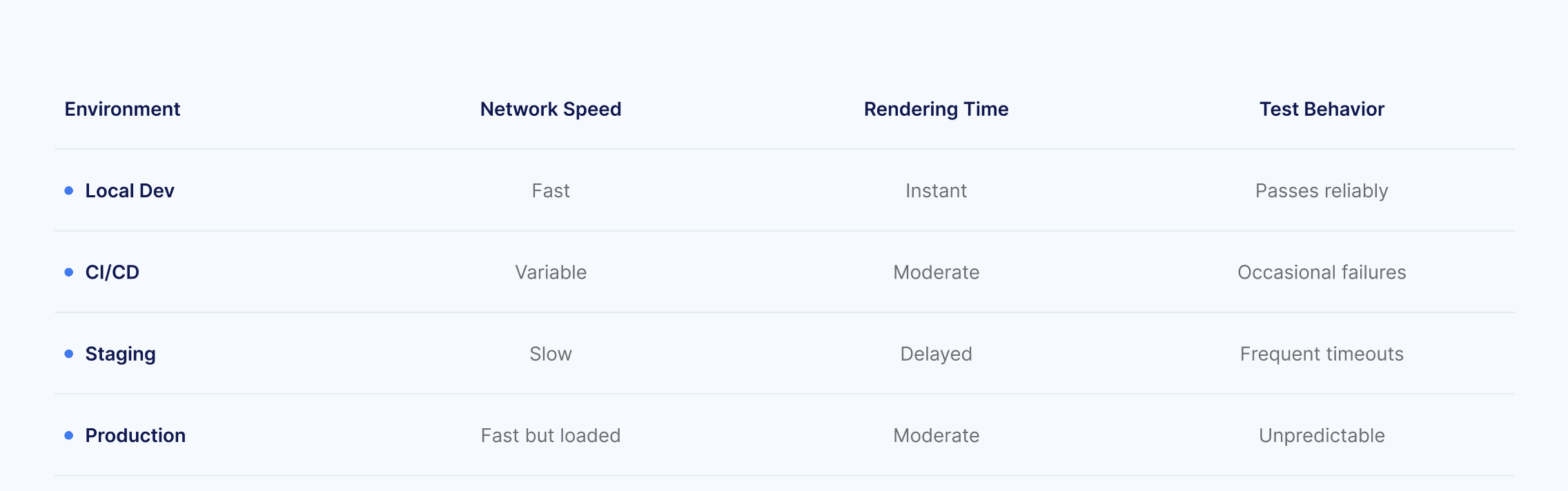
Manual timeout configuration cannot adapt to these variations automatically.
The Write-Run-Debug-Repeat Cycle
Traditional timeout management:
Write test with estimated timeout
Run test, encounter timeout failure
Debug to determine if timing issue or real failure
Adjust timeout value
Re-run test
Repeat until stable across environments
Time Cost: This cycle consumes 30-50% of test authoring effort for complex applications.
How AI Native Testing Eliminates Timeout Management
1. Live Authoring: Real-Time Synchronization
AI native platforms like Virtuoso QA use Live Authoring where tests execute in real-time as you write them. This provides immediate feedback on element availability and application behavior.
How It Works:
Each test step executes against the live application as authored
Platform observes actual element load times and patterns
AI learns application-specific timing characteristics
Tests adapt synchronization automatically based on observed behavior
Impact: No manual timeout configuration required. The platform handles synchronization intelligently based on actual application behavior.
2. Intelligent Element Identification with Built-In Synchronization
AI native platforms build comprehensive DOM models and apply intelligent waiting strategies automatically.
Automatic Synchronization Features:
Elements located using multiple identification strategies
Platform waits until elements are truly interactive (not just present)
Self-adjusts wait behavior based on application patterns
Distinguishes between timing issues and genuine failures
Natural Language Abstraction Eliminates Timeout Exposure
Natural Language Programming abstracts away technical synchronization details.
Tests written in natural language don't expose timeout parameters. The AI layer handles synchronization based on learned application behavior.
Self-Healing Adapts to Timing Changes
When applications change and timing characteristics shift, AI native platforms adapt automatically through self-healing.
Automatic Adaptation:
Platform monitors test execution patterns
Detects timing changes in application behavior
Adjusts synchronization strategies without manual intervention
95% self-healing accuracy maintains test stability despite application changes
Migration Strategy: From Manual Timeouts to AI Native Testing
When to Migrate
High Timeout-Related Maintenance: If your team spends more than 20% of time adjusting timeout values for flaky tests, you're paying the manual configuration tax.
Multi-Environment Instability: Tests passing in local development but failing in CI/CD due to timing differences indicate timeout management problems.
Framework Update Brittleness: When upgrading to newer versions of React, Angular, Vue causes widespread timeout failures.
Onboarding Difficulty: New team members struggle to understand why specific timeout values were chosen and when to adjust them.
Migration Approach for Timeout-Heavy Test Suites
Step 1: Identify Timeout Hotspots: Analyze test logs to find most frequent TimeoutException occurrences. These tests benefit most from intelligent synchronization.
Step 2: Convert High-Maintenance Tests First: Migrate tests requiring constant timeout adjustments to AI native platform where synchronization is automatic.
Step 3: Compare Stability Metrics: Track failure rates, maintenance time, and execution duration. AI native tests show immediate improvement in stability.
Step 4: Scale Migration Based on ROI: Expand migration to additional test suites as team gains confidence in automatic synchronization.
Technical Migration: Timeout Logic to Natural Language
Selenium Timeout Code:
AI Native Natural Language:
All timeout logic handled automatically by AI layer. Zero timeout configuration. Self-adjusting based on application behavior.
Visit our Selenium migration page to see how Virtuoso QA supports seamless test migration while training your team to adopt AI-native testing effectively.
Conclusion: The Inevitable Shift from Manual to Intelligent Synchronization
Selenium timeouts are essential for test stability, but manual configuration creates ongoing maintenance burden that compounds as test suites scale. Understanding implicit wait, explicit wait, fluent wait, and proper timeout strategies remains valuable for traditional Selenium automation.
However, the testing industry is shifting from manual timeout management to intelligent, automatic synchronization. AI native platforms with Live Authoring observe actual application behavior, learn timing characteristics, and adapt tests automatically without requiring timeout configuration.
With 85% faster test creation, 81% maintenance reduction, and 95% self-healing accuracy, the ROI is immediate and measurable. Teams eliminate timeout debugging, environment-specific tuning, and application change brittleness.
The question isn't whether AI native testing will replace manual timeout configuration, but how quickly teams can migrate to capture the efficiency gains.
Related Reads
FAQs on Selenium Timeouts
What is the difference between implicit wait and explicit wait in Selenium?
What are the default timeout values in Selenium?
Can I use implicit wait and explicit wait together in Selenium?
Which Selenium wait strategy is best for modern web applications?
How do I fix TimeoutException in Selenium tests?
How does Live Authoring eliminate timeout configuration?








