

Blog
Salesforce Test Automation - Approach and Best Practices

Published on
October 14, 2025

Salesforce test automation is crucial as manual testing can’t handle the vast configurations, customizations, and data scenarios in Salesforce.
Salesforce has evolved from a simple CRM into a comprehensive enterprise platform. That evolution brings power and testing complexity that traditional approaches can no longer handle.
Today's Salesforce implementations span:
Each layer adds testing surface area. Each release introduces risk. And each customisation that defines your competitive advantage is one more thing that needs to be validated before it reaches production.
This guide covers how AI-powered test automation transforms Salesforce testing from a release bottleneck into a continuous quality practice, so organisations can move fast on the platform without breaking what already works.
Salesforce testing encompasses the validation of all components within the Salesforce ecosystem, including standard functionality, custom configurations, Apex code, Lightning components, integrations, and third party AppExchange solutions. This comprehensive testing approach ensures that critical business processes operate flawlessly from lead capture through customer success, maintaining data integrity across millions of records and complex automation rules. Organizations must validate intricate workflows that span multiple Salesforce clouds, external systems, and user experiences across desktop and mobile interfaces.
The scope of Salesforce testing extends far beyond simple CRM validation. It requires verifying that validation rules enforce business logic correctly, that Process Builder and Flow automations execute without errors, that sharing rules maintain appropriate data access, and that integration patterns synchronize data accurately across the enterprise ecosystem. Testing must ensure that customizations built on the Salesforce platform scale to handle growing data volumes while maintaining governor limits and performance benchmarks across global deployments.
Salesforce imposes a mandatory minimum of 75% Apex code coverage before any deployment to production can proceed. This is not a recommendation. It is a platform-enforced threshold that blocks deployments outright if the requirement is not met.
This makes automated unit testing a compliance obligation as much as a quality practice. Organisations must:
Falling below the 75% threshold during a major release window stops deployments entirely and can disrupt coordinated release schedules across business units. Automated testing platforms that track coverage continuously prevent this by surfacing gaps before they block production.
Salesforce's configurability is its greatest strength, and the root of its testing complexity. As organisations build solutions tailored to their industry, the testing surface grows exponentially.
A single enterprise may need to validate across:
The challenge compounds further because Salesforce's multi-tenant architecture means platform updates can impact custom functionality without warning. A change in one component can cascade across the entire system, making comprehensive regression testing essential and manual regression testing impractical at this scale.
Each Salesforce industry cloud introduces its own layer of specialised functionality that standard testing approaches are not built to handle.
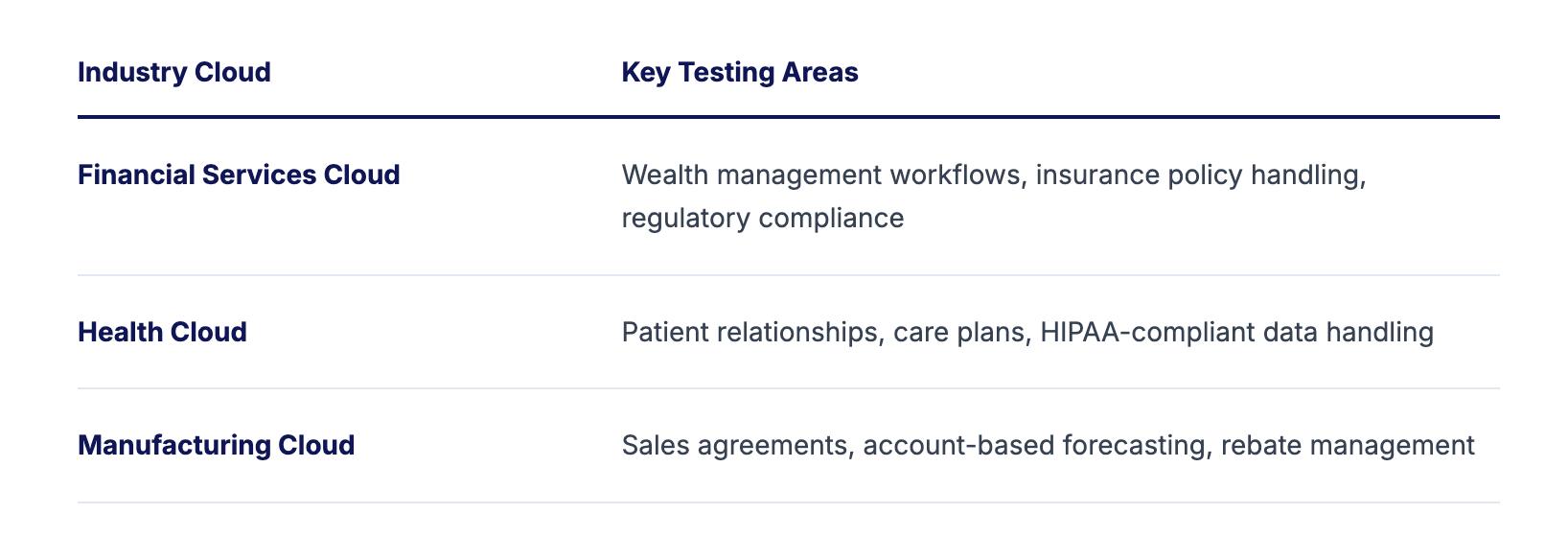
The complexity intensifies when organisations run multiple industry clouds simultaneously. A healthcare provider, for example, might use:
Each combination requires integrated testing that validates industry-specific validation rules, data models, and workflows alongside standard Salesforce functionality and not in isolation.
Salesforce releases three major updates every year: Spring, Summer, and Winter, plus ongoing feature rollouts between releases.
Each release brings:
Organisations must validate that existing functionality survives each update while also testing new features before adopting them. The pace of change makes manual testing structurally unworkable. Automated testing that adapts to platform changes is the only approach that keeps up.
Sales Cloud testing must cover the complete revenue lifecycle, from lead creation through opportunity closure and contract renewal.
Core areas to validate:
CPQ (Configure, Price, Quote) testing adds another layer:
CPQ errors have direct revenue implications. Thorough testing here is not optional.
Service Cloud powers real-time customer interactions. Testing must confirm that every part of the support workflow operates without delay or error.
Case management validation:
Field Service Lightning validation:
Marketing Cloud testing spans multiple studios and requires validation at both the individual touchpoint and the complete journey level.
Platform components to test:
Marketing Cloud to Sales and Service Cloud integration:
Custom Salesforce development introduces risk that standard configuration testing does not cover. Every custom component needs its own validation strategy.
Custom code testing must confirm:
Integration testing must validate:
Integration failures cascade across the enterprise. Testing here protects operational continuity across every connected system.
Related Read: If your Salesforce implementation integrates with enterprise systems like Oracle, explore our guide on Oracle software testing to learn the Do’s and Don’ts of Testing in Oracle.

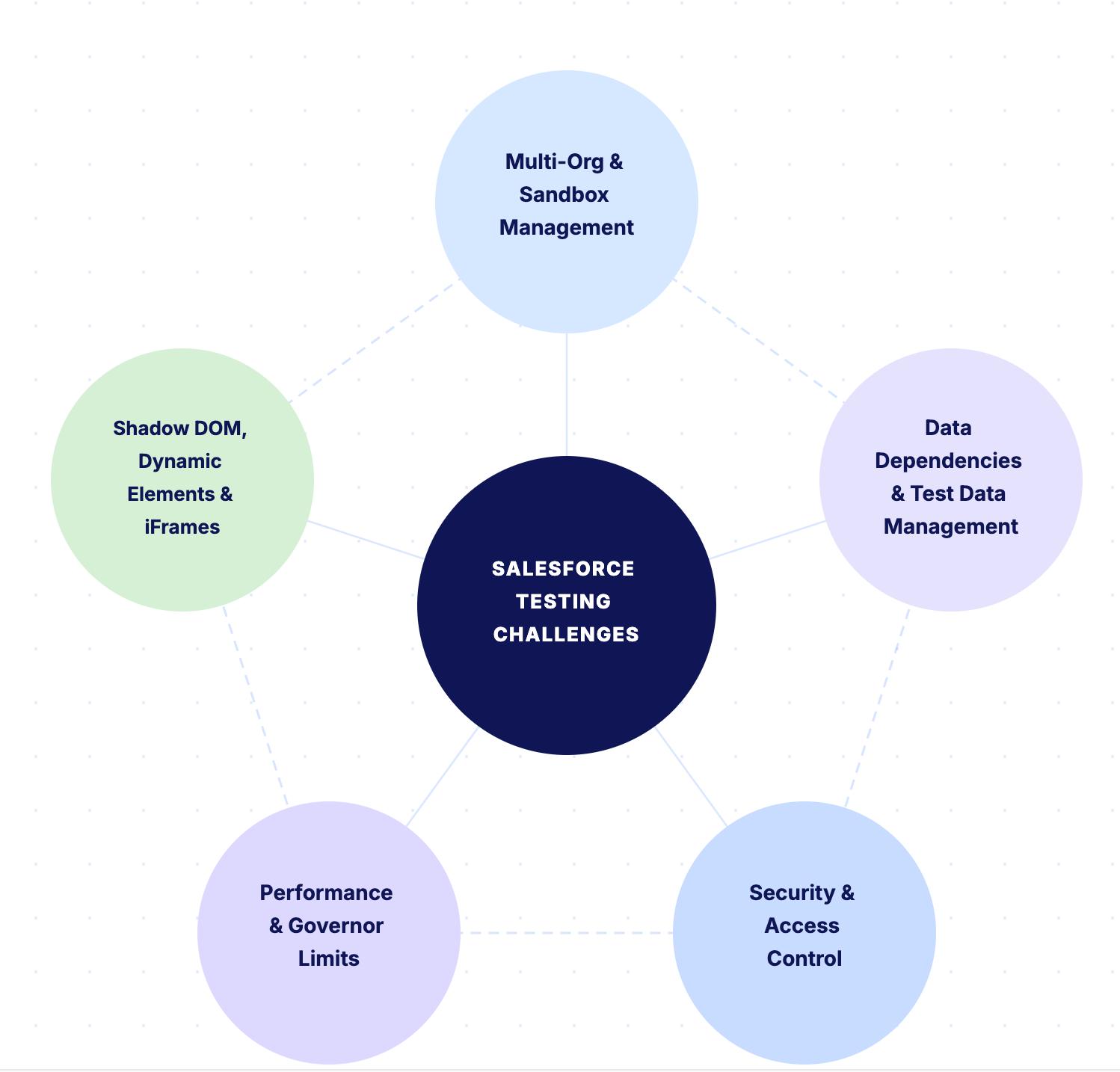
Large enterprises often operate multiple Salesforce orgs for different business units, regions, or brands, each with unique configurations and customizations. Testing must validate functionality within individual orgs while ensuring that inter org integrations function correctly. The challenge intensifies when managing sandbox refreshes, where production data and configurations must be properly masked and synchronized for testing purposes.
Sandbox limitations create additional complexity as different sandbox types provide varying levels of data and functionality. Full sandboxes offer complete production copies but refresh infrequently, while developer sandboxes refresh quickly but lack data. Testing strategies must account for these limitations while ensuring comprehensive validation across development, testing, staging, and production environments.
Salesforce testing requires complex test data that maintains relationships across objects while respecting validation rules, sharing settings, and role hierarchies. Creating realistic test data manually becomes impractical when considering the deep object relationships, especially in organizations with custom objects and complex data models. Test data must reflect real world scenarios including various record types, ownership structures, and lifecycle stages.
Data volume testing presents unique challenges in Salesforce where governor limits and performance degradation can occur with large data sets. Testing must validate that automations handle bulk operations, that list views remain responsive, and that reports generate within acceptable timeframes. The impact of data volume on user experience makes this testing critical for enterprise deployments.
Salesforce's sophisticated security model with profiles, permission sets, sharing rules, and field level security creates complex testing requirements. Testing must validate that users can access appropriate data and functionality while being restricted from unauthorized information. The complexity increases when considering dynamic sharing rules, territory management, and team selling scenarios where access changes based on business context.
Testing must also validate Salesforce Shield features including Platform Encryption, Event Monitoring, and Field Audit Trail for organizations with enhanced security requirements. Encryption testing must ensure that encrypted fields function correctly in formulas, workflows, and integrations while maintaining performance. The security implications make thorough testing essential for compliance and data protection.
Salesforce's multi tenant architecture imposes governor limits that restrict resource consumption, requiring careful testing to ensure that customizations operate within these boundaries. Testing must validate that Apex code respects CPU time limits, that SOQL queries remain selective, that DML operations stay within limits, and that heap size doesn't exceed allocations. Governor limit violations can cause critical business processes to fail unexpectedly.
Performance testing must account for Salesforce's shared infrastructure where performance can vary based on overall platform load. Testing should validate response times for common operations, page load performance, and report generation speed across different usage patterns. The impact of poor performance on user adoption makes this testing critical for implementation success.
Three technical characteristics of the Salesforce platform create specific challenges for test automation that do not exist in standard web application testing.
Salesforce Lightning components use the Shadow DOM, which encapsulates component internals behind a boundary that standard CSS selectors and XPath locators cannot penetrate. Traditional automated testing tools that rely on these locators fail when target elements sit inside Shadow DOM boundaries, producing test failures that have nothing to do with application defects. Teams then spend time investigating failures that are caused by the testing tool, not the application.
Salesforce pages render elements conditionally based on user role, record type, page layout assignment, and business logic state. An element visible to a Sales Manager profile may not render for a Sales Rep. A field enabled by a validation rule under one set of conditions may not appear under another. Test scripts built on static locators break constantly as configurations, profiles, and permission sets evolve across the three annual platform releases.
Salesforce treats embedded tabs and components as separate browser frames. Elements inside iFrames require explicit frame-switching in test scripts before they can be located and interacted with. When Salesforce updates alter iframe structures or introduce new embedded components through release changes, previously stable scripts break silently, generating false failures.
The cumulative effect of all three is a maintenance burden that overwhelms script-based automation frameworks. AI-native element identification addresses this by understanding what a test is trying to interact with rather than depending on static coordinates that change with every release.
Automation handles repetitive, rule-based, and regression testing at a scale and speed that manual processes cannot match. It cannot replace human judgment in every scenario. Understanding where manual testing remains essential prevents both over-automation at the cost of quality and under-automation at the cost of velocity.
UAT validates whether Salesforce workflows serve business users in practice, not just in theory. A case routing rule may trigger correctly according to its configuration and still frustrate agents because the assignment logic does not reflect how the support team actually operates day to day. Human testers experiencing the workflow as real users catch this category of defect. Automated tests confirm functional correctness. They cannot assess whether an experience actually works for the people using it.
Salesforce implementations evolve continuously through admin-driven configuration changes, AppExchange additions, and seasonal release adoption. Exploratory testing by experienced QA analysts uncovers defects that no scripted test anticipated. A tester with domain knowledge of the Salesforce implementation will navigate the platform the way a real user would, finding edge cases and unexpected interactions that predetermined test cases never reach.
Automation works best against stable, well-understood functionality. New Salesforce configurations, recently adopted Einstein features, or freshly implemented Flow automations benefit from manual exploratory validation before automation is built around them. Building automated tests against features that are still changing creates exactly the maintenance overhead that makes test automation expensive.
Automate everything that is stable, repetitive, and rule-based. Run manual testing for judgment-dependent scenarios, newly released features in flux, and anything requiring a human to assess whether the experience feels correct. The two approaches are complementary, not competing.

Effective Salesforce testing starts with mapping business processes to configurations and identifying the critical paths that carry the most risk.
When building your test plan, account for:
With Virtuoso QA's GENerator organizations can convert their Salesforce implementation guides, business requirements documents, and existing manual test scripts into comprehensive automated test suites. This approach leverages existing knowledge while dramatically reducing test creation time from months to weeks.
Virtuoso QA's Business Process Orchestration models complete workflows across multiple Salesforce clouds and integrated systems, ensuring tests reflect real user journeys rather than isolated technical features.
Salesforce testing requires interconnected test data that respects the platform's object relationships, validation rules, required fields, and sharing settings. Creating this data manually at enterprise scale is impractical and error-prone.
Virtuoso QA's AI-powered data generation allows teams to:
Virtuoso QA's test data management capabilities:
Traditional Salesforce test automation required engineers to have deep knowledge of the platform's technical architecture, scripting frameworks, and element identification strategies. Virtuoso QA's natural language test authoring removes that technical dependency entirely, opening test creation to the people who understand Salesforce business processes best.
What this means in practice:
Virtuoso Composable Testing builds reusable components for common Salesforce actions, such as:
These reusable building blocks can be assembled into complex, multi-step test scenarios, reducing the time to author new tests while keeping coverage consistent across every team.
Suggested Read: How to handle complex element selection in Salesforce for effective test automation
Salesforce's three annual releases and ongoing platform updates require testing to run continuously throughout the year, not only in the weeks immediately before a major release window.
Virtuoso StepIQ enables intelligent test prioritisation by:
Virtuoso QA's CI/CD and Salesforce DX integration enables:
Virtuoso QA's API unified functional testing validates both the UI and API layers simultaneously, covering:
Salesforce processes rarely exist in isolation, requiring end to end testing that validates complete business workflows. Business Process Orchestration models these multi cloud processes, ensuring that all components function together correctly. Testing should follow actual business flows from initial customer interaction through service delivery and support.
Critical end to end scenarios include lead to cash processes that span Marketing Cloud, Sales Cloud, and billing systems; case to resolution workflows involving Service Cloud, Knowledge, and Field Service; and commerce journeys that integrate Commerce Cloud with inventory and fulfillment systems. Each scenario requires validation across multiple Salesforce clouds and external systems.
The orchestration layer manages complex test scenarios involving multiple users, approval processes, and time based workflows. For example, testing a complete opportunity cycle requires actions by sales reps, managers, and operations teams over multiple stages. Orchestration ensures comprehensive validation of these multi step processes.
Salesforce's frequent updates and dynamic interfaces traditionally required constant test maintenance. AI/ML self healing capabilities automatically adapt tests to UI changes, maintaining stability even as Salesforce evolves. When Salesforce updates Lightning components or modifies page layouts, the self healing technology identifies changes and updates tests automatically, achieving a 95% success rate.
The platform builds comprehensive models of Salesforce interfaces using AI augmented object identification. These models enable tests to locate elements using multiple strategies including Lightning component structure, ARIA labels, and visual recognition. Tests remain stable even when Salesforce updates the underlying implementation.
Beyond UI changes, self healing handles process modifications introduced by configuration changes or new Salesforce features. If validation rules change or new workflow steps are added, the AI recognizes the new patterns and adjusts tests accordingly. This intelligent adaptation ensures tests remain valid as Salesforce implementations evolve.
Salesforce implementations must handle varying loads from daily operations to seasonal peaks like year end processing. Automated performance testing simulates realistic user loads, validating that Salesforce maintains responsiveness. Testing should cover various scenarios including bulk data operations, concurrent user access, and complex report generation.
Performance testing must validate both Salesforce platform performance and custom development efficiency. Tests measure Apex execution time, SOQL query performance, and page load speeds while monitoring governor limit consumption. This comprehensive approach ensures that customizations scale appropriately.
Exploratory testing complements scripted performance tests by automatically exploring Salesforce interfaces under load. The AI engine identifies performance bottlenecks, governor limit risks, and stability issues that might not be caught by predetermined scripts. This combination ensures thorough performance validation.

Salesforce's unique architecture means that not all automation tools work equally well on the platform. A tool that performs reliably on standard web applications often fails on Lightning components, Shadow DOM, dynamic elements, and Salesforce's three-release annual cadence. Evaluate tools against these criteria before committing.
The tool must handle Lightning Web Components, Classic pages, and mobile Salesforce layouts without requiring separate frameworks for each interface. It should resolve Shadow DOM elements without manual frame-switching workarounds and manage dynamic element identification across different user profiles, record types, and page layouts.
Salesforce admins and business analysts understand the platform's business logic better than most developers. A tool that requires programming expertise excludes the people with the deepest knowledge of what needs to be tested. Natural language test authoring or no-code interfaces allow domain experts to create tests directly, improving coverage quality and reducing the bottleneck around automation engineers.
Salesforce's three annual releases alter UI elements, component structures, and page layouts. A tool without self-healing capability requires manual test updates after every release. Look for a demonstrated self-healing accuracy rate above 90% and evidence of stability across Salesforce Spring, Summer, and Winter release cycles.
Salesforce rarely operates in isolation. Testing must follow complete journeys from Salesforce through integrated ERP, marketing, financial, and operational systems. A tool limited to Salesforce UI testing requires additional tools for API and integration validation, creating coverage gaps and toolchain complexity that erodes ROI.
Tests should trigger automatically on metadata deployments, sandbox refreshes, and release validations. Results should surface within the team's existing DevOps toolchain rather than requiring a separate reporting environment that no one checks consistently.
Meeting Salesforce's 75% Apex code coverage threshold is a deployment prerequisite. The tool should provide visibility into coverage percentages per class, flag coverage gaps before deployment attempts, and integrate with Salesforce DX workflows.
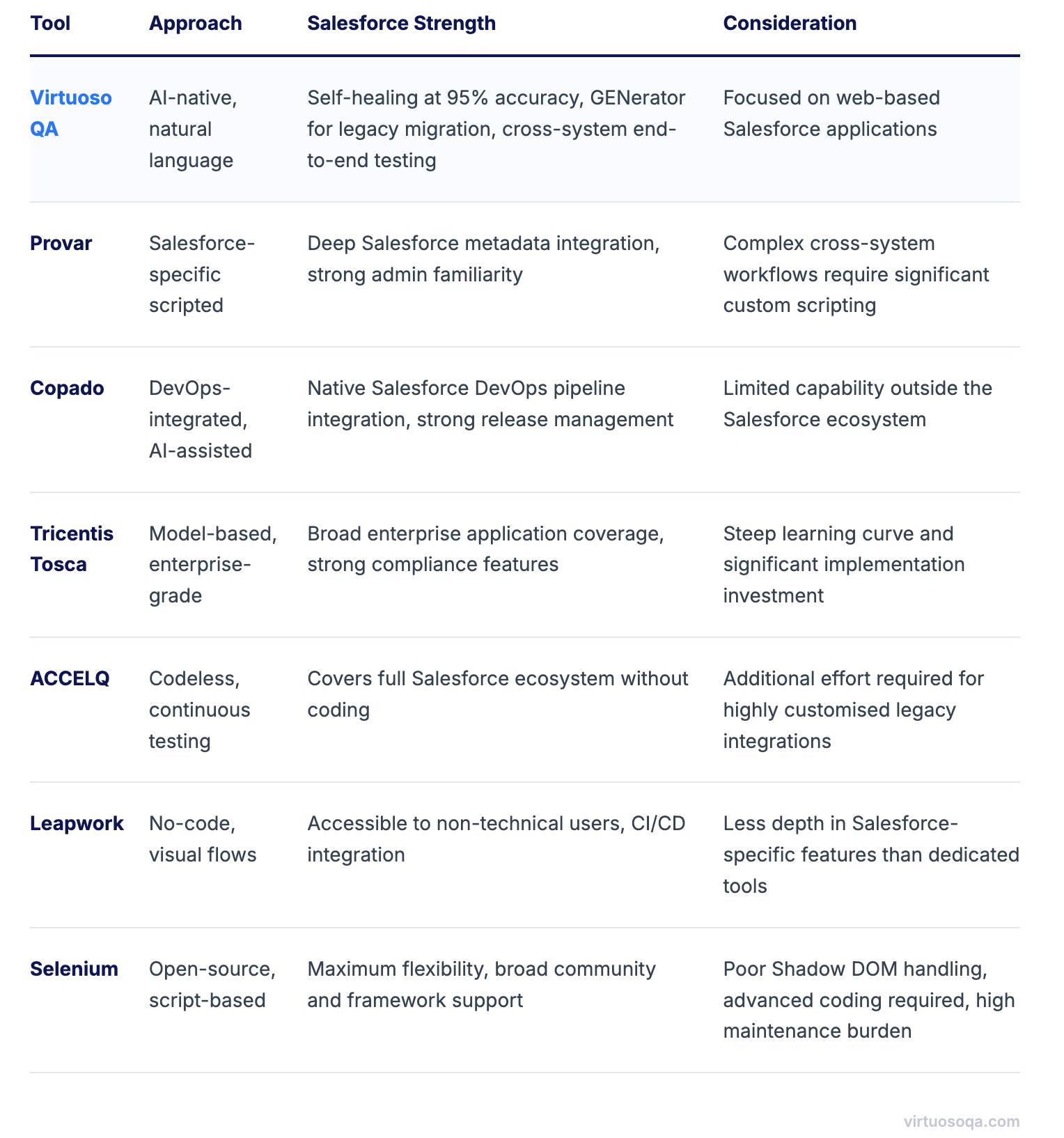
Virtuoso QA transforms Salesforce testing by enabling administrators and business analysts to write tests in plain English using familiar Salesforce terminology. Team members can create tests using statements like "Create and convert lead with campaign attribution" or "Process case escalation with field service dispatch." The AI engine translates these natural language instructions into robust automated tests.
AI Authoring capabilities understand Salesforce context, automatically expanding simple instructions into comprehensive test scenarios. When a tester writes "Complete CPQ quote cycle," the AI understands this involves product selection, configuration, pricing, discount approval, and document generation. This intelligent interpretation ensures thorough testing without requiring detailed specifications.
Generative AI with LLMs assists test creation by suggesting relevant test steps based on Salesforce best practices. As testers build scenarios, the AI recommends validations, edge cases, and error conditions specific to Salesforce functionality. This guided approach accelerates test creation while ensuring comprehensive coverage.
Salesforce's complex data model requires sophisticated test data that maintains relationships while respecting validation rules. Virtuoso QA's AI assistant for data generation creates realistic Salesforce data through natural language requests. Testers can request "Create enterprise account hierarchy with opportunities, cases, and activities" and receive complete, properly related data sets.
The platform understands Salesforce's object relationships, sharing rules, and data types, ensuring generated data reflects real scenarios. This includes maintaining account hierarchies, contact roles, opportunity team members, and case entitlements. The AI handles Salesforce's complexity automatically, eliminating manual data preparation.
Test data management features maintain consistency across sandboxes while protecting sensitive information. Production data can be imported and automatically masked while preserving relationships and business logic. Version control enables teams to maintain standard data sets for different testing scenarios.
When Salesforce tests fail, identifying root causes across configurations, customizations, and integrations traditionally required extensive investigation. Virtuoso QA's AI Root Cause Analysis automatically diagnoses failures by analyzing test execution data, debug logs, and system state. The AI provides detailed insights into whether failures stem from configuration changes, governor limits, or integration issues.
The analysis understands Salesforce's architecture and common failure patterns. If multiple tests fail due to validation rule changes or sharing rule modifications, the AI recognizes patterns and alerts teams to systemic issues. This intelligent analysis reduces debugging time from hours to minutes.
AI Journey Summaries provide clear narratives of test executions that span multiple Salesforce clouds. These summaries explain test flows, identify failure points, and suggest remediation steps in language that Salesforce administrators understand. This transparency improves collaboration between technical and business teams.
Organizations integrate Salesforce with numerous systems requiring validation of complex data flows and process synchronization. Virtuoso QA's unified testing approach validates UI, API, and integration layers, ensuring that all connection methods function correctly. Tests can verify that actions in Salesforce trigger appropriate updates in ERP, marketing automation, and analytics platforms.
The platform's extensibility features enable testing of custom Apex code, Lightning components, and AppExchange packages. Teams can extend testing capabilities through natural language commands that leverage LLMs for creating custom validations. This flexibility ensures that even unique Salesforce implementations receive thorough testing.
Integration testing includes validation of REST APIs, SOAP services, platform events, and Change Data Capture streams. The platform validates data transformations, error handling, and recovery mechanisms. Comprehensive integration testing ensures that Salesforce remains synchronized with the enterprise ecosystem.

Organizations must track specific metrics to evaluate Salesforce testing effectiveness. Test coverage percentage indicates how much Salesforce functionality is validated through automation. Leading organizations achieve over 85% automation coverage for critical Salesforce processes including sales workflows, service operations, and marketing campaigns. Coverage metrics should span configurations, customizations, and integrations.
Defect escape rate measures how many issues reach production versus being caught in testing. For Salesforce implementations where issues can disrupt sales operations or customer service, maintaining a defect escape rate below 2% is essential. Critical defects that could impact revenue generation or customer experience require zero escape tolerance.
Test execution velocity becomes crucial during Salesforce releases and deployment windows. Organizations need rapid feedback to ensure release readiness. Modern automation should complete comprehensive Salesforce regression testing in under 4 hours, enabling validation within maintenance windows.
Mean time to repair for failed tests indicates testing efficiency. With AI powered root cause analysis and self healing capabilities, MTTR should average under 15 minutes for most Salesforce test failures. This rapid resolution ensures that testing doesn't delay deployments or feature adoption.
The return on investment for Salesforce test automation extends beyond efficiency gains to include business agility and risk mitigation. Organizations should calculate comprehensive value including reduced testing costs, faster feature adoption, improved system quality, and decreased production incidents. A typical mid sized organization saves $500,000 to $1,000,000 annually through comprehensive Salesforce test automation.
Direct cost savings come from reduced manual testing effort. With three major Salesforce releases annually plus continuous updates, manual testing can consume thousands of hours. Automation reduces this effort by 85%, freeing resources for innovation rather than repetitive testing.
Business agility improvements often exceed direct savings. Faster validation of Salesforce updates enables quicker adoption of new features that drive competitive advantage. Reduced deployment risks encourage more frequent releases, accelerating time to market for business initiatives. Improved system quality increases user adoption and productivity.
Risk mitigation provides substantial value in Salesforce implementations. System failures can disrupt sales operations, impacting revenue generation. Data integrity issues can damage customer relationships and compliance standing. Integration failures can cascade across the enterprise. Automated testing virtually eliminates these risks, protecting both revenue and reputation.
The future of Salesforce testing will be shaped by the platform's continued evolution toward AI powered experiences and industry specific solutions. As Salesforce Einstein becomes more deeply embedded across the platform, testing must validate not just functional correctness but also AI model performance, recommendation accuracy, and ethical AI considerations. Testing strategies will need to evolve to handle probabilistic outcomes and machine learning behaviors.
Low code development through Salesforce Flow and Lightning App Builder will require testing approaches that validate declarative logic without traditional code coverage metrics. Testing platforms will need to understand visual programming constructs and validate that citizen developed applications maintain enterprise standards for security, performance, and reliability.
Industry cloud proliferation will demand specialized testing knowledge as Salesforce continues releasing vertical solutions. Testing strategies will need to incorporate industry specific regulations, business processes, and integration patterns. The convergence of multiple industry clouds within single implementations will require sophisticated testing orchestration.
Hyperforce migration will introduce new testing considerations as Salesforce implementations move to public cloud infrastructure. Testing must validate performance across different cloud regions, ensure data residency compliance, and verify that infrastructure changes don't impact functionality. The shift to Hyperforce will require testing strategies that account for cloud native architectures.
Salesforce testing automation represents a critical evolution in how organizations ensure the reliability and effectiveness of their CRM platforms. Through natural language test authoring, AI powered self healing, and intelligent test orchestration, organizations can transform Salesforce testing from a release constraint into an enabler of continuous innovation. The combination of dramatic efficiency gains, comprehensive coverage across Salesforce clouds, and rapid issue resolution makes automated testing essential for organizations committed to CRM excellence. As Salesforce continues evolving with AI capabilities, industry solutions, and platform innovations, investing in intelligent test automation becomes not just beneficial but inevitable for maintaining competitive advantage through customer relationship management.

Try Virtuoso QA in Action
See how Virtuoso QA transforms plain English into fully executable tests within seconds.
