Blog
10 Best Cross-Browser Testing Tools and Platforms in 2026

Rishabh Kumar
Published on

Table of contents
Lorem ipsum
Lorem ipsum
Lorem ipsum
Lorem ipsum
Lorem ipsum
Cross-browser testing is no longer optional. Users arrive on Chrome, Safari, Firefox, and Edge across hundreds of device and OS combinations, and a broken experience on any of them is a broken experience full stop. The tools below cover every approach to cross-browser coverage, from AI-native platforms that author and self-heal tests automatically to cloud device labs that execute existing suites at scale.
What to Look for in a Cross-Browser Testing Tool
Not every cross-browser testing tool solves the same problem. Before comparing specific platforms, the categories below clarify what each type of tool actually does and where it fits in a modern QA programme.
AI-native platforms author tests in natural language or from requirements, execute across browsers automatically, and self-heal when the UI changes. They reduce the authoring and maintenance overhead that makes cross-browser coverage expensive to scale.
Cloud browser and device platforms provide the infrastructure to run tests across thousands of browser, OS, and device combinations. They solve the execution problem but rely on teams bringing their own tests.
Low-code and all-in-one platforms combine test authoring, management, and execution in a single environment with varying levels of AI assistance. They suit teams that want one tool for the full testing workflow.
Legacy and model-based platforms provide desktop-based automation with cross-browser capability built on Selenium or proprietary object models. They offer control and flexibility but carry higher maintenance overhead.
Frameworks provide the open-source foundation that most commercial platforms build on. Selenium is the most widely used.
The 10 Best Cross-Browser Testing Tools in 2026
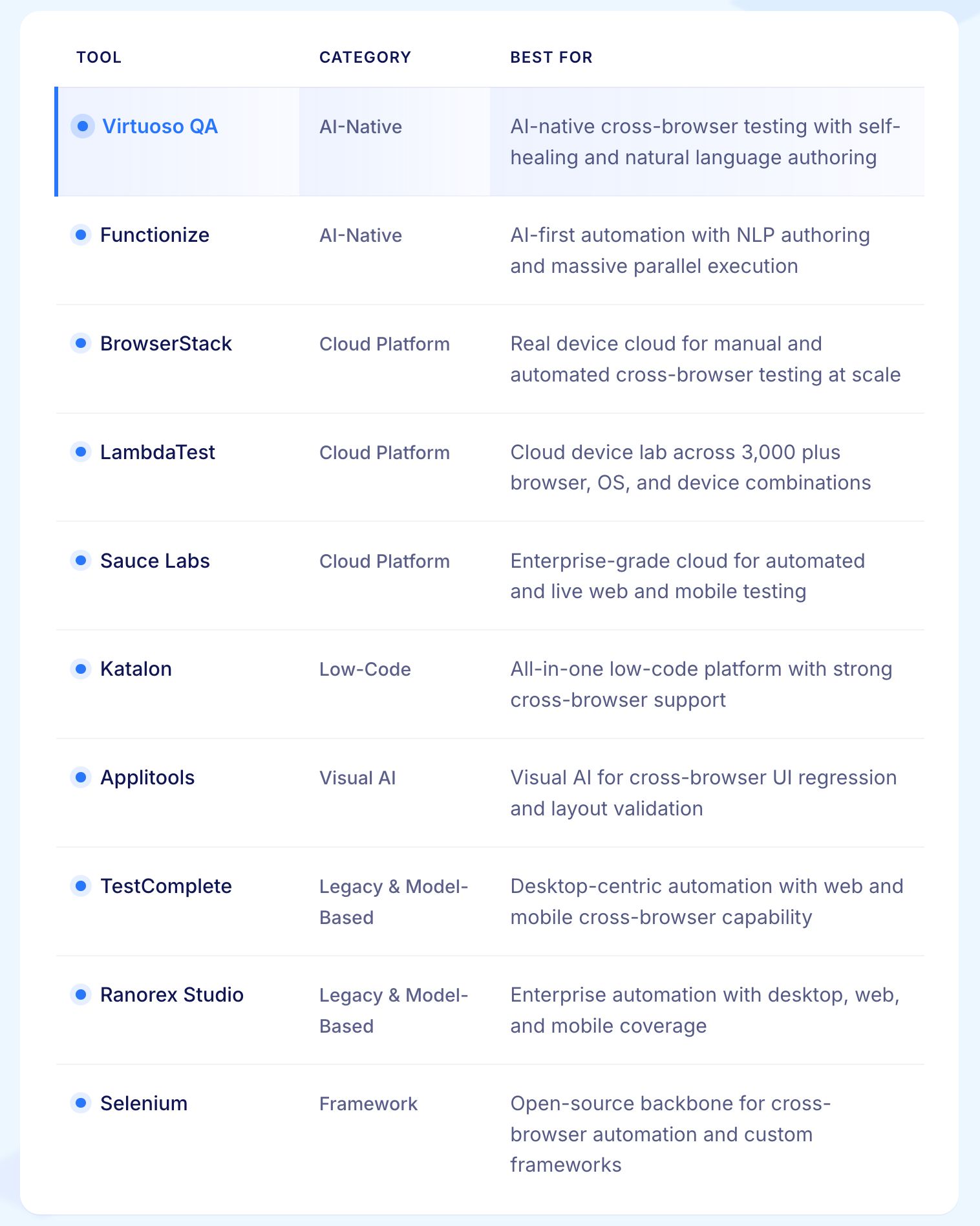
1. Virtuoso QA
Virtuoso QA is an AI-native end-to-end functional testing platform built for web applications. Tests are written in plain English through Natural Language Programming. Virtuoso QA interprets those descriptions into executable steps, identifies elements through visual analysis, DOM structure, and contextual signals, and runs tests in parallel across multiple browsers simultaneously.
When the UI changes, self-healing AI adapts element identification automatically at approximately 95% accuracy. The same natural language journey that validates functional behaviour also runs across browsers, APIs, and visual checks within a single test asset. There is no separate cross-browser workflow to maintain.
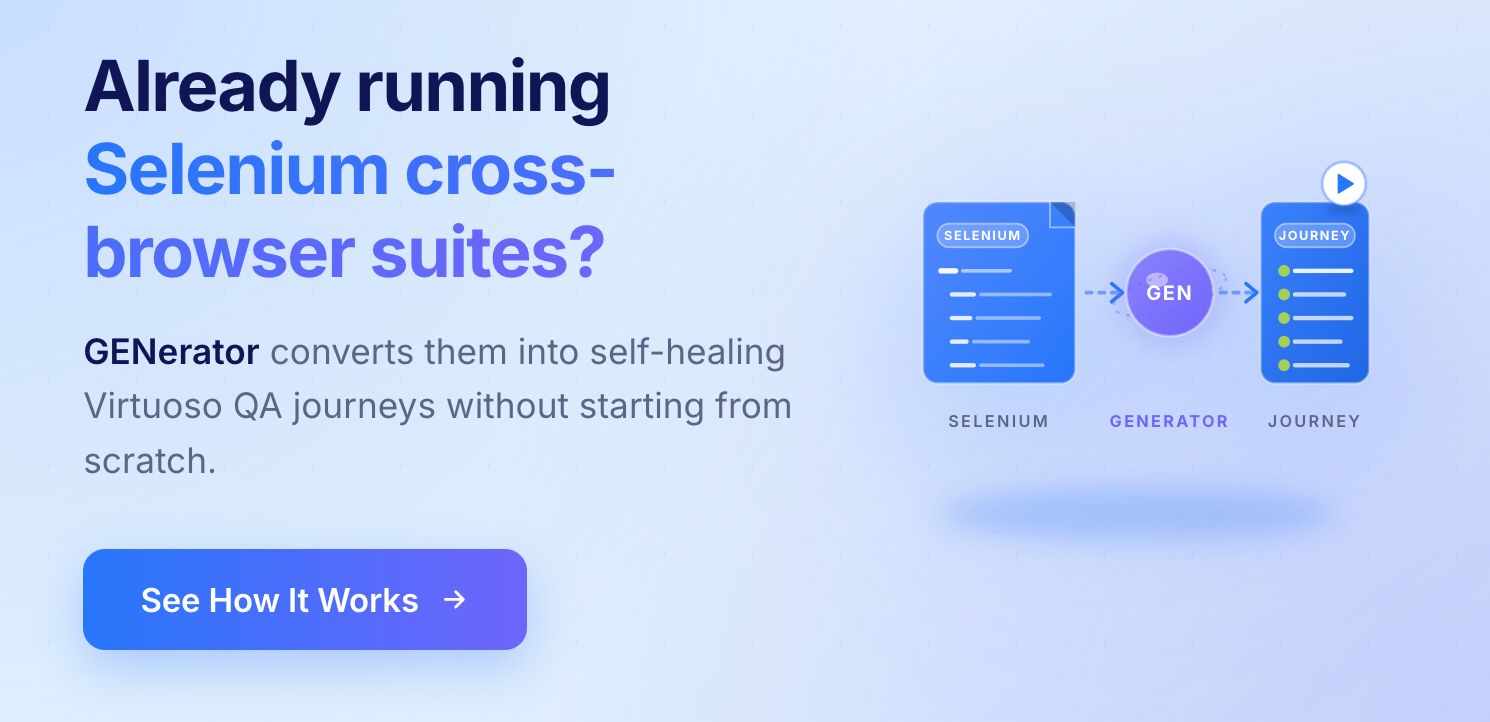
For enterprises already running legacy suites in Selenium, Tosca, or TestComplete, GENerator converts existing test assets into self-healing Virtuoso QA journeys without manual reauthoring.
Platform: Cloud SaaS
Pricing: Custom enterprise pricing
Security: SOC 2 Type 2 certified
Best for enterprise teams that need AI-native cross-browser coverage without coding or manual maintenance
Ratings: G2: 4.5 | Gartner: 4.5
Key Strengths:
Natural language authoring makes cross-browser test creation accessible to the entire team
Self-healing at approximately 95% accuracy absorbs browser updates and UI changes automatically
Unified journeys combine functional, API, and visual cross-browser checks in a single test asset
GENerator converts Selenium, Tosca, and TestComplete assets into self-healing Virtuoso journeys
CI/CD integration with Jenkins, Azure DevOps, GitHub Actions, GitLab, and CircleCI
2,000 plus OS, browser, and device configurations across the cloud grid
Drawbacks:
Focused on web application testing; native mobile testing is on the roadmap
Teams new to AI-native testing need time to understand composable journey design
2. Functionize
Functionize uses AI-driven automation to perform cross-browser testing at scale. Tests can be authored through record-and-playback, natural language, or the Architect interface. Functionize's models learn how the UI behaves and self-heal when locators or layouts change across browser updates.
Rather than setting up Selenium Grid or maintaining device farms, teams run suites on the Functionize Test Cloud and specify the browsers, OS versions, and concurrency required. This makes it compelling for teams that want to reduce flakiness, cut maintenance time, and standardise UI, API, and cross-browser testing on one platform.
Platform: Cloud SaaS
Pricing: Custom enterprise pricing
Ratings: G2: 4.6 | Gartner: 4.2
Best for: Teams that want AI-driven self-healing and natural language authoring at massive parallel scale
Key Strengths:
AI self-healing automatically updates selectors when interfaces evolve across browser releases
NLP test authoring opens cross-browser automation to non-developer testers
Elastic test cloud runs large cross-browser suites in parallel globally
Deep analytics pinpoint DOM changes, network issues, and performance bottlenecks across browsers
Data-driven design reuses test flows with dynamic variables across browser configurations
Drawbacks:
Pricing is not publicly listed and requires direct contact with sales
Some teams report a learning curve adapting existing test assets to the Functionize model
3. BrowserStack
BrowserStack is one of the most widely adopted cross-browser testing clouds, providing access to over 3,500 real browser and device combinations. Its product suite covers Live for manual testing, Automate for Selenium and Playwright execution, App Live and App Automate for mobile, and Percy for visual regression, all under a unified account.
Teams inspect network logs, console logs, screenshots, and videos to diagnose browser-specific problems. BrowserStack is frequently chosen by organisations standardising on a single vendor for web and mobile QA.
Platform: Cloud
Ratings: G2: 4.4 | Gartner: 4.4
Best for: Teams that need the broadest real device coverage for both manual and automated cross-browser testing
Key Strengths:
Large real device cloud covers legacy browsers and modern mobile devices across 3,500 plus combinations
Manual Live sessions simplify exploratory testing across challenging browser environments
Automate grid accelerates Selenium, Cypress, and Playwright regression execution
Rich logs, videos, and screenshots speed up browser-specific defect triage
Percy visual regression identifies UI changes across browser and viewport combinations
Drawbacks:
Pricing scales with parallel sessions and can become expensive at enterprise concurrency levels
Some users report session startup delays and occasional lag during peak usage periods
Environmental customisation options are more limited than some competitors
4. LambdaTest
LambdaTest is a cloud-based cross-browser testing platform supporting manual and automated tests across over 3,000 browser, device, and OS combinations. It supports Selenium, Cypress, Playwright, and Puppeteer on its automation grids, with live interactive sessions for manual debugging of layout and network issues.
KaneAI, its AI testing assistant, enables test authoring using natural language instructions, lowering the barrier for team members without programming backgrounds.
Platform: Cloud
Best for: Teams seeking broad browser and device coverage at a competitive price point
Key Strengths:
Over 3,000 browser and OS combinations without maintaining in-house infrastructure
HyperExecute provides accelerated test execution through intelligent distribution
KaneAI enables natural language test authoring for non-technical team members
Insights highlight flaky tests and unstable browser configurations
One-click bug logging routes directly to Jira, Asana, GitHub, and other tracking tools
Drawbacks:
At higher concurrency levels, costs become comparable to premium competitors
Some users find the dashboard crowded and require time to navigate efficiently
A subset of reviews mentions slower session start times during peak usage hours

5. Sauce Labs
Sauce Labs provides secure, scalable access to browsers, emulators, simulators, and real devices for automated and live testing. The platform supports Selenium, Appium, Cypress, Playwright, and WebdriverIO in parallel across hundreds of browser and OS combinations.
Platform: Cloud
Ratings: G2: 4.3 | Gartner: 4.6
Best for: Large enterprises with strict governance requirements and high-volume automated cross-browser testing
Key Strengths:
Supports Selenium, Appium, Cypress, Playwright, and WebdriverIO without framework lock-in
Real Device Cloud provides thousands of physical mobile devices alongside emulators and simulators
SOC 2 Type 2 and ISO 27001 certifications meet regulated industry security requirements
Sauce Connect secure tunnelling enables testing behind corporate firewalls
Video recordings and detailed logs simplify debugging of intermittent browser-specific failures
Drawbacks:
Pricing is higher than some alternatives, particularly for smaller teams
Some reviewers describe the UI as complex until they become familiar with the platform
Out-of-the-box reporting may require additional tools for advanced analytics
6. Katalon
Katalon combines Katalon Studio, TestCloud, and analytics into an all-in-one environment for web, API, mobile, and desktop test automation. Teams build tests once using keyword-driven or script-based approaches and run them locally, on Selenium Grid, or in Katalon TestCloud across different browsers and OS combinations.
Because it supports both low-code and full-code workflows, Katalon suits mixed teams where manual testers, automation engineers, and developers collaborate on the same suites.
Platform: Desktop app (Windows, macOS, Linux) plus cloud services
Pricing: Free community edition. Paid from $185/month per user.
Ratings: G2: 4.4 | Gartner: 4.5
Best for: Teams that include both manual testers and automation engineers working together on cross-browser suites
Key Strengths:
Low-code interface helps beginners design cross-browser tests with minimal scripting
Full-code mode supports complex enterprise-level automation requirements
TestCloud and external grids provide broad cross-browser execution options
Self-healing and Smart Wait reduce flakiness on dynamic single-page applications
Built-in reports and analytics help prioritise failing cross-browser scenarios quickly
Drawbacks:
Initial project configuration and integrations can be challenging for new users
Katalon Studio can consume significant CPU and memory during heavy parallel test runs
Advanced features and analytics require paid licences that may stretch smaller budgets
7. Applitools
Applitools is a visual AI platform that catches cross-browser and cross-device UI bugs traditional functional tests overlook. Rather than verifying individual DOM attributes, Applitools Eyes captures screenshots across browsers and viewports, compares them to baselines, and highlights only meaningful visual differences.
It is ideal for validating responsive design, theme changes, dark mode, and branding consistency across browser combinations. Applitools integrates with Selenium, Cypress, Playwright, and WebdriverIO so teams add visual coverage to existing suites without significant rewrites.
Platform: Cloud
Ratings: G2: 4.4 | Gartner: 3.9
Best for: Teams that need visual AI to catch cross-browser rendering differences that functional tests miss
Key Strengths:
Visual AI catches layout regressions across browsers that traditional assertions consistently miss
Cross-browser baselines ensure consistent branding and UX across every supported environment
Ultrafast Grid accelerates multi-viewport visual checks across large cross-browser suites
Integrates with Selenium, Cypress, Playwright, and WebdriverIO without requiring rewrites
Review dashboard streamlines triage and approval of cross-browser visual differences
Drawbacks:
Pricing may feel high for teams that only need functional cross-browser coverage
Small environment variations can still trigger differences requiring manual review
New users can find the dashboard and test review workflow complex initially

8. TestComplete by SmartBear
TestComplete provides comprehensive test automation for desktop, web, and mobile applications from a single IDE. Technical team members can script tests using JavaScript, Python, or VBScript. Non-technical testers can build tests through record-and-replay or keyword-driven testing without programming knowledge.
For broader cross-browser coverage beyond local browser installations, TestComplete integrates with BitBar, SmartBear's cloud device platform, which requires an additional investment.
Platform: Desktop and cloud
Ratings: G2: 4.2 | Gartner: 4.3
Best for: Teams automating complex desktop applications alongside web cross-browser testing in a single environment
Key Strengths:
Supports both scriptless record-and-replay and full scripting for maximum flexibility
Covers desktop, web, and mobile application testing from a single IDE
Object recognition handles complex UI structures across browser types
SmartBear ecosystem integration with TestRail, Zephyr, and other QA tools
Keyword-driven testing makes cross-browser automation accessible to non-developers
Drawbacks:
Comprehensive cross-browser coverage requires separate BitBar integration and additional cost
Test maintenance overhead increases as applications and browsers evolve
Resource-intensive for teams focused primarily on web cross-browser testing
9. Ranorex Studio
Ranorex Studio offers enterprise-focused test automation with a particular strength in desktop application testing alongside web and mobile capabilities. Cross-browser web testing leverages Selenium WebDriver integration. Teams focused specifically on web cross-browser testing at scale typically need to separately arrange for cloud execution infrastructure.
Platform: Desktop and cloud integration
Ratings: G2: 4.2 | Gartner: 4.4
Best for: Enterprise teams automating desktop-heavy applications that also require web cross-browser coverage
Key Strengths:
Covers desktop, web, and mobile testing from a single automation environment
Codeless test creation through capture and replay and visual object recognition
Selenium integration provides cross-browser web testing capability
Standard CI/CD integrations connect to Jenkins, Azure DevOps, and GitHub Actions
Well-suited to enterprises with significant desktop application testing requirements
Drawbacks:
Web cross-browser coverage requires separate cloud infrastructure not provided natively
Maintenance overhead from Selenium-based locators increases as applications evolve
Higher investment than open-source alternatives for teams focused purely on web testing
10. Selenium
Selenium is the open-source backbone of browser automation that powers many commercial cross-browser testing solutions. It provides WebDriver APIs for Java, Python, C#, JavaScript, and other languages. With Selenium Grid, organisations distribute tests across a farm of browsers and machines, running cross-browser suites in parallel on-premise or in the cloud.
Selenium suits engineering-led teams comfortable investing in framework design and maintenance, and organisations that need complete control over their automation infrastructure.
Platform: Open-source; Windows, macOS, Linux
Pricing: Free and open-source
Best for: Engineering-led teams that want complete control over their cross-browser automation framework
Key Strengths:
Open-source ecosystem removes licensing costs entirely for expanding QA teams
Supports multiple programming languages and popular test frameworks natively
WebDriver standard offers consistent automation across all major browser vendors
Selenium Grid enables distributed parallel cross-browser test execution
Highly extensible design integrates with reporting, CI, BDD, and cloud grid tools
Drawbacks:
Tests require frequent updates when UI structures or locators change across browsers
No built-in reporting: teams must integrate third-party libraries or build custom solutions
Maintenance effort scales significantly as cross-browser suites grow in size and complexity
Bare Selenium setups run more slowly than commercial cloud grids without additional infrastructure
Frequently Asked Questions
Should I use a cloud browser platform or an AI-native testing platform?
What browsers should be included in cross-browser testing?
How does AI improve cross-browser testing?
How does Virtuoso QA handle cross-browser testing differently from traditional tools?




