Blog
15 Best Web Testing Tools and Frameworks in 2026

Rishabh Kumar
Published on

Table of contents
Lorem ipsum
Lorem ipsum
Lorem ipsum
Lorem ipsum
Lorem ipsum
Web applications are the primary interface through which enterprises deliver value to customers, employees, and partners. A web application that breaks in production is not a technical problem. It is a business problem: lost revenue, frustrated users, and avoidable support costs.
Web application testing validates that applications function correctly, look right, perform under load, and behave consistently across the browsers and devices real users employ. But the tools available for web testing span a wide spectrum, from AI-native test platforms that generate and maintain tests autonomously to open-source frameworks that give engineering teams complete control at the cost of complete responsibility.
This guide cuts through the noise. It covers the platforms worth adopting, the frameworks worth building on, and the specialist tools that solve specific web testing problems, so teams can make informed decisions rather than guessing.
Best Web Testing Tools in 2026
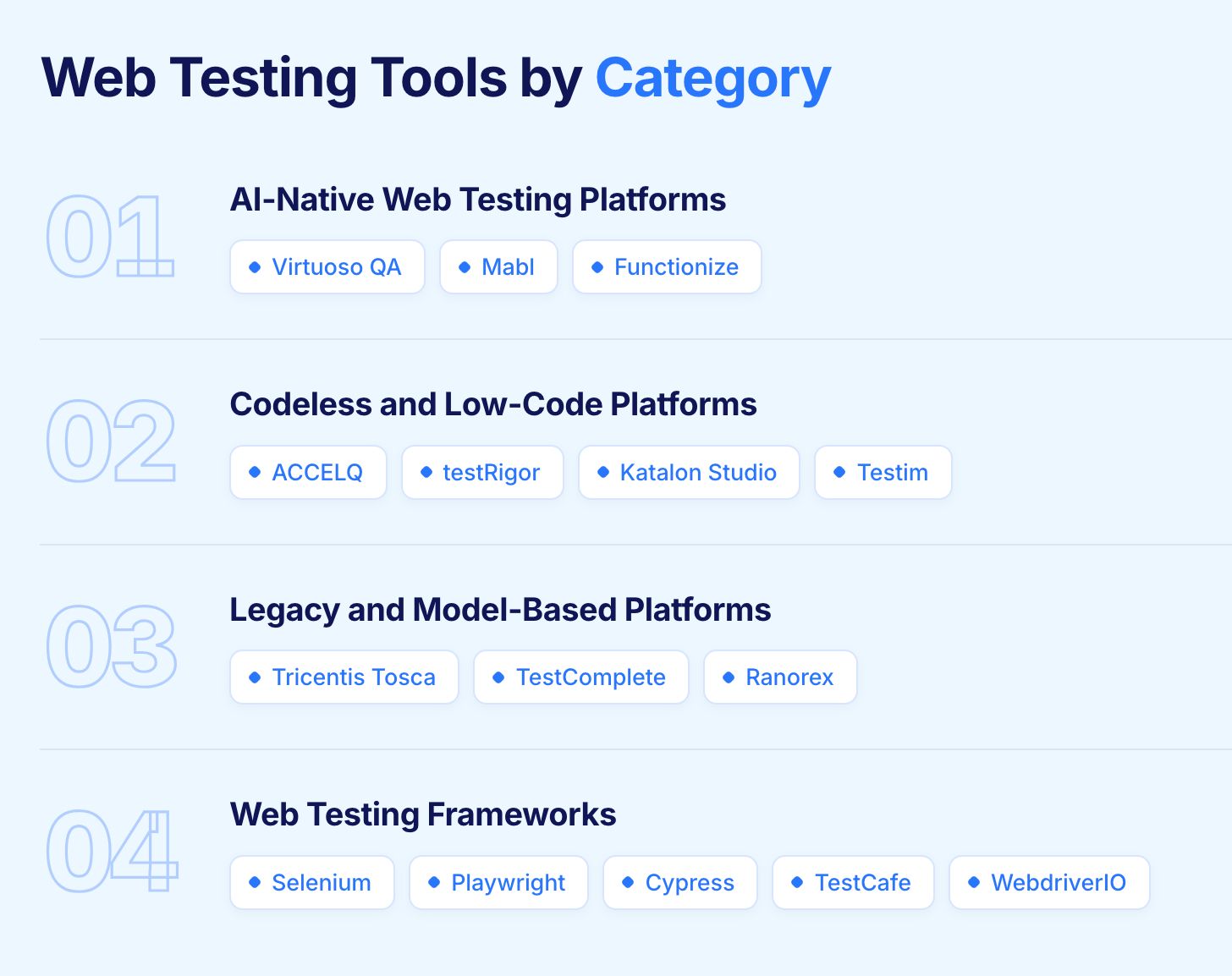
1. Virtuoso QA
Virtuoso QA was built from the ground up as an AI-native web testing platform, not a conventional framework with AI capabilities added on top. Web tests are authored in plain English and executed across the full application stack: UI interactions, API responses, and database state validated in a single composable journey. When the web application changes, Virtuoso QA adapts tests automatically rather than waiting for an engineer to update locators.
Platform: Cloud SaaS
Pricing: Custom enterprise pricing
Security: SOC 2 Type 2 certified
Ratings: G2: 4.5 | Gartner: 4.5
Best for: Enterprise teams that need AI-native web test automation covering UI, API, and database in a single journey without scripting
Key Strengths:
Natural Language Programming: Web tests authored in plain English, no scripting knowledge required
StepIQ: AI analyses the live web application and generates complete test steps automatically
Self-healing at approximately 95% accuracy: Web tests adapt when the application changes without manual intervention
Unified web testing: UI, API, and database validation in a single end-to-end journey
GENerator: Converts existing Selenium, Tosca, and TestComplete web test assets into Virtuoso journeys in hours
AI Root Cause Analysis: Identifies web test failure causes across UI, API, network, and database in one view
AI Test Data Management: Generates contextually realistic test data automatically for web testing scenarios
Cross-browser and cross-device execution across 2,000-plus OS and browser configurations
CI/CD integrations: Jenkins, Azure DevOps, GitHub Actions, CircleCI, Bamboo
Test management integrations: Jira, Xray, TestRail
Drawbacks:
Focused on browser-based web applications; native desktop and mobile are on the roadmap
Custom pricing requires a sales conversation before understanding total cost

2. Mabl
Mabl is a low-code AI-native web testing platform built for continuous delivery environments. Its machine learning layer accumulates execution intelligence across every web test run, using that knowledge to keep tests stable as the application evolves without requiring manual tuning. A single Mabl test covers UI interactions and API responses together, reducing the number of separate web test suites teams need to manage.
Platform: Cloud SaaS
Ratings: G2: 4.4 | Gartner: 4.7
Best for: Developer-led teams running continuous web testing in CI/CD pipelines with low-code authoring and minimal maintenance overhead
Key Strengths:
ML model learns from execution history to improve web test stability over time without human intervention
Auto-healing adapts web tests when UI selectors, API responses, or application structure changes
Covers UI and API web testing in a single test, eliminating the need for separate suite runs
Accessibility and performance checks run alongside functional web validation during each execution
Native CI/CD integration triggers web test suites automatically on every code commit
AI anomaly detection flags unusual application behaviour patterns before they become failures
Drawbacks:
Web testing scope primarily limited to UI and API layers; database and backend validation requires separate tooling
Developer-centric design creates friction for non-technical QA teams authoring web tests
Less composable architecture for large multi-product enterprise web testing programmes
AI intelligence accumulated in Mabl is platform-specific; migrating loses the learned model
3. Functionize
Functionize builds web tests from an AI model of the application rather than from human-authored scripts. Its engine analyses application pages at depth to understand element relationships and functional behaviour, producing test scenarios from that analysis. When the web application changes, SmartFix identifies working alternatives automatically, keeping web tests running without manual rework.
Platform: Cloud SaaS
Pricing: Custom enterprise pricing
Ratings: G2: 4.6 | Gartner: 4.2
Best for: Enterprise teams wanting AI agents to autonomously create and maintain web tests without requiring human-defined test structures
Key Strengths:
AI analyses the web application independently and generates tests without requiring human step definition
SmartFix identifies working element recognition alternatives when web UI changes break existing locators
ML-powered visual regression runs alongside functional web testing in the same execution pass
Natural language authoring allows non-engineers to define web test scenarios without scripting knowledge
Autonomous execution agents manage web test runs without continuous human oversight
Drawbacks:
Web testing scope focused on UI and visual layers; API and database validation requires supplementary tooling
AI-augmented rather than AI-native at the architectural level, which caps maintenance reduction relative to purpose-built platforms
No legacy web test migration tooling for teams moving from Selenium or TestComplete
Custom-only pricing makes upfront web testing programme cost planning difficult
4. ACCELQ
ACCELQ delivers codeless web test automation through a model-based approach where reusable components propagate updates across every web test scenario that uses them. When a shared web UI element changes, updating one component cascades the fix automatically. Its Autopilot AI generates web test cases directly from business requirements and user stories, closing the gap between specification and automation.
Platform: Cloud SaaS with on-premises option
Pricing: Enterprise custom pricing. Free trial available.
Ratings: G2: G2: 4.8 | Gartner: 4.5
Best for: Teams wanting a single codeless platform for web, mobile, API, and desktop testing with model-based reusable components
Key Strengths:
Autopilot AI reads business requirements and generates executable web test flows without manual authoring
Model-based reusable components cascade updates across all web test scenarios that share them
Covers web, mobile, API, and desktop from a single codeless environment without tool switching
Self-healing adjusts web test steps when application interfaces change between releases
Full web test lifecycle management including scheduling, results tracking, and defect traceability
Tight CI/CD integrations including Jira, Jenkins, and Azure DevOps
Drawbacks:
Complex multi-system web test scenarios take meaningful configuration time before producing reliable results
Self-healing reliability varies when web applications change rapidly across multiple layers simultaneously
New users require structured onboarding before reaching full web testing productivity
5. testRigor
testRigor interprets web test instructions semantically rather than syntactically. Instead of identifying elements by their DOM position, it maps instructions to what users see and what the application should do. This makes web tests resilient to interface restructuring and accessible to contributors who have no scripting knowledge.
Platform: Cloud SaaS covering web, mobile, and desktop
Ratings: G2: 4.7 | Gartner: 4.6
Best for: Non-technical QA teams who need to automate web workflows in plain English without managing element locators
Key Strengths:
Web test steps written in everyday plain English without XPath, CSS selectors, or scripting
Semantic element identification survives web UI restructuring that breaks locator-based tests
Handles realistic multi-step web scenarios including two-factor authentication, email verification, and cross-tab flows
Covers web, mobile, and desktop within the same test suite without switching tools
Drawbacks:
Complex conditional logic and data-dependent web workflows can be difficult to express in natural language
Multi-system web journeys spanning backend APIs and databases need independent validation before committing
Less flexible for teams needing programmatic control over web test assertions or custom validation logic

6. Katalon Studio
Katalon wraps Selenium and Appium in a more accessible environment, adding a visual recorder, keyword library, and TestOps analytics on top. Business-side contributors can record web test scenarios visually while engineers extend them with scripted assertions for complex validation. A single E2E web test scenario can cover UI, API, and mobile outcomes without switching tools.
Platform: Desktop app (Windows, macOS, Linux) plus cloud services
Ratings: G2: 4.4 | Gartner: 4.5
Best for: Teams with mixed technical skill levels that need flexible web test authoring ranging from visual recording to full scripting in one platform
Key Strengths:
Recorder and scripting in one environment; web test authors choose based on scenario complexity
TestOps provides centralised web test result tracking and analytics across distributed teams
Data-driven web testing with external data source support for parameterised scenario coverage
StudioAssist AI converts natural language descriptions into executable Groovy or JavaScript web test scripts
CI/CD integration triggers web test suites automatically on code changes
Drawbacks:
Web tests still rely on element locators; UI changes require manual updates across affected scenarios
Complex web validation requires scripting knowledge; not fully codeless at scale
Proprietary format creates vendor lock-in; migrating an existing web test suite is costly
Self-healing for web tests is less mature than dedicated AI-native platforms
7. Testim
Testim enhances Selenium and WebDriver with a machine learning layer that continuously evaluates which locator strategies produce the most stable web test results. Tests improve over time rather than degrading as the application changes. Salesforce-specific web testing is a particular strength, with native Lightning component awareness built in.
Platform: Cloud SaaS with browser extension for web test recording
Ratings: G2: 4.5 | Gartner: 4.7
Best for: Web teams and Salesforce enterprises wanting ML-powered web test stability that improves with each execution
Key Strengths:
ML engine runs competing element identification strategies in parallel and learns which produces the most stable web test results
AI locator model improves with every web test execution, making tests progressively more resilient
Salesforce web testing with native Lightning component awareness handles Salesforce UI changes reliably
Agentic test generation produces complete web test scenarios from natural language workflow descriptions
CI/CD integration runs web test regression automatically on every deployment
Drawbacks:
AI augments web test maintenance rather than eliminating it; some manual updates remain necessary
Web test coverage strongest for standard web and Salesforce; complex multi-system scenarios need validation
No open-source edition; high-volume web testing programmes face meaningful licensing costs
8. Tricentis Tosca
Tricentis Tosca generates web tests from business process definitions rather than element locators, making web test creation accessible to business-side contributors who understand the process but not the technology. Risk-based optimisation selects which web test scenarios to run for each release based on what changed and which business processes it affects.
Platform: On-premises and cloud
Ratings: G2: 4.3 | Gartner: 4.5
Best for: Large enterprises running model-based web test automation at scale across SAP, Oracle, and Salesforce where governance and compliance requirements are strict
Key Strengths:
Model-based web test generation from business process definitions rather than element locators
Risk-based optimisation prioritises web test scenarios by business impact of what changed
Deep native coverage for SAP, Oracle, and Salesforce web application workflows
Comprehensive governance: requirement traceability, audit trails, and compliance reporting built in
Mature enterprise support structure, training certification, and global partner ecosystem
Drawbacks:
Full web testing programme deployment typically takes several months
Total cost of ownership significantly higher than modern AI-native web testing platforms
Weeks of specialist training required before teams can independently manage complex web test models
Heavy architecture slows integration with agile and DevOps web testing practices

9. TestComplete
TestComplete covers Windows desktop, browser-based web, and mobile testing from one Windows-based environment. For organisations where a meaningful portion of web testing involves applications that run in embedded browsers or alongside Windows desktop interfaces, it remains one of the few practical options.
Platform: Windows desktop app; web, mobile, and Windows desktop testing
Ratings: G2: 4.2 | Gartner: 4.3
Best for: Windows-based enterprise teams testing legacy desktop web applications alongside modern browser-based web applications from a single environment
Key Strengths:
Web testing alongside legacy Windows desktop coverage in a single environment
Mixed script and no-code web test authoring accommodates different contributor skill levels
Object recognition handles complex web application interfaces including dynamic content
SmartBear ecosystem integration with Zephyr for web test management and defect tracking
Drawbacks:
No AI self-healing; web tests break when application interfaces change and require manual updates
Web test authoring restricted to Windows; macOS and Linux teams cannot contribute
Migrating web test assets away from TestComplete requires substantial refactoring effort
10. Ranorex
Ranorex delivers web test automation through codeless recording and C#/VB.NET scripting. Its object recognition engine handles modern browser-based web applications alongside legacy Windows desktop interfaces. For organisations with mixed estates where web testing and desktop testing must coexist in a single tool, Ranorex is a practical choice.
Platform: Windows desktop app, mobile via device farms
Ratings: G2: 4.2 | Gartner: 4.7
Best for: Teams testing web applications alongside complex Windows legacy interfaces who need strong object recognition across both environments
Key Strengths:
Web test object recognition handles complex dynamic web interfaces reliably
Cross-browser web testing across Chrome, Firefox, Edge, and Safari from one tool
Reusable web test modules reduce duplication across scenarios
Built-in web test reporting with screenshot-level detail at each step
Drawbacks:
Web test authoring IDE is Windows-only; macOS and Linux teams cannot contribute
No AI self-healing; web UI changes require manual locator updates across affected tests
Better suited to organisations with legacy web and desktop coverage needs than pure web-first teams

Popular Web Testing Frameworks
1. Selenium
Selenium is the most widely deployed web testing technology in the industry with approximately 62 percent market share. Its WebDriver APIs support six programming languages and integrate with every major CI/CD tool and cloud execution provider. Maximum web testing flexibility comes at the cost of maximum maintenance responsibility.
Platform: Open-source; Windows, macOS, Linux
Best for: Engineering organisations with existing Selenium web test investment and dedicated automation engineers to build and maintain a custom framework
Key Strengths:
Multi-language WebDriver APIs for Java, Python, C#, Ruby, JavaScript, and Kotlin
Selenium Grid distributes web test execution across browsers and operating systems in parallel
Decades of community knowledge, web testing patterns, and framework examples available
Compatible with every major CI/CD tool and cloud web test execution provider
Drawbacks:
Approximately 80% of web testing team effort goes to maintaining existing tests rather than building new coverage
No self-healing; every web UI change requires manual locator updates across the entire test suite
Reporting, analytics, and test management for web testing all require additional third-party tooling to assemble
2. Playwright
Playwright represents the current state of the art for code-first web test automation. Browser context isolation ensures each web test starts from a completely clean state. Its trace viewer captures the full execution timeline for every web test failure. Auto-waiting eliminates timing-related false failures. Multi-language support across JavaScript, Python, Java, and .NET makes it accessible across different engineering stacks.
Platform: Open-source; Node.js, Python, Java, .NET on Windows, macOS, Linux
Best for: Engineering-led teams building web test suites for modern web applications who need cross-browser reliability and superior debugging
Key Strengths:
Browser context isolation ensures each web test runs in a completely clean state with no shared contamination
Trace viewer records every web test step for post-failure analysis without manually reproducing the failure
Cross-browser web testing across Chromium, Firefox, and WebKit from a single test codebase
Handles advanced web testing scenarios including multi-tab workflows, shadow DOM, and file interactions natively
Auto-waiting reduces timing-related false failures without explicit synchronisation code
Drawbacks:
All web tests must be written in code; non-engineer contributors cannot author or review scenarios
No self-healing; web UI changes require manual engineering updates across affected tests
All framework decisions including reporting, retry logic, and parallelisation must be built and maintained internally
Web test maintenance cost at scale is comparable to Selenium without supplementary AI tooling
3. Cypress
Cypress runs web tests inside the browser alongside the application, giving tests direct access to the same JavaScript runtime. This makes web testing of React, Vue, and Angular applications particularly reliable because Cypress can observe and interact with application state directly. Network interception allows web tests to control API responses and test error-handling paths without backend changes.
Platform: Open-source on Node.js; Windows, macOS, Linux
Best for: Frontend engineering teams who own web testing for modern JavaScript applications and need fast in-browser feedback within their development workflow
Key Strengths:
In-browser execution gives web tests direct access to application state and JavaScript runtime
Automatic waiting eliminates timing-related false failures common in web testing
Network interception enables web testing of error-handling paths and edge cases without backend changes
Time-travel debugging shows exactly what the web application looked like at each test step
Drawbacks:
JavaScript and TypeScript only; non-developer QA contributors cannot author web tests
Single-tab architecture limits web testing of workflows requiring multiple browser windows
No self-healing; web tests break when application structure changes and require manual code updates
Large web test suites need a cloud execution grid for practical parallel run time management
4. TestCafe
TestCafe is an open-source web testing framework that runs tests directly in the browser without requiring WebDriver, browser plugins, or complex configuration. Its smart waiting mechanism handles asynchronous web application behaviour automatically, reducing flakiness without explicit wait commands. It supports JavaScript and TypeScript and works across all major browsers with minimal setup.
Platform: Open-source on Node.js; Windows, macOS, Linux
Best for: JavaScript teams wanting a simple, configuration-light web testing framework that works without WebDriver dependencies
Key Strengths:
No WebDriver or browser plugins required; works across major browsers with minimal configuration
Smart waiting handles asynchronous web application behaviour automatically
Built-in test runner, assertion library, and screenshot capture without additional dependencies
Works with BrowserStack, Sauce Labs, and other cloud web test execution providers
Drawbacks:
JavaScript and TypeScript only; non-developer contributors cannot author web tests
Smaller ecosystem and community than Selenium, Cypress, or Playwright
No AI self-healing; web UI changes require manual updates across affected test scenarios
Less active development cadence than Playwright; some modern web patterns require workarounds
5. WebdriverIO
WebdriverIO supports both WebDriver protocol and Chrome DevTools from a single API. Its plugin architecture and extensive ecosystem cover web browser testing across all major configurations. Auto-waiting is built in, reducing explicit synchronisation code throughout web test suites. Its native Appium integration extends coverage to mobile testing without requiring a separate framework.
Platform: Open-source on Node.js; Windows, macOS, Linux
Best for: JavaScript and Node.js teams wanting a highly configurable web testing framework with strong cloud provider support
Key Strengths:
Supports both WebDriver and Chrome DevTools protocols for different web test execution needs
Extensive plugin ecosystem for reporters, cloud services, and visual testing integrations
Works directly with BrowserStack, Sauce Labs, and LambdaTest without additional configuration
Auto-wait built in reduces explicit synchronisation code across web test suites
Drawbacks:
Extensive configuration options mean teams must make and maintain many architectural decisions themselves
Requires JavaScript or TypeScript engineering skill throughout the web test lifecycle
No self-healing or AI-assisted web test maintenance; locator updates are manual when applications change
Initial framework setup takes longer than more opinionated tools like Cypress

What Makes a Great Web Testing Tool?
Web testing tools fail teams in predictable ways. Tests break constantly because they are tied to fragile locators. Coverage stalls because only engineers can author tests. Execution takes too long to fit in a CI/CD pipeline.
The right tool addresses at least the first two problems, ideally all three.
Automation and authoring capability
Non-technical contributors should be able to author web tests without a coding barrier. When only engineers can create tests, coverage is always capped at whatever they have time to script.
Look for:
Natural language authoring that accepts plain English descriptions
Visual recording for contributors who prefer point-and-click test creation
Low-code interfaces that do not require framework knowledge to use
Self-healing and maintenance reduction
Web applications change constantly. Every feature release, UI redesign, and framework migration breaks tests tied to specific element locators.
The numbers tell the story:
Conventional Selenium-based automation: approximately 80 percent of team effort goes to maintenance
AI-native platforms: maintenance drops to around 12 percent of total effort
AI-native test platforms identify elements through visual analysis, DOM context, and semantic understanding rather than fixed locators. When the application changes, tests adapt automatically.
Unified coverage across web layers
Running separate suites for UI, API, and database validation and then correlating the results manually is slow and error-prone.
A unified platform that covers all three layers in a single test journey means:
One failure report with complete context instead of three separate reports
Faster root cause diagnosis because all the evidence is in one place
Less toolchain complexity and fewer integration points to maintain
CI/CD integration and execution speed
Web tests that take hours to run will not run on every commit. Teams start batching changes, which increases integration risk and delays feedback.
Non-negotiable requirements for continuous delivery:
Parallel execution across cloud infrastructure
Native integrations with Jenkins, Azure DevOps, GitHub Actions, and CircleCI
Results returned fast enough for developers to act on before moving to the next task
Cross-browser and cross-device coverage
A web test suite that only covers Chrome provides no assurance about Safari, Firefox, or Edge. A test suite that only covers desktop provides no assurance about mobile.
Web applications must work across:
Chrome, Safari, Firefox, and Edge
Windows, macOS, and Linux
Mobile and tablet viewports
A range of screen resolutions and pixel densities
AI-Native vs Traditional Web Testing: The Architectural Difference
The web testing market has divided clearly into two categories. Understanding the difference prevents expensive mistakes when selecting a platform.
Traditional web testing architecture
Selenium, Cypress, Playwright, and similar frameworks were designed when human engineers wrote every line of test code. Tests exist as scripts in programming languages. Element identification relies on static locators: IDs, XPaths, and CSS selectors. When the web application changes, tests break. Engineers update locators, rerun tests, and validate fixes. This cycle repeats for every UI change across every test in the suite.
Even platforms that have added AI features on top of this architecture retain the fundamental dependency on coded scripts and human maintenance. The AI reduces friction at the edges but the core maintenance burden remains.
AI-native web testing architecture
Platforms like Virtuoso QA built as AI-native from inception operate differently. Web tests are expressed in natural language. Element identification uses AI-powered visual recognition and context understanding rather than brittle locators. When web UI changes occur, machine learning models adapt automatically. Test generation leverages large language models to produce web test steps from requirements without manual scripting.
The architectural difference produces measurable outcomes:
Traditional frameworks require specialist automation engineers to maintain web test suites
Approximately 80 percent of conventional web testing effort goes to maintenance
AI-native platforms reduce maintenance to around 12 percent of total effort
QA teams shift from keeping tests alive to expanding coverage
How Virtuoso QA Approaches Web Testing
Virtuoso QA is the only platform in this list where every layer of web testing, authoring, execution, maintenance, and failure diagnosis, is driven by AI rather than assisted by it.
Web tests authored in plain English
Any team member can describe a web test scenario in natural language and Virtuoso QA translates it into executable automation. Business analysts, manual testers, and product owners all contribute web test coverage without waiting for engineering capacity.
Self-healing that keeps web tests green
When a web application changes and elements shift, Virtuoso QA's AI identifies the element through visual analysis, DOM context, and semantic understanding. Approximately 95 percent of web application changes are absorbed without human intervention. The maintenance spiral that consumes most conventional web testing programmes does not develop.
Unified web test journeys
A single Virtuoso QA web test journey validates UI interactions, API responses, and database state together. When a web test fails, AI Root Cause Analysis surfaces screenshots, network logs, and DOM snapshots at the point of failure in one report.
Legacy migration without starting over
GENerator converts existing Selenium, Tosca, and TestComplete web test assets into Virtuoso journeys in hours. Organisations with years of web test investment do not need to abandon that work to benefit from AI-native web testing.
Enterprise-scale web test execution
Virtuoso QA runs web tests across 2,000-plus OS, browser, and device configurations through cloud infrastructure. CI/CD integrations with Jenkins, Azure DevOps, GitHub Actions, CircleCI, and Bamboo keep web test suites running continuously as part of the delivery pipeline.

Related Reads
Frequently Asked Questions
What is the difference between a web testing platform and a web testing framework?
How does self-healing work in web testing?
Can web testing be done without coding?
What is the difference between web testing and cross-browser testing?




