Blog
AI Visual Testing: How It Works, Best Tools and Practices

Rishabh Kumar
Published on

Table of contents
Lorem ipsum
Lorem ipsum
Lorem ipsum
Lorem ipsum
Lorem ipsum
Visual testing has accumulated a lot of noise over the years. Every tool vendor calls their screenshot comparison "AI-powered" now. Most of them are not doing anything fundamentally different from what Selenium and a pixel diff library were doing in 2015.
This page cuts through that. What AI visual testing actually is, where it genuinely helps, where it falls short, and how to think about whether your team needs it.
What is AI Visual Testing?
AI visual testing is the automated practice of using computer vision and machine learning to verify that a web application looks correct to real users. It captures screenshots during test execution, compares them against approved baseline images, and uses AI to determine which visual differences represent genuine defects and which are irrelevant rendering variations.
The critical word is AI. Not all visual testing qualifies.
First-generation visual testing tools compared screenshots pixel by pixel. If a single pixel shifted, the tool flagged it as a potential defect. In practice this produced enormous numbers of false positives from:
Font rendering differences between Chrome and Firefox
Antialiasing variations between macOS and Windows
Timestamps, usernames, and personalised content that changed on every run
Minor browser-specific rendering differences that had no impact on users
QA teams quickly stopped trusting the results. Tools got abandoned. The visual layer went back to being checked manually before releases, which does not scale.
AI visual testing solves this by replacing pixel arithmetic with contextual understanding. The system has learned what UI elements look like, how they relate to each other spatially, and what kinds of visual differences actually matter to users. When it compares two screenshots, it is not counting pixels. It is evaluating whether the visual structure of the page is intact and whether users can do what they came to do.
This is what separates AI visual testing from screenshot comparison tools with the word AI in their marketing.
How AI Visual Testing Differs from Pixel-by-Pixel Comparison
Traditional pixel comparison works by converting two screenshots into pixel value arrays and subtracting one from the other. Any position where values differ beyond a threshold gets flagged. The tool has no concept of what those pixels represent.
This creates two problems in practice:
Problem 1: False positive volume
A one-pixel shift in a decorative border produces the same alert as a navigation bar that has completely disappeared. At scale, teams receive so many flagged differences from harmless rendering variations that reviewing them becomes a full-time job. Real regressions get buried in the noise.
Problem 2: Configuration overhead
To reduce false positives, teams manually define exclusion regions for dynamic content areas. Those regions need updating every time the application changes. Over time the maintenance burden of visual test configuration rivals the maintenance burden of the functional tests themselves.
AI visual testing addresses both through a fundamentally different approach:
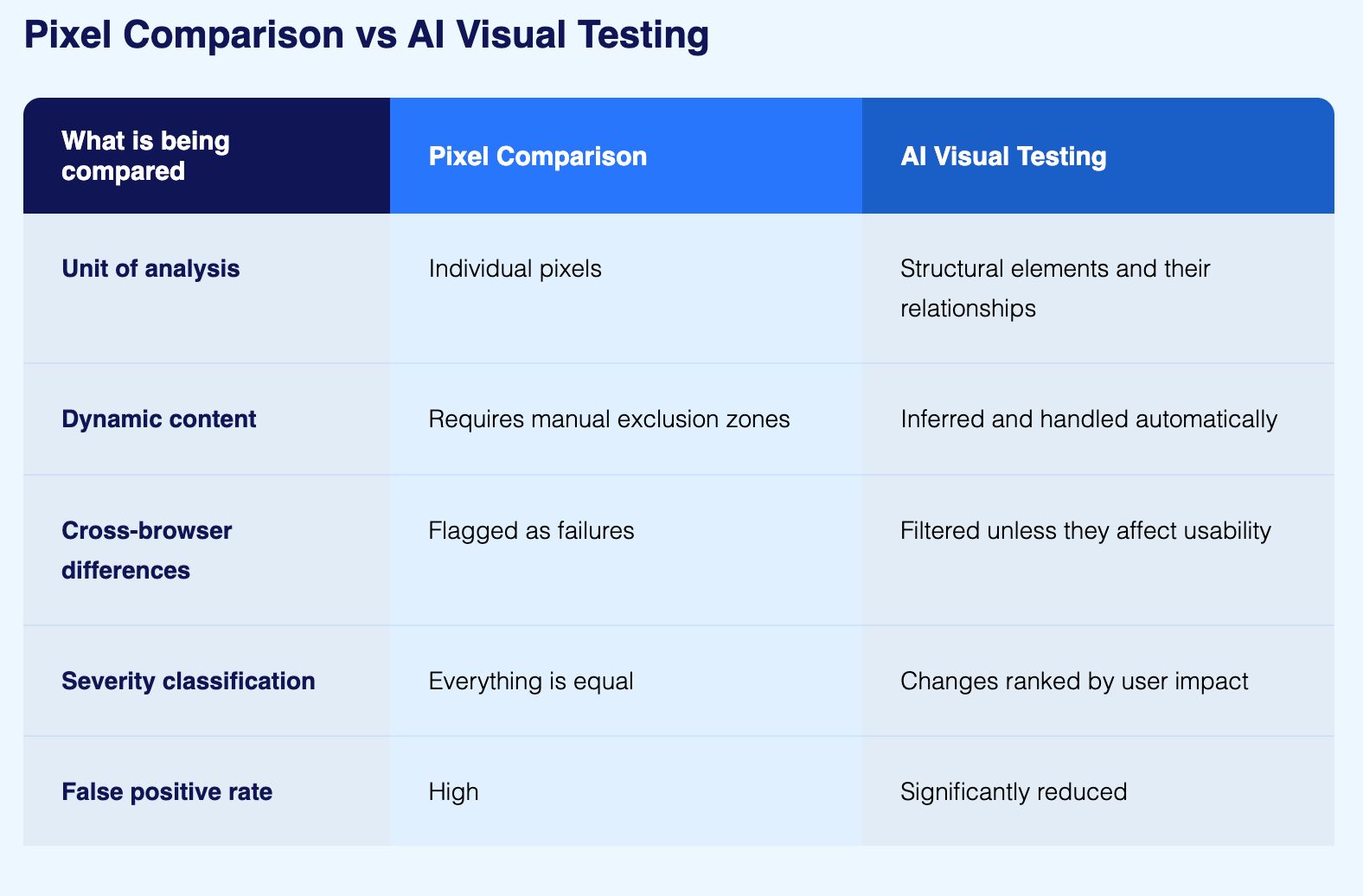
The practical result: an AI-based tool can ignore a font rendering variation several pixels wide while still catching a navigation bar that has shifted down and now overlaps the page header. The pixel difference in the second case might actually be smaller, but the structural impact is far more significant.
What AI Visual Testing Catches That Functional Tests Miss
The most useful way to understand the scope of AI visual testing is to look at the specific categories of defect it catches that functional assertions cannot detect.
1. Overlapping and obscured elements
A button that is functionally present in the DOM but visually hidden behind another element will pass every functional test. The element exists, it is technically interactive, and the test framework can click it programmatically even when a real user cannot. AI visual testing catches this because it evaluates what the user would actually see, not what the DOM contains.
2. Layout regressions from CSS changes
A CSS change can break the visual layout of a page without changing any functional behaviour. Margins collapse, flex containers reflow incorrectly, z-index conflicts cause elements to render in the wrong order. None of these produce functional test failures. All of them are visible to AI visual testing.
3. Cross-browser rendering inconsistencies
The same HTML and CSS renders differently across Chrome, Firefox, Safari, and Edge. Some differences are cosmetically trivial. Others affect usability: a button that is too small to tap reliably on mobile Safari, a dropdown that renders partially off-screen in a specific browser, a form field that loses its focus styling in a particular rendering engine. AI visual testing identifies the inconsistencies that matter while filtering the ones that do not.
4. Responsive design failures at specific viewports
A layout that works perfectly at 1440 pixels and 375 pixels can break at intermediate viewport sizes. Responsive breakpoints are precise, and a design that handles its defined breakpoints correctly can still fail between them. AI visual testing executes across a range of viewport sizes and catches the failures that manual testing on a few representative devices would miss.
5. Typography and colour regressions
Text that has changed colour to become unreadable against its background, font sizes that have changed and disrupted visual hierarchy, line heights that have collapsed and made content dense or inaccessible, these are all in scope for AI visual testing and all outside the scope of functional assertions.
6. Missing or incorrectly loaded visual assets
Images that fail to load, icons that render as broken image placeholders, SVGs that display incorrectly in a specific browser, these defects are invisible to functional tests that check element presence in the DOM rather than visual rendering.

Snapshot Testing and Its Limitations
Snapshot testing comes up frequently in conversations about visual testing, usually from teams already using Jest or similar component testing frameworks. It is worth clarifying what it actually does and where it stops being useful.
In snapshot testing, a component renders and its output is serialised to a file. The next test run compares the new output against that saved file and flags any difference. It is useful for catching unexpected structural changes in component output during development.
The limitations become clear quickly when teams try to use it as a substitute for visual testing at the application level:
It captures DOM structure, not visual rendering. Two components can produce identical snapshots but look completely different because CSS is not evaluated
Snapshot files grow large in sizeable codebases, making meaningful review increasingly difficult
Engineers start committing snapshot updates without reviewing what changed because there are too many differences to examine individually, which defeats the purpose entirely
It cannot detect cross-browser rendering differences, responsive design failures, or layout regressions caused by CSS changes
Snapshot testing belongs in a component development workflow where catching unexpected structural changes early has value. It is not a substitute for AI visual testing at the application level where the concern is what users actually see.

Best Practices for AI Visual Testing
1. Start with the highest-impact journeys
Do not attempt to visually validate every page from day one. Start with login and authentication flows, primary user workflows, checkout and payment processes, and reporting dashboards. These are the pages where a visual defect has the greatest business impact on users.
2. Set sensitivity thresholds to match business requirements
A marketing landing page might need near pixel-perfect consistency across browsers. A data entry form might tolerate minor rendering variations as long as all fields and controls remain accessible and correctly positioned. Configuring sensitivity thresholds to match each page type keeps the signal-to-noise ratio high and review time low.
3. Run visual tests with every deployment
A visual bug introduced in one deployment and not caught for a week is harder to trace and more expensive to fix than one caught immediately. Connecting visual tests to your CI/CD pipeline means visual quality is validated continuously rather than periodically.
4. Combine visual and functional coverage in one platform
Running visual tests in a standalone tool separate from functional testing gives you two incomplete pictures instead of one complete view. A unified platform that validates behaviour and presentation in the same test journey makes failures easier to understand, root causes faster to identify, and test coverage simpler to maintain as the application changes.
Where AI Visual Testing Makes the Biggest Difference
Financial services and banking
Transaction tables need precise alignment. Currency formatting must be consistent across locales. Regulatory disclosures must be visible and readable on every page. A decimal alignment error in a portfolio summary might not trigger any functional test failure, but it can cause a user to misread a position by an order of magnitude. Visual testing catches the presentation failures that functional assertions do not look for.
Retail and ecommerce
Visual bugs that hide the add-to-cart button on mobile, clip product images, or break the checkout layout have a direct and measurable impact on conversion rates and revenue. Visual testing for ecommerce validates the full purchase journey across all target devices, so presentation defects are caught before they reach customers.
Healthcare systems
Clinical data including lab results, medication dosages, and vital sign trends must render with complete accuracy. Functional tests confirm the data is correct. Visual tests confirm the data is displayed correctly. Both matter, and in healthcare both are non-negotiable.
SaaS applications and design-critical products
Brand consistency across browsers and devices affects user trust. Visual testing validates that the interface your design team approved is the interface your users actually see, across every environment you support.
What AI Visual Testing Does Not Do
Before evaluating any tool in this space, it is worth being clear about the boundaries.
It does not replace functional testing
These two disciplines test different things. Visual testing tells you the button looks correct. Functional testing tells you the button works. A visually perfect checkout page that does not actually process payments is still broken. Both layers are necessary and neither one substitutes for the other.
It does not eliminate baseline management
Every intentional design change requires updating approved baselines. If the design team ships visual updates frequently, the maintenance burden of approving changes and keeping baselines current is real. Good tools make this workflow faster, but they do not remove it.
It struggles with highly dynamic or animated interfaces
Applications that use heavy animation, canvas-rendered content, video, or interfaces that are genuinely different on every page load are difficult to test visually even with AI. The technology works best on applications that have a reasonably stable visual structure between test runs.
AI does not mean zero configuration
Sensitivity thresholds still need setting, pages to test still need selecting, and a review workflow for flagged differences still needs building. AI reduces the manual work but does not remove the need for engineering judgement about how to structure the programme.
It does not catch defects in real user environments it has not been configured to test
AI visual testing covers the browser and device configurations you run it against. A visual defect that only appears on a specific device or browser version that is not in your test matrix will not be caught regardless of how sophisticated the AI layer is.

How the Major AI Visual Testing Tools Compare
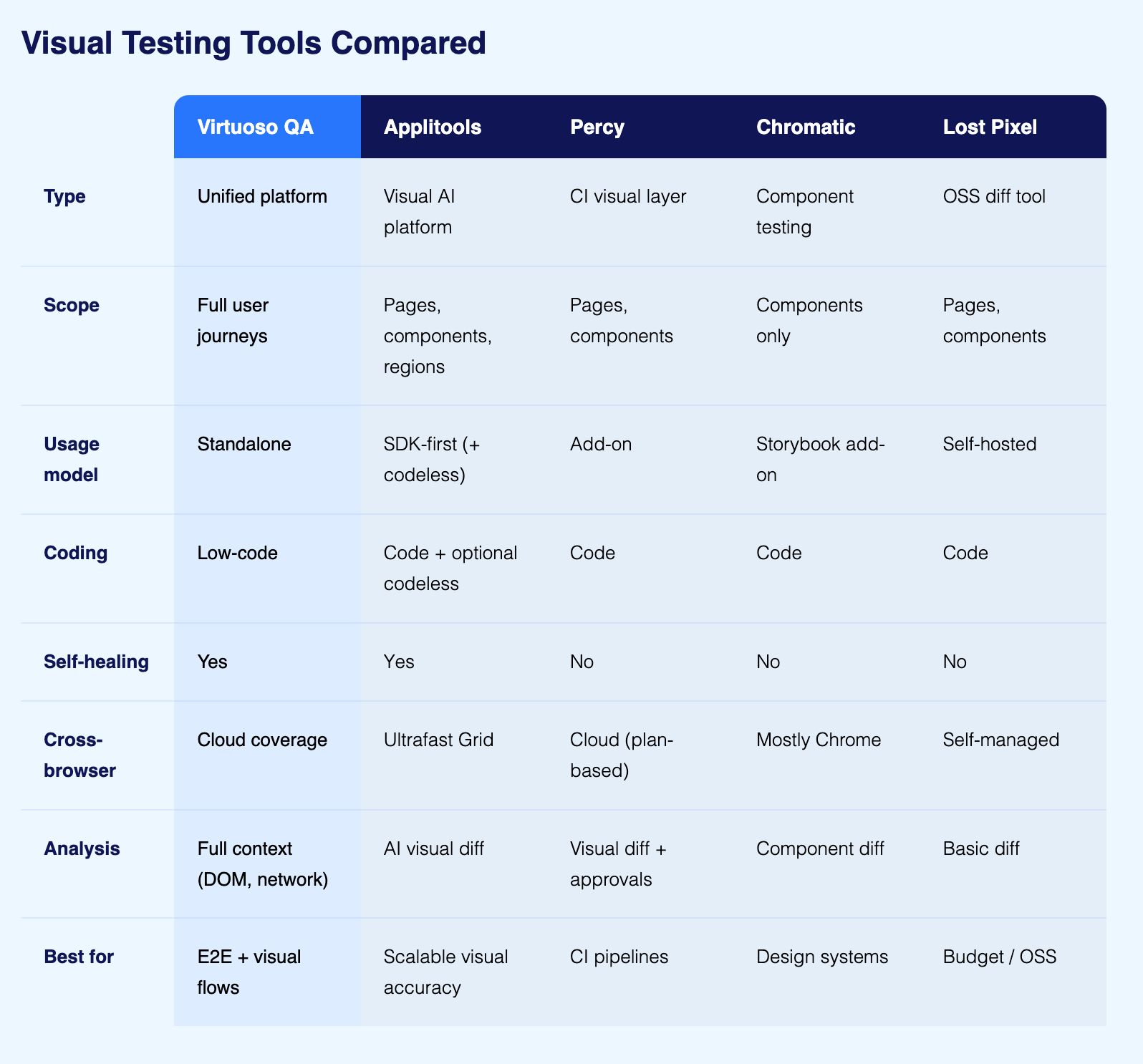
There are five tools that come up consistently when teams evaluate AI visual testing. Here is what each one actually does and where it fits.
1. Virtuoso QA
Virtuoso QA treats visual testing as a step within a functional test journey rather than a separate activity. A single test can interact with the UI, call an API, check a database record, and capture a visual snapshot at the same time, all reported together. This matters because the most difficult visual bugs to catch are the ones that only appear in specific application states, not on a freshly loaded page. Virtuoso QA runs across 2,000-plus OS, browser, and device configurations, and its AI Root Cause Analysis provides screenshots, DOM snapshots, and network logs at the point of failure rather than just a diff image.
2. Applitools
Applitools is a specialist visual AI platform that attaches to existing test frameworks. Its Visual AI engine compares screenshots using layout and content algorithms that distinguish meaningful visual regressions from rendering noise. The Ultrafast Grid runs cross-browser visual checks without spinning up real browsers for each configuration, making large-scale cross-browser validation faster than traditional approaches.
Primarily SDK-based, it receives screenshots from Selenium, Cypress, Playwright, or Appium and applies visual intelligence to them. It also offers codeless and AI-assisted authoring options and self-healing locator capabilities. Teams with mature coded frameworks wanting to add a specialist visual layer without rebuilding their automation approach find it a strong fit.
3. Percy
Percy was built to make visual regression testing a natural part of the CI/CD workflow rather than a separate QA activity. It integrates with any framework that can generate screenshots: Selenium, Cypress, Playwright, Appium, and others.
On every build, Percy captures screenshots, compares them against approved baselines, and presents a review dashboard where teams approve expected changes and flag genuine regressions. Its AI layer reduces false positives from dynamic content and minor rendering variations. Percy is now part of BrowserStack, which extends its infrastructure reach, but the visual testing product itself is Percy.
4. Chromatic
Chromatic is built specifically for component-level visual testing within Storybook. Rather than testing complete application pages, it captures UI components in isolation and compares them against approved baselines. This makes it particularly useful for design system teams who need to catch visual regressions at the component level before they propagate across an application.
Chromatic does not cover application-level user journeys. It is a component regression tool, not an application regression tool, and the distinction matters when evaluating whether it fits the requirement.
5. Lost Pixel
Lost Pixel is an open-source visual regression testing tool designed for teams that want self-hosted visual testing without a SaaS subscription. It works with any framework that generates screenshots and runs pixel-level comparison with configurable thresholds. The AI layer is more limited than commercial alternatives, but for small teams or open-source projects where cost is a primary constraint and the team has the capacity to manage its own infrastructure, it is a practical starting point.

How to Choose an AI Visual Testing Tool
Before evaluating specific products, a few questions narrow the field quickly.
Do you already have a coded test framework?
If a mature Selenium, Cypress, or Playwright suite is already running, Percy or Applitools integrate with what exists without requiring a rebuild. If starting from scratch or replacing an existing framework, a unified platform like Virtuoso QA that handles functional and visual testing together is worth evaluating before committing to two separate tools.
Who will be authoring the tests?
If test authoring is owned entirely by engineers comfortable writing code, specialist visual tools that attach to existing frameworks work well. If QA engineers, business analysts, or product managers need to contribute to test coverage, platforms with plain English authoring become a practical requirement rather than a preference.
Is the requirement component-level or application-level visual testing?
Component-level visual testing validates that individual UI elements render correctly in isolation. Chromatic is built for this. Application-level visual testing validates what real users see when navigating through the product in actual application state. A component can pass every component-level test and still produce a broken layout on a real page with real data.
Most teams need application-level coverage. Some design system teams need both, but component-level testing is not a substitute for application-level visual validation.
How many browsers and devices matter to your users?
If cross-browser visual consistency is critical across a wide range of environments, the comparison method matters as much as the coverage breadth. Pixel comparison across many configurations produces too much noise to be useful. AI-powered comparison is a practical requirement at scale, not a luxury.
Do you need visual testing alone or as part of a broader testing strategy?
Specialist visual tools do one thing well but require separate functional testing infrastructure alongside them. If consolidating functional validation, API testing, and visual verification into one platform is a priority, a unified approach reduces operational overhead and makes failure diagnosis faster because all the context lives in one place.

Frequently Asked Questions
What types of UI bugs does AI visual testing catch?
Can AI visual testing replace functional testing?
How does AI visual testing handle dynamic content?
What industries benefit most from AI visual testing?
What is the relationship between visual testing and self healing?
Can AI visual testing validate responsive design across multiple viewports?