Blog
Microservices vs Monolithic Architecture Testing Strategies

Rishabh Kumar
Published on






Table of contents
Lorem ipsum
Lorem ipsum
Lorem ipsum
Lorem ipsum
Lorem ipsum
Your architecture dictates your testing strategy. Monolithic applications demand different validation approaches than distributed microservices, yet most organizations apply the same testing patterns regardless of architecture. This guide breaks down testing strategies for both paradigms, revealing how unified functional testing that combines UI, API, and database validation delivers complete coverage for any architecture type.
Understanding the Architecture Divide
Before discussing testing strategies, we need to understand what distinguishes these architectural approaches and why those differences matter for quality assurance.
What is Monolithic Architecture?
A monolithic application is built as a single, unified codebase where all functionality resides in one deployable unit. The user interface, business logic, data access layer, and integrations are tightly coupled within a single application.
Characteristics of monolithic systems:
All components share the same runtime environment. Database connections, memory, and processing resources are managed collectively. A change to any part of the system requires redeploying the entire application.
Traditional enterprise systems like SAP ECC, Oracle E-Business Suite, and legacy custom applications typically follow monolithic patterns. Even many modern web applications start as monoliths before evolving toward distributed architectures.
What is Microservices Architecture?
Microservices architecture decomposes applications into small, independently deployable services. Each service handles a specific business capability, communicates through well defined APIs, and can be developed, deployed, and scaled independently.
Characteristics of microservices systems:
Services are loosely coupled and communicate through network protocols, typically REST APIs, GraphQL, or message queues. Each service can use different programming languages, databases, and deployment strategies. Teams can deploy individual services without affecting the entire system.
Modern cloud native applications, including Netflix, Amazon, and Uber, pioneered microservices patterns. Enterprise platforms like Salesforce, ServiceNow, and modern SaaS applications increasingly adopt microservices architectures for flexibility and scalability.
The Testing Implications
These architectural differences create fundamentally different testing challenges:
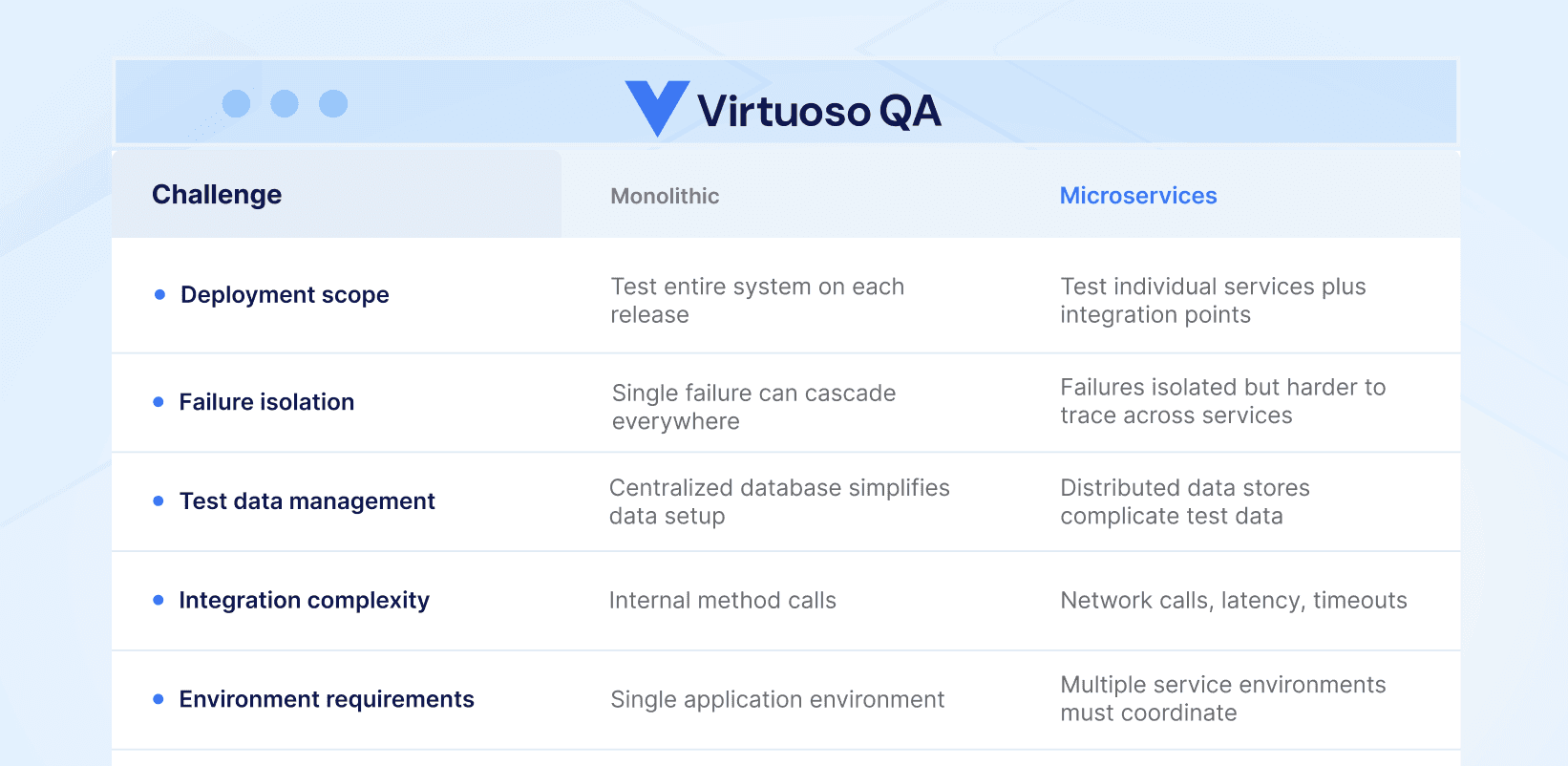
Understanding these differences is essential for building effective testing strategies.
Testing Strategy for Monolithic Architectures
The Testing Pyramid for Monoliths
Monolithic applications benefit from the traditional testing pyramid where unit tests form the foundation, integration tests validate component interactions, and end to end tests verify complete user journeys.
1. Unit Testing in Monoliths
Unit tests validate individual functions and methods in isolation. In monolithic systems, unit testing is straightforward because components share the same codebase and can be tested without network dependencies.
Best practices for monolithic unit testing:
Isolate business logic from data access and UI layers. Use dependency injection to enable testing components independently. Maintain high unit test coverage because the cost of integration testing is relatively high.
2. Integration Testing in Monoliths
Integration tests verify that components work together correctly. In monoliths, this typically means testing the interaction between business logic and database layers, or between different modules within the application.
Key integration testing approaches:
Test database interactions with real database instances or in memory alternatives. Validate that service layers correctly orchestrate business logic. Verify third party integrations function as expected.
3. End to End Testing in Monoliths
End to end tests validate complete user workflows from the UI through all backend layers. For monolithic applications, these tests exercise the entire technology stack within a single deployment.
Effective end to end testing for monoliths:
Focus on critical business processes that span multiple application modules. Validate that UI interactions correctly trigger backend processing. Verify database state changes match expected business outcomes.
The Challenge of Monolithic Test Maintenance
Monolithic applications present a particular testing challenge: test maintenance overhead increases exponentially as the application grows. Because all components are tightly coupled, changes in one area frequently break tests in seemingly unrelated areas.
Traditional test automation frameworks exacerbate this problem. Selenium scripts that rely on CSS selectors and XPath expressions break whenever developers modify UI elements. Manual test maintenance can consume 80% or more of testing resources, leaving little capacity for new test creation.
AI native testing platforms address this challenge through self healing automation that automatically adapts tests when applications change. Instead of brittle selector based identification, smart element identification uses multiple techniques, combining visual analysis, DOM structure, and contextual data, to maintain test stability across UI changes.
Testing Strategy for Microservices Architectures
The Testing Honeycomb for Microservices
Microservices benefit from a different testing approach, sometimes called the testing honeycomb, where integration tests play a larger role than in traditional pyramids. The distributed nature of microservices means that the interactions between services often harbor more bugs than the services themselves.
1. Unit Testing in Microservices
Unit testing in microservices follows similar principles to monolithic unit testing, but the scope is typically smaller. Each microservice has its own bounded context, making unit tests more focused and faster to execute.
Best practices for microservices unit testing:
Keep unit tests within service boundaries. Mock external service dependencies to test business logic in isolation. Maintain fast execution times since microservices often deploy multiple times per day.
2. Contract Testing
Contract testing is essential for microservices but rarely needed for monoliths. Contract tests verify that service interfaces remain compatible as services evolve independently.
Consumer driven contracts:
Consumers define expected API behavior. Providers verify they meet consumer expectations. Changes that break contracts fail immediately, before deployment.
Contract testing prevents integration failures that would otherwise only appear in production or during expensive end to end testing.
3. Integration Testing in Microservices
Integration testing in microservices validates that services communicate correctly through their APIs. This is significantly more complex than monolithic integration testing because network communication introduces latency, timeouts, and failure modes that do not exist with in process method calls.
API testing strategies for microservices:
Test individual service APIs in isolation. Validate request and response payloads against expected schemas. Verify error handling for network failures, timeouts, and malformed requests.
Modern testing platforms provide API managers that allow you to create, test, and call APIs as integrated test steps. You can import existing Postman collections and incorporate API validations directly within UI test journeys.
4. End to End Testing in Microservices
End to end testing in microservices validates complete user journeys that span multiple services. These tests are essential but expensive because they require coordinating multiple service deployments and managing distributed test data.
Effective end to end testing for microservices:
Limit end to end tests to critical business workflows. Use service virtualization to isolate tests from unstable downstream dependencies. Invest in robust test data management across distributed data stores.
The Integration Testing Challenge
The greatest challenge in microservices testing is integration validation. Each service may pass all unit tests independently, yet fail when integrated due to:
Communication failures: Network partitions, latency spikes, or protocol mismatches between services.
Data inconsistencies: Services may have different views of shared data, leading to incorrect behavior.
Version incompatibilities: Different service versions may not communicate correctly, especially during rolling deployments.
Cascading failures: A failure in one service propagates through dependent services, creating complex failure patterns.
Effective microservices testing requires unified functional testing that validates the complete interaction chain: UI actions trigger API calls, API calls modify database state, and database state changes reflect correctly in subsequent UI interactions.

Unified Functional Testing: The Architecture Agnostic Approach
Regardless of whether your architecture is monolithic or microservices based, users interact with your application through the same channels: web interfaces that communicate with backend services that persist data to databases. Unified functional testing validates this entire chain in a single, cohesive test journey.
Combining UI, API, and Database Validation
The most effective testing strategy combines three validation layers within integrated test journeys:
UI Testing: Automate user journeys through the web interface to validate functionality, integrations, and end to end user experience. Tests should work with any frontend technology, including React, Angular, Vue, and legacy frameworks.
API Testing: Integrate API validations within UI test journeys. Call backend services directly to verify that UI actions trigger correct API behavior, or to set up test preconditions without lengthy UI interactions.
Database Testing: Execute SQL queries to verify backend data integrity. Validate that business transactions correctly modify database state and that data changes persist as expected.
This three layer approach catches defects that single channel testing misses. A UI test might verify that a form submits successfully, but without API validation, you would not know if the backend received correct data. Without database validation, you would not know if data persisted correctly.
Implementing Unified Testing in Practice
Modern AI native testing platforms support unified functional testing through integrated capabilities:
API Manager: Create and test APIs using a visual builder. Define endpoints, authentication, headers, request bodies, and expected responses. Test APIs manually during development, then integrate them as steps in end to end journeys.
Import Postman Collections: If you already have API definitions in Postman, import them directly into your testing platform. Existing collections become reusable test components without recreation.
API Calls in Journeys: Use natural language steps to call APIs within your test journeys. For example, after testing user registration through the UI, call an API to verify user data was created correctly in the backend system.
Database Validations: Execute SQL queries as test steps to verify backend state. Validate that transactions committed correctly, that data integrity constraints are maintained, and that business logic produced expected database changes.
Practical Example: Testing an E-commerce Checkout
Consider testing a checkout flow in an e-commerce application, whether monolithic or microservices based:
Step 1: UI Interaction Navigate to the product catalog, add items to cart, proceed to checkout, and complete payment through the web interface.
Step 2: API Validation Call the order service API to verify the order was created with correct line items, pricing, and customer information.
Step 3: Database Validation Query the orders database to verify the order record exists, inventory was decremented, and payment transaction was recorded.
Step 4: Integration Verification Verify that downstream systems received correct notifications: shipping service, email service, analytics service.
This unified approach catches issues that any single layer would miss: UI might show success even if API fails silently API might return success even if database transaction rolled back Database might update even if downstream integrations failed
Architecture Specific Testing Recommendations
Testing Strategies for Monolithic Applications
1. Prioritize regression testing
Monolithic deployments affect the entire system. Comprehensive regression testing ensures changes do not break existing functionality.
2. Invest in self healing automation
Monolithic applications typically have large, complex UIs that change frequently. Self healing capabilities, achieving approximately 95% accuracy in automatic test updates, dramatically reduce maintenance overhead.
3. Use composable test design
Organize tests into reusable checkpoints that can be shared across multiple test journeys. When common functionality changes, update once and propagate everywhere.
4. Leverage parallel execution
Monolithic applications often have extensive test suites. Parallel test execution across multiple browser and device configurations reduces total testing time.
5. Integrate with CI/CD carefully
Monolithic deployments are higher risk. Ensure comprehensive testing gates before production deployment.
Testing Strategies for Microservices Applications
1. Emphasize contract testing
Prevent integration failures by validating service contracts before deployment. Catch breaking changes early in the development cycle.
2. Test services in isolation and integration
Unit test each service independently, then validate integration through API and end to end testing. Both perspectives are necessary.
3. Implement robust API testing
Services communicate through APIs. Comprehensive API testing validates request and response handling, error conditions, authentication, and authorization.
4. Manage distributed test data
Microservices often have separate databases. Coordinate test data across data stores to ensure consistent test scenarios.
5. Design for failure testing
Microservices must handle failures gracefully. Test timeout handling, retry logic, and circuit breaker behavior.
6. Use service virtualization selectively
Mock unstable or unavailable services during development testing, but validate against real services before production deployment.
CI/CD Integration for Both Architectures
Regardless of architecture, modern testing must integrate seamlessly with continuous integration and continuous deployment pipelines.
Pipeline Integration Approaches
1. Trigger tests on code commit
Execute relevant tests automatically when code changes are pushed. For microservices, test the changed service and its direct consumers. For monoliths, run regression suites that cover affected functionality.
2. Use API integration for automation
Modern testing platforms provide REST APIs for triggering executions programmatically. Pass initial data, environment configurations, and custom parameters through API calls.
3. Configure webhooks for notifications
Receive real time notifications when test executions complete. Integrate with Slack, Teams, or other collaboration tools to alert teams immediately when tests fail.
4. Integrate with test management tools
Synchronize test results with platforms like TestRail or Xray for Jira. Maintain unified visibility across manual and automated testing efforts.
Environment Management
Both architectures require robust environment management to test effectively:
1. Environment variables
Store environment specific configurations, such as URLs, credentials, and feature flags, separately from test logic. The same tests should execute against development, staging, and production environments without modification.
2. Environment inheritance
Define base environments and create variations that inherit common settings. A staging environment can inherit from production while overriding only the URL endpoint.
3. Sensitive data handling
Mark credentials and tokens as secrets to ensure they are protected during storage and execution. Security sensitive test data should never appear in logs or reports.
Root Cause Analysis Across Architectures
When tests fail, diagnosing the root cause differs significantly between architectures.
Debugging Monolithic Failures
Monolithic failures typically have a single root cause within the application. Effective debugging requires:
1. Screenshot capture
Visual evidence of application state at failure time helps identify UI rendering issues.
2. Console log analysis
Browser console logs reveal JavaScript errors and application warnings.
3. Network request inspection
Review all network requests made during test execution to identify failed API calls or unexpected responses.
4. Performance metrics
Slow page loads or resource bottlenecks may cause test timeouts that appear as failures.
Debugging Microservices Failures
Microservices failures are harder to diagnose because the root cause may be in a different service than where the failure manifests. Effective debugging requires:
1. Distributed tracing
Follow request paths across multiple services to identify where failures originate.
2. Service dependency mapping
Understand which services are involved in each test scenario to narrow debugging scope.
3. API response analysis
Capture and analyze API responses at each integration point to identify where data becomes incorrect.
4. Correlation of failures
Multiple test failures may share a common root cause in a single service.
AI Powered Root Cause Analysis
Modern testing platforms provide AI Root Cause Analysis that surfaces relevant data automatically:
1. Detailed failure insights
For each failing step, access logs, network requests, and UI comparisons that explain why the step failed.
2. Remediation suggestions
AI analysis provides suggestions for fixing failed tests, accelerating debugging cycles.
3. Trend identification
Identify patterns across multiple failures that indicate systemic issues rather than isolated bugs.
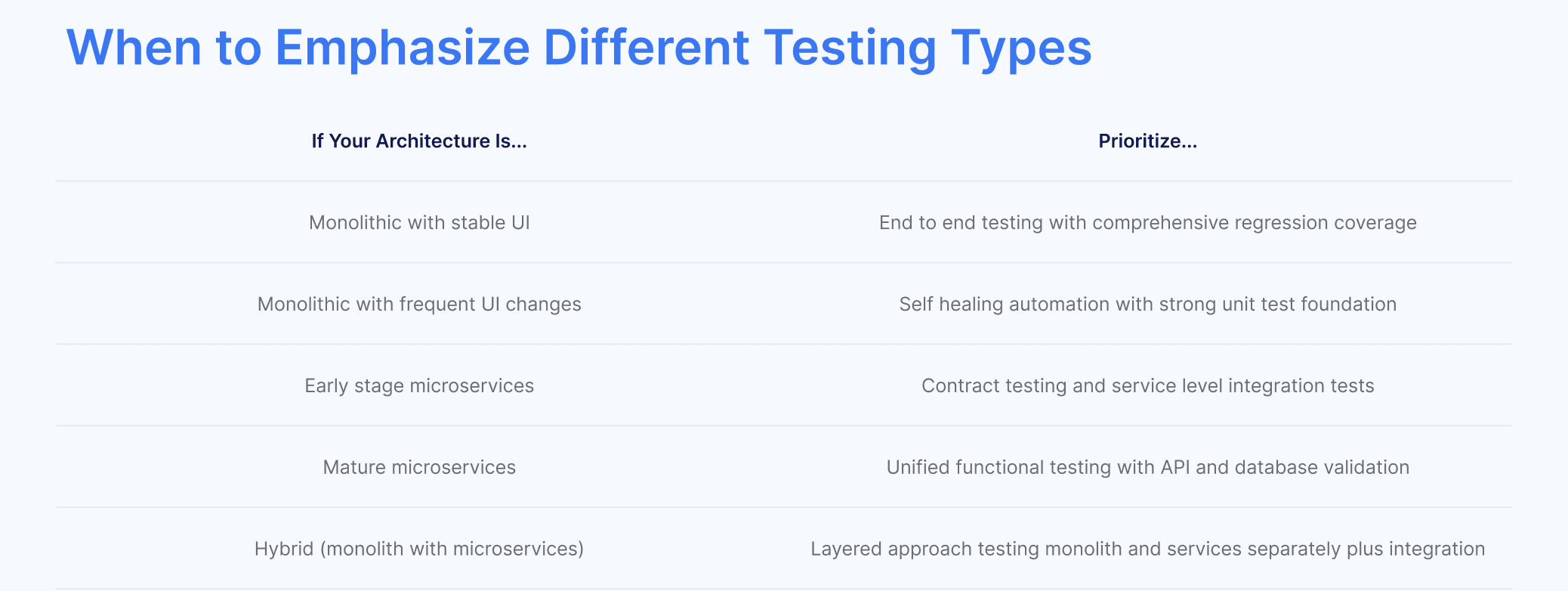
Choosing Your Testing Strategy
Migration Considerations
Organizations migrating from monolithic to microservices architectures face particular testing challenges:
Maintain existing tests during migration - Do not abandon monolithic tests until services are fully decomposed and tested independently.
Test integration boundaries carefully - The boundaries between monolithic and microservices components are high risk areas. Focus testing on these integration points.
Build new tests for new services - As services are extracted, build dedicated test suites that validate service behavior in isolation and integration.
Plan for test data migration - As data stores are decomposed, update test data management to span multiple databases.
The Future of Architecture Testing
The distinction between monolithic and microservices testing is becoming less relevant as unified testing approaches mature. Modern platforms that combine UI, API, and database testing in integrated journeys work equally well for both architectures.
The key is selecting a testing platform that provides:
Natural language test authoring that focuses on user intent rather than technical implementation.
Self healing automation that maintains test stability regardless of architecture complexity.
Unified functional testing that validates complete transaction chains across UI, API, and database layers.
CI/CD integration that enables continuous testing regardless of deployment strategy.
AI powered analysis that accelerates debugging in both monolithic and distributed systems.
With these capabilities, your testing strategy adapts to your architecture rather than constraining it.
Related Reads
Frequently Asked Questions
What is the main difference between microservices and monolithic testing?
Which architecture is easier to test, microservices or monolithic?
What is contract testing and why is it important for microservices?
How do I test API integrations between microservices?
How do I manage test data across distributed microservices databases?
Should I use the testing pyramid for microservices?
" height="10.182000000000016px" id="C361dJxCp" width="11.692999999999984px"/></svg>)