Blog
18 Best UI Testing Tools and Frameworks in 2026

Rishabh Kumar
Published on

Table of contents
Lorem ipsum
Lorem ipsum
Lorem ipsum
Lorem ipsum
Lorem ipsum
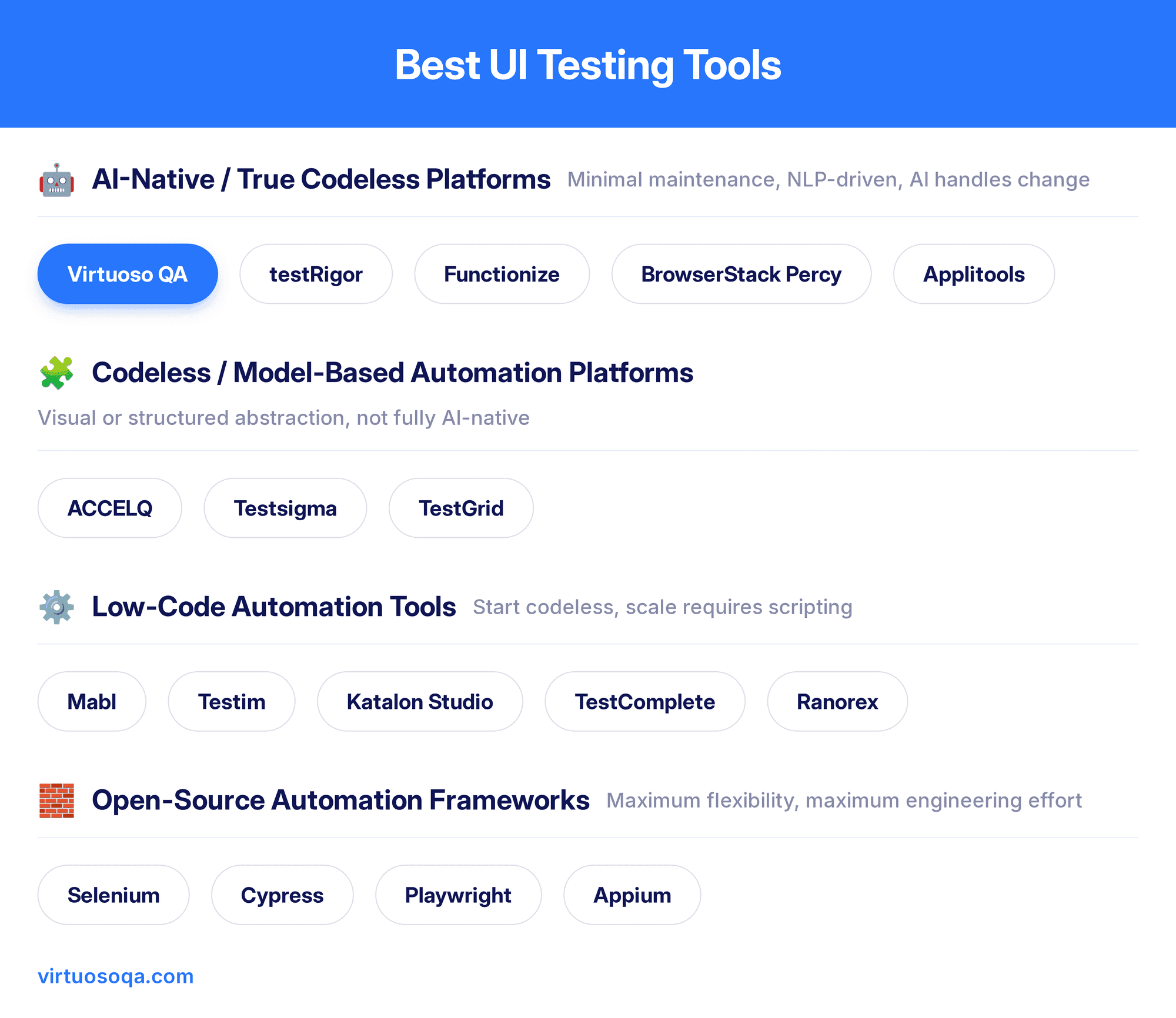
User interface testing validates that applications display correctly, respond to user interactions appropriately, and provide seamless experiences across browsers and devices. Yet UI testing faces unique challenges: interfaces change constantly, elements move and redesign, tests break with every UI update. Traditional UI testing tools spend 80% of effort maintaining brittle tests. In modern times, AI native platforms fundamentally transform UI testing through 95% self-healing accuracy adapting automatically to UI changes, intelligent element identification recognizing components through visual and contextual analysis, natural language test creation eliminating coding requirements, and cross-browser execution validating consistent experiences. This analysis examines 18 leading UI testing tools, revealing why enterprises achieve 90% maintenance reduction and 10x speed gains migrating from traditional frameworks to AI native solutions.
Best UI Testing Tools in 2026
1. Virtuoso QA: AI Native UI Testing Category Leader
Virtuoso QA is built from the ground up as an AI-native platform. Tests are written in plain English through Natural Language Programming, making authoring accessible to QA engineers, business analysts, and product owners without any scripting required. When your UI changes, Virtuoso QA adapts intelligently rather than failing.
Pricing: Custom enterprise pricing. Check with the Virtuoso QA sales team
Security: SOC 2 Type 2 certified
Ratings (As of August 2026): G2: 4.5 | Gartner: 4.5
Best for: Enterprise teams that need AI-native UI test automation with self-healing, plain English authoring, and zero scripting requirement
Key Strengths
95% self-healing accuracy: AI adapts tests automatically when UI or structure changes
StepIQ: autonomous test step generation from application context and user behaviour
GENerator: converts legacy Selenium, Tosca, and TestComplete assets in hours
Unified UI, API, and database testing in a single composable end-to-end journey
AI Root Cause Analysis with logs, network requests, and DOM comparisons on failure
AI Test Data Management: generates realistic parameterised data sets automatically
Cross-browser and cross-device testing across 2,000-plus OS and browser configurations
CI/CD integrations: Jenkins, Azure DevOps, GitHub Actions, CircleCI, Bamboo
Test management integrations: Jira, Xray, TestRail
Drawbacks:
Focused on web-based applications. Native desktop and mobile are on the roadmap
Custom pricing means engaging sales before understanding total cost
2. Functionize: NLP-Based UI Testing at Enterprise Scale
Functionize uses agentic AI to create, execute, and self-heal tests with minimal human input. Its SmartFix engine updates locators automatically when UI structures shift, and natural language inputs let both technical and non-technical contributors define tests without scripting.
Ratings (As of August 2026): G2: 4.6 | Gartner: 4.2
Best for: Enterprise teams wanting fully autonomous UI test creation and execution driven by AI agents
Key strengths:
AI test creation from natural language with no scripting required
SmartFix self-healing that updates locators automatically on UI change
Visual regression detection alongside functional and regression coverage
Parallel cloud execution with CI/CD integrations for Jenkins and Jira
Drawbacks:
UI-focused scope; separate tooling needed for API and database validation
Custom-only pricing slows procurement for teams needing upfront clarity
No composable architecture or legacy migration tooling equivalent to GENerator
3. ACCELQ: Codeless, Cloud-Native End-to-End Automation
ACCELQ delivers codeless automation across web, mobile, API, and desktop from a single environment. Its self-healing engine adjusts test logic dynamically when UIs change, and a model-based approach allows reusable components to assemble into complex scenarios without coding.
Platform: Cloud SaaS with on-premises option
Ratings (As of August 2026): G2: 4.8 | Gartner: 4.5
Best for: Teams needing codeless UI automation across web, mobile, and desktop from a single governed platform
Key strengths:
True no-code flows across web, mobile, API, and desktop
AI self-healing that automatically adjusts test logic to UI changes
Built-in test management with requirements and defect traceability
Tight CI/CD integrations including Jira, Jenkins, and Azure DevOps
Drawbacks:
Advanced flows and reusable components take time to fully master
Performance can slow for very large suites or complex reports
Pricing details require a sales conversation, which slows evaluation
4. Mabl: AI-native low-code testing across web and APIs
Mabl delivers low-code AI-native automation designed for continuous delivery pipelines. Its self-healing engine updates tests automatically when UI structures shift, and parallel checks for performance, accessibility, and visual consistency provide broad quality intelligence during execution.
Platform: Cloud SaaS
Ratings (As of August 2026): G2: 4.4 | Gartner: 4.7
Best for: Developer-led teams running continuous UI testing in CI/CD pipelines with low-code authoring
Key strengths:
Low-code test creation via the Mabl Trainer recorder
AI-powered auto-healing for selectors and timing issues
Unified coverage for browser, API, and mobile web testing
Deep CI/CD integrations and collaboration-oriented workflows
Drawbacks:
No open-source version; licensing costs are a barrier for budget-sensitive teams
Less composable architecture for enterprise-scale test reuse
Lacks the legacy migration tooling and unified API plus database depth of Virtuoso QA
5. BrowserStack Percy
BrowserStack Percy is a visual testing platform that helps teams catch unintended UI changes before they reach production. By automatically comparing screenshots across builds, Percy enables developers and QA teams to identify visual regressions early while reducing the need for time-consuming manual UI checks.
With support for web applications through Percy and mobile app visual testing through App Percy, teams can validate user interfaces across browsers, devices, and screen sizes within existing CI/CD workflows.
Pricing: Starts at $199/month (billed annually)
Security: SOC 2 Type II, ISO 27001, GDPR compliant
Ratings (As of August 2026): G2: 4.4/5 | Capterra: 4.6/5
Best for: Teams looking to automate visual UI testing and prevent visual regressions across web and mobile applications.
Key strengths:
Automated visual regression testing for both web applications and mobile apps using Percy and App Percy.
Integrates seamlessly with popular testing frameworks, CI/CD pipelines, and development workflows.
Intelligent screenshot comparison helps identify UI changes while minimizing noise from expected updates.
Supports cross-browser testing across 3500+ browser-OS combinations and cross-device validation across 30,000+ real devices, to ensure consistent user experiences.
Enables faster release cycles by reducing reliance on manual visual verification.
Drawbacks:
Focused primarily on visual validation and is typically used alongside functional testing tools rather than as a standalone testing solution.
6. Applitools: Visual UI Testing and Regression Detection
Applitools is a leading visual testing platform that catches layout, rendering, and design regressions functional tests miss entirely. Rather than checking that elements exist, its Visual AI validates that the whole page looks right across browsers, devices, and viewports, and it has broadened into functional, accessibility, and API coverage.
Platform: Cloud SaaS with SDKs for Selenium, Cypress, Playwright, and more
Ratings (as of August 2026): G2 4.3
Best for: Teams that need strong visual regression detection layered onto an existing functional UI suite
Key Strengths
Visual comparison that separates real UI regressions from acceptable rendering variation, reducing false positives
Flexible authoring, namely plain-English AI-assisted tests, a codeless recorder, or SDKs for existing frameworks
Broad cross-browser and cross-device visual coverage from a single baseline
Reduced visual-test maintenance through automated result review
Drawbacks
Pricing is quote-based on paid tiers, so total cost needs a sales conversation
Primarily a visual and validation layer, usually run alongside a functional tool rather than replacing one
Can surface noise on complex dynamic pages without tuning
7. TestGrid: Unified Test Infrastructure
TestGrid is a software testing platform built around real-device infrastructure, combining device cloud, automation execution, and AI-driven testing into a single system. It supports testing across web, mobile, API, and performance layers, allowing teams to run tests on actual devices and browsers instead of simulated environments.
Platform: Cloud SaaS
Ratings (As of August 2026): G2: 4.7
Best for: Teams that need UI testing across real devices with AI-assisted test generation built into the platform
Key Strengths
Broad, production-like coverage: Access 1000+ real Android and iOS devices across OS versions, screen sizes, and environments
Embedded test intelligence: AI-driven test generation, maintenance, and self-healing through CoTester, built into the testing workflow
Framework compatibility: Get native support for Selenium, Appium, and Cypress, allowing existing test suites to run without migration
Key Limitation
Initial complexity: Initial learning curve that can be eased by support and documentation
8. testRigor: Plain-English AI-Driven Functional Test Automation
testRigor builds automated tests entirely in plain English using semantic references instead of XPath or CSS paths, making tests resilient to UI restructuring. It handles complex scenarios including 2FA, email verification, and cross-platform validation.
Platform: Cloud SaaS; web, mobile, and desktop
Ratings (As of August 2026): G2: 4.7 | Gartner: 4.6
Best for: Non-technical QA teams who need to automate UI workflows in plain English without managing locators
Key strengths:
Plain-English steps accessible to non-technical contributors
Stable semantic references instead of brittle XPath or CSS paths
Supports complex scenarios including 2FA and email verification
Drawbacks:
Less flexible for teams needing custom-coded logic or advanced assertions
Complex conditional logic can be difficult to express in plain English
9. Testsigma: Cloud-Based Scriptless Testing
Testsigma offers scriptless test creation in simple English with cloud-based execution across browsers, real devices, and desktop. Its unified coverage across web, mobile, API, and desktop from a single platform reduces toolchain fragmentation.
Platform: Cloud SaaS; web, mobile, API, and desktop
Ratings (As of August 2026): G2: 4.6 | Gartner: 4.7
Best for: Teams wanting scriptless UI test creation across web, mobile, and desktop with cloud execution on demand
Key strengths:
Plain-English authoring accessible to non-technical contributors
Unified coverage across web, mobile, API, and desktop from one platform
Cloud execution across thousands of real devices and browsers on demand
Drawbacks:
Self-healing capabilities still developing relative to leading AI-native platforms
Less composable architecture for large-scale enterprise test reuse
Smaller community and ecosystem than established alternatives
10. Sauce Labs: Enterprise Cross-Browser and Cross-Device Execution
Sauce Labs is one of the longest-established cloud testing platforms, built for running UI tests across browsers, real devices, and operating systems at very large scale. Its strength is execution reliability and scale for teams where UI testing sits on the critical path of the deployment pipeline.
Platform: Cloud SaaS
Ratings (as of August 2026): G2: 4.3 | Gartner: 4.5
Best for: Enterprise teams needing high-volume, reliable cross-browser and cross-device UI execution in CI/CD
Key strengths:
Large execution scale across browsers, real devices, and OS combinations
Strong reliability under peak load, suited to testing on the deployment critical path
Deep CI/CD integration and mature enterprise tooling
AI-assisted test creation and failure analysis layered onto the grid
Drawbacks:
Primarily an execution and infrastructure platform rather than a test-authoring tool
Cost scales with execution volume, which needs managing for large suites
Authoring and maintenance still lean on the frameworks you bring to it
11. Katalon Studio: All-in-one testing platform
Katalon combines low-code recording with full scripting on Selenium and Appium foundations. TestOps provides centralised orchestration and analytics. StudioAssist converts natural language into scripts. Strong integration ecosystem, but test assets are tied to Katalon's proprietary format.
Platform: Desktop app (Windows, macOS, Linux) plus cloud services
Ratings (As of August 2026): G2: 4.4 | Gartner: 4.5
Best for: Teams that need both recorder-based and scripted UI test authoring in one platform across web, mobile, and API
Key strengths:
Record-and-playback plus full scripting in one environment
TestOps analytics and orchestration for distributed teams
Rich integrations with CI/CD, Jira, and source control
Drawbacks:
Significant vendor lock-in; migrating test assets requires substantial refactoring
Pricing tiers become complex as teams scale beyond basic usage
Maintenance overhead remains; self-healing is not as mature as dedicated AI-native platforms
12. TestComplete: Commercial Desktop, Web, and Mobile UI Automation
TestComplete supports desktop, web, and mobile automation from a single Windows-based environment with both codeless recording and scripting. It sits within the SmartBear ecosystem alongside Zephyr and AlertSite.
Platform: Windows desktop app; web, mobile, and Windows desktop testing
Ratings (As of August 2026): G2: 4.2 | Gartner: 4.3
Best for: Windows-centric teams testing legacy desktop UI applications alongside modern web and mobile
Key strengths:
Mixed script and no-code support in a single tool
Strong legacy Windows desktop coverage including WinForms and WPF
Tight integration with SmartBear ecosystem including Zephyr and AlertSite
Drawbacks:
Authoring restricted to Windows; not viable for macOS or Linux teams
Significant vendor lock-in; migration requires substantial refactoring
Licensing is among the highest in the market
13. Ranorex: Windows-Centric Visual UI Test Automation
Ranorex delivers cross-platform automation through codeless recording and C#/VB.NET scripting. Its object recognition engine handles legacy Windows desktop alongside modern web interfaces.
Platform: Windows desktop app, mobile via device farms
Ratings (As of August 2026): G2: 4.2 | Gartner: 4.7
Best for: Enterprise teams testing complex Windows desktop UI applications alongside web interfaces
Key strengths:
Accurate object recognition across complex UI technologies
Support for legacy Windows desktop stacks including WinForms and WPF
Built-in reporting with screenshot-level detail
Drawbacks:
Authoring and IDE are Windows-only; not viable for macOS or Linux teams
Better suited to desktop-heavy environments than fast-moving web release cycles
14. Testim: AI-powered web and Salesforce test authoring
Testim enhances Selenium and WebDriver with machine learning that adapts tests to UI changes. Its self-healing engine updates locators automatically on failure, and its Salesforce-specific optimisations make it a strong fit for teams running significant automation on Salesforce Lightning.
Platform: Cloud SaaS with browser extension for authoring
Ratings (As of August 2026): G2: 4.5 | Gartner: 4.7
Best for: Web and Salesforce teams wanting AI-assisted UI test stability with self-healing on WebDriver foundations
Key strengths:
AI smart locators that self-heal when UI changes occur
Agentic AI test generation from natural language descriptions
Salesforce-aware testing with Lightning component optimisations
Drawbacks:
No open-source edition; costs can be significant for high-volume usage
Very small public review base; independent evaluation is essential
Coverage strongest for Salesforce and standard web; niche stacks may show gaps
Popular UI Testing Frameworks
1. Selenium: The Foundational Open-Source Web Browser Automation Framework
Selenium remains the most widely deployed automation technology in the industry, offering unmatched flexibility across six programming languages and a vast ecosystem. Its strength is also its cost: without self-healing, locator maintenance at scale is a constant burden.
Platform: Open-source; Windows, macOS, Linux
Best for: Engineering teams with existing Selenium investment who need maximum flexibility across languages and browsers
Key strengths:
Multi-language support across Java, Python, C#, Ruby, JavaScript, and Kotlin
Massive community, ecosystem, and long-term vendor-neutral stability
Strong cross-browser coverage across Chrome, Firefox, Safari, and Edge
Drawbacks:
No built-in self-healing; locator maintenance is a constant cost at scale
Reporting, dashboards, and test management must be assembled from third-party tools
Strong coding skills and framework architecture are mandatory prerequisites
2. Cypress: Developer-First Javascript Web Automation Framework
Cypress runs tests inside the browser alongside the application, eliminating WebDriver delays and timing-based flakiness. Excellent for modern JavaScript web apps, but a framework rather than a platform: all tests must be written in JavaScript or TypeScript.
Platform: Open-source on Node.js; Windows, macOS, Linux
Best for: Frontend JavaScript developers who need fast, reliable UI test feedback within their existing development workflow
Key strengths:
Real-time test runner with time-travel debugging
Network stubbing and request interception built in
Active community with excellent documentation for modern JS frameworks
Drawbacks:
JavaScript and TypeScript only; excludes non-developer QA contributors
No native mobile support, built-in self-healing, or test management layer
Large parallel runs require pairing with a separate cloud grid
3. Playwright: Microsoft's Cross-Browser UI Testing
Playwright solves Selenium's most persistent problems: automatic waiting, fast isolated parallel execution, and bundled browser binaries that remove driver conflicts. The preferred framework for engineering-led teams, but teams must design their own structure, reporting, and maintenance strategy from scratch.
Platform: Open-source; Node.js, Python, Java, .NET on Windows, macOS, Linux
Best for: Engineering-led teams building cross-browser UI test suites who need modern debugging and isolated parallel execution
Key strengths:
Auto-waiting and flake reduction baked into the runner
Cross-browser support across Chromium, Firefox, and WebKit from one API
Rich tooling including trace viewer, HTML reports, and code generation
Drawbacks:
No low-code authoring; all tests written in code by engineering-skilled contributors only
No built-in self-healing; UI changes require manual locator updates
Framework architecture, reporting, and test management must all be built internally
4. Appium: Open-Source Cross-Platform Mobile UI Automation
Appium provides a unified WebDriver API for automating native, hybrid, and mobile web apps across iOS and Android from a single codebase. The established open-source standard for mobile automation, but requires significant engineering investment to configure and scale.
Platform: Open-source; Windows, macOS, Linux
Ratings: G2: 4.4 | Gartner: 4.4
Best for: Mobile engineering teams automating UI tests across iOS and Android native, hybrid, and mobile web applications
Key strengths:
True cross-platform mobile support for iOS and Android from one API
Multi-language support across Java, Python, JavaScript, and C#
Large open-source ecosystem with community plugins and examples
Drawbacks:
Complex setup requiring SDK, driver, and device farm configuration
No built-in self-healing; locator breakage is frequent as apps evolve
Reporting, analytics, and test management must all be built separately

Understanding UI Testing Challenges and Solutions
UI testing validates user-facing application layers: visual elements display correctly, buttons and forms function appropriately, navigation flows work seamlessly, responsive designs adapt to screen sizes, and cross-browser consistency delivers uniform experiences.
The UI Testing Maintenance Crisis
UI changes constantly. Product teams redesign interfaces, marketing updates landing pages, developers refactor components. Every change breaks traditional UI tests. Buttons move location, element IDs change, page layouts redesign, causing test failures despite no functional defects. Organizations spend 80% of UI testing effort maintaining tests rather than expanding coverage.
AI Native UI Testing Revolution
AI native platforms eliminate maintenance burden through 95% self-healing accuracy. When UI elements move or change, AI-powered identification recognizes components through visual analysis, context understanding, and semantic recognition, updating tests automatically.
Related Reads
Frequently Asked Questions
How does AI improve UI testing?
What is self-healing in UI testing?
Can non-technical team members create UI tests?
What is cross-browser UI testing?
How do you measure UI testing effectiveness?
What is visual UI testing?




