Blog
Automated Regression Testing - All You Need to Know

Rishabh Kumar
Published on

Table of contents
Lorem ipsum
Lorem ipsum
Lorem ipsum
Lorem ipsum
Lorem ipsum
Every bug fix, new feature and refactor carries the same risk: breaking something that used to work. Regression testing is the safety net that catches it. Automation is what lets that safety net keep up with how often modern teams release.
This guide covers what automated regression testing is, why it matters, what to automate (and what not to), how to build and run an automated suite, the challenges to plan for, and how AI-native testing keeps regression automation running without the maintenance burden that sinks traditional suites
What is Regression Testing?
Regression testing is a type of software testing that checks existing functionality still works correctly after code changes. When developers fix bugs, add features or refactor code, they risk introducing new defects or breaking features that used to work. Regression testing catches those unintended consequences before they reach production.
The Core Purpose of Regression Testing
Regression testing answers one critical question: did our changes break anything that was working before?
"Regression" literally means going backwards. In software, a regression is when quality drops because a change has accidentally broken existing functionality. Regression testing stops that backward slide.
To see how the visual side of your application is checked during regression cycles, explore our guide to visual regression testing.
When Regressions Happen
Bug fixes accidentally break related features
New features interfere with existing workflows
Refactoring introduces unexpected side effects
Library or framework updates change behaviour
Configuration changes affect stability
Without regression testing, every release is a gamble. With thorough regression testing, teams release knowing that existing functionality is still intact.
What is Automated Regression Testing?
Automated regression testing uses tools to run regression tests without someone clicking through every workflow by hand. Tests run automatically, check results against expected outcomes, and report what passed and what failed.
That turns regression testing from a slow, labour-intensive process into fast, reliable checks that happen continuously throughout development. Automated regression tests can run large numbers of test cases in a fraction of the time manual testing takes, giving immediate feedback on whether a change has kept the application stable.
Automation is what makes Agile and CI/CD pipelines workable, where code changes constantly and releases can happen several times a day. Without it, testing simply can't keep pace with modern development.
Why Automate Regression Testing?
Manual regression testing can't meet the demands of modern software delivery. Here's why automation makes the difference.

Time Savings
Manual regression testing takes an enormous amount of time. Testing even a moderately complex application by hand can take days or weeks per release, and as the application grows, manual regression quickly becomes impractical.
Automated regression tests run the same checks in minutes or hours instead. A regression cycle that takes a team two weeks by hand might run in a couple of hours once automated. Because regression runs on every release, those savings compound with every cycle.
Faster Releases
Speed to market is a competitive advantage. Teams that ship faster respond to customers sooner and act on opportunities first.
Automated regression testing removes the testing bottleneck that has traditionally held releases back. Fast, reliable regression checks let teams release confidently and often, which supports continuous delivery and rapid iteration.
Improved Accuracy
People make mistakes, especially with repetitive work. Manual regression testing suffers from:
Accidentally skipped test steps
Inconsistent execution between testers
Errors caused by fatigue in long test sessions
Testers interpreting the same test case differently
Automated tests run the same way every time. When an automated regression test passes, you know exactly what was checked.
Scalability
As applications grow, regression suites grow with them. Manual execution gets harder at every step and eventually becomes impossible.
Automated regression testing scales far more easily. Adding test cases doesn't mean hiring more testers, and parallel execution across cloud-based grids lets large numbers of tests run at the same time.
Better Use of Your Team's Skills
Testers spending their days repeating the same regression checks are underused. These are skilled people who could add far more value elsewhere.
Automating regression testing frees QA engineers to focus on higher-value work, such as:
Designing thorough test strategies
Exploratory testing to find unexpected issues
Building and improving automated tests
Analysing quality metrics and trends
Working with developers to improve quality
Automated vs Manual Regression Testing
Factor | Manual Regression Testing | Automated Regression Testing |
|---|---|---|
Execution speed | Days to weeks per cycle | Minutes to hours with parallel execution |
Coverage achievable | 20 to 30% at best | 70 to 90% consistently |
Consistency | Varies by tester and fatigue | Identical on every execution |
Frequency | Once per release cycle | Every commit, every deployment |
Best suited for | Exploratory testing, usability, one-off scenarios | Stable, repetitive, business-critical workflows |
Maintenance requirement | Low; no test code to update | Requires upkeep as application changes |
Cost over time | Scales linearly with team size | Cost per test reduces as suite grows |
Feedback speed | End of testing phase | Immediate, within minutes of code change |
Defect detection timing | Late in cycle | Early, while context is fresh |
Manual and automated regression testing aren't competing approaches. Manual testing is still essential for exploratory scenarios, usability checks and fast-changing features, where the cost of automating outweighs the value. Automation handles the stable, frequent checks that manual testing can't sustain at pace.
Most mature QA teams automate the large majority of their stable regression scenarios, and keep manual capacity for discovery-focused testing. The right split depends on your application and how quickly it changes. AI-native test platforms like Virtuoso QA shift the balance further, by making automated tests faster to create and cheaper to maintain.
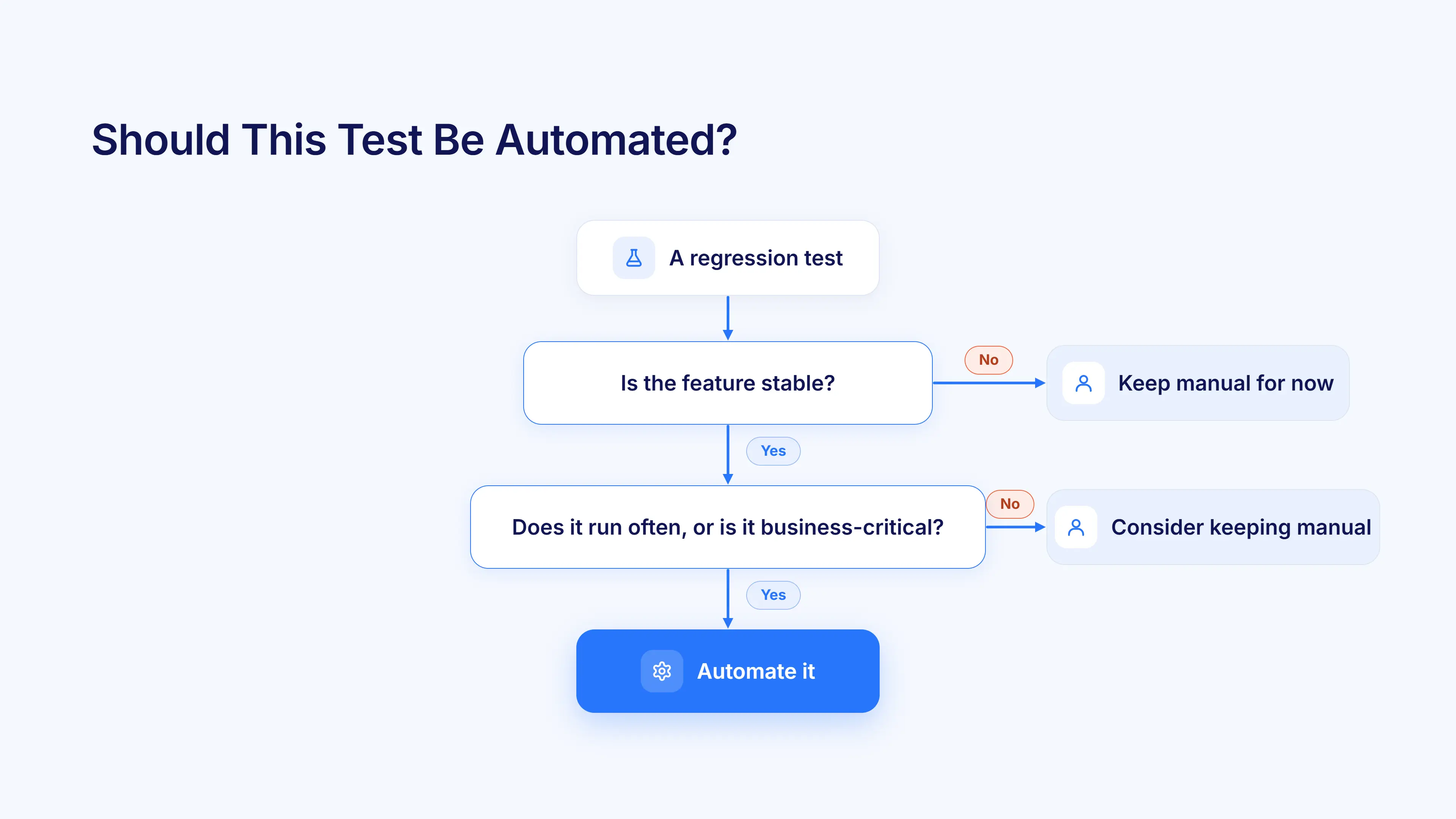
When Should Regression Tests be Automated?
Not every regression test deserves automation. Focus your effort where it delivers the most value.
Automate | Keep manual |
|---|---|
Tests that run often, such as daily or on every build | One-off or rarely run tests |
Stable functionality that rarely changes | Features still under active development |
Business-critical workflows, such as checkout, login and payments | Usability and visual design judgements |
Cross-browser and cross-device checks | Exploratory testing that needs human creativity |
API and integration checks | Scenarios that are expensive to automate and rarely run |
Stable, Reusable Test Cases
Automate tests for stable functionality that changes rarely. Tests for features still in active development need constant updates, so automating them too early wastes effort.
Good candidates have:
Well-defined, consistent test steps
Stable expected outcomes
Little change in the functionality being tested
Clear pass and fail criteria
Requirements that rarely change
Frequently Run Scenarios
Tests that run again and again give the best return on automation. If you run a test once per release, doing it manually might be fine.
If you run it daily, or several times a day, automation pays off quickly.
Prioritise:
Daily regression suites that run with every build
Smoke tests on critical functionality
Tests run across several environments or configurations
Checks required before every deployment
Tests that support your CI workflow
Critical Business Workflows
Business-critical functionality deserves automated regression coverage however often it runs. The cost of a defect in revenue-generating or customer-facing features justifies the investment.
Prioritise automated regression for:
Ecommerce checkout and payment processing
User authentication and authorisation
Financial transactions and calculations
Data integrity and security features
Regulatory compliance requirements
Cross-Browser and Cross-Platform Tests
Checking functionality across browsers, devices and operating systems creates a huge number of combinations. Doing that by hand gets expensive fast.
Automated regression testing excels here:
Run the same tests across Chrome, Firefox, Safari and Edge at the same time
Check responsive designs at different screen sizes in parallel
Test across Windows, macOS and Linux together
Catch platform-specific regressions reliably
Keep broad coverage sustainable
Integration and API Tests
Backend services and APIs change often. Automated regression testing catches integration breaks straight away:
Confirm API contracts stay stable
Check data formats and structures
Verify error handling and edge cases
Test service-to-service communication
Ensure backward compatibility
How to Automate Regression Testing
Successful regression automation needs systematic planning and execution.
Step 1: Select the Right Automation Tool
Your choice of tool has a big impact on whether automation succeeds. Consider:
Application type: Web applications need different tools from mobile or desktop software, so make sure the tool supports your technology stack.
Team skills: Script-based tools like Selenium need programming expertise. Plain English platforms like Virtuoso QA let non-programmers create automated tests too.
Maintenance cost: How much effort will it take to keep tests working as the application changes? Over time, this usually matters more than the licence price.
Budget: Include licences, infrastructure, training and ongoing upkeep.
Popular options include:
Virtuoso QA: an AI-native platform with plain English authoring, reviewable self-healing and release evidence for every run
Selenium: an open-source, script-based framework that needs programming skills
Cypress: a modern JavaScript framework for web applications
Playwright: Microsoft's cross-browser automation framework
Step 2: Identify Suitable Test Cases
Start with stable, repetitive, high-value flows: tests that run often, cover critical functionality and stay fairly stable over time.
Prioritise using these criteria:
Execution frequency: daily and weekly tests first
Business criticality: revenue-generating and customer-facing features
Stability: avoid automating tests that change constantly
Manual effort: longer manual tests give a bigger return
Cross-platform needs: tests that must run across several browsers or devices
Start small, prove the value on these first tests, then expand.
Step 3: Design Your Automation Framework
Framework design affects how maintainable and scalable your automation will be.
Approach | How it works | Best for |
|---|---|---|
Keyword-driven | Tests are built from reusable action keywords | Teams with mixed technical skills |
Data-driven | One test runs against many sets of data | Covering many input combinations efficiently |
Hybrid | Combines keyword-driven and data-driven approaches | Teams needing flexibility across test types |
Model-based | Tests are generated from a model of the application's behaviour | Complex systems with many possible states |
AI-native | Tests are written in plain English, with self-healing and AI assistance | Teams that want broad coverage without heavy scripting or maintenance |
Keyword-driven frameworks wrap test actions into reusable keywords. Test cases are built by combining predefined keywords, so non-technical testers can create tests. When the implementation changes, you update the keyword rather than every test that uses it.
Data-driven frameworks separate test logic from test data. The same test runs with different data sets, checking many scenarios efficiently. Test data is kept separate from test scripts, which means broad coverage from fewer tests.
Hybrid frameworks combine keyword-driven and data-driven approaches. They give flexibility for different test types, use the strengths of both, and support teams with a mix of skill levels.
Model-based testing generates tests from models of the application, such as state models. It systematically covers the possible paths through a system, reduces manual test design effort, and adapts as the model changes.
AI-native testing is where regression automation is heading. Tests are written in plain English rather than code, self-healing keeps tests running when the application changes, and AI suggests steps to improve coverage. Platforms like Virtuoso QA add governance on top, with people approving the changes that matter and every run producing evidence.
To compare keyword-driven and data-driven approaches in more detail, read our article on Keyword-Driven vs Data-Driven Testing.
Step 4: Integrate with Your CI/CD Pipeline
Automated regression tests deliver the most value when they run automatically inside your continuous integration and deployment pipeline. Tools like Jenkins, GitHub Actions, GitLab CI and Azure DevOps can trigger regression tests whenever developers commit code, open pull requests or deploy to test environments.
Pipeline integration means:
Every code change goes through regression checks
Failed tests stop broken code moving forward
Developers get immediate feedback on their changes
Quality gates enforce standards before deployment
Continuous testing happens without anyone having to remember to run it
Step 5: Schedule and Run Tests
Balance thoroughness with speed by running different suites at different points:
When | What runs | Why |
|---|---|---|
Every commit | Fast smoke tests | Catch critical breakages within minutes |
Every pull request | Focused regression on affected areas | Stop broken code before it merges |
Staging deploys | Core regression suite | Confirm the build is ready to promote |
Nightly | Full regression suite | Complete results ready each morning |
Before production | Full regression as a release gate | Ship only when critical journeys pass |
On demand | Any suite | Ad hoc checks when needed |
Nightly builds: Run comprehensive suites overnight, when infrastructure is quiet, so teams arrive to fresh results each morning.
Code commits: Run fast smoke tests on every commit to catch critical breakages within minutes.
Pre-deployment: Run full regression before deploying to staging or production.
On demand: Let teams run tests manually whenever they need an ad hoc check.
Step 6: Monitor and Maintain Your Suite
Automated tests need ongoing care to stay effective:
Update tests when the application changes: When features change on purpose, update the matching tests. Self-healing platforms like Virtuoso QA handle much of this, with every repair logged for review.
Remove obsolete tests: Regularly review and delete tests for removed features or retired workflows.
Improve performance: Find and speed up slow tests that delay feedback.
Analyse failures: Investigate failed tests quickly, to separate real defects from test problems.
Track metrics: Monitor automation coverage, pass rates, run times and return on investment.
This is the step where most automation programmes struggle, so plan for it from day one.
Best Practices for Automated Regression Testing
Automate the Right Test Cases
Focus automation where it gives the most value, rather than trying to automate everything.
Focus on:
Tests that run frequently, daily or several times a day
Stable tests that rarely change
Time-consuming manual tests
Cross-browser and cross-device scenarios
Business-critical workflows
Avoid automating:
Tests for features still in active development
One-off or rarely run tests
Tests that need human judgement or creativity
Usability and visual design checks
Keep Tests Maintainable
Maintainability decides whether automation succeeds long term. Poorly designed tests become technical debt that costs effort without adding value.
Keep tests maintainable with:
Clear, descriptive test names that explain their purpose
Modular design, with reusable components
Consistent standards and patterns
Good documentation
Regular refactoring to improve structure
Self-healing to reduce manual repair work, with every repair reviewable
Combine Manual and Automated Testing
The best regression strategy uses both approaches deliberately:
Automate stable, repetitive regression flows that run often in your CI/CD pipeline.
Test manually for exploratory scenarios, usability and fast-changing features, where automation costs more than it returns.
The goal isn't 100% automation. It's putting your effort where it counts most.
Make Results Provable, Not Just Green
A passing regression suite tells you the tests ran. It doesn't tell you what they proved. Link tests to the requirements they cover, and keep a record of who approved them. When a release board, customer or auditor asks what a release was tested against, you can answer straight away.
Challenges of Automated Regression Testing
Challenge | Why it happens | How to address it |
|---|---|---|
Upfront setup effort | Tools, training, frameworks and first tests all take time | Start with a small set of high-value tests and choose a tool your team can adopt quickly |
Test maintenance | UI and workflow changes break tests | Use reviewable self-healing and reusable components |
Flaky tests | Timing, network delays and unstable data cause random failures | Use proper waits, isolate tests, and stabilise test data |
Test data management | Tests need realistic, consistent data in every environment | Use synthetic data, reset data between runs, and keep sensitive data out |
Coverage vs ROI | Not everything is worth automating | Prioritise by risk and frequency, and review the return regularly |
Automated Regression Testing in Agile and DevOps
Testing happens inside the sprint
Regression checks run as code is written, not in a separate phase at the end. A story isn't done until it passes regression.
Testing shifts left
Developers run relevant regression tests before they commit, so problems are caught when they're cheapest to fix.
Parallel execution keeps feedback fast
Running tests across several machines and browsers at once keeps even large suites within the time developers are willing to wait.
The suite has to keep up with AI-assisted development
As more code is written with AI assistants, changes arrive faster and in greater volume. Regression needs to run on every meaningful change, and maintenance has to be largely automated, or the suite falls behind the code it's meant to protect.
Automated Regression Testing Metrics
Metric | What it tells you | What to look for |
|---|---|---|
Execution time | How long a regression run takes | Stays short enough for fast feedback as the suite grows |
Automation coverage | The share of regression scenarios that are automated | Critical paths fully covered first |
Defect detection | Defects caught by automation before release | Rising over time, with fewer escapes to production |
Flaky test rate | Tests that fail without a real defect | As close to zero as possible |
Maintenance effort | Time spent fixing tests rather than adding coverage | Falling over time |
Automation ROI | Value delivered compared with the cost of automation | Clear and positive, reviewed regularly |
Common Mistakes to Avoid
Mistake | What goes wrong | Better approach |
|---|---|---|
Trying to automate everything | Effort goes into tests that change constantly or rarely run | Automate stable, high-value tests, and keep manual testing where it fits |
Neglecting maintenance | Broken and flaky tests pile up, and trust disappears | Make maintenance routine, and use self-healing |
Ignoring test data | Unstable data causes false failures | Invest in synthetic data and reset it between runs |
Running tests outside CI/CD | Feedback is slow and runs are infrequent | Trigger regression automatically on every change |
Not tracking metrics | No one knows whether automation is working | Track coverage, flakiness, maintenance and ROI |
How Virtuoso QA Automates Regression Testing
With Virtuoso QA automated regression testing, every regression run doubles as a release record, showing the requirement behind each test, the result of every step, and who gave the test the go-ahead.
Tests proposed from your documents: Touchstone works through existing specs and Jira stories, suggests tests that reference their source, and holds each one until a reviewer approves it.
Writing tests without code: Steps are described in everyday English and execute in a live browser as they're typed, with StepIQ recommending what to check next.
Repairs your team controls: When a UI change breaks a step, the platform finds the element another way and puts the fix up for your team to keep or reject.
Full-stack checks in a single test: One regression journey can move through the interface, hit the APIs beneath it and verify the database result.
Failures that explain themselves: Each failed run comes with screenshots, logs, network activity and a suggested cause.
Wide browser reach: Suites run in parallel across more than 2,000 browser, operating system and device combinations.
Pipeline-triggered runs: Jenkins, Azure DevOps and GitHub Actions can start regression automatically.
Legacy suites carried over: GENerator turns existing Selenium scripts into plain English journeys.
Related Reads
Frequently Asked Questions About Automated Regression Testing
When should we automate regression tests?
How does Virtuoso QA help with regression automation?
How do you reduce flaky regression tests?
What percentage of regression tests should be automated?
How often should automated regression tests run?
Can all regression testing be automated?