Blog
What is Regression Testing? Types, Process, Examples and Automation

Abhilash
Published on






Table of contents
Lorem ipsum
Lorem ipsum
Lorem ipsum
Lorem ipsum
Lorem ipsum
The expensive failure is rarely in the feature you just built. It's in the one you built six months ago that quietly broke when you shipped today's change. Software moves constantly, with new features weekly, fixes daily and refactors in between, and every one of those changes risks breaking something that worked perfectly yesterday. Regression testing is the safety net that catches it.
With daily deployments and CI/CD pipelines, regression testing isn't optional. It's the difference between a confident release and a 3am rollback.
This guide covers what regression testing is, why it matters, its types and process, real examples, how to automate it, and how AI-native testing keeps regression suites running on every build without the maintenance burden that sinks traditional suites.
What is Regression Testing?
Regression testing checks that existing functionality still works after code changes, updates or enhancements. It's a quality checkpoint that makes sure your software doesn't go backwards when you move forward with new features.
"Regression" literally means moving backwards. In software, it means a feature that used to work has stopped working, or a fixed bug has come back.
The Question It Answers
Regression testing exists to answer one question: did our recent changes break anything that was working before?
Whether you've fixed a bug, added a feature, improved performance or updated a third-party integration, regression testing confirms that everything else still works.
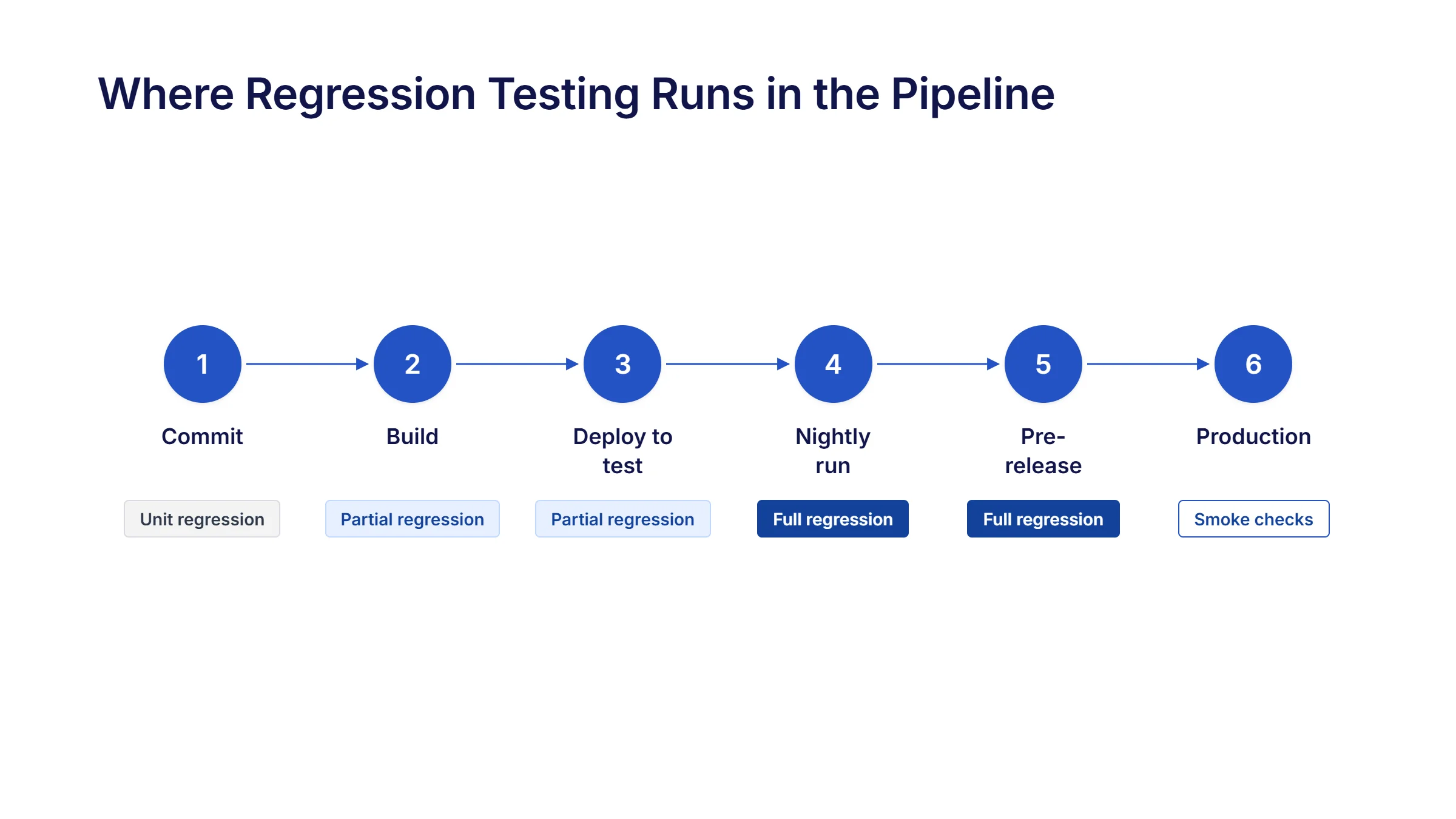
Why Regression Testing Matters

It stops old bugs coming back
Few things are more frustrating than fixing a bug, only to see it reappear weeks later. Regression testing keeps fixes fixed.
It keeps the product stable
Users rely on features working the same way every day. Regression testing keeps them stable and predictable from one release to the next.
It catches defects while they're cheap to fix
The later a defect is found, the more it costs. A production defect isn't just a code change. It's a support ticket, an investigation, a hotfix, a redeployment and a dent in customer trust. Regression testing is the first line of defence against that.
It makes continuous delivery possible
Agile and CI/CD teams release often, sometimes several times a day. Without regression testing, continuous delivery quickly becomes continuous chaos.
It protects the customer experience
Payments, reports and account management have to work every time. Regression testing catches problems before customers do.
It supports compliance
In regulated industries like healthcare, financial services and insurance, compliance features have to keep working after every change. Regression testing checks that they do, and helps show auditors that they were checked.
It lets developers refactor with confidence
Paying down technical debt and improving architecture is risky without a safety net. Regression testing lets developers improve code without fear of breaking it.
Scope of Regression Testing
Level | What it checks | When it runs |
|---|---|---|
Unit | Individual functions or code units | On every commit, usually automatically |
Module | A module or component, including how its functions interact | When that module changes |
System-wide | The whole application, end to end | Before releases, or on a schedule |
Cross-platform | Behaviour across browsers, devices, operating systems and environments | Before releases, or when front-end code changes |
Unit regression gives the fastest feedback, while system-wide regression gives the most confidence. Most teams need all four. For a closer comparison of the first level, see Unit Testing vs Regression Testing.
" height="10.182000000000016px" id="C361dJxCp" width="11.692999999999984px"/></svg>)
When to Perform Regression Testing
After Bug Fixes
Every bug fix should trigger regression testing. The fix itself needs validation, but more importantly, you need to verify that the fix didn't create side effects elsewhere.
After Adding New Features
New features often touch existing code. Regression testing ensures that feature additions don't disrupt current functionality.
After Code Refactoring or Optimization
When developers optimize code, improve performance, or reduce technical debt, regression testing validates that these improvements don't break existing behavior.
During Major Releases
Before major version releases, comprehensive regression testing across all critical workflows is essential for release confidence.
During Continuous Integration Builds
In CI/CD pipelines, automated regression tests run with every build, providing immediate feedback on code quality and stability.
Scheduled Intervals (Nightly/Weekly Runs)
Many teams schedule comprehensive regression suites to run overnight or weekly, catching issues that might not surface in quick build validations.
Types of Regression Testing
Type | What it means | Best used when |
|---|---|---|
Unit regression | Re-testing small, isolated code units | On every commit |
Partial regression | Testing the changed modules plus the modules that depend on them | Most day-to-day changes |
Complete regression | Running the entire suite | Before major releases |
Corrective regression | Re-running existing tests when the functionality hasn't changed | Confirming continued stability |
Selective regression | Running only the tests affected by recent changes | When time is tight |
Progressive regression | Checking that new features work alongside existing ones | When adding new functionality |
Partial and selective regression keep everyday testing fast. Complete regression gives you the most confidence before a big release. For more on each type and when to use it, read our full guide to Types of Regression Testing.
Regression Testing vs Other Testing Types
Testing type | The question it answers | Focus |
|---|---|---|
Does this feature do what it should? | Whether a feature works as designed | |
Retesting | Is this specific bug fixed? | The exact scenario that failed before |
New feature testing | Does the new code work? | What has just been added |
Regression testing | Did our changes break anything else? | What already existed |
These work together. Retesting confirms a fix, functional and new feature testing check new work, and regression testing protects everything else.
For more detail, see our guides on functional test automation and End-to-End Testing vs Regression Testing.
Process of Regression Testing

Step 1: Identify the scope
Decide which parts of the application need testing, based on recent changes, risk and business priorities.
Step 2: Select test cases
Choose tests that cover:
Areas affected by recent changes
High-risk or business-critical features
Frequently used functionality
Areas with a history of defects
Step 3: Prioritise by risk
Run the most important tests first, especially those covering:
Customer-facing workflows
Revenue-generating features
Compliance-critical functions
Integrations with external systems
Step 4: Run the tests
Run them manually or, ideally, through automation. Track results carefully and log failures straight away.
Step 5: Compare results and log defects
Compare actual results with expected behaviour. Log every deviation with clear reproduction steps, severity and environment details.
Step 6: Re-run where needed
After fixes, re-run the failed tests to confirm they pass. Widen testing if a fix reveals deeper problems.
Step 7: Automate for future runs
Turn stable, repeatable regression tests into automated ones. The investment pays back quickly in speed and consistency.
How to Choose Which Tests to Include
Selection technique | Why it matters |
|---|---|
Frequently used features | They have the biggest impact on users if they break |
Recent code changes | Changed code carries the highest risk |
Complex or high-risk modules | Complex logic and calculations fail more often |
Boundary values | Edge cases and limits catch subtle bugs |
Customer-facing workflows | Customers notice these failures first |
Defect-prone areas | Past defects are a good predictor of future ones |
Integration points | Connections to APIs, databases and third parties often break |
Performance-sensitive areas | Changes can quietly slow things down |
How to Write a Good Regression Test Case
Clear preconditions: State the data, system state and user permissions the test needs.
Repeatable, stable steps: Avoid depending on random data, timing or anything else that changes unpredictably.
Measurable expected results: "The system should work" isn't enough. Define exactly what success looks like.
Coverage of dependencies: Check how features work together, not just on their own.
Tags for automation: Label tests by priority, feature area, run time and automation status.
Regression Testing Frameworks
Approaches
Script-based: Tests are written in code. Maximum flexibility, but it needs programming skills.
Keyword-driven: Test logic is wrapped in reusable keywords, so testers can build tests without deep coding.
Data-driven: Test logic is separated from test data, so one test can run across many data sets.
Hybrid: A combination of approaches, using the strengths of each.
To understand how keyword-driven and data-driven approaches compare in detail, read our article on Keyword-Driven vs Data-Driven Testing.
What a Complete Regression Framework Includes
Unit tests for individual functions
API tests for backend services and integrations
UI tests for the interface
Integration tests for how components work together
End-to-end tests for complete business workflows
Performance tests for speed and resource use
Security tests for vulnerabilities and access controls
Regression Testing Examples
Ecommerce: A New Payment Method
After adding a new payment method, regression testing checks that:
Browsing and search still work
The cart still behaves correctly
Prices are still calculated accurately
Stock still updates properly
Order confirmation emails still send
Existing payment methods, like cards and PayPal, still go through
Banking: A Loan Calculator Fix
After fixing a loan calculator bug, regression testing checks that:
Interest is still calculated correctly for every loan type
Account balances still display correctly
Transfers still work
Transaction history is still complete
Two-factor authentication still works
The mobile app still syncs with the web platform
Healthcare: An Updated Registration Form
After updating the patient registration form, regression testing checks that:
Appointment scheduling still works
Prescription uploads are still stored correctly
Patient data still displays accurately everywhere
Insurance verification still connects
Access controls on medical records still apply
Appointment reminders still send
SaaS: A New Single Sign-On Option
After adding a new SSO option, regression testing checks that:
Existing login methods, like email and password or OAuth, still work
User profiles still display correctly
Role-based permissions still apply
API integrations with customer systems are still stable
Billing and subscriptions still work
Data exports and reports still run
Regression Testing in Agile and DevOps
Fast iterations need continuous regression
Agile teams release in short sprints, and manual regression can't keep up. Automated regression running continuously is what lets teams move quickly without losing quality.
Speed and stability aren't a trade-off
Risk-based test selection and automation let teams release often and stay stable.
Shift left
Regression testing starts earlier, with developers running relevant tests before they commit, so problems are caught straight away.
Make it part of done
In Agile, regression isn't a separate phase. A feature isn't finished until it passes regression testing.
Regression Testing in CI/CD Pipelines
Automated runs on every build or deploy: Each change gets feedback within minutes.
Parallel runs: Tests run across several browsers and environments at once, turning hours into minutes.
Nightly full suites: Longer suites run overnight, so full results are ready each morning.
Integration with DevOps tools: Results flow straight into tools like Jenkins, GitHub Actions, GitLab CI, CircleCI and Azure DevOps, so quality is visible to everyone.

Regression Testing in the Age of AI-Coded Software
AI assistants now write a growing share of production code. They tend to produce strong happy-path logic, with weaker handling of the edges.
Every AI-generated change carries the same regression risk as a human-written one. The difference is that changes arrive faster and in far greater volume, so a weekly regression cadence can no longer keep up.

Three things follow for any team using AI-assisted development:
The cadence has to tighten
Regression needs to run on every meaningful change, not on a fixed schedule, because the codebase now moves daily.
Maintenance has to be automated
A suite that needs manual repair after every change will fall behind the code it's meant to protect, so self-healing becomes a requirement, not a nice-to-have.
Results have to be provable
When AI writes the code and AI helps maintain the tests, teams need a clear record of what each run covered and who approved it.
The teams handling this well aren't adding more manual testers. They're using AI to keep their regression suites current, with people approving the changes that matter.
Should Regression Tests Be Automated?
Why Automation Fits
Regression testing is repetitive by nature. The same tests run again and again with each release, which is exactly where people get tired and make mistakes. Automated tests run the same way every time.
When Manual Testing Still Matters
Manual regression testing is still valuable for:
Exploratory testing of edge cases
Checking the user experience
New features whose requirements are still changing
Complex scenarios that are expensive to automate
Visual design checks
Finding the Balance
Automate stable, high-value flows that run often. Keep manual testing for exploratory work, usability checks and areas that are changing quickly.
How to Automate Regression Testing

Choose the right tool
Pick based on your tech stack, team skills, budget and scale. Options range from script-based frameworks like Selenium to no-code platforms like Virtuoso QA.
Prioritise what to automate
Start with tests that:
Run frequently
Cover stable workflows
Protect business-critical paths
Take a long time to run by hand
Cover several browsers or platforms
Connect to your CI/CD pipeline
Automated tests deliver the most value when every change triggers the relevant regression tests automatically.
Manage your test data
Reliable data is essential for consistent automation.
Set up processes for:
Creating and maintaining test data sets
Resetting data between runs
Managing data across environments
Protecting sensitive data in test systems
Schedule nightly suites
Run longer, comprehensive suites overnight or at quiet times, so they don't slow development down.
Measure the return
Track:
Time saved compared with manual testing
Defects caught by automated tests
How many runs happen each day
How much maintenance the suite needs
These numbers justify continued investment and show where to improve.
Best Practices for Regression Testing
Start small and scale up
Automate your most critical workflows first, prove the value, then expand.
Keep the suite clean
Remove obsolete tests regularly, as dead tests waste run time and maintenance effort. Review the suite at least once a quarter.
Use risk-based testing
Prioritise by business impact, complexity, how often a feature is used, and how recently it changed.
Automate critical paths first
Your most important user journeys give the best return when automated.
Look after your test data
Missing or inconsistent data causes failures that aren't real bugs.
Deal with flaky tests fast
Tests that fail at random destroy trust in the suite. Fix them straight away.
Version-control your tests
Treat test code like application code, with version control, reviews and standards.
For more, read our guide to Regression Testing Best Practices for QA Teams.
Challenges of Regression Testing
Challenge | Why it happens | What helps |
|---|---|---|
Slow, large suites | Suites grow with every feature and fix | Risk-based selection and parallel runs |
High maintenance | Frequent UI and logic changes break tests | Reviewable self-healing and reusable components |
Duplicate tests | Overlapping tests build up over time | Regular suite reviews |
Complex environments | Tests depend on databases, services and integrations | Stable test environments and good test data |
Hard to prioritise | Too many tests and too little time | Clear criteria based on risk and business impact |
Automation overhead | Script-heavy tools take time to build and maintain | Plain English authoring and self-healing |
Maintenance is the challenge that sinks most regression suites. In fast-moving teams, keeping tests working can take up more QA time than anything else, which is why maintenance has to be part of the plan from day one.
Virtuoso QA: Regression Testing with Evidence for Every Run
Virtuoso QA runs regression testing that keeps up with your application, and every run produces release evidence: which requirement each test covers, what happened at every step, and who approved the test. When someone asks what a release was tested against, the answer is already there.
Tests from your requirements: Touchstone agents draft tests from your specs and Jira stories, and a named person approves each one before it's built.
Reviewable self-healing: When UI elements change, tests find them through other signals and keep running. Every repair is logged for your team to accept or reject.
Plain English authoring: Anyone on the team can build and maintain regression tests with Natural Language Programming.
AI root cause analysis: Failures arrive with screenshots, network data and a likely cause, so teams know where to look.
UI and API together: UI and API checks run in the same test, for complete coverage of each workflow.
Cross-browser execution: Tests run in parallel across 2,000+ browser, OS and device combinations.
CI/CD integration: Regression runs automatically in Jenkins, Azure DevOps and GitHub Actions.
Regression Testing Metrics and KPIs
Metric | What it tells you | How to use it |
|---|---|---|
Defect detection rate | How often regression runs catch real defects | Very low rates may mean gaps in coverage, or simply stable code |
Test execution time | How long a full suite takes | Track the trend and look for tests to run in parallel |
Automation coverage | The share of regression tests that are automated | Focus on critical paths, not a blanket percentage |
Defect leakage | How many defects reach production despite testing | The clearest measure of whether the suite works |
Pass and fail trends | How results change across releases | Falling pass rates can signal growing technical debt |
Balancing Regression Testing and New Feature Testing
Prioritise by risk: Critical features and busy workflows get more regression attention than rarely used ones.
Review the suite regularly: Remove obsolete tests and add coverage for new critical paths.
Run in parallel: CI/CD pipelines can run regression and new feature tests at the same time.
Plan your resources: Decide deliberately how QA time is split between new features and regression, based on your release pace and risk.
Use parallel execution: Running tests across several environments at once cuts total run time dramatically.
Common Mistakes in Regression Testing
Mistake | Why it hurts | Better approach |
|---|---|---|
Running the full suite for every small change | Wastes time and slows feedback | Select tests based on risk and impact |
Not updating tests after intended changes | Correct behaviour fails as a false alarm | Update tests whenever behaviour changes on purpose |
Ignoring automation maintenance | The suite becomes flaky and untrusted | Make maintenance part of normal work |
Relying on manual regression | It becomes a release bottleneck | Automate stable, high-value flows |
Poor communication between dev and QA | Changed areas get missed | Share change details with QA on every release |
The Future of Regression Testing
AI is changing regression testing quickly:
Self-healing regression tests keep up with UI changes, cutting maintenance dramatically, with each repair recorded for review.
AI test generation drafts regression tests from requirements and application behaviour, with people approving what gets built.
Predictive test selection chooses which tests to run based on code changes, past failures and risk.
Visual regression testing catches unintended UI changes that functional tests miss.
Governed agentic testing connects the loop, from selecting tests to running them, analysing results and proposing fixes, while people approve the decisions that matter and every step is recorded.
Conclusion: The Role of Regression Testing in Modern QA
Regression testing is the foundation that lets modern teams release quickly without breaking what already works.
Every change carries risk. Regression testing catches breaking changes before customers do, gives developers the confidence to improve code, and makes continuous delivery possible.
Automation is the key. Manual regression can't keep up with modern release speeds, but the right automation makes thorough regression testing practical, even with daily releases. And as AI writes more code, proving what each release was tested against matters as much as running the tests.
Virtuoso QA brings that together: tests drafted from your requirements, self-healing you can review, AI root cause analysis, CI/CD integration, and release evidence for every run.
Start small, automate strategically, and keep improving. Your releases will be faster, more confident and better quality.
Related Reads
Frequently Asked Questions on Regression Testing
What is regression testing in simple terms?
What's the difference between regression testing and retesting?
How often should regression tests run?
Should all regression tests be automated?
How do you reduce regression test maintenance?