Blog
Maintenance Testing: Types, Challenges & Self-Healing

Rishabh Kumar
Published on

Table of contents
Lorem ipsum
Lorem ipsum
Lorem ipsum
Lorem ipsum
Lorem ipsum
Maintenance testing is the ongoing effort required to keep software tests relevant, accurate, and executable as applications evolve. For most organizations, this represents the single largest cost in test automation, with teams spending up to 80% of their time fixing broken tests rather than creating new coverage. This guide explores what maintenance testing involves, why traditional approaches fail at scale, and how AI native platforms with self healing capabilities reduce maintenance effort.
What is Maintenance Testing?
Maintenance testing refers to all testing activities performed after software has been deployed to production. It ensures that changes, enhancements, bug fixes, and environmental updates do not break existing functionality or introduce new defects.
Unlike initial development testing that validates new features, maintenance testing validates that working software continues to work. It is the quality assurance checkpoint that protects your application as it evolves.
The Three Dimensions of Maintenance Testing
Maintenance testing operates across three interconnected dimensions:
Application Maintenance Testing: Validating that changes to your application, including new features, bug fixes, and enhancements, do not break existing functionality. This is the most visible form of maintenance testing.
Environment Maintenance Testing: Ensuring your application works correctly when infrastructure changes, including operating system updates, browser version upgrades, database migrations, and cloud platform updates.
Test Maintenance: Keeping your automated tests functional as your application changes. This is often the hidden cost that undermines test automation ROI.
All three dimensions require ongoing attention. Neglecting any one creates risk that compounds over time.
Types of Maintenance Testing
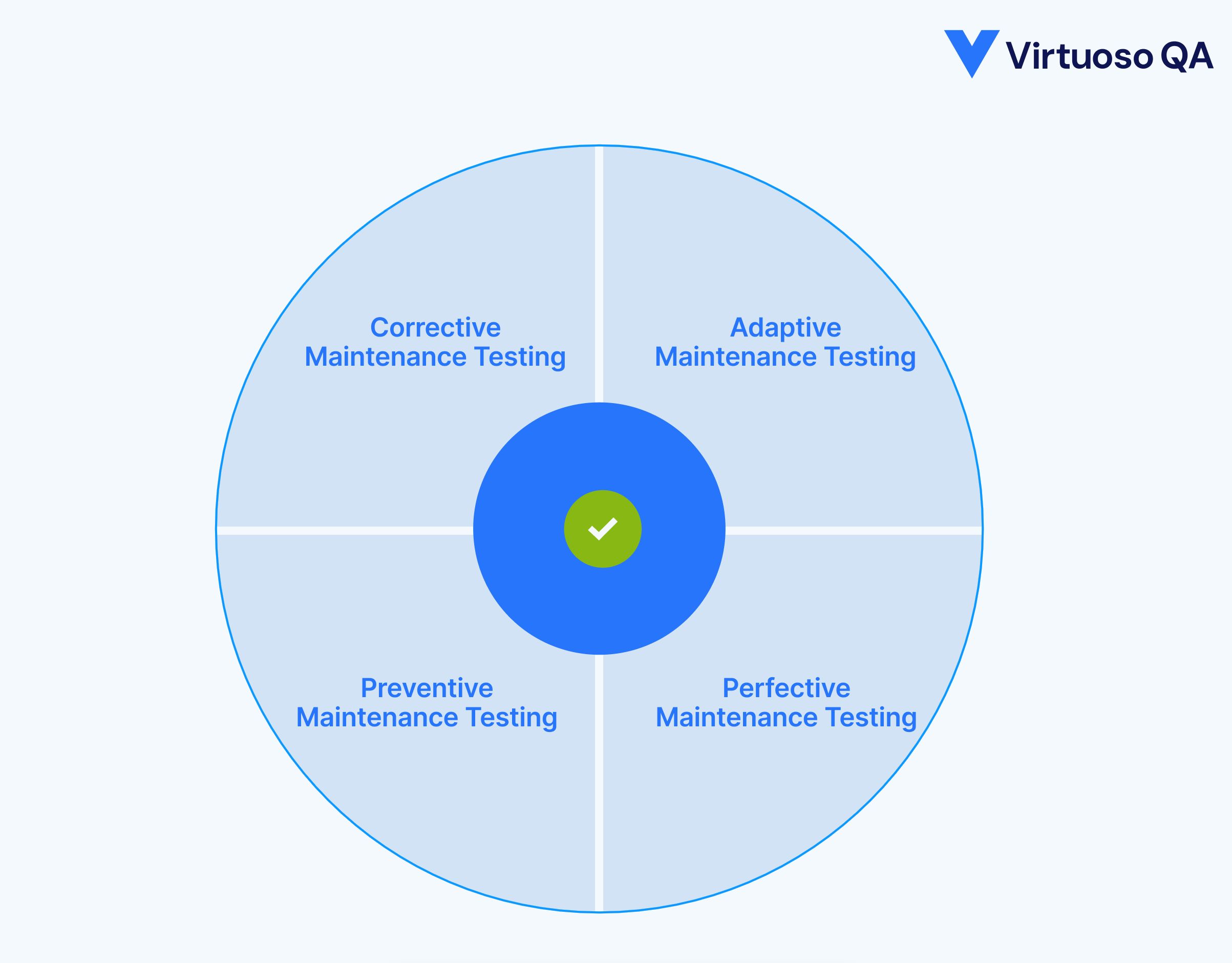
1. Corrective Maintenance Testing
Corrective maintenance testing validates bug fixes and defect repairs. When developers resolve reported issues, corrective testing ensures the fix works correctly and does not introduce new problems.
Key activities include:
Verifying the specific defect is resolved. Testing related functionality that might be affected by the fix. Confirming the fix works across different browsers, devices, and configurations. Validating that no regression has occurred in surrounding features.
2. Adaptive Maintenance Testing
Adaptive maintenance testing validates application changes required by external factors. When operating systems update, browsers release new versions, databases migrate, or regulations change, adaptive testing ensures your application continues to function correctly.
Common triggers for adaptive testing:
Browser version updates (Chrome, Firefox, Edge, Safari). Operating system patches and upgrades. Database platform migrations. Third party API changes. Regulatory compliance updates. Cloud infrastructure modifications.
3. Perfective Maintenance Testing
Perfective maintenance testing validates enhancements and improvements that add new capabilities or improve existing ones. Unlike corrective testing that fixes problems, perfective testing validates intentional improvements.
Examples include:
Testing new features added to existing modules. Validating performance optimizations. Verifying user interface enhancements. Testing accessibility improvements. Validating new integrations with external systems.
4. Preventive Maintenance Testing
Preventive maintenance testing proactively identifies potential issues before they affect users. Rather than responding to problems, preventive testing anticipates them.
Preventive testing strategies:
Scheduled regression testing to catch issues early. Automated smoke tests after each deployment. Periodic cross browser compatibility validation. Regular database integrity checks. Proactive monitoring of test stability trends.
Why Maintenance Testing Matters
1. The Cost of Neglected Maintenance
Organizations that underinvest in maintenance testing pay a compounding price:
Production defects increase
Without ongoing validation, changes that seem safe introduce subtle bugs that reach users. Each escaped defect damages customer trust and requires expensive emergency fixes.
Technical debt accumulates
When maintenance testing lags, teams lose confidence in their test suites. Developers stop relying on automated tests, manual testing increases, and release cycles slow.
Test suites become unusable
Unmaintained automated tests fail for reasons unrelated to actual defects. Teams waste time investigating false failures, eventually abandoning automation entirely.
2. The Hidden Test Maintenance Crisis
The most overlooked aspect of maintenance testing is maintaining the tests themselves. Industry research consistently shows that test maintenance consumes the majority of automation resources:
80% of automation effort goes to maintenance
Traditional test frameworks built with Selenium, Cypress, or Playwright require constant updates as applications change. Locators break, wait conditions fail, and test logic becomes invalid.
Maintenance scales faster than test creation
Each new automated test adds to the maintenance burden. Without intervention, maintenance eventually consumes all available testing resources, making new test creation impossible.
Maintenance costs exceed initial development
The total lifetime cost of an automated test is dominated by maintenance, not creation. A test that takes one hour to write may require ten or more hours of maintenance over its lifetime.
This is why organizations report spending up to 80% of their testing time on maintenance and only 10% on authoring new tests.
3. Impact on Release Velocity and Business Outcomes
Maintenance testing is not just a QA concern. It directly affects how fast your organisation ships software and how confidently it does so. Teams with healthy maintenance practices release more frequently because their regression suites provide reliable signals. Deployments are not held up by broken tests or manual verification cycles.
When maintenance testing breaks down, the cost extends beyond the QA team. Product launches slip because teams cannot validate changes quickly enough. Customer-facing defects increase because regression coverage has gaps. Engineering leadership loses visibility into release readiness because test results are no longer trustworthy.
For regulated industries like financial services, healthcare, and insurance, maintenance testing also carries compliance risk. Audit trails depend on consistent, documented test execution. Unmaintained test suites produce unreliable evidence that may not satisfy regulatory review.

Regression Testing: The Core of Maintenance Testing
Regression testing is the most critical component of maintenance testing. It validates that changes have not broken previously working functionality.
What is Regression Testing?
Regression testing re executes existing tests against modified software to detect unintended side effects. The term "regression" refers to the software regressing to a broken state after changes.
Effective regression testing requires:
A comprehensive test suite covering critical business functionality. Automated execution to enable frequent testing without resource constraints. Fast execution to provide timely feedback during development cycles. Reliable tests that fail only for genuine defects, not test fragility.
Building a Regression Test Suite
A well structured regression suite balances coverage with execution time:
Smoke tests: A minimal set of tests validating core functionality. Smoke tests should execute quickly (under 15 minutes) and run after every deployment. If smoke tests fail, the build is immediately rejected.
Critical path tests: Tests covering the most important user journeys. These represent functionality that, if broken, would significantly impact business operations. Critical path tests should run at least daily.
Full regression tests: Comprehensive tests covering all automated functionality. Full regression may take hours to execute and typically runs nightly or on demand before major releases.
Organizing Regression Tests with Tags
Modern testing platforms enable flexible test organization through tagging. Tags categorize tests for selective execution:
Functional tags: Login, Checkout, Search, Reporting
Priority tags: Critical, High, Medium, Low
Component tags: Frontend, API, Database
Status tags: Smoke, Regression, Nightly
Tags allow execution plans to target specific test subsets. A deployment pipeline might run only smoke tests, while a nightly job runs full regression. This flexibility balances feedback speed with coverage depth.
Regression Test Selection and Prioritisation
Not every test belongs in every regression run. Effective regression testing requires deliberate selection based on risk, change impact, and business priority.
Risk based selection
Prioritise tests that cover functionality where failure would cause the greatest business damage. Payment flows, authentication, and data integrity checks should always run. Lower risk features can be tested less frequently.
Change impact analysis
Focus regression effort on areas affected by recent changes. If a sprint modified the checkout module, prioritise checkout-related regression tests over unrelated areas. Modern platforms can map code changes to affected test journeys automatically.
Test retirement
Regression suites grow over time but rarely shrink. Tests covering deprecated features, duplicate scenarios, or consistently stable functionality with zero failure history should be reviewed and retired periodically. A leaner suite runs faster and produces fewer false positives.
The Test Maintenance Challenge
Why Traditional Tests Break
Traditional automated tests break because they rely on brittle element identification methods:
CSS selectors change. Developers refactor CSS classes for styling purposes, breaking selectors that tests depend on.
IDs become dynamic. Modern JavaScript frameworks generate dynamic IDs that change on each page load, making ID based selectors unreliable.
DOM structure evolves. UI redesigns change element hierarchy, breaking XPath expressions that navigate the DOM tree.
Text content updates. Button labels, link text, and error messages change with application updates, breaking text based selectors.
Timing issues emerge. Single page applications load content asynchronously. Tests that worked with previous timing may fail when application performance changes.
Each of these changes requires manual test updates. At scale, the update volume exceeds team capacity.
The Maintenance Debt Spiral
Test maintenance follows a predictable debt spiral:
Stage 1: Initial Success. The team creates automated tests that pass consistently. Confidence in automation grows.
Stage 2: Growing Fragility. Application changes cause increasing test failures. The team fixes tests, but the backlog grows.
Stage 3: Diminishing Trust. False failures become common. Developers ignore test results because failures do not reliably indicate defects.
Stage 4: Abandonment. The test suite becomes more burden than benefit. Teams revert to manual testing or start over with a new framework, repeating the cycle.
Breaking this spiral requires fundamentally different approaches to element identification and test maintenance.
Self Healing: How AI Native Platforms Eliminate Maintenance Bottlenecks
Self healing test automation represents a fundamental shift in how tests maintain themselves. Instead of relying on brittle selectors that break with application changes, self healing platforms use intelligent element identification that adapts automatically.
How Self Healing Works
Self healing automation uses multiple identification strategies simultaneously:
Hint based identification
Tests describe elements using plain English hints like "Checkout button" or "email field" rather than technical selectors. The testing platform interprets these hints using smart logic and heuristics to find the correct element.
Multi attribute matching
Instead of relying on a single selector, the platform analyses multiple element attributes: text content, element type, position, visual appearance, surrounding context, and DOM structure. When one attribute changes, others maintain identification accuracy.
Intelligent inference
The platform understands test context. When a test step says "Write user@test.com in the email field," it infers that the target is likely an input element designed for email addresses, even if the specific selector is ambiguous.
Automatic selector updates
When element selectors change, the self healing mechanism identifies new selectors that match the same element. Tests continue executing correctly without manual intervention.
Self Healing Accuracy and Impact
Modern AI native test platforms achieve approximately 95% accuracy in self healing automation. This means that 95 out of 100 application changes that would break traditional tests are automatically resolved.
The business impact is dramatic:
81% reduction in test maintenance time: Organizations report maintenance savings of 81% for UI tests and 69% for API tests when using self healing platforms.
88% reduction in overall maintenance effort: Combined with natural language authoring and intelligent element identification, total maintenance burden drops by 88%.
Tests kept automatically up to date: The ongoing burden of updating element selectors is eliminated. Tests remain current without manual intervention.
Visibility Into Self Healing Activity
Self healing should not be a black box. Enterprise teams need to know what changed, when it was healed, and whether the healing was correct.
AI native platforms log every self healing event with details on the original selector, what changed in the application, and the new identification method applied. Teams can review healed steps, approve or override healing decisions, and track healing frequency over time. High healing frequency on a specific journey may signal that the underlying application area is unstable and needs developer attention, not just test adaptation.
This transparency is critical for audit compliance, team confidence, and continuous improvement of both the application and the test suite.
When Self Healing Reaches Limits
Self healing cannot resolve every scenario. Intentional functionality changes should surface as genuine failures. Removed elements require manual updates. Ambiguous matches may need additional guidance.
For these cases, three AI capabilities close the gap.
AI Root Cause Analysis
When tests fail, AI root cause analysis provides detailed failure insights (logs, screenshots, UI comparisons), remediation suggestions that reduce debugging time by 75%, and pattern recognition that surfaces systemic issues across multiple tests. One UI refactor breaking 30 tests is identified as a single root cause, not 30 isolated problems.
AI Journey Summaries
Generative AI analyses recent execution results and delivers impact analysis, change correlation, and trend interpretation. Teams get narrative summaries of test suite health instead of scanning pass/fail tables manually.
Business Process Orchestration
Maintenance testing often spans multiple applications. Business process orchestration enables ordered execution across systems, context sharing between test stages, and unified scheduling and notifications from a single interface. Particularly valuable for adaptive and perfective maintenance where changes in one system must be validated against dependent systems.

Building a Maintenance Testing Strategy
A reactive approach to test maintenance leads to constant firefighting and eroding test coverage. Proactive maintenance testing ensures your test suite remains reliable, relevant, and aligned with application changes. Building a deliberate maintenance strategy transforms testing from an unpredictable burden into a manageable, scheduled activity.
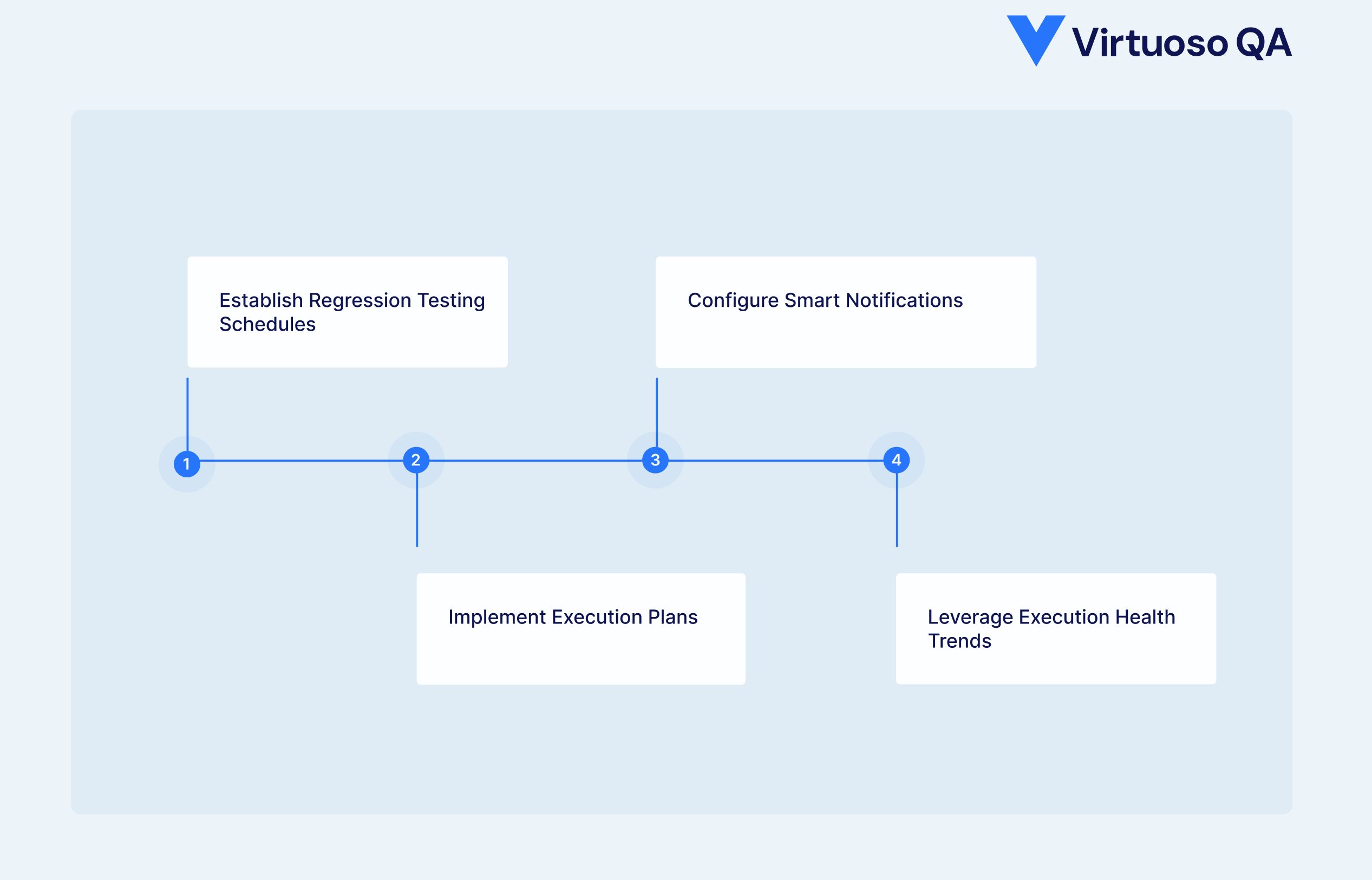
1. Establish Regression Testing Schedules
Effective maintenance testing requires disciplined scheduling that balances thorough coverage with practical time constraints.
Continuous integration tests. Execute smoke tests automatically on every code commit. Catch regressions immediately, before they propagate.
Nightly regression. Run comprehensive regression suites overnight when execution time is less constrained. Review results each morning.
Pre release validation. Execute full test suites before major releases. Include cross browser and cross device testing across all supported configurations.
Scheduled maintenance windows. Allocate specific time for test suite maintenance, not just test execution. Even self healing platforms benefit from periodic review.
2. Implement Execution Plans
Execution plans define which tests run, when they run, and how they are configured. Well-designed plans ensure consistent, repeatable test execution without manual intervention.
Plan configuration includes:
Test Targets: Entire goals, specific journeys, or tag-based selection
Device Configurations: Operating systems, browsers, devices, and orientations
Schedules: Once, hourly, daily, weekly, or custom intervals
Environment Settings: Staging, production, or custom environments
Notification Preferences: Who receives results and under what conditions
Modern platforms support multi-goal plans that combine tests from different goals into unified execution runs. This enables comprehensive regression testing across application boundaries within a single scheduled execution.
3. Configure Smart Notifications
Not all test failures require immediate attention. Effective notification configuration ensures the right people receive relevant information without creating alert fatigue.
Immediate alerts: Critical path failures that indicate production risk.
Aggregated summaries: Nightly regression results compiled into digestible reports.
Trend alerts: Notifications when test stability degrades over time.
Selective silence: Suppress notifications for known issues under investigation.
Integration with Slack, Teams, email, and test management tools ensures the right people receive relevant information without notification fatigue.
4. Leverage Execution Health Trends
Track test execution health over time rather than focusing solely on individual results. Patterns reveal insights that single test runs cannot provide. Execution health trends plot journey executions over time, typically spanning up to 90 days.
This visualisation reveals:
Tests that fail intermittently, indicating potential flakiness.
Correlations between application changes and test failures.
Gradual stability degradation that needs attention.
Impact of test updates on execution outcomes.
When analyzing trends, AI driven journey execution summaries can provide automated analysis of recent changes and their impact on test outcomes.
Test Maintenance Best Practices
1. Design for Maintainability
The best maintenance strategy starts with maintainable test design:
Use natural language steps
Tests written in plain English are easier to understand, update, and maintain than coded scripts. "Click on the Login button" communicates intent more clearly than technical selectors.
Organize with reusable checkpoints
Group related steps into checkpoints that can be shared across multiple journeys. When shared functionality changes, update once and propagate everywhere.
Leverage library checkpoints
For functionality used across multiple goals, create library checkpoints that exist at the project level. Centralizing maintenance prevents duplicate effort.
Parameterize with variables
Use environment variables and test data tables instead of hardcoded values. Changing configurations becomes a data update rather than a test rewrite.
Manage Test Data as a Maintenance Activity
Use AI powered data generation to create realistic test data on demand rather than relying on static datasets that degrade over time. Isolate data between test runs so parallel executions do not interfere with each other. Parameterised journeys combined with external data sources (CSV, API, databases) allow teams to update test data without touching test logic.
2. Monitor Test Stability
Track metrics that indicate maintenance health:
Pass rate trends
Declining pass rates often indicate growing maintenance debt rather than increasing application defects.
Flaky test identification
Tests that sometimes pass and sometimes fail without application changes waste investigation time. Identify and stabilize or remove flaky tests.
Maintenance time tracking
Measure time spent maintaining tests versus creating new coverage. Growing maintenance ratios signal problems.
Self healing activity
Monitor how frequently self healing engages. High healing frequency may indicate application instability or overly brittle test design.
3. Establish Maintenance Workflows
Define clear processes for handling test failures:
Triage quickly
When tests fail, immediately determine whether failures indicate application defects or test issues. Do not let failures linger uninvestigated.
Fix or flag
Either fix failing tests promptly or explicitly flag them as known issues. Unflagged failing tests erode confidence in the entire suite.
Root cause analysis
For each failure, understand the underlying cause. Was it an application change, environment issue, or test design problem? Address root causes, not just symptoms.
Continuous improvement
Regularly review maintenance patterns. Which tests require frequent updates? Why? Can test design improve to reduce maintenance needs?
Measuring Maintenance Testing Success
Key Metrics to Track
1. Test maintenance ratio
Time spent maintaining tests versus creating new coverage.
Target: below 20% maintenance.
2. Mean time to repair
Average time to fix failing tests.
Target: under 30 minutes for routine maintenance.
3. Test stability index
Percentage of tests that pass consistently without changes.
Target: above 95%.
4. Self healing rate
Percentage of application changes automatically handled by self healing.
Target: above 90%.
5. Regression detection rate
Percentage of actual regressions caught by automated testing.
Target: above 85%.
ROI Calculation
Calculate maintenance testing ROI by comparing:
Traditional automation costs: Initial test creation + ongoing maintenance + failure investigation + manual testing for gaps
AI native automation costs: Initial test creation (often faster) + reduced maintenance (81% lower) + reduced investigation (75% faster) + broader automated coverage
Organizations consistently report 78% cost savings and 81% maintenance savings when transitioning to AI native platform with self healing capabilities.
How Virtuoso QA Reduces Maintenance Testing Effort
Virtuoso QA is AI native, built from the ground up to solve the maintenance problem. Every capability reduces time spent fixing tests and increases time spent finding defects.
StepIQ: Autonomous Test Authoring
StepIQ uses NLP and application analysis to generate test steps autonomously. Testers describe intent; StepIQ builds steps by analysing UI elements and user behaviour. Tests are inherently more maintainable because they are based on intent, not selectors.
GENerator: Legacy Scripts to Maintainable Tests
GENerator's LLM powered engine converts scripts from Selenium, Tosca, TestComplete, and other frameworks into Virtuoso QA journeys. It also generates tests from application screens, Figma designs, and Jira stories. Output is composable and reusable, not one off scripts.
AI Authoring and AI Guide
AI Authoring lets testers specify screen regions with natural language descriptions and generates corresponding test steps. AI Guide provides context-aware, in-platform support that surfaces targeted solutions when maintenance issues arise.
Composable Testing Architecture
Reusable checkpoints and library checkpoints shared across goals and journeys mean teams update once, propagate everywhere. Combined with parameterised journeys and environment variables, configuration changes become data updates, not test rewrites.

Related Reads
Frequently Asked Questions
What are the four types of maintenance testing?
What causes automated tests to fail during maintenance?
How do I reduce test maintenance effort?
What is self healing test automation?
How much time do teams spend on test maintenance?
What is the difference between maintenance testing and regression testing?




