Guide
Complete Guide to Smoke Testing with Examples

Adwitiya Pandey
Published on

See Virtuoso in action
Book a walkthrough on your applications and your workflows. Bring a requirement, a user journey, or a brittle Selenium script, and watch the loop run on something you recognise.

Smoke testing, also known as build verification testing, validates whether a new software build is stable enough for further testing. This quick, broad assessment of critical functionality serves as the first quality gate after code deployment, preventing unstable builds from blocking entire QA teams. In modern DevOps environments where teams deploy multiple builds daily, traditional manual smoke testing creates bottlenecks that slow continuous integration pipelines. AI-native test automation now enables teams to execute comprehensive smoke tests in minutes through automated test generation, self-healing maintenance, and seamless CI/CD integration.
What is Smoke Testing?
Smoke testing is a preliminary software testing technique that verifies whether a newly deployed build's most critical functions work correctly. Rather than exhaustively testing every feature, smoke testing performs a quick, broad validation of core functionality to answer one essential question: Is this build stable enough to proceed with comprehensive testing?
Think of smoke testing as a health check for your software. Just as a doctor takes your vital signs before conducting detailed examinations, smoke testing checks the vital functions of a software build before investing hours in detailed functional, integration, or system testing. If core functions fail this initial check, the build is rejected immediately and returned to developers for fixes.
The term "smoke testing" originates from hardware testing practices. When engineers powered on a new circuit board, they would literally watch for smoke. If smoke appeared, the device had critical failures and testing stopped immediately. Similarly, software smoke testing looks for "fires" that indicate fundamental problems requiring immediate attention.
Key Characteristics of Smoke Testing
1. Short and focused
Smoke tests check critical features only, not edge cases or detailed scenarios. Each test is narrow in scope.
2. Rapid execution
The entire smoke test suite should complete within 30 minutes, ideally under 15, to deliver fast feedback without creating a pipeline bottleneck.
3. Broad coverage
While individual tests are shallow, the suite collectively touches all major application components including UI, data processing, integrations, and core business logic.
4. Clear pass or fail outcome
There is no ambiguity
Any smoke test failure indicates a critical issue that must be resolved before further testing proceeds.
5. Repeatable and automatable
Smoke tests execute identically every time, making them ideal candidates for automation within CI/CD pipelines.
6. Independent
Each smoke test runs without depending on the result of another. This enables parallel execution and consistent results regardless of execution order.
7. Regularly maintained
Smoke tests are reviewed and updated as critical features evolve to prevent outdated tests from producing false confidence.
The Critical Role of Smoke Testing in Modern Software Delivery
In today's fast-paced development environments, teams deploy new builds multiple times daily. Each build represents hours of development work and potentially contains integration issues, configuration errors, or breaking changes that make the build unusable. Without effective smoke testing, QA teams waste precious time attempting detailed testing on fundamentally broken builds.
Smoke testing serves as the gatekeeper in the continuous integration pipeline. It prevents bad builds from progressing to expensive testing phases, saves QA resources by identifying showstoppers early, and provides developers with rapid feedback on build stability. This quick validation cycle enables teams to fail fast, fix immediately, and maintain development velocity.
Microsoft research demonstrates that after code reviews, smoke testing is the most cost-effective method for identifying and fixing software defects. The return on investment is clear: catching a critical defect during smoke testing costs far less than discovering it during system testing, acceptance testing, or worst of all, in production.
Smoke Testing vs Sanity Testing vs Regression Testing
Smoke testing is frequently confused with related testing types. Understanding these distinctions ensures teams apply the right testing approach at the right time.
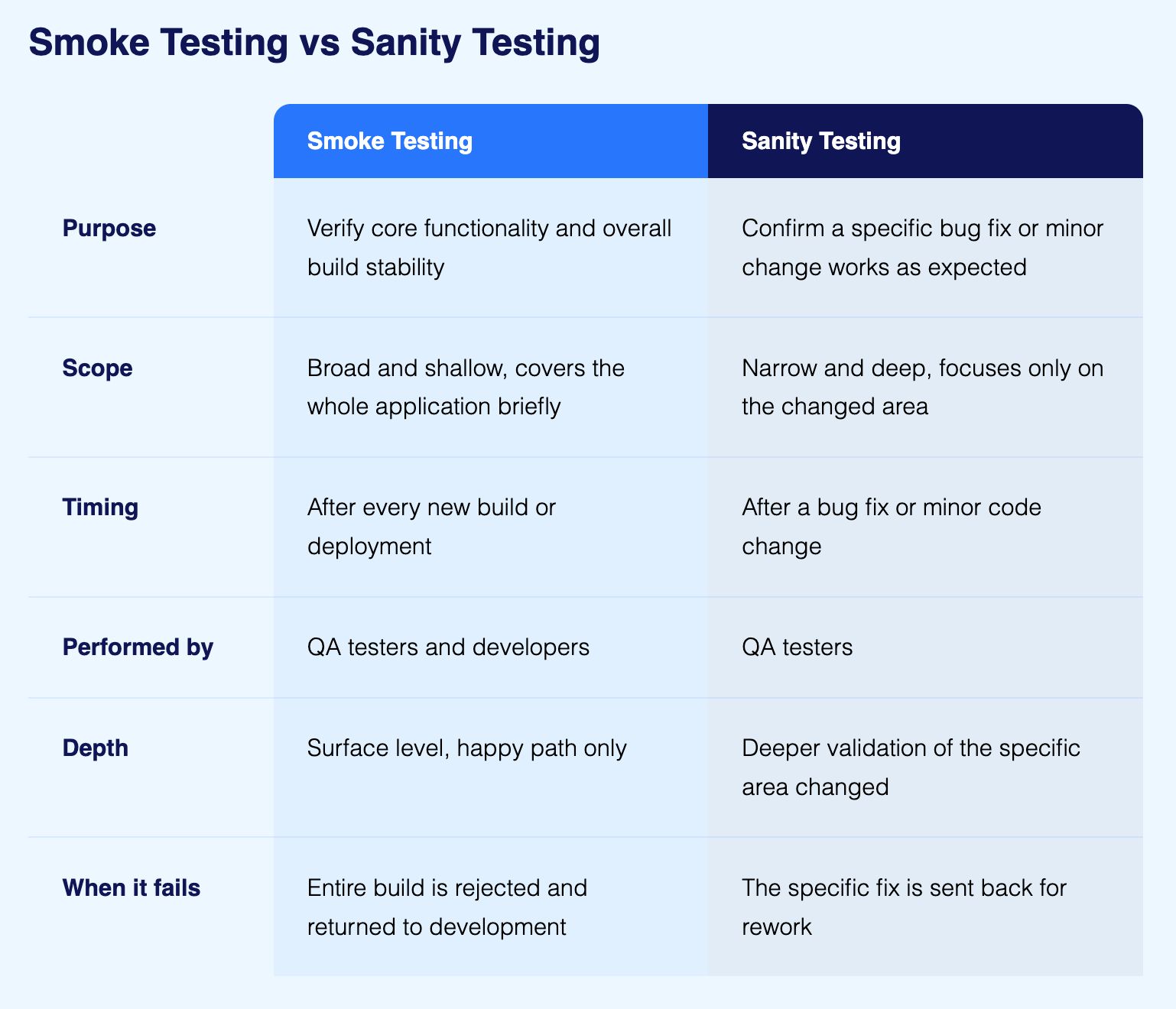
Smoke Testing validates build stability by checking critical functionality broadly but shallowly. It answers: "Is the build stable enough to test?" Smoke tests run after every new build deployment.
Sanity Testing validates specific functionality after minor changes or bug fixes. It answers: "Does this specific fix work?" Sanity testing is narrow and deep, focusing on changed areas rather than broad system coverage.
Regression Testing validates that new changes haven't broken existing functionality. It answers: "Did we break something that worked before?" Regression testing is comprehensive and time-consuming, covering the full application.
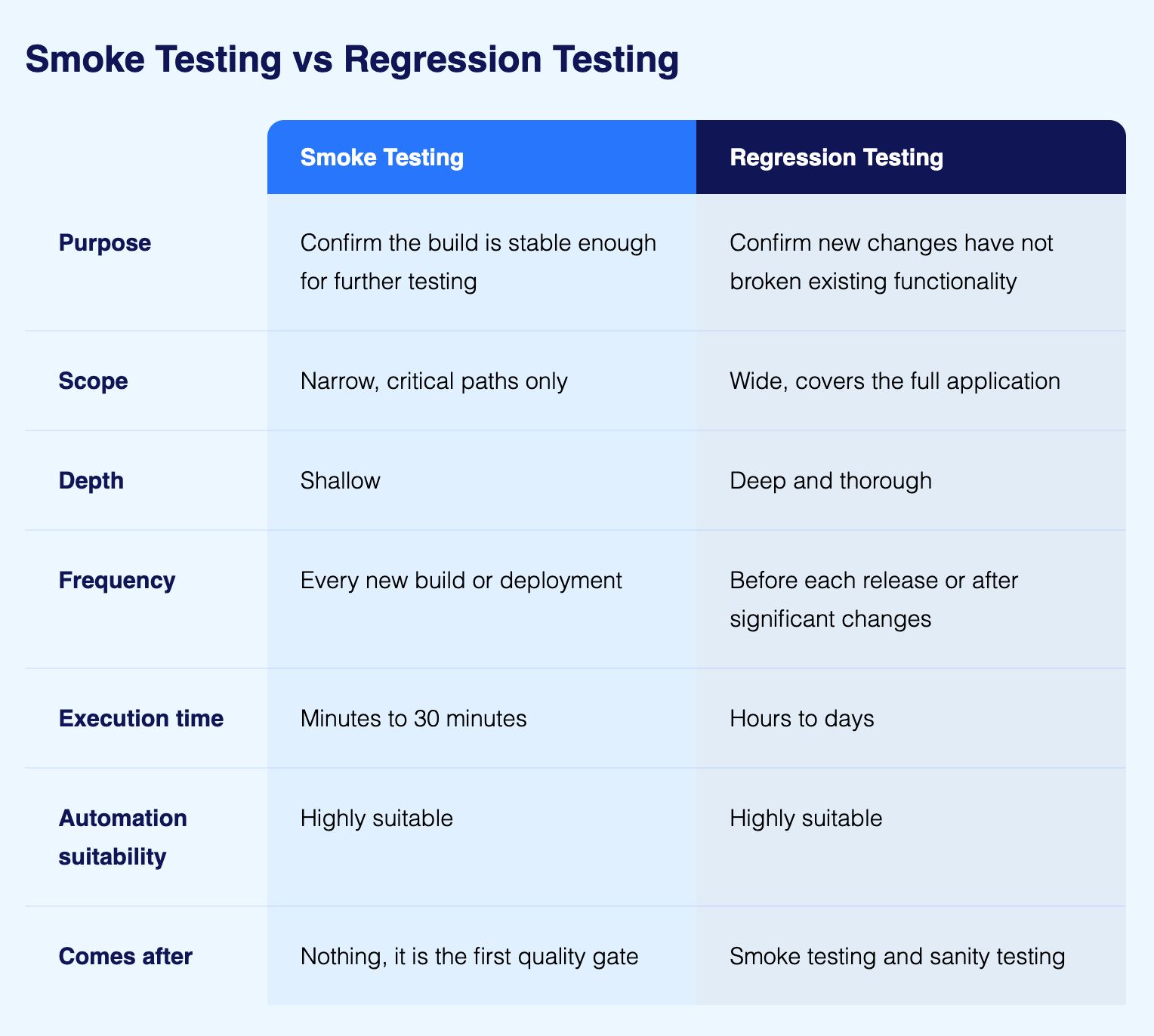
The sequence: Smoke testing happens first (build-level check), then sanity testing (change-level check), then regression testing (comprehensive validation), followed by full functional testing.
To know more, read: Smoke Testing vs Regression Testing - Key Differences Explained
When to Perform Smoke Testing
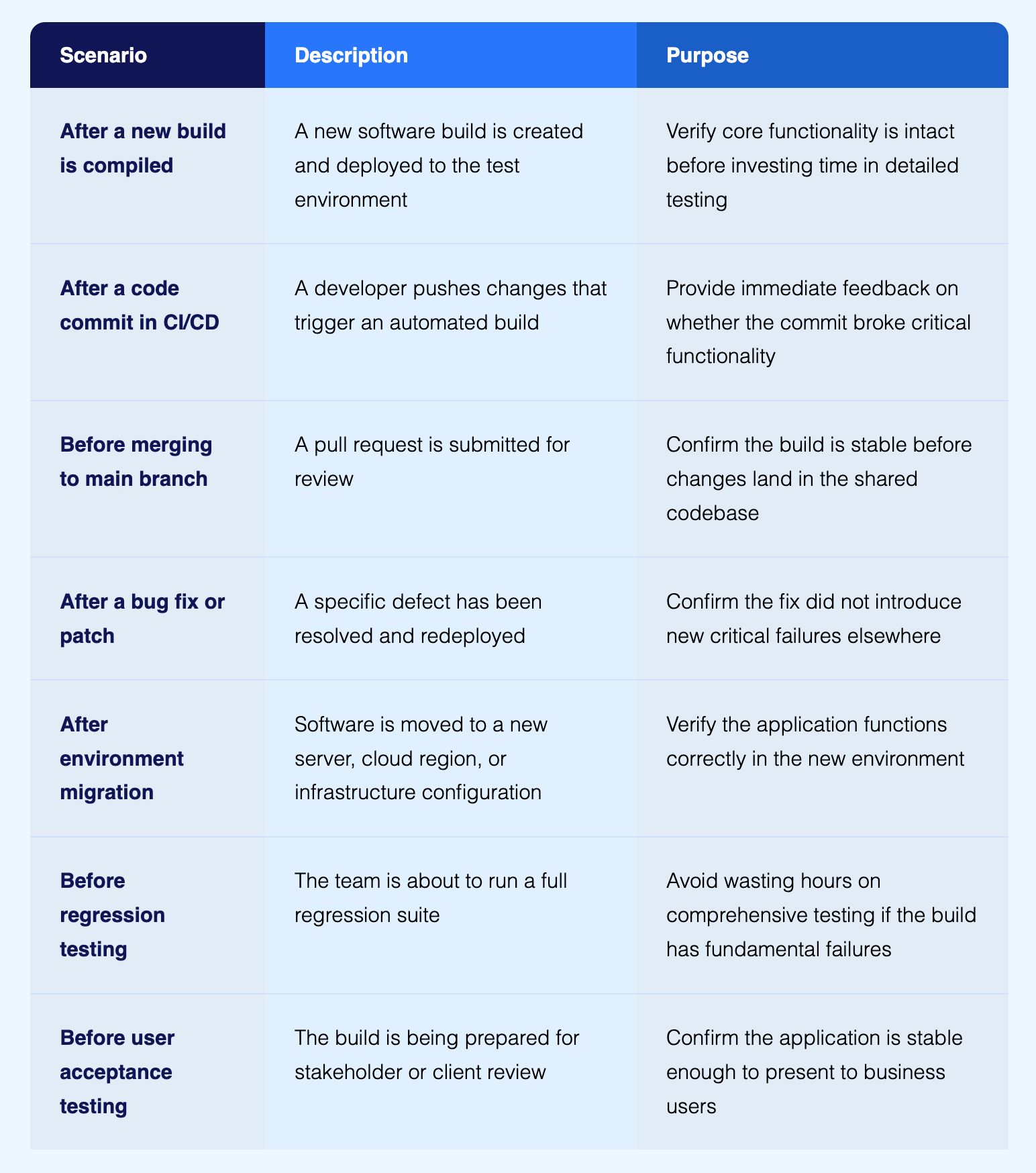
Why Smoke Testing Matters: Business and Technical Impact
Organizations often underestimate smoke testing's strategic value. Effective smoke testing delivers measurable business and technical benefits that compound across the development lifecycle.
1. Preventing Resource Waste
When QA teams begin detailed testing on unstable builds, they waste time logging defects that stem from fundamental build failures rather than feature-specific issues. A single unstable build can block a team of ten testers for an entire day while they troubleshoot environment issues, configuration problems, or showstopper defects.
Smoke testing prevents this waste by identifying unstable builds in minutes rather than hours. The build is rejected before detailed testing begins, allowing developers to fix core issues while QA teams continue testing the previous stable build.
2. Accelerating Feedback Loops
In continuous integration environments, rapid feedback is essential. Developers need to know immediately whether their code changes broke critical functionality. Smoke testing integrated into CI/CD pipelines provides this feedback within minutes of code commits.
This rapid validation enables developers to fix issues while the code context is still fresh in their minds. Rather than discovering integration failures days later during system testing, developers address problems immediately after introduction.
3. Maintaining Testing Momentum
Nothing destroys QA productivity faster than starting detailed test execution only to discover the build is fundamentally broken. Smoke testing maintains testing momentum by ensuring every build entering detailed testing phases is fundamentally sound.
This consistency enables QA teams to maintain predictable testing schedules, plan resource allocation effectively, and deliver quality assessments on committed timelines.
4. Supporting Continuous Integration Maturity
Industry best practices identified by IEEE and documented in Steve McConnell's "Code Complete" emphasize daily builds and smoke tests as hallmarks of continuous integration maturity. Organizations that implement automated smoke testing advance their DevOps capabilities and achieve faster, more reliable software delivery.

Different Types of Smoke Testing
Smoke testing encompasses different approaches and focuses depending on development stage, application type, and organizational needs.
1. Manual Smoke Testing
Manual smoke testing involves human testers executing a predefined set of test cases by hand against a new build. Testers follow step-by-step instructions to validate critical workflows like user login, navigation to key screens, basic data entry, and critical transaction processing.
When to use manual smoke testing:
Early-stage projects without test automation infrastructure
Applications with frequently changing interfaces where automation maintenance is costly
Scenarios requiring subjective evaluation (visual design, usability)
Small teams with limited automation expertise
Limitations: Manual smoke testing is time-consuming, prone to human error, difficult to scale across multiple builds daily, and creates bottlenecks in fast-moving CI/CD pipelines.
2. Automated Smoke Testing
Automated smoke testing uses pre-written test scripts that execute automatically after build deployment. These scripts validate critical functionality programmatically, providing consistent, repeatable validation without human intervention.
Modern test automation platforms enable teams to create smoke tests using Natural Language Programming, dramatically reducing the technical barrier to automation. Instead of writing code, testers describe test scenarios in plain English and the AI executes the appropriate actions.
Benefits of automation:
Executes in minutes instead of hours
Runs consistently without human error
Integrates seamlessly into CI/CD pipelines
Scales effortlessly across unlimited builds
Frees human testers for high-value exploratory work
AI-native advantage: Self-healing test automation achieves 95% accuracy in automatically adapting to UI changes. When interface elements change, tests self-repair rather than fail, eliminating the maintenance burden that traditionally made automated smoke testing unsustainable.
3. Hybrid Smoke Testing
Hybrid smoke testing combines automated checks for stable functionality with manual validation of new or frequently changing features. This balanced approach leverages automation for efficiency while maintaining human judgment where needed.
For example, a hybrid approach might automate login, navigation, and database connectivity checks while manually testing a newly redesigned checkout flow that changes frequently.
4. Functional Smoke Testing
Functional smoke testing validates that core business functions work correctly. This includes critical user workflows, essential transactions, and primary application features.
Examples for an e-commerce application:
User can log in with valid credentials
Product search returns results
Items can be added to shopping cart
Checkout process initiates without errors
Order confirmation displays after purchase
Functional smoke tests don't validate edge cases or detailed scenarios. They simply confirm the happy path for critical functionality works as expected.
5. Non-Functional Smoke Testing
Non-functional smoke testing validates critical quality attributes beyond basic functionality. This includes basic performance checks, security validation, and accessibility verification.
Examples:
Application loads within acceptable time threshold
Authentication and authorization work correctly
Database connections establish successfully
API endpoints respond without errors
Critical pages render properly across major browsers
6. Build Verification Testing (BVT)
Build Verification Testing is essentially synonymous with smoke testing but emphasizes the build-level focus. BVT specifically validates that a new build is deployable, stable, and ready for testing environments.
BVT typically includes:
Application installs without errors
Configuration files are correctly deployed
Database migrations complete successfully
External integrations are accessible
Core services start without errors
The Smoke Testing Process: From Build to Go/No-Go Decision
Effective smoke testing follows a structured process that ensures consistent build evaluation while maintaining rapid feedback cycles.
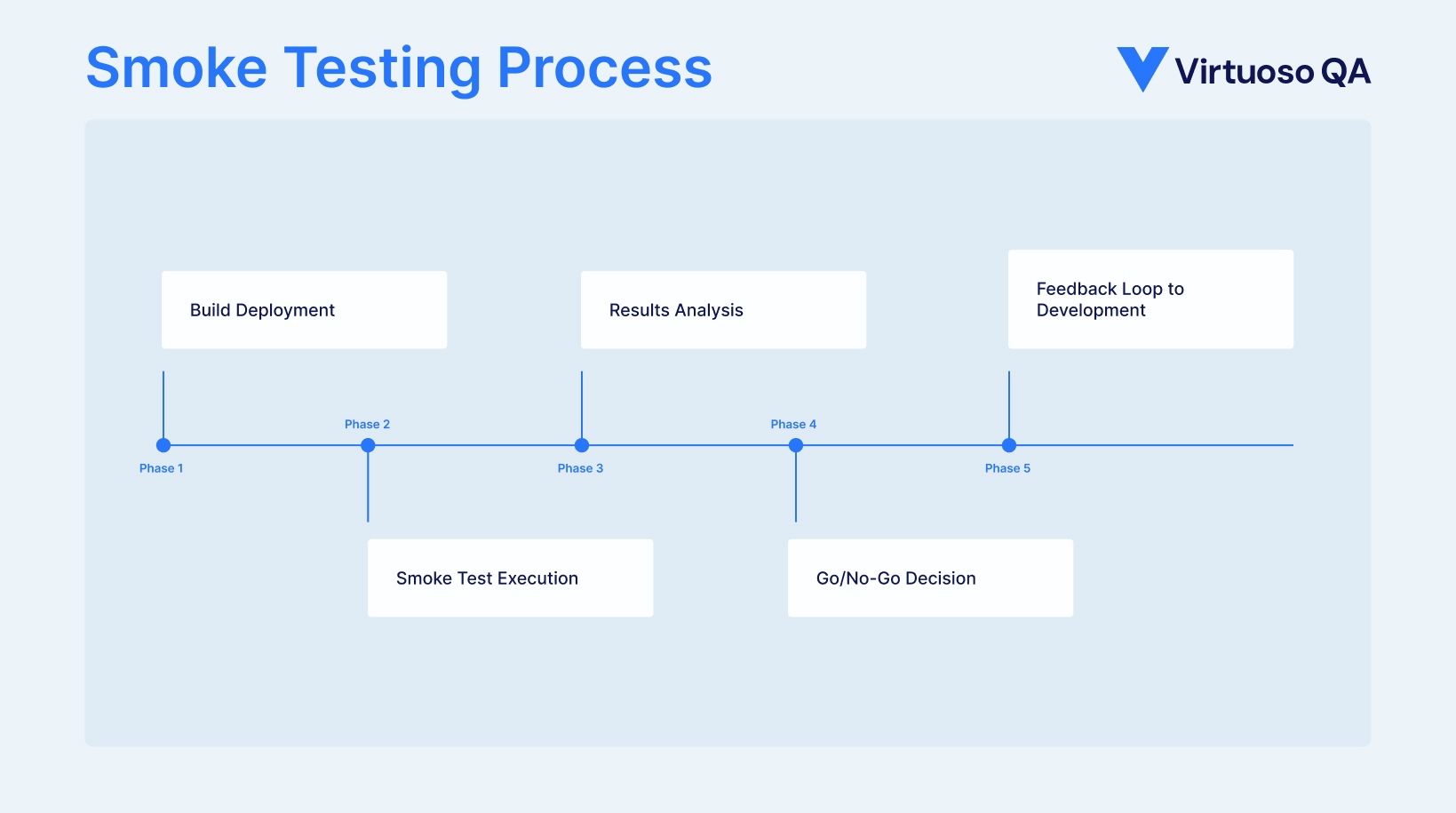
Step 1: Build Deployment
The process begins when developers complete a new build and deploy it to a QA or staging environment. In continuous integration pipelines, this deployment happens automatically after code commits pass unit tests and integration tests.
Modern cloud-based test environments enable rapid provisioning of test infrastructure, eliminating the delays associated with manual environment setup.
Step 2: Smoke Test Execution
Once the build is deployed, smoke tests execute immediately. In automated environments, this happens without human intervention through CI/CD integration. The smoke test suite runs a predefined set of test cases covering critical application functionality.
Execution approach:
Tests run in parallel to minimize execution time
Critical paths are validated first
Tests stop immediately upon detecting showstopper issues
Execution evidence is captured (screenshots, logs, metrics)
Step 3: Results Analysis
After smoke test execution completes, results are analyzed to determine build stability. This analysis identifies:
How many tests passed vs. failed
Which critical functions are broken
Whether failures represent showstoppers
What evidence exists to diagnose issues
AI-powered root cause analysis automatically diagnoses test failures by analyzing screenshots, DOM structures, network traffic, console logs, and performance metrics. Instead of manually investigating failures, testers receive actionable diagnostics immediately.
Step 4: Go/No-Go Decision
Based on smoke test results, a go/no-go decision is made:
Go Decision: If smoke tests pass (or acceptable failure thresholds are met), the build is promoted to detailed testing phases. QA teams proceed with comprehensive functional, integration, and system testing.
No-Go Decision: If smoke tests reveal critical failures, the build is rejected. Development teams receive detailed failure evidence and the build returns to development for fixes. QA continues testing the previous stable build.
Step 5: Feedback Loop to Development
When builds are rejected, rapid feedback to developers is critical. Modern test automation platforms provide comprehensive failure evidence including screenshots, execution videos, network logs, and console errors that enable developers to quickly diagnose and fix issues.
This rapid feedback loop is essential for maintaining development velocity. Developers fix issues while code context is fresh, then deploy a new build for smoke testing validation.
Smoke Testing Best Practices for Modern Development Teams
Implementing effective smoke testing requires both technical capabilities and organizational discipline. These best practices ensure maximum value from smoke testing efforts.
1. Define Critical Functionality Clearly
Smoke tests should focus exclusively on critical functionality that represents the application's "heartbeat." Work with stakeholders to identify must-work features that, if broken, make the build unusable.
Create a clear definition of critical paths:
User authentication and authorization
Primary navigation and routing
Essential data operations (create, read, update)
Critical business transactions
Key integrations with external systems
Avoid scope creep: Resist the temptation to expand smoke tests into comprehensive functional tests. Smoke testing should remain fast (under 30 minutes for most applications) and focused on showstoppers.
2. Automate Smoke Tests from Day One
Manual smoke testing is unsustainable in modern CI/CD environments. Automate smoke tests as early as possible in the development lifecycle, ideally starting when the first critical features are implemented.
Natural Language Programming enables teams to automate tests without extensive coding expertise. Testers describe scenarios in plain English and AI interprets these instructions into executable tests. This democratization of test automation accelerates smoke test creation from weeks to days.
3. Integrate Smoke Tests into CI/CD Pipelines
Smoke tests deliver maximum value when integrated directly into continuous integration pipelines. Configure your CI/CD system to automatically execute smoke tests after each build deployment.
Pipeline integration pattern:
Code commit triggers build
Build compilation and unit tests
Deployment to test environment
Automated smoke test execution
Pass: Proceed to detailed testing
Fail: Reject build, notify developers
This automation ensures every build receives immediate validation without manual intervention.
4. Maintain Smoke Test Independence
Each smoke test should be independent and executable in any order. Tests should not depend on the execution of previous tests or share state across test cases. This independence enables parallel execution for faster feedback.
Test data management: Use dedicated test data for smoke tests that can be reset easily between executions. Avoid using production data or data shared with other test suites.
5. Keep Smoke Tests Fast
Speed is paramount for smoke testing. If smoke tests take too long, they cease being useful gatekeepers and instead become bottlenecks themselves.
Speed optimization strategies:
Execute tests in parallel across multiple execution threads
Focus on UI validation only for critical user-facing workflows
Use API-level testing for backend functionality when possible
Leverage cloud-based execution grids for unlimited concurrency
Eliminate unnecessary wait times and explicit delays
Target smoke test execution under 30 minutes for most applications, ideally under 15 minutes for simple systems.
6. Implement Self-Healing Test Maintenance
Traditional automated smoke tests break frequently as applications evolve. UI changes, element modifications, and workflow updates cause test failures unrelated to actual defects. This maintenance burden makes automation unsustainable.
Self-healing test automation solves this problem through AI-powered adaptation. When UI elements change, tests automatically identify elements using contextual analysis, visual recognition, and intelligent pattern matching. Tests self-repair and continue executing without human intervention.
Organizations implementing self-healing automation report 81-88% reduction in test maintenance effort, transforming smoke testing from a constant maintenance burden into a strategic asset.
7. Establish Clear Pass/Fail Criteria
Define unambiguous criteria for smoke test success before execution begins. Remove subjective judgment from the go/no-go decision by establishing rules like:
100% of critical path tests must pass
No P1 (showstopper) defects allowed
Maximum of N P2 (major) defects acceptable
All smoke tests must execute without errors
Clear criteria prevent debates about build quality and ensure consistent standards across teams.
8. Version Control Your Smoke Tests
Smoke test scripts should be version-controlled alongside application code. This ensures smoke tests evolve with the application and enables teams to track changes, review test updates, and roll back problematic modifications.
Store smoke tests in the same repository as application code or in a dedicated test repository with proper branching and merge strategies.
9. Monitor Smoke Test Metrics
Track key smoke testing metrics to identify trends, optimize processes, and demonstrate value:
Execution time: How long smoke tests take to complete
Pass rate: Percentage of smoke tests passing per build
Defect detection rate: Number of critical defects caught
Build rejection rate: Percentage of builds failing smoke tests
Time to feedback: Minutes from build deployment to test results
Analyze trends over time. Increasing build rejection rates may indicate development quality issues. Decreasing defect detection might suggest smoke tests need expansion.

Smoke Testing Metrics
Tracking the right metrics reveals whether your smoke testing programme is providing genuine build protection or simply generating activity. These four metrics provide the most actionable signal.
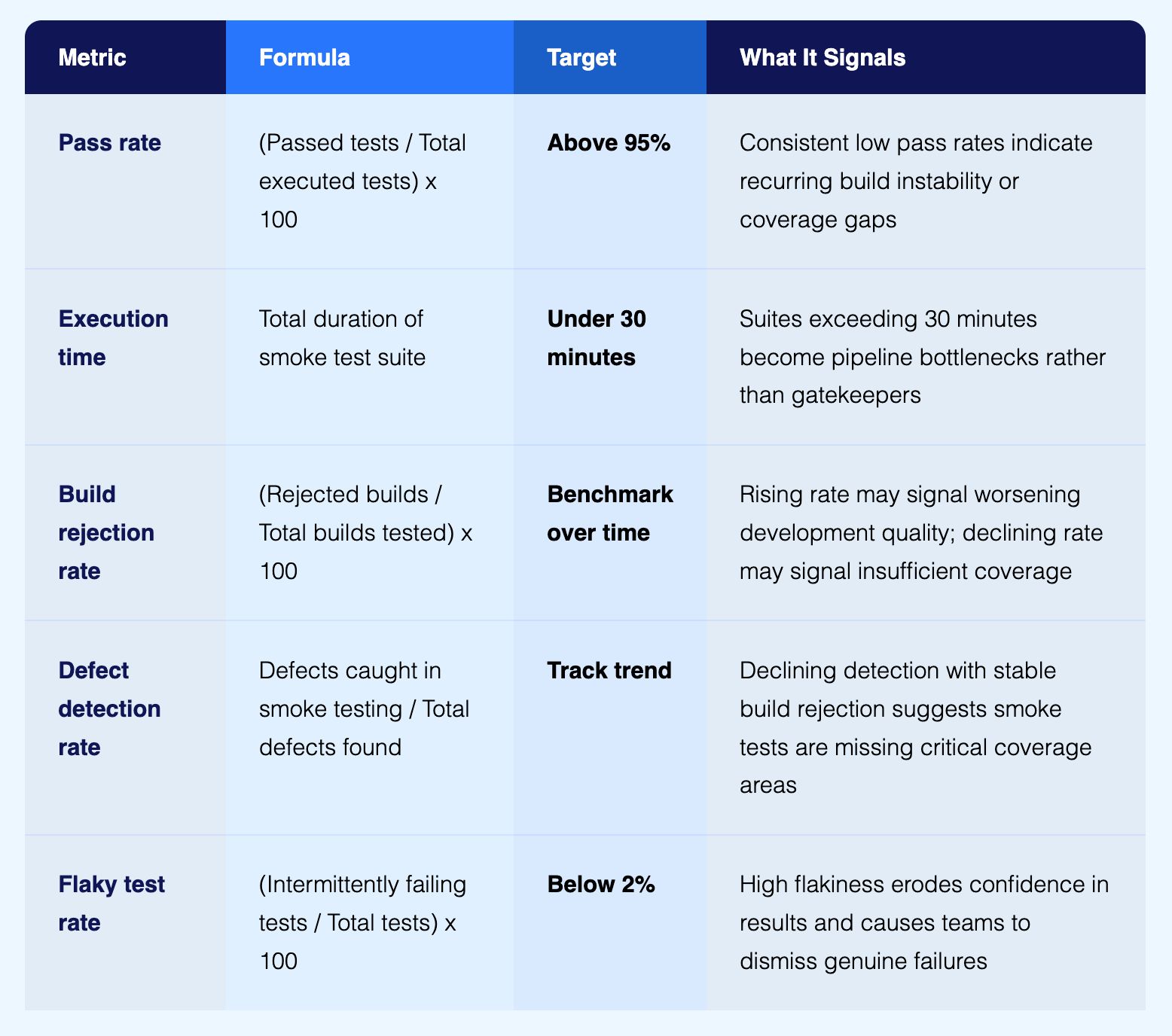
Analyse these metrics across releases rather than in isolation. A smoke test suite with a 98% pass rate that takes 90 minutes to run is not serving its purpose. A suite that completes in 12 minutes with an 85% pass rate that catches two showstopper defects per sprint is delivering real value.
Smoke Testing for Enterprise Applications
Enterprise applications present unique smoke testing challenges due to complexity, integration depth, and business criticality. Tailored approaches ensure effective build validation.
1. Smoke Testing SAP and Oracle ERP Systems
Enterprise resource planning systems span multiple integrated modules handling critical business processes. Smoke testing must validate cross-module integration while remaining fast enough for frequent builds.
Critical smoke test scenarios:
User authentication across all modules
Navigation to primary transaction screens
Database connectivity and basic data retrieval
Integration with financial systems
Core transaction workflows (order entry, invoice processing)
Composable testing approach: Pre-built test libraries for common ERP processes enable teams to assemble smoke tests from validated components rather than building from scratch. This accelerates smoke test creation while ensuring comprehensive coverage.
2. Smoke Testing Salesforce and CRM Platforms
Customer relationship management platforms combine standard functionality with custom configurations unique to each organization. Smoke testing must validate both out-of-box features and custom business logic.
Critical validation areas:
Login and permission-based access
Standard object CRUD operations (Accounts, Contacts, Opportunities)
Custom object functionality
Workflow automation and business rules
Report generation and dashboard rendering
Interesting Read: Understanding Salesforce Testing and the Role of AI Test Automation
3. Smoke Testing Healthcare Systems like Epic EHR
Healthcare applications handle sensitive patient data and must maintain 24/7 availability. Smoke testing validates critical clinical workflows and regulatory compliance controls.
HIPAA-compliant testing:
Patient data access controls and audit logging
Clinical workflow integration (orders, results, documentation)
HL7 and FHIR interoperability endpoints
Medication ordering and administration workflows
Emergency access and override procedures
4. Smoke Testing Financial Services Applications
Banking, insurance, and investment platforms require rigorous smoke testing that validates transaction integrity and security controls before detailed testing begins.
Regulatory and security focus:
Authentication and multi-factor authorization
Transaction processing and rollback mechanisms
Encryption of sensitive data in transit and at rest
Fraud detection and prevention controls
Regulatory reporting data availability
AI-Native Smoke Testing: The Modern Approach
Traditional smoke testing approaches cannot keep pace with modern software delivery demands. AI-native test automation fundamentally reimagines how teams validate builds.
Natural Language Test Creation
Instead of writing code to automate smoke tests, Natural Language Programming enables anyone to create tests by describing scenarios in plain English. This democratization of automation accelerates smoke test development and enables non-technical team members to contribute.
Example smoke test in natural language:
The AI interprets these instructions and executes the appropriate actions against the application. No coding required.
Autonomous Test Generation for Initial Coverage
When starting smoke testing for a new application, creating comprehensive test coverage takes weeks. AI-powered autonomous test generation accelerates this process dramatically.
The AI analyzes the application interface, identifies critical workflows, and automatically generates smoke test scenarios covering common user journeys. Teams achieve baseline smoke test coverage in days instead of months, then refine and customize tests for their specific needs.
Self-Healing Eliminates Maintenance Overhead
The most significant AI breakthrough in smoke testing is self-healing. Traditional automated smoke tests break whenever UI elements change, requiring constant manual repair. This maintenance burden makes automation unsustainable.
AI-powered self-healing achieves 95% accuracy in automatically adapting to application changes. When element selectors change, the AI identifies elements using contextual analysis, visual recognition, and DOM structure analysis. Smoke tests self-repair and continue executing without human intervention.
Intelligent Root Cause Analysis
When smoke tests fail, determining whether the failure represents a real defect or a test issue requires investigation. AI-powered root cause analysis automatically diagnoses failures by analyzing comprehensive evidence.
Automated analysis includes:
Screenshot comparison showing visual differences
DOM structure analysis identifying missing or changed elements
Network traffic revealing API errors or timeouts
Console logs exposing JavaScript errors
Performance metrics identifying slowdowns
Instead of spending hours manually investigating failures, testers receive actionable diagnostics like "Login API returned 503 service unavailable" immediately after test execution.
Seamless CI/CD Integration
AI-native test automation platforms provide native integration with leading CI/CD tools including Jenkins, Azure DevOps, GitHub Actions, GitLab CI, and CircleCI. Smoke tests trigger automatically after build deployment, execute in parallel across cloud-based grids, and report results directly in the CI/CD dashboard.
This seamless integration enables true continuous testing where every code commit receives automated validation without manual intervention.
Common Smoke Testing Challenges and Solutions
Even with modern tools, smoke testing presents challenges that teams must address for successful implementation.
Challenge: Defining Appropriate Scope
Problem: Teams struggle to determine which functionality belongs in smoke tests vs. detailed testing phases. Smoke tests become too comprehensive (slow) or too minimal (miss critical issues).
Solution: Apply the "mission-critical heartbeat" principle. Include only functionality that, if broken, makes the application completely unusable. Work with product owners to identify true showstoppers. Start with minimal coverage and expand only when justified by build rejections.
Challenge: Balancing Speed and Coverage
Problem: Comprehensive smoke tests take too long, creating pipeline bottlenecks. Minimal smoke tests miss important issues, allowing bad builds into detailed testing.
Solution: Implement parallel execution across cloud-based test grids to run tests concurrently. Use API-level testing for backend validation when UI testing is unnecessary. Optimize test data setup and teardown. Target completion under 30 minutes.
Challenge: Test Flakiness Undermines Confidence
Problem: Smoke tests fail intermittently for reasons unrelated to application quality (timing issues, environment instability, test data problems). Teams lose confidence in results and ignore failures.
Solution: Invest in robust test automation practices including explicit waits, environment stability, consistent test data, and intelligent retry logic. AI-powered self-healing eliminates the most common source of flakiness: element identification failures. Track flaky tests and fix systematically.
Challenge: Maintaining Tests as Applications Evolve
Problem: Traditional automated smoke tests require constant maintenance as applications change. UI modifications, workflow updates, and feature additions break tests, consuming QA resources.
Solution: Adopt self-healing test automation that automatically adapts to application changes. This eliminates 81-88% of maintenance effort and ensures smoke tests remain reliable without constant human intervention.
Challenge: Integration with Multiple CI/CD Tools
Problem: Different teams use different CI/CD platforms (Jenkins, Azure DevOps, GitHub Actions). Creating and maintaining smoke test integrations across platforms is complex.
Solution: Use test automation platforms with native CI/CD integrations for all major tools. Modern platforms provide plugins, webhooks, and APIs that enable seamless integration regardless of CI/CD choice.
Virtuoso QA: AI-Native Testing at Scale
Virtuoso QA is an AI-native testing platform built for modern software delivery. Teams create tests in plain English using Natural Language Programming, generate coverage automatically, and eliminate maintenance through self-healing automation.
With built-in CI/CD integration, parallel cloud execution, and AI-powered root cause analysis, Virtuoso QA enables teams to test faster, scale coverage effortlessly, and deliver high-quality software with confidence.
Frequently Asked Questions (FAQs)
When should smoke testing be performed?
Smoke testing should be performed immediately after a new build is deployed to a test environment, before any detailed testing begins. In continuous integration environments, smoke tests run automatically after every code commit that produces a new build. This ensures only stable builds proceed to time-consuming detailed testing phases.
How long should smoke testing take?
Smoke tests should complete quickly to provide rapid feedback. Target execution times are under 30 minutes for most applications, ideally under 15 minutes for simpler systems. If smoke tests take longer, they become bottlenecks rather than gatekeepers. Use parallel execution, cloud-based test grids, and focused test scope to maintain speed.
Can smoke testing be automated?
Yes, smoke testing should be extensively automated. Automated smoke tests execute consistently, integrate seamlessly into CI/CD pipelines, scale across unlimited builds, and free human testers for high-value work. Modern AI-native automation enables creating smoke tests in natural language rather than code, dramatically reducing the technical barrier to automation.
What should be included in smoke tests?
Smoke tests should include only mission-critical functionality that, if broken, makes the application unusable. This typically includes user authentication, primary navigation, essential data operations, critical business transactions, and key external integrations. Smoke tests validate the happy path for core workflows, not edge cases or detailed scenarios.
How does smoke testing fit into CI/CD pipelines?
Smoke testing serves as the first quality gate in CI/CD pipelines. After code commits trigger builds and unit tests pass, the build deploys to a test environment and automated smoke tests execute immediately. If smoke tests pass, the build proceeds to detailed testing phases. If they fail, the build is rejected and developers receive immediate feedback.
What is the difference between smoke testing and regression testing?
Smoke testing validates build stability through quick, broad checks of critical functionality. It runs after every build deployment. Regression testing validates that new changes haven't broken existing functionality through comprehensive testing. It's time-consuming and covers the entire application. Smoke testing happens first and is faster; regression testing is more thorough.
How many test cases should a smoke test have?
Smoke tests should include the minimum number of test cases needed to validate critical functionality, typically 20 to 50 test cases for most applications. The focus is on breadth (touching many features briefly) rather than depth (exhaustively testing individual features). More test cases slow execution and defeat the purpose of rapid build validation.
What happens if smoke tests fail?
If smoke tests fail, the build is rejected and returned to development teams for fixes. The previous stable build remains in the test environment and detailed testing continues on that version. Developers receive comprehensive failure evidence (screenshots, logs, network data) to quickly diagnose and fix issues, then deploy a new build for re-validation.
Should smoke testing be manual or automated?
While smoke testing can be performed manually, automation is strongly recommended for modern development environments. Automated smoke testing executes consistently, integrates into CI/CD pipelines, scales across frequent builds, and provides rapid feedback without human intervention. Reserve manual testing for subjective evaluations or frequently changing features.
How does AI improve smoke testing?
AI improves smoke testing through natural language test creation (write tests in plain English), autonomous test generation (AI automatically creates smoke test scenarios), self-healing maintenance (tests automatically adapt to UI changes with 95% accuracy), and intelligent root cause analysis (AI automatically diagnoses failures with actionable insights). These capabilities dramatically reduce smoke test creation time and eliminate maintenance overhead.
What is build verification testing?
Build Verification Testing (BVT) is essentially synonymous with smoke testing but emphasizes the build-level focus. BVT specifically validates that a new build is deployable, stable, and ready for test environments. It includes checks like successful application installation, correct configuration deployment, database migration completion, and external integration accessibility.






