Blog
8 Best Salesforce Testing Tools: Find the Right Fit

Virtuoso QA
Published on

Table of contents
Lorem ipsum
Lorem ipsum
Lorem ipsum
Lorem ipsum
Lorem ipsum
Salesforce is not a simple application to test. Between Lightning Web Components, Shadow DOM, three major platform releases every year, and the deep customisations that make each organisation's implementation unique, the wrong testing tool does not just slow your team down. It collapses under the weight of the platform entirely.
Choosing the right Salesforce test automation tool is therefore one of the most consequential decisions a QA team can make. The wrong choice leads to brittle scripts, constant maintenance cycles, and a testing programme that struggles to keep pace with every seasonal release. The right choice keeps your Salesforce workflows stable, your release cycles predictable, and your QA team focused on coverage rather than script repair.
This guide breaks down the leading Salesforce test automation tools, what each one does well, where each one has limits, and how to select the right fit for your organisation's size, technical capability, and testing objectives.
What Makes Salesforce Test Automation Uniquely Challenging
Before comparing tools, it helps to understand why standard web application testing tools so often fail on Salesforce. The platform introduces three technical characteristics that break conventional automation:
Shadow DOM: Salesforce Lightning components encapsulate their internals behind a Shadow DOM boundary. Standard CSS selectors and XPath locators cannot penetrate it, which means tools that rely on those locators fail constantly on Lightning pages without any application defect being present.
Dynamic elements: Salesforce renders page elements conditionally based on user profile, record type, and business logic state. What appears for one user may not appear for another, making static element identification unreliable across even minor configuration changes.
Frequent platform updates: Three major releases per year, each bringing hundreds of enhancements, mean that tests written against one version of Salesforce's interface may fail simply because the platform changed around them, not because anything broke.
Any tool you evaluate must address all three of these challenges. Tools that do not are unsuitable for Salesforce testing at enterprise scale, regardless of their general web testing capabilities.
How to Evaluate a Salesforce Test Automation Tool
Use these criteria when comparing options:
Shadow DOM and Lightning compatibility
Can the tool locate and interact with elements inside Salesforce Lightning components without custom workarounds?
Self-healing capability
Does the tool automatically adapt when UI elements change across Salesforce releases, or does every update require manual script repair?
Accessibility for non-technical users
Can Salesforce admins and business analysts write and maintain tests, or does the tool require engineering expertise to operate?
Cross-system testing
Can the tool validate complete end-to-end journeys that span Salesforce and integrated systems such as ERP platforms, marketing tools, and financial applications?
CI/CD and Salesforce DX integration
Does the tool trigger tests automatically on metadata deployments and feed results into your existing DevOps pipeline?
Apex code coverage tracking
Does the tool support Salesforce's mandatory 75% Apex coverage requirement, which blocks production deployments if unmet?
The Best Salesforce Test Automation Tools in 2026
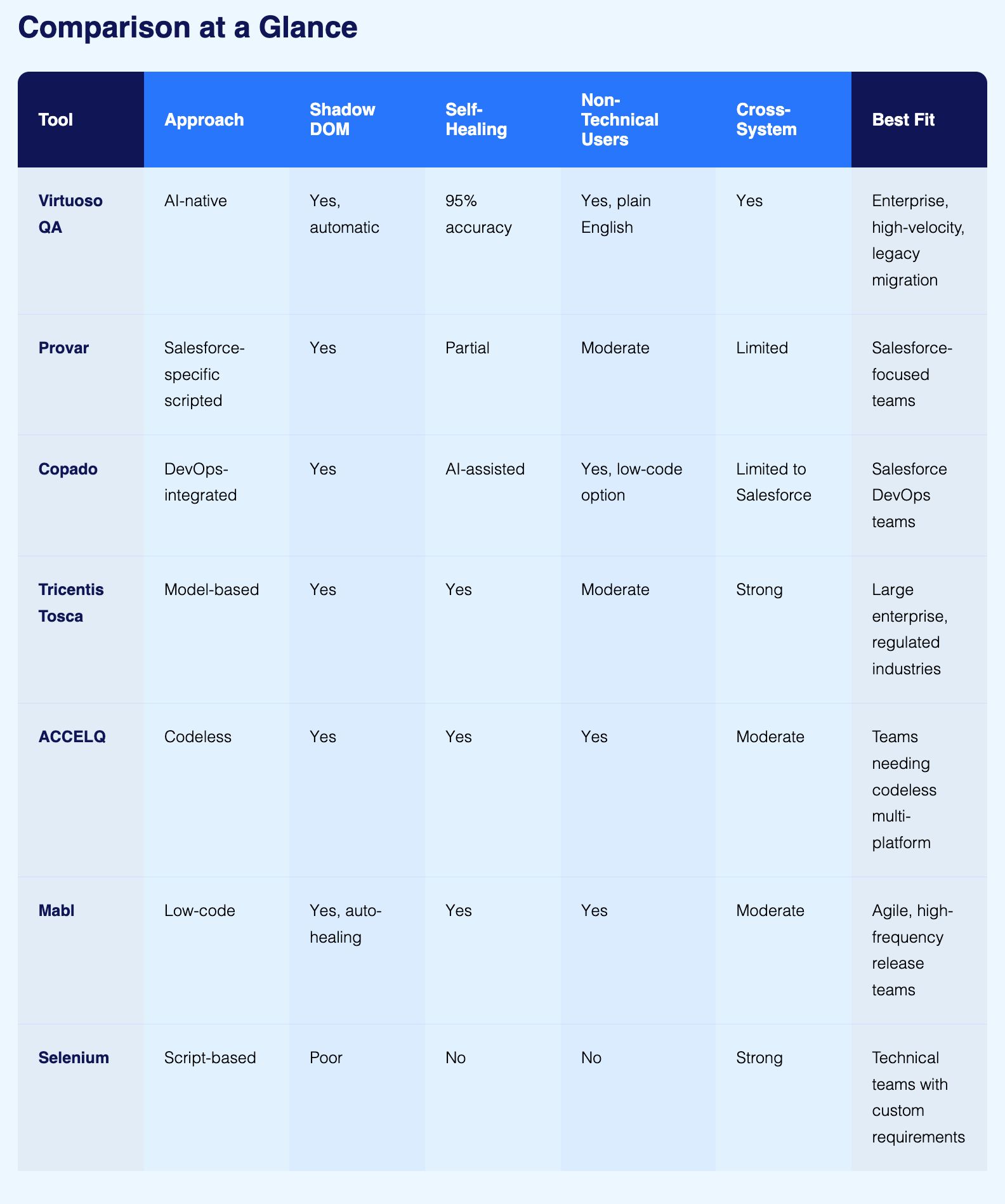
1. Virtuoso QA
Best for: Enterprise teams needing AI-native automation with minimal maintenance overhead
Virtuoso QA is an AI-native test automation platform built from the ground up with natural language processing and machine learning at its core. It is not a conventional tool with AI features added on top. The entire platform is architected around AI, which is what makes it particularly well-suited to Salesforce's dynamic, update-heavy environment.
How it handles Salesforce specifically:
Virtuoso QA's AI augmented object identification automatically resolves elements within Salesforce Lightning's Shadow DOM without requiring manual locator configuration. When Salesforce releases an update that changes component structures, Virtuoso QA's self-healing engine detects the change and adapts the affected tests automatically, achieving approximately 95% accuracy in self-healing scenarios. This means QA teams spend their time expanding coverage rather than repairing scripts after every seasonal release.
Test authoring happens in plain English through the StepIQ engine. A Salesforce admin can write a test step that reads "Create opportunity with products and submit for approval" without writing a single line of code. The Virtuoso QA's GENerator capability converts existing Salesforce documentation, business requirements, and legacy test scripts directly into executable automated tests, cutting migration time from months to weeks.
For teams with existing automation built on Selenium, Tosca, or other frameworks, GENerator converts those legacy assets into natural language Virtuoso journeys that are immediately executable and self-healing from day one.
Key capabilities:
Natural language test authoring accessible to admins, business analysts, and product managers without engineering involvement
Self-healing automation at approximately 95% accuracy across Salesforce Lightning, Classic, and mobile layouts
Virtuoso GENerator for converting legacy test assets and documentation into automated tests
Virtuoso Business Process Orchestration for end-to-end multi-cloud Salesforce workflows
AI-powered test data generation using plain English requests ("Create B2B account with 10 opportunities in various stages")
AI Root Cause Analysis that diagnoses failures across configurations, governor limits, and integrations automatically
Native integrations with Jenkins, Azure DevOps, GitHub Actions, GitLab, TestRail, and Xray
Cross-browser execution across 2,000+ OS, browser, and device configurations with no infrastructure setup
Where to consider alternatives: Virtuoso QA focuses on web-based Salesforce applications. Teams with significant native mobile testing requirements outside of Salesforce may need to complement it for those specific scenarios.
2. Provar
Best for: Teams wanting a Salesforce-dedicated tool with deep metadata integration
Provar is purpose-built for Salesforce, which means it understands the platform's object model, metadata structure, and component types at a level that general-purpose tools do not. Its interface is designed around Salesforce terminology, making it relatively accessible to Salesforce-focused QA teams even without deep coding expertise.
Key capabilities:
Native Salesforce metadata integration for direct access to objects, fields, and components
Support for Apex, API, and database testing within Salesforce workflows
Cross-browser and cross-environment execution
Compatibility with Salesforce releases through resilient test design
Consideration: Complex end-to-end workflows that span Salesforce and external systems often require additional scripting or supplementary tools to manage the integration layer. Teams whose testing scope extends significantly beyond Salesforce may find this limiting.
3. Copado
Best for: Teams that want Salesforce DevOps and testing managed in a single platform
Copado integrates test automation directly into Salesforce DevOps workflows, combining CI/CD pipeline management with quality assurance in one environment. For teams that want to manage the full deployment and testing lifecycle without switching between tools, Copado's native Salesforce alignment is a practical advantage.
Key capabilities:
End-to-end Salesforce DevOps lifecycle management including CI/CD, testing, and compliance
AI-assisted predictive testing capabilities
Parallel test execution using cloneable robot architecture for faster feedback
Low-code test creation for business users alongside script-level tools for technical testers
Natural language keyword-based test authoring
Consideration: Copado is built for the Salesforce ecosystem. Organisations whose end-to-end testing spans significant non-Salesforce systems may encounter limitations in cross-platform coverage, requiring additional tooling for those integration points.
4. Tricentis Tosca
Best for: Large enterprises with complex multi-application environments and regulated industry requirements
Tricentis Tosca uses a model-based test automation approach that creates a dynamic representation of application elements rather than relying on static scripts. This model adapts when applications change, providing a degree of resilience that script-based frameworks cannot match.
Key capabilities:
Model-based test automation that reduces script maintenance for Salesforce and connected systems
Broad technology coverage spanning SAP, Salesforce, web, mobile, API, and mainframe
Risk-based test prioritisation to focus execution on the highest-impact scenarios
Salesforce Lightning and Classic support within the same model
Integration with enterprise DevOps and test management platforms
Consideration: Tosca carries a significant implementation investment in terms of time, cost, and training. Teams without prior experience with model-based testing frameworks typically face a meaningful learning curve before achieving productive output.
5. ACCELQ
Best for: Teams seeking codeless Salesforce automation with broad ecosystem coverage
ACCELQ provides a codeless test automation platform that supports both Salesforce Lightning and Classic without requiring testers to write scripts. Its design-first approach builds modularity into the test architecture from the start, which reduces the accumulation of fragile, hard-to-maintain test assets over time.
Key capabilities:
Codeless test creation accessible to non-technical testers and business analysts
Support for Salesforce Lightning and Salesforce Classic within a unified framework
Self-healing automation that reduces ongoing maintenance effort
Automated test case generation using Salesforce data models
End-to-end coverage across web, API, and mobile layers
Integrations with Jira, Jenkins, and other DevOps toolchain components
Consideration: Integrating ACCELQ with highly customised legacy systems or non-standard enterprise architectures may require additional configuration effort beyond standard Salesforce testing scenarios.
7. Mabl
Best for: Agile teams running high-velocity release cycles across web applications
Mabl is a low-code test automation platform oriented toward speed of test creation and continuous integration across development cycles. It offers Salesforce-specific auto-healing that automatically identifies and adjusts to dynamic elements within Salesforce's Shadow DOM, which makes it more reliable on Lightning pages than general-purpose tools.
Key capabilities:
Low-code test creation accessible to developers, admins, and end users collaboratively
Salesforce-specific Shadow DOM auto-healing
Performance degradation detection triggered by workflow modifications or platform updates
Strong integration with CI/CD pipelines for continuous test execution
Accessible interface that does not require specialist automation engineers to operate
Consideration: For very large enterprise testing programmes that require comprehensive cross-system end-to-end coverage, mabl may need to be supplemented with additional tooling to achieve full coverage across complex integration landscapes.
8. Selenium
Best for: Technical teams that need maximum flexibility and have strong engineering resources
Selenium is the most widely adopted open-source browser automation framework. It supports multiple programming languages, integrates with virtually every CI/CD system, and has the largest community of any testing framework. For teams with strong engineering capability and specific requirements that no off-the-shelf tool addresses, Selenium provides a foundation that can be shaped to almost any need.
Key capabilities:
Support for Java, Python, JavaScript, C#, Ruby, and other major programming languages
Cross-browser compatibility across all major browsers and versions
Open-source with no licensing cost and broad community support
Integration with virtually any CI/CD system, test management tool, or reporting platform
Maximum flexibility to build customised test frameworks for unique requirements
Consideration: Selenium has poor native support for Salesforce's Shadow DOM, requiring significant custom engineering to handle Lightning components reliably. Tests require advanced coding skills to write and maintain. Every Salesforce platform update risks breaking locators and demanding manual script repair. Teams that adopt Selenium for Salesforce typically report spending 60 to 80% of their automation time on maintenance rather than new coverage, which undermines the value of the investment over time.
How to Choose the Right Salesforce Test Automation Tool for Your Business
The right tool comes down to three factors: your team's technical capability, the scope of your Salesforce implementation, and the pace at which your organisation releases. Use the scenarios below to identify where you fit.

Your Team Has Limited Automation Engineering Expertise
If your QA team is primarily made up of Salesforce admins, business analysts, or manual testers without scripting backgrounds, prioritise tools that support natural language or no-code test authoring.
Virtuoso QA, ACCELQ, and Copado all allow non-technical contributors to create and maintain tests without programming knowledge. Virtuoso QA goes furthest here, with plain English test authoring through the StepIQ engine that any team member can use on day one.
Your Salesforce Implementation Spans Multiple Clouds and External Systems
If your testing scope covers not just Salesforce but also integrated ERP platforms, financial systems, marketing tools, and other enterprise applications, cross-system coverage becomes the deciding factor.
Virtuoso QA and Tricentis Tosca both handle complex multi-application end-to-end journeys without requiring separate tools for each integration layer. Teams that buy a Salesforce-specific tool and a separate integration testing tool typically end up with coverage gaps at the handoff points between systems.
Test Maintenance Is Your Biggest Challenge
If your current team spends more time repairing broken scripts after every Salesforce release than writing new tests, self-healing capability is the most important criterion to evaluate.
Virtuoso QA achieves approximately 95% self-healing accuracy, automatically adapting tests when Salesforce UI elements, component structures, or page layouts change. Tricentis Tosca's model-based approach also provides strong resilience, as does ACCELQ's self-healing automation. Any of these three will reduce the maintenance burden that collapses script-based programmes over time.
You Are Migrating from Legacy Automation
If your organisation has an existing test library built on Selenium, Tricentis Tosca, or manual spreadsheets, rebuilding everything from scratch is neither practical nor necessary.
Virtuoso QA's GENerator converts existing Selenium scripts, Tosca test cases, BDD Gherkin scenarios, and manual test documentation directly into natural language Virtuoso tests that are immediately executable and self-healing. What would otherwise take months of manual migration takes weeks with no full rebuild required.
You Are a Smaller Team with Strong Engineering Resources
If your team is lean, technically capable, and does not need enterprise-scale parallel execution or multi-cloud orchestration, simpler options may serve you well without the investment a larger platform requires.
Selenium provides maximum flexibility with no licensing cost and works well for technically strong teams with modest Salesforce testing scope. Mabl is a practical alternative for Agile teams running high-frequency release cycles who want low-code simplicity without the complexity of an enterprise platform.

Related Reads
Frequently Asked Questions
What is the best Salesforce test automation tool?
Can Selenium be used for Salesforce testing?
How important is self-healing in Salesforce test automation?
How do I migrate from Selenium to a modern Salesforce testing tool?




