Blog
Selenium NotFoundException: Causes, Fixes & Solutions

Rishabh Kumar
Published on

Table of contents
Lorem ipsum
Lorem ipsum
Lorem ipsum
Lorem ipsum
Lorem ipsum
NotFoundException is one of the most common and frustrating errors in Selenium WebDriver. It stops test execution cold when the driver cannot locate an element on the page. For teams running hundreds or thousands of automated tests, a single locator failure can cascade into hours of debugging, false negatives, and delayed releases. This guide covers every cause, every fix, and the architectural evolution that eliminates the problem entirely.
What is NotFoundException in Selenium?
NotFoundException is a parent exception class in Selenium WebDriver that gets thrown when the WebDriver cannot find an element matching the specified locator strategy. It sits within the org.openqa.selenium package and serves as the base class for two of the most frequently encountered Selenium exceptions.
The first is NoSuchElementException, which fires when findElement() cannot locate any matching element in the current DOM. The second is NoSuchFrameException, which occurs when attempting to switch to a frame or iframe that does not exist on the page.
In practical terms, NoSuchElementException accounts for the vast majority of NotFoundException occurrences. When your Selenium script calls driver.findElement(By.id("submit-button")) and no element with that ID exists in the DOM at the moment of execution, the WebDriver throws this exception and your test fails.
The stack trace typically looks like this:
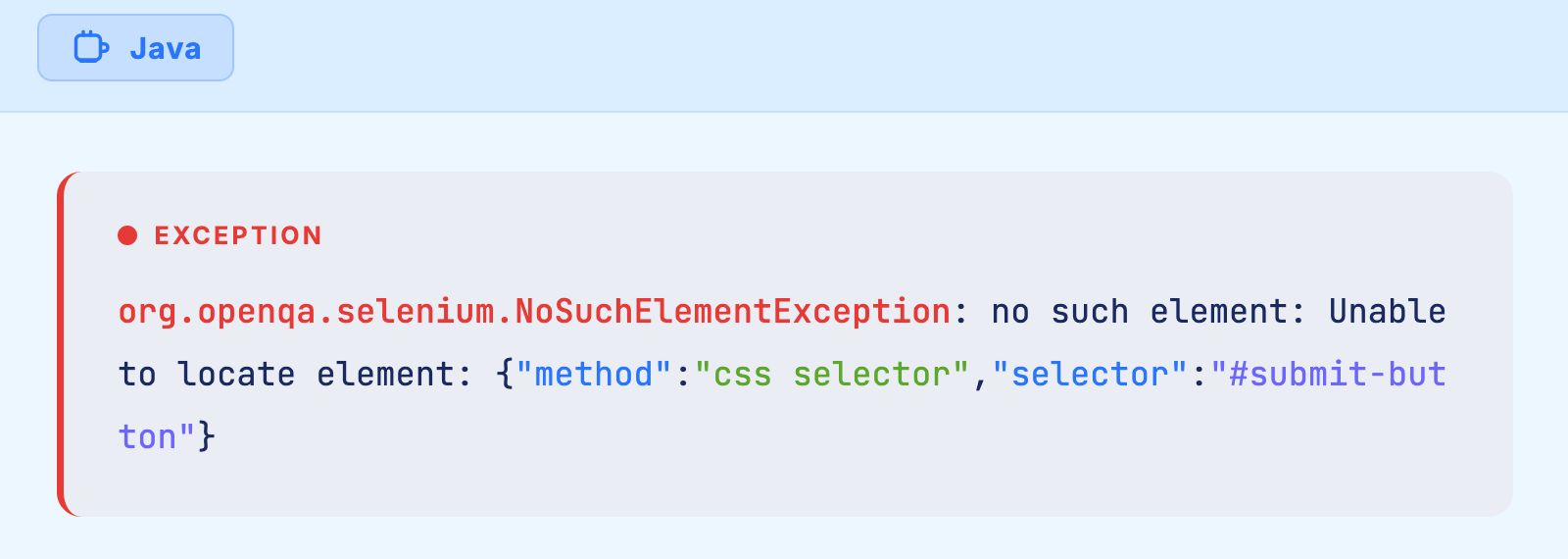
Understanding why this happens and how to prevent it is fundamental to building stable, maintainable Selenium test suites.
Common Causes of NotFoundException in Selenium
1. Incorrect or Outdated Locators
The most straightforward cause is a locator that simply does not match any element on the page. This happens when element IDs, class names, or attributes change during development. A button that was id="login-btn" last sprint might become id="auth-submit-btn" after a UI refactor. Selenium has no way to know that these two locators refer to the same functional element.
This is not a rare occurrence. Research indicates that Selenium users spend approximately 80% of their automation time on maintenance, with only 10% going to actual test authoring. A significant portion of that maintenance burden comes from fixing broken locators.
2. Timing and Synchronization Issues
Modern web applications load content asynchronously. JavaScript frameworks like React, Angular, and Vue render elements dynamically after the initial page load. If Selenium attempts to find an element before the framework has rendered it, the element genuinely does not exist in the DOM yet.
This timing mismatch is the second most common cause of NotFoundException. The page may appear visually complete to a human observer while the DOM is still being constructed underneath.
3. Elements Inside Frames or Shadow DOM
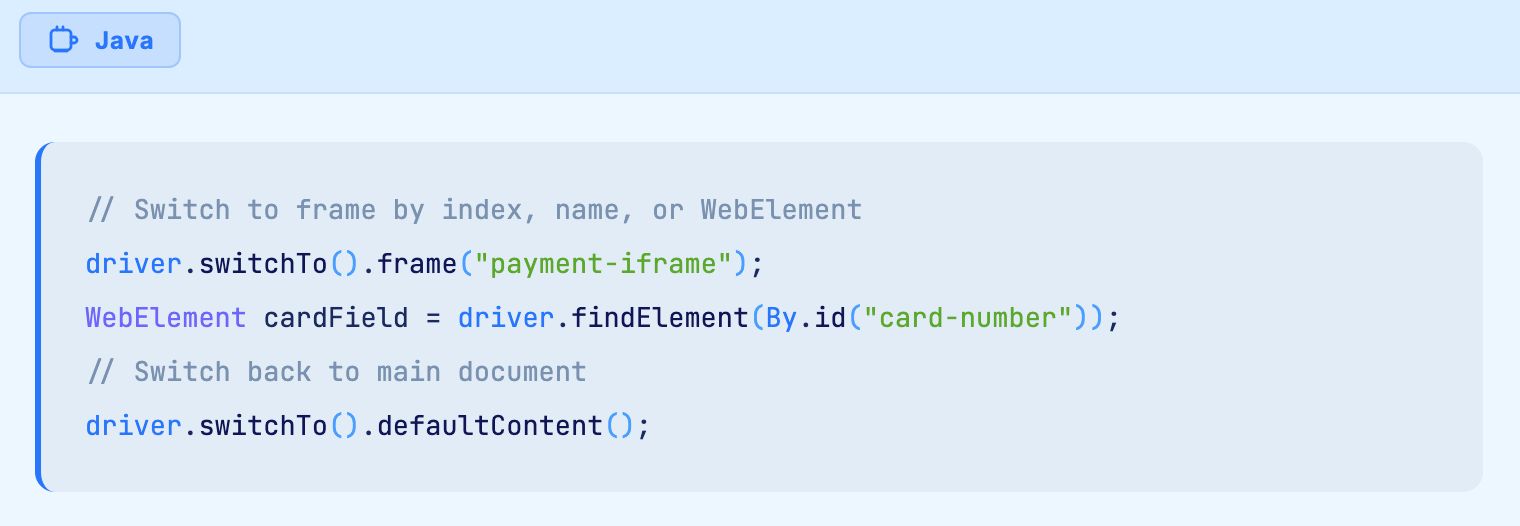
Elements nested within iframes or Shadow DOM boundaries exist in separate document contexts. Selenium cannot see elements inside a frame until you explicitly switch to that frame context using driver.switchTo().frame(). Similarly, Shadow DOM encapsulation hides elements from standard Selenium locators.
Enterprise applications built on platforms like Salesforce Lightning, Microsoft Dynamics 365, and ServiceNow use iframes and Shadow DOM extensively. This makes NotFoundException especially common when automating these systems.
4. Dynamic Element Attributes
Single page applications and low code platforms frequently generate element attributes dynamically. An element might have id="field_abc123" on one page load and id="field_xyz789" on the next. Any locator strategy that depends on these generated values will fail intermittently, producing NotFoundException errors that are difficult to reproduce and diagnose.
5. Page Navigation and State Changes
If a test script attempts to interact with an element on Page A after the browser has already navigated to Page B, the element no longer exists in the current DOM. This commonly happens in multi step workflows where navigation occurs between assertions or actions.
6. Invisible or Hidden Elements
Elements with CSS properties like display:none or visibility:hidden exist in the DOM but may not be interactable. While findElement() can technically locate hidden elements, some frameworks remove elements from the DOM entirely when hiding them, triggering NotFoundException.

How to Fix NotFoundException in Selenium
1. Use Explicit Waits Instead of Implicit Waits
The single most effective fix for timing related NotFoundException errors is explicit waits using WebDriverWait combined with ExpectedConditions.
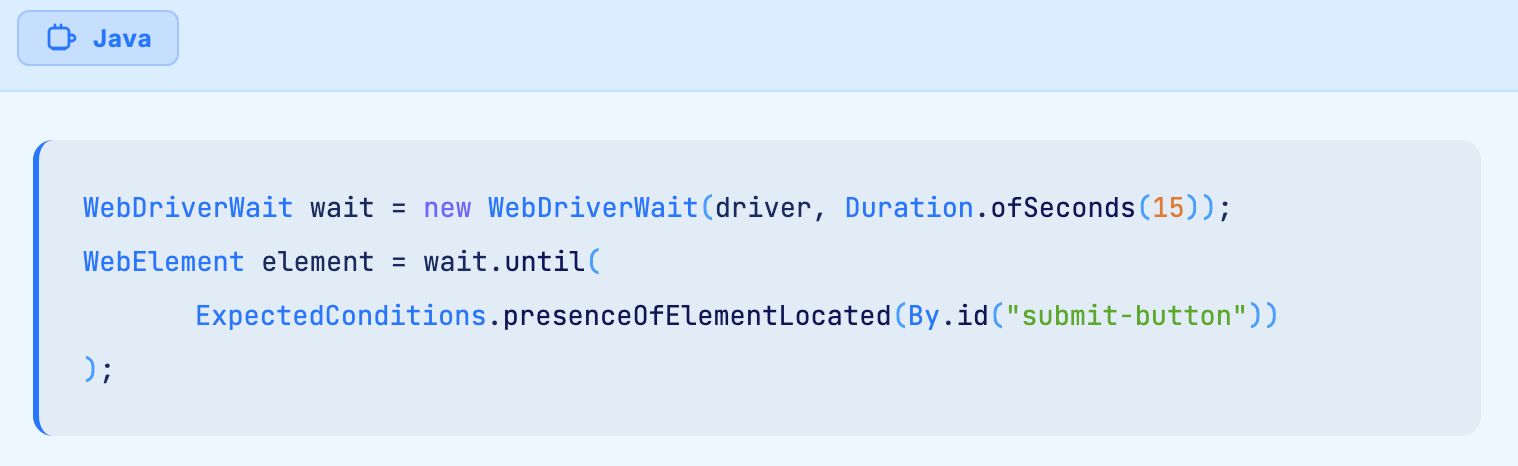
Explicit waits poll the DOM at regular intervals until the element appears or the timeout expires. This approach handles asynchronous rendering gracefully without introducing unnecessary delays.
Avoid using Thread.sleep() as a synchronization mechanism. Hard coded waits slow down test execution when elements load quickly and still fail when elements load slowly. They are the least reliable and least efficient approach to handling timing issues.
2. Build Resilient Locator Strategies
The order of locator reliability, from most stable to least stable, generally follows this pattern:
ID locators are the fastest and most reliable when IDs are stable and unique. Use them whenever possible for static elements.
CSS selectors offer a strong balance of speed, readability, and flexibility. They support attribute matching, pseudo classes, and structural relationships without the verbosity of XPath.
XPath expressions provide the most power for complex scenarios. Relative XPath expressions like //button[contains(text(), 'Submit')] are more resilient than absolute paths that depend on exact DOM structure.
Name, class name, and tag name locators work well for simple, unique elements but become unreliable in complex applications where multiple elements share the same class or tag.
When dealing with dynamic attributes, build locators that target stable characteristics. Instead of relying on a generated ID, use a combination of element type, visible text, aria labels, or data attributes that developers set intentionally.
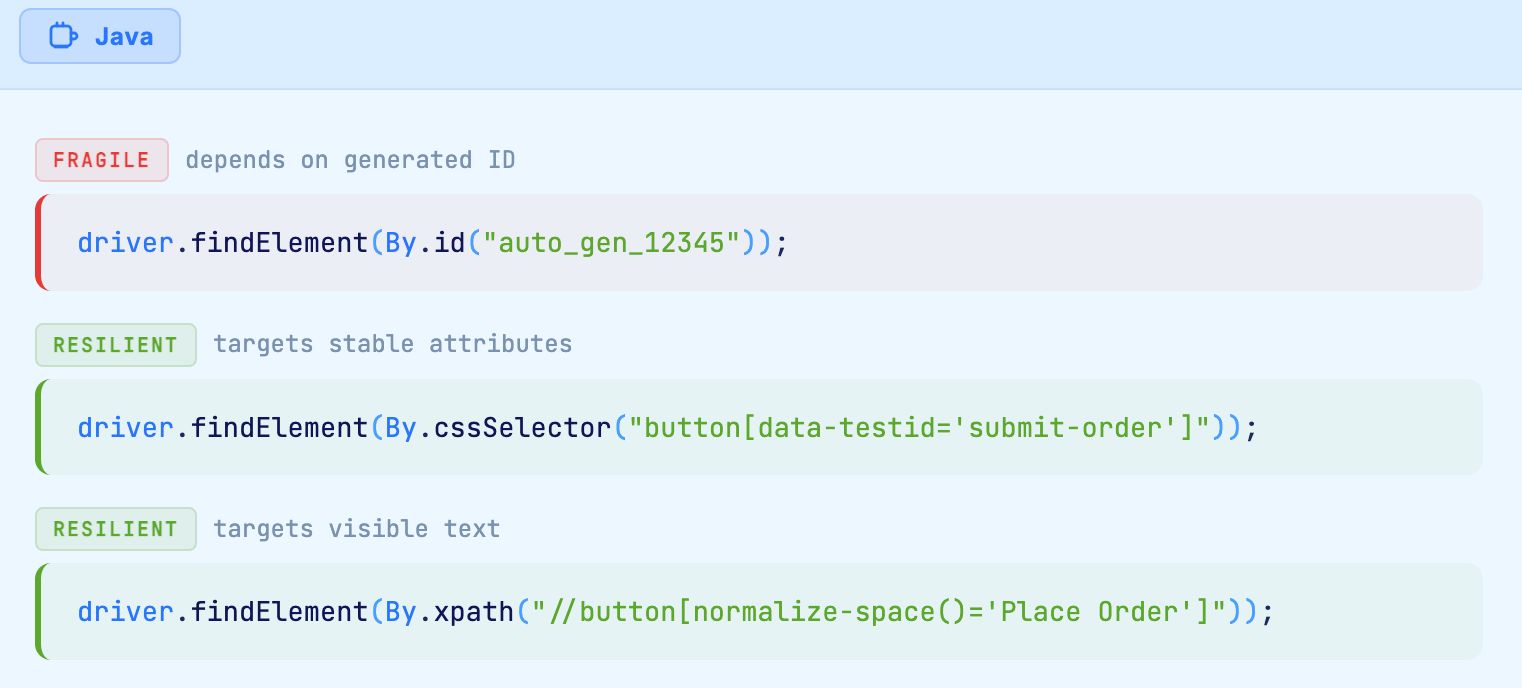
3. Handle Frames and Shadow DOM Correctly
For elements inside iframes, always switch to the correct frame context before attempting to locate elements:
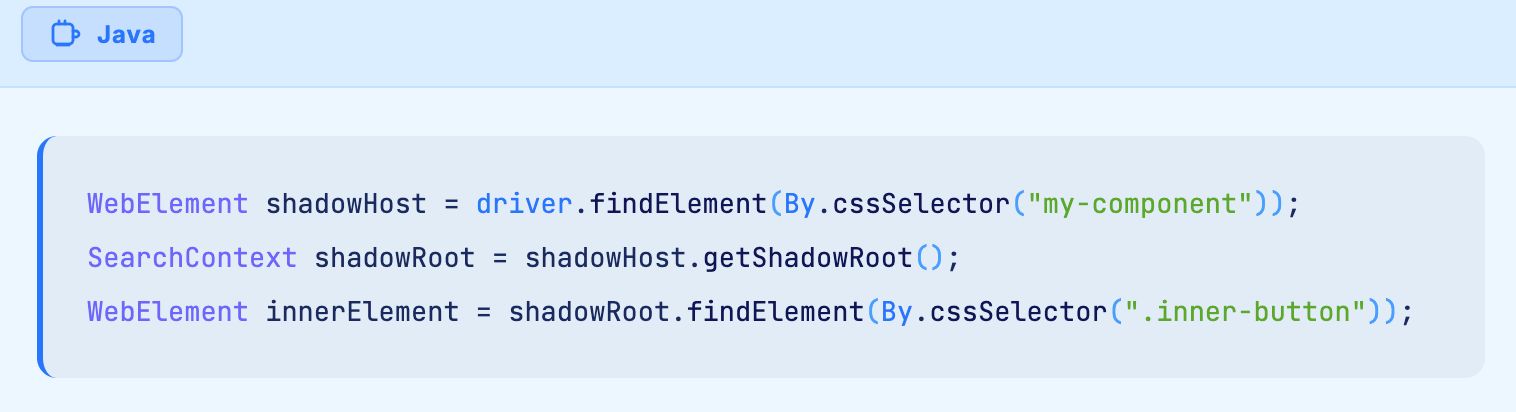
For Shadow DOM elements, use JavaScript execution to pierce the shadow boundary:
4. Implement the Page Object Model
The Page Object Model (POM) design pattern centralizes locator definitions for each page in your application. When an element changes, you update the locator in one place rather than hunting through dozens of test scripts.
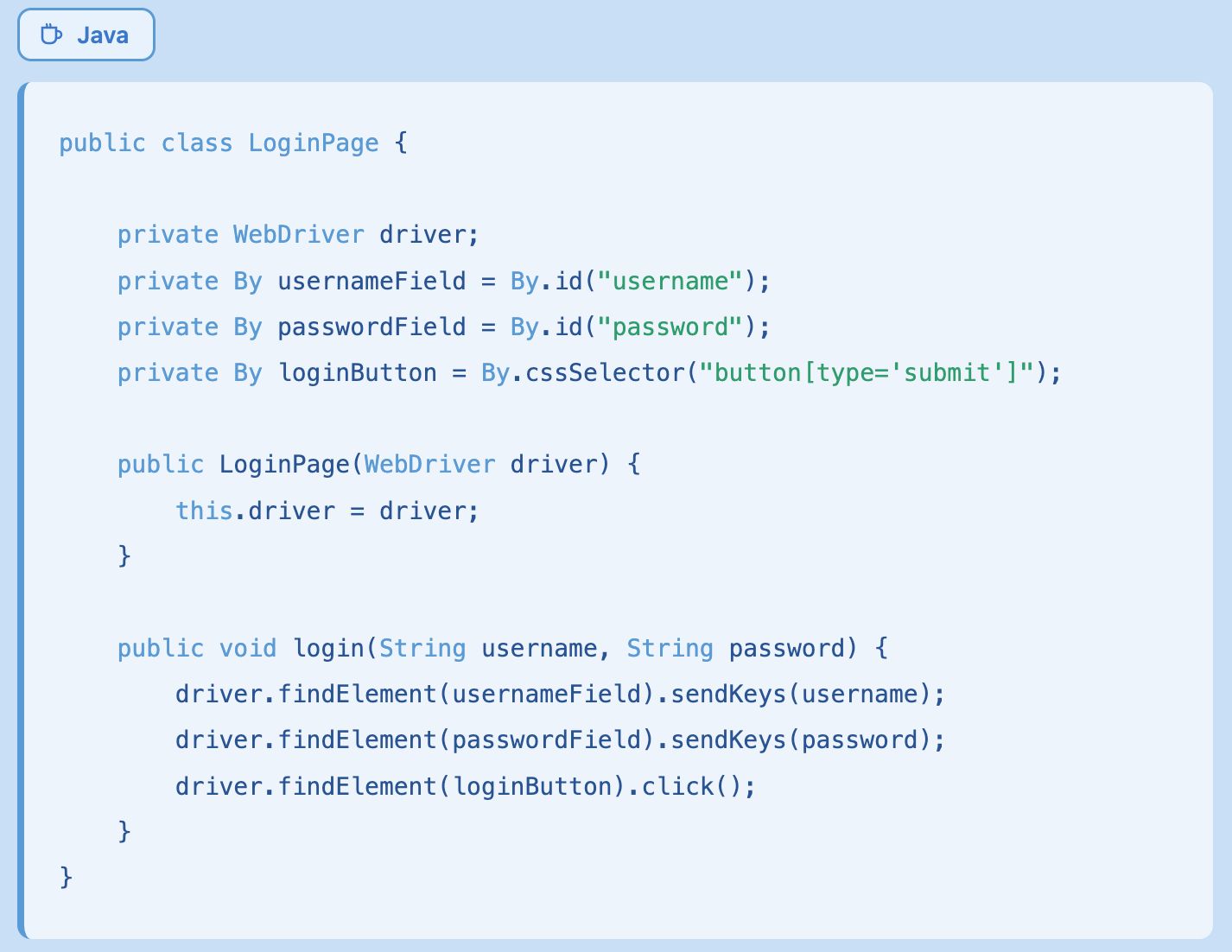
While POM reduces the effort of fixing NotFoundException, it does not prevent the exception from occurring. Locators still break when the underlying application changes.
5. Add Retry Logic for Flaky Elements
For elements that fail intermittently due to timing or rendering race conditions, a retry mechanism can improve stability:

This approach masks the underlying problem rather than solving it. Retry logic adds execution time and can hide genuine application defects when elements truly should not appear.
Why NotFoundException is a Symptom of a Deeper Problem
Every fix described above is a workaround. Explicit waits compensate for the fact that Selenium does not understand page state. Resilient locators compensate for the fact that Selenium identifies elements by fragile technical attributes rather than functional intent. Page Object Models compensate for the fact that locator maintenance scales linearly with application complexity.
The fundamental limitation is architectural. Selenium WebDriver identifies elements using a single locator string. When that string stops matching, the test fails. No amount of clever XPath or CSS selector engineering changes this reality.
For teams maintaining a few dozen tests, these workarounds are manageable. For enterprises running thousands of automated tests across platforms like SAP, Salesforce, Oracle Cloud, and Dynamics 365, the maintenance burden becomes unsustainable. Selenium users report spending 80% of their automation effort on maintenance, with locator failures as the primary driver.
How AI Native Platforms Eliminate NotFoundException
AI native test automation platforms approach element identification differently from the ground up. Instead of relying on a single locator string, they build comprehensive models of each element using every available signal in the DOM.
Virtuoso QA, for example, uses AI augmented object identification that dives into the DOM level of applications to build a comprehensive model of elements based on all available selectors, IDs, and attributes. When one attribute changes, the platform references the dozens of other characteristics it has catalogued to identify the correct element.
This means that if a button's ID changes from "submit-btn" to "order-confirm", the AI still recognizes the element based on its visible text, position, surrounding context, aria attributes, and structural relationships. The test continues to pass without any human intervention.
Self Healing in Action
When the application under test changes, AI/ML self healing automatically fixes dynamic changes in element selectors and structure. Enterprise customers using this approach report an 81% reduction in test maintenance time for UI tests and approximately 95% self healing accuracy across their test suites.
The practical impact is dramatic. Consider a 500 test regression suite running against a Salesforce Lightning application that receives three major platform releases per year. With Selenium, each release typically breaks dozens or hundreds of locators, requiring manual investigation and repair. With AI native self healing, the vast majority of those locator changes are absorbed automatically.
Natural Language Programming Eliminates Locators Entirely
The most fundamental architectural shift is writing tests in plain English rather than in code that references technical locators. Instead of writing:

Natural Language Programming allows testers to write:
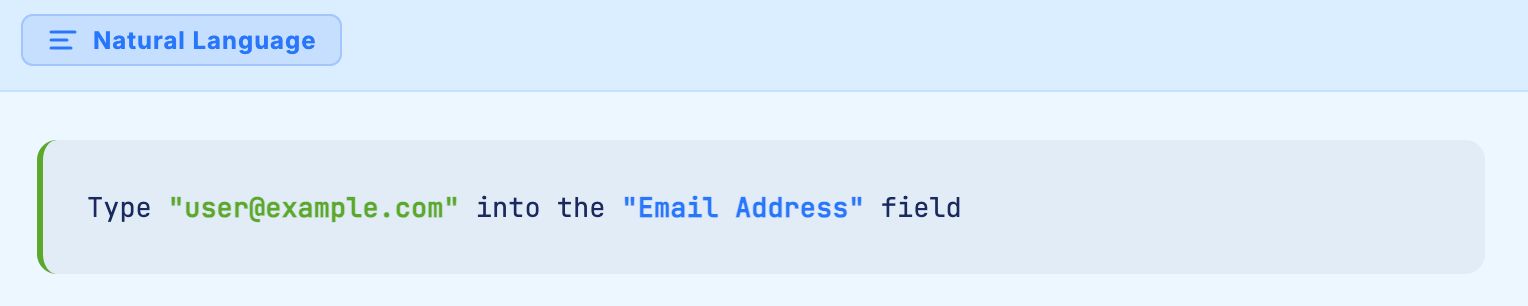
The platform handles element identification intelligently, using descriptive hints to match the human readable instruction to the correct element in the DOM. There is no locator to break, no XPath to maintain, and no NotFoundException to debug.
Live Authoring Validates Elements in Real Time
Live Authoring executes each test step as you write it, providing immediate feedback on whether the element was found and the action succeeded. This eliminates the traditional write, run, debug, repeat cycle that makes Selenium development slow and NotFoundException debugging tedious.
When a step fails during Live Authoring, the tester sees exactly what happened in real time and can adjust immediately. There is no stack trace to parse, no screenshot from a CI pipeline to interpret, and no guesswork about DOM state at the moment of failure.
When to Use Selenium Fixes vs. AI Native Testing
For small teams with limited test suites and stable applications, the Selenium fixes described in this guide are practical and effective. Explicit waits, resilient locators, and Page Object Models can keep a manageable number of tests running reliably.
For enterprise teams automating complex business applications with frequent releases, the math changes. When your test suite grows past a few hundred tests across dynamic platforms, the maintenance cost of manually managing locators exceeds the cost of adopting a platform that handles element identification autonomously.
The decision is not about whether Selenium is a good tool. It is about whether the locator based architecture can scale to meet enterprise testing demands without consuming disproportionate resources.

Related Reads
ElementNotInteractableException in Selenium: Complete Fix Guide
From Selenium Scripts to Self-Healing Tests: The Complete Journey of Test Automation
Selenium Timeouts Explained: Implicit, Explicit, Fluent Waits
Dynamic XPath in Selenium Explained With Practical Examples
Selenium ChromeDriver Setup Guide: Install, Configure & Run Chrome Tests
Frequently Asked Questions
What is the difference between NotFoundException and NoSuchElementException?
How do I fix NoSuchElementException in Selenium?
Why does Selenium throw NotFoundException for elements I can see on the page?
Can explicit waits prevent all NotFoundException errors?
Is NotFoundException the same as StaleElementReferenceException?
How does AI augmented object identification work?




