Blog
How to Create Test Scenarios: AI-Native Approach and Best Practices

Rishabh Kumar
Published on

Table of contents
Lorem ipsum
Lorem ipsum
Lorem ipsum
Lorem ipsum
Lorem ipsum
Executive Summary
Test scenario creation has fundamentally changed. The question is no longer whether to automate your test scenarios but how to leverage AI native platforms that write, execute, and maintain them autonomously. This guide walks you through modern test scenario creation, from foundational concepts to advanced AI powered techniques that reduce authoring time by 88% while improving coverage and reliability.
What is a Test Scenario?
A test scenario is a high level description of a functionality or user flow that needs to be validated. Unlike granular test cases, test scenarios capture the broader user journey through an application, such as "User completes checkout with multiple payment methods" or "Customer submits insurance claim through self service portal."
Test Scenario vs Test Case
Understanding the distinction is critical for efficient QA strategy:
Test Scenario: A single statement describing what to test. Example: "Verify user registration with valid credentials."
Test Case: The detailed steps, input data, expected results, and preconditions required to execute that scenario. A single scenario often generates multiple test cases.
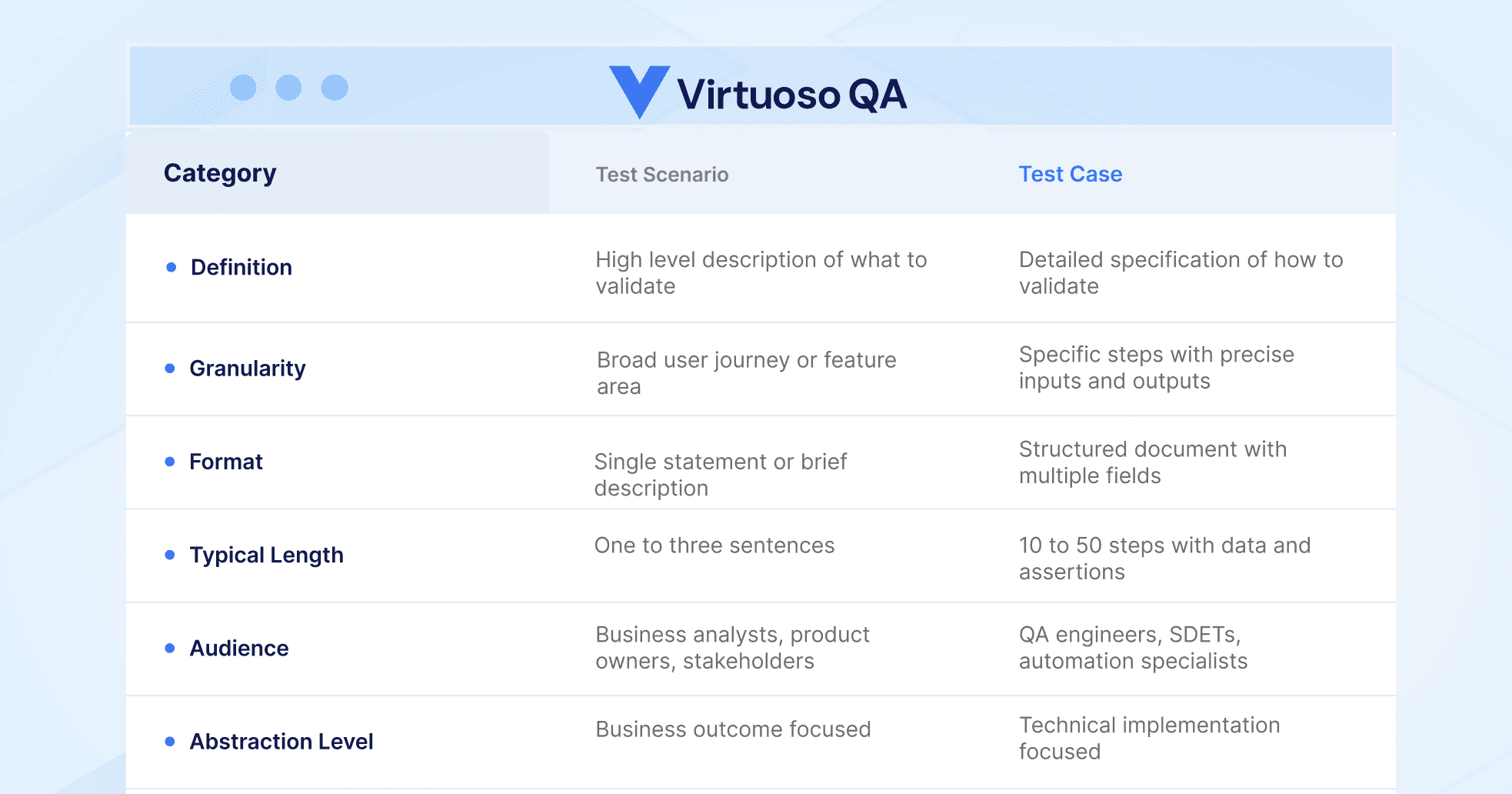
In modern testing, AI native test platforms collapse this distinction. You describe the scenario in natural language, and the platform generates the detailed test steps, checkpoints, and validations automatically.
Why Test Scenario Creation is Evolving?
The Problem with Traditional Approaches
Legacy test scenario creation followed a predictable but inefficient pattern. Business analysts documented requirements, QA teams translated them into test scenarios, automation engineers converted scenarios into coded scripts, and maintenance teams constantly updated breaking tests.
This waterfall approach created three persistent problems:
Speed: Manual scenario documentation takes weeks. By the time tests are ready, the application has already changed.
Accuracy: Translation between requirements and automated tests introduces interpretation errors at every handoff.
Maintenance: Traditional scripts break with every UI change. Teams report spending up to 80% of their time fixing existing tests rather than creating new ones.
The AI Native Shift
AI native test platforms eliminate these friction points. Instead of writing code or managing brittle locators, teams now describe what they want to test in plain language. The platform interprets intent, generates executable test steps, and self heals when applications change.
This shift represents more than incremental improvement. Organizations using AI native approaches report reducing test creation time from 340 hours to 40 hours for equivalent coverage, an 88% reduction that transforms testing economics.

How to Create Test Scenarios: A Step by Step Framework
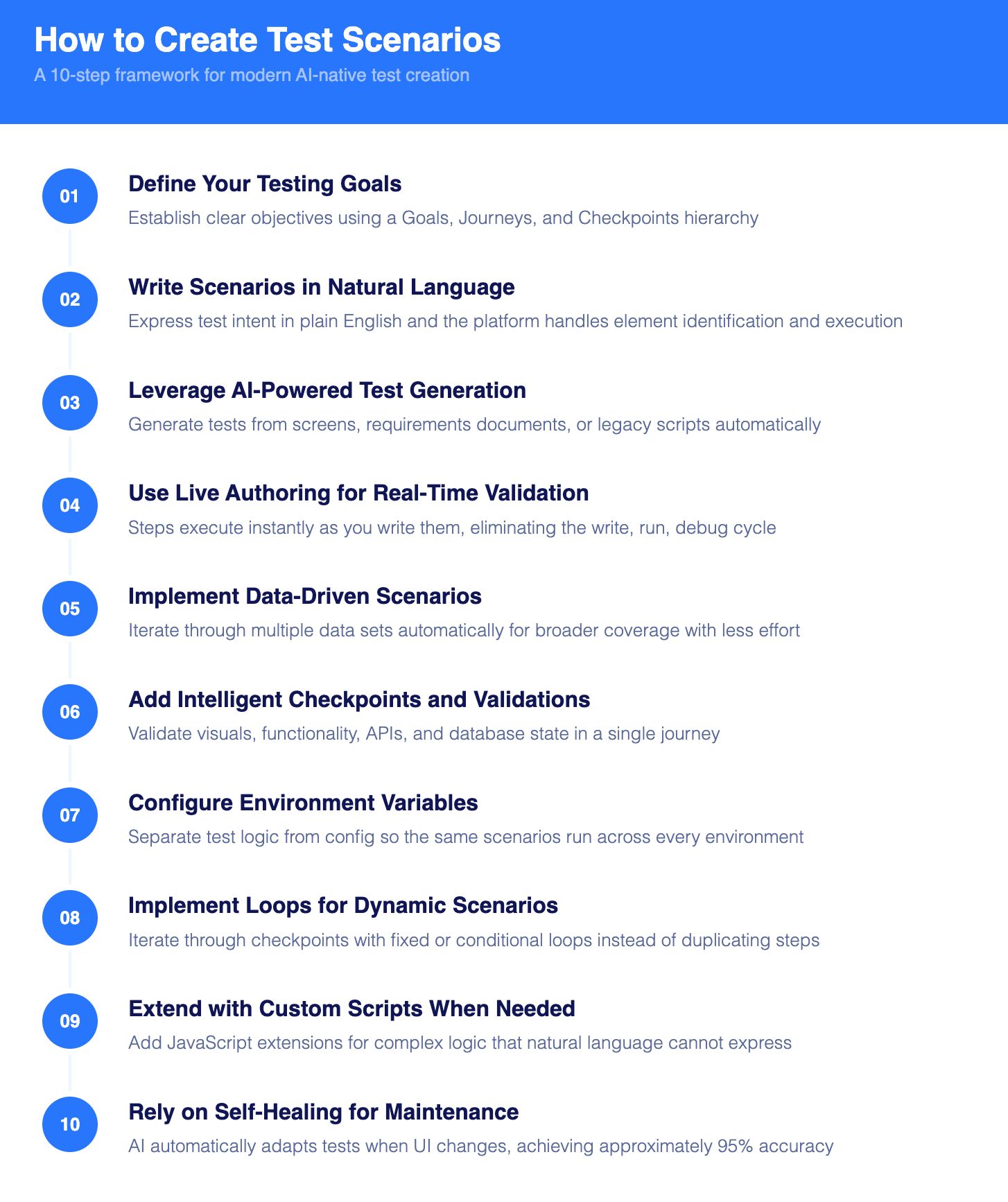
Step 1: Define Your Testing Goals
Before creating any scenario, establish clear objectives. Modern platforms organize tests hierarchically:
Goals: The top level container representing a complete testing objective. Examples include "E commerce Checkout Flow," "Patient Registration System," or "Claims Processing Workflow."
Journeys: End to end user flows within a goal. Each journey represents a complete path through your application, from starting point A to target point B, with validations along the way.
Checkpoints: Logical groupings of test steps within a journey. Checkpoints allow you to organize tests into manageable, reusable components.
This structure enables composable testing, where well designed checkpoints can be shared across multiple journeys, dramatically accelerating scenario creation for related test flows.
Step 2: Write Scenarios in Natural Language
Modern platforms use Natural Language Programming (NLP) to interpret test intent. Instead of writing code like:
You write:
The platform handles element identification, wait conditions, and execution logic automatically. This approach is not just simpler; it creates tests that are inherently more stable because they express intent rather than implementation details.
Step 3: Leverage AI Powered Test Generation
The most significant advancement is autonomous test scenario creation. Modern platforms offer multiple generation paths:
From Application Screens: Point the AI at your application, and it analyzes the DOM structure to suggest test steps based on UI elements, application context, and inferred user behavior patterns.
From Requirements Documents: Upload user stories, BDD specifications, or manual test cases. The AI converts them into executable test scenarios automatically.
From Legacy Scripts: Migrate existing Selenium, Tosca, or TestComplete scripts into AI native format without manual rewriting. The platform understands test logic, assertions, and data flows, then maps them to native syntax.
This capability, sometimes called agentic test generation, transforms the hardest part of test automation: getting started. Instead of building from scratch, teams configure and deploy pre generated scenarios.
Step 4: Use Live Authoring for Real Time Validation
One of the most powerful capabilities in modern test platforms is live authoring, where test steps execute instantly as you write them.
As you add or modify steps, they immediately run against an interactive browser session. This provides instant feedback on whether your scenario works correctly. The workflow becomes:
Write a test step in natural language
Watch it execute immediately in the preview browser
See exactly how your application responds
Adjust the step if needed and re run instantly
This real time validation eliminates the traditional "write, run, debug, repeat" cycle. Teams report that live authoring makes test creation and maintenance 10 to 100 times faster than traditional approaches.
Advanced Live Authoring Capabilities:
Run from Here: Skip setup steps and run from any point in your journey, useful when debugging a specific interaction without re executing the entire flow.
Pause Points: Add strategic pauses to examine application state between steps, enabling deeper investigation of test behavior.
One Step Execution: Execute steps individually to examine exactly how each interaction changes page state.
Step 5: Implement Data Driven Scenarios
Real test coverage requires testing with varied data. Modern platforms support data driven testing through direct integration with test data tables.
Creating Test Data:
Associate journeys with test data tables containing multiple attributes
Map test steps to specific data attributes
The platform automatically iterates through data rows during execution
AI Assisted Data Generation:
For teams needing realistic test data quickly, AI assistants can generate additional data rows based on existing patterns. Specify how many rows you need, and the system creates contextually appropriate data that matches your table structure.
This eliminates hours spent manually creating test data while ensuring scenarios cover edge cases and boundary conditions.
Step 6: Add Intelligent Checkpoints and Validations
Effective test scenarios validate both actions and outcomes. Modern checkpoints support:
Visual Checkpoints: Capture and compare screenshots to detect unexpected visual changes.
Functional Validations: Verify element states, text content, URL changes, and application behavior.
API Validations: Integrate backend API calls within UI journeys to validate end to end data integrity.
Database Validations: Execute SQL queries to verify backend data matches expected states.
This multi layer validation approach catches defects that single channel testing misses.
Step 7: Configure Environment Variables
Enterprise testing requires scenarios that work across multiple environments without modification. Modern platforms support environment management that separates test logic from configuration:
Environment Variables: Store environment specific values like URLs, credentials, and feature flags. Tests reference variables rather than hardcoded values.
Environment Inheritance: Define base environments and create variations that inherit common settings. A "staging" environment can inherit from "production" while overriding only the URL.
Sensitive Data Handling: Mark variables as secrets to ensure credentials and tokens are protected during storage and execution.
This architecture enables the same scenarios to run against development, staging, and production environments without modification.
Step 8: Implement Loops for Dynamic Scenarios
Many real world scenarios involve repetitive actions with varying data. Instead of duplicating test steps, modern platforms support loops that iterate through checkpoints:
Fixed Loops: Repeat a checkpoint a specific number of times (up to 10 iterations).
Conditional Loops: Continue iterating until a condition is met, such as a variable value change or element state.
This is particularly valuable for scenarios like: Adding multiple items to a shopping cart Processing variable length lists in enterprise applications Handling form workflows with repeating sections
Loops eliminate manual repetition while adapting dynamically to test conditions.
Step 9: Extend with Custom Scripts When Needed
While natural language handles most scenarios, complex situations sometimes require custom logic. Modern platforms provide extensibility through JavaScript extensions that integrate seamlessly with natural language steps.
Extensions can: Perform complex calculations and comparisons Execute custom DOM manipulations Integrate with external APIs Handle edge cases that natural language cannot express
Extensions created at organization scope become reusable across all projects, building a library of custom capabilities that compound over time.
Step 10: Rely on Self Healing for Maintenance
The final step in modern test scenario creation is recognizing that you do not have to handle maintenance manually. AI self healing automatically adapts tests when applications change:
Smart Element Identification: Tests use multiple identification techniques combining visual analysis, DOM structure, and contextual data. When one locator breaks, others maintain stability.
Automatic Locator Updates: When UI elements change, the AI identifies the new selectors and updates tests automatically, achieving approximately 95% self healing accuracy.
Root Cause Analysis: When tests do fail, AI powered analysis identifies failure causes and provides remediation suggestions, dramatically reducing debugging time.
This represents a fundamental shift from reactive maintenance to proactive adaptation. Tests evolve with your application rather than breaking against it.

Test Scenario Examples by Application Type
Effective test scenarios reflect the unique workflows, compliance requirements, and user expectations of each industry. The examples below demonstrate how to structure scenarios that capture business critical journeys across different application domains. Each scenario follows the principle of describing user intent rather than technical implementation, enabling AI native platforms to generate detailed test cases automatically while maintaining clarity for stakeholders across the organization.
E commerce Test Scenarios
E-commerce applications demand rigorous testing across the entire purchase funnel. Cart abandonment costs retailers billions annually, and checkout failures directly impact revenue. These scenarios prioritize the high frequency, revenue critical paths that determine conversion success.
Scenario 1: User completes guest checkout with credit card payment
Scenario 2: Registered user applies discount code and completes purchase
Scenario 3: User adds items to cart from multiple categories and modifies quantities
Scenario 4: Customer initiates return request for delivered order
Enterprise ERP Test Scenarios (SAP, Oracle, Dynamics 365)
Enterprise resource planning systems orchestrate mission critical business processes across finance, human resources, supply chain, and customer relationship management. Testing complexity multiplies with cross module dependencies, approval hierarchies, and regulatory compliance requirements. These scenarios target the end to end business processes that organizations cannot afford to fail.
Scenario 1: Finance user creates and approves purchase requisition
Scenario 2: HR manager processes employee termination workflow
Scenario 3: Inventory analyst runs month end reconciliation report
Scenario 4: Sales representative converts lead to opportunity in CRM
Healthcare Application Test Scenarios
Patient safety and data privacy are non negotiable. These scenarios address the clinical, administrative, and compliance workflows that healthcare organizations must validate thoroughly before each release.
Scenario 1: Patient schedules appointment through self service portal
Scenario 2: Clinician reviews and signs electronic prescription
Scenario 3: Insurance coordinator submits prior authorization request
Scenario 4: Administrator generates compliance audit report
Financial Services Test Scenarios
Financial services applications face dual pressures of regulatory compliance and competitive differentiation. Testing must validate transaction accuracy, fraud detection mechanisms, and seamless customer experiences across digital channels. These scenarios cover the account lifecycle, transaction processing, and compliance monitoring workflows that define operational integrity.
Scenario 1: Customer opens new account with identity verification
Scenario 2: Advisor processes fund transfer between client accounts
Scenario 3: Compliance officer reviews flagged transaction alerts
Scenario 4: Customer initiates mortgage application with document upload
Best Practices for Test Scenario Design
1. Write for Intent, Not Implementation
Describe what you want to validate, not how to validate it. Let the AI handle element identification and execution details.
Weak: Click on element with id btn-submit-form-v2
Strong: Click on the Submit button
2. Organize with Reusability in Mind
Design checkpoints as modular components. A "Login" checkpoint used across dozens of journeys only needs maintenance in one place when authentication changes.
3. Prioritize Critical User Journeys
Not all scenarios deserve equal investment. Focus automation on: High frequency user paths Revenue critical transactions Compliance sensitive workflows Regression prone functionality
4. Leverage AI Summaries for Documentation
Modern platforms can generate AI driven journey summaries that analyze recent execution results and document test behavior. Use these for stakeholder communication and audit trails.
5. Integrate with CI/CD from Day One
Create scenarios with continuous execution in mind. Well designed scenarios integrate seamlessly with Jenkins, Azure DevOps, GitHub Actions, and other pipeline tools, executing on every code commit.
The Future of Test Scenario Creation
Test scenario creation bears little resemblance to manual scripting of the past. Natural language programming, autonomous test generation, and self healing maintenance have collapsed weeks of work into hours.
The organizations winning at quality today are not those with the largest QA teams. They are those who have embraced AI native platforms that treat test scenario creation as a collaborative process between human intent and machine execution.
The question is no longer whether you can afford to adopt these capabilities. It is whether you can afford not to.
Related Reads
Software Testing Basics: Complete Guide to QA Fundamentals
How to Write Test Cases in Manual Testing (Templates & Examples)
Understanding UAT Test Scripts: Definition, Templates, and Best Practices
Test Plan vs Test Strategy: Key Differences, Scope, and When to Use Each
Software Test Design: Principles, Techniques, Methodologies
Frequently Asked Questions
How do I write effective test scenarios?
What is the difference between test scenario and test case?
How has AI changed test scenario creation?
What is autonomous test generation?
How do I create data driven test scenarios?
How do I organize test scenarios for enterprise applications?