Blog
What is User Journey Testing and How to Run it

Modhana Priya
Published on

Table of contents
Lorem ipsum
Lorem ipsum
Lorem ipsum
Lorem ipsum
Lorem ipsum
A checkout that passes every unit test can still fail the moment a real user tries to buy something. The login works, the product page renders, the cart adds items, the payment form validates, and somewhere between adding an item and seeing the confirmation the journey quietly breaks, because nothing tested the sequence as a whole. Each part worked. The path through them did not.
User journey testing is the discipline of verifying that path, namely the full sequence of steps a user takes to reach an outcome, rather than the individual features along the way. It sits at the end-to-end layer, exercising the application the way a person actually uses it, across the pages, components, and systems a real task touches.
This page is about running it well rather than defining it in the abstract. What follows covers how to identify the journeys worth testing, how to build journey tests that survive change instead of breaking on every release, how to handle the test data and environments that make or break a journey suite, how journey tests belong in CI/CD, the failure modes that make most journey suites flaky, and where AI has changed the economics of the work.
What is User Journey Testing?
User journey testing verifies a complete user-facing workflow from start to outcome, exercising every component the workflow touches in the order a real user touches them. A journey is a sequence of steps toward a goal, namely sign up, place an order, submit a claim, open an account, and the test follows that sequence end to end rather than checking any single step in isolation.
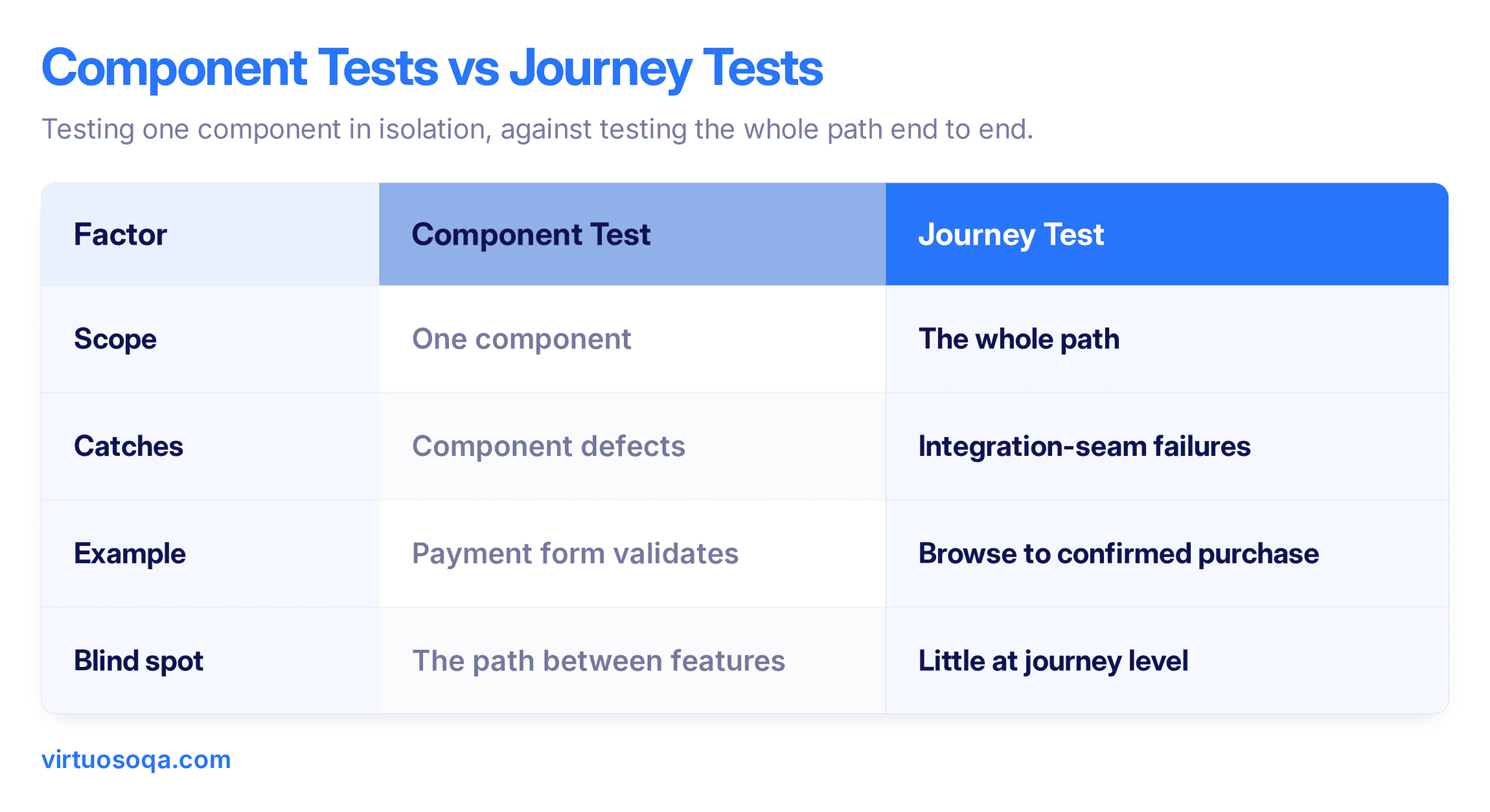
The distinction that matters is between testing a feature and testing a journey. A feature test confirms the payment form validates a card number. A journey test confirms that a user can move from browsing to a completed, confirmed, recorded purchase, with the payment form as one step among many. The journey test catches the failures that live between features, namely the integration seams where two components each work alone but disagree about the data passing between them.
Because it exercises the real path, user journey testing is where usability and integration meet. It reveals not just whether the components function but whether they combine into something a user can actually complete, which is the only question that matters at release time.
How to Identify the Journeys Worth Testing
Not every path through an application deserves an automated journey test, and trying to cover them all produces a slow, fragile suite that dilutes attention. The discipline is choosing the journeys that carry the most risk and the most value, then covering those deeply.
Start from business outcomes, not screens: List the outcomes the business depends on, namely revenue captured, claim submitted, patient admitted, account opened. Each outcome anchors a journey worth testing, and screens that lead to no meaningful outcome usually do not.
Weight by frequency and consequence: A journey that runs thousands of times a day, or one where a failure means lost revenue or a compliance breach, earns deep coverage. A rarely used path with low consequence earns less, deliberately.
Name the top journeys explicitly: Most applications have a handful of journeys that carry the bulk of the value, often the ones a product owner can recite from memory. Identify them by name, since a journey nobody can name is a journey nobody is accountable for testing.
Cover the unhappy paths of critical journeys: The highest-value journeys deserve their negative and edge variations tested too, namely the declined payment, the expired session, the out-of-stock item, because those are where real users get stuck.
The output is a ranked, named list of journeys with a deliberate depth decision behind each, which is the foundation everything else in the programme rests on.

A Worked Example, an E-Commerce Purchase Journey
Abstract descriptions undersell how much a journey touches, so it helps to walk one through. Consider a purchase on an online shop.
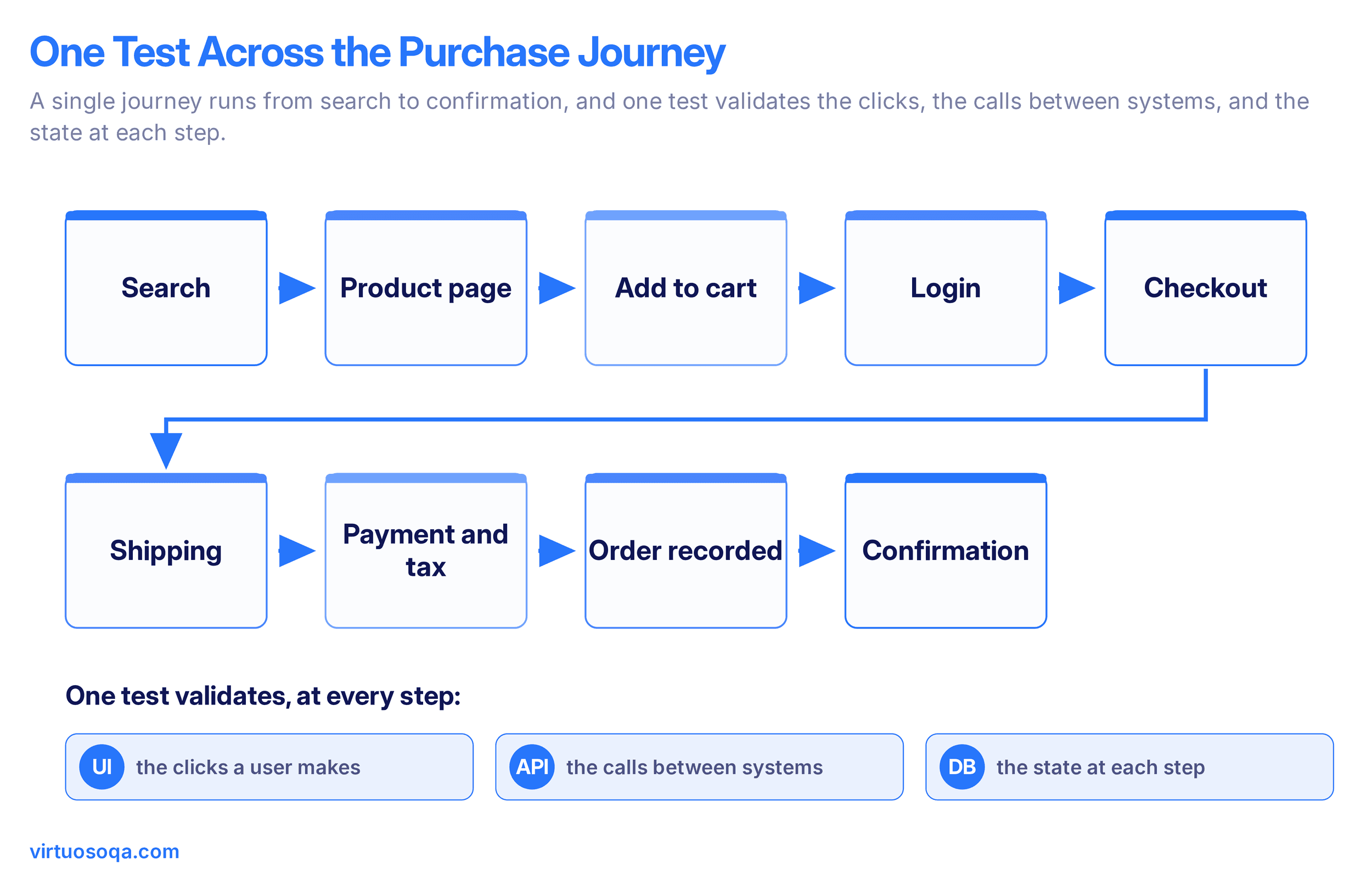
A user lands on the store, searches for a product, and opens its page, which reads the catalogue and the pricing service. They add it to the cart, which updates cart state and checks inventory. They proceed to checkout, which requires an authenticated session, so a login or guest path runs here. They enter shipping, which validates the address and calculates delivery options. They pay, which calls the payment gateway, applies tax for the right locale, and must handle both approval and decline. On approval, the order is recorded, inventory decrements, a confirmation renders, and a confirmation email fires.
A real user journey test validates the visible steps a user takes, the calls between the systems behind them, and the state at each point, namely that inventory actually decremented, that tax posted at the right rate, and that the order record exists. Testing only the clicks would confirm the screens rendered and miss that the confirmation appeared while no order was recorded, which is exactly the silent failure that reaches production and erodes trust.
How to Build a User Journey Test That Survives Change
The reason most teams abandon journey testing is not that the tests fail to catch bugs, it is that they break constantly and cost more to maintain than they return. A journey test that shatters every time a button moves is worse than no test, because it trains the team to ignore red. Building tests that survive change is the whole game.
1. Anchor Steps to Intent, Not to Selectors
A step that says "click the button with CSS class btn-primary-2" breaks on the next redesign. A step that says "the user proceeds to checkout" describes intent and survives the layout change underneath it.
2. Assert on Outcomes, Not Just Screens
A journey test that checks only that "Order Confirmed" appears misses the order that was never recorded. Assert on the state behind the screen, namely the record exists and the inventory moved, so the test proves the outcome rather than the pixels.
3. Model the Journey as Reusable Steps
A login step, an add-to-cart step, a checkout step, built once and reused across every journey that needs them, so a change to login is fixed in one place rather than across forty tests.
4. Keep Each Test to One Journey
A single test that walks four journeys and asserts on twenty outcomes is slow and impossible to diagnose on failure. One journey per test, with a focused set of assertions, keeps failures legible.
5. Make the Test Independent
A journey test that depends on the residue of a previous test cannot run in isolation or in parallel. Each test establishes its own preconditions, namely the user, the data, the starting state, so it runs anywhere in any order.
The test that follows these rules survives the refactor, the redesign, and the parallel run, which is what turns a journey suite from a maintenance liability into a durable asset.

Test Data and Environments for Journey Testing
Journey tests fail more often on their data and their environment than on the application under test, and teams that treat these as afterthoughts build suites that are flaky for reasons that have nothing to do with real defects.
Govern the journey's data: A purchase journey needs a customer, a product in stock, a valid payment method, and a clean cart, and if any of those drift between runs the test fails for the wrong reason. Provision the data the journey needs as part of the test, through APIs or builders, rather than relying on whatever happens to be in the environment.
Reset state between runs: A journey that leaves a cart populated or an order half-placed contaminates the next run. Clean state between runs so each journey starts from a known baseline.
Mirror production where it matters: The environment should match production in the configuration that affects the journey, namely the tax rules, the feature flags, the integrations, so a test that passes in the environment means something for production.
Isolate the run: A journey test competing with other tests for the same data or session is a journey test that fails intermittently. Isolate the environment or the data so runs do not interfere.
Data and environment discipline is unglamorous and it is where most journey-suite flakiness actually lives, so it repays the attention more than any clever assertion does.
Best Practices for User Journey Testing
Pulling the discipline together, a handful of practices separate journey suites that hold from journey suites that drift.
1. Prioritise by Risk and Value
Cover the named, high-consequence journeys deeply and accept lighter coverage elsewhere on purpose.
2. Test Positive, Negative, and Edge Paths
The declined payment and the expired session are where users get stuck, so critical journeys need their unhappy paths covered, not just the happy one.
3. Author in Intent-Based, Readable Steps
Steps a business user can read are steps a business user can review and contribute to, which widens who can maintain the suite beyond engineers.
4. Combine UI and API Verification
A journey crosses interfaces and services, so a test that combines UI actions with API and data assertions reflects the journey as it actually runs.
5. Automate and Parallelise
Journey tests are too slow to run serially at scale, so parallel execution across environments keeps feedback fast enough to gate a release.
6. Keep a Feedback Loop With Product and Design
The people who own the journeys should help define and refine the tests that protect them, so the suite stays aligned with what the business actually cares about.
User Journey Testing in CI/CD
A journey suite that runs only before release is a journey suite that finds problems too late to fix cheaply. The value compounds when journey tests run automatically as part of the pipeline, so a broken journey is caught at the change that broke it.
Gate on the critical journeys: A failing critical-journey test should block promotion, since a release that cannot complete a purchase or submit a claim is not shippable regardless of what the unit tests say.
Run the right journeys at the right stage: A fast smoke set of the top journeys on every commit, the fuller journey suite on the release candidate, so feedback stays quick without skipping depth before release.
Parallelise to keep the pipeline fast: Journey tests are slower than unit tests, so running them across shards and environments in parallel keeps the pipeline within an acceptable window.
Surface failures with enough evidence to diagnose: A journey failure should arrive with the step that broke, a screenshot, and the relevant logs, so triage does not mean re-running the whole journey to reproduce it.
Wired in this way, journey tests become a continuous signal of whether the application still does what users need, rather than a manual gate someone runs by hand the night before release.

Common Pitfalls in User Journey Testing
A handful of failure modes show up in nearly every struggling journey suite, and naming them is usually the first step to fixing them.
1. Selector-Bound Steps
Journeys anchored to CSS selectors or XPath break on every UI change and generate maintenance the team eventually gives up on. Intent-based steps are the fix.
2. Screen-Deep Assertions
Checking that a confirmation message appears without checking that the outcome behind it happened lets silent failures through, namely the confirmation that shows while nothing was recorded.
3. The Everything-in-One-Test Journey
A test that walks several journeys at once is slow, fragile, and undiagnosable, so failures get ignored rather than fixed.
4. Implicit Dependencies Between Tests
A journey that assumes a previous test left it logged in cannot run in isolation, which surfaces as intermittent failure the moment the suite runs in parallel.
5. Neglected Data and Environment
The single largest source of journey flakiness, where the test fails because the data drifted or the environment shifted, not because the application broke.
6. Covering Only the Happy Path
A journey suite that never tests the declined payment or the expired session misses exactly the paths where real users get stuck.
How AI Has Changed User Journey Testing
Journey testing was historically the most expensive kind of testing to build and the first to be abandoned, because end-to-end tests were brittle and the maintenance burden outran the value. AI-native tooling has changed that economics in a few specific ways.
Authoring is open beyond engineers: Natural-language authoring lets QA analysts, product owners, and business users write journey tests in plain English, which removes the authoring bottleneck that kept journey coverage low.
Tests survive UI change: Self-healing absorbs the routine UI changes that used to break journey tests on every release, so coverage earned stays earned rather than decaying within two release cycles.
Generation lifts coverage: Autonomous generation produces journey tests from application context and existing assets, so coverage can rise because the platform generated tests rather than only because people wrote more.
Triage collapses: AI Root Cause Analysis surfaces the failing step and the evidence around it, so a failed journey is diagnosed in minutes rather than reproduced by hand.
The pattern is that the two historical barriers to journey testing, namely authoring throughput and maintenance cost, are exactly what AI-native tooling attacks, which is why journey coverage is becoming achievable at a scale that was impractical a few years ago.
How Virtuoso QA Approaches User Journey Testing
Journey testing is where the maintenance problem is worst, because a journey crosses many components and any one of them changing can break the test. Virtuoso QA is an AI-native platform built for that reality, and a few specifics matter for journeys in particular.
Plain-English authoring across layers: Journey tests are written in plain English through Natural Language Programming, and a single test can validate the UI, the API, and the database together, so the journey is verified as it actually runs rather than in disconnected pieces.
Reusable journey steps: Composable modules map to business actions, namely a login step or a checkout step, built once and reused across every journey that needs them, so a change is fixed in one place.
Self-healing for journey resilience. Self-healing keeps journey tests running as the application changes, reducing maintenance rather than removing it, with proposed repairs running at approximately 95% user acceptance under human oversight.
Outcome assertions beyond the screen. Tests verify that the order was recorded, the email fired, and the state updated, not just that a confirmation rendered, so silent failures are caught.
Diagnostic root cause analysis. AI Root Cause Analysis surfaces the failing step with screenshots and logs, so triage across a long journey is fast.
Related Reads
Frequently Asked Questions
What Is the Difference Between User Journey Testing and End-to-End Testing?
How Is User Journey Testing Different From Feature Testing?
How Do You Identify Which User Journeys to Test?
Why Do User Journey Tests Become Flaky?
Should User Journey Tests Run in CI/CD?
How Does Virtuoso QA Approach User Journey Testing?









