Blog
Test Automation Framework Design - Step by Step Guide

Rishabh Kumar
Published on

Table of contents
Lorem ipsum
Lorem ipsum
Lorem ipsum
Lorem ipsum
Lorem ipsum
Building a test automation framework from scratch is a significant undertaking that shapes testing capabilities for years. This guide walks through the architectural decisions, component layers, and design patterns that distinguish maintainable frameworks from technical debt. We cover everything from foundation selection through reporting implementation. We also examine when building custom frameworks makes sense versus adopting platforms that provide these capabilities out of the box. For organizations testing enterprise applications like Salesforce and Microsoft Dynamics 365, the build versus buy decision carries substantial long term implications.
What is a Test Automation Framework?
A test automation framework is the underlying structure that supports automated test execution. It encompasses the libraries, tools, conventions, and practices that enable teams to create, execute, and maintain automated tests efficiently.
Framework vs Test Scripts
Individual test scripts validate specific functionality. A framework provides the infrastructure that makes scripts work together:
Configuration Management: Handling environments, credentials, and settings
Test Data Handling: Managing inputs across multiple test executions
Execution Control: Running tests sequentially, in parallel, or selectively
Reporting and Logging: Capturing results and diagnostic information
Reusable Components: Shared utilities and common operations
Integration Points: Connecting with CI/CD, defect tracking, and other tools
Without a framework, each script becomes an independent island requiring duplicate code for common operations. Frameworks eliminate redundancy and establish consistency.
Why Framework Design Matters
Poor framework design creates compounding problems:
Maintenance Multiplication: Without proper abstraction, changes propagate across hundreds of tests
Onboarding Friction: New team members struggle to understand inconsistent patterns
Scalability Barriers: Architectures that work for 100 tests collapse at 1000
Technical Debt Accumulation: Quick fixes become permanent problems
Thoughtful design upfront prevents these issues. The investment in architecture pays dividends throughout the framework's lifetime.
Key Factors to Consider Before Designing Your Framework
Before writing any code, evaluate these factors to ensure your framework meets long-term needs.
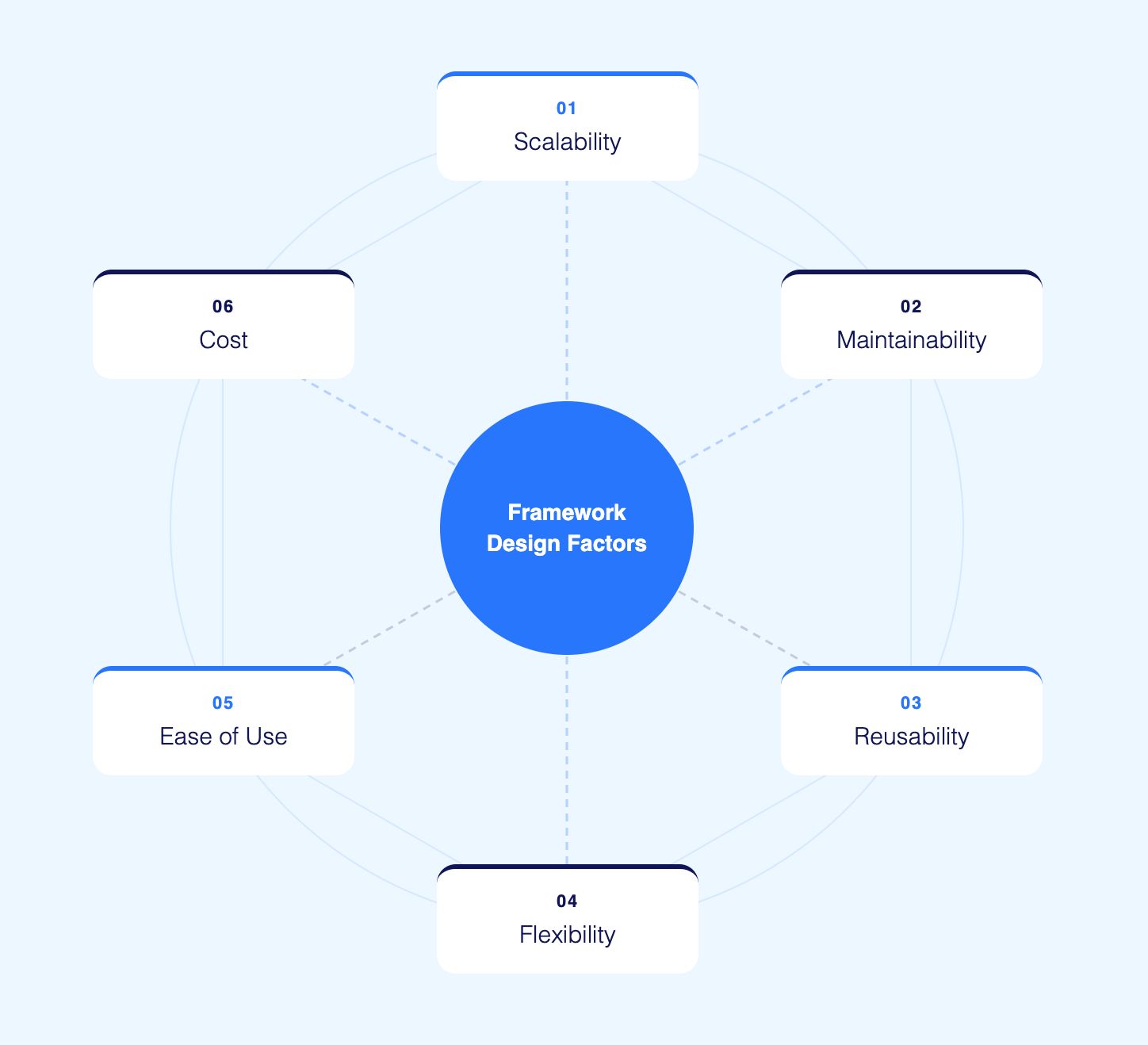
1. Scalability
Your framework must handle growth. A framework supporting 50 tests today should support 500 tests tomorrow without performance degradation. Design for the scale you expect in two years, not just current needs.
2. Maintainability
Tests break when applications change. A maintainable framework localizes changes so a single UI update does not require editing hundreds of test files. Poor maintainability is the top reason automation initiatives fail.
3. Reusability
Writing the same login code in every test wastes time and creates inconsistency. Reusable components like shared utilities, page objects, and common functions reduce duplication and speed up test creation.
4. Flexibility
Requirements change. New browsers launch. Mobile testing becomes priority. Your framework should adapt to new tools, technologies, and testing approaches without complete rewrites.
5. Ease of Use
Complex frameworks that only one person understands create risk. Design for team adoption. Clear patterns, good documentation, and intuitive structure enable anyone on the team to contribute.
6. Cost
Consider total cost including development time, maintenance effort, infrastructure, licensing, and training. A cheaper upfront choice may cost more over time if maintenance burden is high.
Six Test Automation Framework Patterns and When to Use Each
Several established patterns guide framework design. Understanding their tradeoffs enables appropriate selection.
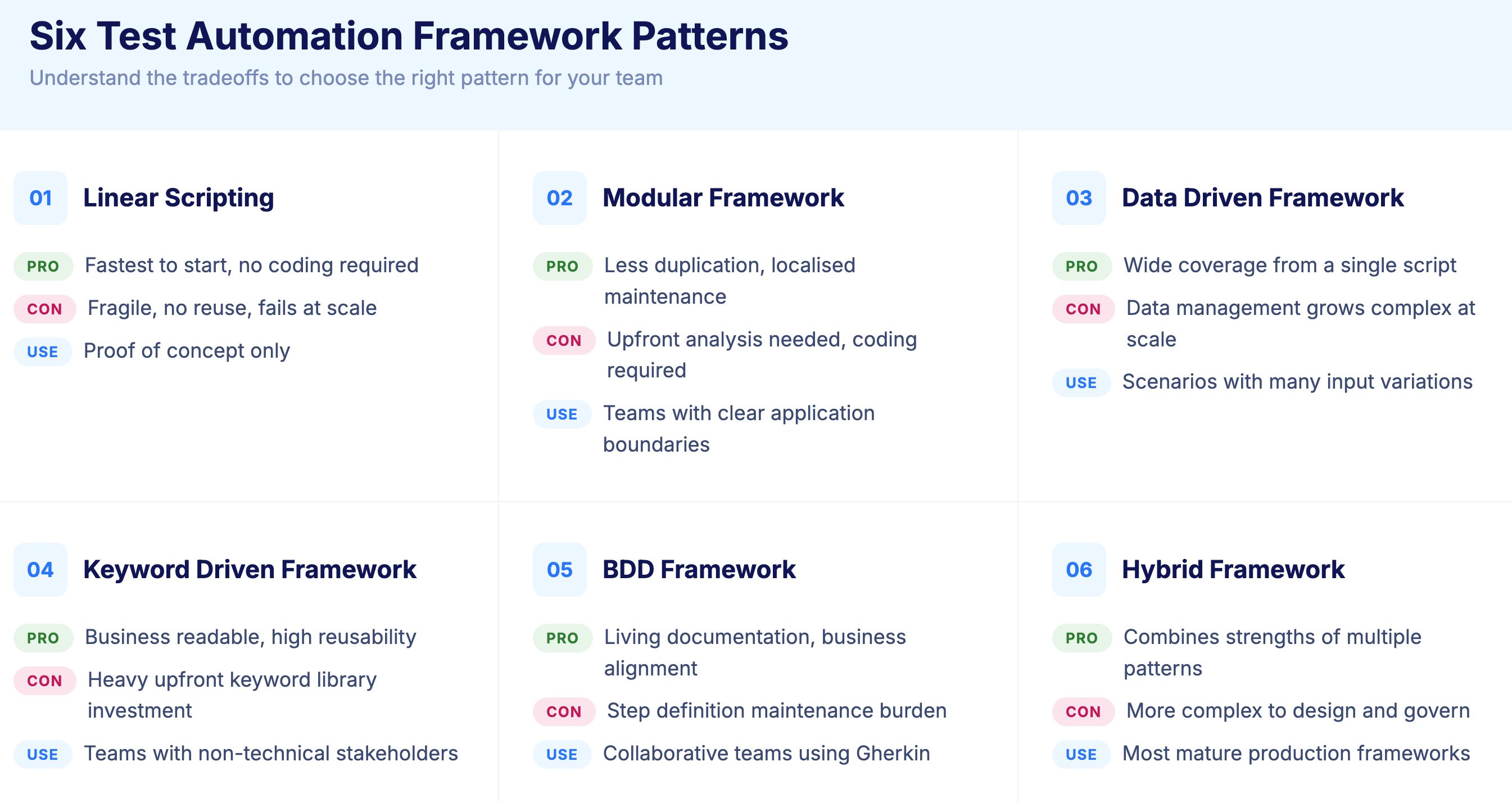
1. Linear Scripting (Record and Playback)
The simplest approach: record user interactions and replay them as tests.
Advantages:
Fastest initial creation
No programming required for basic tests
Visual confirmation of captured steps
Disadvantages:
No reusability between tests
Extremely fragile to application changes
Impossible to maintain at scale
Limited to simple scenarios
Linear scripting fails beyond proof of concept. Any serious automation initiative requires more structured approaches.
2. Modular Framework
Modular frameworks decompose applications into independent components that tests combine as needed.
Structure:
Separate modules for distinct application areas (login, search, checkout)
Tests assemble modules to create complete scenarios
Changes to application areas affect only corresponding modules
Advantages:
Reduced code duplication
Localized maintenance when applications change
Clear organization matching application structure
Disadvantages:
Requires upfront analysis to identify modules
Module boundaries may not align with test scenarios
Still requires programming skills
3. Data Driven Framework
Data driven frameworks separate test logic from test data. The same test script executes multiple times with different inputs.
Structure:
Test scripts contain logic only
External sources (CSV, Excel, databases) provide data
Each data row produces a separate test execution
Advantages:
Expanded coverage without additional scripts
Non programmers can add test cases by adding data
Easier maintenance when logic stays constant
Disadvantages:
Data management becomes complex at scale
Not all scenarios reduce to data variations
Requires infrastructure for data storage and access
4. Keyword Driven Framework
Keyword driven frameworks abstract actions into business readable keywords that non programmers can combine.
Structure:
Keywords represent actions (Login, SearchProduct, AddToCart)
Test cases sequence keywords with parameters
Keyword library implements technical details
Advantages:
Business stakeholders can read and create tests
Technical implementation hidden behind keywords
High reusability of keyword definitions
Disadvantages:
Significant upfront investment in keyword library
Keyword granularity decisions affect usability
Debugging requires understanding keyword internals
5. Behavior Driven Development (BDD) Framework
BDD frameworks express tests in natural language using Given, When, Then syntax that bridges business and technical perspectives.
Structure:
Feature files contain scenarios in Gherkin syntax
Step definitions implement technical execution
Scenarios read like requirements documentation
Example:
Advantages:
Living documentation of system behavior
Business stakeholder involvement in test design
Clear mapping from requirements to tests
Disadvantages:
Step definition maintenance burden
Gherkin syntax limitations for complex scenarios
Organizational discipline required for adoption
6. Hybrid Framework
Most production frameworks combine patterns based on specific needs.
Common Combinations:
Page Object Model + Data Driven: Modular structure with externalized data
BDD + Keyword Driven: Natural language scenarios backed by reusable keywords
Modular + API Integration: UI components combined with API validation
Hybrid approaches capture benefits of multiple patterns while mitigating individual weaknesses.

Core Components Every Test Automation Framework Needs
Regardless of pattern selection, effective frameworks share common components.
1. Configuration Management
Tests require configuration for:
Environment URLs (development, staging, production)
Credentials and authentication details
Browser and device specifications
Timeout and retry settings
Feature flags and conditional behavior
Design Principles:
Externalize configuration from test code
Support environment specific overrides
Secure sensitive values appropriately
Enable configuration without code changes
Configuration files (YAML, JSON, properties) or environment variables typically manage these settings.
2. Page Object Model Implementation
Page Object Model (POM) abstracts web pages into classes that encapsulate element locators and page specific methods.
Structure:
Benefits:
Single location for element locators
Page changes require updates in one place
Tests read as page interactions, not element manipulations
Implementation Tips:
One class per logical page or component
Methods return page objects for fluent chaining
Avoid assertions in page objects (keep in tests)
Handle dynamic elements through parameterized locators
3. Test Data Management
Sophisticated data handling separates maintainable frameworks from brittle scripts.
Data Sources:
CSV and Excel files for tabular data
JSON and YAML for structured data
Databases for large or dynamic datasets
API calls for real time data generation
Design Considerations:
Data isolation between test executions
Cleanup mechanisms after test completion
Referential integrity for related data
Sensitive data protection
AI powered data generation creates realistic test data on demand without maintaining static datasets. This approach eliminates stale data problems and increases test variety automatically.
4. Logging and Reporting
Comprehensive logging enables debugging; clear reporting enables decision making.
Logging Requirements:
Test step execution with timestamps
Element interactions and inputs
API requests and responses
Screenshots at key points and failures
Console and network logs
Reporting Requirements:
Pass, fail, skip status for each test
Execution duration and trends
Failure categorization and grouping
Environment and configuration context
Integrate with tools like Allure, ExtentReports, or ReportPortal for rich visualization. CI/CD pipelines should surface results prominently for immediate visibility.
5. Wait and Synchronization Strategy
Web applications load asynchronously. Robust synchronization prevents flaky tests.
Wait Types:
Implicit Waits: Global timeout for element appearance
Explicit Waits: Condition specific waits with defined criteria
Fluent Waits: Polling with custom intervals and exception handling
Best Practices:
Prefer explicit waits with specific conditions
Avoid hardcoded sleep statements
Wait for application state, not arbitrary time
Handle loading indicators and spinners explicitly
Poor synchronization causes most test flakiness. Invest heavily in robust wait strategies.
6. Parallel Execution Support
Sequential execution cannot scale. Design for parallel operation from the beginning.
Requirements:
Thread safe utilities and shared resources
Independent test data per execution
Configurable parallelization levels
Result aggregation across threads
Implementation Approaches:
Test framework built in parallelization (TestNG, pytest-xdist)
Grid infrastructure (Selenium Grid, cloud providers)
Container orchestration (Kubernetes, Docker Compose)
Retrofit parallelization into frameworks designed for sequential execution causes significant rework. Build parallel capable from the start.
7. CI/CD Integration
Frameworks must integrate with continuous integration pipelines.
Integration Points:
Triggering tests from pipeline stages
Passing configuration through environment variables
Returning exit codes based on results
Publishing reports to accessible locations
Support common platforms: Jenkins, Azure DevOps, GitHub Actions, GitLab CI, CircleCI. Containerized execution simplifies integration by packaging dependencies consistently.
How to Design a Test Automation Framework Step by Step
Step 1: Define Requirements
Before writing code, clarify what the framework must support:
Target applications and technologies
Team skills and language preferences
Scale requirements (current and projected)
Integration needs (CI/CD, test management, defect tracking)
Reporting and compliance requirements
Document these requirements to guide architecture decisions and evaluate success.
Step 2: Select Foundation Technologies
Choose core technologies based on requirements:
Programming Language: Match team expertise. Java, Python, and JavaScript dominate test automation.
Testing Library: Selenium WebDriver for browser automation remains standard. Playwright offers modern alternative with similar capabilities.
Test Runner: TestNG or JUnit for Java, pytest for Python, Mocha or Jest for JavaScript.
Build Tool: Maven or Gradle for Java, pip for Python, npm for JavaScript.
Technology selection constrains later options. Choose deliberately. Alternatively, AI-native test platforms like Virtuoso eliminate these decisions entirely by providing the complete testing infrastructure out of the box, allowing teams to start automating immediately without technical dependencies.
Step 3: Establish Project Structure
Organize code for clarity and maintainability:
The config folder stores environment-specific settings like URLs, credentials, and browser configurations for development, staging, and production.
The src folder contains your core framework code. Within it, pages holds page objects representing each application screen, components stores reusable UI elements like headers and modals, utilities contains helper functions for common actions, and api handles backend API interactions.
The tests folder organizes your actual test files. Smoke tests provide quick health checks, regression tests cover comprehensive functionality, and e2e tests validate complete user journeys.
The data folder separates test inputs from test logic. Testdata holds CSV, JSON, or Excel files with input values, while fixtures stores predefined data for consistent test conditions.
The reports folder captures generated results, screenshots, and logs after test runs. The resources folder stores supporting files like drivers or documents needed during execution.
Consistent structure enables navigation and establishes conventions new team members learn quickly.
Step 4: Build Core Utilities
Implement foundational capabilities:
Driver Management: Browser initialization, configuration, cleanup
Wait Utilities: Reusable synchronization methods
Data Utilities: Reading from various sources
Logging Utilities: Consistent logging across components
These utilities form the foundation everything else builds upon. Invest in quality implementation.
Step 5: Implement Page Objects
Create page objects for application areas:
Identify logical pages and components
Define element locators
Implement interaction methods
Add validation helpers
Start with critical user journeys. Expand coverage incrementally as tests require additional pages.
Step 6: Create Initial Tests
Write tests for highest priority scenarios:
Smoke tests validating basic functionality
Critical path tests for revenue impacting flows
Regression tests for recently changed areas
Initial tests validate framework design. Expect iteration as patterns emerge and issues surface.
Step 7: Integrate with CI/CD
Connect framework to pipelines:
Configure test execution commands
Set up environment variable handling
Establish result reporting
Configure failure notifications
Automation that does not run automatically provides limited value. Integration enables continuous testing.
Step 8: Iterate and Expand
Framework development never truly completes:
Add tests as application evolves
Refactor patterns that prove problematic
Incorporate lessons learned
Adopt new capabilities as needs emerge
Treat the framework as a product requiring ongoing investment.

Common Framework Design Mistakes and How to Avoid Them
1. Over Engineering
Frameworks designed for hypothetical future needs become unnecessarily complex. Build for current requirements with extension points for growth. Premature abstraction creates maintenance burden without delivering value.
2. Insufficient Abstraction
The opposite problem: tests directly manipulating elements without page objects or utilities. Changes ripple across the entire test suite. Balance abstraction appropriately.
3. Ignoring Maintenance
Frameworks require ongoing care:
Locator updates when applications change
Refactoring as patterns evolve
Dependency updates for security and compatibility
Documentation maintenance
Budget ongoing maintenance effort. Neglect accumulates as technical debt.
4. Tight Coupling
Tests dependent on execution order, shared state, or specific data create fragile suites. Design for independence where each test can execute in isolation.
Best Practices for Test Automation Framework Design
Follow these practices to build frameworks that last.
1. Keep It Simple
Complexity kills frameworks. Resist adding features you might need someday. Build for current requirements with clean extension points for future growth. Simple frameworks are easier to maintain, debug, and hand off to new team members.
2. Prioritize Reusability
Before writing new code, check if something similar exists. Build a library of common functions, page objects, and utilities that any test can use. Reusability reduces development time and ensures consistency.
3. Document Everything
Undocumented frameworks become unusable when original authors leave. Include setup instructions, coding conventions, architecture decisions, and usage examples. Update documentation as the framework evolves.
4. Manage Technical Debt
Quick fixes accumulate. Schedule regular refactoring sessions to clean up workarounds, update deprecated methods, and improve code quality. Unmanaged technical debt eventually makes frameworks unmaintainable.
5. Foster Team Collaboration
Frameworks succeed when teams adopt them. Involve testers, developers, and stakeholders in design decisions. Gather feedback regularly. A framework nobody uses provides no value regardless of technical quality.
6. Review and Iterate
No framework is perfect on the first attempt. Conduct regular reviews to identify pain points. Measure metrics like test creation time, maintenance effort, and flakiness rates. Use data to guide improvements.
Build vs Buy: When to Create a Custom Framework vs Use a Platform
Building custom frameworks demands significant investment. Before committing, evaluate whether alternatives like Virtuoso QA can meet your needs faster and at lower cost.
True Cost of Building
Custom framework development requires:
Initial Development: 3 to 6 months for basic framework, longer for sophisticated capabilities
Ongoing Maintenance: 1 to 2 full time equivalents maintaining framework infrastructure
Infrastructure Management: Execution grid setup, browser management, environment provisioning
Opportunity Cost: Engineering effort diverted from test creation to framework development
Organizations often underestimate these costs, viewing frameworks as one time projects rather than ongoing commitments.
When Custom Frameworks Make Sense
Building remains appropriate when:
Unique requirements exceed platform capabilities
Deep integration with proprietary systems required
Organizational constraints prevent platform adoption
Existing framework investment justifies continuation
Large enterprises with specialized needs and dedicated automation teams may justify custom development.
When Virtuoso QA Makes More Sense
AI native test platforms like Virtuoso QA deliver capabilities that would require years of custom development:
Natural Language Test Authoring: Describe tests in plain English without programming. Anyone who can write a test case can create automated coverage.
Self Healing Maintenance: Tests automatically adapt when applications change. Virtuoso QA achieves approximately 95% self healing accuracy, eliminating the locator update burden that consumes framework maintenance.
Live Authoring: Immediate feedback as tests are created. Each step executes instantly, confirming correct implementation before proceeding.
Cloud Execution: Access 2000+ browser, OS, and device combinations without infrastructure management.
Built in Reporting: Comprehensive dashboards and root cause analysis without additional tooling.
CI/CD Integration: Native connections to Jenkins, Azure DevOps, GitHub Actions, and other platforms without custom scripting.
For organizations testing enterprise applications like Salesforce and Microsoft Dynamics 365, platforms provide immediate capabilities that custom frameworks require years to develop.
Migration to Virtuoso QA from Custom Frameworks
Existing framework investments need not be abandoned. Migration approaches include:
GENerator Conversion: Virtuoso's GENerator tool converts Selenium scripts, BDD feature files, and other formats into AI native tests automatically.
Parallel Operation: Run existing framework tests alongside platform tests. Migrate incrementally based on maintenance burden.
Hybrid Architecture: Maintain custom code for unique scenarios while using platforms for standard coverage.
The goal is outcomes, not ideology. Use the approach that delivers quality efficiently.

Related Reads
Frequently Asked Questions
How long does it take to build a test automation framework from scratch?
Which programming language is best for test automation frameworks?
What is the best framework architecture pattern?
How do you handle test data in automation frameworks?
Should we build a custom framework or use a platform?
How do you maintain test automation frameworks long term?




