Blog
10 Test Optimization Techniques: Proven Ways to Reduce Test Cycles

Virtuoso QA
Published on

Table of contents
Lorem ipsum
Lorem ipsum
Lorem ipsum
Lorem ipsum
Lorem ipsum
Testing that cannot keep pace with development becomes a bottleneck rather than a safeguard. As organizations adopt continuous delivery practices, test cycles measured in days become unacceptable. Yet simply running tests faster without strategic optimization leads to gaps in coverage and false confidence. This guide presents ten techniques that genuinely reduce test cycle time while maintaining or improving defect detection. These approaches work individually, but combining them creates compounding acceleration that transforms testing from impediment to enabler.
Why Test Cycle Speed Matters
The cost of slow testing extends far beyond QA team frustration. Every hour of delayed feedback represents:
1. Increased Defect Costs
Bugs discovered late in development cost 10 to 100 times more to fix than those caught early. Slow test cycles push discovery later, inflating remediation expenses.
2. Deployment Delays
When regression testing requires days, release windows shrink. Organizations either delay launches or skip testing, neither option acceptable for competitive markets.
3. Developer Context Switching
Long feedback loops force developers to move on to other work. When test failures finally surface, they must mentally reload context from days earlier, reducing productivity.
4. Reduced Innovation
Teams constrained by testing bottlenecks avoid changes that might extend test cycles. This risk aversion suppresses experimentation and improvement.
Organizations achieving rapid test cycles report releasing 50% more frequently while maintaining or improving quality. Speed and quality are not opposing forces when testing is properly optimized.
The 10 Test Optimization Techniques
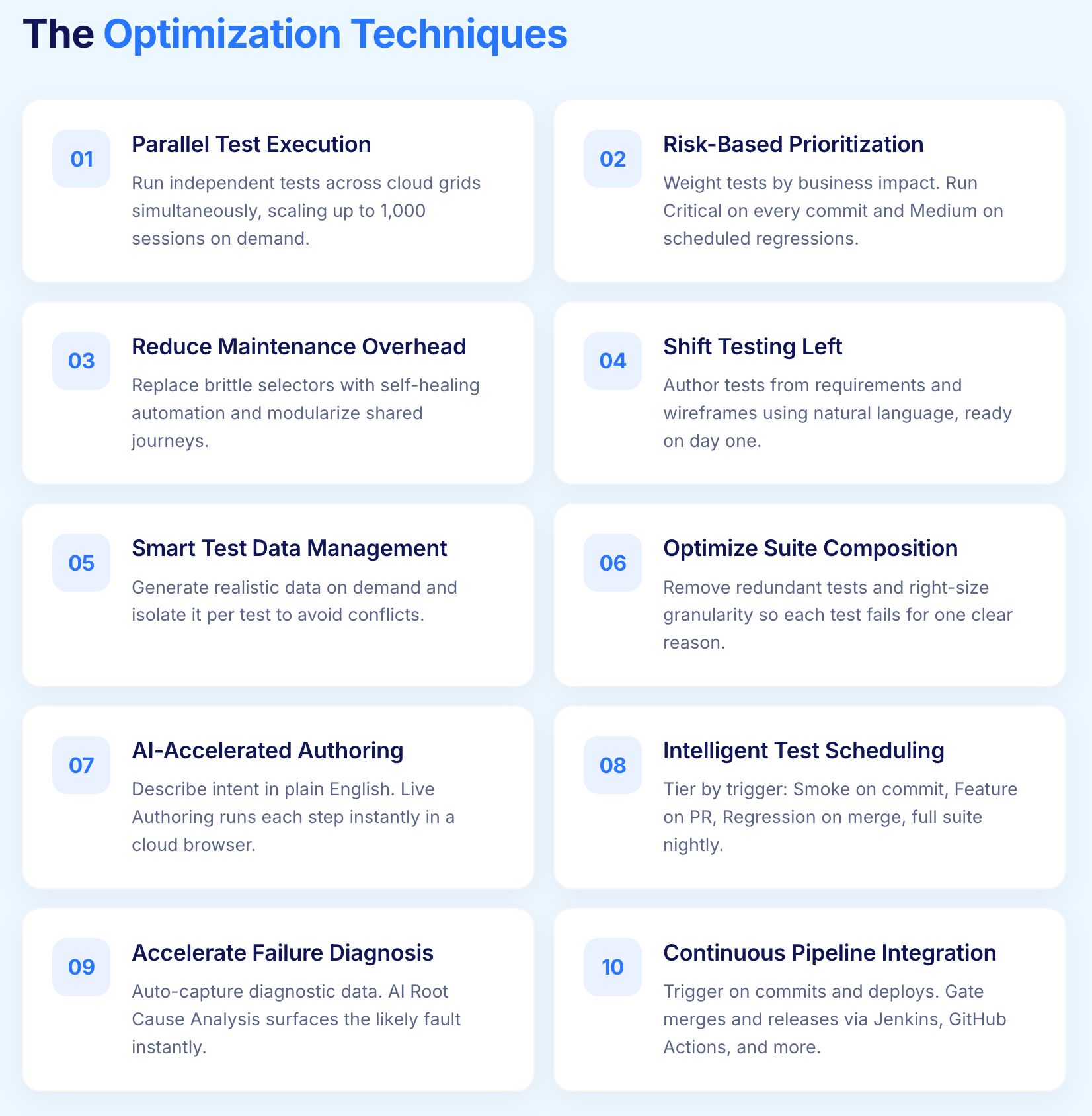
Technique 1: Implement Parallel Test Execution
Sequential test execution creates artificial bottlenecks. A regression suite of 1,000 tests running at 30 seconds each requires over 8 hours for completion. The same suite running across 100 parallel threads completes in under 5 minutes.
Identify Parallelization Opportunities
Tests suitable for parallel execution share key characteristics:
Independent State: Tests do not depend on outcomes or side effects from other tests
Isolated Data: Each test uses its own data sets without conflicts
No Resource Contention: Tests do not compete for limited resources like specific user accounts
Most functional tests meet these criteria with proper design. Tests that share database state or depend on execution order require restructuring before parallelization.
Scale Execution Infrastructure
Parallel execution requires infrastructure that scales. Options include:
Cloud Execution Grids: On demand access to browsers and devices without maintaining hardware. Scale from 1 to 1000 parallel sessions based on immediate need.
Container Orchestration: Spin up test execution containers dynamically through Kubernetes or similar platforms.
Distributed Execution: Spread tests across multiple machines with results aggregated centrally.
Virtuoso QA provides cloud based parallel execution across 2000+ browser, OS, and device combinations without infrastructure setup. Tests scale automatically based on execution plan configuration, eliminating capacity planning overhead.
Technique 2: Optimize Test Selection with Risk Based Prioritization
Running every test for every change wastes resources on low value validation. Risk based prioritization focuses testing effort where it matters most.
Map Tests to Code Changes
Implement traceability between code components and corresponding tests. When a change affects the payment module, execute payment related tests rather than the entire suite.
Change impact analysis identifies:
Directly modified components
Dependent components that consume modified code
Integration points with changed behavior
Prioritize by Business Impact
Weight tests by the severity of missed defects:
Critical: Revenue impacting features, data integrity, security functions
High: Core user journeys, primary business processes
Medium: Secondary features, convenience functions
Low: Edge cases, rarely used functionality
Execute critical and high priority tests on every commit. Reserve medium and low priority tests for scheduled regression runs. This tiered approach provides rapid feedback on critical paths while maintaining comprehensive coverage over time.
Technique 3: Reduce Test Maintenance Overhead
Maintenance consumes testing resources that could expand coverage. Organizations report spending 60% or more of automation effort on fixing existing tests rather than creating new ones. Reducing maintenance directly accelerates test cycles by freeing capacity.
Eliminate Brittle Selectors
Traditional automation fails when element identifiers change. A button's CSS class updates, and dozens of tests break despite unchanged functionality. Robust element identification uses multiple attributes:
Text content visible to users
Semantic HTML roles and labels
Position relative to stable landmarks
Visual characteristics
Self healing automation applies machine learning to identify elements through multiple paths simultaneously. When one identifier changes, alternate paths maintain test stability.
Virtuoso QA achieves approximately 95% self healing accuracy, automatically adapting tests when applications evolve. Organizations report up to 88% reduction in maintenance effort, reclaiming time previously consumed by selector updates.
Modularize Test Components
Duplicate test logic multiplies maintenance burden. A login sequence copied across 50 tests requires 50 updates when authentication changes.
Composable testing architectures extract common sequences into reusable components:
Library Checkpoints: Shared test sequences available across projects
Reusable Journeys: Complete workflows importable into larger tests
Parameterized Templates: Generic tests configurable through data
When authentication requirements change, update the login component once. All dependent tests inherit the change automatically.
Related Read: What Is Test Automation Maintenance? And How AI Solves It
Technique 4: Shift Testing Left
Earlier testing catches defects when they are cheapest to fix. Shifting left testing means testing sooner in the development lifecycle rather than waiting for code completion.
Test from Requirements
Do not wait for code to begin testing. Analyze requirements for testability issues:
Ambiguous acceptance criteria
Missing edge case specifications
Contradictory requirements
Untestable conditions
Create test cases from requirements before development begins. When code arrives, tests are ready for immediate execution.
Author Tests from Wireframes
Visual mockups contain sufficient information for test creation. Navigation flows, form fields, and expected interactions are visible before implementation.
Natural Language Programming enables test authoring without working applications. Describe expected behavior in plain English:
When development completes, tests execute immediately against the working application. This eliminates the delay between code completion and test availability.
Technique 5: Implement Smart Test Data Management
Test data problems cause failures unrelated to application defects. Missing data, stale values, and configuration mismatches waste investigation time and obscure genuine issues.
Generate Data on Demand
Static test data becomes outdated as applications evolve. Date sensitive data expires. Reference data falls out of sync with database constraints. User accounts become locked or deleted.
AI powered test data generation creates fresh, contextually appropriate data for each test execution:
Realistic names, addresses, and contact information
Valid formats for identifiers, codes, and references
Boundary values exercising edge cases
International characters and special content
Generated data eliminates the maintenance burden of static datasets while improving test coverage through variety.
Isolate Test Data
Tests sharing data create dependencies and conflicts. One test modifying a customer record affects subsequent tests expecting original values.
Data isolation strategies include:
Unique Data per Test: Generate or reserve distinct data for each test execution
Transactional Rollback: Execute tests within transactions that roll back after completion
Environment Snapshots: Reset data state between test runs
API Seeding: Create required data through APIs as test setup
Isolated data enables parallel execution without conflicts and makes test failures easier to diagnose.
Technique 6: Optimize Test Suite Composition
Test suites accumulate tests over time without corresponding cleanup. Redundant tests, obsolete validations, and low value checks inflate cycle time without improving defect detection.
Identify and Remove Redundant Tests
Multiple tests validating identical functionality waste execution time. Redundancy emerges when:
Different testers create similar tests independently
Tests remain after features merge or consolidate
Coverage overlaps between unit, integration, and system tests
Analyze test coverage to identify redundancy. Remove or consolidate tests that validate the same behavior without adding unique value.
Retire Obsolete Tests
Tests outlive their relevance when:
Features they validate no longer exist
Requirements change but tests do not update
Technology migrations make tests inapplicable
Regular test suite audits identify candidates for retirement. Tests that consistently pass without catching defects may validate stable functionality requiring less frequent verification.
Right Size Test Granularity
Some tests attempt too much, becoming slow and fragile. Others test too little, requiring excessive quantity for adequate coverage.
Optimal test granularity:
Validates a coherent scenario or user goal
Completes within acceptable time limits
Fails for single, identifiable reasons
Provides clear diagnostic information
Split overly broad tests into focused scenarios. Consolidate trivial tests into meaningful journeys.
Technique 7: Leverage AI for Test Creation Acceleration
Manual test creation cannot scale with modern development velocity. AI assisted authoring accelerates test creation while maintaining quality.
Generate Tests from Natural Language Descriptions
Describe test intent and let AI translate into executable steps. Rather than manually crafting each interaction:
Traditional Approach:
Identify element selectors
Write interaction code
Add wait conditions
Handle exceptions
Define assertions
AI Assisted Approach: "Verify that users can add products to their shopping cart and proceed to checkout"
Virtuoso QA's StepIQ analyzes application context and generates appropriate test steps based on natural language descriptions. Complex authoring becomes intuitive expression of test intent.
Accelerate with Live Authoring
Traditional test development follows an inefficient cycle: write tests, execute tests, analyze failures, debug issues, modify tests, repeat. Each iteration consumes time and requires context switching.
Live Authoring provides immediate feedback as tests are written. Each step executes instantly in a cloud browser, confirming:
Correct element identification
Expected interaction behavior
Proper wait handling
Accurate assertions
Users report test authoring 10 to 100 times faster with Live Authoring compared to traditional approaches. The immediate feedback loop eliminates the write, run, debug cycle entirely.
Technique 8: Implement Intelligent Test Scheduling
When tests run matters as much as how they run. Strategic scheduling maximizes feedback value while minimizing resource consumption.
Tier Test Execution by Trigger
Different events warrant different testing scope:
On Every Commit: Smoke tests validating build health (5 to 10 minutes)
On Pull Request: Feature tests covering changed functionality (15 to 30 minutes)
On Merge to Main: Regression tests validating integration (1 to 2 hours)
Nightly: Comprehensive suites including edge cases (full coverage)
Weekly: Extended tests including cross browser and accessibility
This tiered approach provides rapid feedback for frequent events while reserving comprehensive testing for appropriate checkpoints.
Schedule Around Resource Availability
Execution infrastructure has finite capacity. Scheduling tests during peak development hours competes with active work. Off hours execution:
Avoids resource contention
Provides results ready for morning review
Enables longer running comprehensive tests
Reduces infrastructure costs through better utilization
Virtuoso QA supports scheduled execution with configurable timing, enabling tests to run during optimal windows without manual triggering.
Technique 9: Accelerate Failure Diagnosis
Test failures require investigation. Slow diagnosis extends cycle time even when tests execute quickly. Reducing mean time to diagnosis accelerates the complete feedback loop.
Capture Comprehensive Diagnostic Data
When tests fail, investigators need context:
Screenshots: Visual state at each step, especially failure point
Network Logs: API requests, responses, and timing
Console Output: JavaScript errors and warnings
DOM Snapshots: Page structure for comparison
Performance Metrics: Timing data revealing slow operations
Capturing this data automatically eliminates manual reproduction of failures, often the most time consuming diagnostic activity.
Apply AI Root Cause Analysis
AI Root Cause Analysis automates failure investigation by:
Correlating failure patterns with known causes
Highlighting relevant diagnostic data
Suggesting probable root causes
Identifying whether failures stem from application defects, test issues, or environment problems
Virtuoso QA's AI Root Cause Analysis surfaces actionable insights immediately upon test failure. Investigators review curated evidence rather than searching through logs and reproducing scenarios.
Technique 10: Continuous Pipeline Integration
Testing disconnected from development workflows creates delays. Tight CI/CD integration makes testing automatic and results immediately visible.
Automate Test Triggering
Manual test initiation introduces delays and depends on human availability. Automated triggers execute tests immediately when conditions are met:
Code commits to specific branches
Pull request creation or updates
Deployment to environments
Scheduled intervals
Manual override when needed
Virtuoso QA integrates with Jenkins, Azure DevOps, GitHub Actions, GitLab CI, CircleCI, and Bamboo. Tests trigger automatically without custom scripting or infrastructure configuration.
Gate Deployments on Test Results
Test results should block problematic deployments automatically. Configure pipelines to:
Require test passage before merge approval
Prevent deployment to production when critical tests fail
Alert stakeholders to failures requiring decisions
Automatically roll back failed deployments
This integration transforms testing from optional checkpoint to essential quality gate, ensuring feedback drives action.
Measuring Optimization Impact
Optimization without measurement is guesswork. Track test metrics that reveal true cycle time improvements:
Key Metrics to Monitor
Total Cycle Time: Duration from test initiation to results availability. The metric that matters most for feedback speed.
Execution Time: Actual test running duration, excluding queue wait and result processing. Reveals parallelization effectiveness.
Queue Wait Time: Delay before tests begin executing. Indicates infrastructure capacity constraints.
Failure Analysis Time: Duration from failure to root cause identification. Measures diagnostic efficiency.
Maintenance Ratio: Percentage of effort spent maintaining existing tests versus creating new ones. Below 20% indicates healthy automation.
Defect Escape Rate: Bugs reaching production despite testing. Ensures optimization does not sacrifice effectiveness.
Benchmark and Iterate
Establish baseline measurements before optimization. Track changes as techniques are implemented. Some approaches deliver immediate impact; others compound over time.
Expect diminishing returns from individual techniques. Organizations achieving 70% faster test cycles typically combine multiple approaches rather than maximizing any single dimension.
Accelerate Your Test Cycles Today
Test cycle optimization is not optional for organizations pursuing continuous delivery. The techniques presented here provide a roadmap from testing bottleneck to competitive advantage.
AI native platforms like Virtuoso QA accelerate multiple dimensions simultaneously:
Parallel Execution: Cloud grid scales to 2000+ configurations instantly
Self Healing: 95% accuracy eliminates maintenance burden
Live Authoring: 10x faster test creation through immediate feedback
AI Root Cause Analysis: Minutes to diagnosis instead of hours
CI/CD Integration: Automatic triggering through native platform connections
Organizations using Virtuoso QA report test cycles reduced by 70% while expanding coverage and improving defect detection. The question is not whether to optimize, but how quickly you can begin.

Frequently Asked Questions
How much faster can test cycles realistically become?
Which optimization technique should be implemented first?
Does faster testing mean less thorough testing?
How do you optimize tests that cannot run in parallel?
What infrastructure is needed for parallel test execution?
How do you prevent optimization from introducing new problems?




