Blog
What is Baseline Testing? Definition, Types, and Best Practices

Rishabh Kumar
Published on

Table of contents
Lorem ipsum
Lorem ipsum
Lorem ipsum
Lorem ipsum
Lorem ipsum
Baseline testing establishes a reference point for expected application behavior against which all future changes are measured. It captures how your system performs, appears, and functions at a known good state, then detects deviations when code changes. Without baselines, teams cannot distinguish between intentional improvements and unintended regressions. AI-native testing platforms now automate baseline creation, maintenance, and comparison, enabling enterprises to detect regressions instantly across thousands of test scenarios while adapting baselines intelligently as applications evolve.
What is Baseline Testing?
Baseline testing is the process of establishing a reference standard for application behavior, performance, functionality, or appearance at a specific point in time. This reference becomes the benchmark against which all subsequent test executions are compared to identify changes, regressions, or improvements.
Think of baseline testing as taking a snapshot of your application when it's working correctly. Every future test execution compares against this snapshot. If something changes unexpectedly, the deviation from baseline signals a potential regression that requires investigation.
The Core Components of Baseline Testing
Reference State: A documented, verified version of the application functioning correctly. This includes test execution results, performance metrics, visual appearance, API responses, and database states.
Comparison Mechanism: Automated systems that compare current test executions against baseline references, identifying differences and highlighting deviations.
Acceptance Criteria: Defined thresholds that determine whether deviations from baseline constitute failures. Small differences might be acceptable; large deviations trigger alerts.
Baseline Evolution: Processes for updating baselines when intentional changes occur. Baselines aren't static. They evolve as applications improve, ensuring the reference remains accurate.
Why Baseline Testing Matters
Regression Detection
The primary purpose of baseline testing is catching regressions, unintended changes that break existing functionality. When a new code commit causes test results to deviate from baseline, teams know something broke. Without baselines, teams only detect regressions if they explicitly test for specific failures. Baselines catch unexpected problems automatically.
Suggested Read: What is Regression Testing - Scope, Process, and Techniques
Quality Assurance
Baselines establish what "quality" means for your application. They define expected behavior, acceptable performance, and correct appearance. This shared understanding aligns development, QA, and operations teams around measurable quality standards.
Change Impact Analysis
Baselines reveal exactly what changed between releases. Teams see which features improved, which degraded, and which remained stable. This visibility enables data-driven decisions about release readiness and change approval.
Continuous Monitoring
In production environments, baselines enable anomaly detection. When application behavior deviates from established baselines, response times increase, error rates spike, or user patterns shift, monitoring systems alert teams before issues impact customers.
Types of Baseline Testing
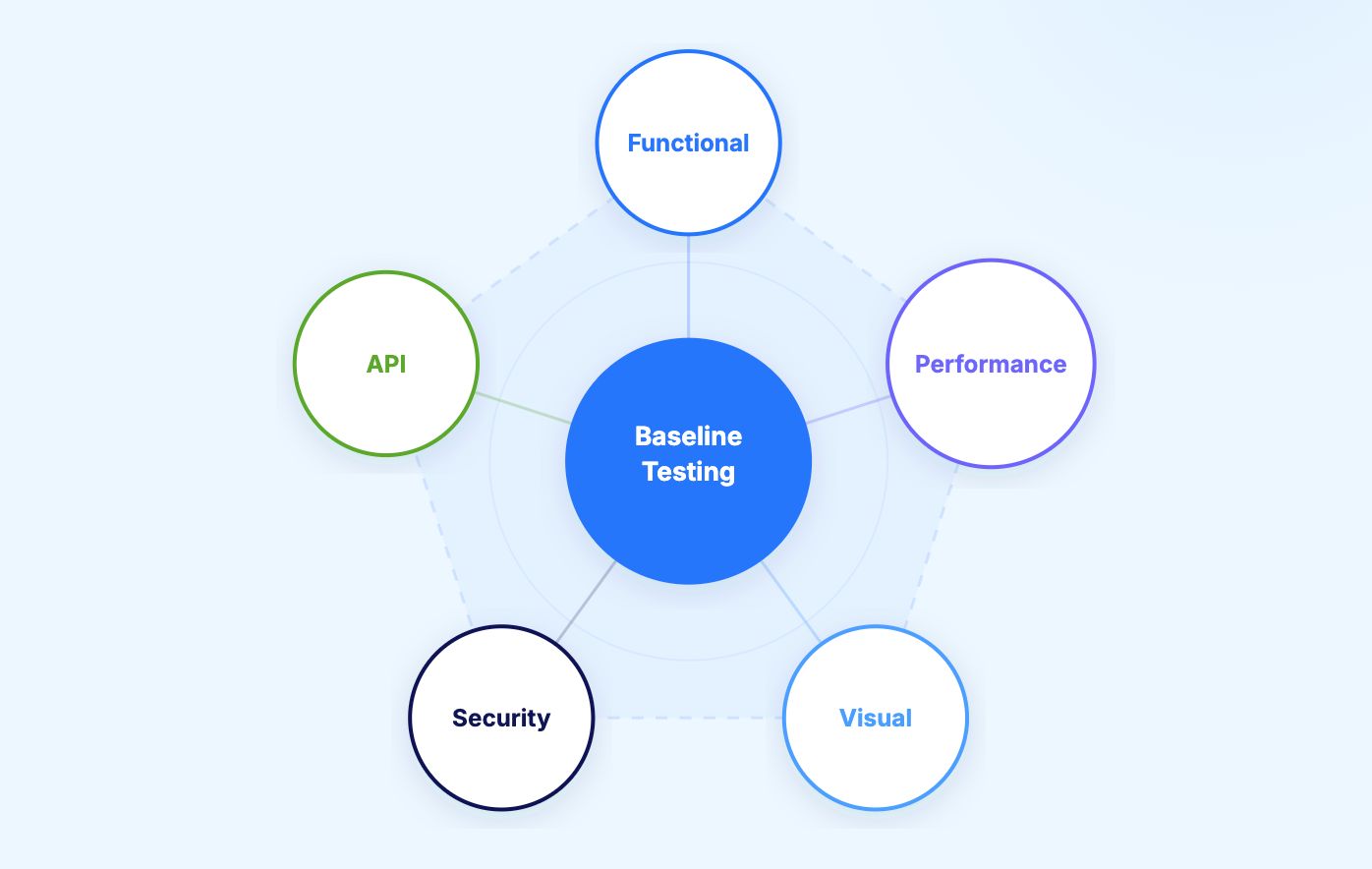
1. Functional Baseline Testing
Functional baselines capture expected application behavior for specific workflows. When users complete actions, what happens? What data appears? Which validations execute? Functional baselines document the correct outcomes.
Example: Login Workflow Baseline
Baseline establishes:
User enters valid credentials
System authenticates within 2 seconds
User redirects to dashboard
Dashboard displays username and account balance
Session token expires after 30 minutes
Future test executions compare against this baseline. If authentication takes 10 seconds instead of 2, or the dashboard shows incorrect data, the deviation signals a regression. These baselines are established through structured functional testing that defines expected outcomes.
2. Performance Baseline Testing
Performance baselines establish acceptable response times, throughput, resource consumption, and scalability characteristics. Teams measure current performance, document it as baseline, then monitor for degradation.
Example: API Performance Baseline
Baseline establishes:
Product search API responds in 200ms at 95th percentile
System handles 1,000 concurrent users without degradation
Database queries complete within 50ms
Memory consumption remains below 2GB under load
CPU utilization stays under 60% during peak traffic
Performance regression detection catches changes that slow systems down, even when functionality remains correct.
Related Read: Learn how End-to-End Testing ensures system-wide performance and stability across user journeys.
3. Visual Baseline Testing
Visual baselines capture how applications look, layouts, colors, fonts, spacing, images. Visual regression testing compares current UI screenshots against baseline images, detecting unintended visual changes.
Example: Homepage Visual Baseline
Baseline captures:
Header navigation placement and styling
Hero image dimensions and position
Button colors and hover states
Typography consistency
Mobile responsive layouts at different screen sizes
Even small CSS changes or broken image links create visual deviations from baseline, alerting teams to UI regressions.
4. Security Baseline Testing
Security baselines document expected security posture, authentication mechanisms, authorization rules, encryption standards, vulnerability scan results. Deviations indicate potential security regressions or new vulnerabilities.
Example: Security Baseline
Baseline establishes:
All API endpoints require authentication
SSL/TLS certificates valid and properly configured
No SQL injection vulnerabilities in database queries
XSS protection enabled on all forms
Security headers properly configured
Security regression testing ensures new code doesn't introduce vulnerabilities or weaken existing protections.
5. API Baseline Testing
API baselines capture expected request/response patterns, data structures, status codes, and contract compliance. Changes to API behavior that break client integrations appear as baseline deviations.
Example: API Contract Baseline
Baseline establishes:
GET /users returns 200 status code
Response contains userId, username, email fields
Response time under 300ms
Pagination works correctly with offset/limit parameters
Error responses return proper 4xx/5xx codes with error messages
API baseline testing prevents breaking changes that impact downstream consumers.

How to Establish Effective Baselines
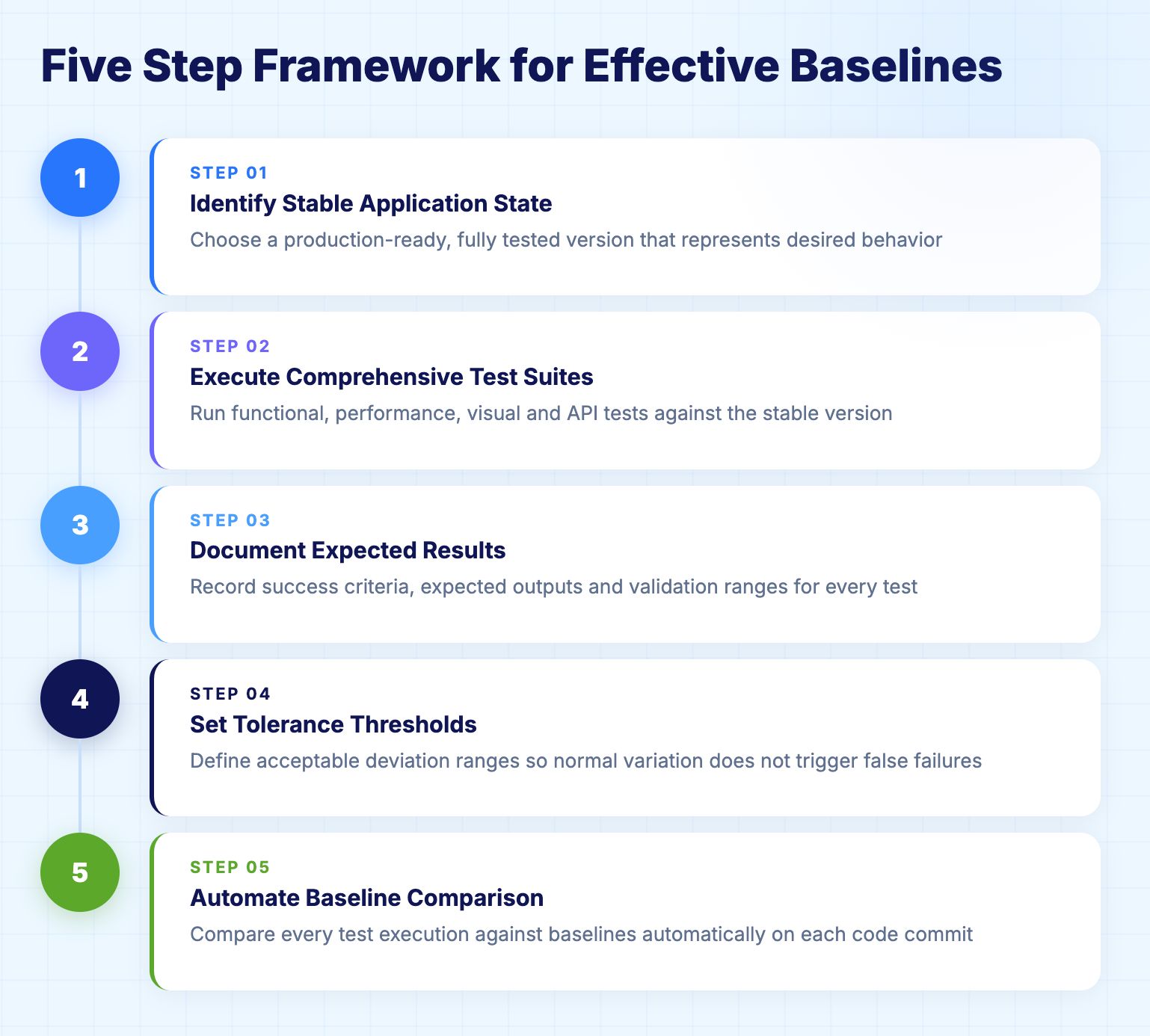
Step 1: Identify Stable Application State
Choose a version of your application that's fully tested, production-ready, and functioning correctly. Don't baseline unstable or buggy versions. The reference must represent desired behavior.
Best Practice: Baseline after major releases when applications stabilize, not during active development sprints when features churn rapidly.
Step 2: Execute Comprehensive Test Suites
Run complete test suites against the stable version, functional tests, performance tests, visual tests, API tests. Capture results, metrics, screenshots, and data states.
Coverage Requirements:
All critical user workflows
Key API endpoints
Representative performance scenarios
Visual snapshots of important pages
Database states for common operations
Step 3: Document Expected Results
Record what "success" looks like for each test. Document expected outputs, acceptable ranges for performance metrics, and validation criteria.
Example Documentation:
Test: User registration
Expected result: Account created, confirmation email sent within 30 seconds
Performance baseline: Registration completes in under 1 second
Visual baseline: Registration form matches approved design
Database baseline: User record appears in database with correct fields
Step 4: Set Tolerance Thresholds
Define acceptable deviation ranges. Not every difference from baseline indicates failure. Some variation is normal and acceptable.
Example Thresholds:
Response time: ±10% from baseline acceptable, >20% triggers failure
Visual differences: <5% pixel difference acceptable, >5% requires review
API responses: Exact match required for data structure, minor timing variations acceptable
Step 5: Automate Baseline Comparison
Implement automated systems that compare test executions against baselines without manual intervention. Automation enables continuous baseline testing at scale.
Automation Requirements:
Execute tests automatically on code commits
Compare results against baselines immediately
Generate reports highlighting deviations
Alert teams when deviations exceed thresholds
Provide debugging context for failures
Maintaining Baselines Over Time
The Challenge of Evolving Applications
Applications change constantly. New features appear. UI designs evolve. Performance optimizes. APIs extend with new fields. Static baselines become obsolete quickly, generating false positives that erode trust in test results.
When to Update Baselines
Intentional Changes: Update baselines when deliberate application changes occur. If teams redesign a UI, improve performance, or enhance functionality, baselines must reflect the new expected state.
Bug Fixes: When fixing defects, update baselines to reflect corrected behavior. The baseline should represent the fixed state, not the buggy state.
False Positives: If baseline comparisons consistently flag acceptable changes as failures, adjust thresholds or update baselines to reflect reality.
Baseline Update Strategies
Manual Review and Approval: Teams review reported deviations, determine whether changes are intentional, and approve baseline updates. This approach ensures intentional oversight but requires human effort.
Automated Baseline Updates: Systems automatically update baselines when changes appear across multiple test environments or receive explicit approval through deployment pipelines.
Version-Controlled Baselines: Store baselines in version control alongside code. When code branches merge, baseline changes merge too, maintaining alignment between code and expected behavior.
AI and Machine Learning Transform Baseline Testing
1. Intelligent Baseline Creation
AI analyzes application behavior and automatically generates baselines without manual configuration. Machine learning observes user interactions, identifies common patterns, and establishes baselines that reflect real-world usage.
Traditional Approach: Manual test creation, explicit baseline documentation, human-defined thresholds
AI-Native Approach: Automatic test generation, learned baselines from production telemetry, intelligent threshold setting based on historical data. For a deeper dive into how generative and agentic AI are redefining automation intelligence, see The Role of Generative AI in Testing.
2. Self-Healing Baseline Maintenance
When applications change, AI-powered platforms automatically update baselines if changes are consistent and intentional. The system learns to distinguish between regressions (unexpected, inconsistent changes) and evolution (expected, consistent improvements).
Example: UI Redesign
Traditional approach:
Developer changes button color from blue to green
Visual baseline tests fail (button no longer matches baseline)
QA engineer manually updates baseline screenshots
Tests pass again
AI-native approach:
Developer changes button color from blue to green
AI detects visual change
AI observes change appears consistently across all environments
AI recognizes change as intentional (not a regression)
AI automatically updates baseline
Tests continue passing without human intervention
3. Anomaly Detection in Production
Machine learning establishes baselines for production behavior, response times, error rates, user flows, resource consumption. When production metrics deviate from learned baselines, systems alert teams immediately.
Production Baselines:
Response time: 95th percentile typically 250ms, baseline range 200-300ms
Error rate: Typically 0.1% of requests, baseline threshold 0.5%
User conversion: Typically 3.2%, baseline alert if drops below 3.0%
Database queries: Typically 40ms, baseline alert if exceeds 100ms
Anomaly detection catches production issues before customers complain by comparing real-time metrics against established baselines.

Enterprise Baseline Testing Examples
1. Financial Services: Trading Platform
A global financial services firm manages baseline testing for their algorithmic trading platform executing millions of transactions daily.
Baseline Strategy:
Functional Baselines: Expected outcomes for order placement, execution, settlement workflows. Baselines capture successful trades, proper accounting entries, and regulatory reporting.
Performance Baselines: Order execution latency (sub-millisecond), market data processing throughput (100,000 messages/second), system availability (99.99%).
API Baselines: Trading APIs return proper order confirmations, price quotes, and account balances with correct data structures.
Results: Baseline testing detected a regression where order execution slowed by 15ms after infrastructure changes. The deviation triggered immediate investigation, revealing network configuration issues before they impacted trading performance.
2. Healthcare: Electronic Health Records
A healthcare provider implements baseline testing for their Epic EHR system serving 30 hospitals and 5,000 clinicians.
Baseline Strategy:
Functional Baselines: Patient lookup, order entry, medication administration, and charting workflows function correctly across all modules.
Performance Baselines: Clinician workflows complete within acceptable timeframes (patient search under 2 seconds, order entry under 5 seconds).
Visual Baselines: UI consistency across Epic modules ensures clinicians see familiar interfaces regardless of which module they use.
Integration Baselines: Epic integrations with laboratory systems, pharmacy systems, and imaging systems return proper data formats.
Results: 6,000 automated journeys maintained with baseline testing. Visual baseline testing caught unintended CSS changes that would have confused clinicians. Performance baseline testing identified database query regressions that degraded system responsiveness.
3. Retail: Ecommerce Platform
A global retailer maintains baseline testing for their ecommerce platform serving 50 million customers across 20 countries.
Baseline Strategy:
Functional Baselines: Product search, cart management, checkout, payment processing, and order fulfillment workflows execute correctly.
Performance Baselines: Page load times (under 3 seconds), search response times (under 500ms), checkout completion (under 30 seconds).
Visual Baselines: Product pages, shopping cart, and checkout interfaces display consistently across desktop, tablet, and mobile devices.
Conversion Baselines: Baseline conversion rates (cart-to-purchase) by customer segment and geography.
Results: Performance baseline testing detected a 2-second slowdown in product search after a code deployment. Visual baseline testing caught mobile layout issues before customers encountered broken interfaces. Conversion baseline monitoring in production identified checkout flow problems within hours of deployment.
Common Baseline Testing Challenges and Solutions
1. Baseline Brittleness
Problem: Minor application changes break baselines unnecessarily. Every UI tweak, every performance fluctuation, every data variation triggers false failures.
Solution: Implement intelligent thresholds and AI-powered baseline comparison. Allow acceptable ranges for performance metrics. Use semantic comparison for API responses rather than exact matching. Enable AI systems to distinguish meaningful deviations from insignificant variations.
2. Baseline Maintenance Burden
Problem: Updating baselines manually after every application change consumes significant time. Teams spend more effort maintaining baselines than creating new tests.
Solution: Adopt self-healing test platforms that automatically update baselines when intentional changes occur. Version control baselines alongside code. Automate baseline updates through CI/CD pipelines with proper approval gates.
3. Baseline Accuracy
Problem: Baselines established in test environments don't reflect production reality. Test data, system configurations, and load patterns differ from production, creating baselines that miss real-world issues.
Solution: Supplement test environment baselines with production baselines. Use synthetic monitoring in production to establish real-world baselines. Leverage production telemetry to inform test environment configurations.
4. Baseline Proliferation
Problem: Too many baselines for too many test scenarios across too many environments. Managing hundreds or thousands of baselines becomes overwhelming.
Solution: Prioritize baseline testing for critical workflows. Not every test requires explicit baselines. Focus on high-value scenarios where regressions carry significant risk. Use AI to automatically manage baseline lifecycle.

Best Practices for Baseline Testing Success
1. Start with Critical Workflows
Don't baseline everything immediately. Begin with business-critical user journeys where regressions cause the most damage, checkout flows, login processes, payment systems, core features that define your product.
2. Integrate Baselines into CI/CD
Baseline comparison should happen automatically in continuous integration pipelines. Every code commit triggers tests that compare against baselines. Failed comparisons block code from progressing until teams review and approve changes.
3. Maintain Baseline History
Track baseline evolution over time. When baselines update, preserve historical versions. This enables teams to understand how applications changed, revert to previous baselines if needed, and analyze quality trends.
4. Combine Multiple Baseline Types
Comprehensive quality assurance requires multiple baseline types working together. Functional baselines catch behavior changes. Performance baselines catch speed regressions. Visual baselines catch UI problems. Use all baseline types for defense in depth.
5. Establish Clear Ownership
Assign responsibility for baseline creation, maintenance, and approval. Without clear ownership, baselines decay into irrelevance as teams ignore outdated references or conflicting results.
6. Review Baselines Regularly
Schedule periodic baseline reviews quarterly or after major releases. Verify baselines still reflect desired application behavior. Update thresholds based on changing business requirements or system capabilities.
Virtuoso QA's AI-Native Baseline Testing
Virtuoso QA transforms baseline testing through intelligent automation that eliminates manual configuration and maintenance.
Automatic Baseline Creation
Virtuoso QA establishes baselines automatically as teams create tests. The platform captures expected outcomes, performance characteristics, and visual appearance without explicit configuration. Tests execute, results become baselines, future executions compare automatically.
Snapshot Testing
Virtuoso QA's snapshot testing captures complete application states, UI appearance, data structures, API responses, as baselines. When applications change, Virtuoso QA compares new snapshots against baselines and highlights differences intelligently.
95% Self-Healing Accuracy
When applications evolve, Virtuoso QA updates baselines automatically. The AI recognizes intentional changes (UI redesigns, performance improvements, feature enhancements) and updates baselines without human intervention. This self-healing eliminates 81% of baseline maintenance effort.
Intelligent Deviation Detection
Virtuoso QA distinguishes between meaningful regressions and insignificant variations. Small performance fluctuations, minor visual differences, and acceptable data variations don't trigger false failures. The AI learns acceptable deviation ranges from historical data.
Visual Regression Testing
Virtuoso QA automatically captures screenshots during test execution and compares against baseline images. The platform identifies visual changes pixel-by-pixel, highlighting exactly what changed and whether changes represent regressions or intentional updates.
Performance Baseline Monitoring
Virtuoso QA tracks test execution performance, including response times, load times, and transaction durations, and automatically establishes performance baselines. Deviations from these baselines trigger alerts, catching performance regressions before they reach production.
Business Process Orchestration
Virtuoso QA models complex enterprise workflows and baselines expected behavior across multi-step processes. When workflows involve dozens of interactions across multiple systems, Virtuoso QA maintains comprehensive baselines that detect regressions anywhere in the process.

The Future of Baseline Testing
Predictive Baselines
Future systems will predict expected application behavior based on code changes, user patterns, and historical data. Before tests execute, AI will forecast outcomes and flag potential regressions.
Continuous Baseline Learning
Baselines will evolve continuously as systems observe production behavior. Machine learning will incorporate real user interactions, performance data, and quality metrics to maintain baselines that reflect actual usage rather than theoretical expectations.
Unified Baselines Across Environments
Future platforms will maintain consistent baselines across development, staging, and production environments while accounting for environment-specific differences. Tests will validate that behavior remains consistent relative to each environment's baseline.
Automatic Threshold Optimization
AI will continuously adjust deviation thresholds based on application characteristics, team preferences, and historical failure patterns. Thresholds will self-tune to minimize false positives while maximizing regression detection.
Related Read: Explore how Agentic AI Testing and intelligent automation are shaping next-generation QA systems that adapt autonomously.
Related Reads
Frequently Asked Questions
How does AI improve baseline testing?
When should I create baselines?
How often should baselines be updated?
Can I baseline applications in active development?
What happens if my baseline is wrong?
Do I need baselines for every test?




