Blog
What is Cloud Test Automation - Tools, Types & Implementation Guide

Rishabh Kumar
Published on

Table of contents
Lorem ipsum
Lorem ipsum
Lorem ipsum
Lorem ipsum
Lorem ipsum
Cloud test automation has transformed how organizations approach quality assurance. Instead of maintaining local infrastructure, managing browser installations, and configuring execution environments, teams access testing capabilities on demand through cloud platforms. This shift reduces infrastructure overhead, enables instant scalability, and accelerates feedback cycles. This guide explains what cloud test automation encompasses, examines the major types of cloud testing approaches, reviews leading tools in the market, and provides guidance for selecting the right platform. For enterprises testing applications like Salesforce and Microsoft Dynamics 365, cloud native testing has become essential rather than optional.
Understanding Cloud Test Automation
What is Cloud Test Automation?
Cloud test automation refers to running automated tests using cloud hosted infrastructure rather than local or on premises systems. The cloud provides execution environments, browsers, devices, and supporting services that testers access over the internet.
How Cloud Test Automation Works
Traditional Test Automation Setup
Local test automation requires substantial infrastructure investment and ongoing maintenance.
Install Browsers and WebDriver Binaries
Each browser requires matching WebDriver versions. Chrome updates frequently, demanding constant driver updates. Firefox, Safari, and Edge each need separate configuration. Version mismatches cause test failures unrelated to application defects.
Configure Test Frameworks and Dependencies
Selenium, Playwright, Cypress, or other frameworks require installation, configuration, and dependency management. Language runtimes, package managers, and supporting libraries add complexity. Environment differences between developer machines cause inconsistent results.
Provision Execution Machines
Running tests requires dedicated hardware or virtual machines. More tests demand more machines. Peak testing periods require capacity that sits idle during normal operations.
Manage Browser Version Compatibility
Users access applications on various browser versions. Testing across versions requires maintaining multiple browser installations. Legacy browser support complicates environment management further.
Scale Infrastructure for Parallel Execution
Sequential test execution takes hours for large suites. Parallel test execution reduces time but requires proportionally more infrastructure. Scaling up means purchasing, provisioning, and maintaining additional machines.
Cloud Test Automation Approach
Cloud platforms eliminate infrastructure burden by providing testing capabilities as a service.
Connect to Cloud Platform
Access cloud infrastructure through web interfaces, APIs, or framework integrations. No local installation beyond basic connectivity. Authentication and authorisation control access to platform capabilities.
Specify Desired Configurations
Select browsers, operating systems, devices, and versions from available options. Request Chrome 120 on Windows 11, Safari on macOS Sonoma, or Firefox on Ubuntu with simple configuration. Access 2000+ combinations without maintaining any locally.
Execute Tests on Cloud Infrastructure
Tests run on cloud-provisioned environments matching requested specifications. Platform handles browser launching, environment isolation, and resource allocation. Multiple tests execute in parallel across available infrastructure without local constraints.
Receive Results and Diagnostic Data
Platforms return pass/fail results with supporting evidence. Screenshots capture visual state at failure points. Video recordings show complete test execution. Logs provide debugging information. Network traffic analysis reveals performance issues.
What Cloud Providers Handle
The cloud provider absorbs operational burden that traditionally falls on testing teams.
Infrastructure Provisioning
Platforms maintain pools of ready environments. Requested configurations provision in seconds rather than hours. Capacity scales automatically based on demand.
Browser and Device Management
Providers install, update, and maintain browsers across all supported versions. New browser releases become available without user effort. Device labs include latest mobile devices alongside legacy hardware.
Scaling and Load Balancing
Run ten tests or ten thousand tests with equal ease. Platform distributes execution across available resources. Queue management handles demand spikes without user intervention.
Maintenance and Updates
Operating system patches, security updates, and compatibility fixes happen automatically. No maintenance windows or upgrade planning required from users.
Testers focus on creating valuable tests and analysing results rather than managing infrastructure. This shift from environment management to quality improvement defines cloud test automation's core value.
The cloud provider handles infrastructure provisioning, browser management, scaling, and maintenance. Testers focus on test creation and analysis rather than environment management.
What Cloud Test Automation Covers
Cloud test automation addresses three essential components of modern applications.
Application Testing
Validate functionality, end-to-end business workflows, data security, and browser compatibility. Application testing ensures software behaves correctly across user scenarios and configurations.
Network Testing
Verify different network bandwidths, protocols, and successful data transfer. Network testing confirms applications perform reliably under varying connectivity conditions.
Infrastructure Testing
Assess disaster recovery capabilities, backup processes, secure connections, and storage policies. Infrastructure testing validates compliance with regulatory requirements and operational resilience.
Most organisations focus primarily on application testing. Network and infrastructure testing become critical for applications with strict performance or compliance requirements.
Key Benefits of Cloud Based Testing
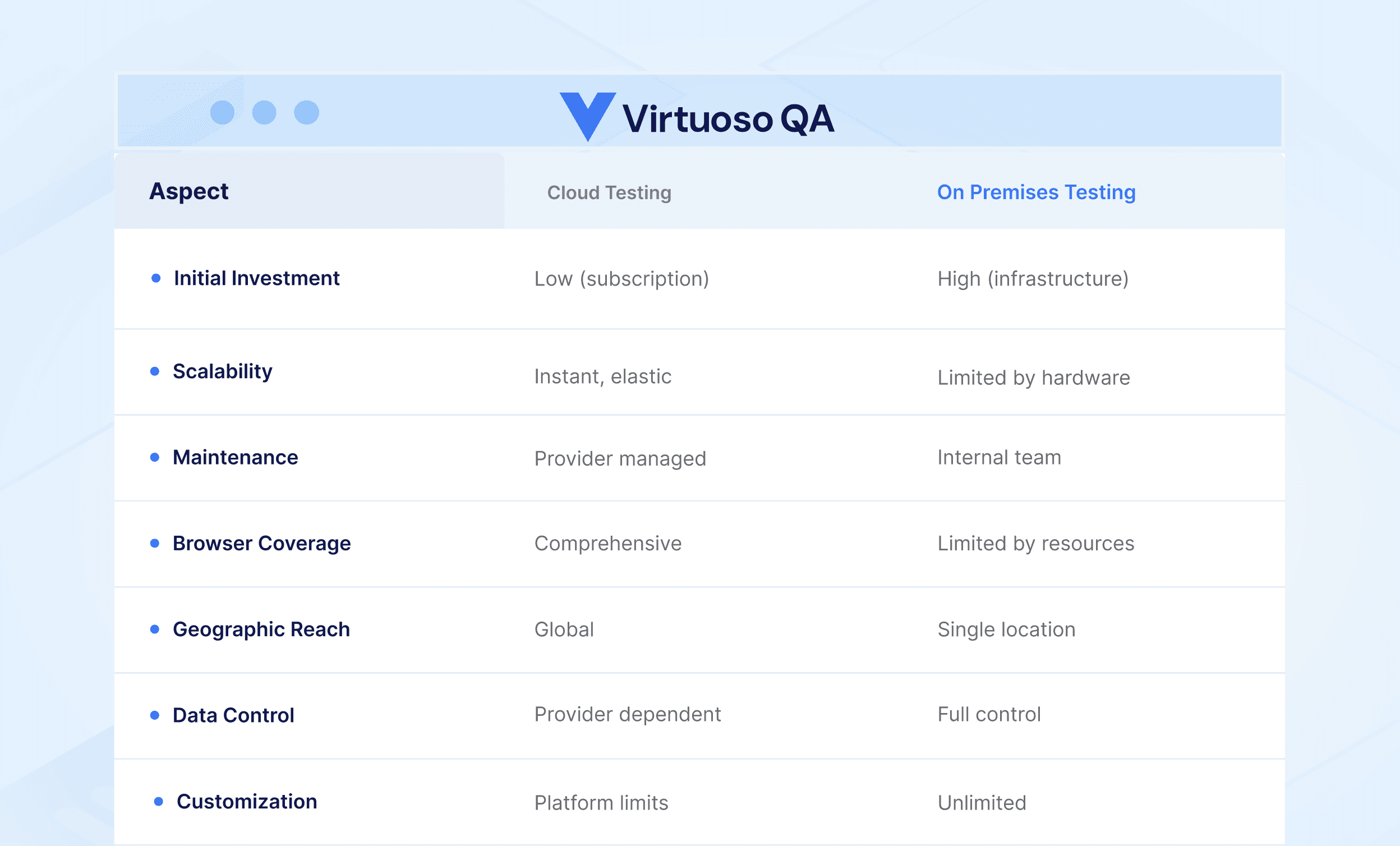
1. Instant Scalability
Local infrastructure limits parallel execution to available machines. Cloud platforms scale dynamically:
Run 10 tests or 10,000 tests with equal ease
Add execution capacity instantly for release testing
Scale down during low activity periods
Pay for actual usage rather than peak capacity
This elasticity transforms testing economics. Organizations no longer choose between comprehensive coverage and acceptable cycle times.
2. Zero Infrastructure Maintenance
Browser updates, operating system patches, driver compatibility, and hardware failures consume significant effort in local environments. Cloud providers absorb this burden:
Automatic browser version updates
Operating system maintenance and security
Hardware replacement and upgrades
Network configuration and optimization
Teams redirect infrastructure effort toward test creation and quality improvement.
3. Comprehensive Browser and Device Coverage
Testing across browsers, operating systems, and devices requires extensive local infrastructure or device labs. Cloud platforms provide:
All major browsers (Chrome, Firefox, Safari, Edge)
Multiple operating systems (Windows, macOS, Linux, iOS, Android)
Various device types (desktop, tablet, mobile)
Different screen resolutions and configurations
Access to 2000+ configurations enables coverage impossible with local resources.
4. Geographic Distribution
Applications serving global users should be tested from global locations. Cloud platforms offer:
Execution from multiple geographic regions
Realistic network conditions and latency
CDN and localization validation
Regional compliance verification
This distribution reveals issues that single location testing misses.
5. Enhanced Team Collaboration
Cloud technology enables teams to collaborate regardless of physical location. Distributed development and QA teams work on the same products in real time, eliminating bottlenecks that previously defined siloed teams.
Cloud-based test automation provides faster feedback loops, giving teams better visibility across the CI/CD pipeline. Shared access to test results, execution history, and diagnostic data enables coordinated problem-solving without waiting for information handoffs. Remote team members access identical testing capabilities as office-based colleagues.

Identifying Which Tests to Automate in the Cloud
Not every test benefits equally from cloud automation. Understanding which tests yield the highest return guides implementation priorities.
Tests Ideal for Cloud Automation
1. Regression Tests
Cloud automation runs thousands of regression tests in parallel, completing in hours what previously took weeks.
Why cloud excels: Massive parallelisation, consistent execution, immediate feedback on code changes.
2. Functional Tests
Smoke tests, sanity tests, and workflow validation benefit from broad coverage and repeatable execution.
Why cloud excels: Browser and device coverage, CI/CD integration, execution consistency.
3. Cross-Browser and Cross-Device Tests
Testing every browser and device combination locally requires extensive infrastructure. Cloud provides instant access to thousands of configurations.
Why cloud excels: 2000+ configurations on demand without local infrastructure investment.
4. Load and Performance Tests
Simulating thousands of concurrent users requires capacity that local infrastructure cannot provide.
Why cloud excels: Elastic scalability, geographic distribution, cost-effective resource usage.
5. Integration Tests
Testing interactions between system components requires rapid environment provisioning and execution isolation.
Why cloud excels: Fast provisioning, parallel execution isolation, API and UI testing combination.
Tests Better Suited for Manual Execution
1. Exploratory Testing
Discovering unexpected issues requires creative thinking and intuition. Human testers notice anomalies that scripted tests miss.
2. User Experience Evaluation
Assessing whether an application feels intuitive requires subjective human judgment that automation cannot replicate.
3. Accessibility Assessment
Automated tools catch technical violations. Comprehensive accessibility evaluation requires human testers using assistive technologies.
4. Usability Observation
Understanding whether users accomplish tasks efficiently requires human observation and feedback.
Balancing Both Approaches
The goal is not maximum automation but optimal allocation. Cloud automation handles volume and repetition. Human testers focus where their judgment creates unique value.
Types of Cloud Test Automation Platforms
Cloud test automation encompasses several distinct approaches serving different needs.
1. Cloud Execution Grids
Cloud execution grids provide browser and device infrastructure for running tests created with standard frameworks like Selenium, Playwright, or Cypress.
How They Work:
Tests written locally using standard frameworks
Execution requests sent to cloud grid
Grid provisions requested browser and device configurations
Tests execute on cloud infrastructure
Results return to local environment
Best For:
Organizations with existing framework investments
Teams wanting cloud scale with familiar tools
Scenarios requiring specific framework capabilities
Limitations:
Test creation still requires programming
Maintenance burden remains with the organization
Framework complexity persists
2. Cloud Native Test Platforms
Cloud native platforms provide complete testing capabilities beyond execution infrastructure, including test creation, maintenance, and reporting.
How They Work:
Tests created directly in cloud platform
No local framework installation required
Execution, reporting, and maintenance integrated
Full testing lifecycle managed in cloud
Best For:
Organizations seeking complete cloud solution
Teams without extensive framework expertise
Rapid deployment without infrastructure setup
Considerations:
Platform capabilities define testing possibilities
Migration from existing frameworks required
Vendor relationship becomes strategic
3. AI Native Cloud Testing
AI native platforms combine cloud infrastructure with artificial intelligence for test creation, maintenance, and analysis.
How They Work:
Natural language test authoring without code
AI powered element identification
Self healing maintenance for application changes
Intelligent root cause analysis for failures
Best For:
Organizations seeking to scale beyond engineer capacity
Teams testing frequently changing applications
Enterprises requiring broad team participation
Advantages:
Lowest maintenance overhead
Fastest test creation
Broadest team accessibility
Virtuoso QA represents this category, combining cloud execution with AI native capabilities.

Selecting the Right Cloud Testing Platform
Choosing the right platform requires systematic evaluation against organisational needs. Feature lists and vendor claims only reveal part of the picture. Structured assessment ensures the selected platform fits technical requirements, team capabilities, and business constraints.
1. Assessment Framework
Before evaluating specific platforms, define what your organisation actually needs. Requirements vary significantly based on application complexity, team expertise, and business priorities. Documenting requirements upfront prevents feature-driven decisions that ignore practical fit.
Evaluate platforms against organizational requirements:
Technical Requirements
Application technologies and frameworks
Browser and device coverage needs
Integration requirements (CI/CD, test management, defect tracking)
Data residency and compliance constraints
Team Requirements
Technical skill levels available
Number of users requiring access
Collaboration and reporting needs
Training and onboarding capacity
Business Requirements
Budget constraints and pricing model fit
Scalability for growth
Vendor stability and roadmap
Support and service level expectations
2. Evaluation Criteria
With requirements defined, evaluate platforms against specific criteria that determine daily usability and long-term value. Focus on factors that differentiate platforms meaningfully rather than commodity features available everywhere.
Ease of Test Creation
How quickly can your team create functional tests?
Time to first working test
Learning curve for different skill levels
Availability of templates and accelerators
Documentation and training resources
AI native test platforms with Natural Language Programming enable fastest creation. Traditional grid infrastructure requires existing framework expertise.
Maintenance Burden
What ongoing effort sustains test health?
Frequency of test breakage
Time to repair broken tests
Self healing capabilities
Element identification approach
Self healing platforms like Virtuoso QA dramatically reduce maintenance. Grid infrastructure passes maintenance burden to users.
Execution Capabilities
Does the platform meet execution needs?
Browser and device coverage
Parallel execution capacity
Geographic distribution options
Execution speed and reliability
Most cloud platforms offer adequate execution. Differentiation occurs in creation and maintenance.
Integration Quality
How well does the platform connect to existing tools?
CI/CD platform support
Test management system integration
Defect tracking connectivity
Reporting and notification options
Native integrations simplify adoption. API access enables custom integration where native support lacks.
Enterprise Application Support
Can the platform handle enterprise applications effectively?
Salesforce, Dynamics 365, Oracle Cloud, SAP support
Complex form and workflow handling
Custom component recognition
Multi-system journey testing
Enterprise applications present unique challenges. Specialized support significantly impacts success.
Proof of Concept Approach
Theoretical evaluation only reveals so much. Conduct practical proof of concept:
Select Representative Scenarios: Include typical and edge cases
Involve Actual Users: Target team members, not just evaluators
Measure Meaningful Metrics: Creation time, maintenance events, execution reliabilit
Test Integration: Validate CI/CD and toolchain connectivity
Assess Support: Evaluate vendor responsiveness during evaluation
Proof of concept reveals fit that feature comparisons miss.
Cloud Test Automation Tools Landscape
The cloud testing market includes diverse tools serving different needs and segments.
1. AI Native Platforms
Virtuoso QA
AI native platform with Natural Language Programming for true codeless test creation. Approximately 95% self healing accuracy automatically adapts to application changes. Live Authoring provides instant feedback during test creation. Cloud execution across 2000+ browser, device, and OS combinations. Native integrations with Salesforce, Dynamics 365, and enterprise applications. Represents the evolution of cloud testing toward intelligent automation.
2. Cloud Execution Infrastructure
BrowserStack
Market leader in cloud browser and device testing. Provides Selenium and Playwright grid access, real device cloud, and visual testing capabilities. Extensive browser and device coverage with strong reliability. Best for organizations with existing framework expertise seeking execution infrastructure.
Sauce Labs
Enterprise focused platform with comprehensive browser coverage, real device access, and AI powered insights. Acquired AutonomIQ for low code capabilities. Strong CI/CD integration and compliance features.
LambdaTest (TestMu AI)
Fast growing challenger offering competitive pricing with extensive browser coverage. Includes HyperExecute for accelerated execution and Kane AI for test generation. Appeals to cost conscious teams seeking modern features.
3. Codeless and Low Code Platforms
Testim
AI powered platform with visual test creation and smart locators. Offers both codeless authoring and JavaScript customization. Acquired by Tricentis. Suits teams seeking balance between accessibility and flexibility.
Mabl
Cloud native platform emphasizing ease of use and AI capabilities. Low code approach with auto healing and visual testing. Strong SaaS application focus. Appeals to teams prioritizing rapid onboarding.
Leapwork
Visual automation platform supporting web, desktop, and enterprise applications. Strong in Citrix and SAP testing scenarios. Suits organizations with diverse application portfolios including legacy systems.
Cloud Testing for Enterprise Applications
Organizations testing Salesforce, Microsoft Dynamics 365, Oracle Cloud, and similar enterprise applications face specific cloud testing considerations.
1. Handling Frequent Updates
SaaS enterprise applications update continuously:
Salesforce: Three major releases annually plus patches
Dynamics 365: Monthly updates
Oracle Cloud: Quarterly updates
ServiceNow: Biannual releases
Each update potentially changes element identifiers, page structures, and functionality. Traditional cloud execution grids require manual test maintenance after updates. AI native platforms with self healing adapt automatically.
2. Complex Business Process Testing
Enterprise workflows span multiple screens, roles, and systems:
Example: Order to Cash Process
Sales representative creates opportunity in Salesforce
Manager approves quote
Customer signs contract in DocuSign
Order created in ERP system
Warehouse fulfills order
Finance processes invoice
Testing such journeys requires platforms capable of:
Multi application navigation
Role based authentication
API and UI combination
State management across systems
Cloud platforms with unified API and UI testing support complete journey validation.
3. Customization Coverage
Enterprise applications feature extensive customization:
Custom fields and objects
Validation rules and workflows
Custom components and Lightning pages
Integration with external systems
Testing must cover both standard functionality and organization specific configuration. AI native platform like Virtuoso QA handle custom elements through intelligent identification rather than requiring selector configuration.
4. Regression Testing at Scale
Enterprise applications require extensive regression coverage:
Standard features across modules
Custom configurations and workflows
Integration points with connected systems
User role and permission combinations
Cloud scalability enables comprehensive regression within acceptable time-frames. Self healing reduces maintenance burden that otherwise limits regression scope.

Implementing Cloud Test Automation
Getting Started
Begin cloud testing adoption methodically:
Phase 1: Pilot
Select limited application scope
Identify pilot team members
Create initial test coverage
Validate integration points
Phase 2: Expand
Broaden application coverage
Train additional team members
Establish standards and practices
Integrate with CI/CD pipelines
Phase 3: Scale
Full application portfolio coverage
Organization wide access
Mature processes and governance
Continuous optimization
Resist pressure to scale before validating approach through pilot.
Step-by-Step Implementation Process
Beyond phased adoption, follow these practical steps for each testing initiative.
Step 1: Define Testing Needs
Clarify automation goals before selecting tools. Identify which software components need testing and which test types (functional, performance, security) are required. Clear requirements guide platform selection.
Step 2: Choose Your Platform
Research and compare platforms against your defined needs. Consider features, device and browser coverage, pricing, and integration capabilities with existing tools.
Step 3: Set Up Test Environment
Create your test environment within the chosen platform. Upload applications under test, configure browser versions and device types, and establish baseline settings.
Step 4: Create Your Tests
Develop automated tests covering required functionality. AI-native platforms like Virtuoso QA enable natural language test creation. Traditional platforms require framework expertise and scripted approaches.
Step 5: Execute and Monitor
Trigger test execution on cloud infrastructure. Utilise parallel execution to accelerate results. Monitor outcomes in real-time, analyse logs and reports, and identify failures requiring attention.
Step 6: Integrate with CI/CD
Connect cloud testing with your CI/CD pipeline. Automate test execution as part of development workflow to catch issues early and enable faster releases.
Managing Test Data in Cloud Testing Environments
Cloud test execution requires data accessible from cloud infrastructure.
Data Provisioning Options
Cloud-Hosted Data: Store datasets in cloud databases accessible to execution environments.
On-Demand Generation: Generate data dynamically during execution. AI-powered platforms create contextually appropriate data through natural language prompts.
Data Subsetting: Extract representative subsets with sensitive information masked.
Parallel Execution Isolation
Parallel tests require independent data to prevent conflicts. Generate unique data per execution or partition datasets by execution thread.
Sensitive Data Considerations
Data Residency: Verify cloud platform regions align with compliance requirements.
Data Protection: Mask or anonymise sensitive information before cloud provisioning.
Synthetic Data: AI-generated data eliminates privacy concerns entirely.
Virtuoso QA's AI-powered data generation creates appropriate test data on demand, eliminating static dataset management.
Integrating Cloud Testing with CI/CD Pipelines
Cloud testing integrates with continuous integration and delivery pipelines for automated quality gates.
How They Work:
Pipeline triggers initiate test execution
Cloud platform runs specified test suites
Results determine pipeline progression
Failed tests block deployment to protected environments
Integration Points:
Jenkins, Azure DevOps, GitHub Actions, GitLab CI
Webhook and API triggering
Result reporting and artifact storage
Notification and alerting systems
Effective CI/CD integration transforms testing from manual checkpoint to automated quality assurance.
Ensuring Cloud Test Automation Success
Success Factors
Organizations succeeding with cloud test automation share characteristics:
Clear Ownership: Designated responsibility for platform success
Adequate Training: Investment in team enablement
Realistic Expectations: Understanding of capabilities and limitations
Continuous Improvement: Regular retrospectives and optimization
Executive Support: Leadership commitment to quality investment
Technical capability matters less than organizational commitment.
Common Pitfalls
Avoid frequent implementation mistakes:
Insufficient Pilot Scope: Testing trivial scenarios rather than representative complexity
Premature Scaling: Expanding before validating approach
Neglecting Maintenance: Assuming tests remain stable without attention
Siloed Implementation: Failing to integrate with development workflow
Tool Fixation: Focusing on platform features rather than outcomes
Calculating Cloud Test Automation ROI
Quantifying returns enables informed decisions and stakeholder alignment.
Cost Elimination
Cloud testing eliminates expenses that traditional on-premises approaches require. Calculate current spending across these categories to quantify savings.
Infrastructure Savings
Cloud platforms eliminate servers, devices, browsers, maintenance, and upgrade expenses.
Typical savings: 60-80% reduction in infrastructure costs.
Maintenance Reduction
Cloud providers handle environment maintenance, browser updates, and device lab management.
AI-native platforms reduce test maintenance labour by 70-90% through self-healing.
Licensing Consolidation
Multiple point tools consolidate into unified platforms, reducing total licensing costs.
Value Creation
Beyond cost elimination, cloud testing creates business value through speed, quality, and productivity improvements.
Faster Release Cycles
Cloud parallel execution reduces test cycle duration by 50-80%, accelerating time to market.
Improved Quality
Comprehensive testing catches defects earlier when fixes cost less, reducing production incidents.
Broader Coverage
Access to 2000+ configurations enables coverage impossible with local infrastructure.
Team Productivity
Time spent on infrastructure and maintenance redirects toward test creation and analysis.
ROI by Platform Type
Cloud Execution Grids: Lower platform cost but maintenance burden remains. ROI depends on existing framework efficiency.
Cloud-Native Platforms: Moderate cost with reduced maintenance. Improved ROI through integrated capabilities.
AI-Native Platforms: Higher platform cost but dramatic maintenance elimination. Highest ROI when labour costs drive total ownership cost. Virtuoso QA customers typically achieve positive ROI within 6-12 months through maintenance elimination and accelerated test creation.
The Future of Cloud Test Automation
Cloud test automation continues evolving toward greater intelligence and accessibility.
Increasing AI Integration
Platforms incorporating generative AI for test creation, maintenance, and analysis. Natural language interfaces becoming standard rather than differentiator.
Expanded Application Support
Better handling of complex enterprise applications, embedded content, and modern frameworks. Reduced friction testing any web application.
Unified Testing Platforms
Consolidation of functional, visual, API, and accessibility testing into integrated platforms. Reduced tool proliferation and context switching.
Autonomous Testing
Movement toward tests that generate, execute, and maintain themselves with minimal human intervention. Human role shifting from test creation to test strategy.
Virtuoso QA leads this evolution with AI native architecture designed for intelligent automation. Natural Language Programming, self healing maintenance, and Live Authoring represent where cloud testing is heading.

Frequently Asked Questions
Is cloud test automation secure for enterprise applications?
Can cloud testing work with applications behind firewalls?
How do we migrate existing tests to cloud platforms?
Which cloud testing approach delivers the best ROI?




