Blog
What is a Test Case - Definition, Types, Formats, and Examples

Rishabh Kumar
Published on

Table of contents
Lorem ipsum
Lorem ipsum
Lorem ipsum
Lorem ipsum
Lorem ipsum
A test case is a detailed set of conditions, actions, and expected results used to validate specific software functionality. It defines exactly what to test, how to test it, and what success looks like. Well-written test cases enable consistent, repeatable validation whether executed manually or automated. Traditional test case documentation requires extensive manual effort, becomes outdated quickly, and creates barriers between testers and stakeholders. AI-native testing platforms now enable teams to create executable test cases in natural language, eliminating documentation overhead while enabling business users to define validation scenarios without technical expertise, accelerating test creation by 80-90% while improving clarity and maintainability.
What is a Test Case?
A test case is a specific set of conditions under which a tester determines whether software functions correctly. It documents the inputs, execution steps, preconditions, and expected outcomes required to validate a particular aspect of application functionality.
Purpose of Test Cases
Validate Requirements - Test cases verify that software implements specific requirements correctly. Each test case maps to requirements, user stories, or acceptance criteria ensuring complete coverage.
Enable Repeatability - Well-documented test cases enable different testers to execute identical validation. Consistency across test executions ensures reliable results.
Support Automation - Test cases provide blueprints for automated tests. Detailed test case documentation translates directly into automated test scripts.
Provide Traceability - Test cases link requirements to validation activities. This traceability proves that all requirements received appropriate testing coverage.
Facilitate Communication - Test cases communicate testing intentions to stakeholders. Developers understand what QA will validate. Product owners confirm testing addresses business needs.
Test Case, Test Scenario, and Test Script: What is the Difference?
These three terms are frequently used interchangeably and mean different things. Confusing them leads to poorly scoped test planning and gaps in coverage.
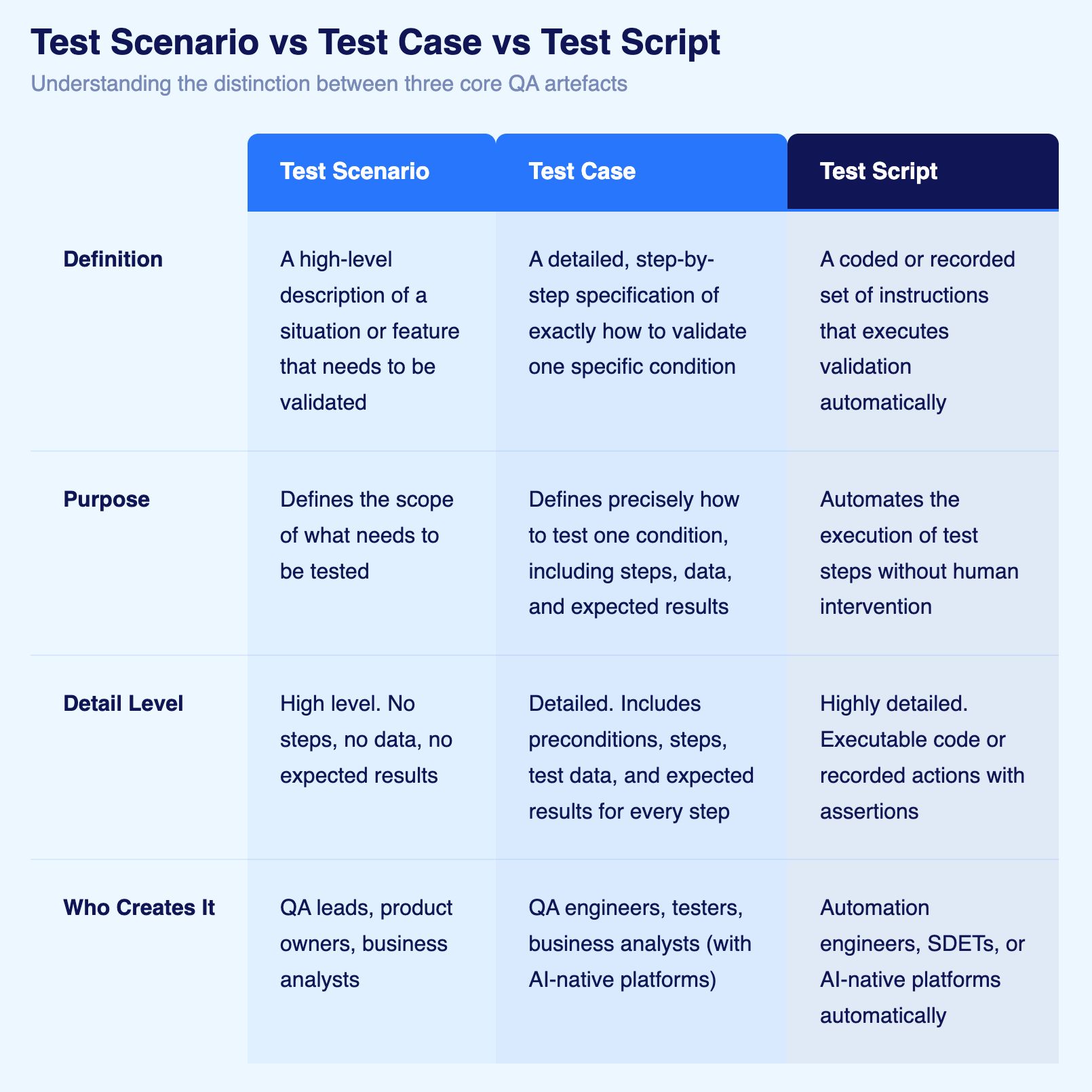
To know the differences in detail, refer our guide on How Test Case and Test Scenario Differ
10 Types of Test Cases
Software can fail in more ways than most teams plan for. A feature can work correctly but crash under load. An interface can function as designed but be unusable for someone relying on a screen reader. A database can accept inputs correctly but return inconsistent results under concurrent queries. Different types of test cases exist because different failure modes require different validation approaches. Knowing which types apply to your context is what separates intentional test coverage from accidental coverage.

1. Functional Test Cases
Functional test cases verify that specific features of an application work as designed. They are the most common type and the natural starting point for any test suite because they map directly to requirements, user stories, and acceptance criteria.
A functional test case for a login feature would verify that a registered user can enter valid credentials and reach the dashboard. It checks the output against the expected behaviour, nothing more.
Examples:
Verifying that a user can add a product to a shopping cart and see the updated cart total
Confirming that a form submission saves data to the correct database record
Checking that a discount code applies the correct percentage to an order total
2. Integration Test Cases
Integration test cases verify that separate components of a system work correctly together. Individual modules may pass functional tests in isolation and still break when they interact. Integration testing finds the failures that live in the connections, not the components.
These tests are especially important in architectures with microservices, third-party APIs, or multiple databases, where integration points multiply and each one is a potential failure.
Examples:
Verifying that a payment API processes a transaction and correctly updates order status in the database
Confirming that a user registration creates both an account record and triggers a welcome email
Testing that a third-party authentication service correctly grants access to the main application
3. User Interface Test Cases
User interface (UI) test cases verify that the visual layer of an application renders correctly and responds to user interaction as expected. A feature can work perfectly in the backend and still fail if the button does not render, the form field does not accept input, or an error message appears in the wrong location.
These tests are particularly critical after UI redesigns, framework migrations, or CSS updates, where visual behaviour can change without any functional code changing.
Examples:
Confirming that form validation messages appear adjacent to the relevant field, not at the top of the page
Verifying that a navigation dropdown opens on hover and closes on click-away
Checking that a data table renders correctly across all supported screen widths
4. Usability Test Cases
Usability test cases evaluate whether an application is intuitive to use. Unlike functional or UI tests that check whether things work, usability tests assess whether real users can accomplish their goals without friction, confusion, or the need for documentation.
These tests require testers to adopt a user perspective rather than a QA perspective. The question is not "does it work?" but "can someone unfamiliar with this application figure out how to use it?"
Examples:
Testing whether a new user can complete account setup without referring to help documentation
Verifying that error messages explain what went wrong and what the user should do next
Checking that the terminology used in the interface matches what target users would expect
5. Accessibility Test Cases
Accessibility test cases verify that an application can be used by people with disabilities, including those who rely on screen readers, keyboard navigation, voice controls, or other assistive technologies. They also validate compliance with standards such as WCAG (Web Content Accessibility Guidelines), the European Accessibility Act (EAA), and the Americans with Disabilities Act (ADA).
Accessibility failures are rarely visible in functional testing. An application can pass every functional test and still be completely unusable for a significant portion of the population.
Examples:
Testing that all interactive elements can be reached and activated using only a keyboard, with no mouse
Verifying that images and icons have descriptive alternative text for screen readers
Confirming that colour contrast ratios meet WCAG AA standards for text legibility
6. Performance Test Cases
Performance test cases measure how a system behaves under varying levels of load and stress. They validate speed, responsiveness, stability, and resource usage. An application may work correctly with five users and fail silently with five thousand.
Performance testing catches bottlenecks, memory leaks, and scalability limits before real users experience them in production.
Examples:
Testing that key pages load within acceptable thresholds under simulated peak traffic
Verifying that API endpoints handle expected request volumes without timeout errors
Confirming that the application remains stable after running continuously for 72 hours
7. Security Test Cases
Security test cases identify vulnerabilities that could be exploited by attackers. They simulate known attack vectors including SQL injection, cross-site scripting, authentication bypass, and unauthorised data access. A feature can pass all functional tests while containing a critical vulnerability that exposes customer data.
In regulated industries, security test cases are not optional. GDPR, HIPAA, PCI DSS, and similar frameworks require demonstrable security testing as part of compliance.
Examples:
Testing that SQL injection attempts in form fields are blocked and do not expose database content
Verifying that authentication systems lock accounts after a defined number of failed login attempts
Confirming that users cannot access records belonging to other accounts by manipulating URL parameters
8. Database Test Cases
Database test cases verify that data is stored, retrieved, updated, and deleted correctly. They ensure data integrity, consistency, and accuracy at the persistence layer. Application-level tests may pass while the underlying data is being written incorrectly, duplicated, or silently lost.
These tests are critical for financial systems, healthcare records, and any application where data accuracy has direct real-world consequences.
Examples:
Verifying that creating a new user record populates all required fields and generates a unique identifier
Confirming that the database enforces uniqueness constraints and rejects duplicate email addresses
Testing that concurrent transactions do not produce inconsistent account balances
9. Regression Test Cases
Regression test cases verify that existing functionality continues to work correctly after code changes. Every new feature, bug fix, or dependency update is a potential source of unintended side effects. Regression testing is the mechanism that catches those side effects before they reach users.
Regression suites grow with each release and are the primary candidates for automation, since they must be executed repeatedly and consistently.
Examples:
Confirming that a change to the checkout layout has not broken the payment processing flow
Verifying that a database schema migration has not affected how existing records are retrieved
Testing that a third-party library update has not changed the behaviour of dependent features
10. User Acceptance Test Cases (UAT)
User acceptance test cases verify that software meets actual business requirements from the perspective of the end user or business stakeholder. They are the final validation before release, confirming not just that the system works technically but that it delivers what was needed.
UAT is typically performed by business users, product owners, or QA team members adopting the user perspective. These tests reflect real-world workflows, including variations and edge cases that technical testing may not anticipate.
Examples:
Testing that a sales manager can generate a monthly pipeline report, filter by territory, and export to Excel
Confirming that a new hire can complete the full onboarding workflow without assistance
Verifying that a customer service representative can locate an order, process a refund, and send a confirmation email in a single workflow
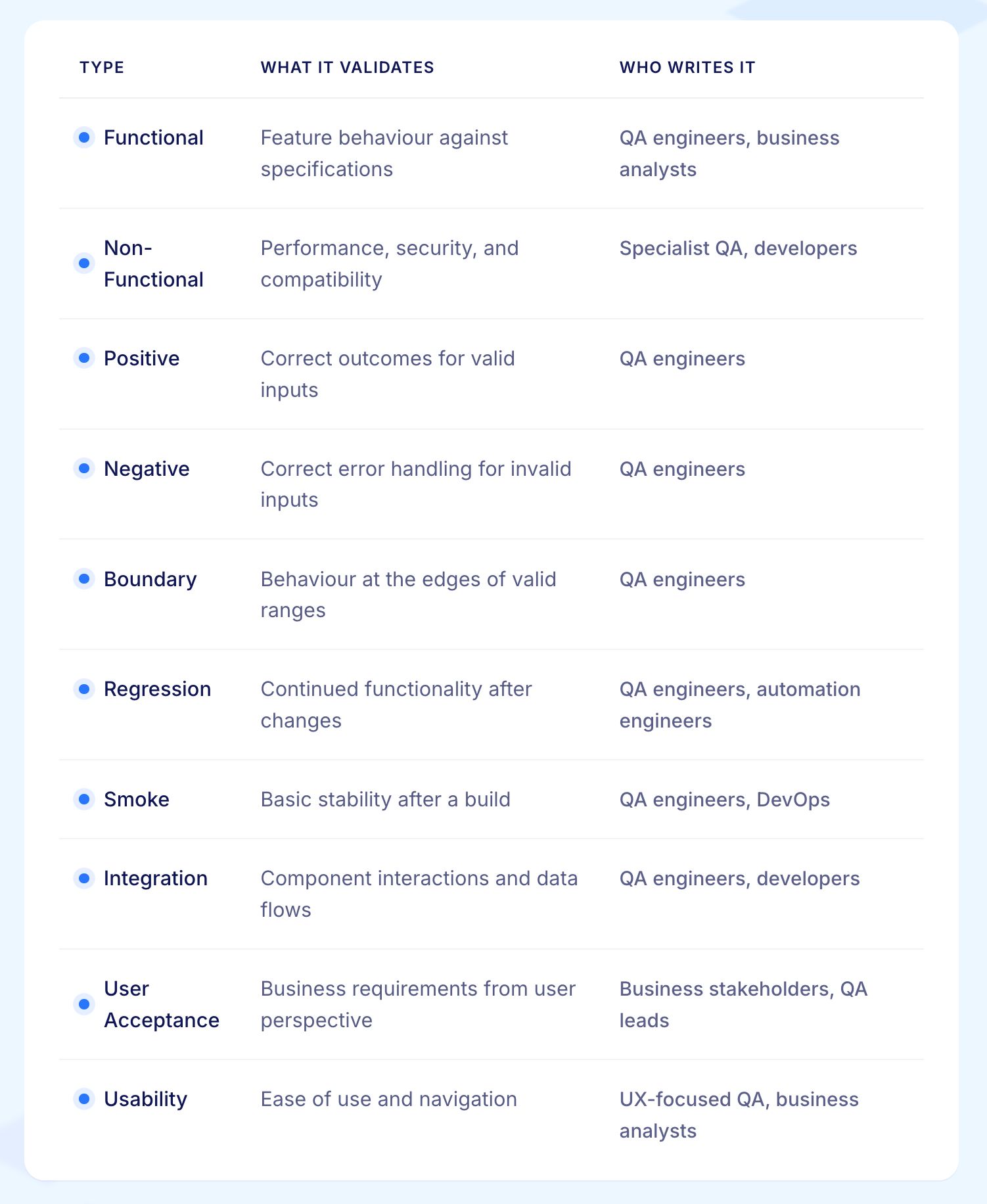
Positive, Negative, and Destructive Test Cases
The types above define what you are testing. There is a second dimension that defines how you approach the test: whether you are confirming expected behaviour, challenging the system with invalid inputs, or pushing it beyond its intended boundaries.
Positive test cases confirm that the system works correctly when used as intended. They test the happy path with valid inputs, expected sequences, normal conditions.
Negative test cases verify that the system handles invalid, unexpected, or out-of-range inputs gracefully. They confirm that errors are caught, messages are clear, and the system does not break when a user does something unexpected.
Destructive test cases intentionally push the system beyond its limits to find breaking points. They simulate extreme conditions, volume spikes, or malicious behaviour to understand where and how the system fails.
Any test type can be written in all three approaches. A login test demonstrates this clearly:
Positive: The user enters a valid registered email address and correct password and clicks Submit. The system authenticates the user and redirects to the dashboard.
Negative: The user enters a valid registered email address and an incorrect password and clicks Submit. The system displays a clear error message, does not reveal whether the email or password is wrong, and does not grant access.
Destructive: A script submits 1,000 login attempts with randomised passwords against a single account within 60 seconds. The system activates rate limiting or account lockout before the threshold is reached, and the account remains accessible to the legitimate user through the recovery process.
A balanced test suite covers all three approaches across all relevant types. Teams that only write positive test cases discover their system works under ideal conditions. Teams that include negative and destructive tests discover how their system behaves when conditions are not ideal, which is when production failures actually occur.
Test Case Components
1. Test Case ID
Unique identifier enabling reference and tracking. Use clear naming conventions like TC-001, TC-LOGIN-01, or USER-REG-001.
Example: TC-CHECKOUT-CC-01 (Test Case for Checkout using Credit Card, first scenario)
2. Test Case Name/Title
Concise, descriptive summary of what the test validates. Use action-oriented language clearly stating the scenario.
Good: "User completes purchase with valid credit card"
Poor: "Test checkout" (too vague)
3. Test Description
Brief explanation of test purpose and scope. Provides context beyond the title.
Example: "Verify that registered users can successfully complete purchases using valid credit card payment, receive order confirmation, and see order in purchase history."
4. Preconditions
Conditions that must exist before test execution begins. Includes system state, user accounts, test data, and configuration requirements.
Examples:
User account exists with username "test@example.com"
Shopping cart contains at least one product
Payment gateway configured for test transactions
Test environment accessible and running
5. Test Data
Specific data values used during test execution. Eliminates ambiguity and ensures consistent test execution.
Examples:
Username: test@example.com
Password: TestPass123
Credit Card: 4111 1111 1111 1111 (test card number)
Expiry: 12/25
CVV: 123
6. Test Steps
Sequential actions the tester performs. Each step describes one specific action in clear, unambiguous language.
Format:
Navigate to login page
Enter username "test@example.com"
Enter password "TestPass123"
Click "Login" button
Verify dashboard displays
7. Expected Results
Explicit description of correct system behavior for each step. Defines success criteria so testers know whether tests passed or failed.
Examples:
Step 1 Expected Result: Login page loads with username and password fields visible
Step 5 Expected Result: Dashboard displays welcome message "Welcome, Test User" and shows account summary
8. Actual Results
Space for documenting what actually happened during execution. Completed during test execution, not during test case creation.
9. Status
Test execution outcome: Pass, Fail, Blocked, or Skipped.
Definitions:
Pass: All expected results matched actual results
Fail: Actual results deviated from expected results indicating defect
Blocked: Test cannot execute due to environment issues or blocking defects
Skipped: Test intentionally not executed (out of scope, deferred)
10. Priority
Business importance indicating testing sequence. Typically High, Medium, or Low (or P1, P2, P3).
Priority Factors:
Business impact if functionality fails
Frequency of feature usage
Regulatory or compliance requirements
Risk of defects in this area
11. Related Requirements
Links to user stories, requirements documents, or acceptance criteria this test validates. Enables traceability.
Example: Requirements: US-123, AC-456
Test Case Formats and Templates
Standard Test Case Format
Traditional format with detailed step-by-step instructions. Most common format for manual test execution.
BDD (Behavior Driven Development) Format
Uses Given-When-Then structure emphasizing behavior specification. Popular in Agile teams practicing BDD.
Exploratory Testing Charter
Lightweight format for exploratory testing sessions. Defines mission, time box, and areas to explore without prescriptive steps.
Checklist Format
Simplified format listing validations without detailed steps. Useful for smoke testing or experienced testers.
How to Write Effective Test Cases

1. Use Clear, Specific Language
Write test cases in simple, unambiguous language anyone can understand. Avoid technical jargon unless writing for technical audiences.
Good: "Click the 'Add to Cart' button located below the product image"
Poor: "Trigger the onclick event handler for the DOM element with class 'btn-cart'"
2. Make Steps Atomic
Each test step should represent one action. Don't combine multiple actions into single steps.
Wrong: "Login and navigate to settings and update password"
Right:
Login with valid credentials
Navigate to settings page
Click "Change Password" option
Update password
Save changes
3. Specify Expected Results for Every Step
Don't assume testers know what should happen. Explicitly state expected outcomes for each action.
Incomplete: "Click login button"
Complete: "Click login button → Expected: User redirects to dashboard page with welcome message displayed"
4. Use Realistic Test Data
Provide specific, realistic test data rather than placeholders or generic values.
Vague: "Enter a valid email address"
Specific: "Enter email address: customer@example.com"
5. Write for Your Audience
Adjust technical detail based on who executes tests. Manual testers need explicit instructions. Experienced testers can handle higher-level descriptions.
For Manual Testers: "Click the blue 'Submit' button at the bottom right of the form"
For Experienced Testers: "Submit the registration form"
6. Include Preconditions
Document everything that must be true before testing begins. Don't assume testers know setup requirements.
Example Preconditions:
Test user account already created
Product inventory contains at least 10 units of test product
Payment gateway configured for test mode
Browser cache and cookies cleared
7. Map to Requirements
Link every test case to specific requirements or user stories. This traceability ensures complete requirements coverage.
8. Keep Test Cases Independent
Each test should execute independently without depending on other tests running first. Avoid test dependencies creating fragile test suites.
Wrong: Test Case 2 assumes Test Case 1 already created a user account
Right: Test Case 2 explicitly creates required user account in preconditions or setup
Common Test Case Writing Mistakes
Vague or Ambiguous Steps
Problem: "Check that the system works correctly"
Solution: "Verify order confirmation displays order number, total amount, estimated delivery date, and shipping address"
Missing Expected Results
Problem: Step describes action without stating what should happen
Solution: Every step includes explicit expected result defining success
Combining Multiple Scenarios
Problem: One test case validates login, profile update, and logout in single test
Solution: Create separate test cases for each scenario enabling targeted testing
Insufficient Test Data
Problem: "Enter valid credentials"
Solution: "Enter username: test@example.com, password: TestPass123"
Assuming Knowledge
Problem: Steps assume tester knows navigation, system quirks, or business rules
Solution: Document all information needed for successful test execution
Overly Technical Language
Problem: Test cases filled with technical jargon incomprehensible to business stakeholders
Solution: Use plain language stakeholders understand while maintaining precision
Industry-Specific Test Case Examples
Banking: Wire Transfer
Healthcare: Medication Administration
Retail: Product Return
The Evolution: AI-Native Test Case Creation
Traditional test case documentation creates bottlenecks through manual writing, constant maintenance, and technical barriers limiting who can create tests.
Natural Language Test Cases
AI-native platforms enable teams to write test cases in plain English without formal documentation structures or technical expertise.
Traditional Approach:
Manual documentation in test management tools
30-60 minutes per test case
Technical knowledge required for precision
Constant updates as applications change
AI-Native Approach:
AI platform translates natural language into executable tests automatically. No formal templates. No technical barriers. Business users create tests.
Automatic Test Case Maintenance
AI-powered self-healing eliminates test case maintenance burden. When applications change, test cases adapt automatically without manual updates.
Traditional Challenge: Application changes require updating hundreds of test cases manually
AI-Native Solution: 95% self-healing accuracy means test cases continue working despite application changes
Living Documentation
Test cases become living documentation automatically updated as tests execute. Results, screenshots, and execution evidence capture system behavior automatically.
Best Practices for Test Case Management
1. Organize Test Cases Logically
Group related test cases by feature, user workflow, or business process. Logical organization enables efficient test selection and execution.
2. Version Control Test Cases
Store test cases in version control systems alongside code. Track changes, enable collaboration, and maintain history.
3. Review Test Cases Regularly
Schedule periodic test case reviews removing obsolete test cases, updating outdated scenarios, and identifying coverage gaps.
4. Maintain Requirements Traceability
Link every test case to specific requirements ensuring complete validation coverage and supporting compliance audits.
5. Establish Naming Conventions
Standardize test case IDs, names, and organization enabling team members to locate and reference tests easily.
6. Measure Test Case Effectiveness
Track which test cases find defects, which rarely execute, and which require frequent maintenance. Optimize test suites based on data.
Who Writes Test Cases
Test case authorship is not the exclusive domain of QA engineers. In practice, who writes test cases depends on team structure, methodology, and the tools available.
1. QA Engineers and Test Analysts
Thy are the primary authors in most organisations. They translate requirements and user stories into structured test cases, define preconditions and test data, and build the regression suites that protect existing functionality across releases. Their testing expertise shapes coverage decisions on what to test, at what depth, and in what priority order.
2. Software Development Engineers in Test (SDETs)
They combine software engineering and QA skills. They write test cases and convert them directly into automated test scripts, working closely with developers to embed testing into the build and deployment process. In organisations with mature CI/CD pipelines, SDETs are responsible for keeping automated regression suites current.
3. Business Analysts and Product Owners
They write test cases in teams practising behaviour-driven development (BDD). Because BDD uses natural language in the Given-When-Then format, business stakeholders can define acceptance test cases directly from user stories without technical expertise. These cases then inform both manual testing and automated validation.
4. Developers
Developers write test cases primarily at the unit and integration level. They are responsible for testing the code they write, catching defects before changes reach the QA phase. In Agile teams, the line between developer and tester has blurred significantly, with developers increasingly contributing to functional and integration test case libraries.
5. Non-Technical Team Members
They can now write test cases on AI-native test platforms that accept plain English as input. A product manager who understands a business workflow can describe it in natural language and have it converted into an executable test automatically. This removes the bottleneck between business knowledge and test coverage, allowing teams to scale authorship without scaling headcount.
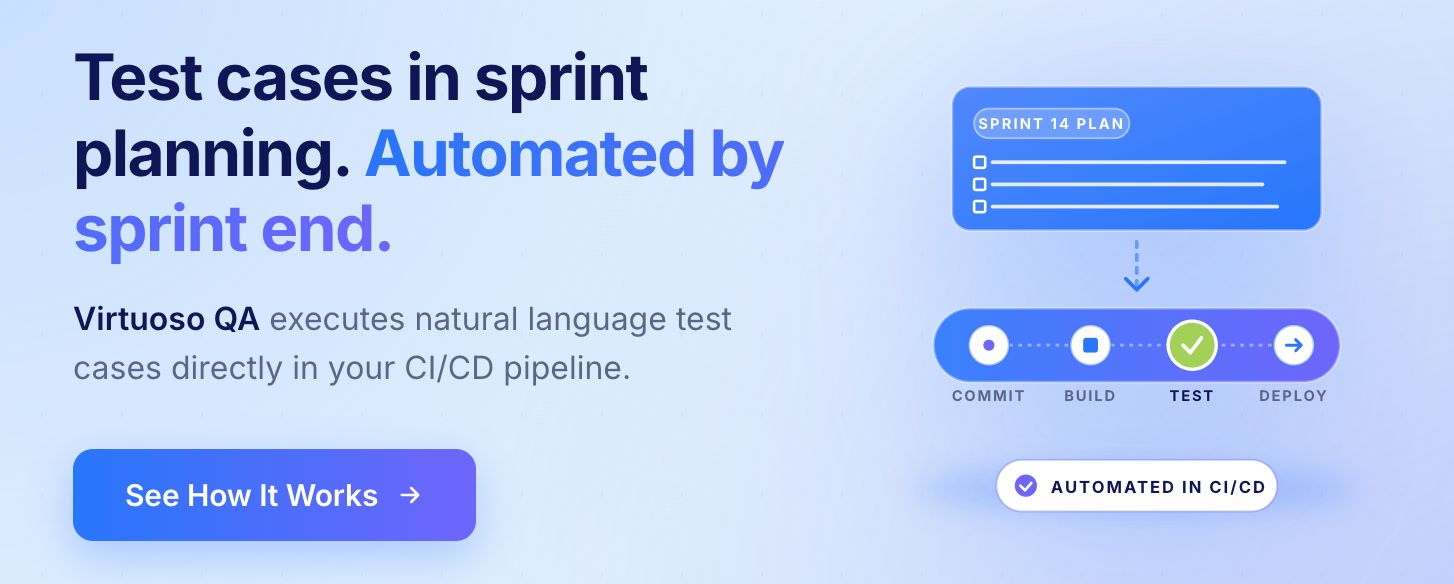
In Agile and Scrum environments, test case authorship is a shared responsibility. Sprint planning sessions involve QA, development, and product stakeholders jointly defining acceptance criteria, which become the basis for test cases written during the sprint. The traditional model of QA writing all test cases after development finishes has been replaced in most modern teams by collaborative authorship throughout the delivery cycle.
Virtuoso QA Transforms Test Case Creation
Virtuoso QA eliminates traditional test case documentation overhead through natural language test creation enabling business users to define validation without technical expertise.
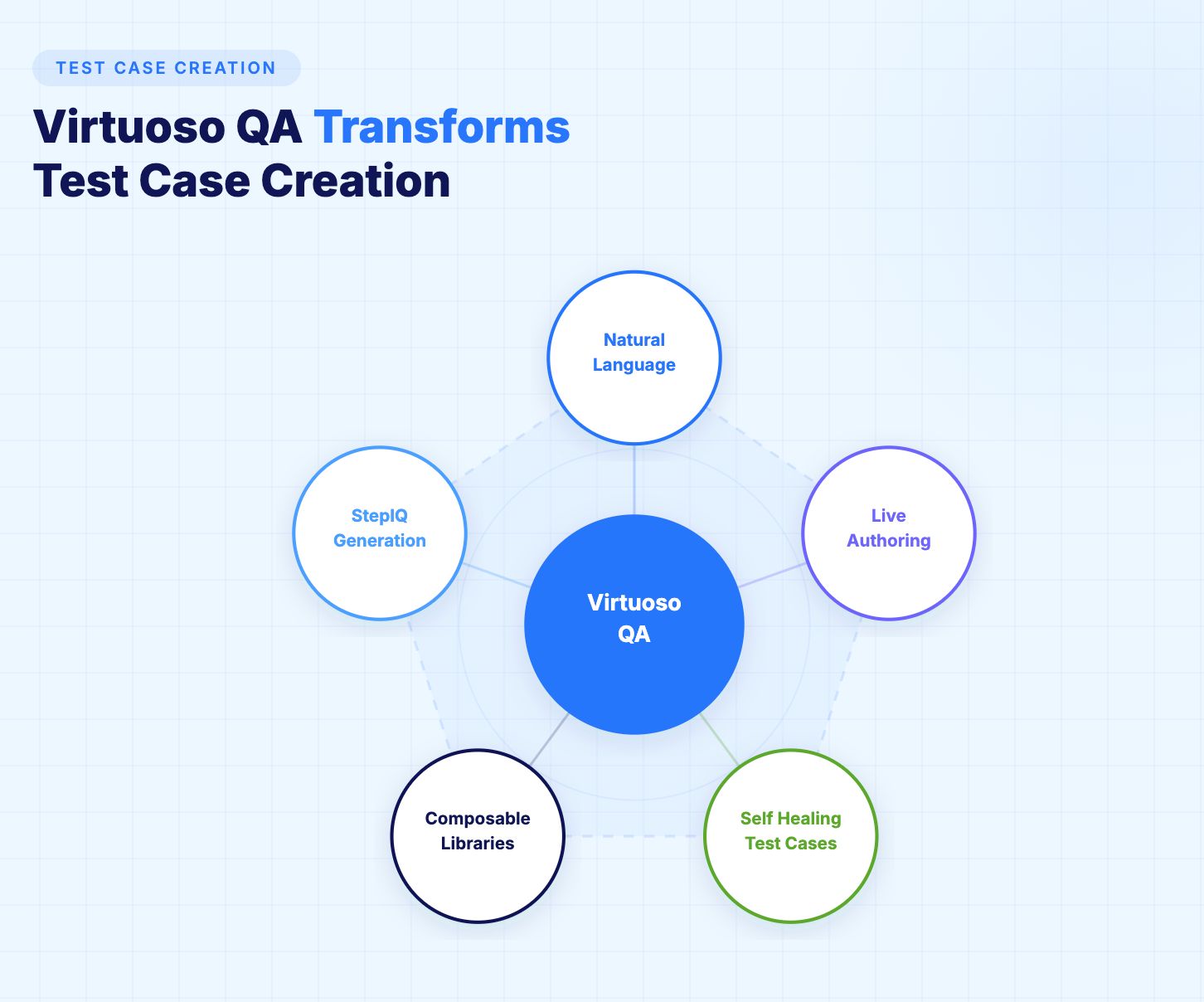
1. Natural Language Programming
Describe test cases in plain English using Virtuoso QA's intuitive interface. AI translates descriptions into executable tests automatically.
2. Live Authoring with Real-Time Validation
As teams create test cases, Virtuoso QA validates steps against actual applications in real time. Incorrect steps highlighted immediately.
3. StepIQ Autonomous Generation
Virtuoso QA analyzes applications and suggests test steps automatically. Describe what to validate; StepIQ generates how to test it.
4. Composable Test Case Libraries
Build reusable test case components shared across teams. Common workflows become building blocks accelerating test case creation.
5. Self-Healing Test Cases
95% self-healing accuracy means test cases adapt automatically to application changes without maintenance.
Related Reads
Frequently Asked Questions
What is the difference between a test case and a test scenario?
How many test cases do I need?
Should test cases be detailed or high-level?
How do I write test cases for Agile development?
What tools are used for test case management?
Can test cases be automated?




