Blog
Use Case vs Test Case: Key Differences Explained

Rishabh Kumar
Published on

Table of contents
Lorem ipsum
Lorem ipsum
Lorem ipsum
Lorem ipsum
Lorem ipsum
A use case describes what a user is trying to accomplish. A test case verifies whether the system lets them accomplish it. The two documents serve different purposes, belong to different phases of development, and are created by different people. Treating them as interchangeable is one of the most consistent ways software teams end up with test suites that pass on every run and fail on every release.
What is a Use Case?
A use case is a structured description of how a user interacts with a system to reach a specific goal. It is written from the user's perspective, not the system's. It captures what the user wants to achieve and the sequence of steps through which the system supports that achievement.
The focus is always on intent. A well-written use case does not describe buttons, field names, or page layouts. It describes the outcome the user needs. The interface will change. Frameworks will be replaced. Business goals, by contrast, tend to be stable across years.
Components of a Use Case
Every use case contains a consistent set of elements regardless of the domain it covers.
Actor: the person, group, or external system initiating the interaction
Goal: the outcome the actor is trying to reach
Preconditions: the state the system must be in before the interaction begins
Basic flow: the step-by-step path through which the goal is successfully reached under normal conditions
Alternative flows: valid paths that differ from the basic flow but still reach the goal
Exception flows: conditions that prevent the goal from being reached and how the system responds
The alternative and exception flows are where most of the testing value lives. Most teams write use cases that capture the basic flow in detail and treat the rest as an afterthought. Most production incidents trace back to alternative and exception flows that were never properly specified or tested.
Example of Use Case
Consider a broker submitting a claim on behalf of an insured client in a specialty insurance platform.
Actor: Authenticated broker
Goal: Submit a verified claim for underwriter review
Preconditions: Broker is logged in, the policy is active, and the loss event has been documented
Basic flow:
Broker selects the relevant policy from their active portfolio
Broker enters claim details including loss date, loss type, and estimated value
Broker uploads supporting documents
System validates the submission against the active policy terms
Broker submits the claim
System returns a confirmation reference number and queues the claim for underwriter review
Alternative flow: Policy is within the claim window but coverage for the specific loss type requires manual underwriter override before submission proceeds
Exception flow: Supporting document exceeds the maximum upload size; system rejects the document and returns a clear error with the permitted size and accepted formats
Advantages of Use Cases
Capture customer intent before any code is written, reducing the risk of building the wrong thing correctly
Provide a stable reference point that survives interface changes, framework migrations, and refactors
Create shared understanding across business analysts, developers, and QA teams without requiring technical knowledge from non-technical stakeholders
Serve as the source material from which test cases, BDD scenarios, and acceptance criteria are derived
Surface missing requirements early by forcing teams to enumerate alternative and exception flows during requirements gathering
Related Read: What is Use Case Testing, How it Works and Best Practices

What is a Test Case?
A test case is a precise, step-by-step procedure designed to verify that the system behaves correctly under a specific set of conditions. Where a use case captures intent, a test case captures proof. Where a use case is written in plain business language, a test case is written with enough detail that any team member or automated tool can follow it and reach the same result every time.
A test case that two different people carry out in two different ways is not yet a test case. It is a rough idea of what to test. Writing a good test case means removing every gap where someone might read a step differently.
Components of a Test Case
Test case ID: a unique label that makes the test case easy to find and reference in reports, defect logs, and release records
Test case title: a short description of what is being checked, written clearly enough that the purpose is obvious from the title alone
Preconditions: the exact system state, data, and setup needed before the test begins
Test steps: a numbered list of actions, each written clearly enough that there is only one way to carry it out
Test data: the exact values used in the test, kept separately so the same test case can run in different environments
Expected result: what the system should produce, written clearly enough that pass or fail is obvious without needing to make a judgement call
Actual result: what the system actually produced, recorded during the test run and compared against the expected result
Status: Pass, Fail, Blocked, or Skipped, with a reason recorded for anything other than a pass
Author and reviewer: names attached to the test case so there is someone to go to if a step needs clarifying"
Example of a Test Case
Test Case ID: CLM-TC-001
Title: Submit valid claim with all required fields returns confirmation reference within five seconds
Preconditions:
Broker logged in as test.broker@example.com
Policy POL-2026-0042 is active and covers the loss type
Test document claim_evidence.pdf at 2MB is available on the test machine
Test Steps:
Go to the Claims section and select policy POL-2026-0042
Enter loss date as 14 March 2026
Enter loss type as Water Damage
Enter estimated loss value as £12,500
Upload claim_evidence.pdf
Click Submit Claim
Expected Result:
System shows a confirmation reference number within five seconds
Claim appears in the underwriter queue with status Pending Review
Broker receives a confirmation email within two minutes
Actual Result: To be filled in during the test run
Status: Pass / Fail
Related Read: How to Write Test Cases in Manual Testing (Templates & Examples)
Advantages of Test Cases
Provide repeatable checks that any team member or automation tool can run the same way every time
Connect requirements to verified behaviour, which matters in regulated industries
Build into a safety net that protects existing features as new ones are added
Catch problems during development where they are cheap to fix rather than after release where they are expensive
Show what the system actually does rather than what it was supposed to do
Use Case vs Test Case: 13 Key Differences
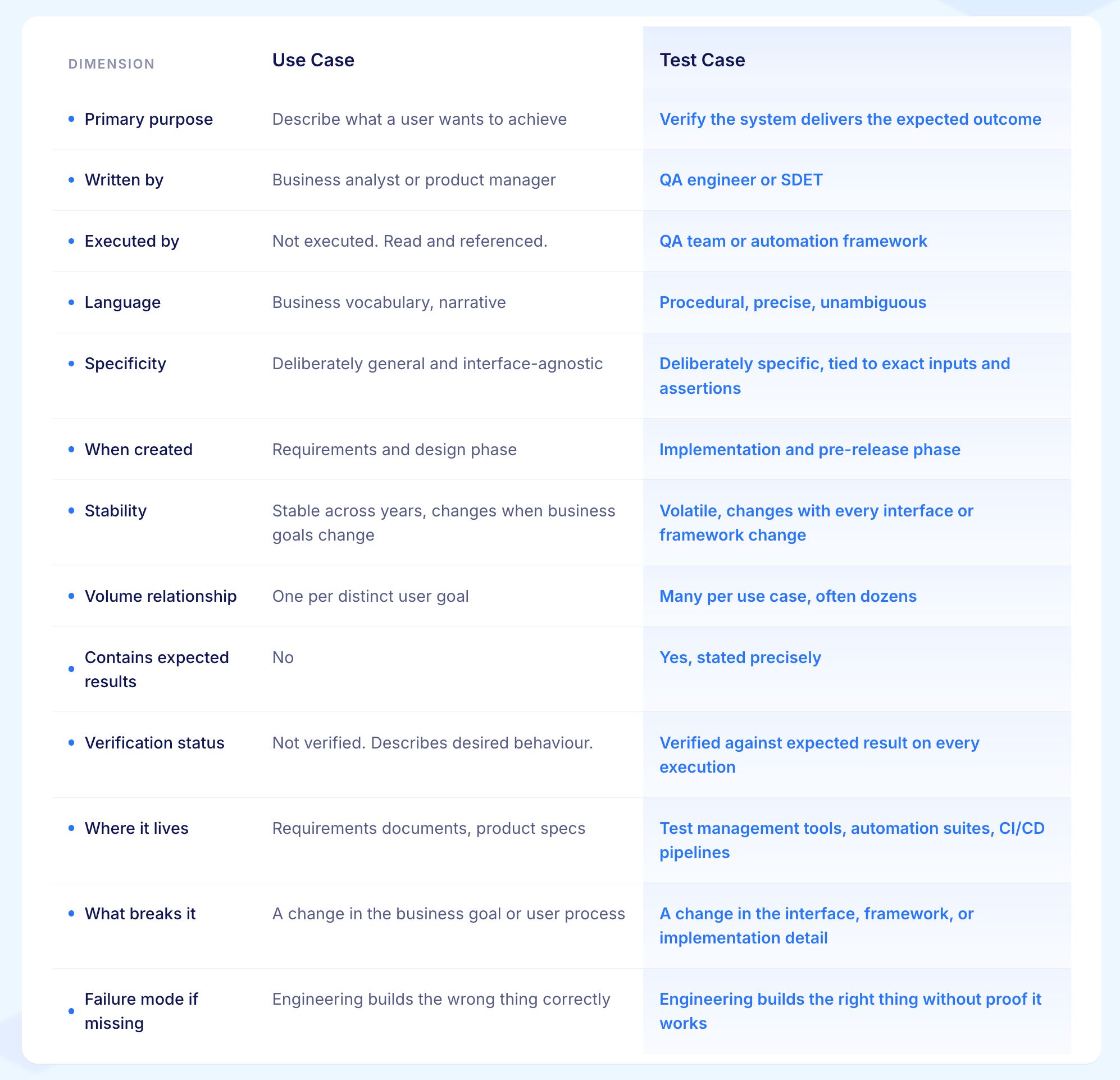
1. Purpose
A use case and a test case are built to answer different questions.
A use case answers: what is the user trying to do and how does the system help them do it?
A test case answers: does the system actually do it, and can we prove it?
One captures the plan. The other captures the proof. Mixing the two produces documents that are too vague to run and too narrow to explain what is being built.
2. Who Creates Each One
Use cases are created by people who understand the business: business analysts, product managers, and sometimes subject matter experts. They write in everyday language because the audience includes everyone involved in the product, not just the QA team.
Test cases are created by QA engineers who turn business goals into precise, step-by-step checks. The difference in who writes each document reflects the difference in what each document is for.
3. Language and Precision
A use case is written so that anyone on the team can read and understand it. A test case is written so that anyone on the team can follow it exactly, without reading it differently to someone else.
In a use case, leaving certain details open is fine because those details get worked out in later conversations. In a test case, every step must be specific enough that two different people follow it the same way. A test case where steps can be read differently needs to be rewritten.
4. How Long Each One Lasts
This is the most practically important difference. Use cases describe goals. Goals stay the same for a long time. A patient admission process, a claim submission workflow, an order checkout: these goals rarely change unless the business itself changes direction.
Test cases, by contrast, are closely tied to the interface, the tools used, and the way the code is built. Every design change, every code rewrite, every tool update can break test cases without changing the underlying goal at all.
Teams that manage both documents the same way end up with a lot of unnecessary repair work.
5. How Many Test Cases Come from One Use Case
One use case does not produce one test case. A single use case with a basic flow, two alternative paths, and two exception paths produces at least ten to fifteen test cases when edge conditions and error situations are properly covered. Often it produces thirty or more.
Teams that expect a one-to-one relationship between use cases and test cases consistently end up testing far less than they think they are.
6. How Each One Gets Checked
A use case is never checked against an expected result. It describes what should happen. A test case is checked every time it runs. The expected result is written down clearly and compared against what the system actually produces. Pass or fail comes from that comparison, not from someone's gut feeling. This is the core practical difference between the two documents.
7. What Goes Wrong When Either is Missing
When use cases are skipped, engineering teams build things that work exactly as described but that nobody needed. The code does what was asked. What was asked was wrong.
When test cases are skipped, engineering teams build the right thing but never check whether it works. The goal was correct. Whether the code meets it was never confirmed. Both are costly mistakes. Both trace back to the same root cause: treating either document as something that can be skipped.
How a Use Case Becomes a Test Suite
The move from use case to test suite is where most testing programmes quietly lose quality. A use case gets read once during requirements review and then loosely referred to when writing tests. The connection between the two documents drifts, and after a few release cycles the test suite is checking behaviour the business changed months ago.
A four-step process keeps that from happening.
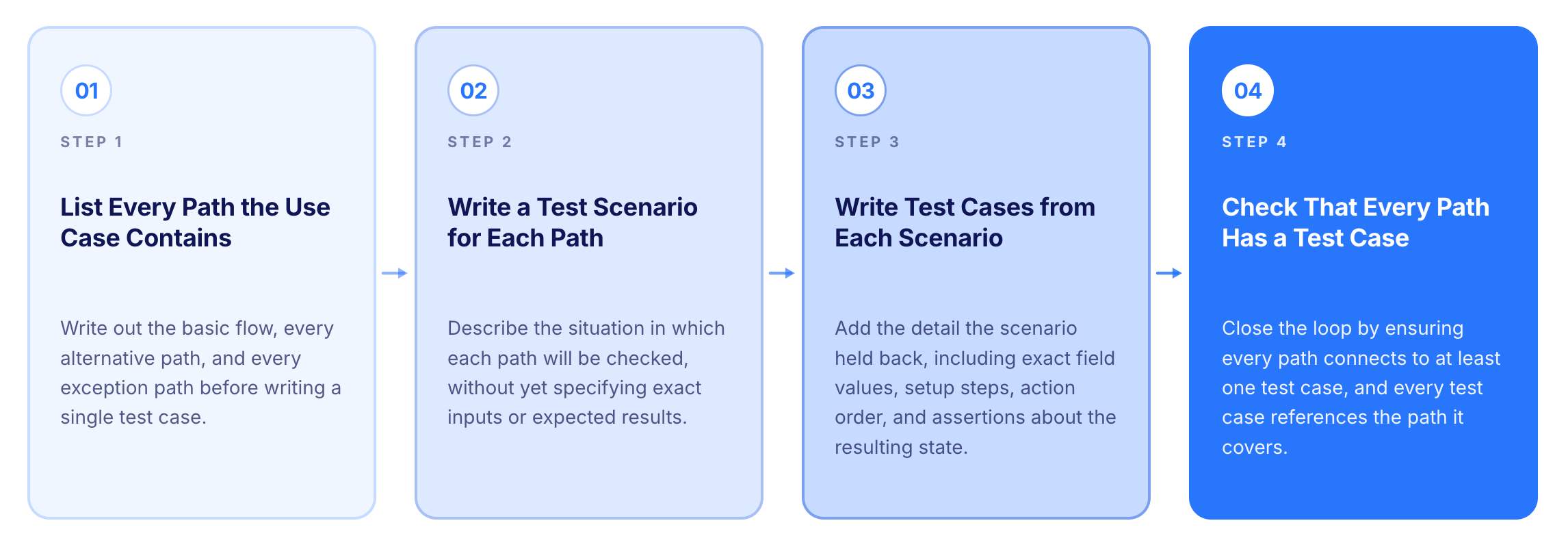
Step 1: List Every Path the Use Case Contains
A use case contains more than one path. The basic flow is one. Every alternative path is another. Every exception path is another. The first step is to write out every path clearly before writing a single test case.
For the insurance claim submission use case: the basic flow, the path where coverage requires manual approval, the path where the document is too large, the path where the policy has expired, the path where the system is unavailable during submission. Each path becomes a test scenario.
Step 2: Write a Test Scenario for Each Path
A test scenario sits between the use case and the test case. It describes the situation in which a path will be checked without yet specifying exact inputs or expected results.
It is the bridge between the plain language of the use case and the precise language of the test case.
For the claim submission use case:
Valid claim submitted by a logged-in broker during an active policy period
Claim submitted where the loss type requires manual underwriter approval
Claim submitted with a supporting document that is too large
Claim submitted one day after the policy expired
Claim submitted during a planned maintenance window
Step 3: Write Test Cases from Each Scenario
A test case adds the detail the scenario held back. Exact field values. Exact setup steps. Exact order of actions. Exact statements of what the system should produce and what state it should be in afterwards.
One scenario typically produces more than one test case.
The "valid claim submitted" scenario produces at minimum: a test for the minimum required fields only, a test for all optional fields filled in, a test with the document at the maximum allowed size, and a test that checks the five-second response time.
Step 4: Check That Every Path Has at Least One Test Case
Close the loop. Every alternative and exception path in the use case must connect to at least one test case. Every test case must reference the use case path it covers. Any path without a test case is an untested workflow. Any test case without a use case reference is a check that nobody will defend when the interface changes.
Worked Example: From One Use Case to Thirty Test Cases
A worked example makes the translation concrete. The example below uses the insurance claim submission use case introduced earlier.
From this single use case, a thorough QA practitioner produces over thirty test cases. A selection across paths:
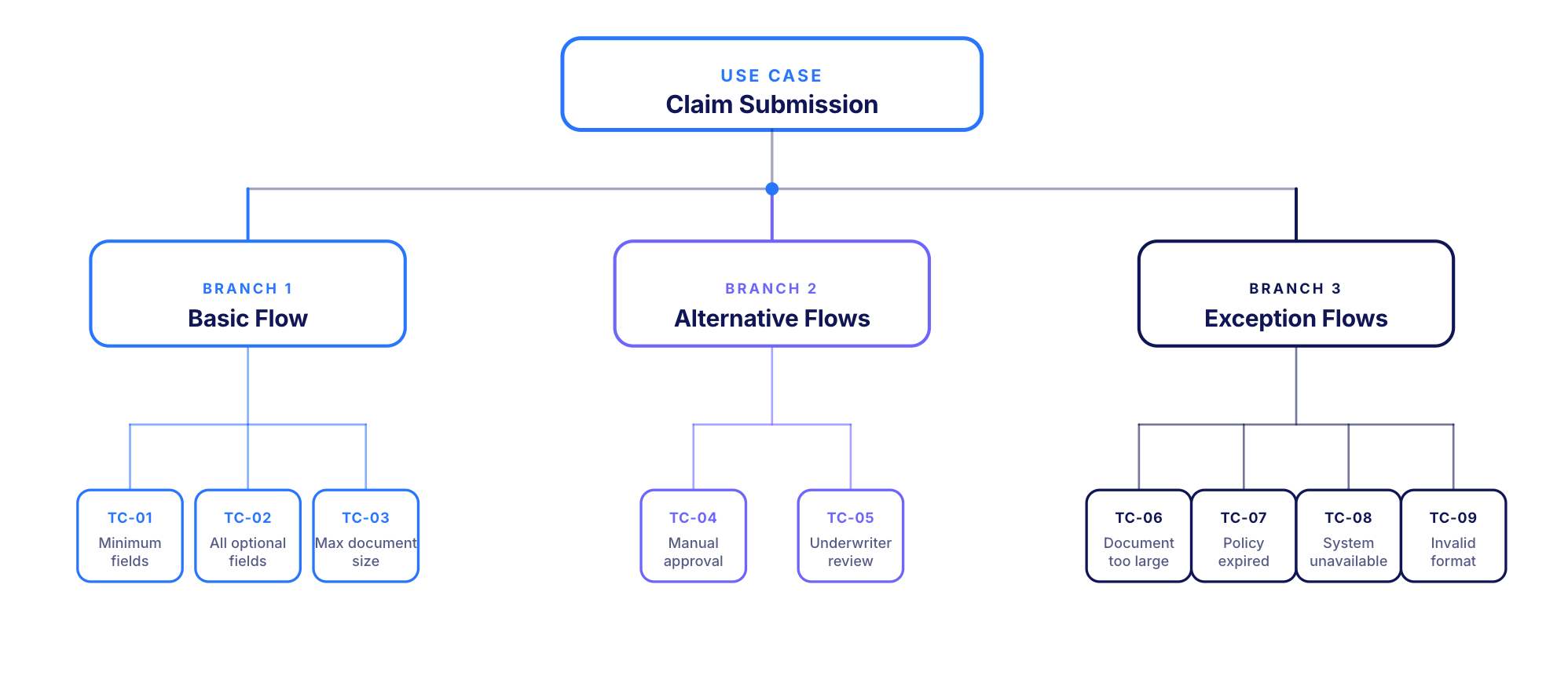
Basic Flow Test Cases:
Submit valid claim with all required fields, expect a confirmation reference within five seconds
Submit valid claim with all optional fields filled in, check all field values are saved correctly in the claim record
Submit valid claim with the supporting document at the maximum allowed size, expect the submission goes through
Alternative Flow Test Cases:
Submit claim where the loss type needs manual underwriter approval before submission completes, expect a clear message explaining the extra step required
Submit claim on a policy with multiple coverage sections, check the claim is linked to the correct section
Exception Flow Test Cases:
Submit claim with a document above the size limit, expect a clear message that states the allowed size and confirms no partial submission was created
Submit claim with policy expired one day before the loss event, expect a clear rejection that explains the coverage gap and confirms no claim record was created
Submit claim with policy expired one day after the loss event, expect a successful submission with a flag for the underwriter noting the timing
Submit claim with the required description field at the maximum character count, expect the submission goes through
Submit claim with one character beyond the maximum, expect a message on the field before submission is attempted
Submit the same claim reference twice, expect the system handles the repeat without creating a second claim
Submit claim during a simulated system outage, expect a clear message to the broker and no partial claim record left in the system
Each test case covers a different risk the use case points to. One use case produces the whole suite. The number of test cases grows from how many distinct questions each path raises.
Interesting Read: How Test Case and Test Scenario Differ
Where Use Cases and Test Cases Meet: BDD
Behaviour-Driven Development came from a practical problem: the gap between use cases and test cases was creating exactly the drift and wasted effort the two documents were meant to prevent.
The Gherkin format (Given, When, Then) produces a single document that reads like a use case and runs like a test case. A feature file written in Gherkin can be read by a product manager and run by a CI/CD pipeline.
Feature: Broker submits a claim on behalf of an insured client
Every scenario maps to a use case path. Every step is specific enough to run. The gap between the two documents closes.
BDD only works when the team keeps the discipline. Feature files written carelessly turn into the same fragile, hard-to-read test scripts they were designed to replace. The discipline is straightforward: use plain business language for business intent and precise language for specific checks.
Virtuoso QA supports natural language test writing that produces the same result without needing Gherkin expertise. Tests are written in plain English, connected to use case intent, and run as precise checks against the live application.
The Five Mistakes That Cost the Most
1. Testing Only the Basic Path
The most common mistake in test case design. Teams write test cases for the path that works and treat the job as done. The alternative paths and exception paths produce the test cases that catch the problems that show up in production.
A test suite built only on the basic path passes on every run and fails on every release.
2. Losing the Goal Along the Way
Test cases get written against the interface without keeping a clear link to the user goal they were meant to check.
A test case that records a list of button clicks without noting which use case path it covers becomes disconnected the moment the interface changes. Nobody can say what it was checking. Nobody keeps it when the next review comes around. It gets deleted or left to go stale.
3. Treating User Stories as Use Cases
A user story is a short prompt for a conversation. A use case is the result of that conversation, with all the paths, setup conditions, and failure situations written out.
Writing test cases directly from user stories without developing proper use cases first produces shallow test suites that only cover the easy path and miss the situations where the business actually loses money.
4. Letting the Two Documents Fall Out of Step
Test cases get updated when the interface changes. Use cases do not get updated when the business goals change.
Six months later, the test suite is checking behaviour the business no longer cares about while missing behaviour the business now needs. A regular review that checks the two documents against each other catches this before it causes problems. Most teams skip it and pay for it later.
5. Treating the Documents as Filing Exercises
Use cases and test cases are not things to produce and file away. They are working documents that shape what gets built, what gets checked, and what gets released.
The moment either document becomes something produced to satisfy a process rather than to guide real work, the quality protection they were meant to provide stops working.
How AI Changes the Relationship Between Use Cases and Test Cases
AI coding tools have produced a result that most teams did not see coming. Use cases have become more important. Test cases have become harder to keep up to date.
AI tools rewrite code faster than any review process can keep pace with. The interface changes. The internal structure changes. Test cases written against the interface break and need fixing after every significant change. The time spent repairing broken tests has gone up sharply across the industry.
What stays the same through all of that change is the use case. The business goal does not change because a tool rewrote a function. The claim still needs to submit. The patient still needs to be admitted. The order still needs to complete.
The teams handling this well are moving in two directions.
First, they are putting more effort into use cases: clearer ownership, more complete paths written out, regular checks that test cases still match the use cases they came from.
Second, they are building test cases that can survive interface changes: tests written in plain language that describe what the user is doing rather than which button to click, self-healing tools that adapt when elements move, and AI tools that read use cases and write test cases automatically.
Virtuoso QA's GENerator reads use cases, requirements, user stories, and BDD scenarios and produces ready-to-run tests from them. Self-healing at approximately 95% accuracy handles the interface changes that used to mean manual test repairs after every release. AI Root Cause Analysis explains failures in terms connected to the user goal rather than the code detail that broke.
The layer of recorded interface scripts that breaks with every release is being replaced by use-case-anchored journey checks that stay current as the application changes.
Use Case and Test Case: A Practitioner Checklist
Writing use cases and test cases is straightforward in theory. Keeping them connected, complete, and useful over time is where most teams fall short.
The checklist below gives you a practical set of questions to ask at the point of work, not after a release has gone wrong. Run through it when writing a new use case, when adding test cases, and when reviewing coverage before a major release.
For Use Cases:
The use case names the actor and states the goal in the first two lines without mentioning the interface
At least three paths are written out: the basic flow, at least one alternative, at least one exception
The use case is written in language that would still make sense after a complete redesign of the front end
One person is named as responsible for keeping the use case current when business goals change
For Test Cases:
Every test case names the use case path it covers
The setup steps are specific enough that any team member can prepare the test without asking for help
The expected result is written clearly enough that pass or fail is obvious without needing to make a call
At least one test case exists for every alternative and exception path in the use case
Values at the edges of the allowed range are explicitly tested rather than assumed to be covered by the main test
Test data is kept separately from the test steps so the same test case can run in different environments
For the Connection Between the Two:
A reference document connects every use case path to at least one test case
A review that checks use cases against test cases is scheduled at every major release
Any test case that cannot be connected to a use case path is reviewed and either linked or removed
Plain language writing or BDD is used for the workflows where the gap between use cases and test cases has historically caused the most problems
How Virtuoso QA Bridges the Gap Between Use Cases and Test Cases
The gap between a use case and a running test suite is where quality quietly disappears. Requirements get written. Tests get created. But the connection between the two drifts over time, and the test suite ends up checking things the business stopped caring about months ago.
Virtuoso QA is built to close that gap and keep it closed.
GENerator reads use cases, user stories, Jira tickets, and BDD scenarios and produces ready-to-run tests from them. The manual translation step that used to take weeks takes hours.
Self-healing AI at approximately 95% accuracy keeps tests connected to their use case paths even after buttons move, fields are renamed, or pages are redesigned. The connection does not break every time the interface changes.
AI Root Cause Analysis explains failures in plain language tied to the customer journey, not to a technical detail that requires an engineer to interpret.
For teams with existing automation in Selenium, Tosca, or TestComplete, GENerator converts legacy scripts into self-healing Virtuoso journeys without starting from scratch.
The discipline of connecting use cases to test cases stays the same. The difference is that Virtuoso maintains that connection automatically as the product changes.

Related Reads
Frequently Asked Questions
Can a test case exist without a use case?
Who writes a use case and who writes a test case?
How many test cases does one use case produce?
Is a use case the same as a user story?
Are use cases still relevant in agile environments?
Where does Virtuoso QA fit in the use case to test case workflow?









