

Blog
Test Automation: What it is & How to Get Started

Published on
March 16, 2026

With this complete guide to test automation, learn what to automate, when to start, how to architect your framework, and the AI-native approaches.
Software ships faster than ever. Release cycles that once measured in quarters now measure in days. Applications that once served hundreds of users now serve millions across thousands of device and browser combinations. And the expectation is absolute: every release must work, everywhere, immediately.
Manual testing cannot keep pace with this reality. Regression cycles that take 15 to 20 days simply do not fit inside a CI/CD pipeline that deploys multiple times per week. This is not a limitation of testers. It is a limitation of doing by hand what machines do better: repetitive, deterministic, high volume execution.
Automation testing exists to solve this. But in 2026, the definition of automation testing itself has evolved far beyond writing scripts and hitting "Run." The emergence of AI native platforms, self healing tests, natural language authoring, and autonomous test generation has created a new category that makes traditional automation frameworks look like the manual processes they were designed to replace.
This guide covers what automation testing is, how it works, every type and approach, the tools landscape from open source to AI native, and the strategic decisions that determine whether your automation investment delivers compounding returns or joins the 73% that fail.
Automation testing is the practice of using software tools, scripts, and intelligent systems to execute test cases, compare actual outcomes against expected outcomes, and report results without manual human intervention. It transforms repetitive validation tasks into repeatable, consistent, and scalable processes.
At its most basic level, automation testing means writing a set of instructions that tell a machine to interact with an application exactly as a human tester would: navigate to a page, enter data into fields, click buttons, and verify that the system responds correctly. The machine executes those instructions identically every time, at a speed and consistency no human can match.
At its most advanced level, automation testing means AI systems that analyze an application, autonomously generate tests based on user flows and requirements, execute those tests across thousands of environments simultaneously, and automatically adapt when the application changes. The human role shifts from writing and maintaining scripts to defining intent and reviewing results.
Both definitions are correct. The difference between them defines the gap between legacy automation and the future of quality assurance.
Manual testing and automation testing are not competitors. They are complementary disciplines that serve different purposes within a comprehensive quality strategy.
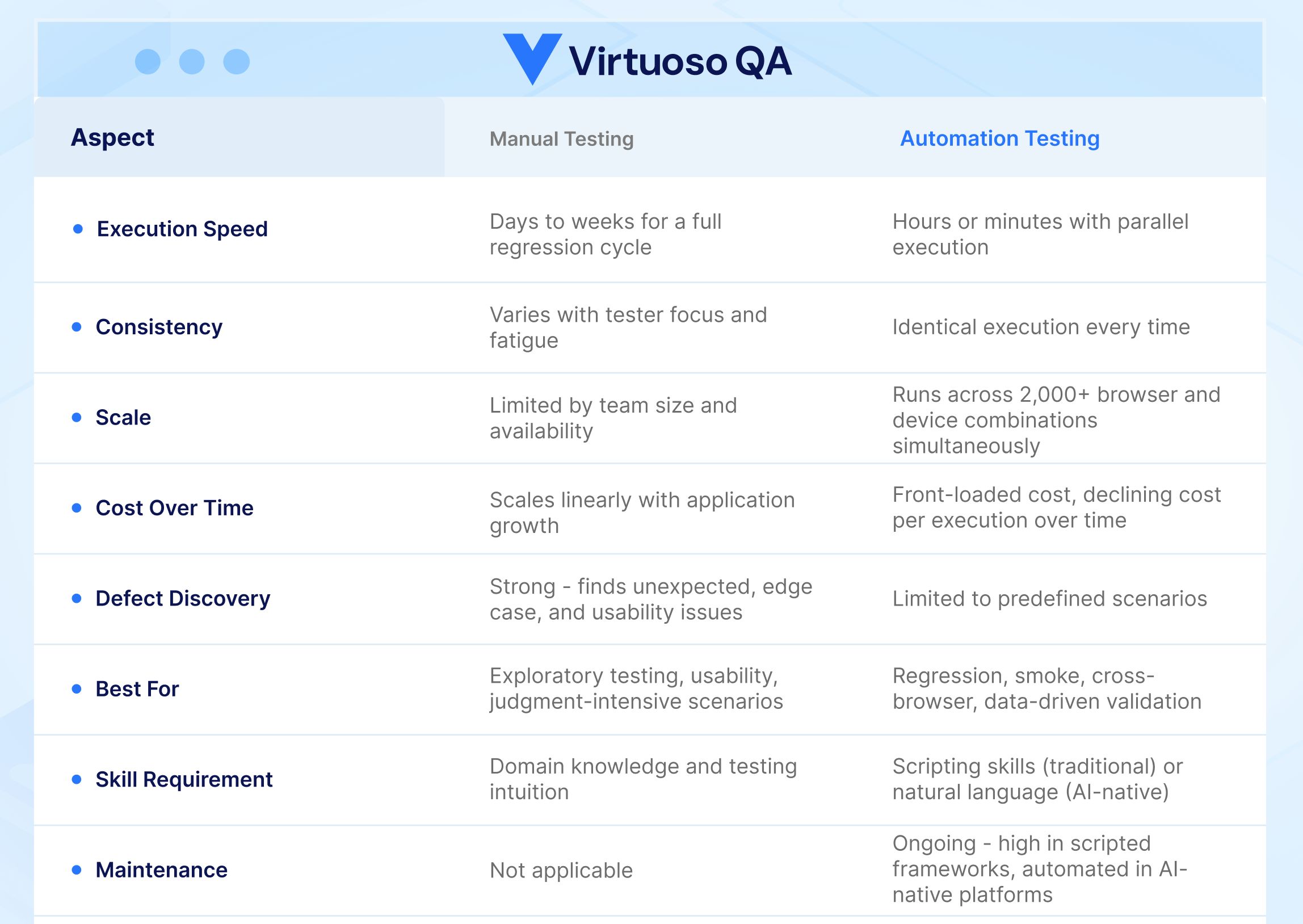
Manual testing involves a human tester interacting directly with an application to discover defects. The tester follows test cases, exercises the system, and applies judgment, intuition, and creativity to find issues that scripts cannot anticipate. Exploratory testing, usability assessment, and edge case discovery are domains where human intelligence remains irreplaceable.
Automation testing involves machines executing predefined test scenarios to verify that known functionality works as expected. It excels at repetition, consistency, speed, and scale. Regression testing, smoke testing, data driven validation, and cross browser verification are domains where automation dramatically outperforms manual effort.
The strategic question is not whether to automate. It is what to automate, when to automate it, and which approach delivers the highest return on your investment.
The most effective QA strategies use both: automation handles the known, repeatable, and scalable. Humans handle the unknown, creative, and judgment intensive.
Automation testing is a front-loaded investment. The cost is real and immediate. The return compounds over time, but only if the approach is right.
Most of the cost in traditional automation is not the tooling. It is the engineering time. A scripted automation framework requires development skills to build, maintain, and extend.
Low-code and AI-native platforms shift that equation. Lower skill requirements, faster authoring, and self-healing maintenance reduce the total cost of ownership significantly.
The return on automation comes from three sources: speed (regression cycles compressed from weeks to hours), coverage (tests running across thousands of environments simultaneously), and consistency (zero human error in execution). Together these reduce defect escape rates, accelerate release cycles, and lower the cost per test execution over time.
The key metric is cost per test execution over the lifetime of the suite. A well-maintained automated test that runs 500 times costs a fraction of a penny per execution. A manual test that takes 10 minutes each time and runs 500 times costs thousands.
Automation fails to deliver ROI in one scenario: when maintenance costs outpace execution savings. Teams that spend more time fixing broken tests than running them are not getting a return, they are getting a second manual testing problem on top of the first.
This is why the architecture of the automation approach matters more than the volume of tests created.
Automation testing spans multiple types, each targeting a different layer of application quality.
Functional testing validates that application features work according to requirements. Automated functional tests verify login flows, form submissions, data processing, navigation, and business logic across the application. This is the most common starting point for automation because functional defects have the most direct impact on user experience.
Regression testing ensures that new code changes do not break existing functionality. Automated regression suites run after every code commit or deployment, catching regressions immediately rather than discovering them weeks later in manual cycles. Regression testing is the highest ROI automation investment because these tests run repeatedly across every release.
Smoke tests verify that the most critical application functions work after a new build or deployment. They are fast, focused, and designed to catch catastrophic failures early. Automated smoke tests typically run as the first gate in a CI/CD pipeline.
Integration testing validates that different modules, services, and systems work together correctly. Automated integration tests verify API contracts, data flow between services, and end to end business processes that span multiple components.
API testing validates backend services independently from the user interface. Automated API tests verify endpoint responses, data validation, error handling, authentication, and performance. They execute faster than UI tests and catch backend defects that the interface may mask.
Cross browser testing verifies that the application behaves identically across different browsers (Chrome, Firefox, Safari, Edge), operating systems (Windows, macOS, Linux, iOS, Android), and device form factors. Automation is essential here because manual cross browser testing across thousands of combinations is physically impossible.
Performance testing measures application speed, stability, and resource utilization under various load conditions. Automated performance tests simulate concurrent users, measure response times, identify bottlenecks, and validate that the application meets SLA requirements under peak traffic.
Visual testing compares the rendered appearance of application pages against approved baseline screenshots. Automated visual tests detect layout shifts, broken styling, font rendering issues, and responsive design defects that functional tests miss.
End to end testing validates complete user workflows from start to finish, spanning the UI, APIs, databases, and external integrations. These tests simulate real user journeys (such as registering, searching, purchasing, and receiving confirmation) to verify the entire system works cohesively.

The wrong tool does not just slow teams down. It creates a maintenance burden that grows with every sprint until the automation investment is written off entirely. The right choice depends on three factors.
If your QA team is primarily non-technical, a framework requiring code will bottleneck on the one or two engineers who can write it. Natural language and low-code platforms open automation to the entire team. If your team is technically strong and values control, a coded framework gives maximum flexibility at the cost of higher maintenance overhead.
Standard web applications with stable UIs are well-served by most modern platforms. Enterprise applications with iFrames, Shadow DOM, dynamic components, and complex multi-service integrations require a platform that handles these patterns natively without manual workarounds.
This is the most under-weighted factor in tool selection. Every automation approach has a maintenance cost. The question is whether that cost is paid by humans manually or absorbed by the platform automatically. Teams that lack the capacity to maintain tests continuously need a platform with self-healing built in, not an optional add-on.
Effective automation follows a structured process that aligns test investment with business priorities.
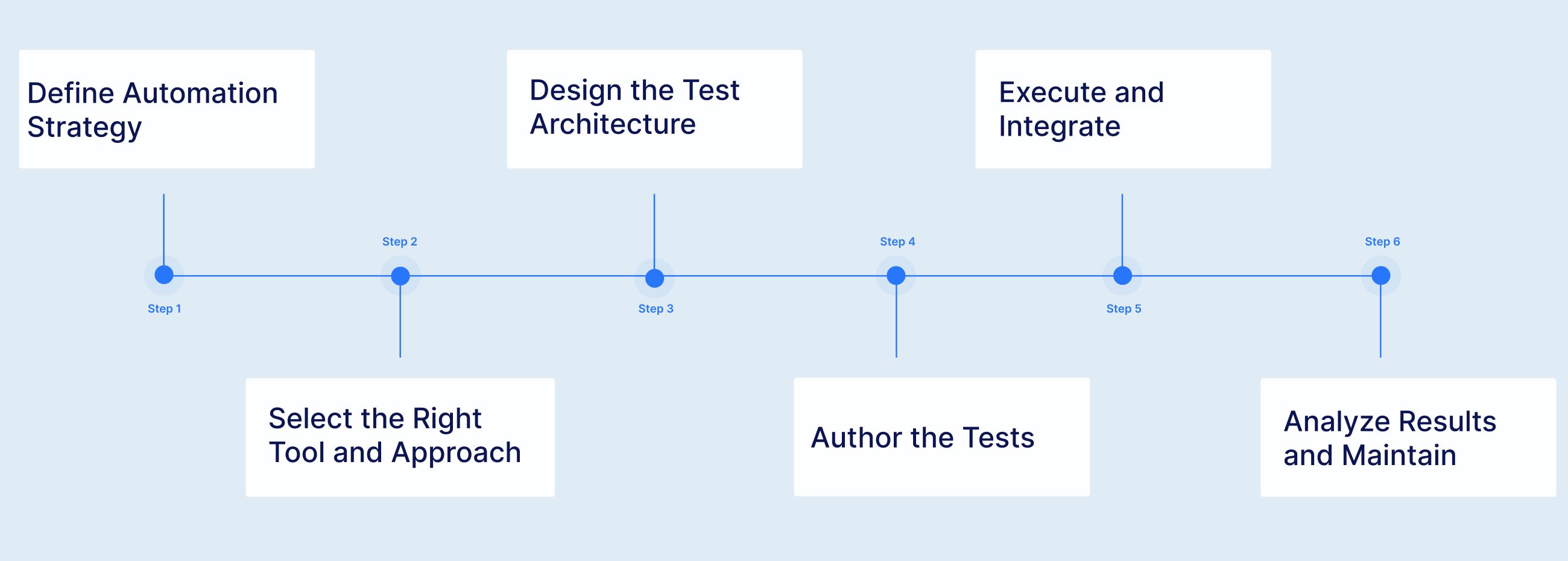
Before writing a single test, define what to automate and why. The highest ROI targets are tests that run frequently (regression, smoke), tests that require broad coverage (cross browser, multi device), and tests that are data intensive (parameterized validation across hundreds of input combinations). Tests that are exploratory, highly subjective, or execute only once are better left to manual testers.
The tool you choose shapes everything that follows: how tests are authored, how they are maintained, how they scale, and what skills your team needs. This decision deserves careful evaluation against your team's capabilities, your application's technology stack, and your long term maintenance capacity. We cover the tool landscape in detail below.
A well designed test architecture separates test logic from test data, organizes tests into maintainable modules, and establishes naming conventions and folder structures that scale. For enterprise environments, this includes composable test libraries where common workflows (login, navigation, checkout) are built once and reused across test suites rather than duplicated.
Test authoring varies dramatically depending on the chosen approach. In traditional frameworks, this means writing code in Java, Python, JavaScript, or C#. In low code tools, this means configuring test steps through visual interfaces. In AI native test platforms, this means writing test intent in natural language or allowing AI to autonomously generate test steps by analyzing the application.
Tests should execute as part of the CI/CD pipeline, triggered automatically by code commits, pull requests, or scheduled intervals. Integration with tools like Jenkins, Azure DevOps, GitHub Actions, GitLab CI, CircleCI, and Bamboo ensures that test results gate the deployment process and provide immediate feedback to development teams.
Execution is only valuable if results are analyzed and acted upon. AI powered root cause analysis identifies whether a failure represents a genuine application defect or a test environment issue, dramatically reducing triage time. Ongoing maintenance, the activity that consumes 60% or more of time in traditional frameworks, is either automated through self healing or requires continuous manual effort depending on the chosen approach.
Automation testing has progressed through distinct generations, each solving the limitations of its predecessor while introducing new capabilities.
The earliest automation tools recorded user interactions and played them back. They were accessible to non programmers but produced the most brittle tests imaginable. Any change to the application, no matter how minor, broke the recorded script. This generation proved the concept of automation but failed at scale.
Selenium, introduced in 2004, defined this generation. Teams wrote automation code using programming languages, created page object models, and built custom frameworks for reporting and execution. This approach delivered control and flexibility but demanded significant engineering investment. Selenium users spend approximately 80% of their time on maintenance and only 10% on authoring new tests. The framework is free, but the hidden cost in developer time often exceeds $340,000 per year at typical enterprises.
Tools like Katalon, TestComplete, and early codeless platforms made test creation faster by providing visual interfaces, drag and drop editors, and keyword driven authoring. They lowered the entry barrier but did not solve the fundamental maintenance problem. Tests created in low code tools break just as easily as scripted tests because they still rely on the same brittle element locators. Creating tests faster only accelerates the maintenance death spiral.
AI native test platform like Virtuoso QA represent the current frontier. Built from the ground up with artificial intelligence at their core, not as an afterthought bolted onto a traditional framework, these platforms fundamentally change the economics of automation. They understand test intent rather than just element locations. When applications change, tests adapt automatically. When new features are deployed, AI autonomously generates test coverage. When tests fail, AI identifies the root cause and distinguishes genuine defects from environmental noise.
The distinction between AI bolted and AI native is critical. AI bolted tools add machine learning features to a traditional automation architecture: smarter locator fallback, basic self healing, or AI assisted test recording. They reduce maintenance somewhat (typically 40% to 50%) but cannot survive fundamental UI changes. AI native platforms understand what a test is trying to accomplish, not just what element to interact with. They achieve 85% to 95% maintenance reduction and survive complete UI redesigns because they operate on semantic understanding rather than element coordinates.
The analogy is precise: AI bolted is adding a turbocharger to a horse. AI native is building a car.
Automation testing is not without friction. Understanding the challenges is essential to overcoming them.
This is the primary reason 73% of automation projects fail. More tests create more maintenance. Maintenance consumes time that should go to new test creation. The suite stagnates. Test coverage gaps widen. The team reverts to manual testing. The automation investment is written off.
Traditional automation demands programming proficiency. Most QA teams include a mix of technical and non technical testers. When only the programmers can author and maintain tests, the automation effort bottlenecks on a small subset of the team.
Flaky tests, tests that pass sometimes and fail other times without any code change, erode team confidence in automation. When the suite cannot be trusted, developers ignore failures and defects escape to production.
Not every test should be automated. Exploratory testing, usability evaluation, and scenarios that execute only once during a project lifecycle deliver poor automation ROI. Over automating wastes effort and inflates maintenance burden.
The tools market spans open source frameworks, commercial low code platforms, and AI native platforms. Each serves different teams, budgets, and maturity levels.
Virtuoso QA represents the AI native category. Built from the ground up with NLP, ML, and GenAI at its core, Virtuoso enables tests authored in plain English through Natural Language Programming, maintained automatically through approximately 95% accurate self healing, and executed across 2,000+ browser and device combinations on a cloud grid with zero infrastructure setup. StepIQ autonomously generates test steps by analyzing the application under test. AI Root Cause Analysis identifies whether failures represent genuine defects or environmental issues. Composable test libraries provide pre built, reusable automation for enterprise platforms including SAP, Oracle, Salesforce, and Microsoft Dynamics 365.
Is your team still stuck in traditional testing cycles? Watch how Virtuoso QA is transforming the way organizations work by replacing slow, manual processes with smart, self-healing automation that keeps up with the pace of modern development.
Regression tests, smoke tests, and critical business flow tests deliver the most value from automation because they execute repeatedly across every release. Automate these first.
Tests that run outside the pipeline are tests that get forgotten. Wire automation into your build and deployment process so that every code change is validated automatically.
A test suite that breaks every sprint is a liability, not an asset. Choose tools and architectures that minimize maintenance so your automation investment compounds rather than decays.
Hard coded test data creates fragile, inflexible tests. Externalize data into parameterized sources so the same test logic validates across hundreds of data variations.
Combine unit tests (fast, focused, developer owned), API tests (backend validation, no UI dependency), and end to end tests (full user journey validation) into a balanced pyramid that catches defects at the appropriate level.
Track automation coverage, test execution time, defect escape rate, and maintenance effort as a percentage of total automation time. These metrics tell you whether your investment is compounding or eroding.
Building an automation suite is the first step. Knowing whether it is delivering value requires a small set of metrics tracked consistently.
The percentage of test cases that are automated versus manual. A higher rate is not always better, coverage should be weighted toward high-frequency, high-risk tests. Target 80% or above for regression-critical functionality.
How long the full regression suite takes to run. For agile teams, anything over 30 minutes is too slow to provide sprint-level feedback. Track this over time, it should decrease as parallelisation improves, not increase as the suite grows.
Defects found in production that automated tests should have caught. Every escaped defect represents a coverage gap. A rising escape rate signals that the automation suite is not keeping pace with application growth.
The single most important health metric for any automation programme. If more than 30 to 40% of your automation time is spent on maintenance, the suite is consuming more than it is producing. Platforms with AI self-healing should drive this number below 20%.
The percentage of test failures that are not caused by genuine application defects. A high false failure rate erodes team trust in the pipeline. When developers learn to ignore failures, the automation suite stops functioning as a quality gate.
The generation of tools a team chooses today will shape their testing capacity for the next three to five years. Understanding where automation is heading is as important as understanding where it is now.
The next frontier is autonomous test generation and maintenance. Agentic AI systems analyse an application, understand its structure and user flows, generate comprehensive test coverage, and adapt continuously as the application changes. The human role shifts from writing and maintaining tests to defining intent and reviewing outcomes.
This is not a future concept. Platforms like Virtuoso QA already deploy agentic capabilities through features like GENerator, which converts requirements, legacy scripts, and UI screens into fully executable tests without manual authoring.
The decline of code-first automation is accelerating. Natural language programming, writing test intent in plain English and having the platform translate it into executable automation is removing the last remaining barrier to whole-team participation in automation. When any QA professional can author, review, and maintain tests without writing a line of code, the resource constraint that limits most automation program disappears.
Test execution is becoming only one part of what automation platforms do. AI-powered analytics are moving toward predictive quality: identifying which areas of the application carry the highest risk before a release, recommending where to invest new test coverage, and surfacing patterns across failure histories that indicate systemic architectural problems rather than individual bugs.


Try Virtuoso QA in Action
See how Virtuoso QA transforms plain English into fully executable tests within seconds.
