Blog
What is Test Planning and 9 Steps to Create a Test Plan

Rishabh Kumar
Published on

Table of contents
Lorem ipsum
Lorem ipsum
Lorem ipsum
Lorem ipsum
Lorem ipsum
A test plan is the document that turns a release, a feature set, or a defined piece of work into a coordinated testing effort. It names what will be tested, by whom, with what approach, against what risks, and to what definition of done. A good test plan is short enough to be read in one sitting and useful enough to be referenced through the work it describes.
The discipline has shifted since the days of hundred-page IEEE 829 plans that nobody read. The modern test plan is a living document: short, current, owned, updated, and read by the people whose work depends on it.
What is a Test Plan?
A test plan is a written agreement that allows a team to know whether testing is on track, off track, or done. It aligns QA, development, product, and stakeholders on what success looks like before the work begins.
A test plan is not a deliverable to be approved and filed. A plan that gets filed dies on the day it is filed. The plan that earns its place is the one that gets read, referenced when scope or schedule shifts, and updated when reality changes. The question is not whether the plan is written. The question is whether the plan is working.
Why is Test Planning Important?
Without a test plan, every person on the team has a slightly different idea of what is being tested, who is responsible for it, and what done looks like. That gap produces missed coverage, last-minute scope debates, and release decisions made on gut feel rather than evidence.
A well-written test plan does several practical things at once.
It forces the team to think through risks before they materialise rather than after
It gives the QA team a clear scope to work from rather than an assumed one
It gives developers visibility into what their code will be tested against
It gives product managers and stakeholders a clear picture of release readiness
It creates a record of decisions that can be revisited when scope or schedule changes
The plan does not have to be long to do all of this. Three pages covering the right components beats thirty pages covering everything twice.

Who Needs a Test Plan?
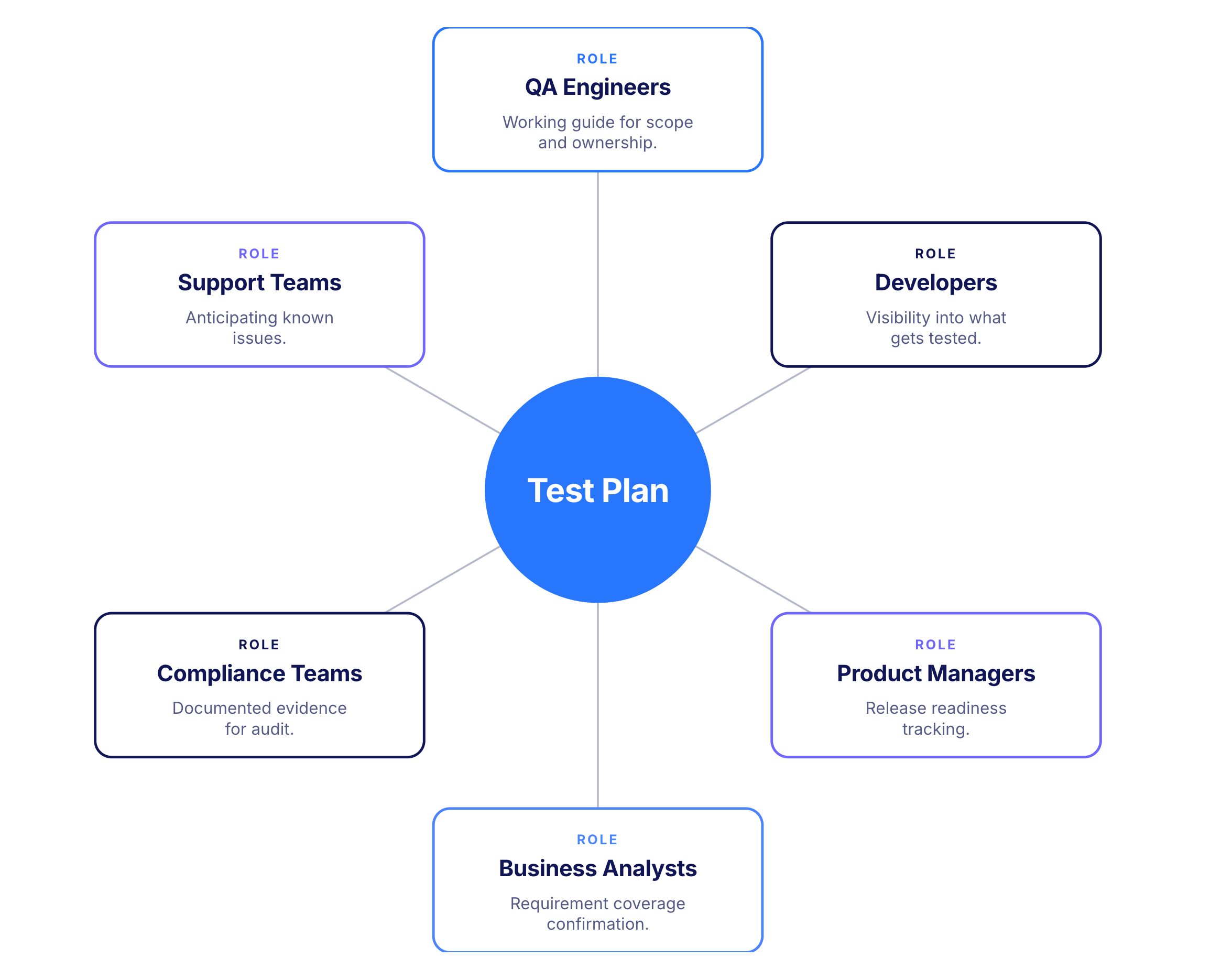
A test plan touches every role involved in a release, not just the QA team.
QA engineers and leads use the plan as their working guide: scope, approach, ownership, risks, and done criteria all live here. The plan is the QA team's primary reference through the cycle.
Developers benefit from knowing what will be tested and what the pass criteria are. This shapes how they approach edge cases, what they include in code reviews, and when they consider a feature ready to hand over.
Product managers use the plan to understand coverage, track progress, and make informed decisions about release timing. The risks and mitigations section is particularly relevant for anyone weighing release trade-offs.
Business analysts use the plan to confirm that test coverage maps to requirements and that the scenarios being tested reflect what users actually need.
Compliance and audit teams in regulated industries use the plan as documented evidence that testing was planned and executed against defined criteria.
Support teams use the plan to anticipate known issues and prepare guidance for users before problems surface in production.
Key Components of a Test Plan
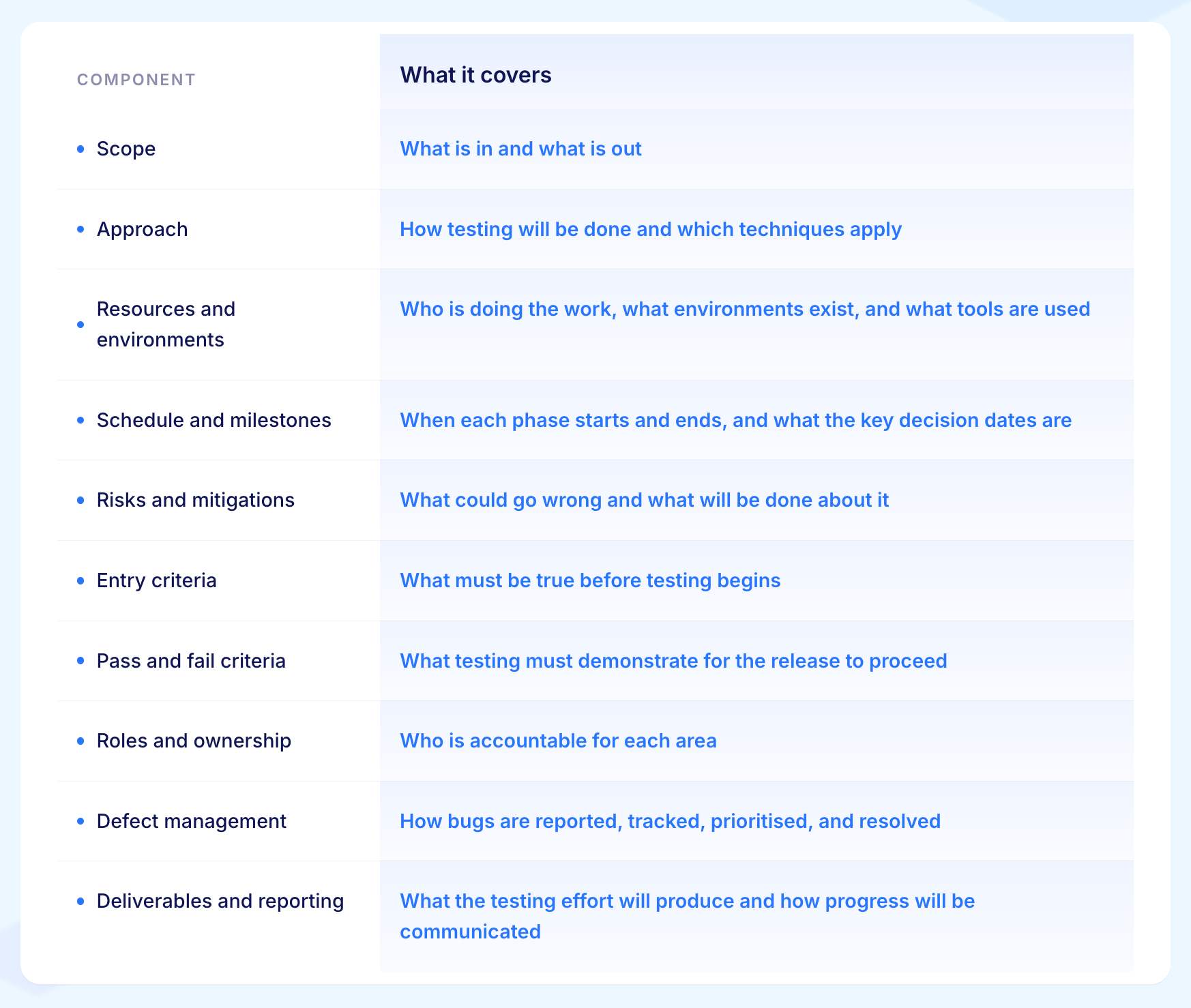
A short test plan with the right components is better than a long plan that covers everything twice. Eight components account for nearly everything a modern test plan needs to carry.
1. Scope
The scope section names what is in and what is out. Both matter equally. The in-scope list tells the team what to test. The out-of-scope list forces a decision about what is being skipped, deferred, or covered by someone else.
Be specific. "All checkout flows" does not tell anyone which flows, which browsers, or which languages. "Single-item, multi-item, and saved-card checkout flows on Chrome, Firefox, Safari, and Edge in English and French" does.
Everything downstream, from effort estimates to done criteria, depends on how clearly the scope is written.
2. Approach
The approach section records how the testing will be done for this specific release: which test design techniques apply, which test types will run, and what level of automation is being used for each area.
Write it as a record of decisions made, not a general description of how testing works.
For example: "We are using boundary value analysis for all date and monetary fields because those are the most common source of defects in the previous two releases." When the work runs into trouble, the team can go back to these decisions and ask whether they are still the right ones.
3. Resources and Environments
List the people doing the work by name and what each person is responsible for. For example: "James owns the checkout module. Priya owns the payment integration. Both are available full time for the three-week cycle." This makes it clear who to go to for any question about a specific area.
Do the same for environments. Name each environment, what it is used for, and when it will be available. If there are constraints, write them down.
For example: "The staging environment is shared with team B and is only available to us from Monday to Wednesday each week."
4. Schedule and Milestones
Name the three dates that matter most:
When system testing starts
When UAT starts
When the release decision will be taken.
For example: "System testing starts 5 June. UAT starts 19 June. Release decision is 30 June."
Add contingency days around the steps most likely to slip. If the staging environment has been unreliable before, add buffer time around that milestone specifically rather than spreading extra days evenly across the whole schedule.
5. Risks and Mitigations
For each risk, write what could go wrong and exactly what will be done about it.
For example: "The fraud screening vendor has not been tested at the volume this release requires. We will run contract testing in week one and limit the initial rollout to one market to reduce the impact if problems appear."
Three or four specific risks with specific actions is more useful than a long list of general concerns with nothing attached to them.
6. Entry Criteria
Entry criteria are the conditions that must all be true before testing starts.
For example: the build is deployed and stable in the test environment, the test environment has been checked and is accessible to all testers, test data is ready, test cases have been reviewed, and any defects that would block progress from the previous cycle have been fixed.
Agree this list with the development and environment teams at the start of the cycle. If any condition is not met by the planned start date, the team knows immediately rather than discovering it on day one of testing.
7. Pass and Fail Criteria
Pass and fail criteria define what must be true for the release to go ahead and what would cause it to be held.
For example: "No critical or high defects are open at the release decision date. All in-scope scenarios are passing on the full browser and device list. The regression suite has been green for three consecutive nightly runs before the release date."
Write criteria that anyone on the team or in the business can check for themselves. If a criterion requires someone to make a judgement call about whether it has been met, rewrite it until it does not.
8. Roles and Ownership
Write down who owns each area of the plan.
For example: "Ana owns the test plan overall. James owns the checkout module test cases and execution. Priya owns the payment integration test cases and execution. David owns the regression suite. Fatima owns test data."
Every area has one named person. If the list reveals an area that nobody has been assigned to, assign someone before testing starts. An unowned area will not receive attention until something goes wrong in it.
9. Defect Management
Write down how bugs will be handled before testing starts.
For example: "All defects are logged in Jira with a severity label. Critical means a core user journey is completely broken with no way around it. High means significant impact but the user can work around it. Medium and Low cover everything else. Developers are assigned defects by the QA lead within 24 hours of logging. Once fixed, the original reporter retests and closes the defect."
Getting this agreed in advance means the first defect found during testing goes straight into the right process rather than triggering a conversation about how to handle it.
10. Deliverables and Reporting
List what the testing effort will produce and who receives each item. For example: "Test cases for all in-scope areas delivered by day five. Daily status update sent to the engineering manager each afternoon. Weekly summary sent to the product owner every Friday. Release readiness report delivered on the release decision date."
Also write down what triggers an escalation.
For example: "If any milestone slips by more than two days, the QA lead notifies the project manager the same day." This means everyone knows in advance when and how problems will be raised rather than finding out differently each time.
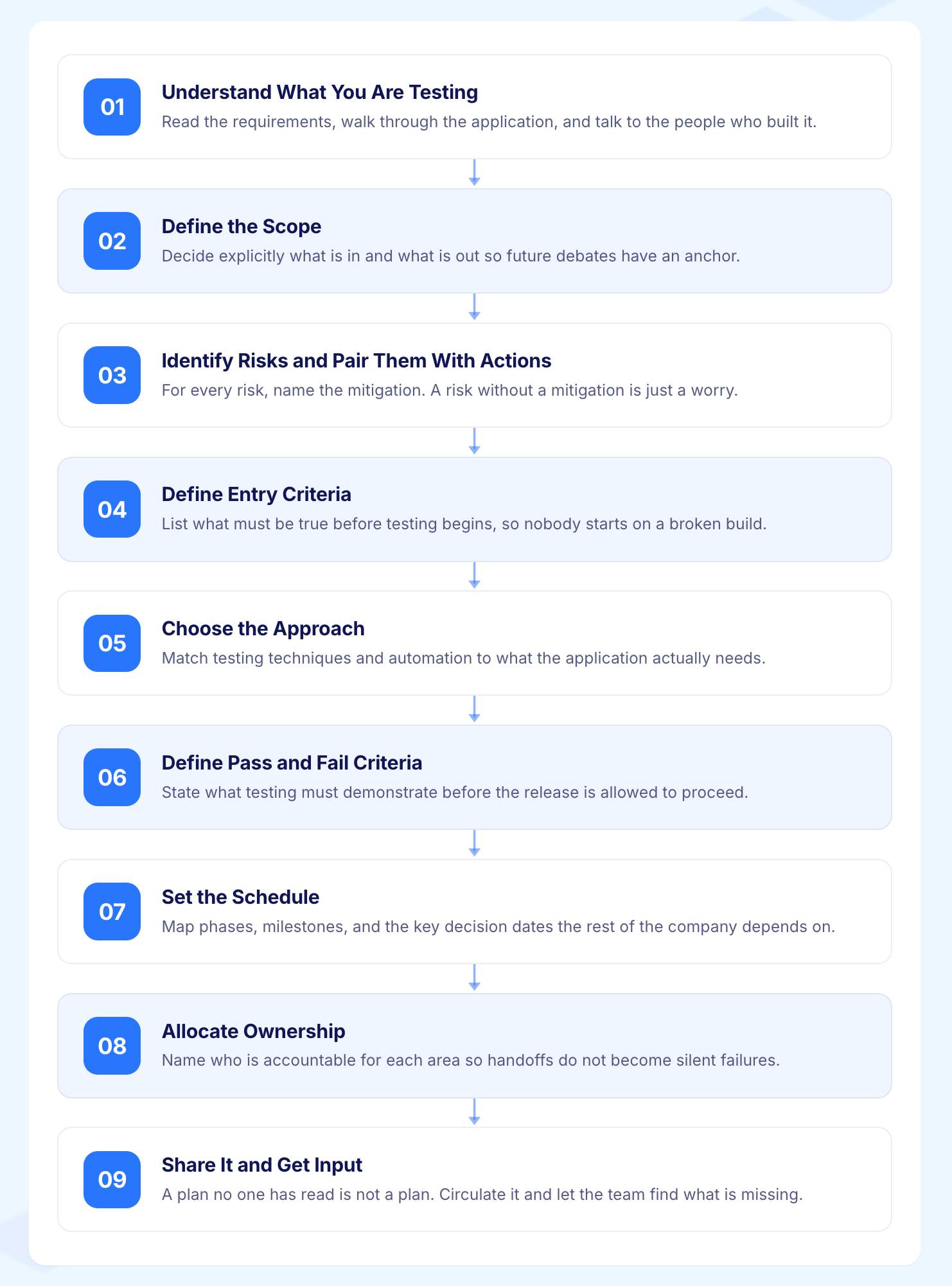
How to Create a Test Plan: A Step-by-Step Guide
Step 1: Understand What You Are Testing
Read the requirements, user stories, and acceptance criteria before writing anything. Talk to developers to understand what is changing. Talk to the product manager to understand what matters most.
What to Do
Read the feature documents and technical specifications
Identify which area carries the highest business risk if it breaks
Write a two-sentence purpose statement to anchor the plan
Why it Matters
A plan written without this context will miss the things that matter most. The purpose statement keeps the team focused when scope or priorities shift mid-cycle.
Example
Purpose statement for a claims module release: "This release adds a guided claims intake journey and automated triage. Testing must confirm both work correctly, that the fraud screening integration behaves as expected, and that the regulatory reports match the new requirements."
Step 2: Define the Scope
Document what will be tested, what will not be tested, and who must confirm each exclusion. Both lists need to be explicit and agreed before testing begins.
What to Do
Write the in-scope list first: features, journeys, integrations, and configurations
Write the out-of-scope list with a reason for each exclusion
Share both lists with stakeholders and get written confirmation
Why it Matters
Unconfirmed exclusions surface as surprises mid-cycle. A stakeholder who disagrees with an out-of-scope decision is better to find out on day one than on day ten.
Example
In scope:
Guided intake journey on web and mobile web
Automated triage for all seven claim types
Fraud screening vendor integration
Regulatory reporting for twelve markets
Out of scope:
Native mobile apps (covered by the mobile team)
Penetration testing (covered by the annual programme)
Full load testing (covered by the platform team)
During review, the engineering manager asked for lightweight API response time checks on the fraud screening integration because it had never been tested at volume. The scope was updated to include this. The full load test remained with the platform team.
Step 3: Identify Risks and Pair Them With Actions
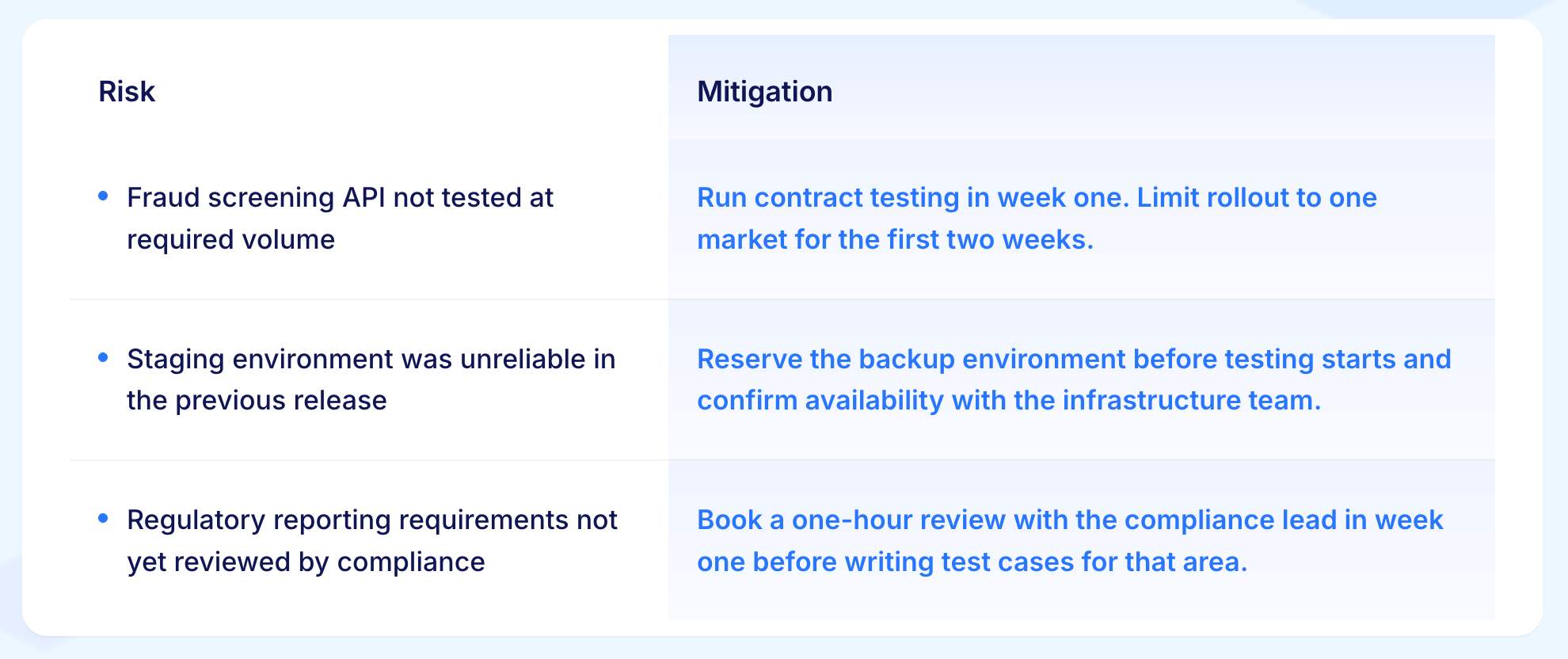
For every area that could cause problems, write what could go wrong and what will specifically be done about it.
What to Do
List the most realistic risks for this release, not generic ones
Write one specific mitigation action for each risk
Ask: if this risk happened, would it change the plan? If not, remove it
Why it Matters
A risks list without actions is just a list of worries. The mitigation is what turns it into a plan.
Example
Step 4: Define Entry Criteria
Write down every condition that must be true before testing starts. Share the list with the development and environment teams and get confirmation by a specific date.
What to Do
List each condition with a named owner and a due date
Get written confirmation from each owner
If a condition will not be met, adjust the start date before testing begins
Why it Matters
Testing that starts before these conditions are met wastes the first week on setup problems rather than actual testing.
Example
By end of day 4 June:
Build deployed to integration environment and passing smoke tests
All three QA engineers have environment access
Test data extract of 500 sanitised records loaded and verified
All 87 intake journey test cases written and peer reviewed
Two critical defects from the previous cycle fixed and retested
During review, the development lead flagged the fraud screening integration would not be ready until 6 June. The system testing start date was moved to 6 June and the product manager was notified the same day.
Step 5: Choose the Approach
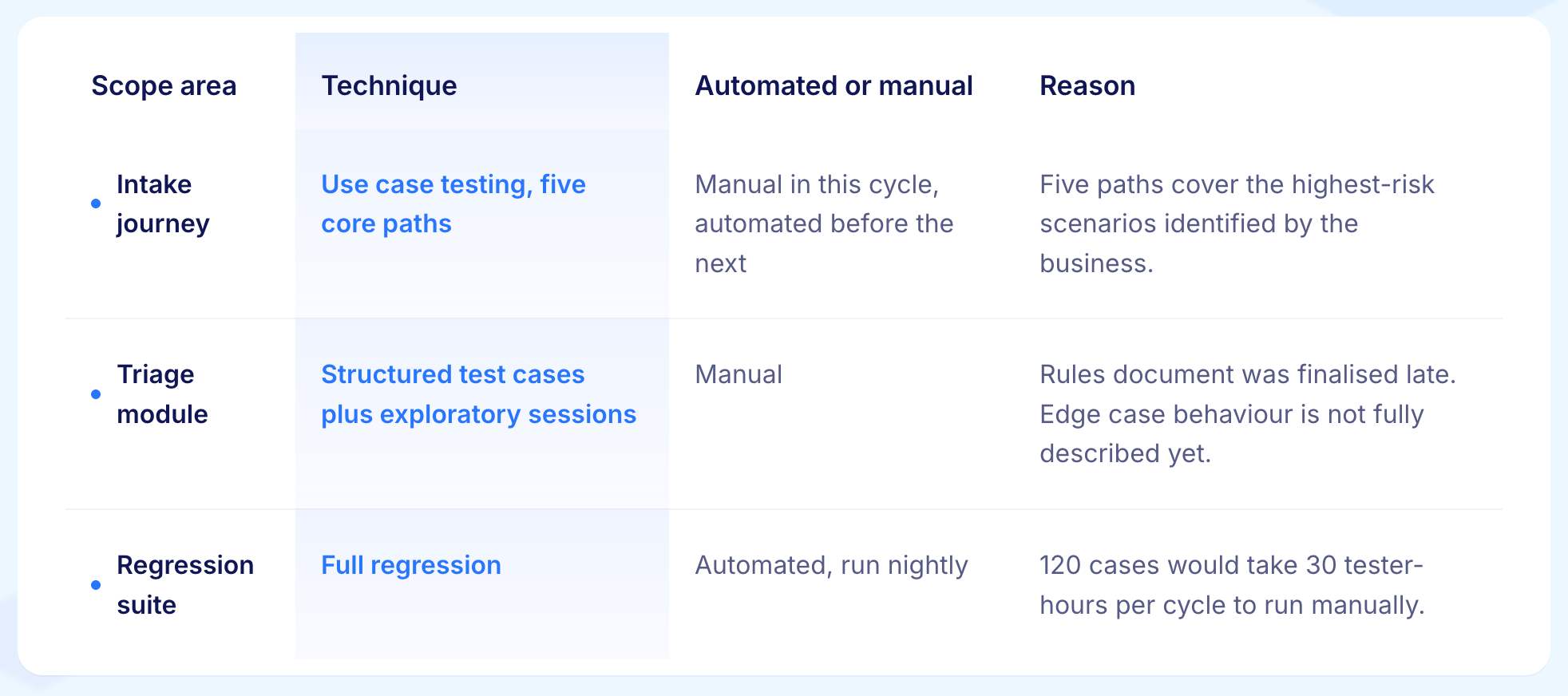
For each scope area, decide which test techniques will be used and how much will be automated versus manual. Write the reasoning behind each decision.
What to Do
Name the test types for each scope area (functional, exploratory, regression, and so on)
Name the test design techniques being applied (use case testing, boundary value analysis, and so on)
State which areas will be automated and which will be manual, and why
Why it Matters
Decisions made without recorded reasoning are impossible to revisit when the work runs into trouble. Writing the reasoning takes two minutes and saves hours of debate later.
Example
Step 6: Define Pass and Fail Criteria
Write down exactly what must be true for the release to go ahead and what would cause it to be held. Get sign-off on these before system testing begins.
What to Do
Write pass criteria as measurable conditions, not general statements
Write fail criteria as the specific things that would trigger a hold
Get written agreement from the product manager, engineering manager, and relevant stakeholders before testing starts
Why it Matters
Criteria agreed before testing produces a clear release decision. Criteria agreed at the release decision meeting produces a debate.
Example
Release proceeds if all of the following are true on 30 June:
No critical or high defects are open
All 212 test scenarios have passed on Chrome, Firefox, Safari, and Edge
Regression suite has been fully green for three consecutive nights
At least two of three market business leads have provided UAT sign-off
Release is held if any of the following are true:
Any critical defect is open and unresolved
The regression suite had any failure in the 48 hours before the decision
Fewer than two market business leads have provided sign-off
At the kickoff meeting, the product manager asked whether a medium defect in the regulatory reporting would hold the release. The QA lead confirmed it would not under these criteria. The product manager agreed and this was recorded in the plan.
Step 7: Set the Schedule
Name the three dates that matter most and the dependencies between them. Add contingency at the most uncertain points.
What to Do
Name the start of system testing, the start of UAT, and the release decision date
Write the dependencies between each milestone explicitly
Add contingency days at the points most likely to slip, not spread evenly across all dates
Why it Matters
A schedule with too many dates is a schedule nobody tracks. Three load-bearing dates with clear dependencies is a schedule people can manage.
Example

The two buffer days before UAT were added because the staging environment was unreliable in the previous release. If the environment is ready early, those days go to additional regression coverage.
Step 8: Allocate Ownership
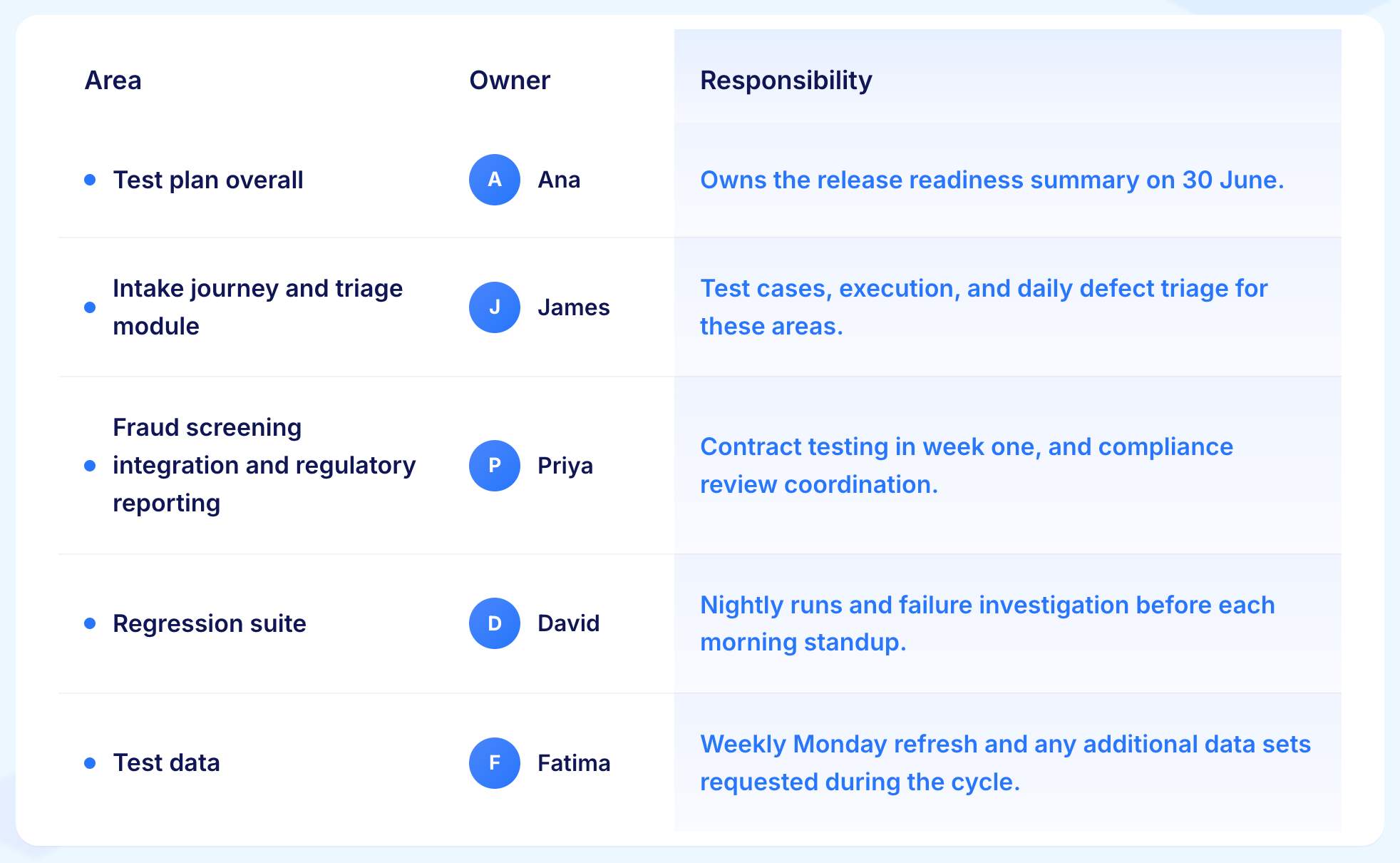
Assign one named person to every area of the plan. No area should have more than one owner or no owner at all.
What to Do
Go through the plan section by section
Assign one person to each area with a clear description of what they own
If any area has no clear owner, resolve it before testing starts
Why it Matters
An area with no owner will not receive attention until something goes wrong in it.
Step 9: Share It and Get Input
Send the plan to the full delivery team before work begins and hold a short meeting to walk through it.
What to Do
Send the plan to developers, product managers, and any relevant stakeholders
Book a short meeting (15 to 20 minutes) to walk through scope, risks, and done criteria
Capture any concerns raised and update the plan before testing starts
Why it Matters
A plan that has been read and discussed by the people doing the work is a plan that does its job. A plan that gets filed without discussion does nothing.
Example
The QA lead sends the plan on day one and books a 20-minute kickoff for the next morning. The agenda:
What is in scope and what is not (five minutes)
The three risks and mitigations (five minutes)
Entry criteria and who confirms each item (five minutes)
Pass and fail criteria for 30 June (five minutes)
At the meeting, the development lead raises a concern that the fraud screening integration may not be stable enough to meet the entry criteria date. The QA lead adds a contingency to the plan: if the integration is not ready by 6 June, that area moves to week two and triage testing fills week one instead. The updated plan goes to the full team by end of day.
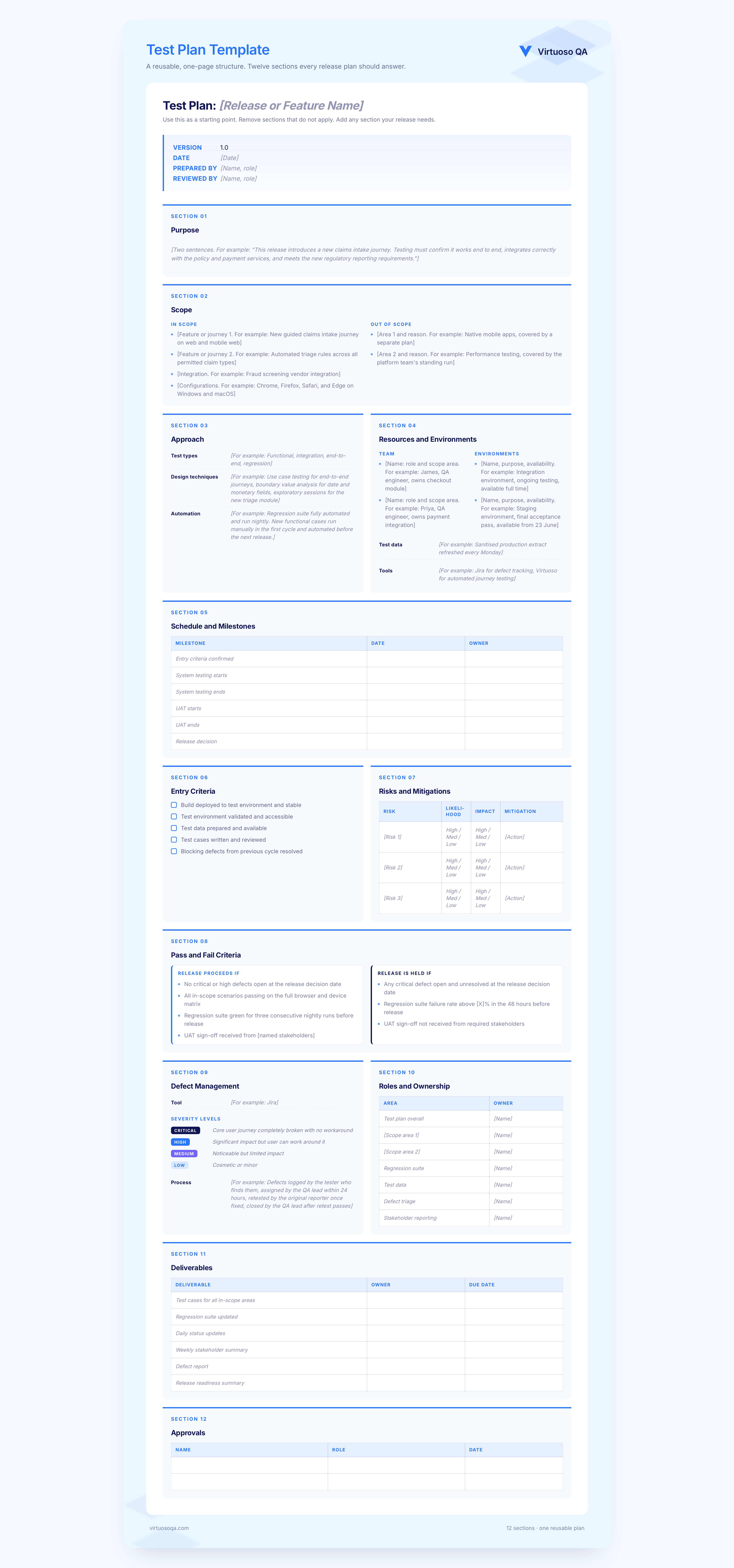
Test Plan Template
Use this as a starting point. Remove sections that do not apply. Add any section your release needs.
A Worked Example: Test Plan for an Enterprise Claims Module Release
Consider a European property and casualty insurer is releasing a new claims-handling module. The module replaces a legacy intake form with a guided journey, adds automated triage, and connects to a new fraud screening service. It is the largest release of the year.
Purpose: Verify the new claims module works end to end, integrates correctly with the policy and payment services, meets the new regulatory reporting requirements, and is ready for rollout across twelve markets.
Scope (in): New intake journey on web and mobile web. Automated triage rules across all permitted claim types. Fraud screening vendor integration. Regulatory reporting outputs. Functional, integration, and end-to-end testing. Regression of the legacy intake until cutover.
Scope (out): Native mobile apps (separate plan). Performance testing (platform engineering team). Security penetration testing (annual programme). User research on the new journey (product team).
Approach: Use case testing for five core journeys. Boundary value analysis for monetary and date inputs. Exploratory sessions in week three for the triage module. End-to-end automation for regression, run nightly on the supported browser matrix.
Resources: Three QA engineers full time. One QA lead at 50%. Two automation engineers for the regression suite. Integration environment for ongoing testing. Staging environment for the final acceptance pass. Test data from a sanitised production extract refreshed every Monday.
Schedule: Entry criteria confirmed by 4 June. System testing starts 5 June. UAT starts 19 June. Release decision 30 June. Two contingency days built in around the staging environment milestone.
Risks: Fraud screening vendor not tested at planned volume. Mitigation: contract testing in week one, staged rollout to one market first. Staging environment was unstable in the two previous releases. Mitigation: disaster recovery environment reserved as fallback. Regulatory reporting requirements are new. Mitigation: early review with the compliance function in week one.
Pass criteria: No critical or high defects open at the release decision. All use case scenarios passing on the full browser matrix. Regression suite green for three consecutive nightly runs before release. UAT sign-off from at least two of three market business leads.
Ownership: Ana owns the test plan overall. James owns the intake journey. Priya owns the triage and vendor integration. David owns the regression suite. Fatima owns test data. The compliance liaison is named for the regulatory thread.
Three pages. Read at a team meeting in the first week. Referenced twice when scope questions came up during the cycle. Updated once when the staging environment issue materialised.
How to Handle Changes to the Test Plan
Test plans change. Requirements shift. A vendor misses a delivery date. A new regulatory requirement arrives mid-cycle. Five practices keep changes from breaking the plan.
Treat the Plan as a Living Document From Day One
For example: "The QA lead updates the plan at the end of each week to reflect any scope or schedule changes from that week." Daily edits during an active cycle are normal.
Assess the Impact Before Agreeing to Any Change
For example: "Adding the accessibility audit to scope adds three days to the schedule and requires one additional tester. The release decision date needs to move from 30 June to 3 July."
Tell Everyone at the Same Time
For example: "Send a single update to the full delivery team within 24 hours of any scope change, naming what changed, why, and what the impact is."
Update the Connection Between Requirements and Test Cases
For example: "If the triage rules change in sprint three, James updates the affected test cases within two days and flags the change in the daily status update."
Reprioritise by Risk When Time is Tight
For example: "If the schedule shrinks by three days, the exploratory sessions on the legacy intake are reduced first. The fraud screening integration and the regulatory reporting get full coverage regardless."

Common Mistakes in Test Planning
1. Writing the Plan to Satisfy a Process Rather Than to Guide Work
A plan written because the project management office requires one, with no expectation that anyone will read it. The moment the plan becomes a filing exercise, it stops being useful.
2. Too Much Detail That Nobody Reads
A plan with fifty numbered subsections covering every possible edge case. A plan that long gets skimmed on day one and ignored for the rest of the cycle. Keep it as short as it can be while still covering what matters.
3. Too Little Detail That Fails to Align Anyone
A plan with three sentences that leaves the scope, approach, and done criteria open to interpretation. Everyone reads it differently and the gaps surface at the worst possible time.
4. No Risks Section
A plan that lists scope and schedule with no mention of what could prevent the testing from succeeding. The risks section is what separates a plan from a list of intentions.
5. No Clear Done Criteria
A plan that says "testing will be thorough and complete" without defining what thorough and complete actually means. When the release decision meeting arrives, stakeholders argue about whether testing is done rather than checking whether measurable criteria have been met.
6. Filing the Plan Instead of Using it
A plan approved by the project manager on day one and never opened again. A plan that gets read, referenced, and updated through the cycle is a plan that does its job. A plan that gets filed does nothing.
How Virtuoso QA Bridges the Gap Between Test Planning and Test Execution
Writing a good test plan is one challenge. Keeping the testing it describes running continuously as the code changes is another.
GENerator reads requirements, user stories, Jira tickets, and BDD scenarios and produces ready-to-run tests from them.
For example: "The QA lead uploads the claims intake requirements on day one of the cycle. GENerator produces the first draft of the journey test suite by end of day. The team reviews and adds edge cases before system testing starts."
Self-healing AI at approximately 95% accuracy keeps tests current when the interface changes.
For example: "The intake form is redesigned in sprint two. Field labels change and the submit button moves. Virtuoso QA detects the changes and updates the affected test steps automatically. The QA lead reviews the changes the next morning rather than spending two days manually fixing broken tests."
AI Root Cause Analysis explains failures in plain language connected to the user journey.
For example: "A test fails on the fraud screening integration. AI Root Cause Analysis surfaces that the vendor API is returning a different response code than expected and links the failure to the relevant test case and the risk that was logged in the plan."
Composable testing libraries let each sprint add coverage rather than replace it.
For example: "The checkout journey is built as a composable module in sprint one. Every subsequent sprint that touches the checkout area runs that module as part of its testing without rebuilding it from scratch."
The plan defines what must work. Virtuoso QA makes sure it does, continuously, as the code changes around it.
Related Reads
Frequently Asked Questions
What is the difference between a test plan and a test strategy?
How long should a test plan be?
Who writes the test plan?
When should a test plan be created?
How does a test plan fit into agile development?
What is risk-based test planning?




