

Blog
User Acceptance Testing (UAT) - Process, Best Practices and Automation

Published on
March 23, 2026


Learn how to plan, execute, and automate UAT effectively. Covers entry and exit criteria, best practices, and AI-native automation for enterprise teams.
User acceptance testing is the final validation gate before software reaches production. It answers the most important question in the entire development lifecycle: does this application actually work for the people who will use it every day? Despite its critical role, UAT remains one of the most manually intensive and time constrained phases of any release cycle. This guide explains what UAT is, how to execute it effectively, and how AI native automation transforms UAT from a bottleneck into a competitive advantage.
User acceptance testing, commonly referred to as UAT, is the final phase of the software testing process where actual end users or business stakeholders validate that the application meets their requirements and is ready for production deployment. Unlike system testing or integration testing, which verify technical correctness, UAT verifies business fitness.
The distinction matters. An application can pass every technical test and still fail UAT because it does not match how real users actually work. A payment processing workflow might function correctly from a technical standpoint but require 12 clicks when the business process demands three. An insurance claims interface might handle calculations accurately but present information in a way that confuses adjusters rather than helping them.
UAT sits at the intersection of technology and business. It is the point where QA teams hand responsibility to business users and ask: does this software solve your problem?
In traditional waterfall development, UAT occurs late in the cycle, often weeks or months after development completes. By this point, correcting significant issues means costly rework and delayed releases. In Agile environments, UAT ideally happens within every sprint, validating that the increment delivered matches the acceptance criteria defined in user stories.
Regardless of methodology, UAT typically follows system testing and integration testing. The application has already been verified to work correctly in technical terms. UAT adds the business validation layer, confirming that the software serves its intended purpose from the user's perspective.
User acceptance testing is often confused with other testing phases. The distinction is not semantic. Each phase answers a different question, and collapsing them creates gaps that reach production.
System testing verifies that the application works correctly as a technical system. It checks functionality, performance, and integration from the engineering perspective. UAT verifies that the application works correctly for the people who will actually use it. A system test can pass on every metric while a business process remains broken. UAT is the business validation layer that system testing cannot replace.
Integration testing confirms that individual components communicate correctly with each other. APIs connect, data flows, and services respond as expected. UAT goes further by asking whether those connected systems produce outcomes that match real business requirements. Integration testing tells you the pipes work. UAT tells you the water tastes right.
QA testing is a continuous discipline spanning the entire development lifecycle, covering unit tests, functional tests, regression tests, and more. UAT is a single phase within that lifecycle, specifically the final business validation before go-live. QA is owned by technical teams. UAT is owned by the business. Both are non-negotiable.
Alpha testing is conducted internally, typically by QA teams or internal employees who simulate end user behaviour within the development environment. This catches major usability issues before external users encounter them.
Beta testing extends validation to a limited group of actual external users in a production like environment. Feedback from beta testers reveals real world usability issues, edge cases, and workflow problems that internal testing may miss.
Refer our blog on Alpha vs Beta Testing to know the key differences between both and when to use each
Contract acceptance testing verifies that the delivered software meets the specific requirements defined in the project contract or statement of work. This is common in outsourced development and system integrator engagements, where acceptance criteria are contractually binding.
In regulated industries such as financial services, healthcare, and insurance, regulation acceptance testing verifies that the software complies with applicable regulatory requirements. This includes SOX audit trail requirements, HIPAA data handling rules, PCI DSS payment security standards, and industry specific mandates.
Operational acceptance testing validates that the application meets operational requirements including backup and recovery procedures, disaster recovery scenarios, monitoring and alerting configurations, and administrative workflows. This ensures the application can be supported effectively once it is in production.

Ambiguous start and end conditions are among the most common causes of failed UAT cycles. Without defined gates, testing either begins too early on an unstable build or drags on indefinitely without a formal close. Entry and exit criteria eliminate that ambiguity.
UAT should not begin until the following conditions are confirmed:
UAT sign-off should only be granted when:
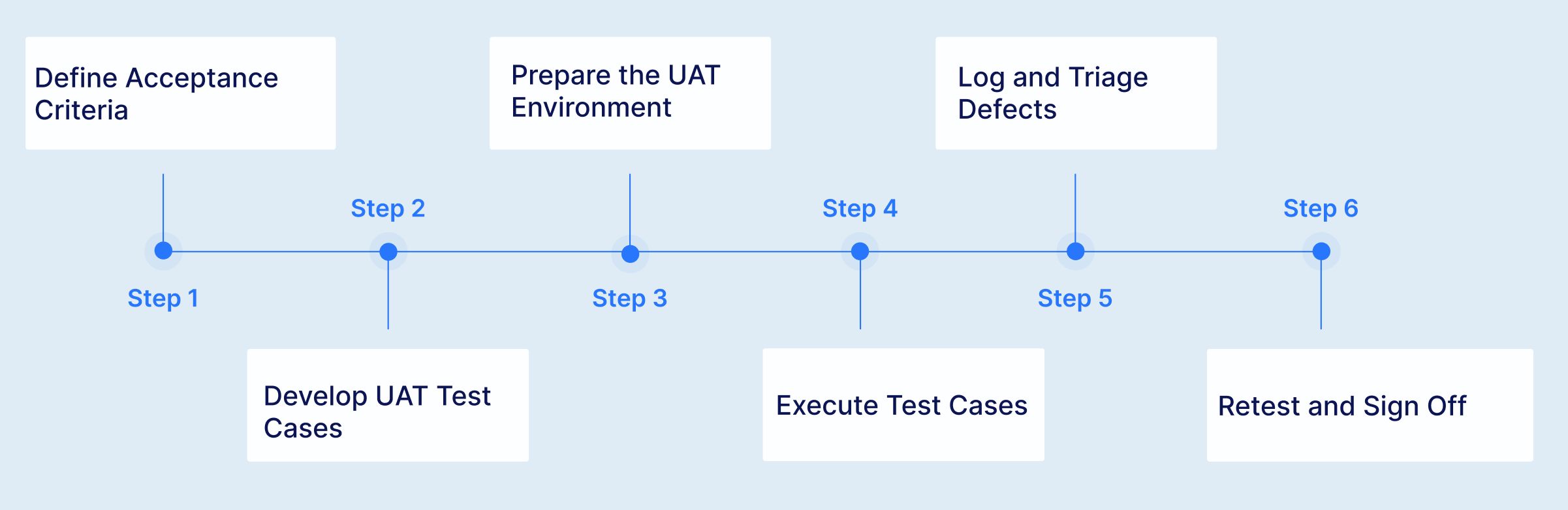
UAT begins long before testing starts. During requirements gathering and sprint planning, define clear, measurable acceptance criteria for every feature. Acceptance criteria should describe the specific behaviour the system must exhibit from the user's perspective, not technical implementation details. Use the format "Given [context], When [action], Then [expected outcome]" to make criteria unambiguous.
Translate acceptance criteria into specific test cases. Each test case should describe a real world user scenario, including the starting condition, the steps the user takes, and the expected business outcome. UAT test cases are written in business language, not technical language, because they will be executed by business users.
UAT must run in an environment that mirrors production as closely as possible. This includes production equivalent data (anonymised or synthetic), realistic system integrations, correct user roles and permissions, and representative transaction volumes. Testing in an environment that differs significantly from production undermines the validity of UAT results.
Business users or designated UAT testers execute the test cases, recording results for each scenario. They compare actual application behaviour against the acceptance criteria and flag any deviations. During execution, users also evaluate usability, workflow efficiency, and overall fitness for purpose, aspects that scripted test cases may not fully capture.
When UAT reveals defects, log them with clear descriptions, evidence (screenshots, steps to reproduce), and business impact assessments. Triage defects collaboratively between business and technical teams to determine which must be fixed before go live, which can be deferred, and which represent misunderstandings rather than actual defects.
After defect fixes deploy, retest the affected scenarios to verify resolution. Once all critical defects are resolved and the business is satisfied that acceptance criteria are met, the designated business authority provides formal sign off authorising production deployment.
UAT succeeds or fails based on who is involved and how clearly responsibilities are defined. The most common reason UAT delivers incomplete coverage is that roles are assumed rather than assigned.
Business users are the primary owners of UAT. They bring domain expertise that no QA team can fully replicate. Their role is to execute test cases from a real-world workflow perspective, identify gaps between the delivered application and actual business needs, and provide the formal sign-off that authorises production deployment. Quality of UAT is directly proportional to the involvement of experienced business users.
QA teams own the infrastructure of UAT: test case design, environment preparation, defect logging, and execution tracking. They translate acceptance criteria into executable test scenarios and ensure coverage is complete. In organisations adopting AI-native automation, QA teams also own the automated UAT suite, freeing business users from repetitive regression execution.
Project managers coordinate scheduling, resource availability, and defect triage prioritisation. Product owners ensure that acceptance criteria accurately reflect business intent before UAT begins. They mediate between business stakeholders and development teams when defect severity is disputed and own the decision on deferred issues.
Developers are responsible for resolving defects surfaced during UAT and deploying fixes to the UAT environment without destabilising previously validated scenarios. DevOps teams maintain environment integrity, manage build deployments, and ensure CI/CD pipelines correctly route UAT builds to the designated environment.
UAT is almost always squeezed. Development delays consume time that was allocated for acceptance testing. The go live date rarely moves. The result is rushed UAT with incomplete coverage, undiscovered defects, and reluctant sign offs. In enterprise implementations, UAT windows that should span weeks get compressed to days.
The people best qualified to perform UAT, experienced business users, are also the people with the least available time. They have their regular jobs to do. Asking a senior claims processor to spend two weeks testing instead of processing claims creates real business impact. The result is often undertrained substitute testers who lack the domain knowledge to identify subtle but critical issues.
UAT requires realistic data that mirrors production scenarios. Creating and maintaining this data manually is time intensive, and using production data raises privacy and compliance concerns. Many organisations struggle to provide UAT environments with data realistic enough to validate complex business workflows.
Every time a defect fix deploys, previously passed scenarios must be retested to ensure the fix did not break something else. This regression testing burden grows with every iteration, consuming the limited UAT window and reducing the time available for new scenario validation.
Regulated industries require comprehensive evidence of UAT execution, including what was tested, the data used, results observed, and who approved the outcomes. Manual UAT generates inconsistent documentation that may not withstand regulatory scrutiny.
The difference between UAT that builds confidence and UAT that manufactures false assurance comes down to how it is executed. These practices separate teams that ship with certainty from teams that sign off and hope.

UAT automation has historically been considered impractical because UAT is supposed to involve real users making subjective judgements. This view is partially correct but mostly outdated. While exploratory evaluation by business users remains valuable, the vast majority of UAT effort involves executing predefined acceptance scenarios against known criteria. This repetitive execution is precisely what automation excels at.
Most automation frameworks fail at UAT because they require technical skills that business users do not have. Selenium, Cypress, and Playwright all require programming proficiency. Even "low code" tools typically demand enough technical knowledge to create a barrier for business stakeholders. The people who understand the business processes best cannot contribute to automation, and the people who can automate do not fully understand the business processes. This gap undermines UAT's fundamental purpose.
AI native test platforms resolve this conflict by enabling test creation in natural language. Business users describe acceptance scenarios in plain English, and those descriptions become executable automated tests. There is no coding barrier between the person who defines what should be tested and the automation that validates it.
Enterprise system implementations present the most compelling case for UAT automation because the scale of acceptance testing is enormous.
Begin by automating the UAT scenarios that must be rerun after every defect fix or release. These repetitive regression scenarios consume the most business user time and benefit most immediately from automation. Freeing users from repetitive regression gives them more time for exploratory evaluation where their domain expertise adds unique value.
Automation handles the execution of predefined acceptance scenarios. Human users focus on exploratory evaluation, usability assessment, and identifying issues that scripted scenarios cannot anticipate. The combination is more effective than either approach alone.
Automated UAT scenarios should run as part of your continuous integration pipeline, catching regression issues before they reach the formal UAT phase. Integration with Jenkins, Azure DevOps, GitHub Actions, GitLab, CircleCI, and Bamboo enables this continuous acceptance validation. When automated UAT runs on every build, the formal UAT phase focuses on final business validation rather than discovering functional defects.
Automated UAT should produce comprehensive documentation automatically. AI native platforms generate execution reports with step by step evidence including screenshots, network logs, and DOM snapshots in PDF and Excel/CSV formats. This documentation satisfies regulatory requirements without manual effort.
Link every automated UAT scenario to its corresponding business requirement or user story. Integration with Jira, Xray, TestRail, and Azure Test Plans maintains bidirectional traceability throughout the acceptance process. This ensures complete coverage of acceptance criteria and provides clear evidence of validation for project sign off.
Related Read: Requirements Traceability Matrix (RTM) Explained
A UAT test plan is not a formality. It is the single document that aligns business, QA, and technical stakeholders on scope, ownership, schedule, and success criteria before a single test is executed.
A complete UAT test plan covers the following:
Use this checklist as the final gate before production deployment:
The percentage of UAT scenarios that pass on first execution. Low first time pass rates indicate that earlier testing phases are not catching defects that should be resolved before UAT.
The elapsed time from UAT start to business sign off. Shorter cycles indicate efficient processes and fewer critical defect iterations. Track this across releases to identify trends.
The number of production defects that should have been caught during UAT. A declining defect escape rate validates that your UAT coverage is improving.
The total person hours of business user time consumed by UAT. Automation should progressively reduce this metric, freeing business users for strategic evaluation rather than repetitive execution.
Virtuoso QA is an AI-native test automation platform that lets business users author UAT scenarios in plain English, with no scripting required. StepIQ generates test steps autonomously, self-healing keeps tests valid through every build cycle, and composable test libraries cut enterprise UAT preparation from months to days. Audit-ready execution reports are generated automatically, satisfying compliance requirements without manual effort. Customers consistently report 80% less maintenance effort and go-live cycles that compress from weeks to days.


Try Virtuoso QA in Action
See how Virtuoso QA transforms plain English into fully executable tests within seconds.
