Blog
Custom SaaS Application Testing: A Practical Guide

Rishabh Kumar
Published on

Table of contents
Lorem ipsum
Lorem ipsum
Lorem ipsum
Lorem ipsum
Lorem ipsum
Building your own SaaS platform gives you an edge that off-the-shelf software can't. It also gives you a testing problem off-the-shelf software never had.
Your platform serves many customers at once, each with their own plan, settings and data. You deploy several times a week, sometimes several times a day. Your APIs are part of the product, and enterprise customers expect them never to break. And when something goes wrong, it doesn't go wrong for one customer. It can go wrong for all of them at once.
This guide covers what custom SaaS testing involves, where it gets hard, and how to build a testing approach that keeps up with continuous delivery and lets you prove to customers that every release was tested.
What is Custom SaaS Application Testing?
Custom SaaS application testing checks that a cloud application you've built yourself works correctly, securely and reliably for every customer, on every release. These platforms are usually built from microservices, APIs, containers and serverless functions, and they're delivered through continuous deployment.
It covers more than whether features work. It also has to confirm that:
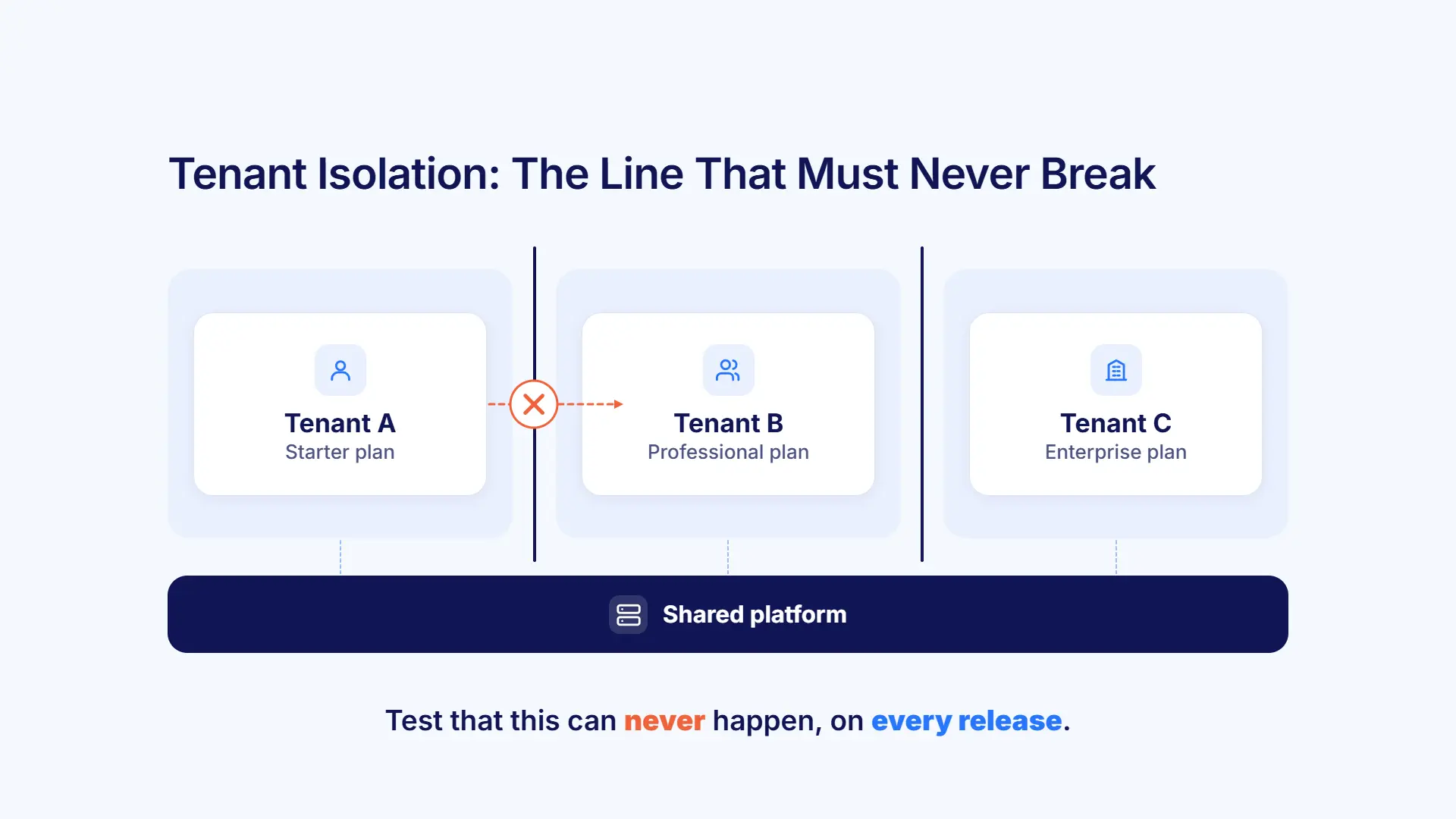
Each customer's data stays private: one tenant can never see another's data.
Plans and limits behave correctly: features, usage limits and billing match each subscription tier.
APIs stay stable: new versions don't break existing customer integrations.
The platform holds up: it scales with demand and stays available.
Why Custom SaaS Applications Need Dedicated Testing
Multi-Tenancy Multiplies the Risk
One platform might serve hundreds of customers, from small start-ups to large enterprises. Each one can have a different plan, different feature access, different API limits, custom settings and very different data volumes.
That creates risks most applications never face:
One tenant's heavy usage slowing everyone else down
One tenant seeing another tenant's data, which breaks trust and regulations
Configuration errors that only appear for one particular combination of plan and settings
Testing every combination by hand isn't realistic. Automation is the only way to cover it.
Continuous Deployment Leaves No Room for Slow Testing
SaaS platforms don't have maintenance windows. They ship new features, fix bugs and scale infrastructure while customers are using them.
Modern release techniques add their own testing needs:
Feature flags that switch features on for specific customers or groups
A/B tests that show different users different versions
Canary releases that roll out to a small group first, to catch problems early
Blue-green deployments that switch traffic between environments without downtime
Each of these changes what a given user sees, and each needs testing.
APIs Are Part of the Product
For many enterprise customers, the API is the main way they use your platform.
Testing has to cover:
Usage patterns from single requests to bulk data operations
Rate limiting and clear error handling
Reliable webhook and event delivery
Your platform also depends on other services, such as identity providers for single sign-on, payment gateways, analytics tools and partner APIs, and every one of those connections needs testing too.
Key Components of Custom SaaS Testing
Component | What to test | What goes wrong without it |
|---|---|---|
Application and user experience | Business logic by role and tenant, UI across browsers and devices, multi-user collaboration | Workflows break for certain roles, plans or configurations |
Platform and infrastructure | Auto-scaling, failover, circuit breakers, disaster recovery, access control | Outages, cascading failures, unauthorised access |
Data and analytics | Transaction integrity, reporting accuracy, dashboards, data retention | Wrong numbers in customer reports, lost or corrupted data |
Billing and subscriptions | Metering, tiered pricing, overages, trials, plan changes, cancellations | Over- or under-charging, features unlocked on the wrong plan |
Application and user experience
Test business logic across every user role and tenant configuration, check the UI renders correctly across browsers and devices, and confirm that real-time collaboration stays consistent when several users work at once.
Platform and infrastructure
Confirm auto-scaling responds to load, circuit breakers stop failures spreading, disaster recovery keeps data intact, and role-based and tenant-based access rules are always enforced.
Data and analytics
Check transactions complete correctly, analytics and metrics are accurate, dashboards refresh as expected, and reports generate within acceptable times.
Billing and subscriptions
Billing errors cost money and customer trust. Check every billable event is captured, pricing and overages are calculated correctly, trials end on time, plan changes take effect at the right moment, and cancellations handle data retention properly.
Testing Challenges in Custom SaaS Applications
Challenge | Why it's hard | What helps |
|---|---|---|
Environment drift | Dev, test, staging and production slowly drift apart | Environment-specific configuration kept separate from test logic |
Configuration variability | Feature flags and tenant settings create countless combinations | Data-driven tests across representative tenant setups |
Performance at scale | Load is unpredictable, and tenants affect each other | Dedicated load testing modelled on real usage |
Security and compliance | One vulnerability affects every tenant at once | Continuous security scanning plus functional access checks |
API versioning | APIs change constantly, but integrations must keep working | Contract and backward-compatibility tests on every release |
Environment drift
SaaS applications run across several environments, and their configurations tend to drift apart over time. Third-party services available in production may not exist in lower environments, so tests can pass in staging and fail in production.
Configuration variability
Feature flags, tenant settings and runtime parameters create a huge number of possible combinations, and bugs often hide in just one of them.
Performance at scale
Load is hard to predict, and in a multi-tenant system one customer's spike can affect everyone. Testing needs to confirm response times hold as data grows, scaling works under pressure, resources are shared fairly between tenants, and SLAs are met.
Security and compliance
A vulnerability in a SaaS platform affects every tenant at once. Testing must cover authentication, encryption in transit and at rest, audit logs and privacy controls, along with whichever standards apply to you, such as GDPR, HIPAA, SOC 2, PCI DSS or data residency rules.
How to Test Custom SaaS Applications
Plan Around Customer Impact
Prioritise by customer impact and business risk. Plan for short feedback windows, and make sure coverage includes:
The main tenant and plan combinations
Every API consumer type, from single users to bulk integrations
The journeys that drive revenue and retention
Build Realistic Multi-Tenant Test Data
Good SaaS test data includes:
Several tenants with different configurations and usage patterns
Users with different roles and permissions
Subscription tiers with the correct feature gates and limits
Realistic API usage volumes for each tenant
AI test data generation lets you describe what you need in plain English, such as "an enterprise tenant with SSO, custom fields and a high API usage limit", and get realistic, separated data sets for each tenant, without copying real customer data into test environments.
Write Tests Everyone Can Read
Plain English tests let product managers, customer success teams and domain experts contribute, not just automation engineers.
For example:
Turn common SaaS operations into reusable components, such as "Create tenant", "Configure subscription" and "Generate usage report", and combine them into larger end-to-end scenarios.
Build Testing into Your CI/CD Pipeline
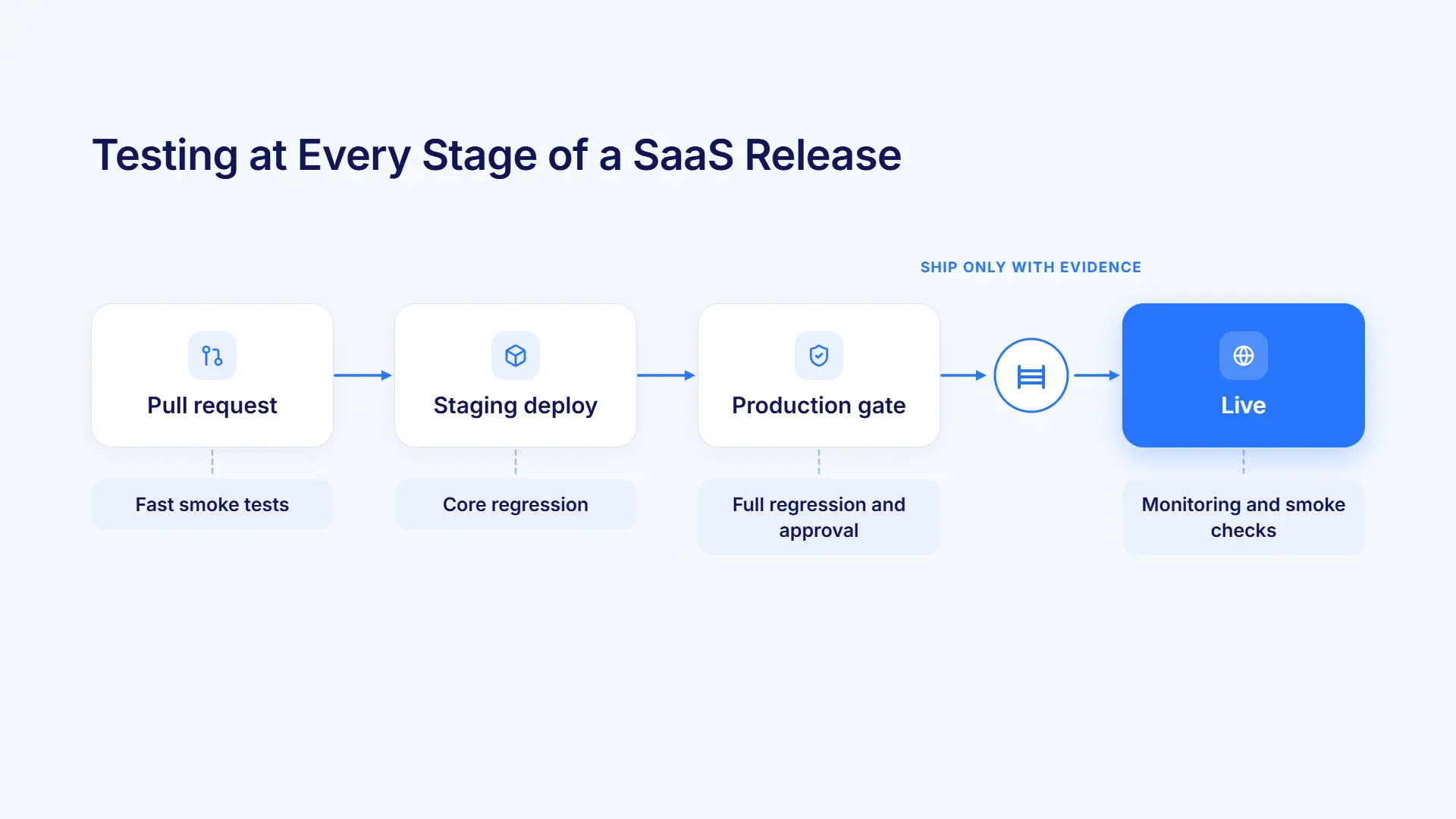
A typical setup looks like this:
On every pull request: fast smoke tests on critical journeys
On staging deploys: core regression across key tenant setups
Before production: full regression as a release gate
Throughout: parallel execution, so even large suites fit within the deployment window
Check UI behaviour, API responses and webhook delivery together, so problems between layers don't slip through.
Want to see this in practice? Watch our video on in-sprint test automation for SaaS applications.
Best Practices for Custom SaaS Testing
Test Complete Customer Journeys
Cover these end to end:
Sign-up and onboarding, through to first value
The daily workflows that keep customers engaged
Upgrade and downgrade paths
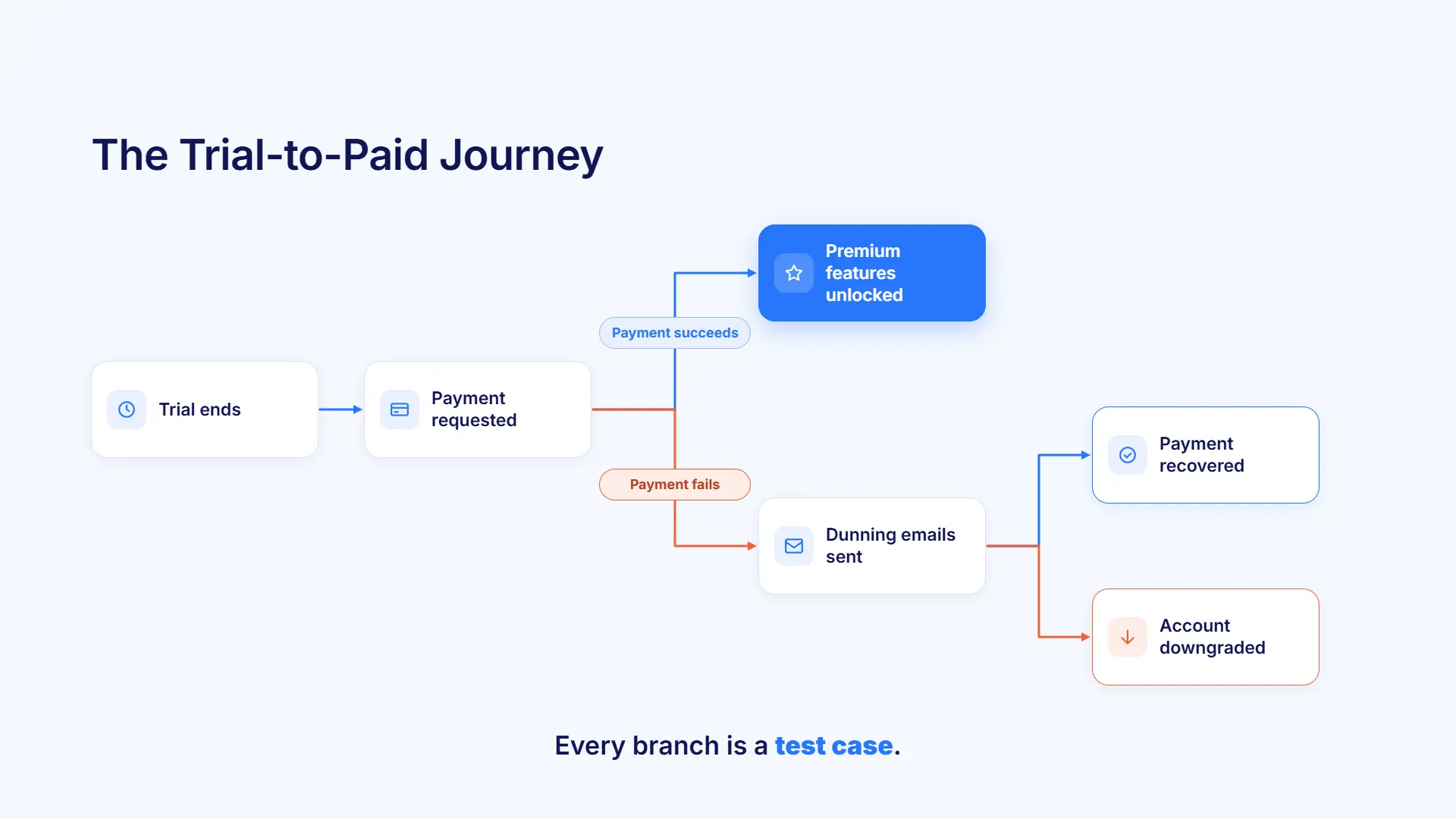
Trial-to-paid conversion, including payment and feature activation
Admin tasks like user management and billing
Test the processes that connect them too. When a trial ends, a payment request should go out. A successful payment should unlock premium features. A failed payment should start dunning. A cancellation should trigger the right data retention and offboarding steps.
Keep Maintenance Under Control
SaaS interfaces change constantly through new features, feature flags, A/B tests and front-end rewrites. Self-healing keeps tests running by finding elements through several signals rather than one locator. Make sure every repair is logged and reviewed, so your suite keeps up without changing silently.
Use Specialist Tools for Performance and Security
Functional automation covers what your platform does. Performance and security need dedicated tools alongside it:
Load testing tools: for onboarding surges, API spikes, peak reporting periods and auto-scaling behaviour.
Security scanners: for injection attacks, cross-site scripting, authentication bypass and dependency vulnerabilities.
Keep a functional check of tenant isolation in your regression suite as well, confirming that users in one tenant can never reach another tenant's data through the UI or API.
Build Compliance Evidence into Every Release
Enterprise customers increasingly ask SaaS vendors for proof, not promises. Treat compliance checks, such as access controls, audit logs and data handling, as part of every regression run, and keep a record of what was tested on each release. That turns security questionnaires and SOC 2 audits from a scramble into a lookup.
Example Scenarios by Industry
These illustrative scenarios show how testing priorities change by industry, while the core themes stay the same.
SaaS type | What to test | The highest-risk area |
|---|---|---|
Healthcare platform | Patient records by role, audit logs, role-based access, HIPAA controls | One provider seeing another's patient data |
Fintech platform | Multi-currency transactions, billing accuracy, API rate limits, PCI DSS controls | One merchant accessing another's transactions |
B2B workflow platform | Tenant-specific workflows, approval chains, API version compatibility, SSO | A breaking API change disrupting customer integrations |
Healthcare SaaS
Run regression before every release, with compliance checks producing evidence for release sign-off. Tenant isolation tests confirm one organisation can never see another's patient data.
Fintech SaaS
Test transactions across currencies and payment methods, billing including tiered pricing and overages, and rate limiting under burst traffic.
Pair functional tests with load testing for month-end billing runs and promotional spikes.
B2B workflow SaaS
Test each tenant's workflow configuration, approval chains by role, SSO across several identity providers, and backward compatibility across every supported API version. Run the full suite nightly, so results are ready before the working day starts.
SaaS Testing Metrics and KPIs
Metric | What it tells you | Goal |
|---|---|---|
Deployment confidence rate | The share of releases that ship without needing a rollback | As close to 100% as possible |
Cross-tenant defect escapes | Tenant isolation defects reaching production | Zero |
Regression cycle time | Time from commit to regression results | Short enough to fit your deployment window |
API contract violations | Changes that break existing integrations | Falling over time |
Test maintenance effort | QA time spent fixing tests rather than adding coverage | As low as possible, and falling |
Compliance coverage | The share of regulatory requirements with automated checks | Full coverage of applicable requirements |
Deployment confidence rate
A falling rate means coverage gaps, or an application growing faster than its test suite.
Cross-tenant defect escapes
This should always be zero. Any escape here is a critical failure, with regulatory and customer trust implications.
Regression cycle time
For teams deploying several times a day, core regression taking much more than half an hour quickly becomes a bottleneck.
Test maintenance effort
On traditional frameworks, fixing broken tests can take up more QA time than writing new ones. Track it, and aim to push it down release by release.
How Virtuoso QA Supports Custom SaaS Testing
Virtuoso QA tests browser-based SaaS applications and the APIs behind them, and every run produces release evidence: which requirement each test covers, what happened at every step, and who approved the test.
When an enterprise customer or auditor asks how a release was tested, you can show them.
Tests from your requirements: Touchstone agents draft requirements and tests from your specs and user stories, citing the source for each one, and a named person approves every requirement before it's built.
Plain English authoring: Product managers, customer success teams and QA can all write tests in Natural Language Programming, with StepIQ suggesting the next step.
AI test data generation: Describe the tenants, users and plans you need, and get realistic test data without copying customer data.
UI and API in one test: A single test can work through the application, call your APIs and confirm the result, so issues between layers are caught.
Composable components: Reusable steps like "Create tenant" or "Configure subscription" are built once and shared across tests.
Business Process Orchestration: Multi-step processes like trial-to-paid run as one workflow, with data passed between stages.
Reviewable self-healing: When fast-moving UIs change, tests keep running, and every repair is logged for your team to accept or reject.
AI root cause analysis: Failures arrive with screenshots, logs, network data and a likely cause, so teams know where to look.
Legacy migration: GENerator converts existing test suites into plain English journeys, so you don't have to start again.
Related Reads
FAQs on Custom SaaS Testing
What is custom SaaS application testing?
How is SaaS testing different from testing traditional software?
How do you test a multi-tenant SaaS application?
How often should SaaS applications be tested?
Can Virtuoso QA create tests from our existing specs and user stories?
How does Virtuoso QA help prove a release was tested?