Blog
60+ Ready-to-Use Test Cases for API Testing

Rishabh Kumar
Published on

Table of contents
Lorem ipsum
Lorem ipsum
Lorem ipsum
Lorem ipsum
Lorem ipsum
APIs carry the load of modern enterprise software. Every customer journey moves through them, every integration depends on them, and every release puts new ones into production. Designing solid test cases is the difference between catching defects in staging and discovering them through customer support tickets.
Below are 50 categorised test cases covering functional, performance, security, and contract testing, followed by a design guide.
What an API Test Case Actually Looks Like
An API test case is a structured specification of how an endpoint should behave under a defined set of conditions. The shape is consistent regardless of language or platform.
A complete test case includes:
Preconditions: The system state, authentication tokens, seeded data, and environment configuration required before the request fires
The request itself: HTTP method, endpoint, headers, query parameters, path variables, and request body
Expected response: Status code, headers, body schema, specific values, and timing expectations
Postconditions: Any system state changes the call should produce, including database mutations and downstream events
A test case missing any of these elements is incomplete. The most common gap is postcondition validation. A successful HTTP 201 response means the API accepted the call. It does not prove the resource was actually persisted, replicated, or made visible to consumers.
60 Test Cases For API Testing For Each Category
1. Functional Test Cases for API Testing
Functional testing validates that each endpoint does what it claims to do. These cases cover the core operations every API suite must address before moving into edge cases and security scenarios.
✅ Valid GET request returns HTTP 200 with the expected response body
Send a GET request to a valid endpoint with correct authentication. The response should return HTTP 200 with the full resource payload. Assert that all contracted fields are present, no fields are missing, and the values match what is stored in the database.
✅ Valid POST request returns HTTP 201 with the created resource
Send a POST request with a well-formed payload and valid authentication. The response should return HTTP 201 with the newly created resource including its generated ID. Verify the resource now exists in the database with the correct field values and timestamps.
✅ Valid PUT request updates the resource and returns HTTP 200
Send a PUT request with updated field values for an existing resource. The response should return HTTP 200 with the updated resource. Query the database directly to confirm the changes were persisted and that unchanged fields were not overwritten.
✅ Valid DELETE request removes the resource and returns HTTP 204
Send a DELETE request for an existing resource. The response should return HTTP 204 with no response body. Follow up with a GET request using the same ID and confirm the response returns HTTP 404, proving the resource is no longer accessible.
✅ Valid PATCH request partially updates the resource
Send a PATCH request updating only one field of an existing resource while leaving all other fields unchanged. The response should return HTTP 200 with the updated resource. Verify the patched field changed and all other fields remain exactly as they were before the request.
✅ Pagination returns the correct page with accurate metadata
Send a GET request with page and page size parameters. Verify the response contains exactly the expected number of items, the items correspond to the correct page of the dataset, and pagination metadata such as total count, current page, and next page link are accurate.
✅ Sorting parameter returns results in the correct order
Send a GET request with a sort parameter specifying ascending order on a date field. Verify all items in the response are ordered correctly from earliest to latest. Repeat with descending order and verify the reversal. This confirms sort logic is applied correctly rather than returning results in insertion order.
✅ Filtering parameter returns only matching results with no extras
Send a GET request with a filter parameter such as status=active. Verify every item in the response matches the filter condition and no items with a different status appear. Also verify the total count in the metadata reflects the filtered set, not the full dataset.
✅ Response body matches the published OpenAPI schema
Send a valid request and capture the response body. Validate it programmatically against the published JSON Schema or OpenAPI specification. Every required field must be present, every field type must match the contract, and no additional undocumented fields should appear in the response.
✅ Response time is within the documented latency threshold
Send a valid GET request and measure the time between the request being sent and the response being received. Verify this falls within the maximum latency documented in the API specification or SLA. Repeat this ten times and verify none of the responses exceed the threshold, not just the average.
✅ API returns correct results when optional fields are omitted
Send a POST request with only the required fields and no optional fields. The response should return HTTP 201 and the resource should be created successfully. Retrieve the resource and verify optional fields either contain default values as specified or are absent from the response rather than causing errors.
✅ API returns correct results when all optional fields are included
Send a POST request with all required and optional fields populated. The response should return HTTP 201 and all field values should be stored and returned exactly as submitted. This case confirms the API does not silently ignore or strip optional fields.
2. Test Cases for API Authentication Testing
Authentication confirms who the caller is. These cases verify the API correctly identifies callers and rejects requests that cannot be verified.
✅ Valid bearer token is accepted and returns the expected resource
Send a request with a correctly formatted, unexpired bearer token in the Authorization header. The response should return the expected resource with HTTP 200. This is the baseline that confirms the authentication mechanism is working before testing the failure cases.
✅ Expired token returns HTTP 401 with the correct WWW-Authenticate header
Generate or simulate an expired token and send it in the Authorization header. The response should return HTTP 401. Verify the WWW-Authenticate header is present and the error body indicates the token has expired rather than being invalid. This distinction matters for consumers implementing automatic token refresh.
✅ Malformed token returns HTTP 401 without exposing parsing details
Send a request with a deliberately corrupted token such as a truncated JWT or a token with an invalid signature. The response should return HTTP 401. Verify the error body does not expose how the token was parsed, what algorithm is expected, or any internal authentication mechanism details.
✅ Missing Authorization header returns HTTP 401 consistently across all endpoints
Send a request to a protected endpoint with no Authorization header. The response should return HTTP 401. Run this test against every protected endpoint in the API, not just one, to confirm the authentication middleware is applied uniformly rather than selectively.
✅ Refresh token flow produces a new valid access token
Send a request to the token refresh endpoint with a valid refresh token. The response should return a new access token with an updated expiry time. Verify the new access token works correctly by using it to access a protected resource. Also verify the original access token behaviour matches the contract.
✅ API key passed in a query parameter is rejected
Attempt to authenticate by passing an API key as a query parameter such as ?api_key=value rather than in the Authorization header. The response should return HTTP 401, confirming credentials are only accepted through the documented header. Accepting credentials in URLs risks them being logged in server access logs and browser history.

3. Test Cases for API Authorisation Testing
Authorisation confirms what an authenticated caller is permitted to do. These cases verify that access controls are correctly enforced across roles, tenants, and permission scopes.
✅ Role without write permission cannot create or modify resources
Authenticate with a token belonging to a read-only role. Attempt POST, PUT, and DELETE requests. Each should return HTTP 403 with an error message indicating the caller lacks the required permission. Verify no partial writes occurred by checking the database state after each attempt.
✅ Cross-tenant resource access returns HTTP 404 not HTTP 403
Authenticate as a valid user in tenant A and attempt to access a resource belonging to tenant B using its known ID. The response should return HTTP 404 rather than HTTP 403. Returning HTTP 403 would confirm to the caller that the resource exists but is inaccessible. Returning HTTP 404 prevents resource enumeration by unauthorised parties.
✅ OAuth token without the required scope returns HTTP 403
Generate a valid OAuth token missing the scope required for the operation being tested, for example a token with orders:read but not orders:write. Attempt to send a POST request. The response should return HTTP 403. Verify the error body identifies the missing scope requirement.
✅ Read-only token cannot execute write operations on any endpoint
Authenticate with a token that has read-only permissions. Attempt POST, PUT, and DELETE requests on all endpoints that require write access. Each should return HTTP 403. Verify the database state is unchanged after each attempt to confirm no writes occurred despite the rejected responses.
✅ Administrative endpoints are inaccessible to standard user tokens
Identify all administrative endpoints in the API such as user management, configuration, and reporting. Authenticate as a standard user and attempt to access each one. Every request should return HTTP 403. Document which endpoints were tested and the tokens used so the test case can be reproduced reliably.
✅ JWT signature validation rejects tampered tokens
Take a valid JWT and modify the payload section to escalate privileges such as changing a role claim from user to admin. Send the modified token with the original signature. The response should return HTTP 401 because the signature no longer matches the payload. This confirms the API validates the full token rather than just decoding the claims.
4. Test Cases for API Negative and Boundary Testing
Negative and boundary cases are where the most impactful defects hide. Most production incidents involving API validation trace back to boundaries that were never explicitly tested.
✅ Field value at the minimum boundary is accepted and stored correctly
Send a request where a constrained numeric field contains exactly the minimum valid value. For a field accepting values from 1 to 100, send 1. The response should return the expected success code and the value should be stored correctly. This confirms the minimum boundary is inclusive and correctly implemented.
✅ Field value one below the minimum is rejected with HTTP 400
Send a request where a constrained field contains a value one unit below the minimum, for example 0 for a field accepting 1 to 100. The response should return HTTP 400 with a validation error identifying the field and the violated constraint. Verify no partial processing occurred.
✅ Field value at the maximum boundary is accepted and stored correctly
Send a request where a constrained field contains exactly the maximum valid value, for example 100 for a field accepting 1 to 100. The response should return the expected success code. This confirms the maximum boundary is inclusive and correctly implemented. A common defect here is using a strict less-than operator instead of less-than-or-equal-to.
✅ Field value one above the maximum is rejected with HTTP 400
Send a request where a constrained field contains a value one unit above the maximum, for example 101 for a field accepting 1 to 100. The response should return HTTP 400 with a validation error. This case specifically catches off-by-one errors at the upper boundary.
✅ Empty string in a required field returns HTTP 400
Send a POST or PUT request where a required text field is present in the payload but contains an empty string. The response should return HTTP 400 identifying the field. Some implementations incorrectly treat an empty string as a valid value for a required field, which this test case detects.
✅ Null value in a required field returns HTTP 400 with the field name
Send a request where a required field is explicitly set to null in the JSON payload. The response should return HTTP 400 with the field name clearly identified in the error. Verify the error distinguishes between a null value and a missing field, as these represent different client errors.
✅ Special characters in text fields are processed safely without server errors
Send a request where text fields contain special characters including apostrophes, quotation marks, angle brackets, ampersands, and backslashes. The response should either accept the input and store it correctly, or reject it with HTTP 400 if the characters violate validation rules. A HTTP 500 response to special character input indicates a server-side handling defect.
✅ Excessively large request body returns HTTP 413 with a clear error
Send a POST request with a payload significantly larger than the documented maximum. The response should return HTTP 413 Payload Too Large with an error message indicating the limit. Verify the server does not crash, time out, or return HTTP 500 in response to the oversized payload.
✅ Wrong Content-Type header returns HTTP 415
Send a POST request with a JSON payload but set the Content-Type header to text/plain or application/xml. The response should return HTTP 415 Unsupported Media Type rather than attempting to parse the body incorrectly. This confirms the API validates the content type before processing the request.
✅ Malformed JSON body returns HTTP 400 not HTTP 500
Send a POST request with syntactically invalid JSON in the body such as a missing closing brace or an unquoted key. The response should return HTTP 400 with a parsing error message. A HTTP 500 response to malformed JSON indicates the error is not being caught gracefully before it reaches application logic.

5. Test Cases for API Error Handling
Error responses need to be as precisely specified as success responses. Downstream consumers often branch their logic on error codes, and a regression in error shape causes silent failures across an integration network.
✅ Every error response follows the contracted error schema
Trigger each category of error: validation failure, authentication failure, not found, and server error. For each, validate the response body against the documented error schema. Every field in the error schema should be present and correctly typed. An error response that deviates from the schema is a contract violation that will break consumers silently.
✅ Stack traces and internal paths are never exposed in error responses
Deliberately trigger server-side errors by sending requests designed to cause exceptions such as database constraint violations or null pointer conditions. Inspect every error response for stack traces, file paths, class names, framework version strings, or internal service URLs. None of these should appear in any response returned to the caller.
✅ Internal server errors return HTTP 500 with a support reference ID
Trigger a genuine server error and verify the response returns HTTP 500 with a reference ID that support teams can use to locate the relevant logs. The response should not contain the underlying error message or exception type. The reference ID should be unique per request so the specific failure can be traced.
✅ Validation errors identify the specific field and constraint that failed
Send a request that fails multiple validation rules simultaneously such as a missing required field and a value exceeding the maximum length. Verify the error response lists each failing field separately with the specific constraint violated. A single generic error message is not sufficient for a consumer to correct the request without trial and error.
✅ Rate limit exceeded returns HTTP 429 with a Retry-After header
Send requests at a rate exceeding the documented rate limit. Once the limit is exceeded, the response should return HTTP 429 Too Many Requests. Verify the response includes a Retry-After header indicating how many seconds the caller should wait before retrying. Verify requests sent before the limit was reached processed correctly.
✅ Duplicate resource creation returns HTTP 409 with a conflict explanation
Send two identical POST requests that would violate a unique constraint such as a duplicate email address or order reference. The second request should return HTTP 409. Verify the error body explains the conflict and identifies which field or constraint was violated.
6. Test Cases for API Idempotency and Concurrency
Modern API consumers retry automatically when they encounter network failures or timeouts. These cases verify the API handles repeated and simultaneous calls without producing duplicate results or inconsistent state.
✅ Repeated POST with the same idempotency key creates exactly one resource
Send the same POST request three times using an identical idempotency key in the request header. Query the database after all three requests complete and confirm exactly one resource was created, not three. Verify all three responses returned identical bodies and the same HTTP 201 status code. This test case catches the failure mode where retries create duplicate records or charges.
✅ Repeated DELETE of the same resource is handled gracefully
Send a DELETE request for an existing resource and confirm it returns HTTP 204. Send the same DELETE request a second time to the same resource ID. The response should return either HTTP 204 or HTTP 404 consistently based on the contract, never an unexpected error. Idempotent delete behaviour prevents retry storms from causing errors in consumers that retry on failure.
✅ Concurrent updates to the same record produce a deterministic outcome
Send two PUT requests to the same resource simultaneously with conflicting field changes. After both requests complete, query the database and verify the final state matches either the last-write-wins contract or the optimistic locking behaviour specified in the API documentation. Verify neither request produced a partially applied update.
✅ Concurrent purchases of the last inventory unit result in exactly one success
Set the inventory count for a product to one unit. Send simultaneous purchase requests from multiple callers. Verify exactly one request succeeds with HTTP 200 and the remaining requests receive HTTP 409. Query the inventory system to confirm the count reached zero and not a negative number, which would indicate a concurrency defect.
✅ Parallel creation requests with different idempotency keys each create a unique resource
Send ten simultaneous POST requests each with a unique idempotency key and unique payload data. After all requests complete, query the database and verify exactly ten resources were created with no duplicates, no missing records, and no field values from one record appearing in another. This case confirms the API handles parallel creation at volume without collisions or data corruption.

7. Test Cases for API Security Testing
APIs handle sensitive data and are a common target for exploitation. These cases verify that security controls are in place and correctly enforced across every endpoint.
✅ SQL injection payloads in query parameters are rejected safely
Send GET requests where query parameters contain SQL injection strings such as a single quote followed by OR 1 equals 1. The response should return HTTP 400 with a validation error or process the string as a literal value without executing it as SQL. Verify the database was not queried with the injected string. A HTTP 500 response or unexpected data in the response body indicates a vulnerability.
✅ Cross-site scripting payloads in text fields are sanitised before storage
Send POST requests where text fields contain XSS payloads such as a script tag with an alert function. Verify the response does not echo the script back in the response body. Retrieve the stored resource via GET and verify the script tag was either rejected, escaped, or stripped before storage.
✅ All API communication requires HTTPS and plain HTTP requests are rejected
Attempt to send requests to every endpoint using HTTP rather than HTTPS. Each request should either receive an immediate rejection or a redirect to the HTTPS equivalent. Verify no endpoint processes a request sent over plain HTTP, which would transmit credentials and payloads in clear text.
✅ Sensitive data does not appear in response bodies or error messages
Review every response body across functional, negative, and error test cases for passwords, API keys, secret tokens, payment card numbers, or any other sensitive data category. None of these should appear in any response under any circumstances including error messages and debug output.
✅ CORS headers restrict cross-origin requests to authorised domains only
Send requests to the API with an Origin header set to an unauthorised domain. Verify the Access-Control-Allow-Origin response header does not echo back the unauthorised origin and does not contain a wildcard. Send the same request with an authorised domain and verify the correct Access-Control-Allow-Origin value is returned.
✅ Brute force protection limits repeated authentication attempts
Send repeated requests to the authentication endpoint with incorrect credentials. After a defined number of failed attempts, verify the API either locks the account temporarily, returns HTTP 429, or requires an additional verification step. Verify the number of permitted attempts matches the documented security policy.
8. Test Cases for API Workflow and Chained Testing
Real API consumers rarely call a single endpoint in isolation. They sequence calls across a journey. Workflow test cases string several requests together to verify end-to-end behaviour and catch defects that single-endpoint tests cannot reach.
✅ Authentication token obtained in step one is used successfully across subsequent steps
Send a login request and capture the returned access token. Use that token in the Authorization header for all subsequent requests in the workflow. Verify the token is accepted at each step without requiring re-authentication. This confirms the token is correctly issued and consistently accepted across the API surface.
✅ Resource created in step one is retrievable and modifiable in subsequent steps
Send a POST request to create a resource and capture the returned resource ID. Use that ID to send a GET request and verify the resource is retrievable with the correct field values. Then send a PUT request using the same ID and verify the update is applied. This end-to-end sequence confirms the create, read, and update operations are correctly linked through the resource identifier.
✅ Workflow correctly enforces state transitions and rejects invalid ones
Walk a resource through its valid state transitions in sequence, for example draft to submitted to approved. At each state, attempt to apply an invalid transition such as moving from approved back to draft. Verify the invalid transitions return HTTP 409 with a clear explanation. This confirms state machine logic is enforced throughout the workflow, not just at the point of creation.
✅ Cancelling a workflow mid-sequence rolls back all changes correctly
Begin a multi-step workflow such as creating a quote, binding it to a policy, and initiating payment. After the second step, send a cancellation request. Verify the response confirms cancellation and query the database to confirm all records created in the preceding steps are correctly rolled back or marked as cancelled. This case reveals partial state defects where some records are cleaned up and others are not.
✅ Chained workflow handles downstream service failure gracefully
During a multi-step workflow, simulate a failure in a downstream dependency such as a payment gateway or notification service by configuring the test environment to return an error from that service. Verify the API returns a meaningful error to the caller, does not leave the workflow in a partially completed state, and correctly cleans up any records created before the failure occurred.
9. Test Cases for API Data Integrity and Downstream Validation
A successful API response is necessary but not sufficient. Test cases that complete without validating downstream effects miss a major class of defects. These cases verify the full chain, not just the API response.
✅ POST request persists the resource to the database with all correct field values
Send a POST request to create a resource and capture the returned resource ID. Query the database directly using that ID and verify every field matches the values submitted in the request. This case confirms the API is not returning a fabricated success response while silently failing to write to the database.
✅ Write operation publishes the correct event to the message bus
Send a POST request to create a resource and immediately query the message bus or event stream for the expected event. Verify the event was published with the correct event type, the correct resource ID, and the correct field values. Missing or malformed events break every downstream service that depends on them.
✅ Write operation creates the correct audit log entry
Send a POST, PUT, or DELETE request and query the audit log table directly after the request completes. Verify an audit entry was created with the correct action type, the correct resource ID, the correct timestamp, and the correct user attribution. Missing audit entries are a compliance defect in regulated industries.
✅ DELETE operation removes the resource from all relevant tables and systems
Send a DELETE request for a resource that has related records in other tables such as an order with associated line items, payments, and audit logs. After the request completes, query every related table and verify all related records were handled according to the documented deletion policy, whether that is hard deletion, soft deletion, or cascading. A response of HTTP 204 with orphaned records remaining in related tables is a data integrity defect.
How to Write API Test Cases That Actually Catch Defects
Writing test cases that hold up over time requires discipline at the design stage. These practices reflect what works in production API testing programmes.
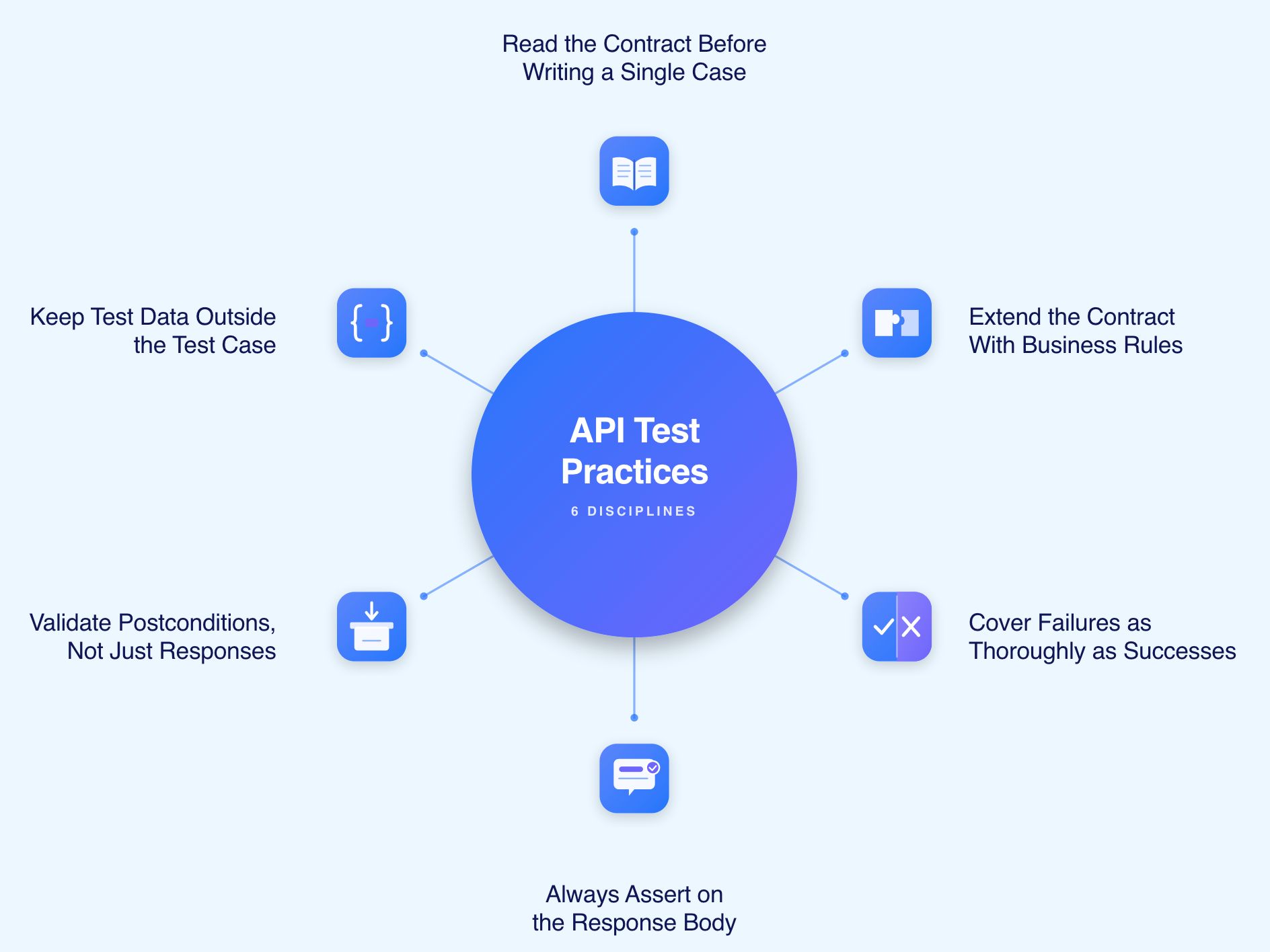
Read the Contract Before Writing a Single Case
An OpenAPI or Swagger specification is the authoritative source of truth for what the API promises. Read it in full before authoring test cases. Every endpoint, every parameter, every status code, and every response schema in the specification is a test case waiting to be written.
Extend the Contract with Business Rules
Contracts describe technical behaviour. They rarely capture the business rules that constrain it. A field accepting values up to one million may be restricted to one thousand for a specific customer tier by a business rule that does not appear in the specification. Domain experts, product documentation, and support data all surface these rules.
Cover Failure Conditions as Thoroughly as Success Conditions
A suite where the majority of cases test successful operations produces high pass rates and limited confidence. At least half the cases in a healthy suite should exercise failure conditions: missing fields, invalid values, boundary violations, authentication failures, and error response quality.
Always Assert on the Response Body
A status code check passes too easily. Asserting on specific field values, types, and schema compliance is what proves the API actually did what it claimed rather than returning a placeholder response.
Validate Postconditions, Not Just Responses
A successful HTTP 201 confirms the API accepted the request. It does not confirm the resource was persisted correctly. Every test case for a write operation should verify the downstream state: database records, event publications, audit log entries, and inventory changes.
Keep Test Data Outside the Test Case
Tokens, IDs, environment URLs, and base paths hard-coded into test cases stop the suite from running in other environments. Store all configuration as parameterised variables. Test cases should reference variables, not literal values.
Common Mistakes in API Test Case Design
Several patterns produce suites with high pass rates and low protection.
1. Over-reliance on Happy Paths
A suite where 90% of cases test successful operations catches fewer defects per case than a balanced suite. Failure conditions, boundary values, and error response quality all require explicit coverage.
2. Hard-coded environment values
Tokens, IDs, and URLs baked into test cases prevent the suite from running in another environment without manual updates. Configuration belongs in variables.
3. No Body Assertion
A status code check alone confirms the API responded. It does not confirm the response was correct. Assert on field values, types, and schema compliance in every case.
4. Missing Postcondition Checks
A pass without database verification is half a test. Write operations need downstream state validation to prove the full chain worked.
5. No Version Coverage
APIs have at least two active versions at any given time. Test cases for older versions are not optional until those versions are formally retired.
6. Uniform Timeouts
Tight latency assertions belong on critical endpoints. Applying the same timeout to every endpoint hides regressions on high-priority paths or generates noise on low-priority ones.
The AI-Native Shift in API Test Case Creation
Two limits broke the original economics of API test case design: authoring took too long and maintenance consumed the savings that automation was supposed to deliver.
AI-native test platforms address both by changing where the effort goes. Rather than engineers spending weeks translating specifications into test scripts, generation tools ingest OpenAPI specifications, Gherkin scenarios, and BRDs to produce executable test cases automatically. The practitioner's role shifts from authoring to reviewing and extending with business rules and edge cases that contracts cannot capture on their own.
Maintenance overhead shrinks through self-healing. Tests that combine UI, API, and database steps were historically the most fragile assets a team could own. A single locator change broke the entire chain. Self-healing capabilities keep these assets stable through application change so the test value compounds rather than depreciates with every release.
Natural language authoring removes the engineering bottleneck from test creation entirely. A practitioner specifies the journey in plain English and the platform translates intent into executable steps. The asset is reviewable by product managers, support teams, and domain experts, not just by engineers fluent in a particular automation framework.
When failures occur, AI Root Cause Analysis identifies which step in a chained journey actually broke rather than surfacing a single red result that could mean anything. Correlating logs, network requests, screenshots, and UI state together cuts defect triage time significantly.
How Virtuoso QA Handles API Test Cases
Virtuoso QA treats API testing as a first-class part of every journey rather than a bolt-on capability.
Unified journeys combine UI actions, API calls, and SQL validations in a single test asset so postcondition verification is built in rather than added as an afterthought
GENerator drafts test cases from specifications, requirements, application screens, or legacy suites, accelerating coverage by weeks rather than months
Self-healing at approximately 95% accuracy keeps API and UI assets stable through refactors and AI-driven code changes without manual locator updates
CI/CD integration with Jenkins, Azure DevOps, GitHub Actions, GitLab, and CircleCI runs the right cases on the right triggers, driven by change rather than schedule
Composable libraries allow API test cases to be reused across products, environments, and partner deployments without rebuilding from scratch

Interesting Reads
Frequently Asked Questions
How do you write a test case for a REST API?
What is a sample test case for an API POST request?
How many test cases are typically needed for a single API endpoint?
How do you design negative test cases for APIs?
How does AI improve API test case creation?
Can API test cases be reused across environments?




