Blog
Test Case vs Test Scenario: What They Are, How They Differ

Adwitiya Pandey
Published on

Table of contents
Lorem ipsum
Lorem ipsum
Lorem ipsum
Lorem ipsum
Lorem ipsum
A test scenario describes what to test. A test case describes how to test it. The two documents serve different purposes, belong to different moments in the cycle, and are read by different people. Using them interchangeably is one of the most consistent ways a test suite ends up with coverage that looks complete and verification that is not.
What is a Test Scenario?
A test scenario is a short statement of something the system should be able to do. It names the user, the action, and the expected outcome without specifying the steps, the inputs, or the data needed to verify it. One sentence is usually enough.
The goal of a test scenario is to answer one question: what needs to be tested here? It does not answer how. That is the test case's job.
For example: "Registered customer transfers funds between their own accounts within daily limits." That single sentence is enough to plan with, report on, and estimate effort from. It is not yet enough to execute.
Components of a Test Scenario
Every useful test scenario contains three things.
Who: the person or system doing the thing. For example: registered customer, admin user, automated billing service
What: the action or capability being tested. For example: transfers funds, resets a password, submits a claim
Context: the conditions that apply. For example: within daily limits, with an expired policy, using a saved payment method
Test Scenario Examples
Registered customer transfers funds between their own accounts within daily limits
Broker submits a claim on behalf of an insured client with an active policy
Department head approves a purchase order that requires escalation due to value
Admitting clerk books a patient into an elective procedure slot at a partner facility
Each fits on one line. Each names the who, the what, and the context without describing a single screen, button, or field.
Advantages of Test Scenarios
Quick to write, often in minutes during a planning meeting
Stable across releases because they describe goals rather than interfaces
Readable by product managers, business analysts, and stakeholders who do not need to know the implementation
Serve as the planning layer that tells the team what is and is not covered
Each one can be turned into multiple test cases without rewriting the scenario itself
What is a Test Case?
A test case is a precise, step-by-step procedure for verifying that the system behaves correctly under a specific set of conditions. It takes a scenario and adds everything the scenario deliberately left out: exact inputs, exact steps, exact expected results, and the conditions that must be true before and after the test runs.
A test case is written to be followed exactly. Two different people following the same test case should reach the same pass or fail conclusion every time. If they cannot, the test case needs to be rewritten.
Components of a Test Case
Test case ID: a unique label for tracking and referencing
Title: a short description of what is being verified, clear enough that the purpose is obvious from the title alone
Linked scenario: the scenario this case is verifying
Preconditions: the exact state the system must be in before the test begins
Test data: the exact values used in the test
Steps: a numbered list of actions, each specific enough that there is only one way to carry it out
Expected result: what the system should produce, written clearly enough that pass or fail is obvious
Actual result: recorded during execution
Postconditions: the state the system should be in after the test completes
Status: Pass, Fail, Blocked, or Skipped
Test Case Examples
From the scenario "Registered customer transfers funds between their own accounts within daily limits":
Test Case 1: Verify that a customer with a £1,000 current account balance and a £5,000 daily limit can transfer £500 to their savings account.
Test Case 2: Verify that a customer with a £100 current account balance cannot transfer £500 and receives a clear insufficient funds message.
Test Case 3: Verify that a customer who has already transferred £4,800 today cannot transfer a further £500 and receives a daily limit exceeded message.
One scenario. Three test cases. Each covers a different condition the scenario implied but did not specify.
Advantages of Test Cases
Provide repeatable, consistent verification that any tester or automation tool can run the same way every time
Catch defects that scenario-level planning cannot because they test specific values and specific conditions
Build into a regression suite that protects existing features as new ones are added
Serve as evidence in regulated industries that specific conditions were verified
Are specific enough to be automated directly
Test Case vs Test Scenario: Key Differences
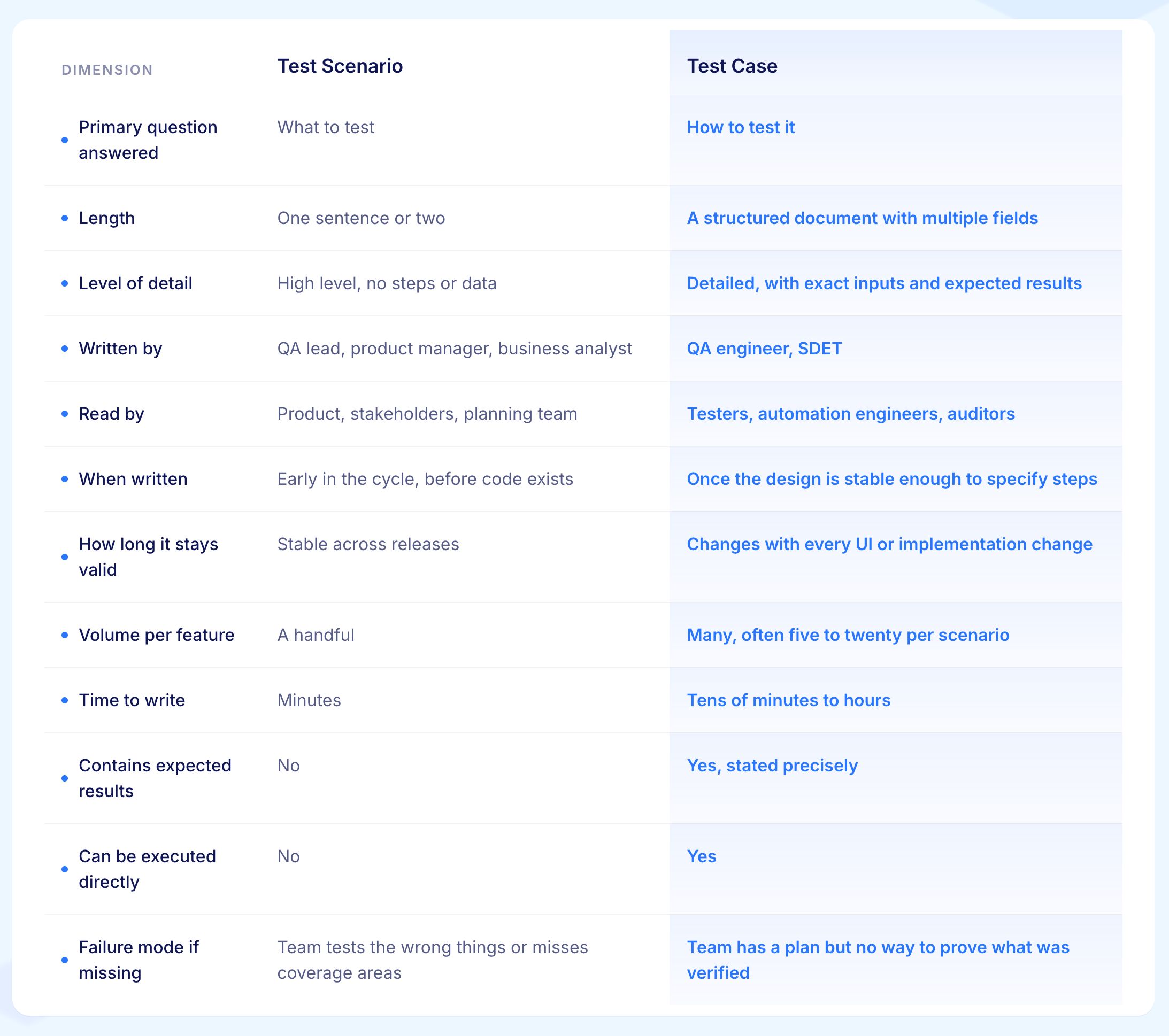
1. Primary Question Answered
A test scenario answers one question: what does this part of the system need to be able to do?
A test case answers a different one: when we test that specific thing, exactly what do we do, what data do we use, and what does the correct answer look like?
The scenario is the plan. The test case is the proof.
2. Length
A test scenario fits in one or two sentences. For example: "Registered customer transfers funds between their own accounts within daily limits."
A test case is a structured document with multiple named fields: ID, preconditions, steps, expected result, actual result, and status.
The length difference is not a quality difference. Each is the right length for what it is trying to do.
3. Level of Detail
A test scenario deliberately leaves out the steps, the exact inputs, and the expected results. That detail is left open on purpose because the scenario is meant to stay valid across multiple releases.
A test case adds all of that back in: the exact account balance, the exact transfer amount, the exact error message that should appear. Different levels of detail for different purposes.
4. Written By
Test scenarios are written by whoever understands the business goal being tested. That is often a QA lead, a product manager, or a business analyst.
Test cases are written by QA engineers or SDETs who know the application well enough to specify the exact steps and values.
The difference in who writes each document reflects the difference in what each document is for.
5. Read By
A product manager can read a test scenario and confirm the right things are being covered without needing to know how the application is built.
A test case is written for testers and automation engineers who need to know exactly what to do, and for auditors in regulated industries who need evidence of what was verified and how. The two documents have different audiences by design.
6. When Written
Test scenarios get written early, often during sprint planning or requirements review before any code exists. Writing detailed cases at that stage wastes time because the design will change and the cases will need to be rewritten.
Scenarios written early will still apply when the design is done. Cases get written once the design has stabilised enough to specify exact steps without expecting to rewrite them immediately.
7. How Long it Stays Valid
A scenario describing "registered customer transfers funds between their own accounts" will still be valid after a complete redesign of the transfers screen. The goal has not changed.
The test cases derived from that scenario will need updating every time a field moves, a label changes, or a step is added to the flow. Scenarios survive interface changes. Cases need maintenance after each one.
8. Volume Per Feature
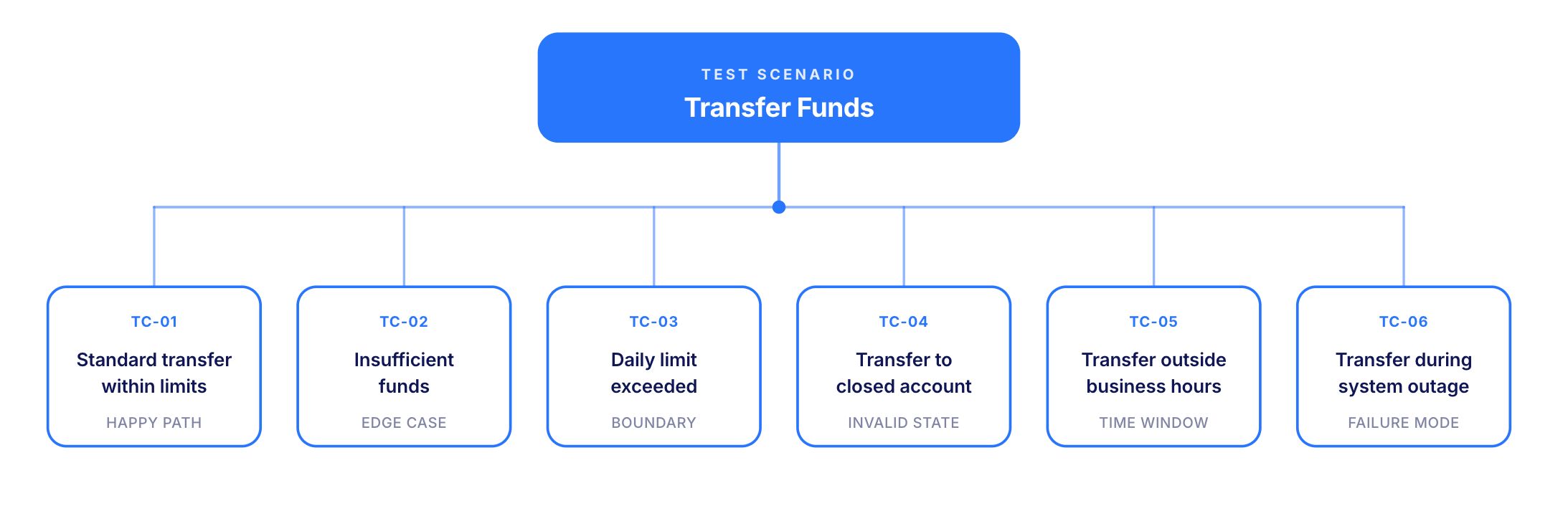
One test scenario almost always produces more than one test case. A transfer scenario produces cases for the successful transfer, insufficient funds, daily limit exceeded, transfer to a closed account, transfer outside business hours, and transfer during a system outage.
Six or more cases from one scenario is typical. Teams that expect one case per scenario consistently end up testing far less than they think they are.
9. Time to Write
A test scenario takes minutes. A test case takes longer, often tens of minutes, sometimes hours for high-stakes verification where every step and every boundary condition needs to be spelled out precisely.
The time difference is why scenarios get written in planning meetings and cases get written in preparation time before a sprint demo or regression run.
10. Contains Expected Results
A test scenario does not contain an expected result in the testing sense. It describes a goal, not an outcome.
A test case states the expected result precisely for every step and for the final outcome of the test. That precision is what makes a test case executable and what makes pass or fail an objective determination rather than a judgement call.
11. Can be Executed Directly
A test scenario cannot be executed. It is a statement of intent, not a procedure.
A test case can be followed step by step by a tester or run directly by an automation framework. The case is the unit of execution. The scenario is the unit of planning.
12. Failure Mode if Missing
When test scenarios are missing, the team executes cases without a clear picture of what is and is not being covered. Coverage gaps are invisible until something breaks in production.
When test cases are missing, the team has a coverage plan but no way to prove that any specific condition was actually verified. A regulated industry audit, a release decision, or a production defect will expose that gap immediately.
The Scenario-Case Ladder
A useful way to think about the two documents is as two rungs on a ladder. The ladder has four levels, each more specific than the one above it.
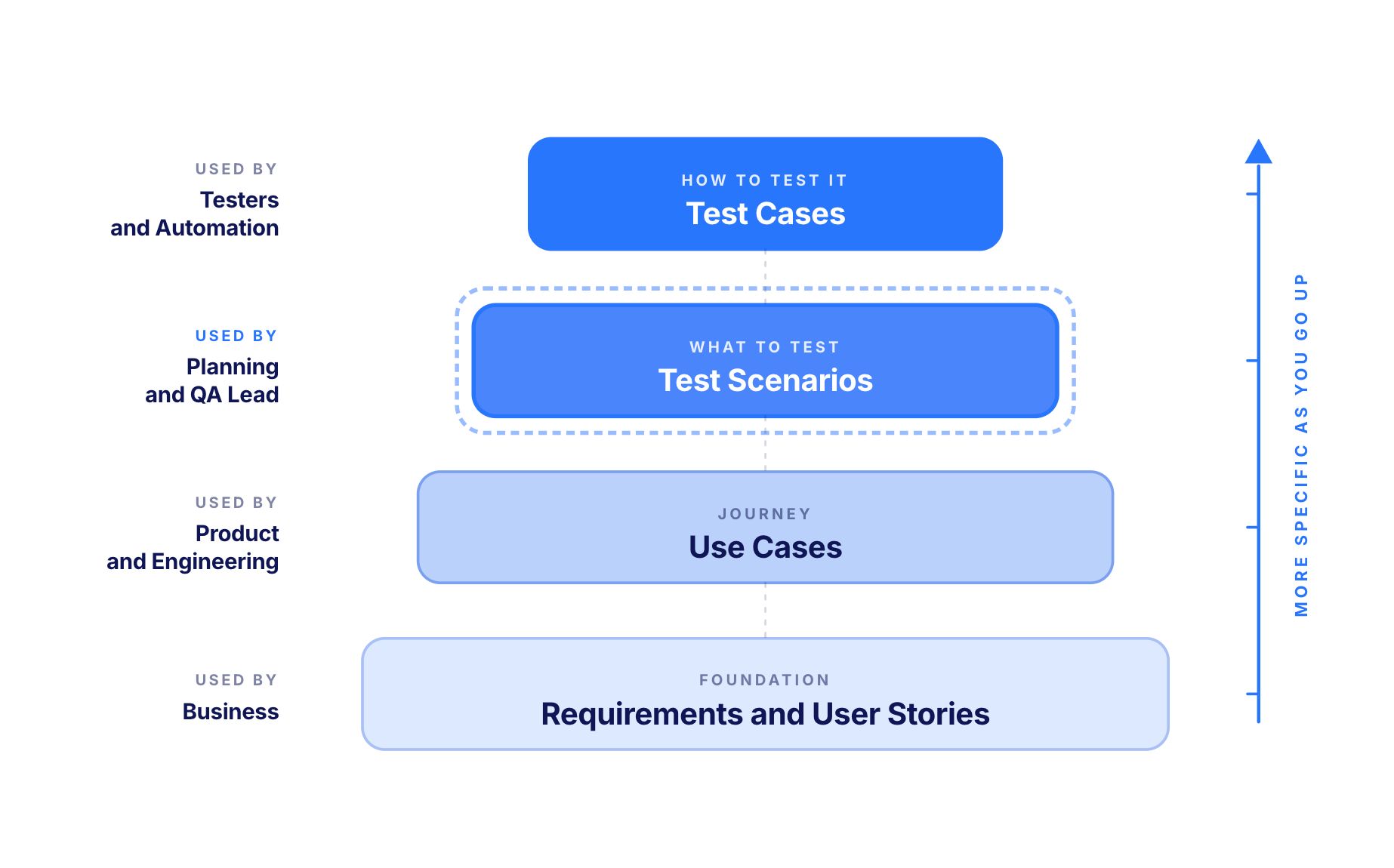
Rung 1: Requirements and user stories
What the business has asked for.
For example: "Customers should be able to transfer money between their accounts." The most general level.
Rung 2: Use cases
Structured descriptions of the user journey with actors, flows, and conditions named.
For example: a full use case for the transfer feature with basic flow, alternative flows for edge conditions, and exception flows for failures.
Rung 3: Test scenarios
Short statements of the conditions and workflows that need verification, derived from use cases or directly from requirements.
For example: "Registered customer transfers funds between their own accounts within daily limits."
Rung 4: Test cases
Step-by-step instructions for verifying each scenario under specific conditions. The most specific level.
For example: the three transfer test cases shown above.
Each rung serves a different conversation. Requirements are for the business. Use cases are for product and engineering. Scenarios are for planning and coverage. Cases are for execution and proof. Teams that only work on one rung end up with documentation that supports only one of those conversations.
When to Use a Test Scenario
Test scenarios do their best work at five specific moments.
1. During Sprint Planning or Requirements Review
Write one scenario per acceptance criterion. It gives the team a coverage map for the story without requiring case-level detail in a planning meeting.
2. When Discussing Coverage With Stakeholders
"Are we testing the right things?" is a scenario-level question. A list of scenarios shows what is and is not being covered in plain language any stakeholder can read and challenge.
3. For Status Reporting
"Sixty percent of the scenarios for this release have been verified" is a useful statement for a product manager. A case-count report is less useful because cases vary widely in scope.
4. When the Code Does Not Yet Exist
Writing detailed cases against an unfinished design means rewriting them when the design changes. Scenarios written now will still apply when the design is done.
5. When Communicating Across Teams
Developers, business analysts, and product managers can all read a scenario and understand what is being covered without needing to understand the test framework or the implementation.
When to Use a Test Case
Test cases do their best work at five specific moments.
1. When Executing Tests Manually or Running Automation
A case is the artefact a tester or automation framework actually runs. The scenario describes the intent. The case carries it out.
2. For Regression Suites
A regression suite is a set of cases run repeatedly across releases. Scenarios describe the regression scope. Cases are what get executed each time.
3. When Onboarding a New Tester
A tester new to the system can follow a case and produce a meaningful result without needing to understand the broader business context. Cases are complete in a way scenarios are not.
4. In Regulated Environments
A regulator asking for evidence that a specific control was verified expects a case with steps, data, and a recorded result. A scenario is not evidence of execution.
5. When Building Automation
An automated test is essentially a test case rendered in executable code. The case is the source document. The automation follows from it.

How to Write a Test Scenario
What to Do:
Identify the user or system involved
Name the action or capability being tested
Add the relevant context or conditions
Keep it to one or two sentences
Make sure it is readable by someone who does not know the implementation
Why it Matters
A scenario that is too specific turns into a pseudo-case that is hard to maintain. A scenario that is too vague gives the team no useful planning information. One clean sentence with the actor, the action, and the context is the right level.
Example
Too vague: "Test the transfer feature."
Too specific: "Test that the transfer button on the transfers screen submits a POST request to /api/transfers with the correct payload when the current account has sufficient funds."
Right level: "Registered customer transfers funds between their own accounts within daily limits."
Steps to Write One:
Name the actor. Who is doing the thing?
For example: registered customer, admin user, support agent.
Name the action. What is the system being asked to support?
For example: transfers funds, resets a password, approves a purchase order.
Add the context. Under what conditions?
For example: within daily limits, with an expired policy, using a saved payment method.
Check the length. If it takes more than two sentences, the scenario is too detailed.
Check the audience. If a product manager could not read it and confirm it describes the right thing to test, rewrite it.
Related Read: AI-Native Approach to Create Test Scenarios
How to Write a Test Case
What to Do:
Assign a unique ID
Write a title that makes the purpose obvious from the title alone
Link it to the scenario it is verifying
Define the exact preconditions
List the exact test data
Write numbered steps, each specific enough that there is only one way to carry it out
Write the expected result clearly enough that pass or fail is obvious without a judgement call
Leave space for actual result and status
Why it Matters
A test case that two different people execute in two different ways is not yet a test case. Every gap where someone could interpret a step differently is a gap that needs to be closed before the case is finished.
Steps to Write One
Start with the scenario. Every test case should link back to the scenario it is verifying. If there is no scenario to link to, write the scenario first.
Name the specific condition being tested.
For example: "Transfer rejected because daily limit is exceeded" rather than just "Transfer test."
Write the preconditions with specific values.
For example: "Current account balance is £10,000. Two earlier transfers today totalling £4,800." Not just "customer has an account."
List the test data separately. Name every value the test uses. This makes the case reusable across environments.
Write each step as a single action with a single expected outcome.
For example: "Click Confirm Transfer. Expected: error message appears stating the daily limit has been reached."
Write the final expected result as a clear statement.
For example: "No transfer record is created. Current account balance is unchanged at £10,000."
Check that pass or fail is obvious. If someone would need to make a judgement call about whether the expected result was met, rewrite the expected result until they would not.
Related Reads: How to Write Test Cases in Manual Testing (Templates & Examples)
Worked Example: One Scenario, Three Test Cases
A concrete example makes the relationship clear. The scenario below is from a retail banking application.
The scenario: Registered customer transfers funds between their own accounts within daily limits.
One sentence. Names the actor, the action, and the context. A planning meeting can use this sentence to estimate work, decide ownership, and place the verification in the right sprint.
Test Case 1: Standard Transfer Within All Limits
Test Case ID: TRF-TC-001
Linked scenario: Registered customer transfers funds between their own accounts within daily limits
Preconditions:
Customer is authenticated
Current account balance is £1,000
Savings account exists and is active
Daily transfer limit is £5,000
No prior transfers today
Test steps:
Navigate to the Transfers section
Select source account: Current Account
Select destination account: Savings Account
Enter amount: £500
Click Confirm Transfer
Expected result: Confirmation screen shows a reference number. Current account balance shows £500. Savings account balance increases by £500. Both accounts show the transfer in transaction history.
Status: Pass / Fail
Test Case 2: Transfer Rejected for Insufficient Funds
Test Case ID: TRF-TC-002
Linked scenario: Registered customer transfers funds between their own accounts within daily limits
Preconditions:
Customer is authenticated
Current account balance is £100
Savings account exists and is active
Daily transfer limit is £5,000
Test steps:
Navigate to the Transfers section
Select source account: Current Account
Select destination account: Savings Account
Enter amount: £500
Click Confirm Transfer
Expected result: Error message clearly states insufficient funds. Current account balance unchanged at £100. Savings account balance unchanged. No transfer record created.
Status: Pass / Fail
Test Case 3: Transfer Rejected Because Daily Limit is Exceeded
Test Case ID: TRF-TC-003
Linked scenario: Registered customer transfers funds between their own accounts within daily limits
Preconditions:
Customer is authenticated
Current account balance is £10,000
Savings account exists and is active
Daily transfer limit is £5,000
Two earlier transfers today totalling £4,800
Test steps:
Navigate to the Transfers section
Select source account: Current Account
Select destination account: Savings Account
Enter amount: £500
Click Confirm Transfer
Expected result: Error message clearly states the daily limit has been reached and shows the remaining allowance as £200. Current account balance unchanged. Savings account balance unchanged. No transfer record created.
Status: Pass / Fail
One scenario. Three cases. Each covers a different condition the scenario pointed to without specifying. The same scenario, worked further, would produce cases for transfers to a closed account, transfers initiated outside business hours, and transfers submitted during a backend outage. Every additional case probes a different risk the scenario raised.
Test Scenarios and Test Cases in Agile
Agile development changes the balance between scenarios and cases without removing the need for either.
In agile, scenarios often serve as acceptance criteria. The team writes a user story, attaches scenarios that describe what done looks like, builds the feature, and then derives test cases for regression.
The flow is: user story, then scenarios as acceptance criteria, then implementation, then cases for ongoing regression.
Sprint planning is a scenario-level conversation. Refinement meetings are where scenarios get written. Execution and regression are where cases take over. Teams that try to write detailed cases in sprint planning slow the planning down. Teams that enter a regression run with only scenarios have nothing to execute.
BDD sits between the two. A Gherkin scenario (Given, When, Then) reads like a test scenario and runs like a test case. It was designed to close the gap between the two artefacts by making them the same document. BDD has not replaced the scenario-case distinction. It has produced one specific format that does both jobs at once for teams that need that.
In fast-moving agile environments, scenarios are often the more durable investment. Interfaces change every sprint. Goals change far less often. A scenario written in sprint one describing what the transfer feature must do will still be valid after the transfer UI has been redesigned three times. The test cases derived from it will need updating after each redesign.
Related Read: What is Agile Testing? Principles, Types and Best Practices
Common Mistakes Teams Make
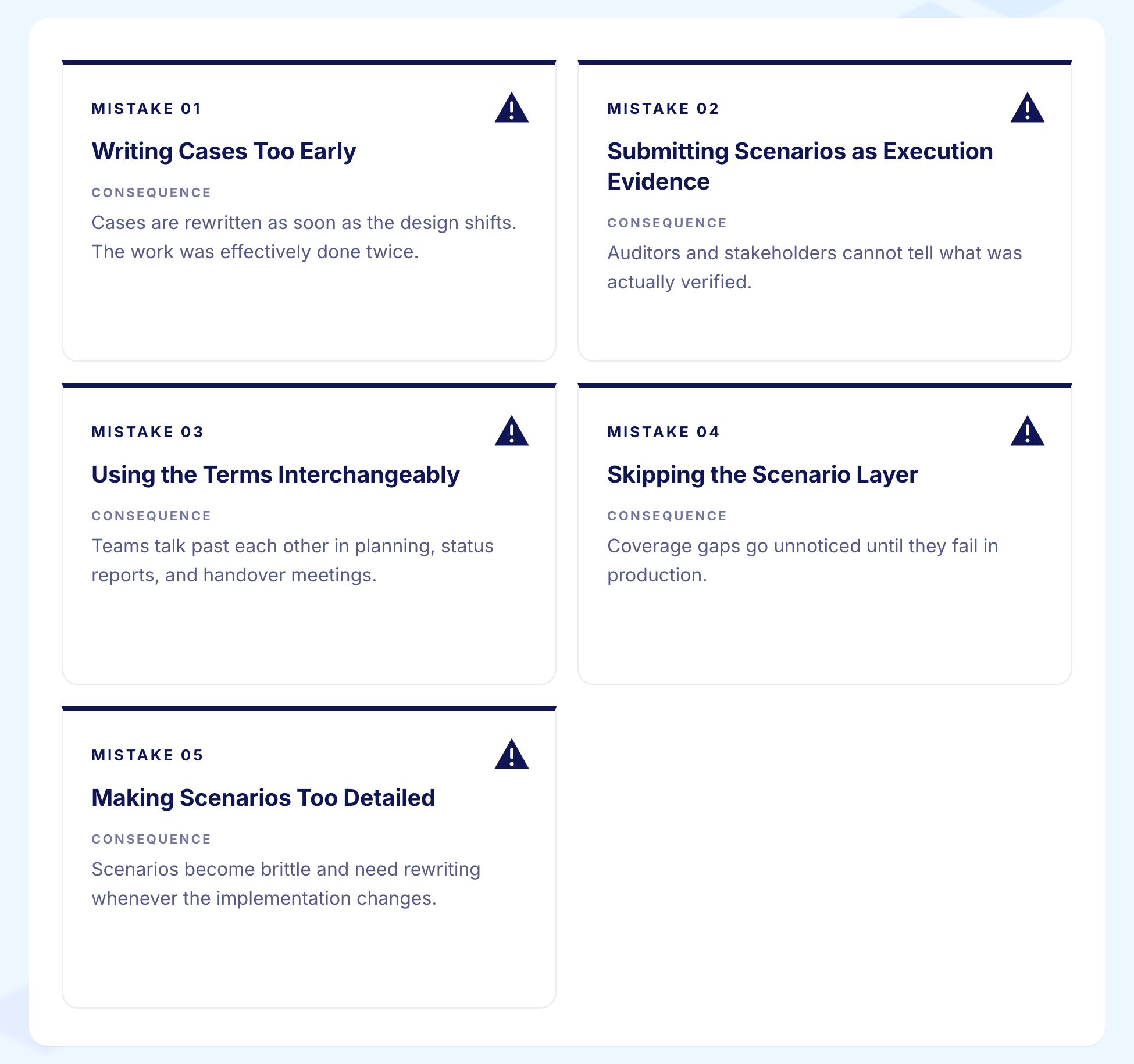
1. Writing Cases When Scenarios Would Do
The most common waste. A feature still being designed does not need case-level detail yet. Cases written against an unstable design get thrown away or, worse, get half-updated and silently diverge from what the application actually does. Write scenarios first. Write cases when the design has stabilised.
2. Submitting Scenarios as Evidence of Execution
The opposite problem. A regression run cannot execute a scenario. A scenario is a plan for a test, not a test. Teams that submit a list of scenarios as the output of a regression cycle have submitted a coverage plan, not verification evidence. Cases are what produce pass or fail results.
3. Using the Two Terms Interchangeably
When scenario and case mean the same thing on a project, the team ends up writing documents that are too vague to execute and too detailed to plan with. Half a scenario and half a case is no useful artefact at all. Keep the distinction clear in conversation and in documentation.
4. Skipping the Scenario Layer
Going straight from requirement to detailed case produces large volumes of verification that nobody can summarise.
When a stakeholder asks "what are we testing in this release," the answer should be a readable list of scenarios, not a link to 1,800 cases in a test management tool. The scenario layer is what makes coverage visible.
5. Making Scenarios Too Detailed
A scenario with twelve numbered steps is no longer a scenario. It has lost the brevity that makes a scenario useful for planning and the precision that makes a case useful for execution. Keep scenarios to one or two sentences. If a scenario is growing beyond that, it is becoming a case and should be treated as one.
How AI Changes the Relationship Between Scenarios and Cases
AI coding tools and AI test generation have changed what teams spend time on, not what the two documents are for.
AI test generators can now read a well-written scenario and produce a draft set of test cases from it, populating the steps, the expected results, and in some cases the test data. The quality of what comes out depends entirely on the quality of what goes in. A vague scenario produces a generic case. A precise scenario produces a precise case.
The practical result is that the scenario rises in importance. When the case is generated rather than hand-written, the human judgment goes into the scenario rather than into formatting tables. Teams that invested in clear scenario writing find AI generation works well for them. Teams with vague, one-word scenarios get generic output that needs significant editing before it is useful.
The case becomes easier to maintain. A generated case lives closer to the application. When the application changes, the case can be regenerated or self-healed rather than manually rewritten. The maintenance burden that hand-written cases carry through every UI redesign shrinks substantially.
Virtuoso QA's GENerator reads scenarios, requirements, user stories, and BDD scenarios and produces ready-to-run journey tests from them. Self-healing at approximately 95% accuracy keeps those cases current as the application changes. The scenario is the durable input. The case is the continuously maintained output. The human work shifts toward writing precise scenarios and reviewing generated cases rather than hand-crafting every step.
How Virtuoso QA Bridges Test Scenarios and Test Cases
The gap between a scenario and an executable, maintained test case is where most testing programmes lose time and quality.
GENerator reads scenarios, requirements, user stories, and BDD feature files and produces ready-to-run Virtuoso journeys from them. The manual step of turning a scenario into a detailed case happens automatically. The team reviews the output, adds the edge cases that only domain knowledge can surface, and moves on.
Self-healing AI at approximately 95% accuracy keeps cases current when the interface changes. When the transfer screen is redesigned and the button moves, the case updates automatically rather than breaking and waiting for a manual fix.
AI Root Cause Analysis explains case failures in plain language connected to the scenario they came from.
For example: "The daily limit exceeded case is failing because the error message text changed from 'Daily limit reached' to 'Transfer limit exceeded.' The scenario is still valid. The expected result needs updating."
Composable libraries let scenarios from one project become reusable building blocks in the next. A transfer scenario written once becomes a module any downstream project can draw from without rebuilding it from scratch.
The scenario stays stable. The case stays current. The gap between the two closes automatically.
Related Reads
Frequently Asked Questions
Which comes first: the test case or the test scenario?
How many test cases should a test scenario produce?
Can you run a test scenario without a test case?
What is the format of a test scenario?
What is the format of a test case?
Can AI generate test cases from test scenarios?




