Blog
Test Case Design Techniques - Expert Guide for QA Teams

Rishabh Kumar
Published on

Table of contents
Lorem ipsum
Lorem ipsum
Lorem ipsum
Lorem ipsum
Lorem ipsum
Test case design techniques are structured methods for choosing which test cases to write so that the most important risks are covered with the least wasted effort.
They fall into three families:
Black-box techniques that test from the specification
White-box techniques that test from the code
Experience-based techniques that draw on what testers know tends to go wrong
Used together, they turn testing from guesswork into a deliberate coverage strategy.
Most testing courses teach a dozen techniques and leave practitioners to choose. Most practitioners end up using three out of habit rather than design. The gap between what is taught and what is practised is where most test suites lose their way: too many overlapping test cases, too few covering the high-risk corners, and almost nothing selected by design rather than routine.
What Test Case Design Techniques Actually Do
Strip the textbook language away and the working purpose of test case design becomes clear. The job is to convert an open-ended question ("what should we test?") into a closed-ended answer ("these test cases, in this order, for these reasons") that holds up to scrutiny.
Three properties define a good design technique:
1. It Bounds the Input Space
A function accepting any integer from 1 to one million has a million possible inputs. A good technique reduces that to a defensible handful without losing coverage of the distinct behaviours.
2. It Targets the Risky Corners
Off-by-one errors, undefined states, contradictory rules: each one is statistically more likely than a random fault. The techniques that find them efficiently are the ones that earn their place.
3. It Produces Something Reviewable
A test case derived from a recognised technique can be challenged, repeated, and defended. A test case born purely from intuition cannot.
Design techniques are a shared vocabulary for talking about coverage. Without them, every test review becomes a matter of subjective opinion. With them, decisions about what to test become decisions about what risk to cover.
The Three Families of Test Case Design Techniques
The standard grouping divides design techniques into three families, each approaching the system from a different angle.
1. Black Box Techniques
Black box technique treat the system as a sealed container. The tester works from the specification, requirements, user story, or API contract. The internal code is irrelevant.
The question is: Given what the system is supposed to do, what cases prove it does?
2. White Box Techniques
White box testing look inside. The tester works from the source code. Coverage is measured against the structure of the code itself: statements, branches, conditions, paths.
The question is: Given how the system is built, what cases prove every part is exercised?
3. Experience Based Techniques
Experience based technique rely on what the tester already knows about how systems fail.
The question is: Given everything that has gone wrong before, what cases are most likely to reveal a fault the other two families would miss?
The strongest test suites use all three. Black-box techniques anchor coverage to user-facing behaviour. White-box techniques catch structural gaps. Experience-based techniques find what the spec did not say and the code did not show.
To know the difference in detail check our comparison page on Black Box vs White Box Testing
Quick Reference: Test Case Design Techniques
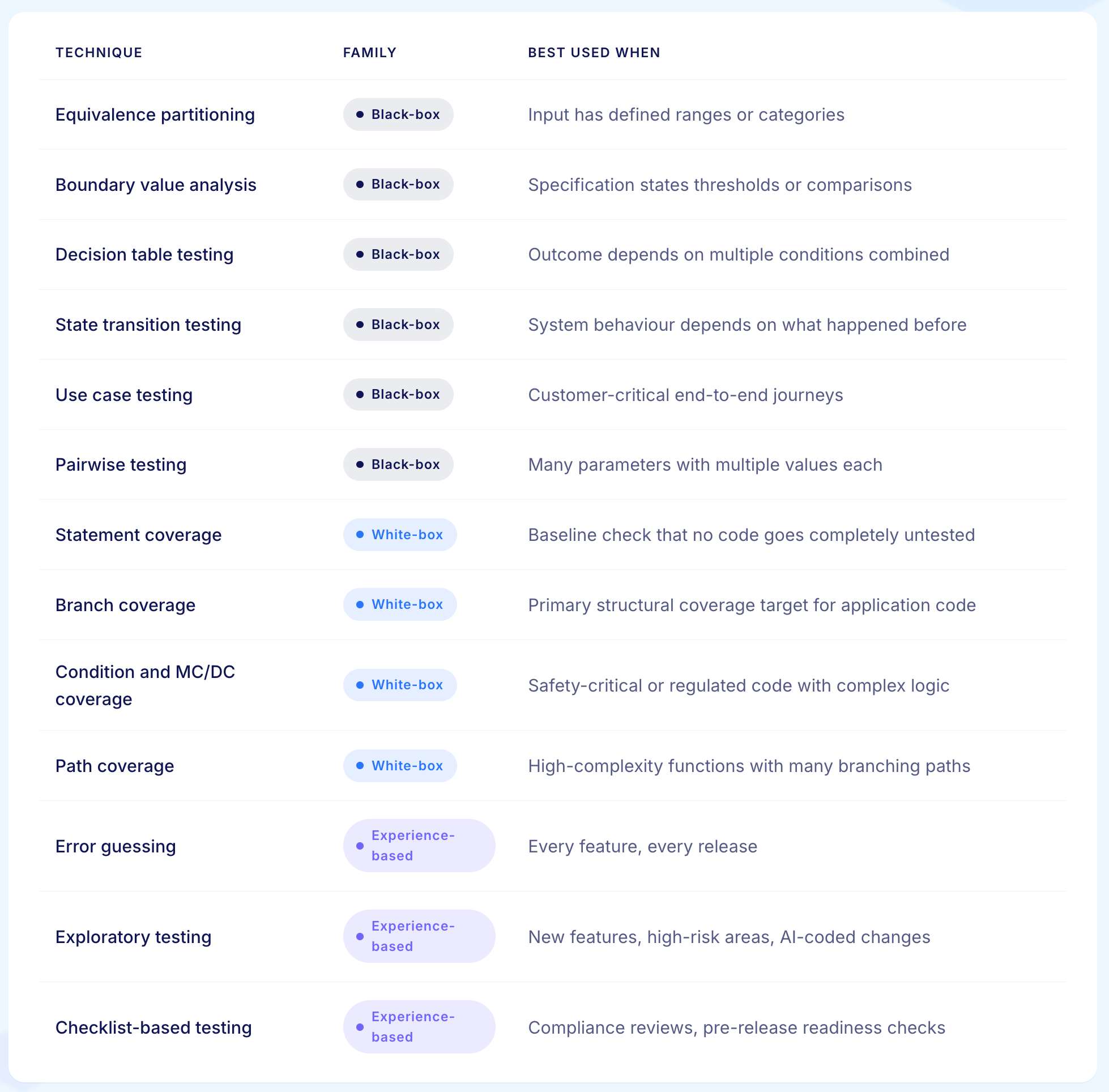
Black-Box Test Case Design Techniques
Black-box techniques are the backbone of most enterprise test suites. Customer-facing applications, business systems, and API contracts are all designed from a specification and tested against the same specification. A QA engineer who masters these techniques can design a defensible suite for almost any business application.
1. Equivalence Partitioning
Equivalence partitioning divides the input space into groups where the system should behave the same way for every value in the group. The technique then tests one representative value from each group rather than testing every possible value.
The job equivalence partitioning is hired to do is eliminate redundant tests. If the system processes any integer from 1 to 100 the same way, testing 1, 50, and 99 proves the same thing as testing all one hundred values. The technique gives the tester permission to stop after one.
Worked Example
A claims platform processes property damage values. Claims below £500 are auto-approved, claims from £500 to £25,000 require adjuster review, and claims above £25,000 trigger a manager workflow. Negative values are invalid.
The four groups are: invalid negatives, 0 to 499, 500 to 25,000, and 25,001 and above. One value from each group proves the behaviour. Four tests replace tens of thousands of possibilities.
When to Use it
Any input field with defined ranges. Any business rule with quantitative thresholds. Any API parameter with documented bounds.
When to Skip it
Inputs where every value is materially different, such as account numbers used for lookup rather than calculation.
2. Boundary Value Analysis
Boundary value analysis tests the values at the edges of equivalence groups because faults cluster at edges. Off-by-one errors are among the most common bugs in software, and boundaries are where they live.
The job boundary value analysis is hired to do is deliberately expose off-by-one defects, missing equality checks, and inverted comparison operators. Any time a specification uses the words "more than," "at least," "up to," "before," or "after," boundary analysis has work to do.
Worked Example
Continuing the claims platform. The auto-approval boundary sits at £500. Boundary tests check £499, £500, and £501. If the rule was implemented as value > 500 rather than value >= 500, the £500 case routes to the adjuster instead of being auto-approved. The boundary test catches what an equivalence group test would have passed.
When to Use it
Whenever a specification states a threshold, comparison, or inclusive or exclusive bound. Date and time boundaries (start of day, end of month, year transitions) are particularly fruitful.
When to Skip it
Inputs with no natural ordering. Enumerated values where boundaries carry no meaning.
3. Decision Table Testing
Decision table testing maps every combination of conditions that affects an outcome, and the action the system should take for each combination. Each row in the table becomes a test case.
The job decision table testing is hired to do is systematic coverage of business logic that depends on the interaction of multiple conditions. It is unbeaten on combinations of rules: discount calculations, eligibility checks, routing logic, regulatory decisions.
Worked Example
A retail platform calculates customer discounts based on three conditions: loyalty tier (silver, gold, platinum), order value (over or under £100), and whether a promotional code is applied. The decision table produces 3 x 2 x 2 = 12 combinations, with the expected discount for each. Each row is a test case. The discount engine is now covered for every documented combination, with explicit evidence of which have been verified.
When to Use it
Any feature where the outcome is the product of multiple conditions. Pricing engines, eligibility logic, claims routing, policy underwriting, content access rules.
When to Skip it
Linear business logic with no condition interactions. Decision tables for a single-condition flow add overhead without adding value.
4. State Transition Testing
State transition testing models the system as a set of states and the events that move it between them. Each state-event combination becomes a test case, and the technique requires coverage of both valid and invalid transitions.
The job state transition testing is hired to do is verify stateful behaviour, where the system's response to an event depends on what happened before. Order workflows, user sessions, document lifecycles, claims pipelines, and account lifecycles all belong here.
Worked Example
A loan origination system moves an application through states: draft, submitted, underwriting, approved, declined, funded, closed. Events trigger transitions: submit, decision, fund, cancel. Test cases cover every valid transition (a submitted application can move to underwriting) and every invalid one (a closed application cannot move back to draft). Invalid transition tests are as important as valid ones and often more revealing.
When to Use it
Workflows, lifecycle-driven systems, finite state machines, any feature where the next response depends on prior history.
When to Skip it
Stateless calculations and pure functions where each input is processed independently.

5. Use Case Testing
Use case testing builds test cases around complete end-to-end user scenarios. Each test follows a full journey through the system, from a triggering event to a meaningful outcome.
The job use case testing is hired to do is verify integration. Unit tests prove individual functions work in isolation. Use case tests prove the functions work together to deliver the experience a real user has.
Related Read: Key Differences between Use Case and Test Case
Worked Example
A health system's patient registration journey includes searching for an existing record, creating a new patient, capturing consent, assigning an attending clinician, generating a chart, and triggering insurance verification. The use case test exercises every component in the order the user would, with realistic data, confirming the full chain works as the patient will experience it.
When to Use it
Customer-critical workflows. Cross-system journeys. Anywhere the business value lives in the integration rather than in individual functions.
When to Skip it
Component-level verification where the goal is to isolate a single function's behaviour.
6. Pairwise Testing
Pairwise testing tests every pair of parameter values rather than every combination. Research has shown that most defects are triggered by the interaction of one or two parameters, not many. Pairwise coverage catches most of them with a fraction of the test count.
The job pairwise testing is hired to do is manage combinatorial explosion. When a feature has ten parameters with five values each, full coverage requires nearly ten million tests. Pairwise coverage achieves similar defect-finding confidence with fewer than fifty.
Worked Example
A workforce management platform supports four browsers, three operating systems, two display resolutions, three time zones, and four language packs. Full combinatorial coverage is 288 configurations. Pairwise coverage, generated by an orthogonal-array tool, is around twenty. The team gains confidence in cross-environment compatibility without running the full matrix.
When to Use it
Configuration testing, cross-browser testing, multi-parameter features, any scenario with three or more parameters where each has multiple values.
When to Skip it
Features where every combination matters individually, such as financial calculation engines with regulatory implications for every permutation.
White-Box Test Case Design Techniques
White-box techniques apply when the test designer has access to the source code and needs to verify its structure. Coverage is measured against the code itself rather than the specification. The audience is typically the developer or a test engineer working close to the codebase.
For application-level testing of business systems, white-box techniques sit alongside but rarely replace the black-box family.
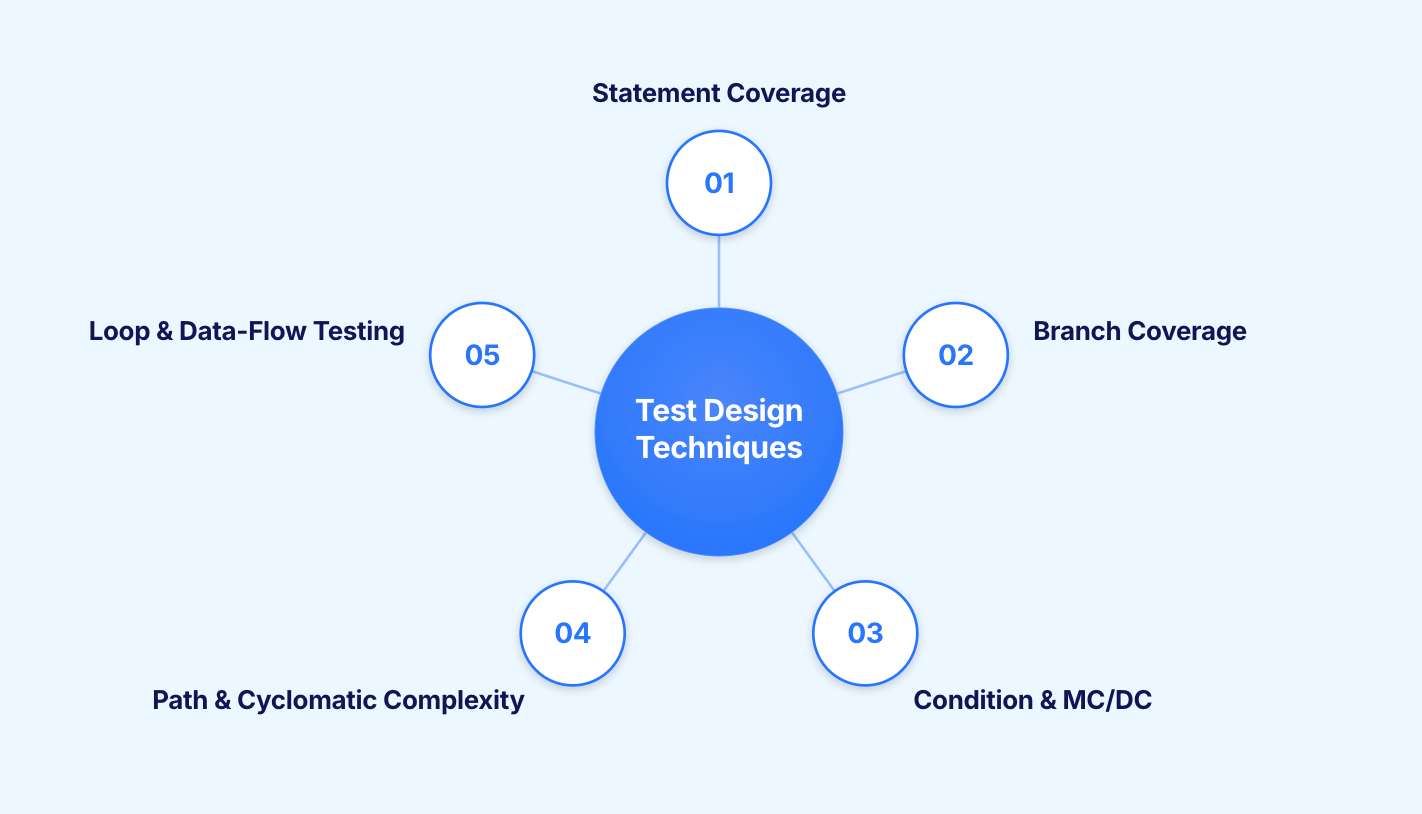
1. Statement Coverage
Statement coverage requires every executable line of code to be run by at least one test. Achieving full statement coverage proves no completely untested code exists, but it is the weakest of the structural criteria.
The job statement coverage is hired to do is eliminate completely uncovered code. A line that has never run could be silently broken. Coverage tools report a percentage. The team should treat it as a floor, not a ceiling.
Where it Falls Short
A test suite at 100% statement coverage can still miss decisions, conditions, and combinations entirely. Statement coverage is necessary but not sufficient.
2. Branch Coverage
Branch coverage requires every possible outcome of every decision point to be exercised. For every if statement, both the true branch and the false branch run at least once. For every switch, every case runs.
The job branch coverage is hired to do is verify that the code makes the right choices, not just that it executes. A test suite at full branch coverage exercises every fork in the control flow.
Worked Example
A payment processing function contains a conditional block checking whether a transaction is above £10,000 and whether the account is flagged for review. Branch coverage requires test cases where the transaction is above the threshold and below it, and where the account is flagged and not flagged.
Without branch coverage, a test suite that only exercises the standard payment path would never reach the flagged-account logic, leaving a complete decision path untested.
When to se it
As the primary structural coverage target for most application code. Modern coverage tools report branch coverage natively.
Where it Falls Short
Branch coverage does not verify that each individual condition inside a compound decision independently affects the outcome.
3. Condition Coverage and MC/DC
Condition coverage requires every Boolean sub-expression to evaluate to both true and false at least once. Modified Condition/Decision Coverage, known as MC/DC, is stronger: every condition must independently affect the outcome of the decision it belongs to.
The job MC/DC is hired to do is verify complex logical expressions in software where every condition matters. MC/DC is the standard for safety-critical avionics software under DO-178B/C and is increasingly required in automotive and medical-device contexts.
When to Use it
Safety-critical software. Regulated environments where the auditor will ask for evidence of independent condition coverage.
Where it Falls Short
The cost of achieving MC/DC is high. Outside contexts that specifically require it, the return rarely justifies the investment.
4. Path Coverage and Cyclomatic Complexity
Path coverage requires every possible path through the code to be executed. For anything beyond trivial functions, full path coverage is not achievable in practice: the number of paths grows exponentially with branches and loops. Cyclomatic complexity is the more useful related metric, counting the linearly independent paths and giving a practical bound for path-based test design.
The job cyclomatic complexity is hired to do in practice is signal structural risk. Functions with high cyclomatic complexity are statistically more defect-prone. Targeting them with both structural tests and refactoring effort is a defensible use of limited time.
When to Use it
As a code-quality signal and a prioritisation tool rather than as an absolute coverage target.
5. Loop Testing and Data-Flow Testing
Loop testing specifies test patterns for loops: zero iterations, one iteration, two iterations, a typical number, the maximum minus one, the maximum, and the maximum plus one. Data-flow testing traces variable definitions and uses through the code to catch anomalies such as variables that are defined but never used, or used before they are defined.
The job these techniques are hired to do is surface defects that arise specifically from iteration and data movement, which often slip past simpler coverage criteria.
When to Use Them
Compute-heavy functions, data-processing pipelines, loops with complex termination conditions.
Experience-Based Test Case Design Techniques
Experience-based techniques use what the tester already knows about how software fails. Specifications are incomplete. Code is opaque. Real systems break in ways that no formal model anticipates. Experience fills the gaps the other two families leave open.
1. Error Guessing
Error guessing draws on the tester's knowledge about where defects tend to hide. It sounds informal, but in practised hands it is one of the most cost-effective design methods available.
The job error guessing is hired to do is systematically apply pattern recognition. Experienced testers carry a mental catalogue of common defect patterns: null inputs, empty strings, special characters, time-zone boundaries, race conditions, leading zeros, unicode edge cases. A two-hour error-guessing session on a new feature will regularly find defects that two weeks of scripted test design missed.
When to use it
Every feature, every release, without exception. Even the most structured test plan benefits from a dedicated error-guessing pass.
How to Make it onsistent
Maintain a defect-pattern checklist for the application. Add to it every time a new pattern surfaces in production. The checklist turns individual intuition into transferable team knowledge.
2. Exploratory Testing
Exploratory testing is the simultaneous design, execution, and learning that happens when a tester actively investigates an application without a predefined script. Done well, it is not unstructured. It is structured by charters and time-boxed sessions with explicit scope and reporting.
The job exploratory testing is hired to do is discover issues that scripted tests cannot find by definition. Scripted tests look for the expected. Exploratory tests look for the surprising. The two are complementary, not substitutable.
When to use it
Every release. New features. Areas the scripted suite rarely visits. Verification of changes that AI coding agents have introduced into the codebase.
How to Make it Consistent
Session-based test management, where each session is bounded by a charter, time-boxed, and reported, converts exploratory testing from art into evidence.
3. Checklist-Based Testing
Checklist-based testing applies a curated list of known issue patterns systematically across the application. The list might cover accessibility, internationalisation, security basics, performance heuristics, usability patterns, or domain-specific risks.
The job checklist-based testing is hired to do is preserve organisational memory. Every defect found in production should generate a checklist entry. Every checklist entry should reduce the probability of that defect class recurring.
When to Use it
Regulatory compliance reviews, accessibility audits, pre-release readiness checks, regression coverage of historically problematic areas.
How to Keep it Useful
Update the checklists regularly. A checklist not updated in a year is solving last year's problems.

How to Choose the Right Test Case Design Technique?
Practitioners do not apply techniques in a vacuum. They look at the feature, the risk, and the available time, then pick the techniques that will yield the most coverage for the effort. A four-question framework, used consistently, turns that choice from improvisation into discipline.
Question 1: What is the shape of the input?
If the input has natural ranges, equivalence partitioning and boundary value analysis apply. If it has many independent parameters with multiple values, pairwise testing applies.
Question 2: Does the outcome depend on combinations of conditions?
If yes, decision table testing applies. The number of rows is the number of designed test cases. Skip this only if the logic is genuinely linear.
Question 3: Does the system have meaningful state?
If the response to an event depends on prior events, state transition testing applies. The state diagram is the specification for that portion of the test suite.
Question 4: Is the feature business-critical, integration-heavy, or user-visible?
If yes, use case testing applies on top of the lower-level techniques. The use case test is the end-to-end safety net.
Layer in white-box techniques where structural risk is highest (high cyclomatic complexity, safety-critical code, complex compound conditions) and add experience-based techniques to every feature without exception.
The framework is not a recipe. It is a working order of operations that prevents the most common design mistake: writing tests by pattern rather than by purpose.
How Techniques Work Together in Practice
The best test suites are not built from a single technique. They are layered, with each technique filling a gap the others leave.
Here is how a practitioner would combine techniques for a new discount calculation feature in a customer-facing e-commerce application.
At the input level: Equivalence partitioning identifies the distinct order value categories (under £50, £50 to £200, above £200). Boundary value analysis adds cases at £49, £50, £200, and £201 to catch off-by-one errors in the threshold logic.
At the logic level: A decision table maps every combination of loyalty tier, order value, and promotional code to the expected discount. The table has twelve rows. Twelve test cases, each with a clear reason for existing.
At the state level: The order workflow has states (basket, checkout, payment, confirmed, dispatched, returned). A state transition test suite covers every valid and invalid transition, confirming the discount applies correctly at the payment stage and is not reversed at dispatch.
At the integration level: A use case test walks the complete journey: product selection, basket review, promotion code entry, payment, and confirmation email. It verifies the discount appears correctly throughout, not just in the calculation function.
At the structural level: Branch coverage confirms the promotional code conditional evaluates both true and false paths. A coverage report flags any discount-logic branches not reached by the black-box cases.
At the experience level: A one-hour error-guessing session tries zero-value orders, expired promotional codes, duplicate code entries, and concurrent basket updates. Two defects surface that none of the designed techniques found.
The combined output is a test plan where every test case can be traced to a technique and every technique can be traced to a specific risk. That is the artefact a senior engineer will defend in review and an auditor will accept as evidence.

How AI Changes Test Case Design
Test case design was developed in a slower world. The techniques themselves are timeless. The work of applying them is being transformed by three shifts.
AI as the test designer
Modern AI-native platforms like Virtuoso QA can read a specification or user story and produce a first-pass test suite that applies equivalence partitioning, boundary analysis, and decision tables automatically. The human tester's role moves from writing test cases to reviewing them, challenging them, and adding the experience-based cases that AI cannot generate from a specification alone.
The design techniques become more important in this model, not less. They are the vocabulary the human uses to assess the AI's output and identify what is missing.
AI as the code author
When AI assistants are writing a significant share of application code, the rate of change and refactoring increases. Tests built without design discipline break on every refactor. Tests built from techniques that anchor to behaviour, such as decision tables, state transitions, and use case tests, survive because they verify what the code should do rather than how the current implementation does it.
AI as the failure analyst
When a test fails, AI failure-reasoning models can identify which technique's risk class the failure belongs to and recommend the design lens to deepen. Failure becomes feedback into test design rather than just another entry in a defect log.
The result is a working pattern that is genuinely new: the human tester as the designer of risk, AI as the generator of cases, the platform as the keeper of evidence. Design techniques are the shared language that makes the collaboration work.
The Most Common Mistakes in Test Case Design
Poor test suites are rarely caused by ignorance of techniques. They are caused by consistent bad habits that the techniques were invented to prevent.

1. Writing Positive Paths Only
The happy path is the easiest to design and the least likely to find defects. Every test plan needs a deliberate allocation of negative cases.
2. Treating Every Test Case as Equally Important
Risk is not uniform. A test plan that gives the same attention to a low-risk admin screen and a customer-critical payment flow is a test plan that fails at the moment it matters.
3. Confusing Recording With Designing
Recording a user journey produces a test case. It does not produce a designed test case. The recording captures what was done. The design captures what should be verified.
4. Skipping Documentation of Why a Test Exists
A test case without a stated technique is a test case nobody will defend in review. The technique is the warrant for the case's existence.
5. Over-Investing in White-Box Coverage
A team that achieves 95% branch coverage and 10% customer-journey coverage has built an unbalanced suite. The failure that reaches production will almost certainly be a journey failure, not a branch failure.
6. Under-Using Experience-Based Techniques
Error guessing and exploratory testing are among the cheapest, fastest defect-finding methods available. Suites that skip them leave significant value on the table.
7. Letting the Suite Age
Designed tests have a half-life. Business rules change, decision tables go stale, state diagrams gain new nodes. A suite without periodic redesign drifts into irrelevance even when every test passes.
How a Modern Platform Supports the Techniques
Tooling does not replace design judgement. The right platform can compress every step from a working technique to a maintained test case.
Five capabilities matter most.
Natural-Language Authoring
When a tester can express a test in plain language, the distance between technique and test case collapses. The tester thinks in techniques and writes in English rather than in code.
Composable Test Modules
Boundary tests for a payment flow look similar across applications. Composable, reusable modules turn well-designed test logic into shared assets across teams and products.
Agentic Test Generation
A platform that reads a specification and proposes a first-pass suite (equivalence classes, boundary cases, decision-table rows) lets the human concentrate on review, prioritisation, and the experience-based layer that requires genuine domain knowledge.
Self-Healing
Designed tests are valuable. Designed tests that survive UI drift without manual repair are an order of magnitude more valuable. Self-healing converts design effort into long-term coverage rather than a one-time asset.
Evidence-Grade Reporting
Each technique applied, each case run, each result logged. Reviewers, auditors, and engineering leadership get a record that explains not only what was tested but why each case existed.
Virtuoso QA brings these together in a single AI-native platform. Tests authored in natural language. Cases generated from intent through GENerator. Coverage assembled from composable modules. Drift absorbed by self-healing at approximately 95% accuracy. Every action recorded in an audit trail. The design techniques in this guide become the working language of the platform.
Related Reads
Frequently Asked Questions
What is equivalence partitioning with an example?
What is boundary value analysis and why is it important?
When should I use decision table testing?
How does pairwise testing reduce test counts?
Can AI generate test cases automatically?
How often should test cases be redesigned?








