

Blog
Positive vs Negative Testing: Differences & Examples

Published on
June 17, 2026


Positive vs negative testing explained with side-by-side comparison, examples, techniques, the right ratio, and how AI changes the balance.
Positive testing proves a feature works when the user behaves. Negative testing proves the feature stays safe when they do not. Both belong in every suite, yet most enterprise teams lean heavily on the first and pay for the gap in production.
This guide covers the definitions, a side-by-side comparison, worked examples on both sides, the design techniques that find real bugs, the ratio question that decides how trustworthy a suite is, and what changes now that AI writes a growing share of the code those tests are meant to verify.
The defect that costs real money almost never lives where the engineer was looking. It lives at the edge, in the moment a user does something nobody pictured, when an input lands outside the expected range, or when a dependency returns the one response that was never documented. That edge is the home of negative testing, and it is the part of quality work most teams quietly underfund.
The reason is structural rather than careless. Positive cases follow user stories, map neatly to acceptance criteria, and look good in a demo, so they get written and funded.
Negative cases ask the author to think like a confused user, a curious attacker, or a degraded system, which is harder work whose payoff shows up only as incidents that never happen. The result is a suite that passes cleanly right up until the day it should have failed.
Getting the balance right starts with being precise about what each kind of testing actually proves, so the rest of this guide builds from clear definitions out to the techniques and the ratio that decide suite quality.
Most readers arrive wanting the contrast in one view, so here it is before the deeper discussion.
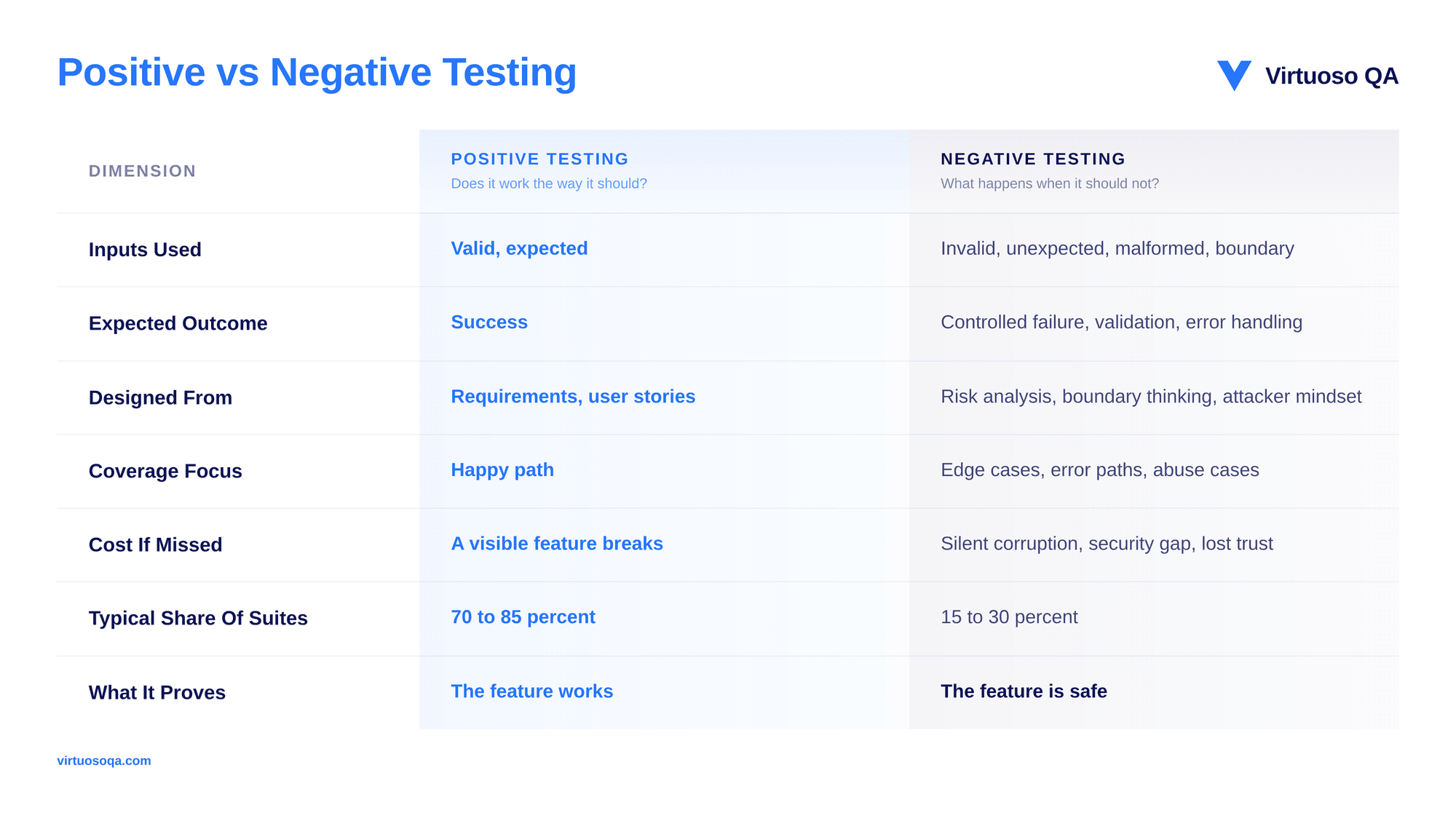
Positive testing verifies that an application behaves correctly when it receives valid input and is used the way its designers intended. A login form with correct credentials should let the user in. A checkout with a valid card should complete the purchase. A search for a correctly spelled product should return that product.
Positive testing confirms the system delivers on its promises along the routes that were planned for it.
A few concrete cases make the category easy to spot inside a real suite:
Every case shares one shape: valid input, expected behaviour, confirmed outcome.
Positive tests confirm the system works for the use case the team explicitly designed for. They verify functionality, check that requirements have been met, and form the backbone of acceptance testing and release confidence.
What they do not prove is whether the system holds up in the hands of users who behave differently from the design assumption. That proof lives on the other side.
Negative testing verifies that an application behaves correctly when it receives invalid, malformed, unexpected, or boundary input, or when it is used in ways the designer never planned.
The goal is not to break the system for its own sake. The goal is to confirm the system protects itself, validates its inputs, surfaces sensible errors, and stays in a known state.
A robust application fails predictably, while a fragile one corrupts quietly.
The pattern is clearer in the wild than in the abstract:
Negative tests live at the boundary, where users get creative, where attackers probe, and where the unexpected meets the unspecified.
Negative tests confirm the system is robust under conditions outside its design envelope. They verify validation logic, error handling, security posture, and graceful degradation, proving the application can be trusted with users who will not read the instructions.
The category is uncomfortable to fund because it cannot be shown off in a sales demo, and the expensive failures it prevents stay invisible right up until they are not.
Destructive testing is an evolved form of negative testing that deliberately pushes the system toward failure to check how it holds up and recovers.
Where standard negative testing feeds invalid inputs, destructive testing creates extreme conditions: a service crash mid-transaction, a database that drops out, memory exhausted, or a sudden traffic spike.
It is most at home in performance, resilience, and chaos-engineering work on distributed systems.
The distinction is worth holding clearly:
For example, simulating a database shutdown while many users submit forms at once should show the application failing gracefully with a clear message, protecting data integrity, and recovering cleanly once the connection returns. That is destructive testing confirming resilience, not just rejection.
In practice the line blurs at the edges. A test confirming that a validation message appears correctly when an invalid input is submitted is both negative, because the input is invalid, and positive, because the validation component behaves as designed.
A useful working rule: The test is positive if the intent is to confirm a designed capability, and negative if the intent is to confirm protection against an undesigned input. The same field can drive both.
A valid date one day inside a boundary is a positive test, while a date one day outside the same boundary is a negative one. The category is not about the input itself but about what the test is trying to learn.
Both kinds of testing should start early in development, while defects are cheapest to catch, and a sound discipline is to write at least two tests per requirement, one positive and one negative.
As teams review requirements, they should be naming the error paths as deliberately as the happy paths, which often surfaces missing acceptance criteria such as the exact wording of an error message.
That said, running both everywhere is expensive and not always warranted, and there are levels of testing where only positive cases belong:
Risk drives the rest. In regulated, safety-critical domains such as financial transactions or healthcare records, both positive and negative coverage is frequently mandatory, with the level of rigour set by the functional risk of each area.
The two categories are not confined to functional checks on form fields. They apply just as cleanly to non-functional work, and naming the pairing helps teams place it:
The same positive-and-negative logic that governs a single input field scales all the way up to how the whole system behaves under pressure.
A single end-to-end journey shows both categories travelling together.
The positive case confirms the machine works under ideal conditions. The negative case confirms it defends itself and the account holder when something is wrong. Neither alone tells you the journey is safe; together they do.
The interesting question on this topic is not the definition. It is the ratio that decides how much the suite can be trusted.
Audit almost any enterprise regression suite and the distribution leans heavily positive, for the structural reasons noted at the start.
Positive tests are easier to write, follow user stories written in the positive case, map to acceptance criteria, demo well, and get funded by stakeholders who care about feature completeness.
Negative tests demand the harder cognitive move of imagining what could go wrong, and their reward shows up only in the incidents that never occur, which is a difficult thing to claim credit for.
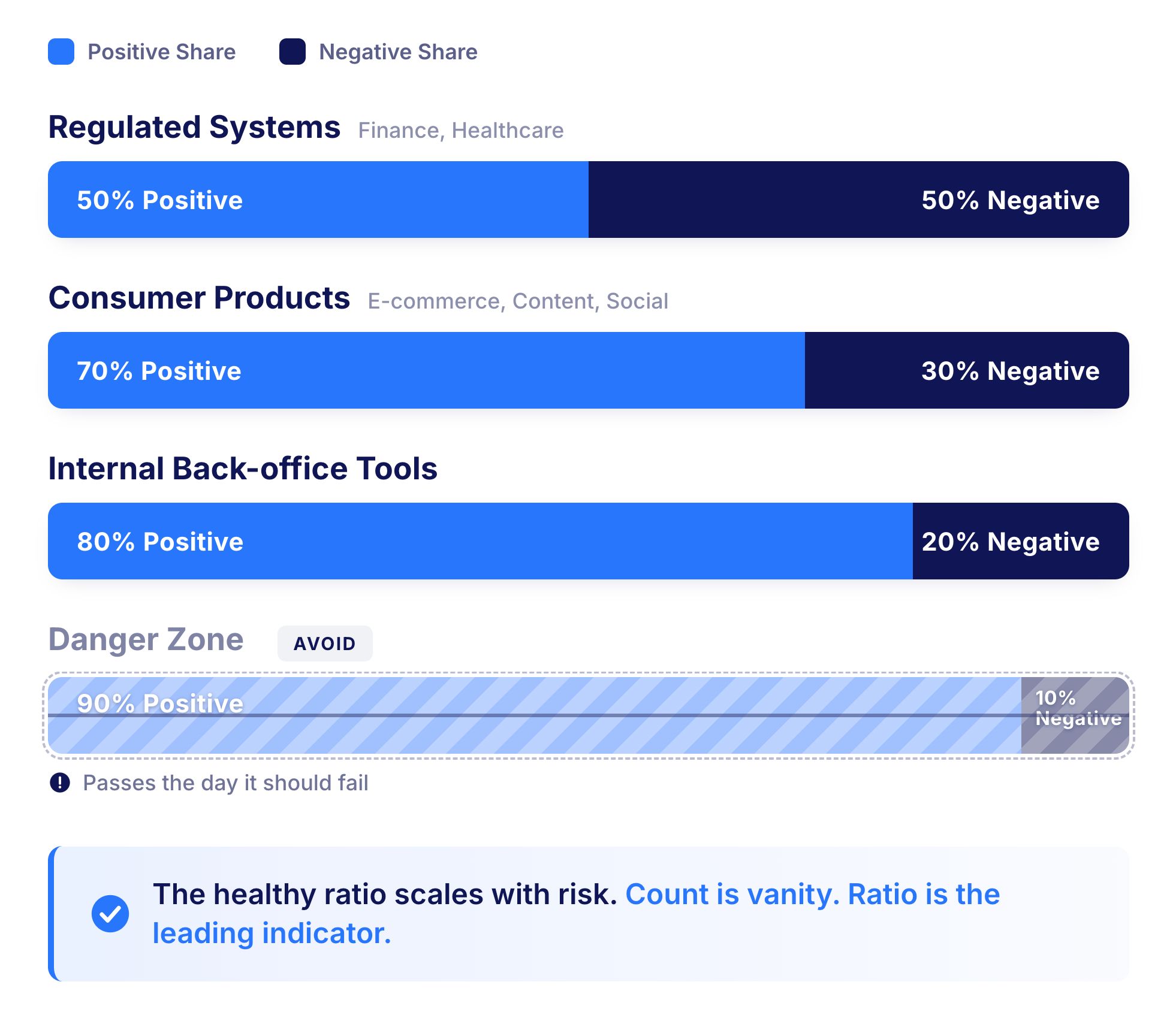
A suite of ten thousand mostly-positive tests is not safer than a suite of three thousand with proper negative coverage. Total count is a vanity metric, and ratio is the leading indicator.
The right balance depends on the application and its risk profile:
The pattern that fails almost everywhere is 90/10 or thinner on the negative side. A suite that light on negative coverage will pass on the day it should fail.
Sizing the right share of negative testing is judgement-led, but a working model makes it defensible.
For each major user journey, list the validation boundaries it crosses. For each boundary, write at least one negative case immediately above and below it.
Add abuse cases for any field a user types into freely, error-path cases for any external dependency, and concurrency cases for any shared resource. The arithmetic produces a defensible minimum, and most teams find their actual coverage falls well short of the floor the exercise reveals.
Virtuoso QA treats both categories as first-class concerns inside the same generation and execution fabric, rather than bolting negative testing on as an afterthought.
The strongest suites do not treat positive and negative as separate efforts but as two faces of the same journey. A checkout test covering only the happy path leaves the team blind to what happens when the payment provider returns an unexpected response, while a test covering only the negative path proves nothing about whether normal customers can buy anything. The journey is the unit of testing, and positive and negative are its two faces.
The shift in framing is small but important. The team stops asking whether negative tests exist for a feature and starts asking whether the journey is verified at every point it can succeed and at every point it can fail.
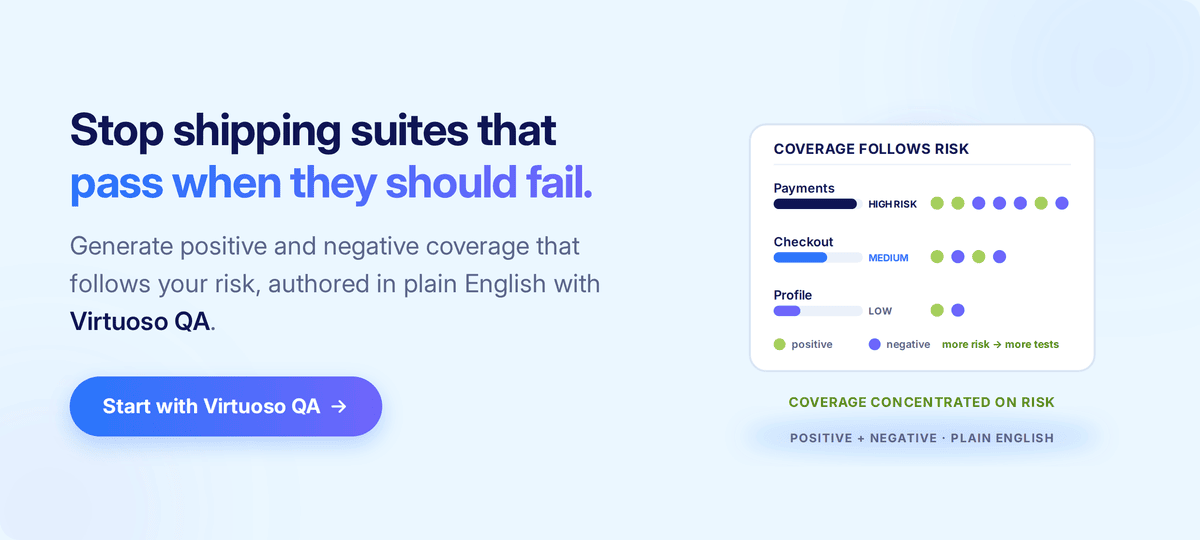

Try Virtuoso QA in Action
See how Virtuoso QA transforms plain English into fully executable tests within seconds.
