Blog

Negative Testing in Software Testing: Scenarios, Techniques, and Real-World Examples

Abhilash
Industry Analyst, Test Automation
Published on
June 16, 2026
In this Article:

Negative testing is a software testing technique that checks how an application responds to invalid input, unexpected actions, and adverse conditions.

Positive testing tells you the application works when everyone behaves. Negative testing tells you what happens when they do not, and that second question is where most production incidents are born.

This guide walks through what negative testing is, the scenario categories that recur across every enterprise system, the techniques that make those scenarios repeatable, the step-by-step process for running them, the real-world failures that prove the point, and how AI-native test automation runs the lot continuously rather than once a quarter.

The Half of QA That Quietly Gets Skipped

Users do not read your validation rules before they fill in a form. They paste a phone number into the email field, type their date of birth with the day and month the wrong way round, hammer the submit button four times when the page feels slow, and walk away from a half-finished checkout to answer the door. Every one of those moments is an input your application never planned for, and every one is a chance for something to break in a way the customer remembers.

Most teams know they should test for this. Far fewer actually do, because the happy path is easier to write, easier to demo, and easier to sign off. The result is a familiar catalogue of avoidable defects:

  • A registration page that throws a server error on an address with no domain.
  • A quantity box that happily accepts minus three.
  • A search field that falls over the moment someone types an emoji.

None of these show up in a pass rate built only on valid inputs, and all of them surface within days of release. The discipline that closes the gap is negative testing, and it has never mattered more than it does now.

The sections below give you the full picture: definitions, scenario libraries, enterprise patterns, design techniques, a repeatable process, real failures, and the automation approach that lets you run everything on every build.

What is Negative Testing in Software Testing?

Negative testing is a software testing technique that checks how an application responds to invalid input, unexpected actions, and adverse conditions. The point is not to confirm that the system works when everything lines up. The point is to confirm that it fails in a controlled, predictable, and informative way when something does not.

The ISTQB glossary frames it as testing a component or system in a way it was not intended to be used, and that "not intended" space is exactly where negative cases live.

A negative test case has the same shape as any other: a starting state, a set of steps, and an expected outcome.

What changes is the input you feed it:

  • Where a positive case enters a valid email and expects the user to progress, a negative case enters a string with no @ sign and expects a specific validation message.
  • Where a positive case submits a value inside the allowed length, a negative case submits one character beyond it and expects a clean rejection rather than a stack trace.

A system that has been through thorough negative testing complains loudly and helpfully when something is wrong, instead of failing silently when something is broken. That distinction is the whole game.

Negative Testing vs Positive Testing

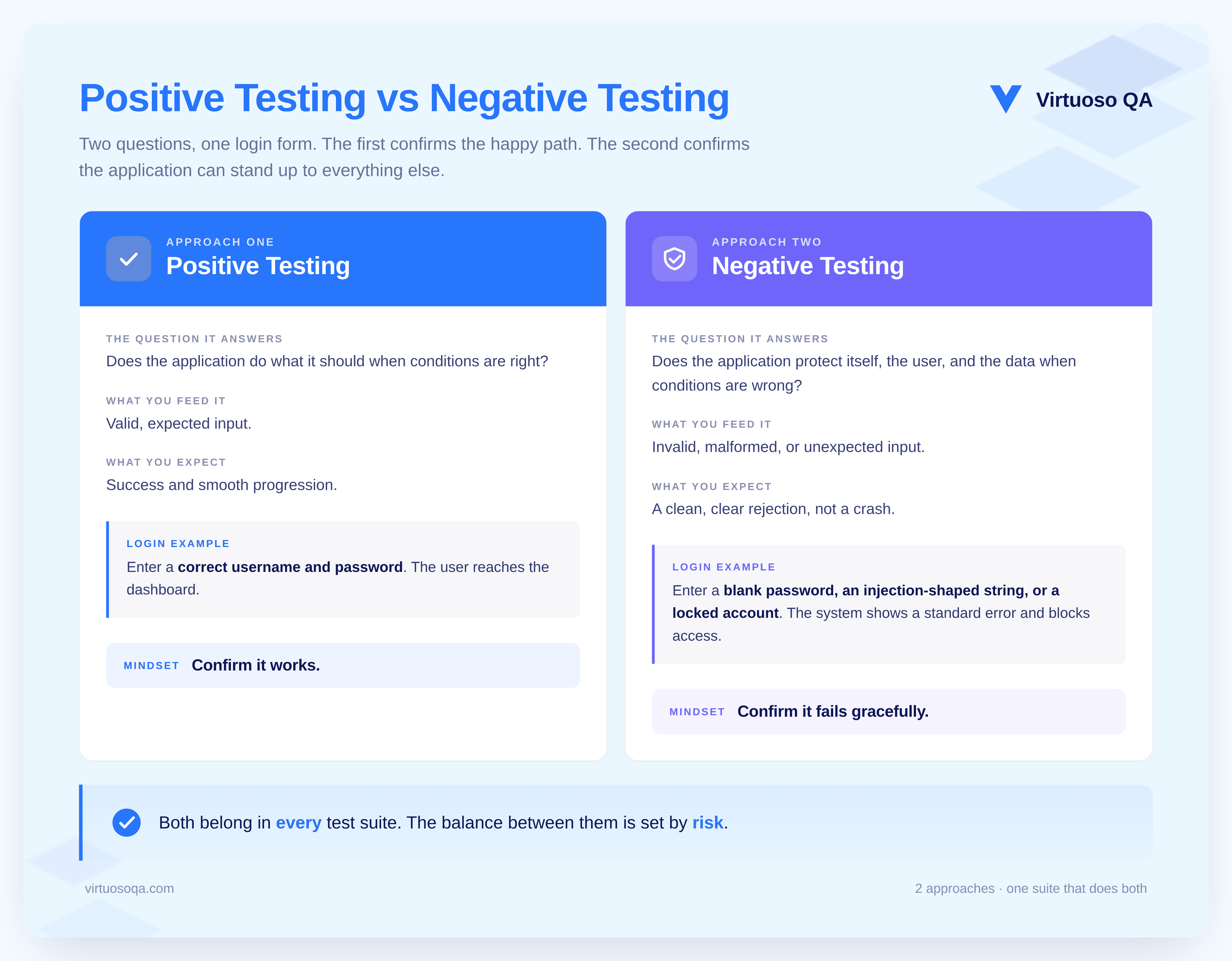
Positive and negative testing are two halves of the same job, not rivals competing for the same time budget:

  • Positive testing answers whether the application does what it should when conditions are right.
  • Negative testing answers whether the application protects itself, the user, and the data when conditions are wrong.

The trap teams fall into is assuming the first question covers the second.

Picture a login form. It accepts a valid username and password and lands the user on their dashboard, so the positive test passes. That same form might still:

  • Crash on a whitespace-only password.
  • Accept an injection-shaped string without sanitising it.
  • Return a 500 instead of a clean error on a missing field.
  • Let a locked account straight through.

The positive pass rate stays green throughout, and every one of those gaps reaches production untouched. The answer is to design both kinds of case together, with the balance set by risk.

A payment or claims workflow may warrant more negative cases than positive ones, while a static content page needs far fewer. Judging that ratio is part of the craft of test design, not an afterthought.
Negative Testing vs Positive Testing

Why Negative Testing Scenarios Matter More Than Ever

Three shifts have pushed negative testing from a nice-to-have toward a release-blocking requirement:

1. The Surge in AI-Generated Code

AI assistants and coding agents are very good at producing the happy path and noticeably weaker at producing thorough error handling. Missing input validation, fragile null handling, off-by-one mistakes on boundaries, and quiet type coercion all turn up more often in generated implementations than in hand-written ones.

Without negative tests to catch them, those weaknesses ship.

2. The Cost of Getting it Wrong in Front of Regulators and Customers

A login screen that reveals which half of the credential was incorrect is a security finding. A payment form that accepts a negative amount and credits the customer is a fraud opening. According to IBM's 2025 Cost of a Data Breach Report, the global average breach now costs 4.44 million US dollars, with the UK average at 3.29 million pounds, and a meaningful share of those incidents trace back to exactly the input-handling failures negative testing is built to catch.

3. The Rising Price of a Single Bad Moment in Production

One ungraceful error shown to thousands of users during a peak-traffic event costs more in lost trust and support load than a full year of negative testing investment.

The economics point firmly toward catching these failures inside the suite, long before a customer ever sees them.

What Negative Testing Helps You Uncover

Beyond confirming that a single field rejects a single bad value, negative testing surfaces whole classes of problem that positive testing structurally cannot reach:
  • Security weaknesses, such as injection openings, weak authentication, and unauthorised access through manipulated requests.
  • Data corruption, where invalid or malformed input is accepted and quietly poisons the stored record.
  • Hidden defects that only appear when the system meets input it was never designed to handle.
  • Stability and resilience gaps, where adverse conditions cause crashes, hangs, or unrecoverable states.
  • Business-logic loopholes, where a workflow can be bypassed or a control sidestepped by acting out of the expected sequence.
CTA Banner

The Two Foundational Types of Negative Testing

Before the eight scenario categories, it helps to hold two broad types in mind, because almost every negative case is a version of one or the other:

  • Error-handling tests check how the application responds to invalid input and unexpected conditions.

    An expired card at checkout, a required field left blank, a connector that errors mid-flow: the test confirms the system returns a clear, helpful message rather than a crash or a blank screen.
  • Stress and load tests push the system past its normal limits to see how it copes.

    Ten thousand simultaneous logins, a transfer request for an absurd amount, a server running low on memory: the test confirms the system degrades in a controlled way rather than falling over.

The eight categories below sit underneath these two types and give you the granular coverage checklist.

The Eight Categories of Negative Testing Scenarios

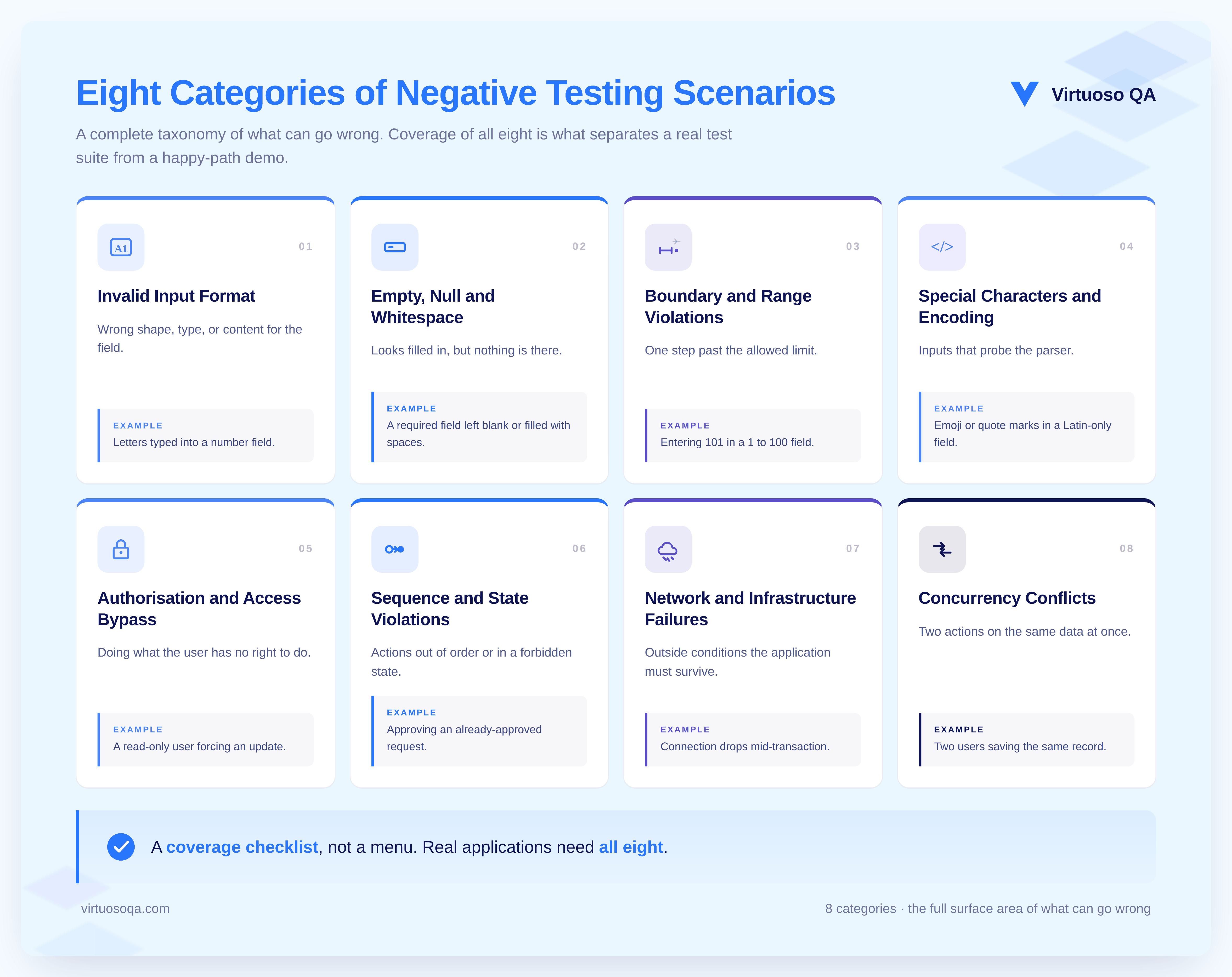
Negative testing scenarios sort into eight categories that show up in almost every meaningful enterprise application. Each one targets a different way the system can be pushed off course.

Treat the list as a checklist for coverage rather than a menu to pick from.
Eight Categories of Negative Testing Scenarios

1. Invalid Input Format

The biggest single category by volume. These are inputs that are not the right shape, type, or content for the field receiving them:

  • A numeric field handed letters.
  • A date field handed the 31st of February.
  • An email field handed a string with no domain.
  • A phone field handed punctuation in a digits-only specification.
  • A currency field handed two decimal points or scientific notation.
  • A URL field handed a javascript: scheme instead of http.

2. Empty, Null, and Whitespace Values

Inputs that look filled in but are not:

  • A mandatory field submitted blank.
  • A field holding nothing but spaces where real content was expected.
  • An API request carrying a null where a string was required.
  • A search box containing only punctuation.
  • A file upload that turns out to be zero bytes.

3. Boundary and Range Violations

The values sitting just outside the acceptable range, where defects love to cluster:

  • A number field accepting one above its stated maximum.
  • A text field accepting one character past its limit.
  • A date field accepting the day before the valid window opens.
  • A pagination request asking for a page that does not exist.
  • A quantity field accepting a negative when only positive values make sense.
  • A value that exceeds the data type itself, such as a number pushed past the limit a signed integer can hold.
Related Reads: What is Boundary Value Analysis in Software Testing?

4. Special Characters and Encoding

Inputs that probe the assumptions baked into the parser:

  • Emoji, right-to-left scripts, and accented characters in a field validated only for plain Latin text.
  • Apostrophes and quotation marks in a field whose contents flow into a database query or a rendered page.
  • Control characters, null bytes, and zero-width spaces.
  • Mismatched encodings, such as UTF-8 content arriving into a system that expects Latin-1.
  • Very long strings designed to stress the buffer.

5. Authorisation and Access Bypass

Attempts to do something the current user has no right to do:

  • A read-only account trying to push an update.
  • A user from one tenant reaching another tenant's record by editing the URL.
  • A standard user hitting an admin-only endpoint.
  • A user trying to raise their own privileges.
  • A session token reused after logout or after it has expired.

6. Sequence and State Violations

Actions taken out of order, or in a state that should forbid them:

  • Placing an order with an empty basket.
  • Approving a request that has already been approved.
  • Cancelling a transaction that has already settled.
  • Editing a record another user has locked.
  • Firing a workflow event before its prerequisites are met.

7. Network and Infrastructure Failures

Conditions outside the application that the application still has to survive:

  • The connection dropping midway through a multi-step flow.
  • A backend service returning a 500 in the middle of a transaction.
  • A long-running operation timing out.
  • The user refreshing, navigating back, or closing the tab during submission.
  • A session lost to inactivity.

8. Concurrency Conflicts

Two actions touching the same data at overlapping moments:

  • Two users saving edits to the same record at once.
  • A report running against data that another user is updating live.
  • Stock being decremented below zero by parallel orders for the last item.
  • A workflow firing twice because an event was duplicated.

Negative Testing Scenarios With Real-World Examples

The categories above are the theory. The scenarios below are the practice, grouped by the surfaces where users and systems actually meet. Each cluster maps a defect class that has caused real production incidents.

Login and Authentication

Logging in is the first thing every user does, so it deserves the first and most thorough negative test plan:

  • Enter a valid username with the wrong password past the lockout threshold, and confirm the lockout fires without revealing which field was wrong.
  • Submit an empty username, an empty password, and both empty together.
  • Feed whitespace-only values into each field.
  • Push excessively long strings into both.
  • Drop injection-shaped strings into the credential fields and confirm a standard authentication failure rather than a server error.
  • Attempt a login with a disabled account, during an active password reset, with an expired session cookie, and with a cookie issued to a different user.

Forms and Data Entry

Forms are where users collide with validation rules, and the source of the complaint that the field accepted the input but nothing happened afterwards:

  • Submit mandatory fields empty, both alone and in combination.
  • Enter one character beyond the documented length.
  • Feed a numeric field with letters, decimals, exponents, and negatives.
  • Hand an email field malformed addresses missing the @, the domain, or the top-level part, plus trailing spaces.
  • Give a date field impossible dates and dates outside the valid range.
  • Send a currency field multiple decimal points and stray currency symbols.
  • Enter multi-language content and confirm it renders correctly in display, search, and export.

E-commerce and Payment Workflows

Negative testing here protects revenue and trust at the same time:

  • Add items to the basket with a quantity of zero, a negative quantity, and an absurdly large one.
  • Apply an expired, invalid, or already-redeemed promotional code.
  • Check out with a card that fails authorisation and with incomplete address details.
  • Abandon the checkout and return, confirming the basket and pricing survive intact.
  • Have two users buy the last item in stock at the same instant.
  • Refund an order that only partly shipped.
  • Place an order as a flash promotion ends mid-transaction.

File Uploads

Uploads are where your application meets the wider world's content, and most applications mishandle that meeting at least once:

  • Upload files over the size limit.
  • Upload files with disallowed extensions and MIME types.
  • Upload a file with an allowed extension but a forbidden payload, such as an executable renamed to .pdf.
  • Upload zero-byte files and files with corrupted metadata.
  • Fire more simultaneous uploads than the concurrency limit allows.
  • Interrupt an upload with a dropped connection and confirm the application returns to a recoverable state.

Search and Filters

Search that stumbles on edge cases produces blank pages, and users blame the product rather than their query:

  • Search with an empty string, whitespace only, special characters, and a very long string.
  • Search using characters that carry meaning in the underlying query language.
  • Build filter combinations that should return nothing, and confirm the correct empty state appears.
  • Set filter values outside the available range, such as a date far in the future or a status that does not exist.
  • Sort a column with no data.
  • Request a page beyond the last.

API Endpoints

APIs accept input from clients your team does not control, which makes them prime negative-testing targets:

  • Send requests missing required headers, carrying malformed JSON or XML, or with an invalid content type.
  • Send structurally valid requests with out-of-range field values.
  • Use expired, revoked, or wrong-scope tokens.
  • Exceed the documented rate limit and confirm a clean 429 response.
  • Target resources that do not exist and confirm a 404 rather than a 500.
  • Call endpoints with HTTP methods they do not support.

Multi-Step Workflows

Long workflows accumulate state, and every transition is a place for a negative scenario to live:

  • Abandon the flow at each step and come back later.
  • Jump steps out of order by editing the URL.
  • Trigger an action only valid in a later state.
  • Let the workflow time out while waiting on an external approval.
  • Have two users edit the same workflow state at once.

Reporting and Exports

Reports that fail negative tests fail their readers quietly:
  • Request a report covering a period with no data.
  • Apply filter combinations that return zero rows.
  • Run a report across a daylight-saving boundary.
  • Request an export larger than the export limit.
  • Fire concurrent exports at the same destination.
CTA Banner

Negative Testing Across the Wider QA Picture

Negative testing is not a phase that sits in one box. It threads through several other testing types, and naming where it applies helps you place it correctly in your strategy:

1. Unit Testing

Developers write negative unit tests to confirm a single function rejects bad arguments and raises the right exception, not just that it returns the right answer for good ones.

2. System Integration Testing (SIT)

When separate components are wired together, negative cases catch the failures that only appear at the seams, such as one service passing malformed data to another or a downstream system mishandling an upstream error. SIT is where many input-validation gaps first become visible.

3. End-to-End Testing

Running a full journey with invalid inputs partway through confirms the whole chain handles failure gracefully rather than leaving the user stranded mid-flow.

4. Security Testing

Negative cases overlap heavily with security work, probing how the system responds to injection-shaped payloads, invalid tokens, and unauthorised requests.

Negative Testing Techniques

Designing negative cases is a craft, and a handful of named techniques carry most of the practical weight. The first five are the core design methods; the rest map techniques to specific surfaces.

1. Boundary Value Analysis on the Invalid Side

Boundary value analysis hunts for off-by-one defects at the edges of valid ranges, and the invalid side of each boundary supplies a large share of negative cases.

A field accepting 1 to 100 produces negative cases at 0, -1, 101, and 1000 alongside the valid cases at 1 and 100. The values just past the edge are where the bugs gather, so they earn explicit tests.

2. Equivalence Partitioning of Invalid Classes

Equivalence partitioning groups inputs into classes that should behave the same way, then tests one representative from each.

The invalid classes, such as non-numeric content in a numeric field or out-of-range numbers in a bounded one, form the structural backbone of a negative test plan and keep the case count manageable without sacrificing coverage.

3. Input Validation Testing

This technique focuses squarely on whether the application checks the format, type, and completeness of what it receives.

You feed a registration form a malformed email or leave a required field blank and confirm the system flags it with a clear message rather than accepting it. It is the most direct expression of negative testing and the one every form on every page deserves.

4. Error Guessing

Error guessing turns hard-won experience into explicit cases. A practitioner who has watched failures across many releases develops a feel for where the next one will appear, and that intuition becomes a set of targeted negative tests.

AI-augmented platforms speed the practice along by surfacing patterns from earlier failures and proposing the scenarios worth adding.

5. Fuzz Testing

Fuzz testing feeds the system large volumes of random, malformed, or unexpected data to see what falls over. It is especially effective at uncovering crashes, memory problems, and security holes that no hand-written case would think to try, because the inputs are generated rather than imagined.

Feedback-driven fuzzing, which uses the results of earlier runs to shape new inputs, is particularly strong at finding deep defects in parsers, file handlers, and APIs.

6. Fault Injection

Fault injection deliberately introduces problems into the environment rather than the input: simulated dropped connections, forced backend errors, artificial delays, partial outages.

It catches resilience defects that input-driven testing alone can never reach, because the fault lives outside the form field entirely.

7. State Transition Testing

State transition testing checks how the application behaves as it moves between states, and crucially how it handles transitions that should not be allowed.

Trying to log in, reset a password, or edit a record on a suspended account confirms the system blocks invalid transitions rather than processing them. It is the natural home for the sequence-and-state category of scenarios.

8. Session-Based Testing

Session-based testing examines how the application handles the lifecycle of a user session under invalid conditions. Letting a session sit idle past its timeout and then attempting a sensitive action confirms the system forces re-authentication rather than honouring a stale session, closing off a common security gap.

9. Surface-Specific Negative Techniques

The same mindset applies to specific layers of the stack:

  • UI testing under negative conditions confirms the interface stays usable at extreme resolutions, with enlarged fonts, or in high-contrast mode, rather than breaking the layout.
  • API testing confirms the service returns a clean error for numeric input where a string was expected, empty bodies, or special characters, rather than crashing or leaking internal detail.
  • Database testing confirms that a query for a non-existent record returns a proper "not found" response instead of exposing the underlying schema.
Test Automation is Costing More than Saving - Download Whitepaper

How to Design a Negative Test Case

A useful negative test case has four parts, and writing all four is what separates a real case from a vague intention to try something odd:

1. Precondition

The starting state, such as an authenticated user with a known account balance.

2. Invalid Input or Action

The specific thing that should not be accepted, such as a transfer amount one penny above the limit.

3. Expected Response

The graceful behaviour you require, such as an inline error message, a disabled submit button, and no call made to the backend.

4. Observable Side Effect

What must be true afterwards, such as the balance unchanged, no transaction logged, and the right audit event recorded.

Take a transfer-funds form that accepts amounts between £0.01 and £10,000. A single field generates a whole family of negative cases:

  • The amount £10,000.01 just over the limit
  • A negative amount
  • Zero
  • A non-numeric string
  • An empty value
  • Three decimal places
  • And a figure in scientific notation

That is seven negative cases against one field, which is exactly why automation becomes essential as the form grows.

A practical design sequence looks like this:

  • Understand the requirement so you know precisely what valid looks like, because you cannot define invalid without it.
  • Identify the weak points, focusing on input fields, integrations, transitions, and external dependencies where failure is most likely.
  • Define the invalid scenarios using boundary value analysis, equivalence partitioning, and error guessing.
  • Document each case with its precondition, input, expected response, and side effect.
  • Review and refine the set after execution, adding any cases that earlier runs revealed you had missed.

How to Perform Negative Testing - Step by Step

Running negative testing well is a methodical process rather than a session of typing gibberish and hoping something breaks:

1. Define the Test Cases or Scenarios

Start from likely failure points: invalid inputs, missing fields, out-of-range values, unauthorised actions, and broken sequences.

2. Set up a Production-Like Environment

Mirror the real configuration, access levels, and integrations so the results reflect what users would actually hit.

3. Execute the Cases

Feed the invalid inputs and perform the invalid actions step by step, watching the system's response at each stage.

4. Use Automated Tooling

Run the cases through an automation platform so the repetitive, high-volume work stays fast and consistent rather than depending on manual effort.

5. Monitor Behaviour and Capture Evidence

Record error messages, status codes, screenshots, network traces, and logs, and watch for crashes, data corruption, and unhandled exceptions.

6. Analyse the Results and Report

Identify every unexpected behaviour, document it in detail, and route it to the development team with enough context to fix it.

7. Run Regression After Fixes

Once defects are resolved, re-run the suite to confirm the fix worked and introduced nothing new.
CTA Banner

Negative Testing in Enterprise Systems

Every enterprise platform layers its own behaviour on top of the universal categories. The patterns below show up in nearly every release across the major systems, and they are where negative coverage earns its keep.

Salesforce Negative Testing Scenarios

Salesforce ships several releases a year and its validation logic shifts with them.

Useful negative cases include:

  • Field-level security hiding a field the user expected to see, with confirmation that the absence is handled cleanly rather than throwing a runtime error.
  • Validation-rule violations on opportunity stage changes with mismatched probability, amount, and close date.
  • Workflow and flow logic firing on unexpected event combinations.
  • Bulk operations pushed past Apex governor limits.
  • Sharing-rule edge cases that block access unexpectedly.
  • Lightning components rendering a sensible error state when an underlying call fails.

Microsoft Dynamics 365 Negative Testing Scenarios

Dynamics 365 carries its own footprint across Sales, Service, and the Power Platform.

Common negative cases include:

  • Business-rule violations on entity records.
  • A Power Automate flow forced to fail when an external connector errors.
  • Plugin exceptions on create and update events.
  • Security roles blocking the actions they should.
  • An embedded Power App degrading gracefully when its data source is unavailable.

SAP S/4HANA Negative Testing Scenarios

SAP transactions are dense with rules and tolerances.

Common negative cases include:

  • A sales order created against material with no available stock.
  • An invoice posted into a closed period.
  • A payment run with a bank-determination error.
  • A posting with a foreign-currency rate outside the configured tolerance.
  • A custom Z-program run against malformed input.

Guidewire Negative Testing Scenarios

Insurance workflows carry real money and real consequences when they fail.

Common negative cases include:

  • A quote requested outside the underwriting eligibility window.
  • An endorsement with an effective date outside the policy term.
  • A claim raised against an inactive or lapsed policy.
  • A premium calculated with rating data that breaks the engine's schema.
  • A document generated when its referenced template has been retired.

Advantages of Negative Testing

Investing in negative testing pays back across quality, security, and cost:

1. Greater Robustness

Software that stays standing under bad input earns trust and avoids the headline-grabbing crash.

2. Stronger Security

You find injection openings, weak validation, and access gaps before an attacker does.

3. Better User Experience

Clear, friendly error messages and graceful fallbacks signal a product that respects its users.

4. Broader Coverage

You learn not just what works, but what happens when things go wrong, which is most of real-world usage.

5. Lower Long-Term Cost

Catching defects in design and test is far cheaper than firefighting them in production after release.

Challenges of Negative Testing, and Why Teams Avoid it

Negative testing is harder than positive testing, and being honest about why helps you plan around it:

1. The Input Space is Effectively Infinite

Positive testing has a finite set of correct inputs; negative testing asks you to imagine every wrong one, which never truly ends.

2. Requirements Are Often Ambiguous

If no one has defined what counts as invalid, writing tests for it becomes guesswork.

3. Realistic Invalid Data is Hard to Build

Generating meaningful malformed inputs, especially across integrated systems, takes real understanding of how the system behaves under stress.

4. Time Pressure Pushes it Down the List

A suite that proves a feature works is easier to demo to a sponsor than one that proves it fails well, so negative testing is the first thing cut under a deadline.

5. It Demands an Adversarial Mindset

Testers have to think like an attacker or a careless user, which is a different and more tiring stance than confirming the happy path.

6. Volume Without Design Backfires

Piling on negative cases without a technique behind them just inflates the regression suite. The fix is disciplined design through boundary analysis and partitioning, not raw quantity.
CTA Banner

Common Pitfalls in Negative Testing

Four mistakes account for most of the failures in real programmes:

1. Stopping at the Obvious Invalid Inputs

Letters in a number field is the warm-up, not the plan. The valuable cases probe assumptions the developers did not know they had made.

2. Testing Only the Input and Ignoring the Response

A rejection gets confirmed, but the specific message, status code, and audit entry go unchecked.

3. Treating Negative Testing as a One-Off Hardening Sprint

Validation and error handling drift continuously and need continuous verification.

4. Keeping it Manual

The volume of worthwhile negative cases on any real application long ago outgrew what hand-execution can sustain at modern release speed.

Negative Testing Best Practices

Five habits separate a negative testing programme that holds the line from one that exists only on paper:

1. Treat Negative Cases as First-Class Work

Design and automate them alongside positive cases rather than tacking them on after they pass. Programmes that file negative testing under optional discover during the next incident review that it was not.

2. Anchor Each Case to a Failure Mode, Not a Quirky Input

A list of strange things to type is not a plan. A list of failure modes you intend to confirm are handled is, with the input as the trigger rather than the goal.

3. Reuse Proven Fragments Through Composable Libraries

Login negative cases recur across every authenticated journey, and form-validation cases recur across every form. Turning those into shared assets extends coverage without expanding the work in step.

4. Capture the Full Evidence, Not Just the Verdict

A negative test that passes because an error appeared, without recording the exact message, the status code, the screenshot, and the log entry, has only signalled a state that might or might not be correct. Modern execution captures all of it automatically.

5. Run Negative Cases on Every Pipeline Event

Input handling drifts, error messages get rewritten, and boundary behaviour changes quietly. Tests that ran once and never again protect nothing.

Negative Testing in the Age of AI-Coded Software

When AI assistants and agents produce code at speed, negative testing changes shape in three ways:

  • The volume of cases has to rise, because generated code covers the happy path well and the error paths inconsistently, so the suite carries more of the load.
  • The cadence has to tighten, because AI-coded applications change daily and weekly negative runs no longer keep up.
  • The authoring shifts, because the same generative capability that writes the code can propose the negative cases that probe it, drawn from requirements, prior incidents, and the application's own context. Human attention moves from writing cases one by one to reviewing and curating a proposed plan.

How Virtuoso QA Runs Negative Testing at Scale

Designing negative cases is one problem. Executing them across a real enterprise stack, repeatedly, as the code and the platforms change underneath you, is a problem of a different size.

Closing that gap is what Virtuoso QA is built for:

  • Natural Language Programming: You author negative scenarios in plain English, stating the expected behaviour outright.

    Write "when the order amount is -1, expect rejection with the message Amount must be greater than zero," and that line becomes an executable, parameterised step with no script to maintain and no locator to babysit.
  • GENerator: Existing negative suites from Selenium, Tosca, TestComplete, or written requirements convert into Virtuoso QA journeys at scale, turning a migration measured in years into one measured in weeks.
  • StepIQ: Steps build from the application itself, surfacing the fields, validation messages, and surrounding behaviour so negative cases anchor to what the system actually does rather than to a guess.
  • AI-augmented object identification: Elements are recognised through a blend of visual analysis, DOM structure, and contextual data, so negative tests written against Salesforce, Dynamics 365, SAP S/4HANA, Oracle, and Guidewire survive the platform updates that would shatter locator-based scripts.
  • AI and machine-learning self-healing: Changed selectors and structures are repaired automatically, and negative cases benefit out of proportion because they so often exercise the UI elements that change most.
  • Composable testing libraries: Proven login, form-validation, and API negative fragments become reusable assets, so a single fix propagates across every journey that uses it.
  • AI assistant for data generation: Realistic invalid datasets, from malformed dates to oversized payloads, generate on demand without anyone maintaining fixtures by hand.
  • API unified functional testing: Negative API steps sit inside the same journey as the UI steps, so negative API and negative UI coverage run together for true end-to-end validation.
  • AI root cause analysis: When a case fails, the platform delivers the logs, network traces, screenshots, and a proposed cause, turning triage from hours into minutes.
  • CI/CD native and secure: Everything runs on every pipeline event through native integrations with Jenkins, Azure DevOps, GitHub Actions, GitLab, and CircleCI, on a platform that is SOC 2 Type II certified with SAML single sign-on through Azure AD and Okta.

The outcome is negative testing that runs continuously, produces evidence good enough for audit, and keeps pace with the speed at which modern software now changes.

CTA Banner

Future Outlook

The next phase of negative testing is generative and signal-driven. Three shifts will define the coming years:

AI-Generated Negative Cases

Production analytics, support tickets, and incident reports feed AI agents that propose negative cases anchored to the failures that have actually happened, rather than the ones a tester imagined.

Impact-Aware Selection

A change to one module automatically pulls in the relevant negative cases, and full regression becomes the fallback rather than the default.

Negative Testing of AI Behaviour Itself

Coverage extends to how model-driven decisions behave at the edges of their confidence, what happens when retrieval misses, and how the system falls back when generation drifts.

The platforms that thrive will be the ones already built to catch the failure paths that generated software is most likely to ship.

Related Reads

Frequently Asked Questions

What are common negative testing scenarios?
Common categories include invalid input format, empty and null values, boundary and range violations, special characters and encoding, authorisation and access bypass, sequence and state violations, network and infrastructure failures, and concurrency conflicts.
Can you give negative testing examples for a login form?
Negative test cases for a login form include valid username with wrong password (and lockout after the configured threshold), empty username and password, whitespace-only credentials, excessively long credentials, special characters and SQL-injection-shaped strings, login with disabled or deleted accounts, login during an active password reset, expired session cookies, and session cookies issued for a different user. The expected outcome is consistent rejection with messages that do not reveal which credential was wrong.
What are negative testing techniques?
The five techniques that carry most of the practical load are boundary value analysis applied to the invalid side of the range, equivalence partitioning of invalid input classes, error guessing driven by practitioner experience, fault injection at the environment level (simulated network drops, backend errors, slow responses), and functional testing of input validation against malicious-looking payloads. Modern AI-native platforms accelerate each technique through generation, suggestion, and resilient execution.
How does AI improve negative testing?
AI changes the economics. Test generation produces negative cases from requirements, design artefacts, and prior incident patterns. Self-healing keeps negative tests resilient against UI change. AI Root Cause Analysis triages failures with evidence rather than guesswork. AI assistants for data generation produce realistic invalid datasets without manual fixture work. The combined effect is that negative testing runs continuously at the cadence of AI-coded delivery, rather than as a one-off hardening exercise.
What are negative test cases for API testing?
Negative API test cases include requests with missing required headers, malformed JSON or XML, invalid Content-Type, valid structure with invalid field values, values exceeding documented limits, expired or revoked tokens, requests at rates exceeding the documented limit (verifying 429 response), requests targeting non-existent resources (verifying 404 response), and requests using HTTP methods the endpoint does not support. Each case verifies that the API responds with the correct error code and a useful error body, not a 500.

How does Virtuoso QA support negative testing?

Virtuoso QA supports negative testing through Natural Language Programming for plain-English authoring of invalid scenarios, GENerator for migrating existing negative suites and generating new ones from requirements, StepIQ for context-aware step generation, AI augmented object identification and self-healing for resilient execution across Salesforce, Dynamics 365, SAP S/4HANA, Oracle, and Guidewire, composable libraries for reusable negative patterns, AI assistants for invalid data generation and journey summaries, API unified functional testing for end-to-end negative coverage, AI Root Cause Analysis for evidence-led triage, and native CI/CD integrations with Jenkins, Azure DevOps, GitHub Actions, GitLab, and CircleCI.

Subscribe to our Newsletter

Codeless Test Automation

Try Virtuoso QA in Action

See how Virtuoso QA transforms plain English into fully executable tests within seconds.

Try Interactive Demo
Schedule a Demo