Blog
Safari Browser Testing: Common Issues, Causes & Fixes

Adwitiya Pandey
Published on

Table of contents
Lorem ipsum
Lorem ipsum
Lorem ipsum
Lorem ipsum
Lorem ipsum
Safari is the browser most enterprise web applications underestimate. The market share looks modest until the customer segment is examined, since Safari dominates iOS, which dominates mobile traffic in most Western financial services, healthcare, and B2B markets, and Safari on macOS tends to skew toward higher-income, higher-lifetime-value users.
A Safari bug is rarely a cosmetic problem. It is often a revenue problem hiding in the customer segment that matters most, and the discipline of Safari testing protects exactly those customers.
Why Safari Testing Deserves Disproportionate Attention
The case for serious Safari testing rests on three structural facts rather than market-share statistics.
The first is the iOS WebKit monopoly. Every browser on iOS runs on WebKit underneath, regardless of the badge, so Chrome on iPhone is WebKit, Firefox on iPhone is WebKit, and Edge on iPhone is WebKit. A Safari rendering bug on iOS is therefore a bug for every iOS user rather than a Safari-specific minority, since the fragmentation collapses to one engine on the most lucrative mobile platform.
The second is the demographic skew. Safari users tend to concentrate in customer segments enterprise software is built to serve, such as senior financial services professionals, healthcare providers, design and creative buyers, and executive decision-makers. A Safari bug in a wealth management dashboard misses a portfolio manager, and a Safari bug in a clinical workflow tool misses a consultant making admission decisions, so the value per defective session tends to run higher on Safari than on most browsers.
The third is the upgrade cycle. Safari updates ship with iOS and macOS releases on an annual cadence anchored to Apple's autumn launch, and customers tend to adopt the new Safari quickly because the operating system carries it, so a regression introduced in a Safari major version reaches the customer base within weeks rather than months.
The combination is asymmetric. Safari is not the browser most customers use, but it is often the browser the most valuable customers use, so the investment in testing should reflect that rather than the global market-share number.
What Makes Safari Structurally Different
Safari is not a Chromium build with a different logo. The browser is built on WebKit, the engine Apple has maintained and constrained on its own terms for two decades, and five structural differences explain most of the bugs that surface in Safari testing.
WebKit is the rendering engine: CSS feature support, font handling, JavaScript runtime behaviour, and Web API implementations all differ from Blink and Gecko in specific, documented ways, some version-dependent and some deliberate policy decisions Apple has made.
Intelligent Tracking Prevention governs storage and cookies: ITP imposes a seven-day cap on script-writable storage including localStorage, sessionStorage, and IndexedDB under certain conditions, blocks most third-party cookies, and partitions storage across cross-site contexts, which breaks integration flows that work transparently on Chrome.
Autoplay and media restrictions are stricter: Audio cannot play without a user gesture initiating it, video autoplay requires the muted attribute, and the Web Audio API requires unlocking through a user interaction before the AudioContext will produce sound.
The iOS viewport model is dynamic: The visible viewport changes as the browser chrome appears and disappears on scroll, which makes vh-based layouts behave in ways that surprise developers testing only on desktop, and although Safari now has its own viewport units (svh, lvh, dvh) that other browsers have adopted, the historical bugs around 100vh on iOS Safari remain the most reported visual issue in mobile web development.
The release cadence is annual and coupled to the operating system: Customers who update iOS or macOS receive the new Safari at the same time, so a regression in a Safari major version reaches the customer base on the same schedule as the operating system itself.
The five facts together explain why Safari testing requires its own discipline rather than a checkbox in a generic cross-browser matrix.
iOS Safari and macOS Safari Are Not the Same Browser
A common testing error is to treat Safari on iOS and Safari on macOS as one browser with two viewport sizes. They are not. The two share a common WebKit core, but the iOS variant operates under significantly tighter constraints, and the list is long enough that the two should be treated as separate test targets.
iOS Safari runs all browsers on the platform, including Chrome, Firefox, and Edge on iPhone, all of which use WebKit underneath.
iOS Safari has stricter memory limits, particularly on older devices, with hard ceilings that cause tab crashes.
iOS Safari has more aggressive background-tab throttling and JavaScript timer limits.
iOS Safari has different file-upload behaviour, with image inputs triggering the camera and photo picker rather than a file dialog.
iOS Safari has different keyboard handling, with the on-screen keyboard affecting viewport calculations and form positioning.
iOS Safari restricts service workers more heavily than macOS Safari, particularly around installation and update behaviour.
iOS Safari handles touch events with patterns that diverge from desktop pointer events.
A test plan that exercises only macOS Safari will miss the failure surface that affects most Safari traffic, since most Safari traffic comes through iOS, and a test plan that exercises only iOS Safari will miss the desktop-specific bugs that affect the highest-value macOS users. Both targets belong in the matrix.
The Six Categories of Safari Bugs You Will See
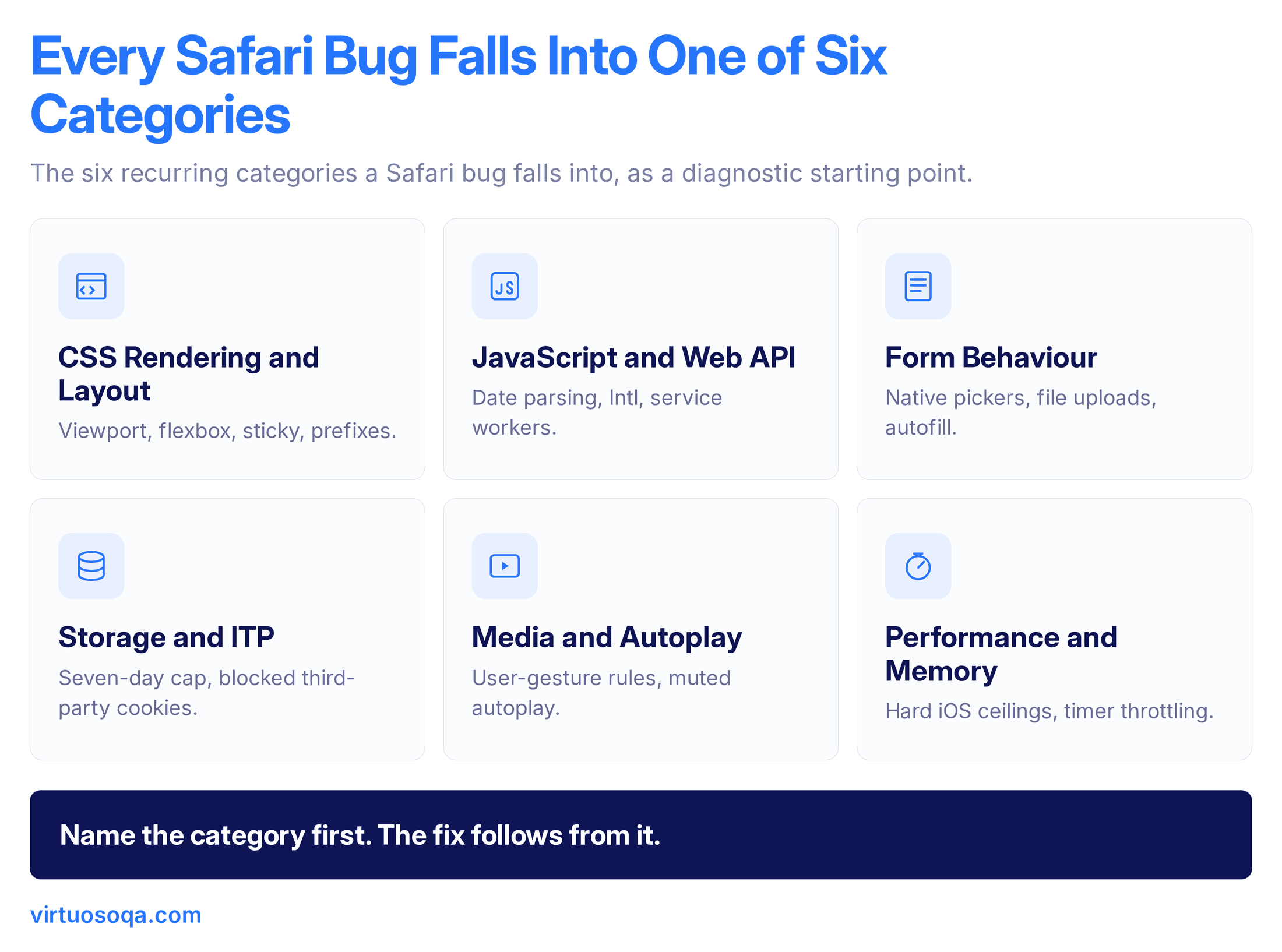
Production defect data resolves to six recurring categories, and recognising the category accelerates diagnosis when a Safari bug arrives.
1. CSS Rendering and Layout
Layout differences are the most visible Safari bugs and often the easiest to reproduce. Recurring patterns include the 100vh bug on iOS Safari, where the unit calculates against the maximum viewport rather than the visible viewport and produces layout overflow when the browser chrome is visible, flexbox behaviour around min-content sizing in earlier Safari versions that can break truncation patterns, position: sticky behaviour that diverges in nested scrolling containers, backdrop-filter requiring the -webkit- prefix in some versions, date and number input controls rendering with different default styling that Safari restricts more heavily, and custom scrollbar styling being unavailable in Safari, which breaks designs that rely on it cross-browser.
The fix pattern is to use the modern viewport units (svh, lvh, dvh) where supported, test layout at multiple chrome states on iOS, and avoid styling that Safari has chosen not to expose to authors.
2. JavaScript and Web API
Runtime behaviour differences are the second category and the more dangerous one, because they often pass type-checked code that breaks at runtime in Safari only. Date parsing is strict in Safari, so the string "2024-09-15 14:30" parses in Chrome and fails in Safari, which requires the T separator as "2024-09-15T14:30". Optional chaining and nullish coalescing have shipped, but transpilation targets must reach back to the Safari versions still in customer hands.
The Intl API has feature gaps that vary by version, particularly around formatRange and DateTimeFormat options. Service worker implementations diverge from Chromium in installation, update, and fetch-interception behaviour. And WebRTC implementation differences cause audio and video session bugs in real-time applications.
The fix pattern is to test JavaScript behaviour end-to-end on Safari rather than relying on unit tests alone, particularly for date and time logic, internationalisation, and any code that touches storage or background workers.
3. Form Behaviour and Input Handling
Forms are where Safari's policy decisions show up most clearly. Number inputs accept text on iOS Safari in some configurations, date inputs render the iOS native picker rather than a custom JavaScript date picker, file uploads on iOS Safari trigger the camera or photo library rather than a file dialog when the accept attribute targets images, autofill for stored credentials and addresses follows Apple's heuristics rather than the form's explicit autocomplete attributes, and form submission and validation messages render with Safari styling that cannot be fully overridden.
The fix pattern is to test forms with realistic inputs on real iOS devices rather than emulators, because the system-level integrations of keyboard, camera, photo library, and autofill require the operating system to be present.
4. Storage, Cookies, and ITP
The Intelligent Tracking Prevention framework is the most consequential Safari-specific behaviour for application architecture, since it imposes constraints no other major browser imposes at the same depth. Script-writable storage such as localStorage, sessionStorage, and IndexedDB is capped at seven days under certain navigation patterns, third-party cookies are blocked entirely in most contexts, cross-site storage is partitioned by top-level site, and cross-site single sign-on flows that work on Chrome can fail on Safari without explicit handling.
The fix pattern is to architect for ITP constraints rather than against them, namely preferring first-party cookies with the Secure and SameSite attributes, using the Storage Access API for cases that require cross-site state, and designing SSO flows that work within ITP partitioning rather than relying on third-party cookie persistence.
5. Media Playback and Autoplay
Audio and video on Safari follow stricter rules than other browsers. Audio playback requires a user gesture to initiate the AudioContext, video autoplay requires the muted attribute and the silent-autoplay rules vary by user setting, picture-in-picture is implemented with Safari-specific APIs that diverge from the W3C Picture-in-Picture API, the Fullscreen API requires user-initiated activation and has restrictions on iOS that desktop developers do not encounter, and streaming media may require specific codec support that varies between Safari versions.
The fix pattern is to design media interactions around user gestures, test on real iOS devices, and avoid assumptions that autoplay will succeed silently.
6. Performance and Memory
iOS Safari has hard ceilings on memory and JavaScript timer behaviour that desktop developers rarely encounter. Long-running tabs crash on memory-constrained iOS devices, background-tab JavaScript is throttled aggressively and breaks polling-based applications that work on Chrome, JIT compilation behaviour differs and affects performance-sensitive code, and service workers are paused more aggressively in the background on iOS.
The fix pattern is to measure on representative devices, particularly older iPhones still in customer hands, and to design for the memory and timer constraints rather than the desktop optimum.
Diagnosing Safari Bugs: The Practitioner's Toolkit
A Safari bug that cannot be reproduced cannot be fixed, and the diagnostic toolkit follows a specific sequence.
Safari Web Inspector is the equivalent of Chrome DevTools. On macOS Safari, the Inspector is enabled through the Develop menu, which must first be enabled in Safari preferences, and on iOS Safari, remote debugging requires connecting the device to a Mac via cable and enabling Web Inspector in iOS Safari settings. The setup is more involved than Chrome remote debugging, but the diagnostic capability is equivalent.
Responsive Design Mode in macOS Safari simulates iOS viewport dimensions, user agents, and touch behaviour, but it omits the memory constraints, system integrations, and actual WebKit version that ships on each iOS release, and real device access fills that gap by capturing the diagnostic fidelity simulators miss.
Console output from Safari is sometimes less verbose than from Chrome, and stack traces that surface clearly in Chrome can appear terse in Safari, which is why source maps and structured error capture matter more in Safari debugging. Safari Technology Preview ships ahead of stable Safari and previews upcoming WebKit changes, which is useful for catching regressions before they reach customer devices. The toolkit is workable, the friction is higher than Chrome debugging, and the discipline of using it routinely is what separates teams that catch Safari bugs early from teams that find out from support tickets.
How to Test on Safari Without a Mac in Every Pocket
The practical question that recurs in enterprise QA teams is how to cover Safari at scale when the engineering team is running Linux laptops and the test infrastructure sits in the cloud.
Four approaches handle the problem at different cost points.
Real device cloud grids provide remote access to iOS and macOS devices for both manual and automated testing, scaling without on-premises hardware.
In-house device labs offer maximum control and minimum latency but require hardware investment and maintenance.
Virtualised macOS is technically possible but operates against Apple's licensing terms in most configurations, so it is rarely chosen by enterprises.
An integrated cross-browser execution grid embedded in the test automation platform itself has become the most common enterprise choice, removing the device-management problem from the engineering team and placing it inside the test platform. Virtuoso QA takes this approach, running Safari across macOS and iOS on a managed grid so teams get the coverage without owning or maintaining the devices.
Most enterprises combine approaches, running a small in-house lab for exploratory testing and edge cases alongside an integrated grid for the breadth of automated coverage.
The Safari Compatibility Matrix Implications
A practical Safari compatibility matrix balances depth against cost. The combinations that actually matter are the current major Safari on macOS and on iOS at deep coverage, since they represent the current cohorts, the previous major on both at smoke-test depth for customers on the prior release, Safari Technology Preview at regression depth for early warning of upcoming changes, iPad Safari on the latest iPadOS at functional depth for its different viewport and form factor, and Safari on older, memory-constrained iPhones at performance depth for the hard memory limits that crash modern single-page applications.
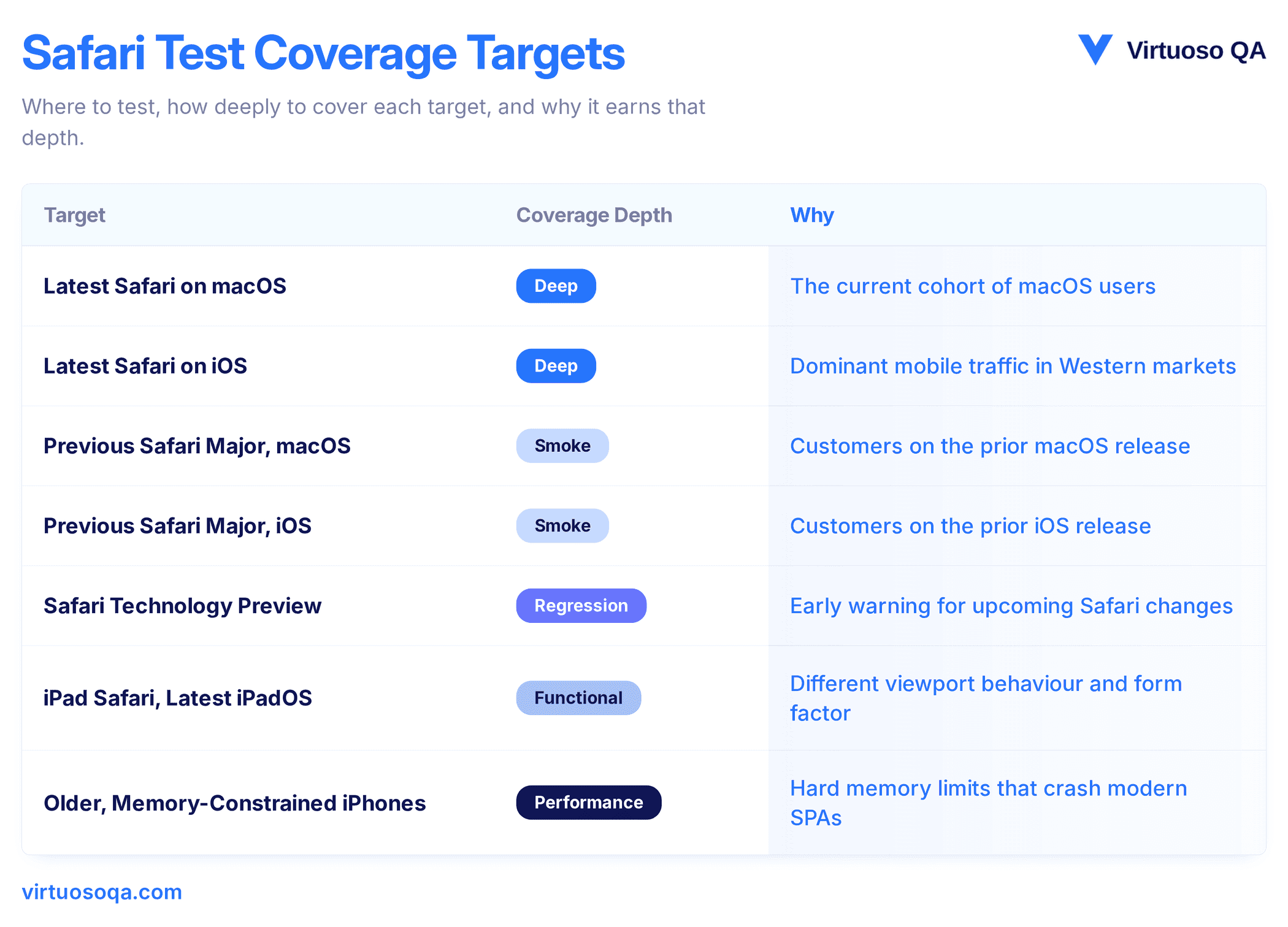
The matrix is more concentrated than a full cross-browser compatibility matrix because the engine variance within Safari is narrower than the variance between Safari and Chrome. The trade-off is that within Safari, the iOS variants are functionally different browsers in important ways and have to be tested as such. The broader cross-browser picture is covered in our page on browser compatibility testing.
How AI-Generated Frontend Code Amplifies Safari Risk
A new pattern has emerged with the rise of AI coding assistants in frontend development, which is that AI-generated code tends to be Chrome-first, for a knowable reason.
The training corpora contain far more Chrome-tested code than Safari-tested code, since Stack Overflow answers, GitHub repositories, and shared examples skew toward Chrome assumptions, and models reproduce that skew in their generation patterns.
AI-suggested CSS will use features Chrome supports but Safari has not shipped, AI-suggested JavaScript will assume Chrome's date parser, AI-suggested storage code will ignore ITP constraints, and AI-suggested media code will assume Chrome's autoplay rules.
Three failure patterns are visible in production today.
AI introduces a JavaScript feature that has shipped in Chrome but is still flagged or unshipped in Safari.
AI uses a CSS property that requires the -webkit- prefix in current Safari and does not include the prefix.
AI builds a storage layer that breaks against ITP's seven-day cap, with the failure mode invisible during development and visible only after a week of inactivity.
The response is not to slow down AI-assisted coding, but to verify continuously on Safari, with self-healing tests that survive frontend refactors and root-cause analysis that surfaces when a failure is Safari-specific.
Where Virtuoso QA Fits
Virtuoso QA supports Safari testing as a first-class target on a broad cross-browser execution grid, covering current and prior Safari versions on macOS, iOS Safari across iPhone and iPad models, and the major iOS version cohorts customer bases tend to span.
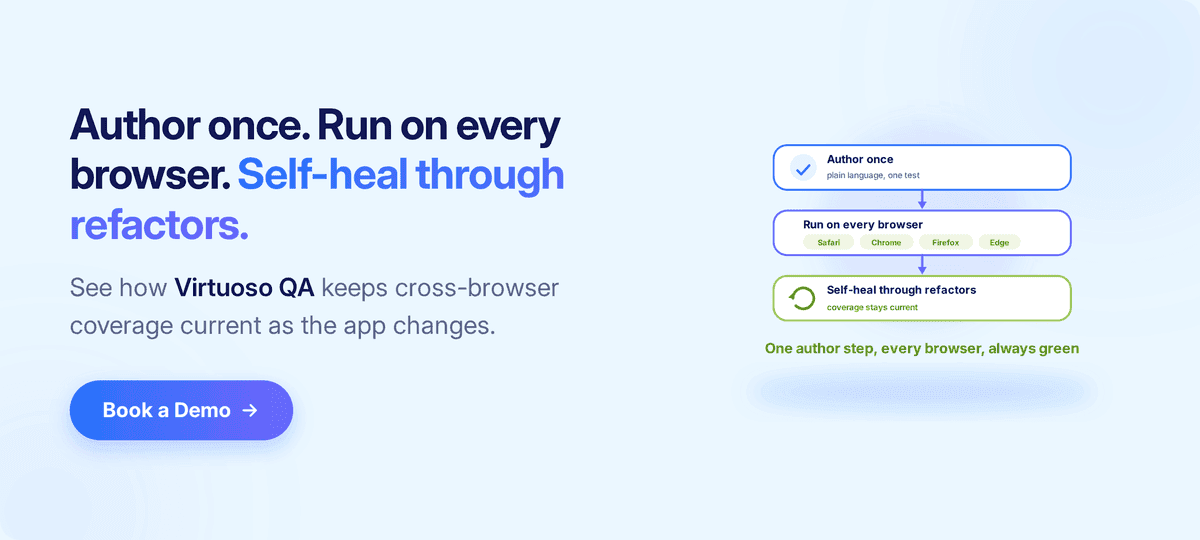
Natural Language Programming allows the same test definition to execute across Safari, Chrome, Firefox, and Edge without engine-specific maintenance.
Self-healing absorbs the small interface changes that cause Safari tests to break unnecessarily on frontend refactors.
AI Root Cause Analysis helps identify whether a failure is Safari-specific, a real regression, or a transient flake, which is the diagnostic question Safari debugging usually opens with.
CI/CD integrations with Jenkins, Azure DevOps, GitHub Actions, and GitLab plug Safari coverage into the release pipeline so a Safari regression is caught before it reaches production, and visual checks, functional assertions, and API verifications all execute within the same Safari session against the same grid configuration.
A Practitioner's Checklist for Safari Testing
A short checklist captures the discipline.
The Safari matrix covers current and prior major versions on both macOS and iOS.
iPad Safari is tested as a separate target, not assumed equivalent to iPhone Safari.
Memory-constrained iOS devices appear in the matrix for performance-sensitive applications.
Date and time logic is verified on Safari with realistic input formats.
Storage and SSO flows are tested against ITP behaviour, not Chrome assumptions.
Media playback paths are exercised with the autoplay and user-gesture constraints Safari imposes.
Forms are tested on real iOS devices, not simulators, to capture keyboard and native-picker behaviour.
Service worker installation and update flows are verified on iOS Safari specifically.
Safari Technology Preview is in the regression matrix for early-warning coverage.
Visual regression tests capture iOS Safari at multiple viewport states, both chrome visible and chrome hidden.
Diagnostic support is available for Safari failure triage.
Tests run in the CI/CD pipeline and block merges on Safari-specific failure.
The list is short for the same reason Safari debugging is hard, namely that the constraints are knowable, but the consistency of testing them is rare.
Related Reads
Frequently Asked Questions
Why Is Safari Testing More Important Than Its Market Share Suggests?
What Is Intelligent Tracking Prevention and Why Does It Affect Testing?
How Can a Safari-Only Bug Be Debugged?
Is It Possible to Test Safari Without Owning a Mac?
Why Does an App Work on Chrome but Break on Safari?
How Does Virtuoso QA Help With Safari Testing?