

Blog
Web Form Testing: How to Automate Validation, Error Handling, and Submission Workflows

Published on
March 19, 2026

Learn how to automate form testing across validation, error handling, and submission workflows without the enterprise maintenance burden.
Every meaningful interaction between a user and a web application passes through a form. Registration screens. Checkout pages. Insurance policy applications. CRM lead capture. ERP purchase orders. Healthcare patient intake. The form is where intent becomes data, where a user's action triggers a business process, and where a single validation failure can destroy trust, revenue, or compliance standing.
Yet form testing remains one of the most under automated areas in enterprise QA. Teams still rely on manual testers to click through dozens of field combinations, submit known bad data, and visually confirm that error messages appear in the right place with the right wording. It works at small scale. It collapses at enterprise velocity.
This guide examines how to systematically automate form testing across validation logic, error handling behavior, and submission workflows. It covers the technical complexity that makes form testing uniquely difficult, the strategies that separate robust automation from brittle scripts, and the role AI native platforms now play in transforming what was historically the most tedious layer of functional QA.
A form that rejects valid input loses a customer. A form that accepts invalid input creates downstream data corruption. A checkout form that fails silently on a specific browser loses revenue with no error trail. An insurance application that skips a required field produces a non compliant policy record.
The business consequences of inadequate form testing are not hypothetical. Research consistently shows that a one second delay in page response reduces conversions by approximately 7%. When that delay is caused by unhandled validation errors, unexpected field behaviors, or submission failures that return no meaningful feedback, abandonment rates escalate dramatically. In enterprise applications like Salesforce, SAP, or Oracle, a broken form can cascade through entire business processes, from order entry to invoicing to fulfillment.
Form testing is not a detail. It is a frontline defense for data integrity, user experience, and operational reliability.
Consider a standard enterprise form with 15 fields. Each field may have three to five validation rules: required field checks, format validation, character limits, conditional logic based on other fields, and cross field dependencies. Multiply that across positive and negative test cases, boundary values, and multiple browsers, and a single form can require hundreds of individual test scenarios.
Now multiply that across hundreds of forms in a Salesforce org, an SAP implementation, or a custom web application. The test matrix grows exponentially while sprint cycles shrink. Manual form testing becomes mathematically unsustainable, and teams inevitably choose between coverage and speed. They almost always sacrifice coverage.
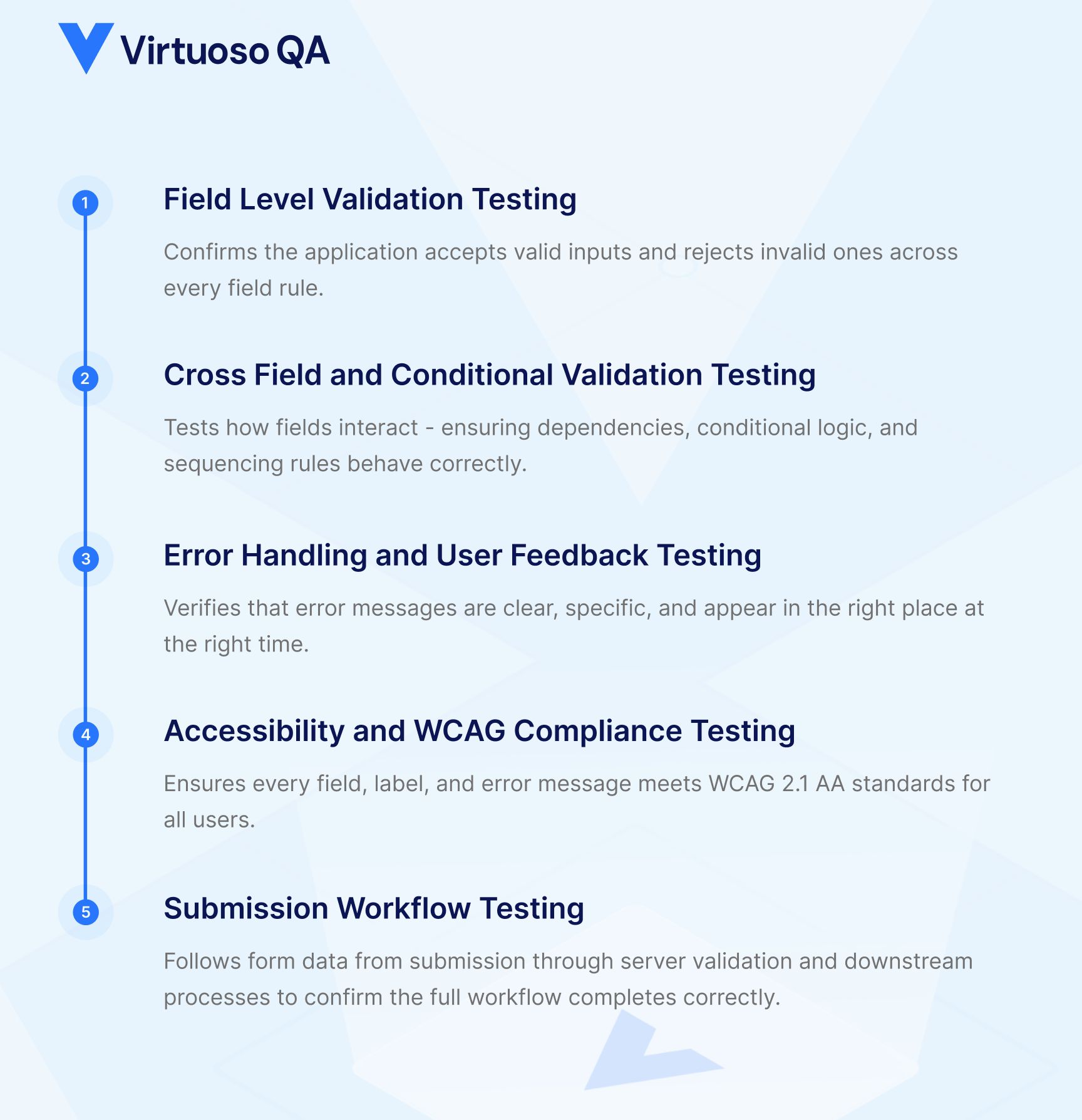
Field level validation is the first layer. Every input field carries rules that determine what the application considers acceptable. These include required field enforcement (ensuring mandatory fields cannot be submitted empty), data type validation (numbers in numeric fields, dates in date fields, emails matching expected patterns), character length constraints (minimum and maximum boundaries), and format masks (phone numbers, postal codes, currency values).
Effective field level testing requires both positive testing (confirming valid inputs are accepted) and negative testing (confirming invalid inputs are properly rejected). Boundary value analysis is critical here. If a field accepts 1 to 100 characters, tests must verify behavior at 0, 1, 100, and 101 characters. Each boundary represents a potential defect.
Real world forms rarely operate field by field. They carry dependencies. Selecting "Business" as an account type might make a Tax ID field mandatory. Choosing a country might change the format required for postal codes. Setting a start date must enforce that the end date falls after it.
These cross field validations are where the majority of form defects hide. They are also where manual testing becomes most error prone, because testers must remember every conditional relationship and test each combination deliberately. In enterprise platforms like Salesforce, where administrators can configure validation rules, workflow rules, and formula fields that interact across objects, the conditional complexity can be significant.
Validation rules are only half the equation. The other half is how the application communicates failures to the user. Error handling testing verifies that inline error messages appear adjacent to the correct fields, that error text is specific and actionable (not generic messages like "An error occurred"), that visual indicators like red borders or warning icons render correctly, that focus moves to the first error field for accessibility compliance, and that error states clear properly once the user corrects the input.
In modern frameworks like React, Angular, Vue, and Salesforce Lightning Web Components, error rendering is often asynchronous. An error message might depend on a server side validation call returning before the DOM updates. This timing dependency makes error handling testing particularly fragile for traditional automation tools that rely on static element identification.
Forms are one of the highest-risk areas for accessibility failures. Every input field, label, error message, and submit button must meet WCAG 2.1 AA standards to be usable by people relying on screen readers, keyboard navigation, or other assistive technologies.
Accessibility form testing verifies that every field has a correctly associated label, that error messages are announced by screen readers when validation fails, that focus management moves logically through fields in a predictable order, and that colour alone is never the only indicator of a required field or error state.
In the UK and EU, WCAG 2.1 AA compliance is mandatory for public sector digital services. In the US, Section 508 applies to federal government applications. For enterprise teams in these sectors, accessibility testing is not optional, it is part of the definition of done for every form.
The submit button is not the end of the test. It is the beginning of the next validation layer. Submission workflow testing verifies the entire chain: client side validation passes, the form payload reaches the server, server side validation executes, the database record is created or updated correctly, confirmation feedback returns to the user, and any downstream processes (email triggers, workflow automations, API callbacks) execute as expected.
In enterprise environments, form submissions often trigger multi system workflows. A Salesforce lead form might create a record, fire an assignment rule, send a notification to a queue, and push data to a marketing automation platform. Testing the submit action in isolation misses the business process. True form testing follows the data from input to outcome.

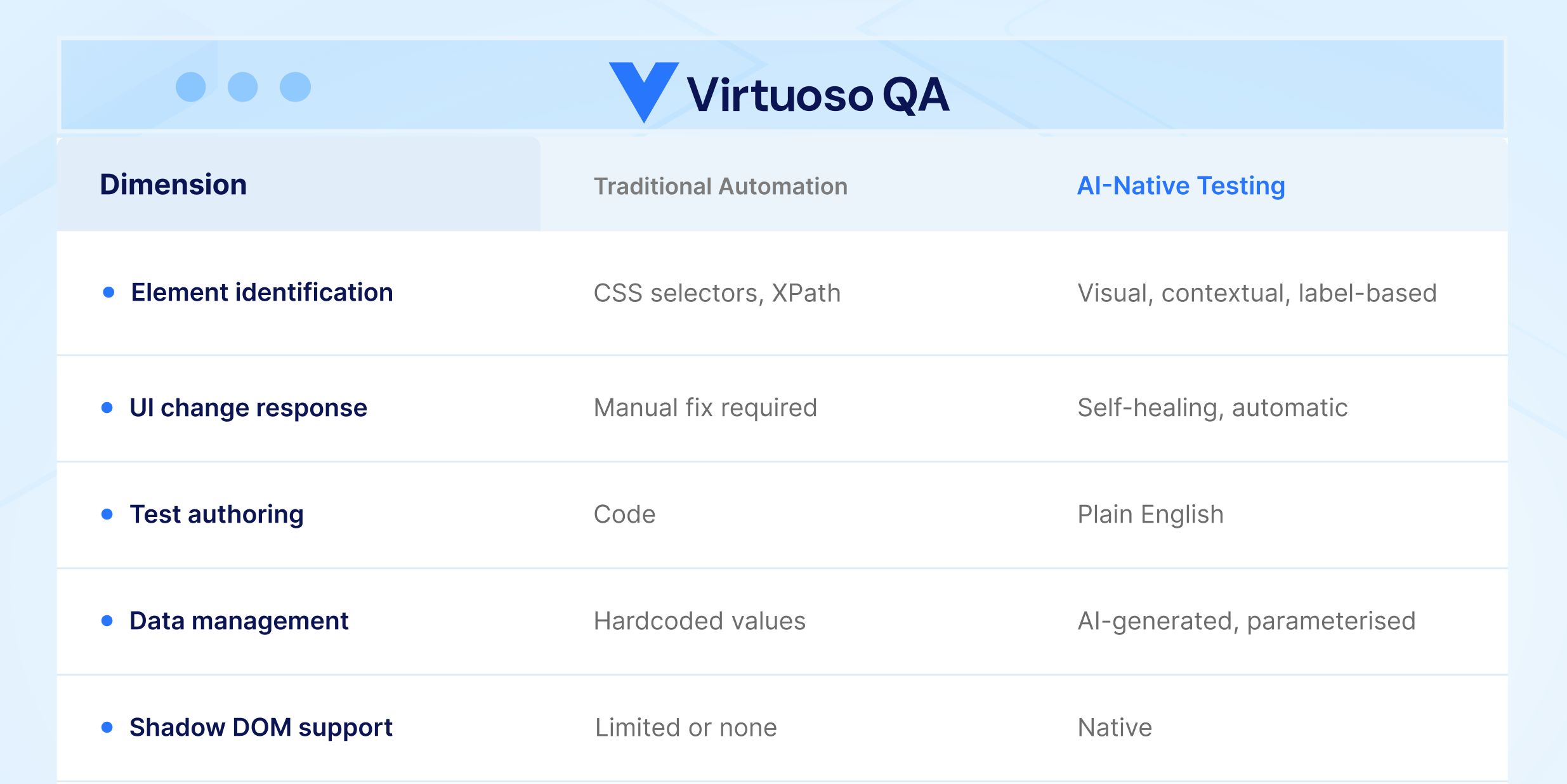
Traditional form testing automation depends on identifying elements by CSS selectors, XPath expressions, or element IDs. Forms are particularly vulnerable to selector instability because form fields are frequently restructured during UI updates, dynamic frameworks regenerate element identifiers on every page load, enterprise platforms like Salesforce use Shadow DOM encapsulation that hides form elements from standard DOM queries, and conditional fields appear and disappear based on application state.
When selectors break, every form test that depends on them breaks. Organizations using Selenium or similar framework based tools report that up to 60% of their QA time is consumed by maintenance rather than new test creation. For form heavy applications, that ratio is often worse, because forms concentrate the highest density of interactive elements per page.
Form tests are inherently data dependent. Every test scenario requires a specific combination of input values. Positive tests need valid data. Negative tests need precisely invalid data. Boundary tests need values at exact thresholds. Testing a form with 15 fields across 10 scenarios requires 150 discrete data points, and that is for a single form.
Managing this test data manually leads to hardcoded values in scripts that become stale, test environments that drift from production configurations, and an inability to run the same tests with different data combinations without rewriting them. Without a systematic approach to data driven testing, form automation provides an illusion of coverage that does not reflect real world usage patterns.
Modern web forms do not behave synchronously. A field blur event might trigger an API call for real time validation. A dropdown selection might load dependent options from a server. A submit action might display a loading spinner before redirecting. These asynchronous behaviors create timing challenges that cause test flakiness in traditional frameworks. Hard coded waits are unreliable. Polling for element states adds complexity. The result is form tests that pass intermittently, eroding team confidence in the automation suite.
AI native test platforms fundamentally change how form tests are created. Instead of writing selector based scripts, testers describe form interactions in plain language. A test step might read: "Enter 'john.smith@company.com' in the Email field" or "Verify error message 'Please enter a valid phone number' is displayed." The platform's Natural Language Programming interprets the intent and interacts with the appropriate element regardless of its underlying selector, framework, or DOM structure.
This approach eliminates the selector fragility problem entirely. When the form UI changes, the AI identifies elements by their visible characteristics, label associations, and contextual position rather than brittle technical identifiers. Tests written in natural language remain stable across application updates.
Enterprise forms present unique identification challenges. Salesforce Lightning forms use Shadow DOM encapsulation. SAP Fiori forms generate dynamic identifiers. Oracle Cloud forms embed complex component hierarchies. An AI native platform uses multiple identification techniques simultaneously, combining visual analysis, DOM structure, contextual data, and label associations, to reliably locate form elements regardless of the underlying framework.
When a platform release changes the internal structure of a form component, as Salesforce does three times per year, intelligent element identification adapts without requiring test modifications. Self healing capabilities with approximately 95% accuracy mean that form tests continue running even when the application evolves beneath them.
AI native platforms address the data dependency challenge directly. Rather than manually constructing test data sets, AI can generate realistic, contextually appropriate form data automatically. This includes valid data conforming to field format requirements, boundary values that test the limits of each constraint, deliberately invalid data for negative testing scenarios, and locale specific formats for international form testing.
When combined with data driven testing capabilities that support parameterization from external sources like CSV files, APIs, and databases, a single form test can execute across thousands of data combinations without manual data preparation. This transforms form testing from a coverage gap into a coverage strength.
The most sophisticated form testing does not stop at the user interface. AI native platforms enable combined UI and API testing within the same test journey. A form submission test can fill fields through the UI, submit the form, then make API calls to verify the server side record was created correctly, check database values for data integrity, and confirm that downstream processes triggered as expected.
This unified approach validates the complete form lifecycle, from user input through business process execution, without requiring separate testing tools or disconnected test suites. For enterprise applications where form submissions drive critical workflows like order processing, policy issuance, or patient registration, this end to end validation is essential.

Not every form carries equal weight. Start by identifying forms that directly impact revenue (checkout, order entry, subscription), compliance (regulatory submissions, audit trails), and user acquisition (registration, onboarding). These high risk forms should have the deepest test coverage, including boundary testing, cross field validation, and full submission workflow verification.
Design form tests to be parameterized from the start. Every form test should accept its input data from an external source rather than embedding values in test steps. This practice enables rapid scaling of test coverage, supports regression testing with production like data, and allows the same tests to serve different test environments without modification.
Form behavior varies across browsers and devices more than almost any other UI component. Date pickers render differently. Input masks behave inconsistently. Validation timing varies. Cross browser form testing on a scalable cloud grid, covering all modern operating systems, browsers, and device configurations, catches the defects that single browser testing misses.
Form tests deliver maximum value when they run automatically on every build. Integrating form validation tests into CI/CD pipelines through tools like Jenkins, Azure DevOps, GitHub Actions, or GitLab ensures that form defects are caught before they reach staging or production environments. Automated form testing that runs in minutes rather than days makes continuous delivery of form heavy applications practical.
Use this checklist to verify form testing coverage before any form reaches production.
Most form testing automation breaks the moment a UI updates. Selectors change, shadow DOM shifts, dynamic identifiers regenerate, and suddenly half your test suite is reporting false failures.
Virtuoso QA eliminates that cycle. Tests are authored in plain English, so there is no selector to maintain. AI-powered self-healing adapts to UI changes automatically. With built-in data-driven testing, a single form test runs across hundreds of input combinations without rewriting a line.
From Salesforce Lightning forms to SAP Fiori to custom enterprise applications, Virtuoso QA handles the complexity so your team can focus on coverage, not maintenance.


Try Virtuoso QA in Action
See how Virtuoso QA transforms plain English into fully executable tests within seconds.
