Blog
How to Write a Usability Testing Script (with Examples and Templates)

Adwitiya Pandey
Published on

Table of contents
Lorem ipsum
Lorem ipsum
Lorem ipsum
Lorem ipsum
Lorem ipsum
You can build the most technically flawless application on the planet and still watch users abandon it in frustration. The gap between what engineers build and what humans actually experience is where usability testing lives. And the quality of your usability test depends almost entirely on one thing: the script.
A usability testing script is the difference between structured insight and expensive guesswork. Done right, it transforms subjective opinions into repeatable, measurable intelligence that drives product decisions. Done wrong, it introduces bias, wastes participant time, and produces data no one can act on.
This guide walks you through exactly how to write a usability testing script that delivers results, with real examples and enterprise templates.
What is a Usability Testing Script?
A usability testing script is a structured document that guides everything a moderator says and does during a usability test session. It covers introductions, background questions, task prompts, follow up probes, and the debrief. Think of it as the operating system for your test session.
The script exists for one purpose: consistency. When you test with five participants or fifty, every single person should receive identical instructions, identical task framing, and identical opportunities to share feedback. Without that consistency, you are not running a test. You are running a series of unrelated conversations.
Usability Testing Script vs. Test Plan
These are related but different documents. The test plan defines the why, who, and what: your research objectives, participant criteria, metrics, timeline, and logistics. The script defines the how: the exact words, prompts, and sequence the moderator follows during each session.
Your test plan says "we need to evaluate whether new users can complete the checkout flow within three minutes." Your script says "imagine you have found a product you want to buy. Please go ahead and complete the purchase. Think aloud as you go."
Both are essential. Neither replaces the other.
Moderated vs Unmoderated Usability Testing - Which Script Do You Need?
The format of your test determines the format of your script. Getting this wrong means writing a script that does not fit the session it is supposed to guide.
Moderated Usability Testing
A live moderator guides the participant through the session in real time, either in person or via video call.
When to use it:
You need to probe unexpected behaviour in the moment
The workflow is complex and participants may need clarification on task boundaries
You are testing with enterprise users who have limited availability and you need to extract maximum insight per session
What the script needs:
Precise moderator language for every transition, probe, and intervention
Conditional branches for when participants succeed quickly vs struggle
Neutral intervention phrases for when guidance is unavoidable
Unmoderated Usability Testing
Participants complete tasks independently on their own device with no live moderator present.
When to use it:
You need to test with a large number of participants quickly
Tasks are self-explanatory and do not require contextual clarification
You want to observe natural behaviour without moderator influence
What the script needs:
Completely self-explanatory task prompts that require zero clarification
Built-in think-aloud instructions embedded in the task text, not delivered verbally
No conditional probes, as every follow-up question must be pre-written and apply universally
Key difference: In moderated testing, the moderator carries much of the cognitive load. In unmoderated testing, the script must carry all of it.
Why Every Usability Test Needs a Script
1. Eliminates Moderator Bias
Without a script, moderators naturally vary their tone, phrasing, and emphasis across sessions. One participant gets a warm, encouraging prompt. Another gets a terse, clinical one. That variation contaminates your data. A script standardizes delivery so the only variable is the participant's genuine reaction.
2. Ensures Complete Coverage
During live sessions, it is easy to forget a question or skip a task when the conversation flows in an unexpected direction. The script acts as a checklist. Every objective gets addressed. Every critical question gets asked. Nothing falls through the cracks.
3. Enables Team Alignment
When multiple researchers, designers, or product managers are involved, the script creates a single source of truth. Everyone agrees on what is being tested and how. This eliminates the post session debates about whether a particular insight is valid because the methodology was inconsistent.
4. Improves Data Quality
Consistent methodology produces comparable data. When every participant encounters the same tasks in the same sequence with the same framing, you can confidently identify patterns. "Four out of five users struggled with the navigation menu" becomes a defensible finding, not an anecdote.
5. Respects Participant Time
A well structured script keeps sessions focused and efficient. Participants are giving you their time and attention. A script ensures you make the most of every minute without wandering into tangents that do not serve your research objectives.
How to Write a Usability Testing Script: Step by Step
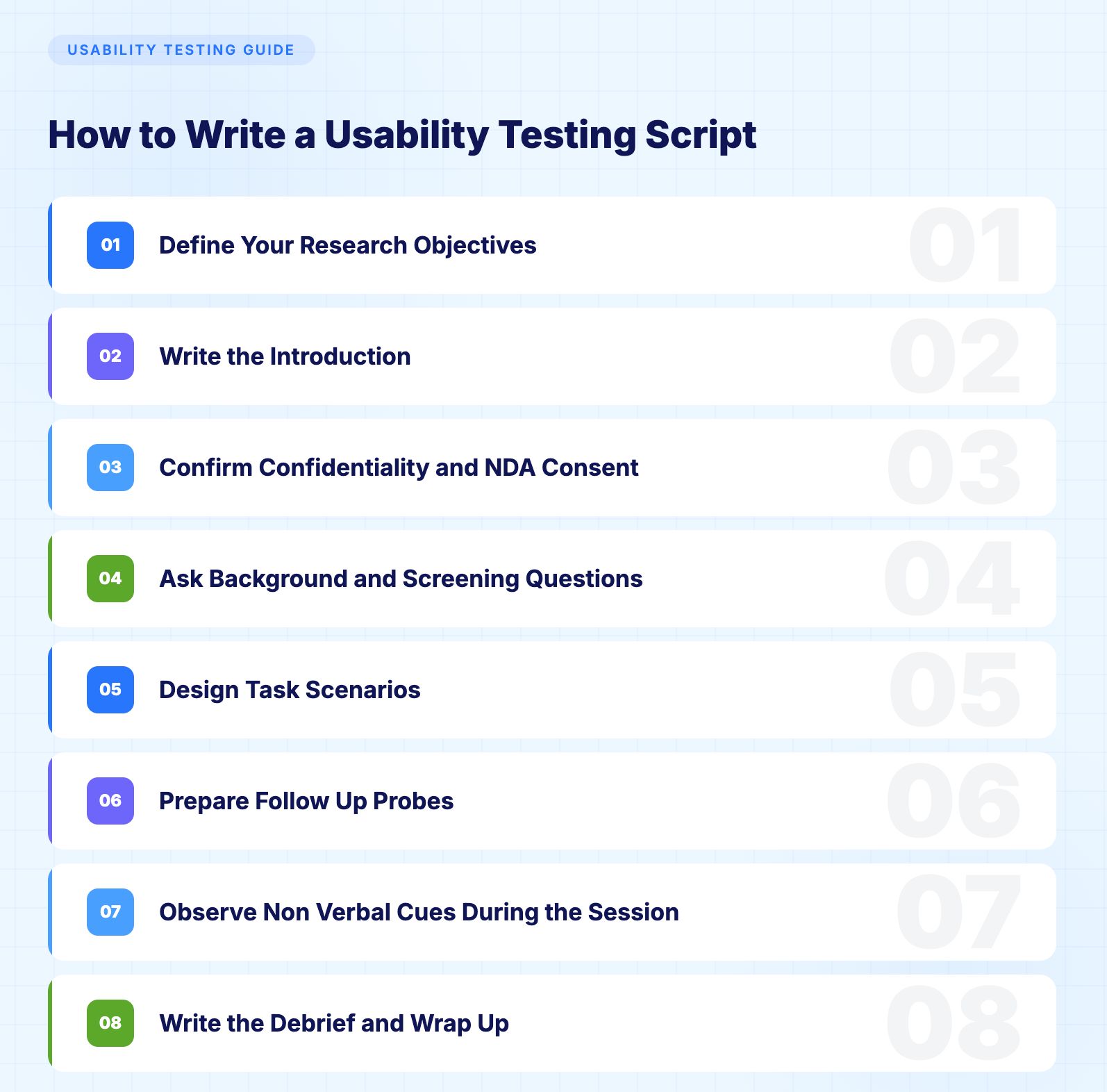
Step 1: Define Your Research Objectives
Before writing a single word of script, crystallize what you need to learn. Vague objectives like "get feedback on the app" produce vague results. Specific objectives drive specific scripts.
Strong research objectives follow this pattern: "Determine whether [user type] can successfully [complete specific action] within [measurable criteria] using [product or feature]."
Examples of strong objectives:
Determine whether first time Salesforce administrators can create a custom report within five minutes without external help.
Evaluate whether insurance claims processors can navigate the new policy lookup interface and locate a specific policy within three clicks.
Assess whether retail managers can complete the end of day reconciliation workflow on the new POS dashboard without errors.
Every element of your script, from task design to follow up questions, should trace back to these objectives.
Step 2: Write the Introduction
What this step does:
It establishes psychological safety so participants feel comfortable behaving honestly rather than performing for the moderator. A strong introduction removes anxiety, explains what is about to happen, and ensures the participant understands that the product is being tested, not them.
The introduction sets the tone for the entire session. Your participant needs to understand three things: what is happening, why it matters, and that they cannot fail.
Here is a template you can adapt:
"Thank you for taking the time to join us today. My name is [moderator name] and I am a [role] at [company]. We are currently working on [product or feature] and we want to understand how people actually interact with it.
I want to emphasize something important: we are testing the product, not you. There are no right or wrong answers. If something feels confusing or frustrating, that is exactly the kind of feedback we need. You will be helping us build something better.
This session will take approximately [duration]. I will ask you to complete a few tasks using [product] and share your thoughts as you go. We call this thinking aloud, which simply means narrating what you are doing, what you expect to happen, and what you are feeling as you work through each task.
[If recording] With your permission, we will be recording this session. The recording is strictly for our internal research and will not be shared publicly. You can stop at any time.
Do you have any questions before we begin?"
Key principles for the introduction:
Keep it warm but professional, establish psychological safety, explain the think aloud protocol, get consent for recording, and invite initial questions.
Step 3: Confirm Confidentiality and NDA Consent
What this step does:
It protects confidential product information when testing unreleased features or pre-launch products. Enterprise sessions almost always involve sensitive material, and confirming consent before background questions begin ensures nothing is shared outside the session.
For enterprise usability testing involving unreleased features, pre-launch products, or confidential workflows, NDA consent is required in addition to recording consent.
Add the following before moving into background questions:
"Before we start, I want to confirm that you have received and signed our non-disclosure agreement. Everything you see today is confidential and should not be shared outside of this session. If you have any questions about what you can and cannot discuss, please ask me now before we begin."
If NDAs were sent in advance as part of participant recruitment, confirm receipt and ask whether the participant had any questions about it. Do not assume a signed NDA equals a participant who has read and understood it.
For UK and EU participants, confirm that recording consent and data handling comply with GDPR obligations. Add the following:
"This recording will be stored securely and deleted within [specified retention period, typically 30 to 90 days]. It will not be shared with any third parties. You can withdraw your consent and request deletion at any time by contacting [contact details]."
Step 4: Ask Background and Screening Questions
What this step does:
It builds a picture of who your participant is before the tasks begin. This context lets you interpret their performance accurately, a power user struggling with a feature tells you something different than a first-time user struggling with the same feature.
Keep background questions brief and relevant. Five minutes maximum.
Example background questions for enterprise application testing:
"What is your current role and how long have you been in this position?"
"How often do you use [platform or application] in your daily work?"
"On a scale of one to ten, how would you rate your comfort level with [relevant technology]?"
"Can you briefly describe the tools you currently use for [relevant workflow]?"
"Have you used any similar products or features before?"
For Salesforce-specific testing, you might ask: "Which Salesforce clouds do you work with regularly? How do you typically handle release testing when Salesforce pushes seasonal updates?"
Background questions accomplish two things: they warm the participant up before the real tasks begin, and they provide demographic context that enriches your analysis.
Remind participants at this stage that you are testing the software, not them. Clearly reaffirming this reduces anxiety and combats social desirability bias, where participants perform actions they think you want to see rather than what comes naturally.
Step 5: Design Task Scenarios
This is the heart of your usability testing script. Task design is where most scripts succeed or fail.
The Golden Rules of Task Design
Write tasks as realistic scenarios, not instructions. Bad: "Click the Reports tab and create a new report." Good: "Your manager has asked you to pull a summary of all open opportunities from the last quarter. Please go ahead and do that however you would normally approach it."
The first version tells the participant exactly what to do. The second tests whether they can figure it out themselves. That distinction is everything.
Never use the same language that appears in the interface. If the button says "Generate Report," do not use the phrase "generate a report" in your task. Use natural language like "create" or "pull together" instead. This prevents participants from simply matching words rather than demonstrating genuine comprehension.
Move from simple to complex. Start with a straightforward task to build confidence, then escalate difficulty. This mirrors real world usage patterns and prevents early frustration from poisoning later tasks.
Limit tasks to five or seven per session. More than that leads to fatigue, which corrupts your data.
Example Task Scenarios
For a CRM platform like Salesforce:
Task 1 (Simple): "You have just received a new lead inquiry from a potential customer named Sarah Chen at Meridian Technologies. Please add this lead to the system with whatever information you think is important."
Task 2 (Moderate): "Your team meeting is in ten minutes and your director wants to know how many deals are expected to close this month. Find that information and tell me what you see."
Task 3 (Complex): "A customer called to report an issue with their recent order. You need to find their account, review their order history, and create a support case documenting the problem."
Task 4 (Cross functional): "You need to set up an automated email that goes out to every new lead that enters the system from the website. Walk me through how you would approach that."
For an e commerce platform:
Task 1 (Simple): "You want to buy a pair of running shoes in size 10. Find a pair you like and add them to your cart."
Task 2 (Moderate): "You received a gift card worth fifty dollars. Apply it to your order and check what the remaining balance would be."
Task 3 (Complex): "You bought a jacket last week but it does not fit. Start the return process and select the option for an exchange in a different size."
For an enterprise ERP system:
Task 1 (Simple): "You need to look up the current inventory level for product SKU 4421. Find that information."
Task 2 (Moderate): "A new vendor has been approved. Add them to the system and set up their payment terms as net 30."
Task 3 (Complex): "You need to create a purchase order for 500 units of raw material from your primary supplier, apply the negotiated discount, and route it for approval."
Step 6: Prepare Follow Up Probes
What this step does:
It gives you a set of ready-made questions to ask immediately after each task while the experience is still fresh. Good probes extract the reasoning behind what you observed without suggesting what the answer should be. They turn a completed task into a conversation that reveals the why behind the behaviour.
Universal probes that work for any task:
"What were you expecting to happen when you clicked that?"
"Was there anything that surprised you about that process?"
"On a scale of one to five, how easy or difficult was that? What would have made it easier?"
"Was there a point where you felt unsure about what to do next?"
Prepare conditional probes too. If a participant struggles: "I noticed you paused there. Can you tell me what you were thinking?" If they succeed quickly: "That seemed straightforward. What made it intuitive?"
Never ask leading questions. "Did you find that confusing?" is leading. "How would you describe that experience?" is neutral.
Step 7: Observe Non-Verbal Cues During the Session
What this step does:
It reminds moderators that observation is as important as asking questions. Participants do not always verbalise their confusion or frustration. Body language, mouse behaviour, and pauses often tell the real story before participants find the words for it.
Watch for signs of confusion: hesitation before clicking, backtracking to a previous screen, hovering over multiple options without selecting, leaning forward or squinting, and audible frustration such as sighing or clicking more forcefully.
Watch for signs of smooth comprehension: direct unhesitating navigation, commentary that matches what the interface actually does, and completing tasks faster than expected.
Log non-verbal observations in a notes column alongside your script. "Participant clicked the wrong button three times before finding Reports" is more useful than "participant said the navigation was confusing."
Step 8: Write the Debrief and Wrap Up
What this step does:
It gives participants the chance to share overall impressions and any thoughts they held back during the tasks. The debrief often surfaces the most honest feedback of the entire session because participants are no longer focused on completing individual activities.
Effective debrief questions:
"Now that you have used [product], what is your overall impression?"
"What was the most frustrating part? What was the easiest?"
"If you could change one thing, what would it be?"
"How does this compare to the tools you use today?"
"Is there anything you wanted to say during the test but held back?"
Close with gratitude and logistics: "Thank you so much for your time today. Your insights will directly influence how we improve this product. [Explain any incentive or next steps.] If any additional thoughts come to mind, please feel free to reach out to [contact information]."
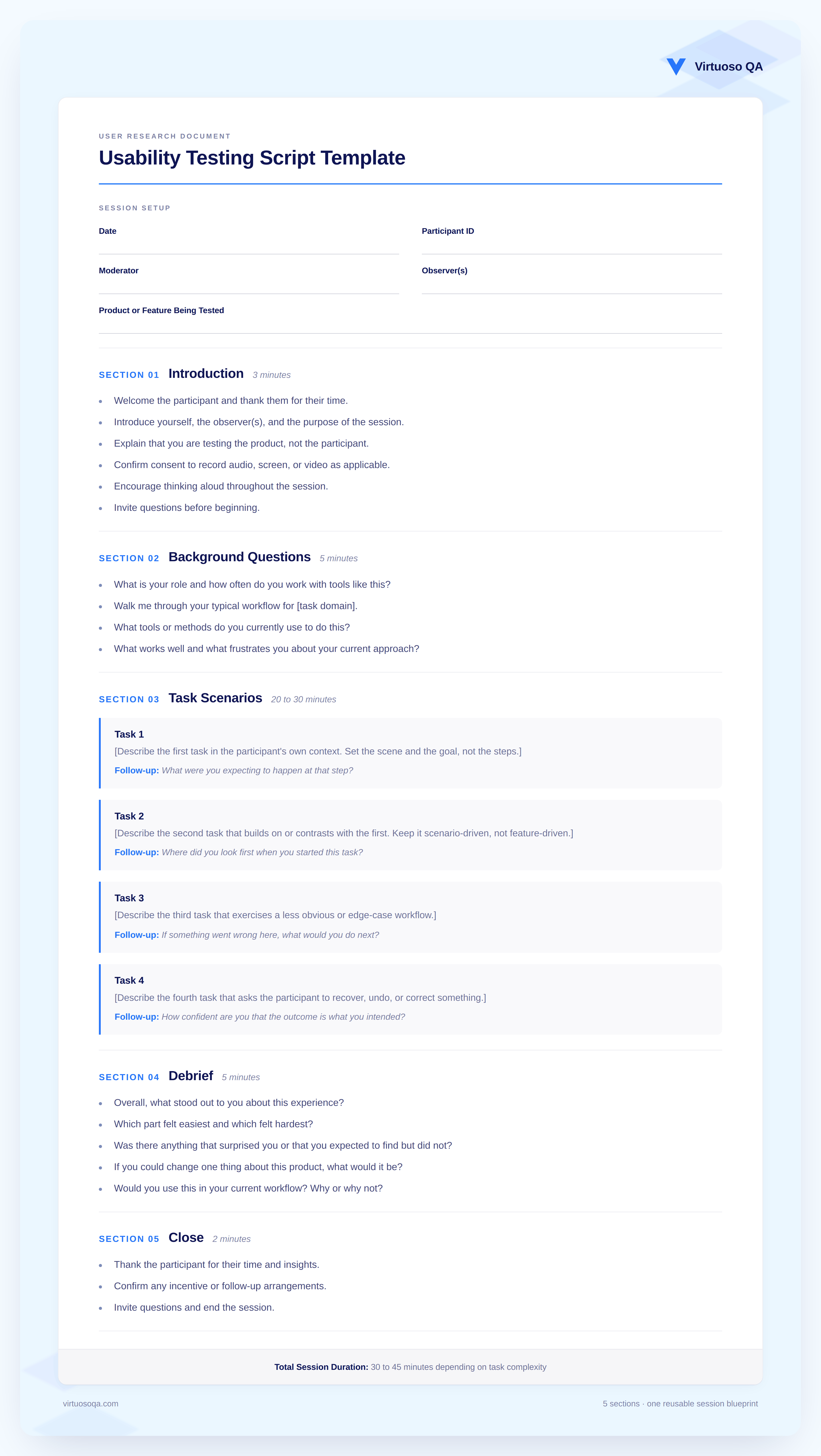
Usability Testing Script Template
Session Setup Date: ___Participant ID: ___Moderator: ___Observer(s): ___Product or Feature Being Tested: ___
Introduction (3 minutes)
Welcome and introductions
Explain the purpose: testing the product, not the person
Describe the think-aloud method
Confirm recording consent
Confirm NDA consent for unreleased features
Invite initial questions
Background Questions (5 minutes)
Role and experience level
Familiarity with product category
Current tools and workflows
Comfort level with technology
Task Scenarios (20 to 30 minutes)
Task 1: [Simple warm-up scenario] — Follow-up: [Probing questions]
Task 2: [Moderate complexity scenario] — Follow-up: [Probing questions]
Task 3: [Complex or multi-step scenario] — Follow-up: [Probing questions]
Task 4 (optional): [Edge case or error recovery scenario] — Follow-up: [Probing questions]
Debrief (5 minutes)
Overall impression
Most and least intuitive elements
Comparison to current tools
Suggestions for improvement
Open floor for additional comments
Close (2 minutes)
Thank participant
Explain next steps and incentives
Provide follow-up contact information
Total Session Duration: 30 to 45 minutes depending on task complexity
Best Practices for Usability Testing Scripts
1. Keep Sessions Under 30 Minutes
Cognitive fatigue sets in fast. After 30 minutes, participant responses become less reliable. If you need to cover more ground, run multiple focused sessions rather than one marathon.
2. Pilot Test Your Script
Run through the script with a colleague or internal team member before testing with real participants. You will catch confusing phrasing, unrealistic timing, and tasks that are too easy or too difficult.
3. Avoid the "Helper" Instinct
When a participant struggles, the natural instinct is to help them. Resist it. Silence is data. Let them work through confusion for a reasonable amount of time before intervening. Script a neutral intervention phrase like "what would you do if I were not here?" to use when necessary.
4. Use Realistic Data and Environments
Testing with placeholder text like "Lorem Ipsum" or obviously fake data undermines realism. Use representative data that mirrors what users will encounter in production. If you are testing a Salesforce implementation, populate the environment with realistic accounts, contacts, and opportunities.
5. Separate Usability Testing from Functional Validation
Usability testing answers "can the user figure this out?" Functional testing answers "does the system work correctly?" These are different questions that require different approaches.
Human researchers should focus on the usability dimension: observing confusion, measuring task completion, and capturing qualitative reactions. The functional validation dimension, verifying that buttons work, forms submit correctly, data flows end to end, and the interface renders properly across browsers, should be handled by automation.
This is where AI native test automation fundamentally changes the equation. Platforms built with natural language programming allow teams to write functional tests in plain English, eliminating the need for coded scripts or fragile selectors. Self healing capabilities ensure those automated tests stay reliable even as the application evolves across releases. AI powered root cause analysis pinpoints exactly why a failure occurred.
The result: your QA engineers spend zero time manually clicking through regression scenarios and 100% of their time on high value activities like usability research, exploratory testing, and user experience evaluation. The functional baseline is guaranteed by automation. The human insight comes from usability testing.
6. Record Everything (With Consent)
Screen recordings, audio, facial expressions, and moderator notes all contribute to a richer analysis. Tools that capture these data streams simultaneously make it easier to correlate what users said with what they actually did.
7. Test with Five Users, Then Iterate
Research from Nielsen Norman Group consistently shows that five users will uncover approximately 85% of usability issues. Test, analyze, fix, and test again. Iterative usability testing produces better outcomes than a single large study.
Common Usability Testing Script Mistakes to Avoid
1. Leading the Witness
"Do you think this navigation is easy to use?" is a leading question that primes the participant toward a positive response. Rewrite it as: "How would you describe the navigation experience?"
2. Writing Tasks as Instructions
"Click the hamburger menu, then select Settings, then choose Notifications" is a set of instructions, not a test. Rewrite it as: "You are receiving too many email alerts from this application. Find where you would adjust those settings."
3. Testing Too Many Things at Once
Each session should target a focused set of objectives. Trying to evaluate the onboarding flow, the dashboard, the reporting module, and the settings page in a single 30 minute session guarantees shallow insights on everything and deep insight on nothing.
4. Ignoring Edge Cases
Real users do unexpected things. Include at least one task that involves error recovery: what happens when they enter invalid data, navigate to a dead end, or try to undo an action? These moments often reveal the most about the true quality of the user experience.
5. Skipping the Pilot
The first time your script is read aloud should not be during a live session. Every script has phrasing that sounds fine on paper but feels awkward when spoken. Pilot testing catches these issues before they matter.

Usability Testing in Enterprise Environments: Special Considerations
Enterprise applications introduce unique complexity that consumer product testing rarely encounters.
Multi Step Business Processes
Enterprise workflows often span dozens of screens and involve conditional logic. A claims processor in an insurance system might touch five different modules to complete a single task. Your usability script needs to account for this complexity by designing task scenarios that mirror real operational workflows end to end.
Role Based Access and Permissions
Different users see different interfaces based on their permissions. A Salesforce administrator experiences a fundamentally different product than a sales representative. Your script must be tailored to each role, with tasks that reflect what that specific user type actually does.
Integration Touchpoints
Enterprise applications rarely exist in isolation. Data flows between CRM systems, ERP platforms, marketing automation tools, and financial systems. Usability testing should include tasks that cross system boundaries, evaluating whether users can navigate the seams between integrated applications.
Release Cycle Impact
Platforms like Salesforce push three major releases per year, plus monthly updates for features like Agentforce and Data Cloud. Each release can change layouts, introduce new components, and deprecate existing workflows. Usability testing scripts should be version aware, updated to reflect the current state of the platform, and re executed after significant releases.
How AI is Transforming Usability Testing Workflows
The rise of AI is not replacing usability testing. It is making human researchers more effective by handling the work that machines do better.
AI-powered analytics automatically tag moments of hesitation, confusion, or frustration in recorded sessions, reducing the time researchers spend reviewing footage. Natural language processing transcribes sessions and surfaces recurring themes across participants without manual coding.
On the functional testing side, AI-native test platforms handle the mechanical validation that used to consume QA teams. When test creation takes minutes instead of hours, when tests self-heal across platform updates, and when root cause analysis is automated, the entire testing organisation shifts toward higher-value work.
The most effective enterprise QA strategies combine automated functional validation with human-led usability research. Machines verify that the system works. Humans verify that the system makes sense. That combination is how the best teams ship products that are both reliable and genuinely usable.
Virtuoso QA is built for exactly this. Tests are written in plain English, so any QA practitioner can build coverage without coding skills. AI self-healing keeps your regression suite current through every sprint and platform release. Parallel execution across 2,000+ browser and device combinations means the full functional baseline runs in minutes. And when something fails, AI Root Cause Analysis identifies exactly what broke and why, separating real defects from noise in seconds.
Enterprises using Virtuoso QA have reduced test maintenance by over 80%, cut regression cycles from days to minutes, and freed QA teams to focus on the work that only humans can do: exploratory testing, usability research, and the judgement calls that no automated script can make.
Frequently Asked Questions
How long should a usability testing script be?
How many tasks should a usability testing script include?
Should I use a moderated or unmoderated usability test?
How do I avoid bias in my usability testing script?
Can AI replace usability testing?
How often should I run usability tests?









