Blog
Black Box Testing: Techniques, Benefits, and AI Automation

Adwitiya Pandey
Published on

Table of contents
Lorem ipsum
Lorem ipsum
Lorem ipsum
Lorem ipsum
Lorem ipsum
Black box testing validates software functionality from a user perspective without knowledge of internal code structure, implementation details, or system architecture. Testers interact with applications as end users would, verifying that inputs produce expected outputs regardless of how the software achieves those results.
AI-native platforms have transformed black box testing from a labour-intensive manual process into autonomous validation at scales impossible with traditional methods, delivering comprehensive functional coverage while reducing testing effort.
Understanding Black Box Testing Fundamentals
Black box testing treats software as an opaque system where testers can observe only external behavior. The metaphor is precise: imagine a physical black box with buttons (inputs) and display panels (outputs). Testers press buttons and verify displays show correct information without opening the box to examine internal mechanisms.
The Core Principle: Specification-Based Testing
Black box testing validates software against specifications, requirements, and expected behaviours rather than examining code implementation.
Key characteristics:
Testers do not need programming expertise or knowledge of technical architecture
Business analysts, domain experts, and manual testers can all contribute effectively
Testing focuses on user-visible functionality, the ultimate measure of quality from a customer perspective
Tests remain stable as internal implementations change, because they are written against behaviour not code
A banking application's transfer function should deduct money from one account and credit another. Black box testing verifies this outcome occurs correctly without analysing the database queries, transaction logic, or error handling code that make it happen.
Black Box vs White Box vs Grey Box Testing
The testing spectrum ranges from complete code ignorance to complete code transparency.
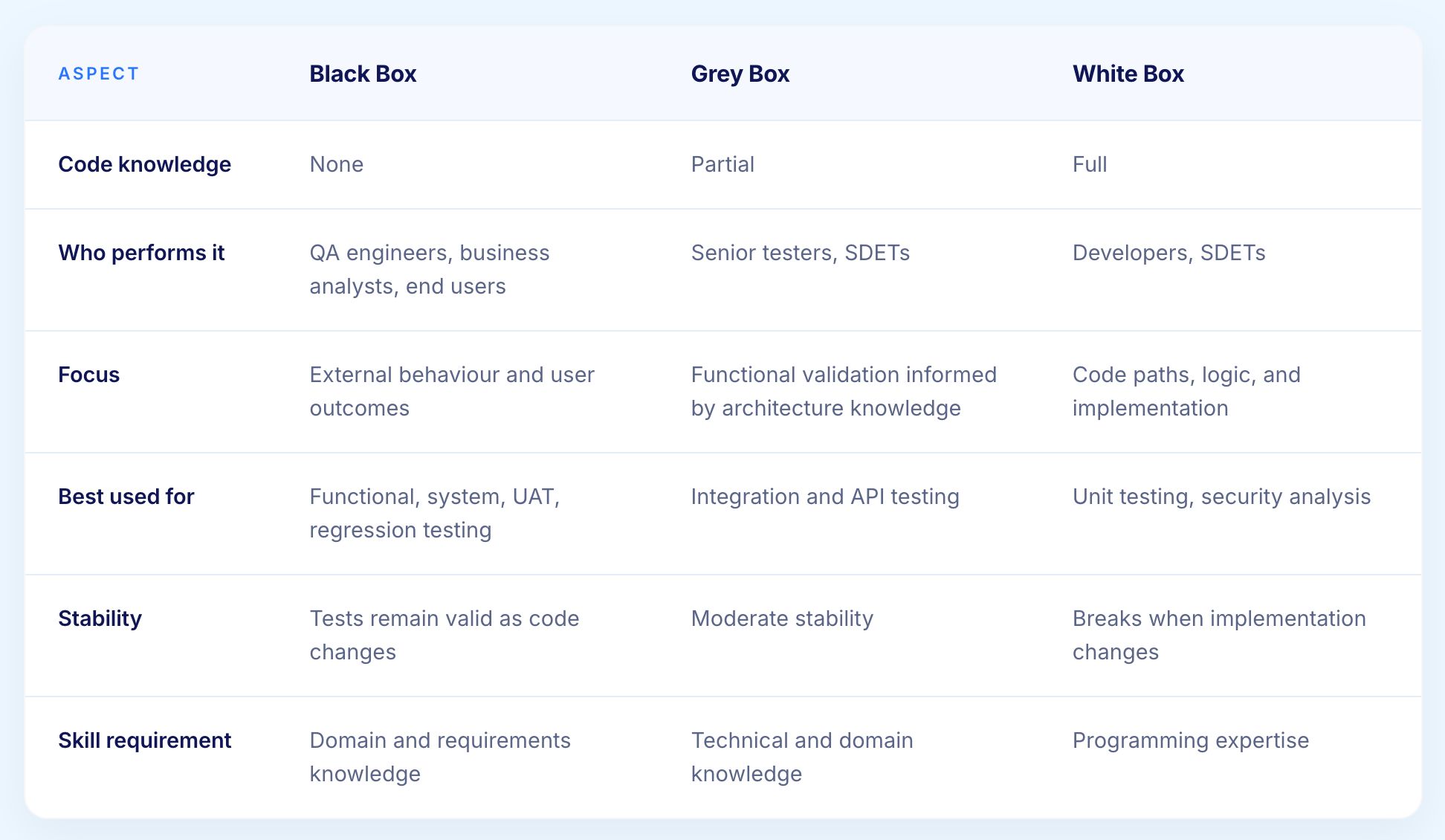
For enterprise functional testing, black box approaches dominate because they:
Scale efficiently without requiring specialist engineering skills for every tester
Align naturally with user experience validation
Remain stable as internal implementations evolve
Translate directly from business requirements and user stories
Refer our guide on Black Box vs White Box Testing to understand the difference between both, when to use each, the techniques behind both, and how AI is shifting the balance between them.
Why Black Box Testing Defines Enterprise Quality Assurance
Enterprise software serves business users who care only about functionality, not implementation. A healthcare administrator using Epic EHR does not need to know the system uses Oracle databases, REST APIs, and Java microservices. They need patient records to display correctly, orders to process accurately, and workflows to complete reliably.
Black box testing validates these business-critical requirements by catching the defects that actually impact users:
Incorrect calculations that produce wrong financial or clinical results
Broken workflows that prevent users from completing business processes
Data integrity failures that corrupt records or produce inconsistent outputs
Integration issues where data does not flow correctly between systems
User interface problems that make the application unusable for its intended purpose
The approach also provides natural alignment with business requirements. User stories, acceptance criteria, and business process documentation translate directly into black box test scenarios without requiring technical interpretation.
Advantages and Limitations of Black Box Testing
Advantages
Accessible to non-technical contributors: Business analysts and domain experts can create and execute tests without coding knowledge
User-centric validation: Tests reflect how real users interact with the application, making defects more likely to represent genuine user-facing problems
Implementation independence: Tests remain valid when internal code changes, as long as external behaviour stays the same
Natural requirements traceability: Test scenarios map directly to user stories and acceptance criteria
Scalable across testing levels: The same methodology applies from integration testing through to UAT
Applicable by external testers: Third-party testers and business users can contribute without system architecture knowledge
Limitations
No visibility into internal code paths: Cannot validate that specific code branches execute correctly or that internal logic is sound
Incomplete coverage by nature: Without code visibility, some execution paths may never be exercised by functional tests
Cannot detect missing implementations: If a requirement was never built, black box testing against that requirement will fail but provides no insight into why
Test case explosion risk: Comprehensive validation of all input combinations can become mathematically impractical without systematic techniques
Relies on accurate specifications: Tests are only as good as the requirements they are derived from. Vague or incomplete specifications produce incomplete tests

Black Box Testing Techniques and Methodologies
Effective black box testing employs systematic techniques that ensure comprehensive validation without exhaustively testing every possible input combination, which would be mathematically impossible for real applications.
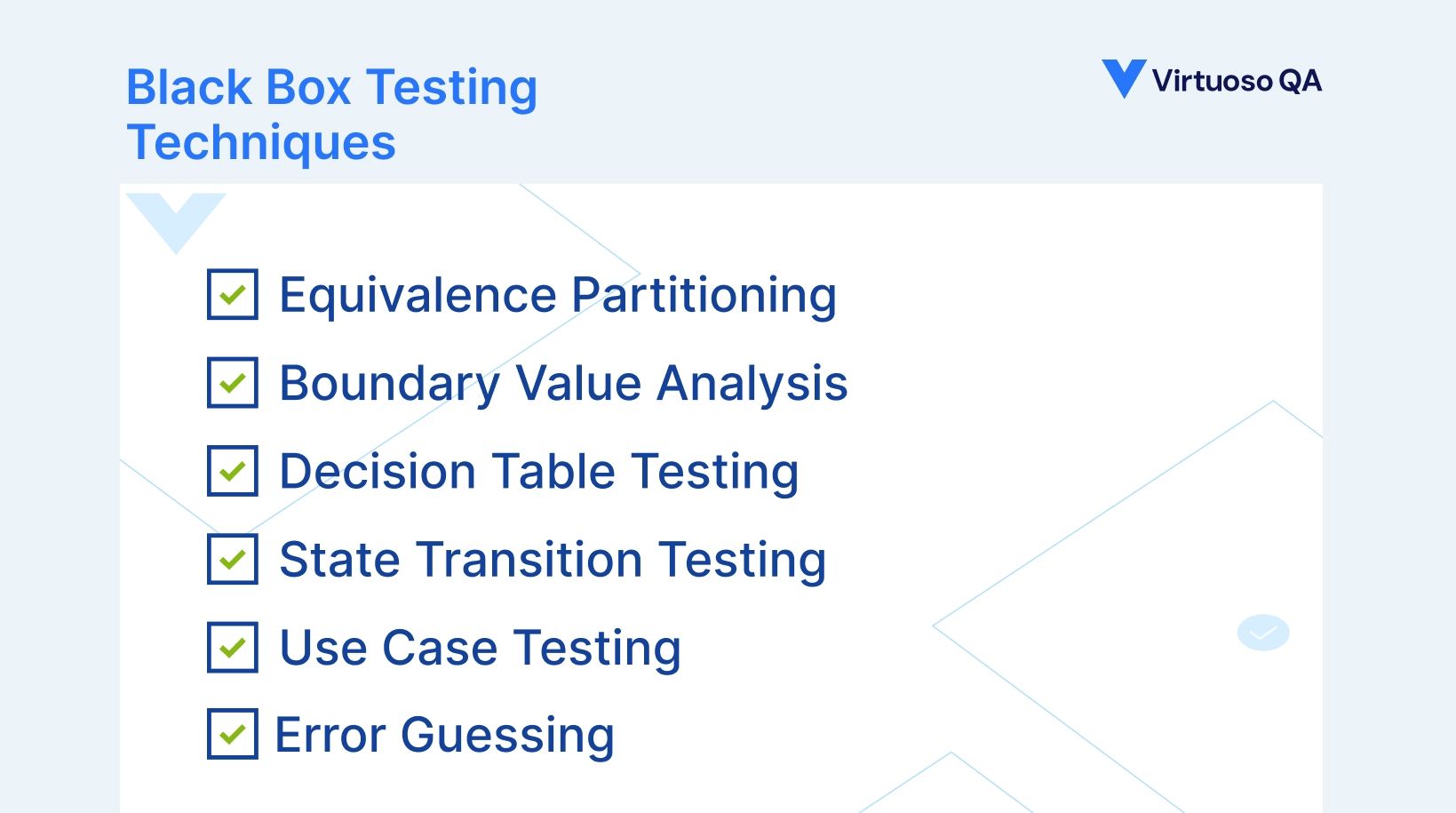
1. Equivalence Partitioning
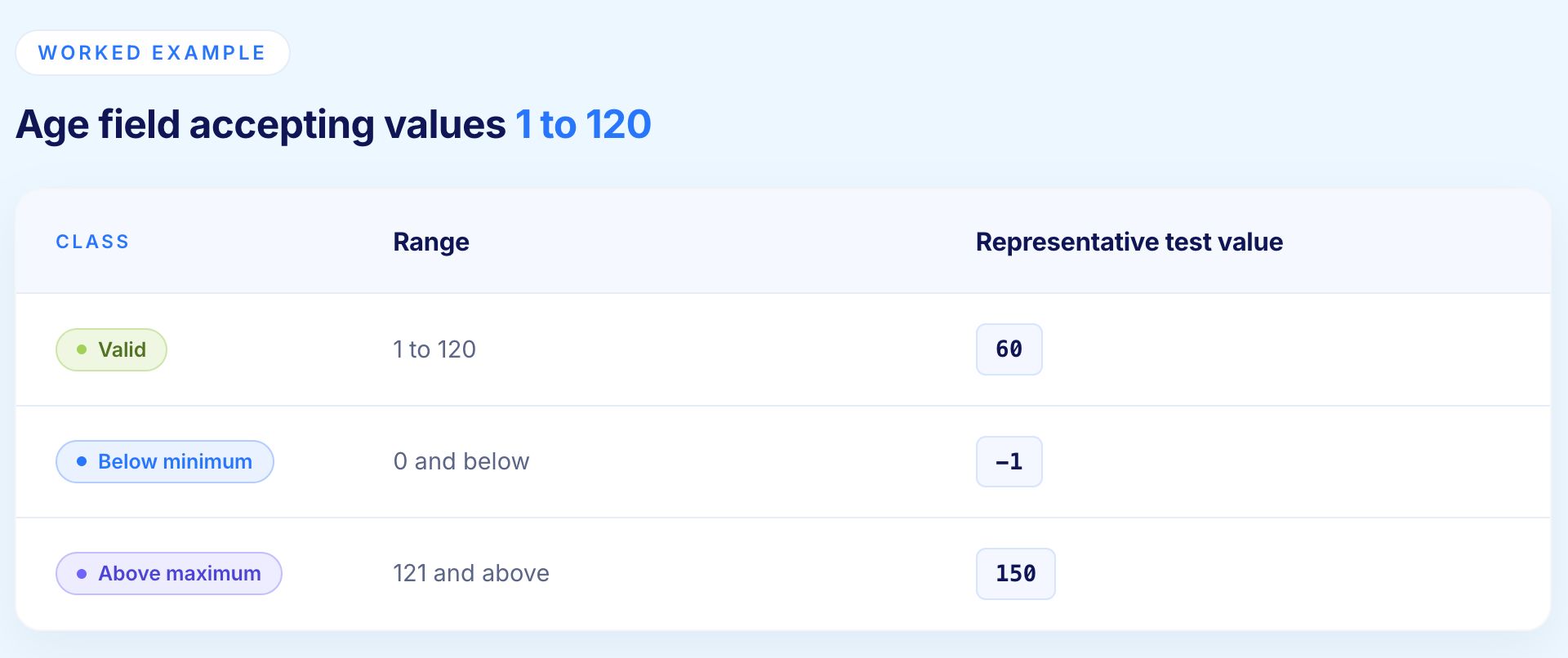
Equivalence partitioning divides input domains into classes where all values within a class should produce similar behaviour. Rather than testing every possible value, one representative value from each class is tested, providing confidence that the entire class behaves correctly.
How it works:
Identify valid input ranges and invalid input ranges for each field or parameter
Group inputs into equivalence classes where all values should produce the same result
Select one representative value from each class for testing
If one value in a class passes, all values in that class are assumed to pass
Example - Age field accepting values 1 to 120
Enterprise application
A financial calculation accepting dollar amounts from $0.01 to $999,999,999.99. Testing every value is impossible. Equivalence classes covering valid amounts, zero, negative values, amounts exceeding the maximum, and various decimal precision scenarios provide systematic coverage without exhaustive testing.
2. Boundary Value Analysis
Boundary value analysis recognises that defects cluster at the edges of equivalence classes rather than in the middle. Testing values at and immediately around boundaries catches the off-by-one errors, incorrect comparison operators, and edge case handling failures that are most common in software.
For each input field or parameter, boundary testing covers:
Minimum valid value
Maximum valid value
One below the minimum
One above the maximum
Optionally: minimum plus one and maximum minus one for extended coverage
Example - Age field accepting 1 to 120
Test values: 0, 1, 2, 119, 120, 121
Enterprise application
An insurance premium calculation with rate changes at specific age boundaries (25, 50, 65). Boundary value analysis ensures the system correctly applies rates at these transition points where calculation logic changes, catching the most financially significant defects.
3. Decision Table Testing
Decision table testing handles complex business logic involving multiple conditions and corresponding actions. It systematically enumerates all possible condition combinations and specifies the expected action for each, ensuring no rule combination is missed.
When to use it:
Business logic involves multiple independent conditions
Different combinations of conditions produce different outcomes
Regulatory or compliance requirements demand documented coverage of all rule combinations
Example - Loan approval system

Enterprise application
Systems with sophisticated business rules for regulatory compliance, financial calculations, and workflow routing benefit enormously from decision table testing that validates every rule combination systematically.
4. Cause-Effect Graphing
Cause-effect graphing handles specifications where multiple input conditions combine to produce different outcomes, converting the logic into a graph that links conditions (causes) to behaviours (effects) through Boolean operators, then deriving test cases from the resulting decision table. It sits close to decision table testing, since the graph is the analytical step that produces the table.
When to use it:
Multiple input conditions interact to select an outcome, as in eligibility, permission, and pricing rules
The conditions are binary and the outputs are discrete categories
The interaction between conditions, not just each condition alone, is where defects are likely to hide
Enterprise application: an insurance claim intake rule where the policy status, coverage limits, and documentation together decide whether a claim is accepted, rejected, or returned. Cause-effect graphing exposes the combinations a single-condition test would miss.
5. State Transition Testing
State transition testing validates systems where outputs depend not just on current inputs but on the sequence of previous interactions. Applications with workflows, multi-step processes, or stateful objects require this approach.
Key questions state transition testing answers:
Do all valid state transitions execute correctly?
Are invalid state transitions properly prevented?
Does the application maintain correct state through complex user journeys?
Are there missing transitions that leave the system in an unrecoverable state?
Example - Job application workflow:
States: Draft → Submitted → Under Review → Interview Scheduled → Offer Extended → Accepted or Rejected
Test cases validate:
Each legitimate transition executes correctly
Invalid transitions (Rejected → Accepted) are prevented
Accepting an offer properly closes all other open workflows
A rejected application cannot re-enter the active pipeline without explicit action
Enterprise application
Complex workflows in healthcare, financial services, and HR systems that span days or weeks require rigorous state transition testing to catch logic errors in state management that cause operational failures.
6. Use Case Testing
Use case testing derives test scenarios directly from how users actually interact with applications. Rather than testing individual features in isolation, it validates complete end-to-end workflows accomplishing real business objectives.
Why it matters:
Catches integration failures that component testing misses
Provides natural traceability to business requirements and user stories
Produces tests that business stakeholders can understand and validate without technical expertise
Mirrors real user behaviour, making defects more representative of genuine user-facing problems
Example - E-commerce checkout
Customer searches for products → filters by category and price → adds items to cart → applies discount code → enters shipping information → provides payment details → completes checkout → receives confirmation
Each step is validated as part of a coherent journey, not as an isolated function.
Enterprise application
Business processes spanning multiple applications, user roles, and integration points require use case testing to validate the complete workflow rather than just individual components.
7. Error Guessing
Error guessing leverages tester experience and domain knowledge to anticipate where defects are likely to occur. It is less systematic than other techniques but efficiently targets known problem areas.
Common patterns experienced testers look for:
Null or empty values in required fields
Special characters in text inputs (apostrophes, ampersands, angle brackets)
Concurrent operations that create race conditions
Timezone handling at daylight saving boundaries
Very long strings that exceed field limits
Zero values in calculation fields
Duplicate submissions from double-clicking
Error guessing works best as a complement to systematic techniques rather than a substitute for them. Combined with equivalence partitioning and boundary analysis, it provides comprehensive coverage balancing methodical testing with practical experience.

Black Box Testing in Different Software Testing Levels
Black box methodologies apply across all testing levels, from individual components to complete system validation, with techniques adapting to each level's scope and objectives.
Unit Testing with Black Box Approach
While unit testing typically employs white box techniques examining code paths, black box unit testing validates individual functions or methods based on specifications without examining implementation. A function calculating tax should return correct values for various inputs regardless of internal calculation logic.
This approach provides value when unit functionality is well-specified, implementation details should not influence tests (allowing refactoring without test changes), and testers lack access to source code or implementation expertise.
Integration Testing
Integration testing uses black box techniques to validate interfaces between components, systems, or modules. Tests verify data flows correctly between integrated systems, APIs return expected responses for given inputs, and multi-system workflows complete successfully.
For enterprises implementing SAP, Salesforce, Oracle, and custom applications, integration testing validates these systems communicate correctly through APIs, message queues, and shared databases. Black box approaches test integration points by sending inputs to one system and verifying outputs appear correctly in connected systems.
System Testing
System testing applies black box techniques to complete applications or systems, validating that fully integrated software meets requirements and specifications. This represents pure black box testing: comprehensive functional validation from a user perspective without any consideration of internal architecture or implementation.
Enterprises conduct system testing to validate business-critical applications work correctly before deployment, meet functional requirements and acceptance criteria, handle expected load and data volumes, and integrate properly with external systems and dependencies.
User Acceptance Testing
User acceptance testing (UAT) represents the ultimate black box testing, where business users validate software meets their needs and works correctly in real-world scenarios. UAT testers are actual end users who care only about whether the application helps them accomplish business objectives.
For enterprise deployments, UAT validates that implementations of SAP, Oracle, Salesforce, Epic EHR, and other complex systems support actual business processes. Business users execute their normal workflows using production-like data to verify the system functions correctly for real operations.
Regression Testing
Regression testing ensures previously working functionality continues operating correctly after changes. Black box regression testing re-executes functional test suites validating that modifications, enhancements, or integrations have not broken existing capabilities.
This is where automation becomes critical. Manual black box regression testing requires executing potentially thousands of test cases for each release. AI native test platforms like Virtuoso QA automate black box functional validation, executing comprehensive regression suites in hours while maintaining 95% self-healing accuracy that adapts tests to application changes automatically.
Virtuoso QA's AI Native Black Box Testing: The Automation Revolution
Traditional black box testing faces a fundamental scaling problem. Comprehensive functional validation requires testing numerous input combinations, equivalence classes, boundaries, use cases, and state transitions. Manual execution cannot keep pace with continuous delivery. Framework-based automation requires coding expertise, which contradicts black box testing's core accessibility advantage.
Virtuoso QA resolves this with an AI-native approach across five capabilities.
Natural Language Black Box Test Creation
AI native platforms like Virtuoso QA transform black box testing by enabling test creation in natural language describing user actions and expected outcomes. "Navigate to product search, enter category 'electronics', filter by price $100 to $500, verify results display correctly" becomes executable black box test automation without coding.
This preserves black box testing's fundamental advantage: testers without programming expertise can create automated functional validation. Business analysts understanding requirements, manual testers knowing workflows, and domain experts recognizing edge cases translate their knowledge directly into automated black box tests.
Autonomous Black Box Test Generation
StepIQ autonomously generates comprehensive black box test suites by analyzing application specifications, understanding user workflows, and creating test scenarios validating functional requirements. Where manual black box test design requires weeks of test case authoring, autonomous generation produces equivalent coverage in hours.
The platform analyzes application structures, identifies critical user journeys and business processes, determines equivalence classes and boundary values, generates use case scenarios, and creates tests validating expected outcomes for various inputs, all without human intervention.
Self-Healing for Black Box Test Stability
Black box tests traditionally break when user interfaces change even if underlying functionality remains correct. A button moving from top-right to top-left, a field changing ID attributes, or a page layout redesign causes black box tests validating that functionality to fail despite no actual defects.
Virtuoso QA's 95% self-healing accuracy means black box tests automatically adapt to UI changes without human intervention. AI-powered element identification recognizes buttons, fields, and controls through visual analysis, context understanding, and semantic recognition rather than brittle technical locators that break when applications change.
Unified Black Box Testing Across UI and API
Modern black box testing must validate complete user workflows spanning visible user interfaces and invisible backend processing. A purchase transaction includes UI interactions (product selection, checkout form submission) and backend operations (inventory reduction, payment processing, order creation).
Virtuoso QA provides unified black box testing where single test scenarios validate both user interface behavior and underlying API operations. Tests verify UI displays correct information, API endpoints return expected data, database states update correctly, and external integrations process appropriately, all within coherent black box validation from a user outcome perspective.
AI Root Cause Analysis for Black Box Test Failures
When black box tests fail, determining root causes traditionally requires manual investigation: did the UI change break the test, did functionality actually fail, or did test data become invalid? This diagnostic work consumes significant time in black box testing programs.
Virtuoso's AI Root Cause Analysis automatically diagnoses black box test failures, comparing expected versus actual behavior, examining UI rendering, analyzing API responses, reviewing error logs, and providing actionable remediation suggestions. When tests fail, the platform identifies whether failures indicate real defects requiring fixes or test maintenance needs, reducing defect triage time by 75%.
Black Box Testing Tools and Platforms in 2026
1. Virtuoso QA: AI Native Black Box Testing Platform
The category-defining AI-native platform for enterprise black box functional testing.
Key capabilities:
Natural Language Programming for codeless test creation
StepIQ autonomous test generation from requirements
95% self-healing accuracy maintaining tests through application changes
Unified UI and API validation in single black box scenarios
AI Root Cause Analysis diagnosing failures automatically
Watch the short overview below to see how Virtuoso QA enables fast, codeless test creation in plain English while delivering the robustness and scalability enterprises expect from code-backed automation.
2. Selenium: Traditional Black Box Testing Framework
The most widely used framework for black box UI testing. Testers write code simulating user actions to validate functional behaviour without examining source code.
Key considerations:
Approximately 80% of effort goes to maintenance as tests break when UIs change
Requires specialised engineering teams continuously updating scripts
Contradicts black box testing's accessibility advantage by requiring programming skills
Best suited to organisations with dedicated automation engineers and existing Selenium investment
3. TestComplete: Commercial Black Box Automation
Provides black box testing through script-based or keyword-driven approaches covering desktop, web, and mobile.
Key considerations:
Faces the same maintenance challenges as open-source frameworks
Code-dependent tests require programming skills
Object recognition attempts to identify UI elements reliably but still breaks with significant UI changes
4. Katalon Studio: Low-Code Black Box Testing
Offers low-code black box test automation through visual interfaces supplemented with scripting for complex scenarios.
Key considerations:
Reduces but does not eliminate the coding requirement
Black box tests still depend on element locators requiring manual maintenance
Better suited to teams with some technical capability who need flexibility alongside accessibility
5. ACCELQ: Codeless Black Box Testing Platform
Positions as a codeless platform for black box functional testing with AI-augmented capabilities.
Key considerations:
Validate self-healing effectiveness compared to AI-native architectures through a proof of concept
Assess ease of complex functional test creation for non-technical users
Evaluate team productivity on actual applications before committing

Implementing Black Box Testing in Enterprise Organizations
1. Establishing Black Box Testing Strategy
Before writing a single test case, define the framework that will govern the programme:
Identify business-critical applications and workflows requiring comprehensive functional validation
Determine which black box testing levels apply: integration, system, UAT, regression
Allocate resources balancing manual exploratory testing with automated validation
Establish success criteria measuring coverage, defect detection rate, and release confidence
2. Building Black Box Test Cases
High-quality black box test cases share these characteristics:
Clear preconditions: The required system state and test data before the test begins
Unambiguous steps: User actions described without implementation details
Explicit expected results: The correct functional outcome in measurable terms
Requirements traceability: A link to the specification the test validates
For complex enterprise applications, organise black box tests by:
Business process or user journey
User role or persona
Feature area or module
Risk level and business criticality
3. Black Box Test Data Management
Black box testing requires realistic test data without exposing production information:
Synthetic data generation: Creates realistic but entirely fictitious information
Data subsetting: Extracts representative production samples with sensitive values removed
Data masking: Obscures sensitive fields in production copies while preserving realistic structure
AI-powered data generation: Platforms like Virtuoso create contextually appropriate test data automatically from natural language descriptions
4. Balancing Manual and Automated Black Box Testing
Neither approach alone is sufficient. The right balance depends on what each does best.
Manual black box testing excels at:
Exploratory scenarios discovering unexpected issues
Usability evaluation from a genuine user perspective
Ad-hoc testing of newly released features
Edge cases requiring human judgement and creativity
Automated black box testing delivers value for:
Regression validation of previously tested functionality
Data-driven testing across multiple input combinations
Continuous testing in CI/CD pipelines
High-volume scenario testing that would be impractical to execute manually
5. Measuring Black Box Testing Effectiveness
Track these metrics to evaluate and improve the programme over time:
Functional coverage: Percentage of requirements validated by black box tests
Defect detection rate: Proportion of production defects that better black box testing would have caught
Automation percentage: Ratio of automated to manual black box test execution
Testing cycle time: Duration required for complete black box validation per release
Defect escape rate: Number of defects reaching production that testing should have caught
The Future of Black Box Testing: AI Native Automation
Black box testing methodology remains timeless: validating software from a user perspective without examining internal implementation provides the most relevant measure of quality for business applications. What transforms in 2025 is how black box testing executes.
Manual black box testing cannot scale to meet continuous delivery demands. Framework-based automation contradicts black box testing's core advantage by requiring coding expertise. AI native platforms resolve this paradox by enabling truly codeless black box test creation through natural language while delivering autonomous maintenance that keeps tests valid as applications evolve.
The mathematics are compelling. An enterprise with 50 applications requiring comprehensive black box functional validation before each bi-weekly release faces 1,300 annual validation cycles. Manual execution is impossible. Framework-based automation requires large specialized engineering teams. AI native platforms enable small, general QA teams to execute comprehensive black box validation automatically with 88% less maintenance effort.
Organizations adopting AI native black box testing gain competitive advantages: faster releases because functional validation no longer bottlenecks deployment, higher quality because comprehensive automated coverage catches defects manual testing misses, reduced costs because QA teams focus on expanding coverage rather than maintaining tests, and improved morale because skilled testers work on interesting testing challenges rather than repetitive manual execution or script maintenance.
Related Reads
Frequently Asked Questions
What are the main black box testing techniques?
Can non-technical testers perform black box testing effectively?
How does AI improve black box testing automation?
When should organizations use black box testing versus white box testing?
How do you measure black box testing coverage?
How do you create effective black box test cases?




