Blog
State Transition Testing: Diagrams, Techniques and Examples

Abhilash
Published on

Table of contents
Lorem ipsum
Lorem ipsum
Lorem ipsum
Lorem ipsum
Lorem ipsum
Most software bugs are not about what the system does. They are about what the system does next.
A login form that rejects a wrong password is straightforward. A login form that locks the account after three consecutive wrong passwords is different. The response on the fourth attempt depends on what happened on the previous three. That history-dependent behaviour is exactly what state transition testing is built to verify.
This guide covers what state transition testing is, the four components every model is built from, how diagrams and tables work and when to use each, the N-switch coverage ladder for deciding how deep to test, three recurring failure modes, the hidden state problem that causes the most expensive production incidents, a step-by-step guide to applying the technique, and how it changes in an AI-coded environment.
What is State Transition Testing?
State transition testing is a black-box test design technique that checks how a system behaves as it moves between the conditions it can be in. The tester identifies every state the system can occupy, every event that can act on it, every valid move between states, and every action the system performs when a move happens. Test cases come from that model, covering both the moves that should work and the moves the system should refuse.
The technique is the right tool when behaviour depends on what happened before, not only on what is happening now. A system that always returns the same result for the same input does not need state transition testing. A system where the same input produces different results depending on the system's current condition does.
A practical rule: if the same event behaves differently depending on where the system currently is, that system is a candidate for state transition testing.
The Four Components of a State Transition Model
Every state transition model is built from four components. Naming them consistently matters because they map directly to the structure of the test cases.

Two additional concepts sit underneath. A start state is where every journey begins. End states are where journeys can legitimately stop. A model that is not explicit about both tends to produce edge case bugs that are hard to reproduce and harder to explain.
The State Transition Diagram
A state transition diagram is a visual map of every condition the system can be in and every path it can take to move between them. States appear as labelled shapes, usually rounded rectangles or circles. Transitions appear as arrows pointing from one state to another, labelled with the event that triggers the move and any action the system performs along the way.
We can look into state transition diagram with the help of a worked example of a B2B subscription lifecycle.
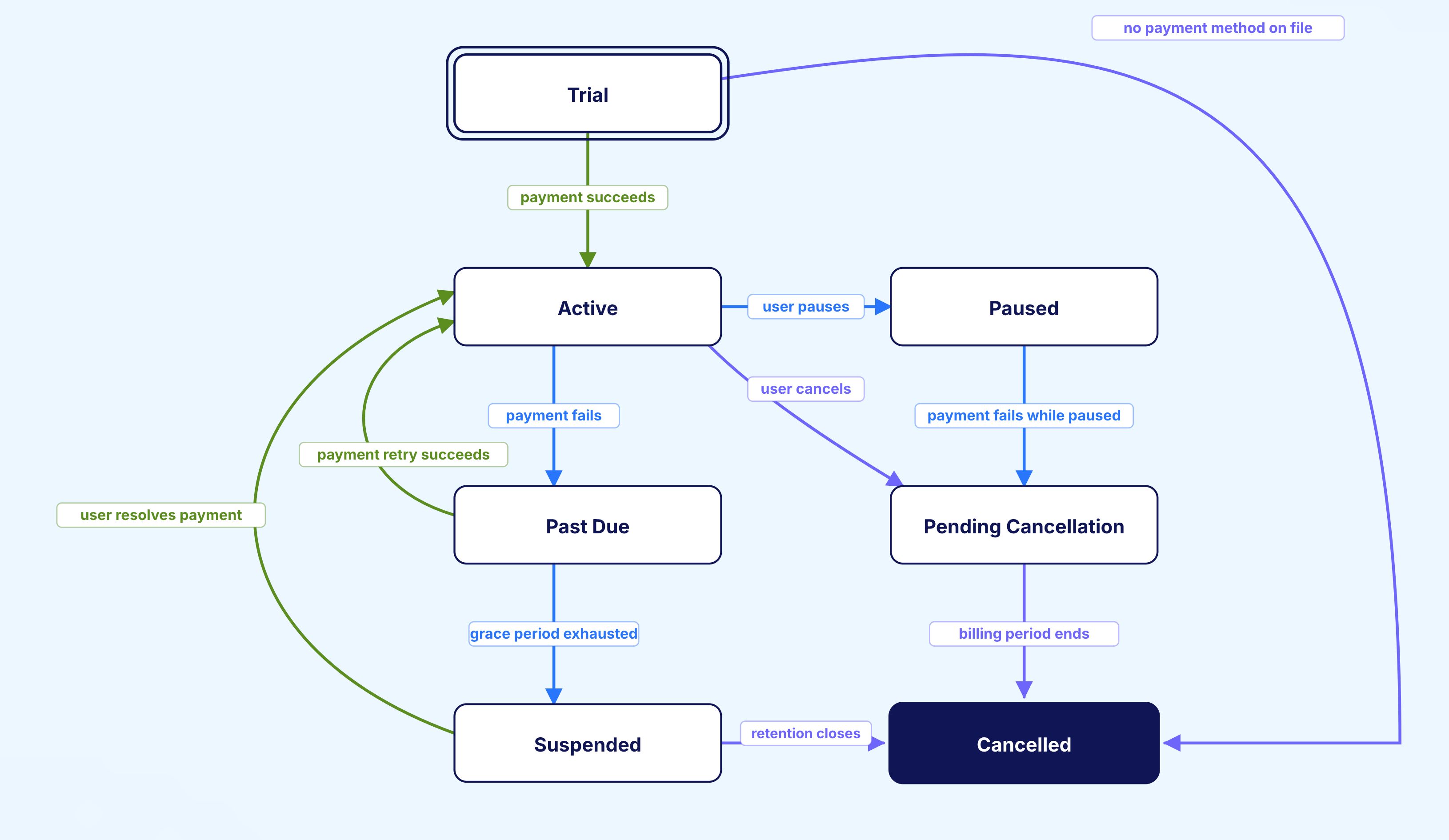
States: Trial, Active, Past Due, Suspended, Pending Cancellation, Paused, Cancelled.
Key transitions:
Trial moves to Active when payment succeeds, or to Cancelled when no payment method is on file at the end of the trial period
Active moves to Past Due when a payment fails, or to Pending Cancellation when the user cancels (preserving access until the period ends), or to Paused when the user pauses
Past Due moves back to Active when a payment retry succeeds, or to Suspended when the grace period runs out
Suspended can move back to Active when the user resolves the payment, or to Cancelled when the retention window closes
Pending Cancellation moves to Cancelled when the billing period ends
The diagram makes several things visible quickly. The system has two paths to Active (from Trial and from Suspended). The test cases for each need different setup. The path from Trial directly to Cancelled exists but is unusual. Both are worth testing explicitly.
Diagrams are the right tool when the team needs shared understanding and when the test set needs review by people who do not write test code. The visual moves faster than a table in that context.
The State Transition Table
A state transition table is a grid where rows list every state, columns list every event, and each cell records what happens when that event fires in that state. The result is a complete picture of both the transitions that should happen and the ones the system should refuse.
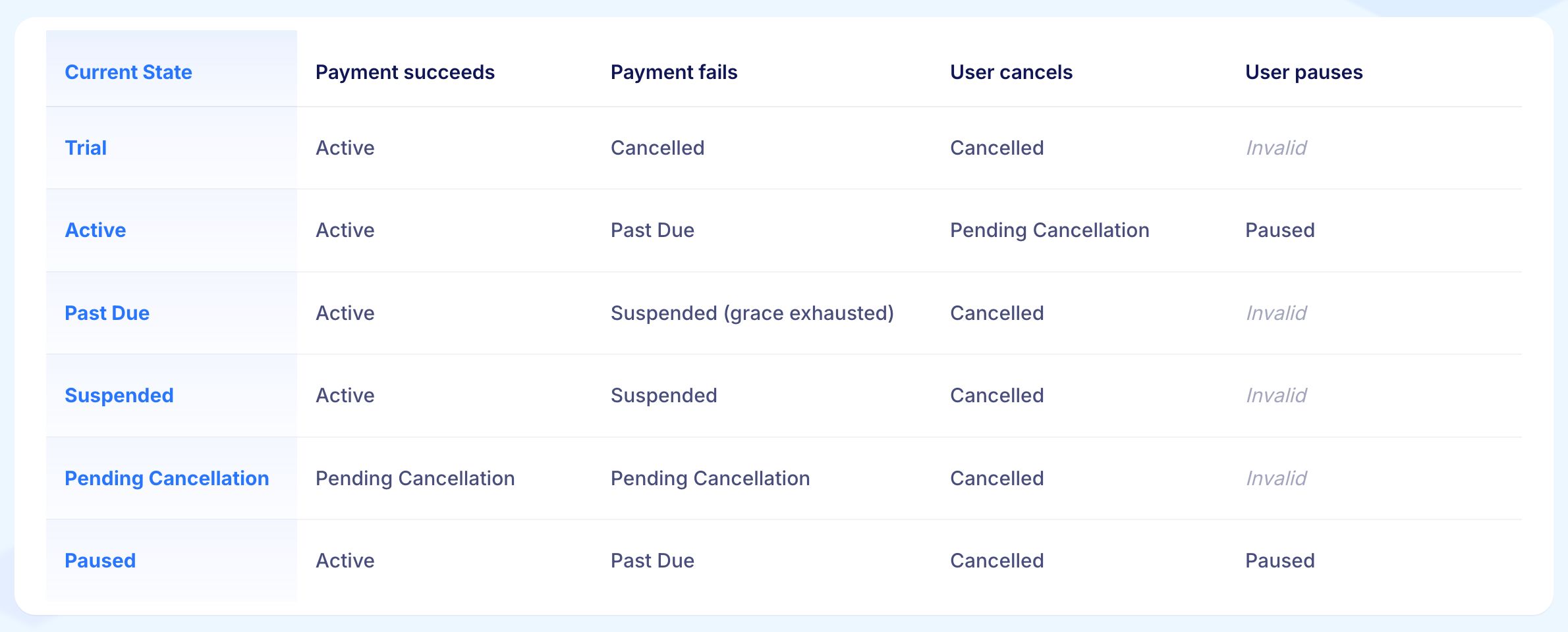
The Invalid cells are as important as the valid ones. An Invalid cell is a transition the system must refuse. A user trying to pause a Trial subscription is an invalid move. The system should reject it cleanly, not enter a Paused state with no active payment.
The table surfaces the negative test cases the diagram makes easy to skip. A diagram draws only the arrows that exist. A table makes the missing arrows visible. Both together catch what either alone would miss.
State Transition Diagram or Table: Which to Use

The two are not alternatives. They serve different purposes and cover different failure modes.
The diagram is the right tool for finding valid transitions worth testing. The eye follows the paths that exist. Test cases follow the arrows. The visual is easy to share, review, and update in a cross-functional meeting.
The table is the right tool for finding invalid transitions worth testing. Every combination of state and event gets a cell, including the ones the diagram does not draw. Each Invalid cell is a negative test case the team would otherwise miss.
The working rule: Build both. Use the diagram to drive positive test coverage. Use the table to drive negative test coverage.
The N-Switch Coverage Ladder
N-switch coverage defines how many transitions a single test case moves through before the check is considered complete. The decision of how deep to go is where serious state transition testing separates from superficial coverage.
0-Switch Coverage
Every individual transition is tested at least once. A test case starts in a known state, fires an event, confirms the system reached the correct next state, and stops. Repeated across all transitions, 0-switch proves each one works in isolation.
This level catches the obvious problems: a transition with broken logic, a transition that throws an error, a transition that fires the wrong action. Most automated suites that claim state coverage are working at 0-switch.
1-Switch Coverage
Every pair of consecutive transitions is tested. A test case starts in a known state, fires the first event to reach a second state, then fires a second event to reach a third state, and verifies the whole two-step journey.
1-switch catches a different class of problem. The system accepts the second transition when it should not, given the path it took to get there. Or the system does the right thing on the first transition but leaves the state in a condition that only becomes visible when the second transition fires.
A subscription moving Trial to Active to Past Due is a different system condition from one that moved Trial to Cancelled to Active. 0-switch hits both arrows in isolation. 1-switch hits the journey that combines them, which is where the interesting bugs tend to live.
N-Switch Coverage
Every sequence of N+1 consecutive transitions is tested. The depth grows and the test count grows quickly. Large systems cannot achieve full N-switch coverage at high N. The practical question is how deep to go for a given risk profile.
A pattern that works at enterprise scale:
0-switch as the baseline for every state transition suite
1-switch on journeys with financial, regulatory, or trust implications
Targeted N-switch on the highest-risk paths, chosen based on production incident history and risk assessment
This keeps the suite manageable while keeping coverage tight where it matters most.
Three Failure Modes of Stateful Software
The pattern of state bugs is consistent across systems. Naming the failure modes makes them easier to test for deliberately rather than discover accidentally.
1. Invalid Transitions Accepted
The system performs a move it should refuse. A subscription moves from Cancelled to Active without going through re-activation. An order moves from Delivered back to Pending. A user account moves from Locked to Logged In without re-authentication. The design rejects the transition. The implementation accepts it.
The bug is dangerous because the system keeps working with apparent normality. Problems accumulate silently until an audit or production incident surfaces them. By that point the damage is already done.
2. Valid Transitions Silently Refused
The opposite shape. The system blocks a move that should be allowed, often without telling the user why. A renewal attempt fails for a customer in a state the implementation does not recognise as renewable. A return is rejected for an order where return is supposed to be permitted.
Support tickets accumulate. The bug is hard to reproduce because it only appears in the specific state combination the user has reached, which the support team may not know how to recreate.
3. State Corruption
The move completes but leaves the system in a condition that is neither the starting state nor the intended destination. A partial commit. A flag set in the database while a related flag is not. A cached state that disagrees with the source of truth.
The system appears to be in one state to the user, another to the back office, and a third to the analytics pipeline. State corruption is the most expensive of the three failure modes. It surfaces in reconciliation work, audits, and customer disputes the company cannot resolve because the system itself does not agree on what state the customer is in.
The Hidden State Problem
The failure mode that accounts for a disproportionate share of state-related production incidents. Hidden states are states the design did not acknowledge but the implementation has.
A team designs a subscription lifecycle with seven states. The implementation adds an eighth: a database flag for accounts under fraud review, set by a back-office tool.
The flag does not appear in the diagram, the table, or the test suite. Customers in this hidden state experience unexpected behaviour: a renewal that succeeds while access is denied, a cancellation that completes but does not stop billing, a support agent who cannot find the customer in the standard tooling because the standard tooling does not know the hidden state exists.
Hidden states follow a recurring pattern. An engineer adds a flag to handle an edge case. The flag is set in one place and checked in others. Over months, the flag becomes a state in everything but name. By the time anyone notices, the implementation has several hidden states, none documented, all interacting.
The discipline that catches hidden states is checking the implementation against the modelled states. Every conditional branch in production code that depends on a stored value is potentially a hidden state.
The first principle of state transition testing at scale: The diagram is not the model. The implementation is the model.
How to Apply State Transition Testing: A Step-by-Step Guide
What to Do:
List every condition the system can be in for the area being tested
Look at requirement documents, API status fields, database flags, and UI labels like Processing, Failed, or Locked
Keep the list tight. A model nobody can review will not help
Why it Matters:
The quality of the state model determines the quality of the test suite. A model that misses states misses the test cases that cover them. Starting with the states that are explicitly named in the system makes the model reviewable before any tests are written.
Example:
For a claims management system, the states are: Draft, Submitted, Under Review, Documents Requested, Approved, Rejected, Payment Authorised, Paid, and Closed. Each one maps to a database status field and a UI label. Any state not on this list is either a gap in the model or a hidden state waiting to cause a production incident.
Step 2: List the Events That Can Happen in Each State
What to Do:
For each state, list every event that can act on it
Separate user actions (submit, cancel, retry), system events (timeout, scheduled job), and external events (webhook received, payment confirmation)
Do not skip the events that should be refused in a given state. These are the source of negative test cases
Why it Matters:
The events list is where the test coverage comes from. Missing an event in a state means missing the test cases for that combination. External events like webhooks are particularly important because they arrive asynchronously and are easy to forget when modelling from the UI perspective.
Example:
In the claims system, the Under Review state can receive the following events: adjuster approves, adjuster rejects, adjuster requests more documents, claimant withdraws, system timeout after 30 days with no action.
Each of these becomes a transition to test. The system timeout is the one most likely to be missing from the model if the team only looks at the UI.
Step 3: Build the Diagram and the Table
What to Do:
Draw the diagram first: states as shapes, transitions as labelled arrows
Build the table after: rows as states, columns as events, cells as next state and action
Mark every cell where the transition should be refused as Invalid, not blank
Why it Matters:
The diagram makes the valid paths visible and easy to review. The table makes the invalid transitions visible. Building only one of the two leaves a gap.
Teams that build only the diagram test only the cases that should pass. The Invalid cells in the table are the source of the negative test cases that catch the most damaging state bugs in production.
Example:
The claims system diagram shows the approved path clearly: Submitted to Under Review to Approved to Payment Authorised to Paid.
The table reveals the Invalid cells: what happens if a payment authorisation is requested while the claim is still in Draft, or if a claimant tries to withdraw a claim that is already Paid.
Both are Invalid transitions the diagram does not draw. Both need explicit test cases confirming the system refuses them cleanly.
Step 4: Generate Test Cases From the Model
What to Do:
Write one test case for each valid transition at 0-switch coverage
Write one test case for each Invalid cell, confirming the system refuses the move and produces no unintended side effects
Add 1-switch coverage for journeys with financial, regulatory, or trust implications
Add targeted N-switch coverage for the highest-risk paths based on incident history
Why it Matters:
A test case derived from the model has a clear justification. A test case written from intuition does not. Model-derived test cases also make coverage gaps visible: any transition or Invalid cell without a test case is a documented gap rather than an unknown one.
Example:
From the claims system model, the 0-switch test cases include: Submitted receives adjuster approval and moves to Under Review (valid), Draft receives payment authorisation request and stays in Draft with an error (invalid).
The 1-switch cases include: Submitted to Under Review to Documents Requested, verifying the state after both transitions, not just each one in isolation.
Step 5: Keep the Model Current
What to Do:
Update the diagram and table whenever the system's behaviour changes
Review the model at the same time as reviewing the code changes that affect state
Retire states that no longer exist and add states that were introduced
Why it Matters:
A state model that does not match the implementation is not a model. It is outdated documentation. Within six months of the last update, a stale model produces test cases for behaviour the system no longer has and misses test cases for behaviour it now has. The model is only as useful as it is current.
Example:
The claims system adds a new state, Fraud Review, triggered by an internal risk scoring tool. The model is updated to add the state, the transitions into it (from Submitted and Under Review), the transitions out of it (back to Under Review or to Rejected), and the Invalid transitions that should be refused while a claim is in Fraud Review.
The test suite is updated at the same time. The new state does not become a hidden state.

When State Transition Testing is the Right Tool
The technique earns its place when behaviour depends on history. Four cases where it works better than alternatives.
1. Workflows With Explicit Lifecycles
Orders, subscriptions, claims, applications, policies, invoices, tickets. Any object that moves through defined statuses is a candidate. The richer the lifecycle, the more the technique pays back.
2. Systems With Regulatory or Audit Obligations
Financial transactions, healthcare records, insurance claims, identity verification. Regulators want to see the state model and the coverage against it. The discipline is the documentation.
3. Real-Time and Event-Driven Systems
Booking engines, trading systems, fulfilment systems. Behaviour is fundamentally time-dependent. Equivalence partitioning misses the timing.
4. User Interfaces With Progressive Steps
Multi-step forms, onboarding flows, configuration wizards. The form is a state machine. The technique surfaces the bugs other methods miss.
When State Transition Testing Is Not the Right Tool
1. Stateless Services
A REST endpoint that returns the same response for the same request every time does not need state transition testing. Equivalence partitioning and boundary value analysis cover the surface more efficiently.
2. Systems With Too Many States to Model
A system with hundreds of interconnected states is not a candidate for full state modelling. Property-based testing or behaviour modelling at a higher level fits better. A practical approach is to apply state transition testing to specific high-risk areas rather than the whole system.
3. Exploratory and Creative Testing Scenarios
State transition testing is strong on known unknowns. The unknown unknowns belong to exploratory testers with permission to roam.
Common Mistakes Teams Make
1. Modelling Only the Happy Paths
The diagram contains the arrows that should exist. The test suite covers them. The arrows that should not exist get no coverage because the table was never built. The invalid transitions are where the most damaging state bugs live.
2. Stopping at 0-Switch
Each transition is tested in isolation and the team moves on. Bugs that live in transition sequences accumulate and show up later as production incidents with no obvious cause.
3. Treating the Diagram as the Model
The implementation has states the diagram does not acknowledge. The test suite matches the diagram. Production behaviour matches the implementation. The gap is where the expensive bugs live.
4. Skipping the Table
Diagrams alone miss the invalid transitions. A team that builds only the diagram tests only the cases that should pass.
5. Letting the Model Go Stale
The system changes. The diagram and table do not. Within months, the model describes a system that no longer exists and the test suite provides false confidence.
State Transition Testing in an AI-Coded Environment
AI coding tools are changing state transition testing in three specific ways.
1. AI-Generated Code Produces More State Machines Per Release
AI tools write more conditional branches, more status fields, and more flag-based logic than a human developer reviewing their own output would tend to leave in. The number of states in a system can grow faster than the model is updated. The hidden state problem gets worse before it gets better.
2. AI Agents Are Themselves State Machines
A chain of tool calls is a sequence of state transitions: planning, retrieval, generation, verification, response. Skipped steps are common. Loops that should stop sometimes do not. Applying state transition testing to agent behaviour is one of the more rigorous ways to check that an agent does what the design intended.
3. AI-Generated Test Suites Cover Happy Paths and Miss the Edge Cases
Models tend to generate 0-switch coverage of named states and miss the invalid transitions and N-switch journeys where the expensive bugs live. Pairing AI test generation with explicit coverage requirements at 0-switch, 1-switch, and risk-prioritised N-switch produces a much better result than letting the generator run without coverage constraints.
The team that thinks carefully about stateful behaviour in an AI-coded environment ships fewer of the corruption incidents that are becoming more common as AI velocity increases.
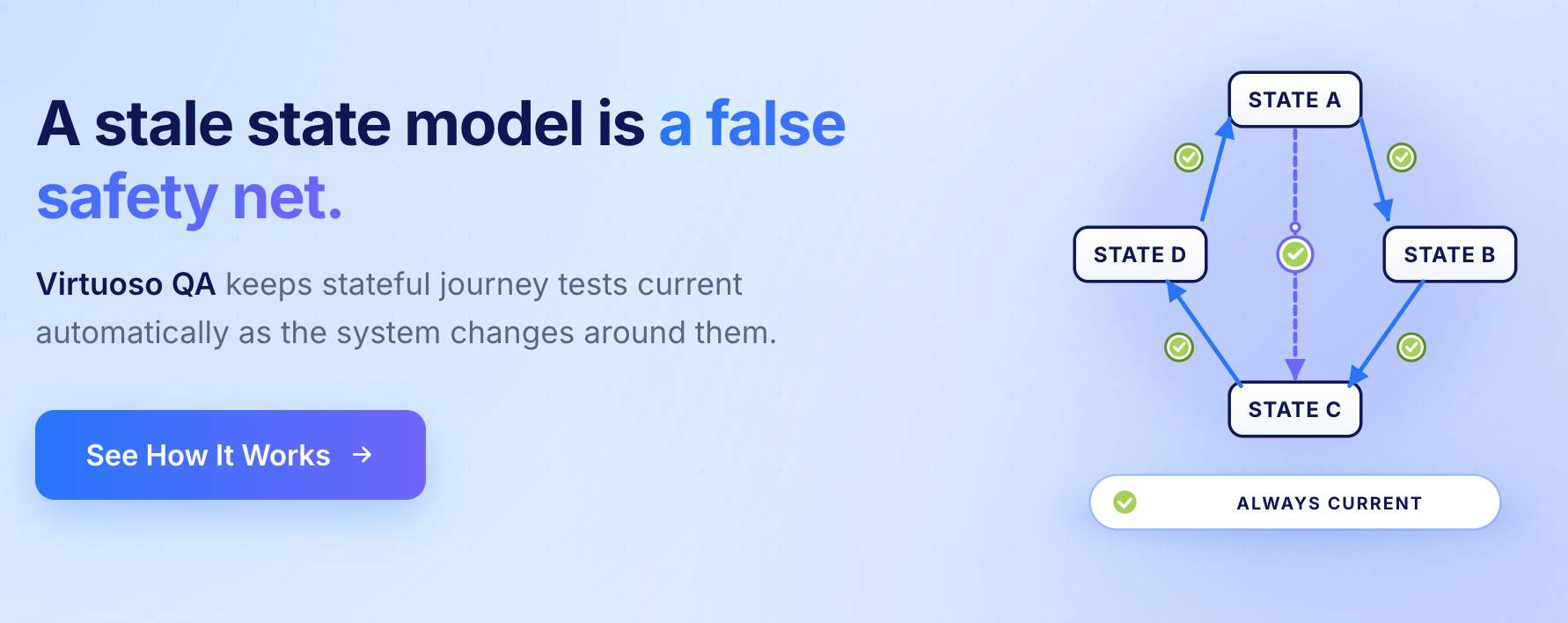
How Virtuoso QA Approaches Stateful Verification
State transition bugs show up as functional failures, end-to-end journey breaks, and regressions. Virtuoso QA covers all three.
End-to-end journey tests follow the full state lifecycle from start to end state in a single run. Functional tests verify the actions the system performs at each transition, not just that the status field changed. Regression tests run every stateful journey automatically on every release so a change to one transition does not quietly break another.
When a transition breaks, the failure is visible immediately rather than surfacing as a production incident two releases later.
Best Practices for State Transition Testing
1. Start With the Highest-Risk Workflows
Money, access, and irreversible actions should come before edge cases. The first state models a team builds should be for the workflows where a wrong transition causes a customer-visible problem.
2. Keep State Names Specific
Vague state names like InProgress or Processing hide ambiguity that becomes a bug later. A state name should be specific enough that two engineers reading it independently would agree on exactly what it means.
3. Document Invalid Transitions Explicitly
Every Invalid cell in the table needs a test case that confirms the system refuses the move cleanly and produces no side effect. Teams that skip invalid transition testing discover those cases in production.
4. Split Large Models by Feature Boundary
A model with fifty states is hard to review and hard to maintain. Splitting it into smaller models, one per major workflow or feature area, keeps each model reviewable and the team accountable for keeping it current.
5. Align Across QA, Engineering, and Product Before Scaling
A state model that engineering has not reviewed may not match the implementation. A model that product has not reviewed may not reflect the business rules. Both mismatches produce gaps. Getting agreement before building the test suite is cheaper than discovering the gaps after.
6. Update the Model on the Same Cadence as the Code
The model is only useful while it matches the implementation. A state model reviewed at the same time as the pull request that changes state behaviour stays current. A model reviewed quarterly does not.
Related Reads
Frequently Asked Questions
What is the difference between a state transition diagram and a state transition table?
What is N-switch coverage in state transition testing?
When should state transition testing be used?
What is a hidden state, and why does it matter?
Can state transition testing be automated?
How does Virtuoso QA support state transition testing?