Blog
Functional Testing - Definition, Lifecycle, and Types

Rishabh Kumar
Published on

Table of contents
Lorem ipsum
Lorem ipsum
Lorem ipsum
Lorem ipsum
Lorem ipsum
Software that merely runs is no longer the bar. Users expect an application to do the right thing on every input, complete every workflow, and behave consistently across web, mobile, and API surfaces, and a single broken flow at the wrong moment can cost revenue and trust in the same afternoon. Functional testing is the discipline that verifies the software does what it is supposed to do before that moment arrives.
The page covers what functional testing is, why it matters, what to test, the roles involved, the techniques and types, the lifecycle, the metrics worth tracking, the tooling landscape, and the way AI-native platforms and the current wave of generative AI are reshaping the practice.
The treatment is aimed at QA engineers, developers, and product managers who need something deeper than a definition.
What is Functional Testing?
Functional testing is a type of software testing that validates whether an application performs according to its specified requirements. It focuses on testing the software's features and functionality by providing appropriate inputs and examining the outputs against expected results.
Core Purpose
Functional testing answers one fundamental question: Does the software do what it's supposed to do?
Unlike non-functional testing which examines how well the system performs, functional testing verifies that each function of the software application operates in conformance with the requirement specification. It's entirely focused on the user perspective, testing what users see and interact with rather than the underlying code structure.
Key Characteristics of Functional Testing
Tests software functions by feeding inputs and examining outputs
Based on business requirements and user specifications
Performed from the user's point of view
Can be done manually or through automation
Focuses on "what" the system does, not "how" it does it
Why Functional Testing is Essential for Modern Software
In an era where a single software failure can cost millions in revenue and irreparably damage brand reputation, functional testing has evolved from a nice-to-have to an absolute necessity.
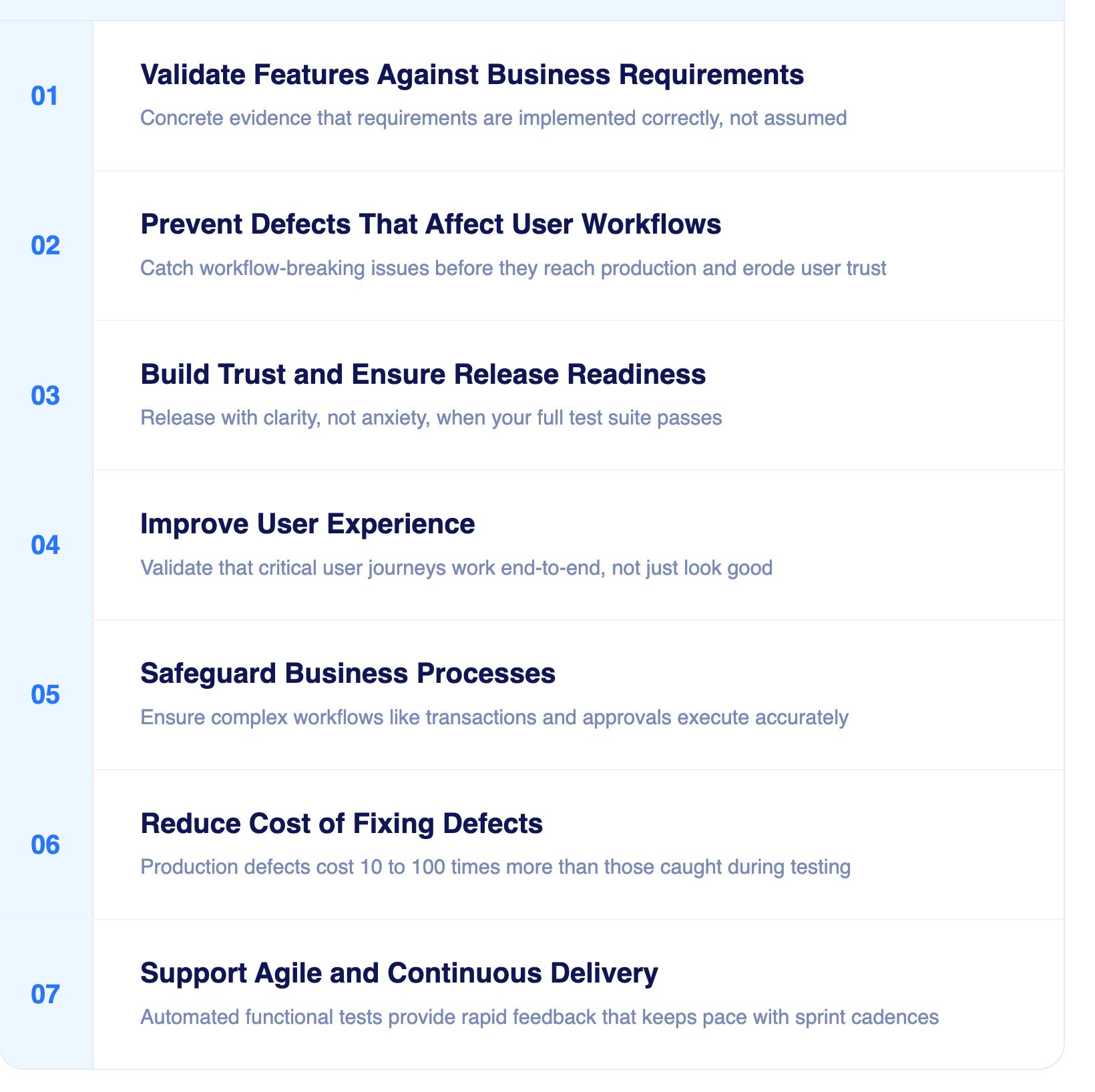
Validate Features Against Business Requirements
Every software project begins with a set of business requirements that define what the application must do. Functional testing directly validates that these requirements have been implemented correctly. Without this validation, you're essentially shipping software based on assumptions rather than verified facts.
When functional tests pass, you have concrete evidence that your development team has successfully translated business requirements into working features.
Prevent Defects That Affect User Workflows
Users don't care about your code architecture or technology stack. They care about whether they can complete their tasks efficiently. A broken login flow, a malfunctioning checkout process, or a search feature that returns incorrect results can instantly destroy user trust.
Functional testing catches these workflow-breaking defects before they reach production, protecting your users from frustrating experiences and your business from costly consequences.
Build Trust and Ensure Release Readiness
Releasing software is a high-stakes decision. Functional testing provides the confidence needed to make that decision with clarity rather than anxiety. When your functional test suite passes comprehensively, you can release knowing that core features work as intended.
This confidence cascades throughout your organization, from developers who can refactor code safely to executives who can commit to release dates with certainty.
Improve User Experience
User experience isn't just about beautiful interfaces. It's about whether users can accomplish their goals without friction. Functional testing directly validates that critical user journeys work end-to-end, ensuring that design intentions translate into functional reality.
By combining functional UI tests with API calls, you move closer to true end-to-end testing. To learn more, check out our article on Functional UI Testing with API Calls
Safeguard Business Processes
For enterprise applications, functional testing validates that complex business processes execute correctly. Whether it's processing a financial transaction, managing inventory updates, or orchestrating multi-step approval workflows, functional testing ensures business logic operates accurately.
Reduce Cost of Fixing Defects
The earlier you catch a defect, the cheaper it is to fix. Finding a functional bug during testing costs exponentially less than discovering it in production, where it affects real users, requires emergency hotfixes, and potentially causes data integrity issues.
Industry research consistently shows that fixing a defect in production costs 10-100 times more than fixing it during the testing phase.
Support Agile and Continuous Delivery
Modern development teams release software frequently, sometimes multiple times per day. Functional testing, especially when automated, enables this velocity by providing rapid feedback on whether new code maintains existing functionality while adding new features successfully.
What to Test in Functional Testing
Functional testing covers more ground than individual buttons and forms. A thorough functional test plan validates every layer of user interaction and business logic.
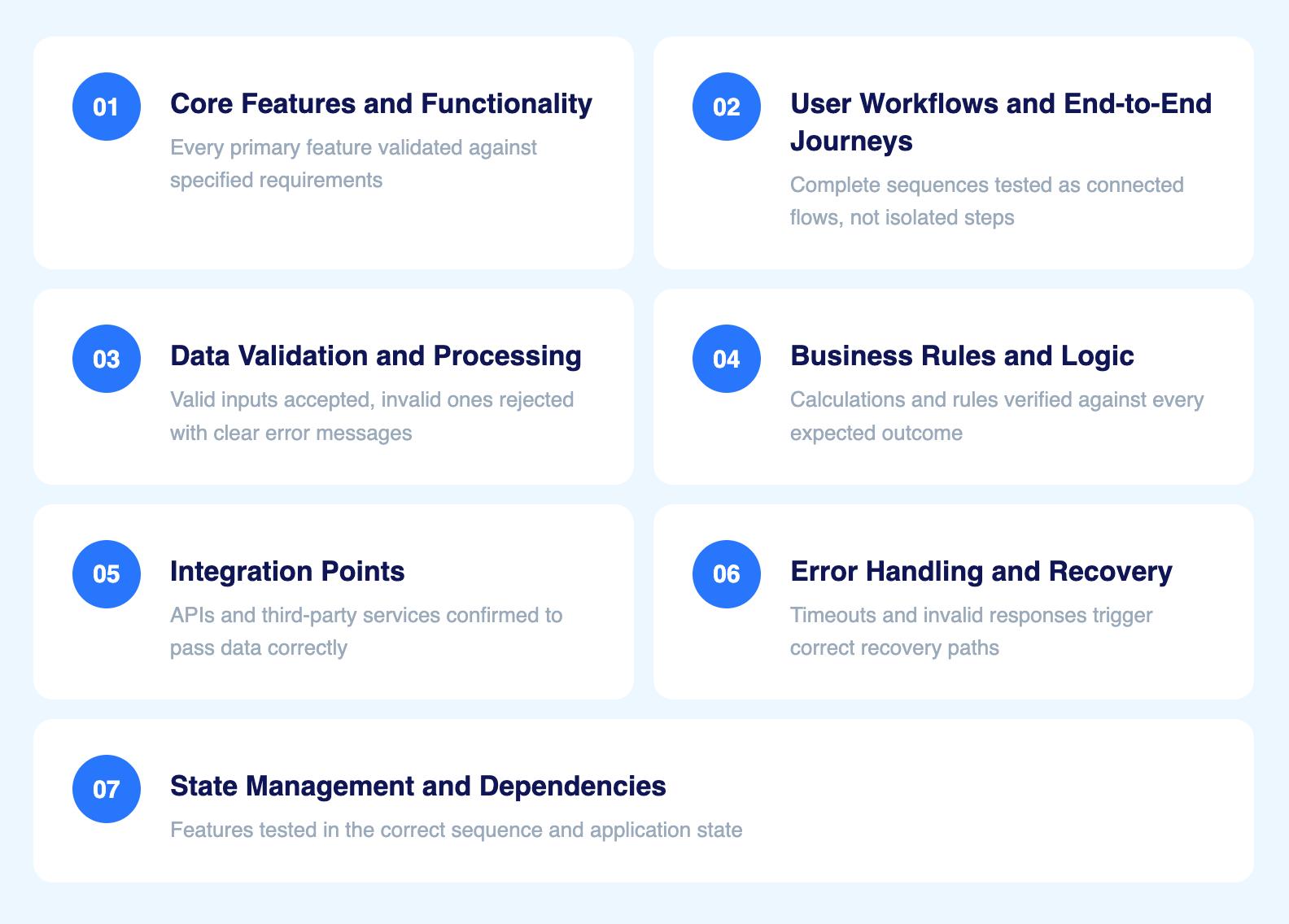
Core features and functionality
Every primary feature, including login, search, checkout, form submission, and data export, must be validated against its specified requirements. This includes both the happy path and failure scenarios.
User workflows and end-to-end journeys
Individual features that work in isolation can still fail when chained together. Test complete sequences from start to finish. A user discovering a product, adding it to a cart, checking out, and receiving a confirmation should be validated as a single connected flow, not three separate tests.
Data validation and processing
Input handling is one of the highest-defect areas in functional testing. Validate that the system accepts valid inputs, rejects invalid ones with clear error messages, and handles edge cases correctly. Empty fields, special characters, maximum length inputs, and boundary values all require dedicated test cases.
Business rules and logic
Calculations, conditions, and rules embedded in the application must produce correct outputs. Discount logic, tax calculations, eligibility checks, approval thresholds, and access control rules all require functional test cases that verify the expected outcome for every condition.
Integration points
Modules that pass unit testing can still fail when they interact. APIs, databases, third-party services, and internal integrations all require testing to confirm that data flows correctly across system boundaries.
Error handling and recovery
Test what happens when things go wrong. Expired sessions, failed payments, network timeouts, and invalid API responses should all trigger appropriate error messages and recovery paths rather than blank screens or unhandled exceptions.
State management and dependencies
Some features behave differently depending on prior user actions or application state. A discount that applies only after a user has been active for 30 days, or a form field that unlocks only after another is completed, must be tested in the correct sequence and state.

Roles Involved in Functional Testing
Functional testing is rarely the responsibility of a single role. In modern software teams, it is a shared activity across multiple disciplines.
QA Engineers and Testers
The primary owners of functional test design and execution. They translate requirements and user stories into structured test cases, execute both manual and automated tests, log defects, and verify fixes.
Software Developers
Responsible for unit-level functional testing during development. In Agile teams, developers increasingly participate in test case design during sprint planning and conduct code-level functional validation before handoff to QA.
Business Analysts
Play a critical role in functional testing by defining acceptance criteria and participating in user acceptance testing. Their domain knowledge ensures that test cases reflect real business rules and user expectations, not just technical specifications.
Automation Engineers and SDETs
Convert approved functional test cases into automated scripts, integrate them into CI/CD pipelines, and maintain automation frameworks. In AI-native test platforms like Virtuoso QA, this role shifts from script maintenance to coverage strategy and test governance.
Product Managers and Owners
Define acceptance criteria and prioritise which functional areas carry the highest business risk. They often participate in UAT sign-off and make release readiness decisions based on functional test outcomes.
End Users and Business Stakeholders
Involved primarily in user acceptance testing, where real users validate that the application solves actual business problems under realistic conditions. Their feedback catches usability issues and requirement misalignments that structured test cases may not surface.
Real-World Examples of Functional Testing
Functional testing manifests differently across industries and application types. Here's how it applies in real-world scenarios:
E-commerce: Add to Cart, Checkout, Payment Gateway Validation
For an e-commerce platform, functional testing validates critical revenue-generating workflows:
Users can browse products and add items to their cart
Cart calculations correctly sum prices and apply discounts
Checkout flows capture shipping and billing information accurately
Payment gateways process transactions securely
Order confirmation emails are triggered and delivered
Inventory systems update in real-time after purchases
A single functional defect in any of these areas directly impacts revenue and customer satisfaction.
Banking: Login, Fund Transfers, Balance Checks
Banking applications demand exceptional functional accuracy because errors can have serious financial and regulatory consequences:
Authentication systems verify credentials correctly
Account balance displays reflect real-time data
Fund transfer functions move money accurately between accounts
Transaction history logs maintain perfect accuracy
Interest calculations execute according to defined rules
Regulatory reporting features generate compliant outputs
Healthcare: Appointment Booking, Prescription Upload
Healthcare systems must function flawlessly because errors can affect patient care:
Appointment scheduling systems prevent double-bookings
Electronic health records display accurate patient information
Prescription management systems catch drug interaction warnings
Patient portal features allow secure document uploads
Billing systems calculate insurance coverage correctly
Compliance features maintain HIPAA standards
SaaS: User Signup, API Integration Checks
SaaS platforms rely on functional testing to ensure seamless onboarding and integration:
User registration flows capture required information
Email verification systems work reliably
Dashboard features display accurate metrics
API endpoints return expected responses
Third-party integrations exchange data correctly
Subscription management handles billing accurately
The Functional Testing Lifecycle
Successful functional testing follows a structured lifecycle that ensures comprehensive coverage and efficient execution.

Requirement Analysis
The functional testing lifecycle begins with thoroughly understanding what needs to be tested. This phase involves:
Reviewing functional requirements documentation
Identifying testable features and user workflows
Understanding acceptance criteria for each requirement
Clarifying ambiguities with product owners and developers
Prioritizing requirements based on business criticality
Test Planning & Design
Once requirements are clear, the testing team creates a comprehensive test strategy:
Defining the scope of functional testing
Selecting appropriate testing techniques
Identifying test data requirements
Determining test environment needs
Allocating resources and setting timelines
Choosing between manual and automated approaches
Environment Setup
Proper test environment configuration is critical for reliable functional testing:
Provisioning test servers and databases
Configuring test data that mirrors production scenarios
Setting up integrations with dependent systems
Establishing network configurations
Ensuring environment parity with production where necessary
Test Execution
With preparation complete, testers execute functional test cases:
Running tests according to the test plan
Providing inputs and capturing outputs
Comparing actual results against expected results
Documenting test execution details
Capturing screenshots or videos for failed tests
Defect Logging & Reporting
When functional tests reveal defects, systematic logging ensures nothing falls through the cracks:
Creating detailed defect reports with reproduction steps
Assigning severity and priority classifications
Linking defects to specific requirements
Attaching supporting evidence like logs and screenshots
Tracking defects through resolution and verification
Regression & Retesting
After defects are fixed, functional testing continues to ensure corrections work and haven't introduced new issues:
Retesting specific defects to confirm fixes
Running regression test suites to catch unintended side effects
Validating that fixes haven't broken related functionality
Maintaining traceability between defects and test cases
Techniques for Functional Testing
Effective functional testing employs various techniques to maximize defect detection while optimizing testing efficiency.
Black Box Testing
Black box testing treats the application as an opaque box, focusing entirely on inputs and outputs without knowledge of internal code structure. Testers validate functionality by:
Providing various input combinations
Observing system behavior and outputs
Comparing results against requirements
Identifying functional discrepancies
This technique is particularly effective because it mirrors the user perspective. Users don't see your code; they only see whether the application behaves as expected.
Boundary Value Analysis
Many defects lurk at the boundaries of acceptable input ranges. Boundary value analysis systematically tests values at the edges of valid ranges:
Testing minimum acceptable values
Testing maximum acceptable values
Testing values just below the minimum
Testing values just above the maximum
Validating that boundary conditions trigger appropriate behavior
For example, if a text field accepts 1-100 characters, boundary value analysis tests 0, 1, 100, and 101 characters to ensure proper validation.
Equivalence Partitioning
Rather than testing every possible input value, equivalence partitioning divides input data into logical groups where all values should produce similar behavior. Testing one representative value from each group provides efficient coverage:
Identifying equivalence classes for inputs
Selecting representative test values from each class
Reducing redundant test cases
Maintaining comprehensive coverage with fewer tests
Decision Table Testing
For complex business logic involving multiple conditions and rules, decision tables organize test scenarios systematically:
Mapping all condition combinations
Defining expected outcomes for each combination
Ensuring all logical paths are tested
Identifying missing or contradictory rules
This technique excels at testing systems with intricate business rules where multiple factors influence outcomes.
State Transition Testing
Applications often transition between different states based on user actions or system events. State transition testing validates these state changes:
Mapping all possible system states
Identifying valid transitions between states
Testing invalid transition attempts
Verifying system behavior in each state
Exploratory Testing
While structured test cases provide systematic coverage, exploratory testing leverages human creativity and intuition to discover unexpected issues:
Testers simultaneously learn, design, and execute tests
Focus shifts dynamically based on findings
Encourages creative thinking about edge cases
Complements scripted testing with human insight
Different Types of Functional Testing
Functional testing encompasses several specialized types, each serving specific purposes within the software quality lifecycle.
1. Unit Testing
Unit testing validates individual code components in isolation, typically written and executed by developers:
Tests smallest testable parts of an application
Validates functions, methods, or classes independently
Runs quickly and frequently during development
Provides immediate feedback on code changes
Forms the foundation of the testing pyramid
2. Smoke Testing
Smoke testing performs preliminary testing to reveal simple failures severe enough to reject a software build:
Executes critical functionality checks quickly
Determines whether detailed testing should proceed
Catches obvious defects early in the testing cycle
Often automated to run after each build
Acts as a gatekeeper before comprehensive testing
3. Sanity Testing
Sanity testing conducts focused testing on specific functionality after changes:
Validates that specific bugs are fixed
Checks that new features work at a basic level
Narrower in scope than smoke testing
Determines whether deeper testing is warranted
Saves time by avoiding full regression when changes are minor
4. Integration Testing
Integration testing validates that different modules or services work together correctly:
Tests interfaces between components
Validates data flow between integrated systems
Identifies integration-related defects
Ensures modules interact as designed
Critical for microservices architectures
5. Regression Testing
Regression testing ensures that existing functionality continues working after code changes:
Re-runs previously executed tests
Validates that new code hasn't broken existing features
Protects against unintended side effects
Typically heavily automated due to repetitive nature
Essential for maintaining software stability
6. User Acceptance Testing (UAT)
User acceptance testing validates that software meets business requirements and is ready for production:
Performed by actual end users or business stakeholders
Tests real-world scenarios and workflows
Validates that software solves intended business problems
Final validation gate before production release
Focuses on business value rather than technical correctness
Functional vs Non-Functional Testing
Understanding the distinction between functional and non-functional testing helps organizations allocate testing resources effectively. Both are required for a complete quality assurance programme, one without the other leaves critical gaps.
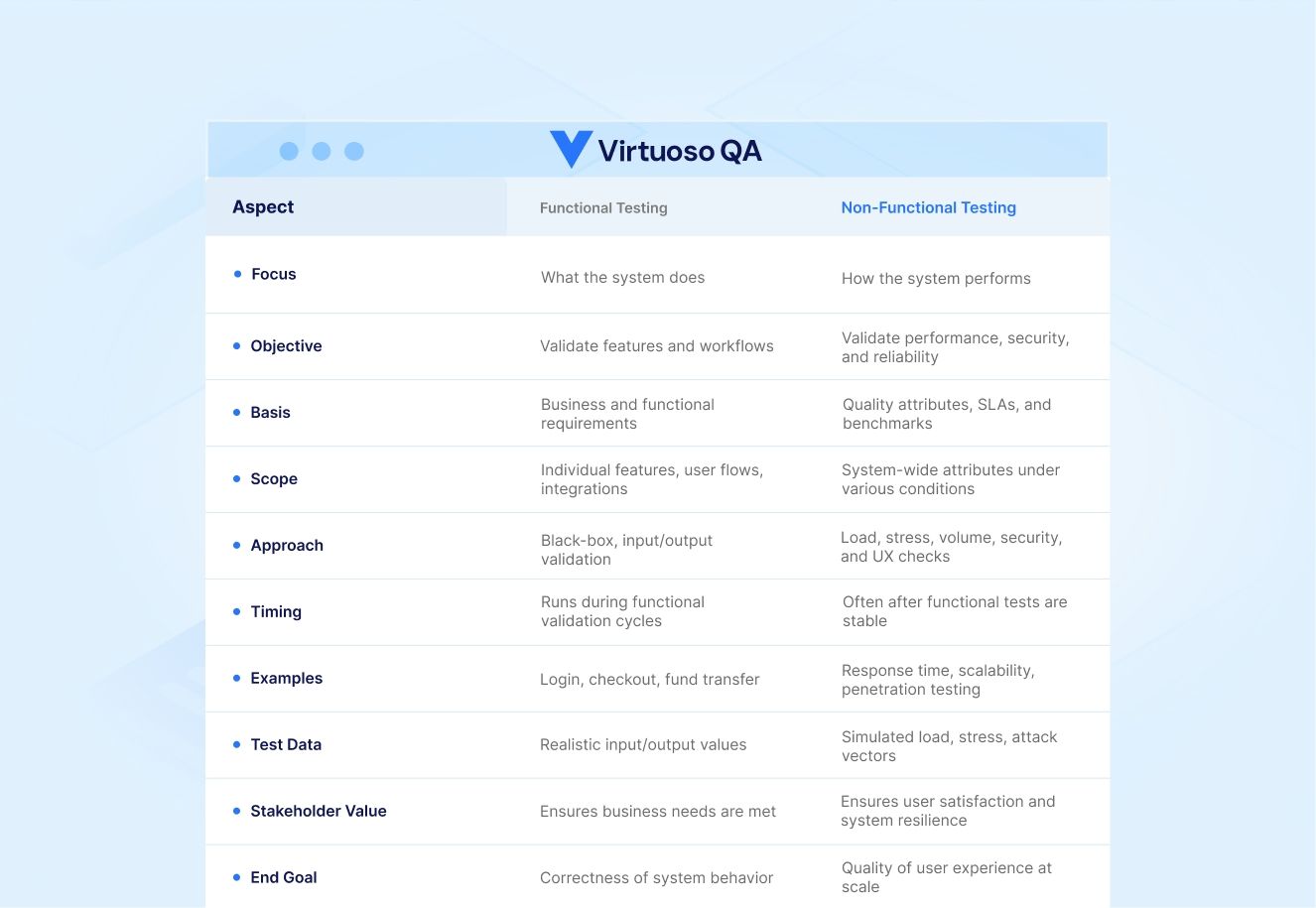
Focus: What the System Does vs How It Performs
Functional testing validates that features work correctly. Non-functional testing examines performance characteristics like speed, reliability, and security under various conditions.
Metrics: Pass/Fail vs Performance Benchmarks
Functional tests produce binary pass/fail results. Non-functional tests measure against performance targets like response times, throughput, or resource utilization.
Examples: Login Validation vs Load Testing
Functional testing verifies that login accepts valid credentials and rejects invalid ones. Non-functional testing validates that login handles 10,000 concurrent users without degradation.
Importance Together: Both Required for Complete QA
High-quality software requires both functional correctness and acceptable performance characteristics. Functional testing without non-functional testing delivers features that work but may perform poorly. Non-functional testing without functional testing optimizes systems that don't meet user needs.
How to Perform Functional Testing Effectively
Executing functional testing successfully requires more than just running test cases. Follow these practices to maximize effectiveness:
Step 1: Define Requirements Clearly
Ambiguous requirements lead to inadequate testing. Invest time upfront to ensure requirements are:
Specific and measurable
Testable with clear pass/fail criteria
Documented and accessible to all team members
Reviewed and approved by stakeholders
Traceable throughout the testing process
Step 2: Design Test Cases
Well-designed test cases form the foundation of effective functional testing:
Cover all requirements systematically
Include both positive and negative scenarios
Specify clear preconditions and expected results
Remain independent and reusable
Balance comprehensiveness with maintainability
Step 3: Prepare Realistic Test Data
Test data quality directly impacts testing effectiveness:
Mirror production data characteristics
Include edge cases and boundary values
Maintain data privacy and security standards
Refresh regularly to avoid stale datasets
Version control for reproducibility
Step 4: Execute Tests Manually or Automatically
Choose the appropriate execution approach based on test characteristics:
Automate stable, repetitive tests for efficiency
Maintain manual testing for exploratory and usability scenarios
Balance automation investment against ROI
Consider test stability before automating
Integrate automated tests into CI/CD pipelines
Step 5: Validate Outcomes Against Requirements
Every test execution requires thorough validation:
Compare actual results against expected outcomes
Document discrepancies systematically
Consider both direct outputs and side effects
Verify data integrity and system state
Capture evidence of test execution
Common Challenges in Functional Testing and How to Address Them
Even with good practices, teams hit recurring obstacles, and recognising them early is usually half the fix. Each challenge below has a practical counter.
1. Changing Requirements
Requirements evolve mid-development and leave cases stale, so keep testers, developers, and stakeholders in close contact and update cases alongside requirement changes.
2. Ambiguous Specifications
When detail is missing, effective cases are hard to design, so work with business analysts to clarify expectations before writing or running tests.
3. Limited Test Data
Realistic data is essential for meaningful results, so use generation tools, anonymised production data, or domain input to build robust sets.
4. Tight Release Schedules
Short iterations squeeze manual testing, so prioritise cases by risk, build for reusability, and automate the repetitive validation work.
5. Unstable Test Environments
Inconsistent environments produce unreliable results, so standardise configurations, automate setup, and use containerised or cloud-based environments for consistency.
Functional Testing in Agile & DevOps
Modern software development methodologies have transformed how functional testing integrates into the development lifecycle.
Shift-Left Testing
Shift-left testing moves functional validation earlier in the development process:
Developers write unit tests alongside feature code
Testers review requirements before implementation begins
Automated tests run with every code commit
Defects are caught and fixed within the same sprint
Reduces cost and time of defect resolution
Testing early in sprints prevents the traditional pattern of development finishing early while testing struggles to complete before release deadlines.
Continuous Testing in CI/CD
Continuous integration and continuous delivery pipelines rely on automated functional testing:
Automated tests trigger with every code push
Fast feedback identifies breaking changes immediately
Testing parallelization accelerates execution
Test results gate progression through deployment stages
Failed tests prevent broken code from reaching production
Collaboration
Modern functional testing thrives on collaboration across roles:
QA engineers, developers, and product teams share responsibility for quality
Cross-functional teams discuss requirements and acceptance criteria together
Developers participate in test case review
QA provides input during development planning
Shared ownership creates collective accountability for quality
Best Practices for Functional Testing
Following established best practices elevates functional testing from a checkbox activity to a strategic quality enabler.
Prioritize Business-Critical Scenarios
Not all functionality carries equal business risk. Focus testing effort on:
Revenue-generating features
User-facing workflows
Regulatory compliance requirements
Frequently used functionality
Areas with history of defects
Maintain Traceability Between Requirements and Test Cases
Traceability ensures comprehensive coverage and simplifies impact analysis:
Link each test case to specific requirements
Track which requirements have test coverage
Identify untested requirements proactively
Assess impact of requirement changes on test suite
Generate coverage reports for stakeholders
Balance Manual and Automated Functional Testing
Optimal functional testing employs both approaches strategically:
Automate stable, repetitive test cases
Maintain manual testing for usability and exploratory scenarios
Consider automation ROI based on execution frequency
Regularly evaluate and rebalance automation portfolio
Train team members in both manual and automation skills
Use Realistic Datasets and Environments
Testing effectiveness depends on environmental fidelity:
Test environments mirror production configurations
Test data represents real-world scenarios
Volume testing uses production-scale datasets
Integration testing connects to realistic endpoints
Performance characteristics approximate production
Continuously Review and Optimize Test Suites
Test suites require ongoing maintenance to remain effective:
Regularly review and remove obsolete test cases
Identify and eliminate redundant tests
Update tests when requirements change
Monitor test execution times and optimize slow tests
Refactor tests to improve maintainability
Limitations of Functional Testing
While essential, functional testing has inherent limitations that organizations must understand and address.
Does Not Measure Performance or Scalability
Functional testing validates that features work correctly but doesn't assess whether they perform acceptably under load. A functional test might pass for a checkout process that completes correctly but takes 30 seconds.
Complement functional testing with performance testing to ensure adequate response times and scalability.
Time-Consuming Without Automation
Comprehensive manual functional testing consumes significant time and resources. As applications grow in complexity, manually executing full regression suites becomes impractical.
Automation investment is essential for maintaining comprehensive functional testing as software scales.
High Maintenance for Large Regression Suites
Automated functional test suites require ongoing maintenance as applications evolve. UI changes, workflow modifications, and requirement updates all necessitate test updates.
Modern AI-powered testing platforms like Virtuoso QA address this challenge through self-healing capabilities that automatically adapt to application changes.
Metrics to Track in Functional Testing
Measuring functional testing effectiveness requires tracking relevant test metrics that provide actionable insights.
1. Test Coverage Percentage
Test coverage measures what proportion of functionality has test cases:
Requirements coverage: Percentage of requirements with tests
Code coverage: Percentage of code executed during testing
Trend coverage over time to ensure improvements
Set coverage targets based on risk profiles
Regularly assess and address coverage gaps
2. Defect Density
Defect density measures the number of defects found relative to application size:
Calculate defects per thousand lines of code
Track density trends across releases
Identify high-defect-density modules for targeted improvement
Compare against industry benchmarks
Use as an indicator of code quality
3. Test Pass/Fail Ratio
Pass/fail ratio indicates test suite stability and application quality:
Monitor ratio trends over time
Investigate sudden changes in pass rates
Track separately for different test types
Use as a release readiness indicator
Identify flaky tests that fail inconsistently
4. Defect Leakage
Defect leakage measures how many defects escape to production:
Calculate production defects vs. total defects found
Track leakage trends to assess testing effectiveness
Analyze leaked defects to identify testing gaps
Target zero critical defect leakage
Use findings to improve test coverage
5. Automation Coverage Percentage
Automation coverage indicates what proportion of tests run automatically:
Track automation growth over time
Set automation targets based on test stability
Monitor automation ROI through execution frequency
Identify high-value manual tests for automation
Balance automation effort against benefit
6. Execution Time
Test execution time impacts feedback speed and testing efficiency:
Monitor total suite execution time
Identify and optimize slow-running tests
Implement parallel execution to reduce duration
Set execution time targets for different test types
Balance comprehensive coverage with timely feedback
Why Automate Functional Testing?
Automation transforms functional testing from a resource-intensive bottleneck into a strategic accelerator of software delivery.
Speed & Efficiency
Automated functional tests execute far faster than manual testing:
Run hundreds of tests in minutes vs. days
Execute tests in parallel across multiple environments
Provide rapid feedback to developers
Enable frequent testing without resource constraints
Support continuous integration and deployment
Regression Handling
Regression testing perfectly suits automation because tests repeat identically:
Execute regression suites with every code change
Catch unintended side effects immediately
Maintain comprehensive regression coverage sustainably
Free manual testers for exploratory work
Build confidence in code changes
Cross-Browser & Cross-Device Coverage
Users access applications across diverse platforms and devices. Automation enables comprehensive coverage:
Test across multiple browsers simultaneously
Validate responsive designs on various screen sizes
Execute identical tests on different operating systems
Maintain consistent test coverage across platforms
Catch platform-specific issues reliably
CI/CD Integration
Modern development pipelines require automated testing to function effectively:
Tests trigger automatically with code commits
Failed tests prevent broken code from advancing
Fast execution enables frequent deployments
Continuous testing provides constant quality visibility
Supports DevOps culture of shared responsibility
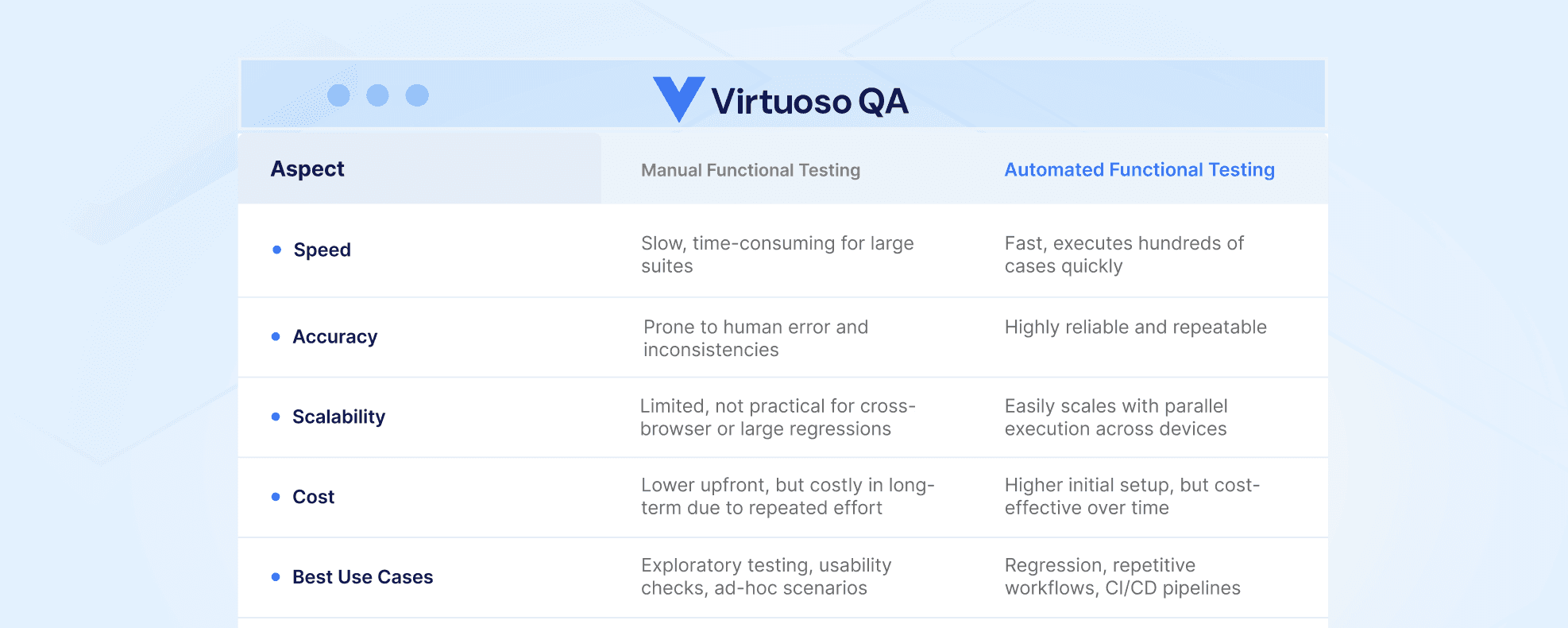
Manual vs Automated Functional Testing
Choosing between manual and automated approaches requires understanding the strengths and limitations of each.
Choosing the Right Automation Tool
Selecting appropriate automation tools significantly impacts testing success. Consider these factors carefully.
Key Factors to Consider
When evaluating automation tools, look beyond brand names and focus on how well the tool fits your organization's needs:
Ease of Use
Tool usability affects adoption and productivity:
Evaluate learning curve for team members
Consider whether non-technical testers can use the tool
Assess quality of documentation and training resources
Try tools with actual team members before committing
Consider no-code options for broader team participation
Scalability
Testing needs grow with applications and teams:
Assess whether tools handle increasing test volumes
Evaluate parallel execution capabilities
Consider cloud-based execution for scalability
Review performance with large test suites
Ensure tools support your growth trajectory
Integration Support
Modern testing tools must integrate seamlessly with development ecosystems:
Verify CI/CD pipeline compatibility
Check integration with issue tracking systems
Assess API availability for custom integrations
Evaluate reporting and analytics capabilities
Consider integration with test management platforms
Reporting & Analytics
Actionable insights require robust reporting:
Evaluate clarity and comprehensiveness of test reports
Assess real-time visibility into test execution
Review historical trend analysis capabilities
Consider stakeholder reporting requirements
Examine failure analysis and debugging features
Script-Based vs No-Code Options
The choice between traditional script-based tools and modern no-code platforms significantly impacts team productivity and test maintenance.
Script-Based Tools (e.g., Selenium)
Traditional automation frameworks require programming skills:
Offer maximum flexibility and customization
Require development expertise to create and maintain
Involve longer test creation time
Demand ongoing maintenance as applications change
Limit participation to technical team members
No-Code Tools (e.g., Virtuoso QA)
Modern no-code platforms democratize test automation:
Enable non-technical testers to create automated tests
Accelerate test creation with visual interfaces
Leverage AI for self-healing tests that adapt to changes
Reduce maintenance burden significantly
Allow broader team participation in automation
Top Functional Testing Tools and Frameworks
Selecting the right tool significantly impacts the sustainability and ROI of your functional testing programme. The market divides broadly into three categories: script-based frameworks, low-code and no-code platforms, and mobile-specific tools.
Script-Based Frameworks
1. Selenium
The most widely adopted open-source web testing framework. Supports Java, Python, JavaScript, C#, and Ruby. Offers maximum flexibility for complex scenarios but requires programming expertise and extensive maintenance as applications evolve.
2. Cypress
A developer-friendly JavaScript testing framework built for modern web applications. Runs directly in the browser, offering fast execution and detailed debugging. Suited to frontend-heavy applications and teams with JavaScript expertise.
3. Playwright
Microsoft's cross-browser automation framework. Supports Chromium, Firefox, and WebKit with a single API. Strong for teams needing reliable cross-browser functional testing with good parallel execution support.
4. Robot Framework
An open-source, keyword-driven automation framework that supports both technical and non-technical contributors. Widely adopted in enterprise environments for its readable test syntax and extensible library ecosystem.
Low-Code and No-Code Platforms
1. Virtuoso QA
An AI-native platform that allows functional tests to be authored in plain English through the StepIQ engine. Self-healing technology automatically adapts tests when the UI changes, eliminating the maintenance burden that collapses most script-based initiatives. Integrates natively with Jenkins, Azure DevOps, GitHub Actions, GitLab, TestRail, and Xray. Supports cross-browser execution across 2,000+ OS, browser, and device configurations without infrastructure setup.
2. Tricentis Tosca
An enterprise-grade, model-based test automation platform with a drag-and-drop interface. Uses AI to build dynamic models of application elements, enabling scriptless functional test creation. Strong coverage of SAP, Salesforce, and other enterprise application ecosystems.
3. Katalon
A low-code automation platform supporting web, mobile, API, and desktop testing. Bridges the gap between no-code accessibility and scripted flexibility, offering both recorder-based and script-based test creation.
Functional Testing in Action with Virtuoso QA
Virtuoso QA represents the next generation of functional testing platform, combining AI-powered automation with intuitive no-code test creation. As a no-code, AI-driven test solution, Virtuoso QA addresses traditional functional testing challenges:
Self-Healing Automation
Tests automatically adapt when UI elements change, eliminating the maintenance burden that typically consumes 30-50% of automation effort.
Cross-Browser/Device Support
Execute functional tests across all major browsers and devices from a single test definition, ensuring consistent user experiences everywhere.
Real-Time Reporting
Access comprehensive test results immediately, with AI-generated insights into failures that accelerate debugging and resolution.
Key Benefits for Functional Testing:
Create functional tests 10x faster than traditional scripting approaches
Reduce test maintenance by up to 85% through AI-powered self-healing
Enable non-technical team members to participate in test automation
Integrate seamlessly with CI/CD pipelines for continuous testing
Scale functional testing across browsers and environments effortlessly
Features of Virtuoso QA That Transform Functional Testing:
Natural Language Test Creation: Write tests in plain English without coding
Live Authoring: Real-time validation as you create tests ensures accuracy
AI Root Cause Analysis: Automatically identifies why functional tests fail
Test Data Management: Sophisticated data handling for complex functional scenarios
API Testing Integration: Combine UI and API functional testing seamlessly
Virtuoso QA empowers teams to achieve comprehensive functional test coverage without the traditional overhead of scripted automation, making quality assurance accessible to entire organizations rather than limiting it to specialized automation engineers.
Related Reads
Frequently Asked Questions About Functional Testing
When should functional testing happen?
What tools are used for functional testing?
How do you measure functional testing effectiveness?
What is the biggest challenge in functional testing?
Can functional testing find all defects?
How long does functional testing take?




