Blog
The 9 Stages of Bug Life Cycle in Testing Explained

Adwitiya Pandey
Published on

Table of contents
Lorem ipsum
Lorem ipsum
Lorem ipsum
Lorem ipsum
Lorem ipsum
Every software defect tells a story. It begins the moment a tester, an automated test, or an end user encounters unexpected behavior. It ends when the fix is verified, the defect is closed, and the team has evidence that the issue will not resurface. The journey between those two points is the bug life cycle.
The bug life cycle, also called the defect life cycle, is the structured process that governs how software defects are identified, reported, triaged, assigned, fixed, verified, and closed. It is not a bureaucratic exercise. It is the operational backbone of software quality. Organizations that manage it well release faster, ship fewer defects to production, and spend less on emergency fixes. Organizations that manage it poorly drown in unresolved tickets, missed release deadlines, and eroding customer trust.
This guide covers every stage of the bug life cycle in detail, the stakeholders involved at each stage, how bug severity and priority drive triage decisions, enterprise best practices for defect management at scale, the economics of finding bugs early versus late, and how AI is transforming every phase of the defect lifecycle from detection through resolution.
What is a Bug in Software Testing?
A bug is a flaw in a software application that causes it to behave differently from its intended or specified functionality. Bugs can manifest as incorrect outputs, system crashes, visual rendering errors, data corruption, security vulnerabilities, or performance degradation.
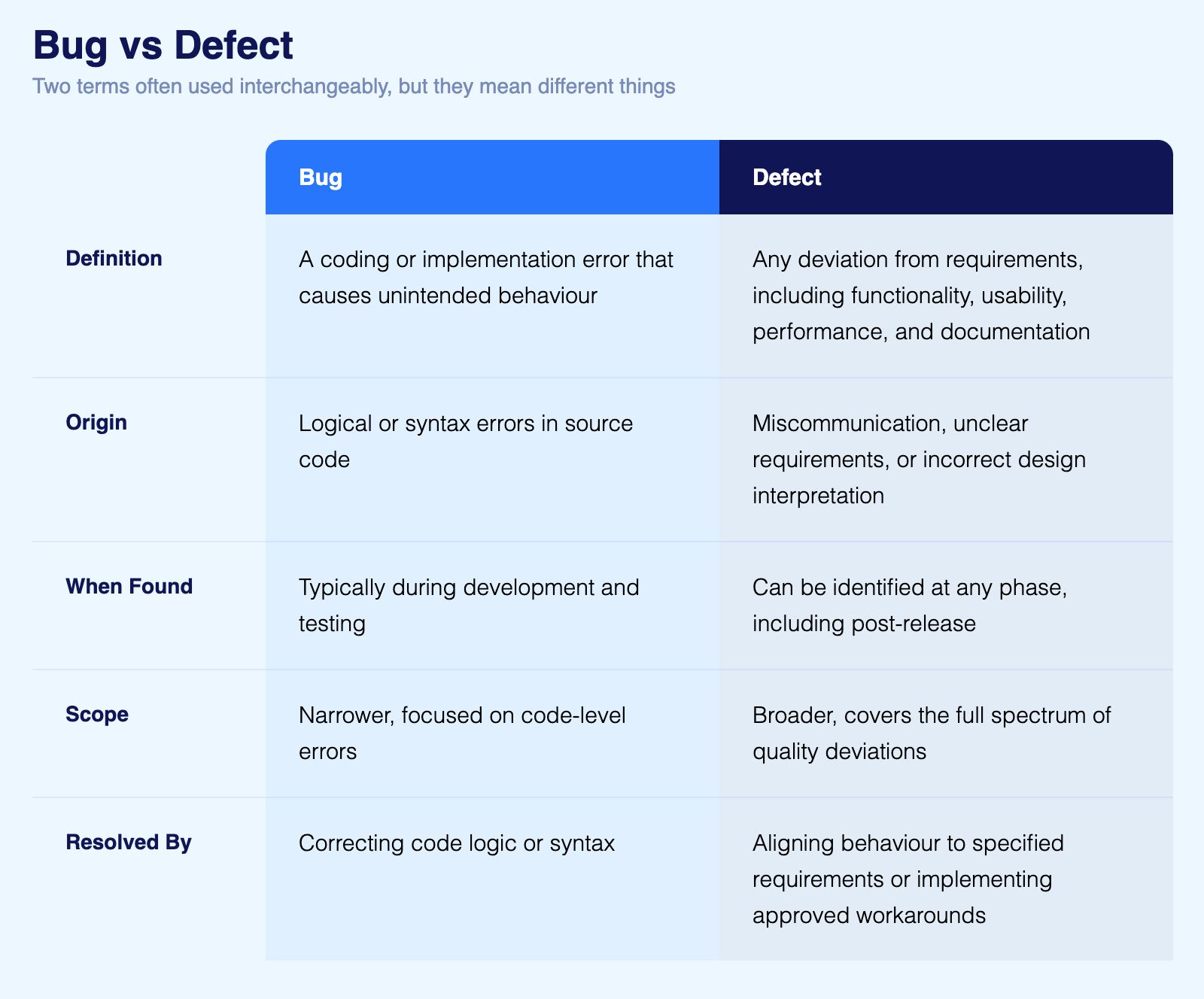
The terms "bug" and "defect" are often used interchangeably, though there are subtle distinctions in formal software engineering contexts. A bug typically refers to a coding or implementation error, a mistake in the source code that produces unintended behavior. A defect is a broader term that encompasses any deviation from requirements, including functionality issues, usability problems, performance shortfalls, and documentation errors.
For the purposes of this guide, "bug" and "defect" are treated as equivalent terms, consistent with how most enterprise QA teams use them in practice.
Common Types of Software Bugs
Understanding bug types helps teams categorize defects efficiently and route them to the right stakeholders.
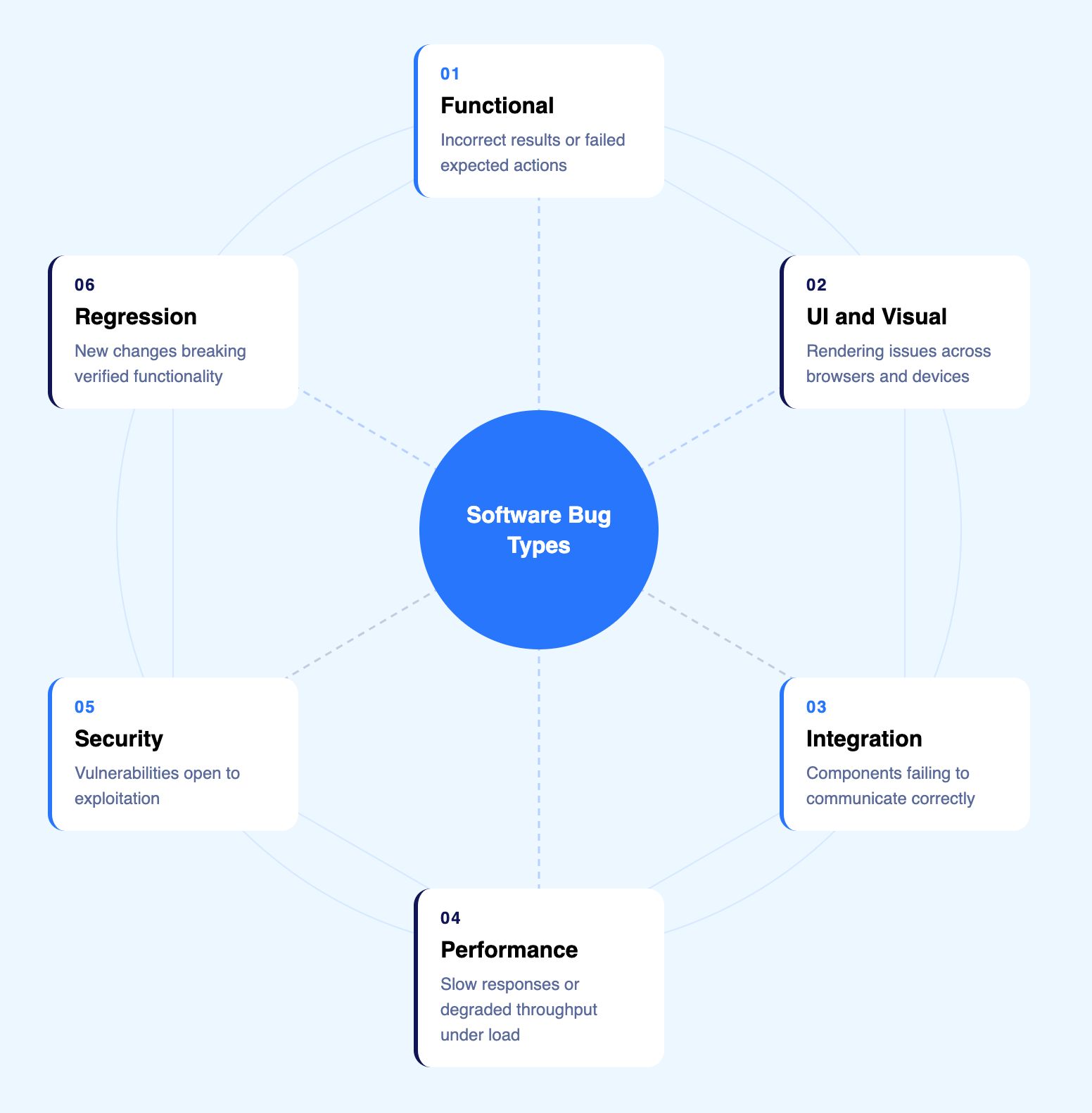
Functional bugs occur when the application produces incorrect results or fails to perform an expected action. A login form that accepts invalid credentials or a calculation engine that returns wrong totals are functional bugs.
UI and visual bugs involve rendering issues: misaligned elements, broken layouts, incorrect fonts, or inconsistent styling across browsers and devices. These defects may not break functionality but directly impact user experience and brand perception.
Integration bugs appear when different system components fail to communicate correctly. An API that returns unexpected data formats, a payment gateway that drops transaction details, or a third party service that times out without proper error handling are integration bugs.
Performance bugs manifest as slow response times, high memory consumption, or degraded throughput under load. A page that takes eight seconds to load or a query that exhausts database connections under concurrent usage are performance defects.
Security bugs expose vulnerabilities that could be exploited: SQL injection points, cross site scripting (XSS) openings, authentication bypasses, or data exposure through improper access controls.
Regression bugs are defects introduced by new code changes that break previously working functionality. They are among the most costly because they undermine the stability that teams have already verified.
Bug vs Defect: What is the Difference?
The terms bug and defect are used interchangeably in most QA teams. In formal software engineering, there are distinctions worth understanding:
The Bug Life Cycle: Every Stage Explained
The bug life cycle follows a defined sequence of stages. At each stage, the defect carries a status that communicates its current state to all stakeholders. While specific workflows vary between organizations, the core stages are consistent across the industry.
Stage 1: New
The life cycle begins when a defect is identified and logged into the bug tracking system. The tester or automated test system creates a bug report with all relevant details: a clear description of the observed behavior versus expected behavior, precise steps to reproduce, the environment and configuration where the bug occurred, severity and priority classification, and supporting evidence such as screenshots, video recordings, logs, or DOM snapshots.
At this stage, the bug is assigned the "New" status. It has been documented but not yet reviewed by the development team. The quality of the initial bug report directly influences how quickly and accurately the defect will be resolved. Vague or incomplete reports create back and forth between testers and developers that adds days to the resolution cycle.
Stage 2: Assigned
The QA lead or project manager reviews the new bug report, validates that it is a legitimate defect (not a duplicate, not a known issue, not a misunderstanding of requirements), and assigns it to the appropriate developer or development team. The bug moves to "Assigned" status.
Triage decisions happen at this stage. The team evaluates the defect's severity (how impactful is it?) and priority (how urgently must it be fixed?) to determine where it falls in the development queue. Critical, show stopping defects bypass the queue entirely and go straight into active development.
Stage 3: Open
The assigned developer begins investigating the defect. They reproduce the bug in their environment, analyze the root cause, and identify the code change needed to fix it. The bug is now "Open" or "In Progress."
During investigation, the developer may determine that the reported issue is not actually a defect. In that case, the bug may transition to one of several alternative statuses:
Duplicate: The same defect has already been reported under a different ticket. The duplicate is linked to the original and closed.
Rejected / Not a Bug: The reported behavior is actually correct, or the report is based on a misunderstanding of the requirements. The developer provides justification and returns the ticket to the tester for review.
Deferred: The defect is valid but low priority and will not be addressed in the current release cycle. It is scheduled for a future sprint or release.
Stage 4: Fixed
The developer implements the code change, verifies it in their local environment, and marks the bug as "Fixed." The fix is committed to the codebase, typically through a pull request or merge process that includes code review.
At this point, the defect has a proposed solution but has not yet been verified by the QA team. "Fixed" does not mean "resolved." It means the developer believes the issue is addressed and is passing it back to testing for verification.
Stage 5: Pending Retest
The fixed code is deployed to a testing environment, and the bug is queued for verification by the QA team. The status moves to "Pending Retest" or "Ready for QA."
This stage is a handoff point where coordination between development and QA is critical. If the test environment does not reflect the fix (due to deployment delays or environment configuration issues), the retest will produce misleading results.
Stage 6: Retest
The tester executes the exact steps described in the original bug report to verify that the defect has been resolved. They confirm that the reported behavior no longer occurs and that the fix has not introduced any new issues in related functionality.
Regression testing is essential at this stage. Verifying the specific fix is necessary but not sufficient. The tester must also confirm that adjacent functionality remains intact. Automated regression suites are critical here because they can verify hundreds of related scenarios in the time a manual tester would take to verify one.
Stage 7: Verified
If the retest confirms that the defect is resolved and no regressions have been introduced, the bug moves to "Verified" status. The QA team has confirmed that the fix works correctly in the testing environment.
Stage 8: Closed
After verification, the bug is marked "Closed." This is the final stage of the life cycle. The defect has been identified, investigated, fixed, verified, and confirmed resolved. The bug report becomes part of the project's quality history, available for trend analysis, root cause reviews, and future reference.
Stage 9: Reopened
If the retest reveals that the defect persists, or if the same defect resurfaces after being closed (perhaps in a different environment, browser, or configuration), the bug is "Reopened." It returns to "Open" or "Assigned" status, and the investigation and fix cycle repeats.
Reopened bugs are a quality signal. A high reopen rate indicates problems with root cause analysis, insufficient testing of fixes, or environmental inconsistencies between development and testing.

Bug Severity vs Bug Priority: The Triage Framework
Severity and priority are the two dimensions that drive every triage decision. They are distinct concepts, and conflating them is one of the most common mistakes in defect management.
Severity: Technical Impact
Severity measures the technical impact of the defect on the system. It is an objective assessment of how badly the bug affects functionality.
Critical: The application crashes, data is corrupted, a security vulnerability is exposed, or a core business function is completely broken. No workaround exists. Production is impacted or at immediate risk.
High: A major feature is broken or produces incorrect results, but a workaround exists. The defect significantly impacts usability or business operations but does not cause system failure.
Medium: A feature works but not as specified. The defect causes inconvenience or confusion but does not prevent users from completing their tasks. Output may be partially incorrect or formatting may be wrong.
Low: A cosmetic issue, a minor UI inconsistency, or a documentation error. The defect does not affect functionality or usability in any meaningful way.
Priority: Business Urgency
Priority measures how urgently the defect must be fixed based on business context. It is a subjective decision made by project stakeholders.
Immediate: Fix now. The defect is blocking a release, impacting production users, or creating regulatory or financial risk. Development stops other work to address it.
High: Fix in the current sprint or release cycle. The defect is significant but not blocking, and delaying it would create unacceptable risk.
Medium: Fix in the next sprint or release. The defect is valid and should be addressed but can wait without creating significant business impact.
Low: Fix when resources are available. The defect is a minor improvement or cosmetic fix that does not affect business outcomes.
Why Severity and Priority Are Independent
A critical severity bug might have low priority if it affects a feature used by very few customers. A low severity bug might have high priority if it is visible on the homepage during a major product launch. Effective triage requires evaluating both dimensions independently.
Bug Status vs Priority vs Severity: How They Differ
These three dimensions are distinct and serve different purposes in defect management. Confusing them leads to poor triage decisions and misaligned development effort.
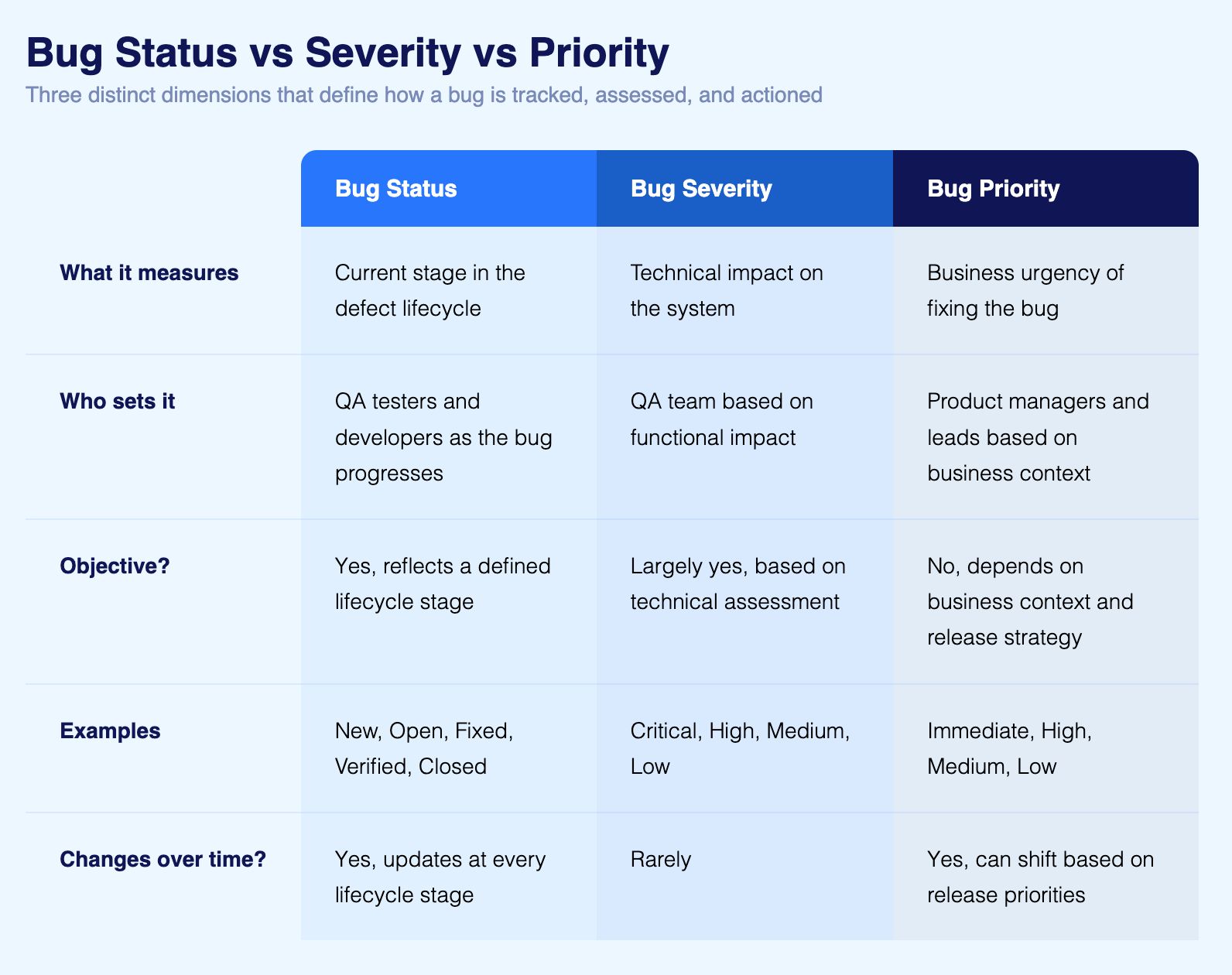
A Critical severity bug does not always mean Immediate priority. A low severity cosmetic bug on a homepage during a product launch may carry High priority. Effective triage evaluates all three independently before deciding how to act.
The Economics of Bug Detection: Why Timing Changes Everything
The cost of fixing a bug increases exponentially the later it is found in the software development lifecycle. Industry research consistently shows that a bug found in production costs approximately 30 times more to fix than the same bug caught during development.
This cost multiplier exists because production bugs trigger incident response processes, require emergency hotfixes outside normal release cycles, demand investigation across complex production environments, may cause customer facing outages that damage revenue and reputation, and often require communication to customers, executives, and sometimes regulators.
Bugs caught during the testing phase cost a fraction of this because the environment is controlled, the context is fresh, and the fix can be integrated into the normal development workflow.
This economic reality is why continuous testing, the practice of running automated tests throughout the CI/CD pipeline, is not just a quality practice but a financial one. Every defect caught before production is a cost avoided that compounds across hundreds of releases per year.
Enterprise benchmarks illustrate this impact. Organizations with mature automated testing practices typically achieve defect escape rates below 5%, meaning fewer than 5% of defects reach production. Organizations relying primarily on manual testing often see escape rates of 20% to 40%, with each escaped defect carrying that 30x cost multiplier.
Stakeholders in the Bug Life Cycle
Effective defect management requires clear ownership at every stage. Ambiguous responsibility is the primary cause of bugs languishing in tracking systems without resolution.
1. QA Testers
Owns defect detection and verification. They identify bugs through manual and automated testing, write detailed bug reports, execute retests, and verify fixes. In AI powered environments, testers also review automated defect reports generated by testing platforms.
2. QA Leads and Managers
Owns triage and prioritization. They review incoming bug reports, validate severity classifications, assign defects to developers, and monitor resolution timelines. They are the gatekeepers who ensure critical defects receive immediate attention while lower priority issues are properly queued.
3. Developers
Owns investigation and resolution. They reproduce bugs, perform root cause analysis, implement fixes, conduct code reviews, and confirm that fixes do not introduce regressions.
4. DevOps Engineers
Owns environment management and pipeline integration. They ensure that testing environments reflect production configurations, that CI/CD pipelines execute automated tests at the right stages, and that deployment processes deliver fixes reliably.
5. Product Managers and Project Leads
Owns business context. They provide the priority dimension of triage decisions, making calls about which defects must be fixed before release and which can be deferred based on business impact, customer visibility, and strategic priorities.
How AI Transforms the Bug Life Cycle
Traditional bug lifecycle management is manual, slow, and dependent on individual expertise. AI is fundamentally changing every stage.
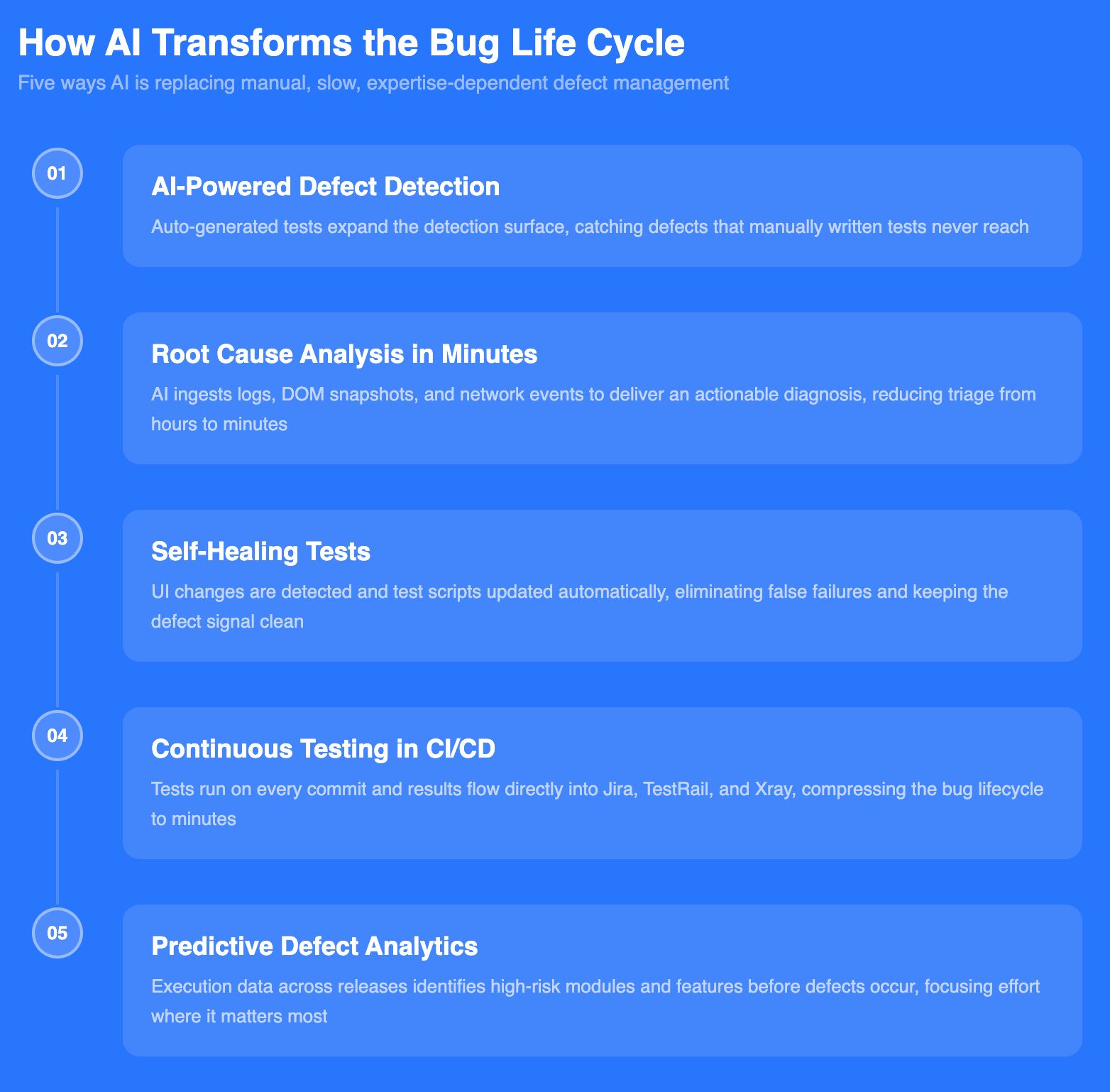
1. AI Powered Defect Detection
Traditional defect detection relies on manually authored test cases. If a test does not exist for a specific scenario, the bug goes undetected until a user finds it. AI native testing platforms generate tests autonomously, dramatically expanding the defect detection surface.
Virtuoso QA's StepIQ feature analyzes the application under test and auto generates test steps based on UI elements, application context, and user behavior patterns. This means defects that would never be caught by manually written tests are identified automatically. Combined with cross browser and cross device execution across 2000+ configurations, AI driven detection catches environment specific bugs that manual testing invariably misses.
2. AI Root Cause Analysis: From Hours to Minutes
When a test fails in a traditional testing environment, a QA engineer must manually investigate the failure: reviewing logs, checking screenshots, comparing expected and actual results, and determining whether the failure represents a genuine application defect, a test environment issue, or a test logic error. This investigation can take hours per failure, and across a regression suite of hundreds or thousands of tests, it creates an enormous bottleneck.
Virtuoso QA's AI Root Cause Analysis automates this process. It ingests multiple data inputs from each test execution, including test step logs, network events, error codes, DOM snapshots, and UI comparisons, and delivers an actionable diagnosis. The AI distinguishes between application defects, environment issues, data problems, and test logic errors, reducing triage time from hours to minutes and ensuring that developers receive only genuine defects rather than noise.
3. Self Healing Tests: Eliminating False Failures
A significant portion of "bugs" reported in traditional automation are not bugs at all. They are test failures caused by UI changes that broke the test script, not the application. When a button moves, a field is renamed, or a page layout changes, traditional automated tests fail, and those failures enter the bug lifecycle as false reports that waste developer investigation time.
Self healing AI eliminates this problem. Virtuoso QA's self healing technology detects UI changes and automatically updates test scripts to accommodate them, achieving approximately 95% accuracy. This means the bug lifecycle is not polluted with false failures. Every defect that enters the system is a genuine issue that requires attention, dramatically improving the signal to noise ratio for development teams.
4. Continuous Testing in CI/CD Pipelines
AI testing platforms integrate directly into CI/CD pipelines, executing automated tests on every code commit, pull request, or deployment. This continuous testing model compresses the bug lifecycle by catching defects within minutes of introduction, while the context is fresh and the fix is simple.
Virtuoso QA integrates natively with Jenkins, Azure DevOps, GitHub Actions, GitLab, CircleCI, and Bamboo. Tests execute on demand, on schedule, or triggered by pipeline events. Results flow directly into bug tracking tools like Jira, TestRail, and Xray, creating defect tickets automatically with complete evidence attached. The manual handoff between testing and development that traditionally adds days to the bug lifecycle is reduced to minutes.
5. Predictive Defect Analytics
As AI testing platforms accumulate execution data across releases, they develop the ability to predict where defects are most likely to occur. Code modules with high historical defect density, features that break frequently after adjacent changes, and environments that produce inconsistent results can all be identified proactively, allowing teams to focus testing effort where it will catch the most bugs.

Enterprise Best Practices for Bug Life Cycle Management
These practices separate organizations that manage defects efficiently from those that drown in unresolved tickets.
1. Write Bug Reports That Developers Can Act On
Every bug report should include a clear, descriptive title, the environment and configuration where the bug was observed (browser, OS, device, data conditions), precise steps to reproduce, expected behavior versus actual behavior, severity and priority classification, and supporting evidence (screenshots, video recordings, logs, network traces, DOM snapshots).
Reports that lack reproduction steps or environmental details create back and forth between testers and developers that adds days to the resolution cycle. AI testing platforms mitigate this by automatically capturing comprehensive evidence for every test failure.
2. Standardize Severity and Priority Definitions
Ambiguous classification leads to inconsistent triage. Define severity and priority levels explicitly, document the definitions, train all stakeholders, and enforce them consistently. When a tester classifies a bug as "Critical, Immediate," everyone in the organization should understand exactly what that means and how it should be handled.
3. Establish Clear SLAs by Severity Level
Define resolution time targets for each severity level. Critical bugs might require a fix within 4 hours. High severity bugs within 24 hours. Medium within the current sprint. Low within the current quarter. SLAs create accountability and prevent low priority bugs from accumulating indefinitely.
4. Automate Regression Testing for Every Fix
Every bug fix should trigger automated regression testing to confirm that the fix works and that no regressions have been introduced. Manual regression verification does not scale. AI native platforms execute regression suites in minutes rather than days, providing fast, comprehensive verification for every fix.
5. Track Defect Metrics That Drive Improvement
Monitor defect density (bugs per feature or module), defect escape rate (bugs reaching production), mean time to resolution (from New to Closed), reopen rate (percentage of bugs that are reopened after being closed), and defect aging (how long bugs remain open). These test metrics reveal systemic issues in development and testing processes that, when addressed, reduce defect volume over time.
6. Treat Escaped Defects as Learning Opportunities
Every bug that reaches production should trigger a retrospective. Why was it not caught during testing? Was the test coverage insufficient? Was the scenario not considered? Was the testing environment different from production? These root cause reviews improve testing processes systematically, reducing future defect escape rates.
Common Bug Handling Mistakes to Avoid
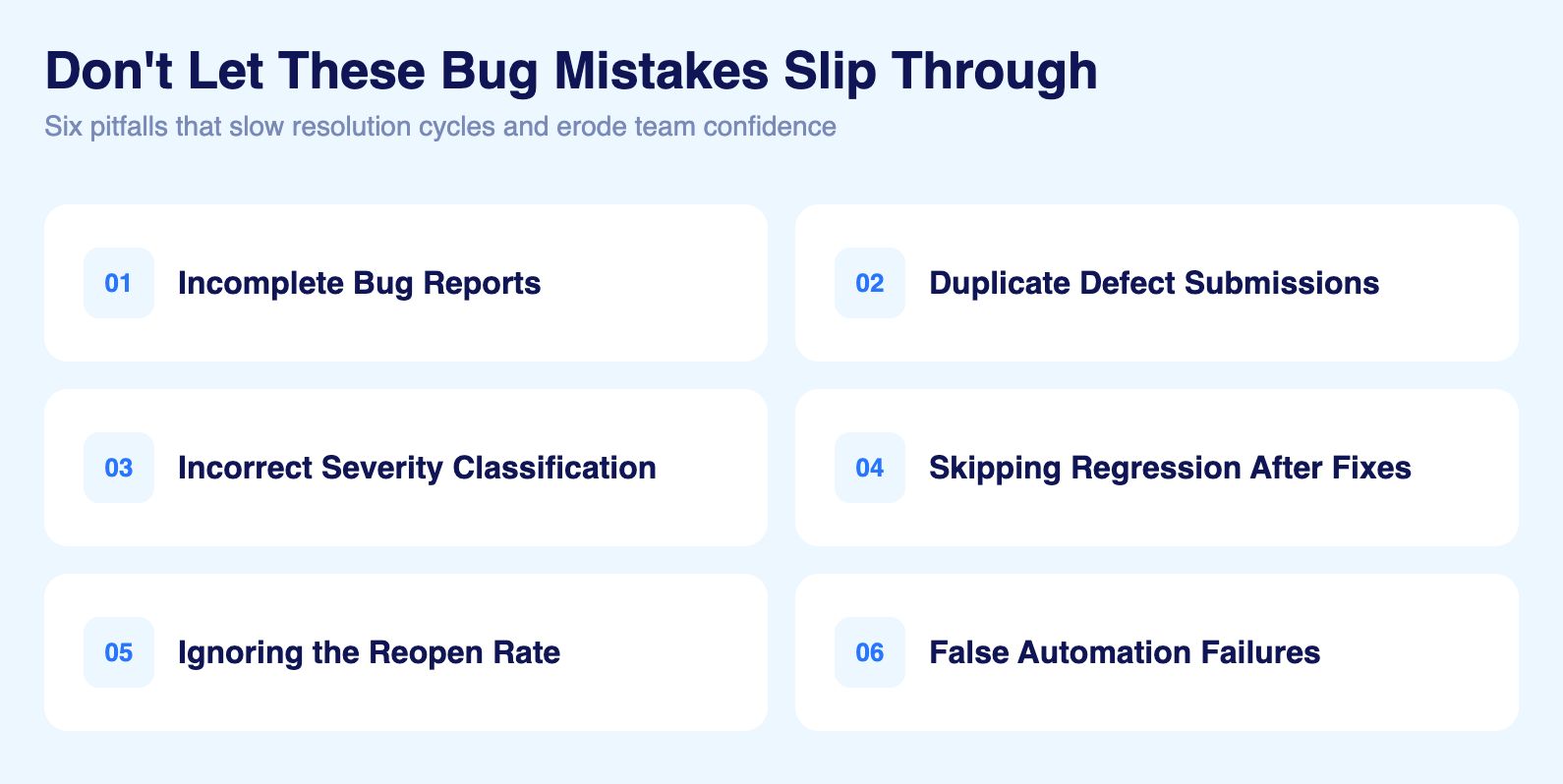
Incomplete or vague bug reports
Missing reproduction steps, unclear expected results, or absent environment details force developers to investigate blind. Each clarification request adds hours to the resolution cycle.
Duplicate defect submissions
The same bug reported multiple times splits investigation effort and clutters the tracking system. Triage should always check for existing open defects before assigning a new one.
Incorrect severity classification
Over-classifying defects as Critical creates noise in the triage queue. Under-classifying allows impactful defects to sit unresolved. Standardised definitions enforced consistently across the team prevent both.
Skipping regression testing after fixes
Verifying only the specific bug fix is insufficient. Adjacent functionality must be confirmed to ensure the fix has not introduced new defects. Automated regression suites make this practical at scale.
Ignoring the reopen rate
A high reopen rate signals systemic problems in root cause analysis or fix verification. Teams that do not track it miss the opportunity to improve their resolution processes.
Treating false automation failures as real defects
In script-based automation, UI changes break tests without breaking the application. These false failures enter the bug lifecycle as defect reports, wasting developer investigation time. Self-healing AI eliminates this by adapting tests to UI changes automatically.
How to Write an Effective Bug Report
The quality of a bug report determines how quickly a developer can reproduce, investigate, and fix the defect. Vague reports generate back-and-forth that adds days to the resolution cycle. Every bug report should include:
Title
Concise and specific. Describe the problem, not the symptom
Good: "Checkout button unresponsive after applying promo code on Safari 17"
Poor: "Checkout not working"
Steps to Reproduce
Numbered, sequential, and precise
Include exact data inputs, navigation paths, and configuration details
Note frequency and conditions if the defect is intermittent
Expected vs Actual Behaviour
Expected: what the application should do per requirements
Actual: what the application did instead
This comparison is the clearest signal of a genuine defect
Environment Details
Browser, version, operating system, device
Application version or build number
Test data or account state at time of defect
Severity and Priority
Classify severity based on technical impact
Note business context that affects priority
Apply consistent definitions across the team
Supporting Evidence
Screenshots with annotations highlighting the defect
Video recordings of the full reproduction sequence
Console logs, network logs, and DOM snapshots where relevant
Bug Report Checklist
Title is specific and describes the problem clearly
Steps to reproduce are complete and sequential
Expected and actual results are both stated
Environment details are fully documented
Severity and priority are classified
Screenshots or logs are attached
Related test case or requirement is linked
Virtuoso QA generates comprehensive defect evidence automatically for every test failure, including screenshots, DOM snapshots, network logs, and an AI root cause diagnosis, eliminating the manual effort of assembling a complete bug report.
How Virtuoso QA Accelerates the Entire Bug Life Cycle
Virtuoso QA's AI native architecture compresses every phase of the defect lifecycle, from detection through resolution.
Defects are detected earlier through autonomous test generation (StepIQ) and continuous testing across CI/CD pipelines, catching bugs within minutes of introduction rather than days or weeks later.
False failures are eliminated through self healing AI that adapts tests to UI changes automatically, ensuring developers investigate only genuine defects.
Triage is accelerated through AI Root Cause Analysis that diagnoses failure causes automatically, delivering actionable evidence rather than raw pass/fail data.
Verification is faster through automated regression execution across 2000+ browser and device combinations, confirming fixes comprehensively in minutes.
Reporting is complete through integration with Jira, TestRail, and Xray, with detailed execution reports in PDF and Excel/CSV including step by step evidence, screenshots, DOM snapshots, and network logs.

Related Reads
Frequently Asked Questions About the Bug Life Cycle
What is the difference between bug severity and bug priority?
What is the difference between a bug and a defect?
How does AI improve bug life cycle management?
What is a defect reopen rate and why does it matter?
How does continuous testing affect the bug life cycle?
How does self healing AI reduce false bug reports?